Animation ICT
Overview
https://www.teach-ict.com/gcse_new/software/animation/miniweb/pg6.htm#
1. Introduction
 Animation is the art of creating the optical illusion of moving pictures.
 When a set of related images are shown rapidly one after another, people sense
them as one continuous motion picture.
 This is the principle behind all motion images such as video, graphics and film.
The effect is called 'persistence of vision'. It is lucky we have it, as it means we can
enjoy looking at films.
 This mini-web will introduce you to the subject of animation.
2. Flip book animation
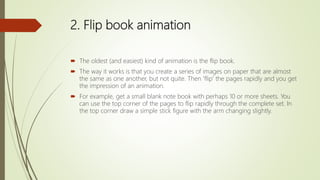
 The oldest (and easiest) kind of animation is the flip book.
 The way it works is that you create a series of images on paper that are almost
the same as one another, but not quite. Then 'flip' the pages rapidly and you get
the impression of an animation.
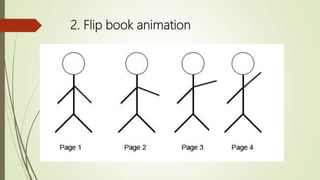
 For example, get a small blank note book with perhaps 10 or more sheets. You
can use the top corner of the pages to flip rapidly through the complete set. In
the top corner draw a simple stick figure with the arm changing slightly.
2. Flip book animation
 Now flip through each image and you will see the arm raise.
 You can also use photographs in the same way, which is the basis of the entire
film industry
 There are some amazing flip book videos on YouTube, so explore.
 Click on this link:
 Flip book animation
 https://www.youtube.com/watch?v=JVzf9rtgf9Y
3. Basic animation terms
 Before going on to other methods of animation, there are some basic animation
terms you need to understand. These are
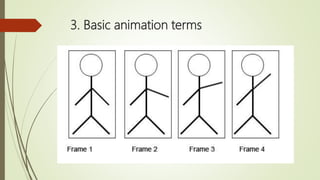
 Frame
 A frame is a single image within the complete animation sequence. You work on
each frame to create the overall animation. For example, each image in the
sequence below would be on a single frame.
3. Basic animation terms
 Frame rate
 This is the speed at which each frame is presented to the viewer. The film industry
uses a standard 24 frames per second (fps). Computer games try and get as high
a frame rate as possible such as 120 fps, this makes the action smoother.
 Click on this link:
 tweening and animation
 https://www.youtube.com/watch?v=csUCSpr-qgg
 https://www.youtube.com/watch?v=OLpzhFT3ZYw
4. Basic animation terms
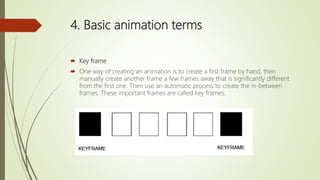
 Key frame
 One way of creating an animation is to create a first frame by hand, then
manually create another frame a few frames away that is significantly different
from the first one. Then use an automatic process to create the in-between
frames. These important frames are called key frames.
4. Basic animation terms
 Tweening
 The 'automatic process' mentioned above is called 'tweening'. Tweening is the
process where the content of the frames between the key frames are created
automatically by the animation software so that the animation glides smoothly
from one key frame to the next.
 Rendering
 This is a process where color, shades, shadows and other effects are added to the
basic animation by the animation software. It is an extremely computer-intensive
task. For example, if a photo-realistic image in a single frame takes 10 seconds to
render - a 1 hour film would take 240 hours (10 days) to complete. This is why
Hollywood studios have 'render farms' made up of hundreds of powerful
networked computers.
5. Stop-Motion or Claymation animation
 With stop-motion animation, you set up a clay model or some other kind of
model, then take a photograph and store the image. Then alter the model
slightly such as moving an arm, leg, face and so on, then take another image.
 Carry on doing this until the whole story has been told. You will now have a
complete set of images.
 In a professional film such as Wallace and Gromit at 24 frames per second, a 1
hour animation takes 86 thousand images - extremely hard work!
 The whole set of images are then compiled into a movie.
 In the clip below, we created a simple animated clay snake and kept taking
pictures of it to make it move.
 It is in MP4 format which Windows Media Player is able to play.
5. Stop-Motion or Claymation animation
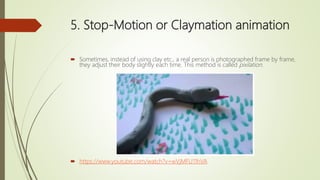
 Sometimes, instead of using clay etc., a real person is photographed frame by frame,
they adjust their body slightly each time. This method is called pixilation.
 https://www.youtube.com/watch?v=wVjMFU11hVA
6. Rotoscoping animation
 If you want realistic movement of a character within an animation, another
technique called rotoscoping can be used.
 With rotoscoping, a live actor is filmed doing the actions required - a sword fight
maybe. Then the animator takes the video into an animation package and draws
around the actor, frame by frame. The animator ends up with a complete set of
realistic movements for a character.
 The actual animated character is then drawn within the border of the movement.
This method has been used extensively in films such as Lord of the Rings to bring
a fictional character to life.
 https://www.youtube.com/watch?v=jWi8ljDdKDM
 https://www.youtube.com/watch?v=P_SmBvgqRNE
7. Animation on the web
 Apart from pure entertainment found in films and cartoons, animation also has a very
practical purpose in more business-like situations.
 Draw attention
 If you want to enliven a page or to draw attention to part of a web page, then
animation can be used to draw the eye. For example, we use the little fellow below to
draw attention to a search box on some of our pages.
 An example of an animated gif. An animated gif is a standard file format made up of a
few frames of static images. The web browser loops through each frame quickly to
create the animation.
 Advertising Banners
 You will notice that advertising banners make heavy use of animation all over the
internet as they are very keen to get your attention. On the other hand, some
banners are there just to provide a cheerful mood such as the one we made below for
our Christmas seasonal pages
7. Animation on the web
 Apart from pure entertainment found in films and cartoons, animation also has a very
practical purpose in more business-like situations.
 Draw attention
 If you want to enliven a page or to draw attention to part of a web page, then
animation can be used to draw the eye. For example, we use the little fellow below to
draw attention to a search box on some of our pages.
 An example of an animated gif. An animated gif is a standard file format made up of a
few frames of static images. The web browser loops through each frame quickly to
create the animation.
 Advertising Banners
 You will notice that advertising banners make heavy use of animation all over the
internet as they are very keen to get your attention. On the other hand, some
banners are there just to provide a cheerful mood such as the one we made below for
our Christmas seasonal pages
7. Animation on the web
 Interactive games and quizzes
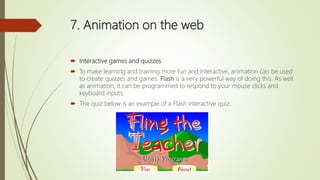
 To make learning and training more fun and interactive, animation can be used
to create quizzes and games. Flash is a very powerful way of doing this. As well
as animation, it can be programmed to respond to your mouse clicks and
keyboard inputs.
 The quiz below is an example of a Flash interactive quiz.
7. Animation on the web
 There are other animation technologies as well that include
 CGI - Computer Generated Imagery, widely used in modern films
 Java - similar to Flash in that it can be used for animation.
 Dynamic HTML - the latest HTML 5 standard supports basic animation without
'add-ons' such as Flash, but only the very latest browsers support it.
 https://www.youtube.com/watch?v=vG41n5jrgBc
8. Planning an animation
 You should realize by now that animation is quite a labor-intensive process. You do
not want to waste hours doing the wrong thing only to have to start all over again.
 So planning before hand is essential, no matter how basic the project.
 You need to know what the story of the animation is to be. And for this, professional
animation companies use a story board. This is where an artist draws a number of
sketches that show key points within the story. Almost like a comic strip except its
purpose is to explain every key part of the animation

 Every major film that uses CGI or other animation methods will have a story-board
artist working for them.
 Of course for personal projects only the most crude hand drawn sketches are needed.
Telling the story is the point - not the quality of the drawings.
 https://www.youtube.com/watch?v=65_3bq_0eSY
9. Planning an animation - mood boards
 These are used to give an idea to the animator of the overall 'feel' for the story.
They are also widely used in all manner of design work from car design studios to
fashion houses.
 A mood board is simply a collection of colors, images, fabrics - anything really,
that helps give a feeling of what the project is about.
 https://www.youtube.com/watch?v=RwwgXe3FXlI
10. Pros and Cons of animation

Animation ict

  • 1.
  • 2.
    1. Introduction  Animationis the art of creating the optical illusion of moving pictures.  When a set of related images are shown rapidly one after another, people sense them as one continuous motion picture.  This is the principle behind all motion images such as video, graphics and film. The effect is called 'persistence of vision'. It is lucky we have it, as it means we can enjoy looking at films.  This mini-web will introduce you to the subject of animation.
  • 3.
    2. Flip bookanimation  The oldest (and easiest) kind of animation is the flip book.  The way it works is that you create a series of images on paper that are almost the same as one another, but not quite. Then 'flip' the pages rapidly and you get the impression of an animation.  For example, get a small blank note book with perhaps 10 or more sheets. You can use the top corner of the pages to flip rapidly through the complete set. In the top corner draw a simple stick figure with the arm changing slightly.
  • 4.
    2. Flip bookanimation
  • 5.
    2. Flip bookanimation  Now flip through each image and you will see the arm raise.  You can also use photographs in the same way, which is the basis of the entire film industry  There are some amazing flip book videos on YouTube, so explore.  Click on this link:  Flip book animation  https://www.youtube.com/watch?v=JVzf9rtgf9Y
  • 6.
    3. Basic animationterms  Before going on to other methods of animation, there are some basic animation terms you need to understand. These are  Frame  A frame is a single image within the complete animation sequence. You work on each frame to create the overall animation. For example, each image in the sequence below would be on a single frame.
  • 7.
  • 8.
    3. Basic animationterms  Frame rate  This is the speed at which each frame is presented to the viewer. The film industry uses a standard 24 frames per second (fps). Computer games try and get as high a frame rate as possible such as 120 fps, this makes the action smoother.  Click on this link:  tweening and animation  https://www.youtube.com/watch?v=csUCSpr-qgg  https://www.youtube.com/watch?v=OLpzhFT3ZYw
  • 9.
    4. Basic animationterms  Key frame  One way of creating an animation is to create a first frame by hand, then manually create another frame a few frames away that is significantly different from the first one. Then use an automatic process to create the in-between frames. These important frames are called key frames.
  • 10.
    4. Basic animationterms  Tweening  The 'automatic process' mentioned above is called 'tweening'. Tweening is the process where the content of the frames between the key frames are created automatically by the animation software so that the animation glides smoothly from one key frame to the next.  Rendering  This is a process where color, shades, shadows and other effects are added to the basic animation by the animation software. It is an extremely computer-intensive task. For example, if a photo-realistic image in a single frame takes 10 seconds to render - a 1 hour film would take 240 hours (10 days) to complete. This is why Hollywood studios have 'render farms' made up of hundreds of powerful networked computers.
  • 11.
    5. Stop-Motion orClaymation animation  With stop-motion animation, you set up a clay model or some other kind of model, then take a photograph and store the image. Then alter the model slightly such as moving an arm, leg, face and so on, then take another image.  Carry on doing this until the whole story has been told. You will now have a complete set of images.  In a professional film such as Wallace and Gromit at 24 frames per second, a 1 hour animation takes 86 thousand images - extremely hard work!  The whole set of images are then compiled into a movie.  In the clip below, we created a simple animated clay snake and kept taking pictures of it to make it move.  It is in MP4 format which Windows Media Player is able to play.
  • 12.
    5. Stop-Motion orClaymation animation  Sometimes, instead of using clay etc., a real person is photographed frame by frame, they adjust their body slightly each time. This method is called pixilation.  https://www.youtube.com/watch?v=wVjMFU11hVA
  • 13.
    6. Rotoscoping animation If you want realistic movement of a character within an animation, another technique called rotoscoping can be used.  With rotoscoping, a live actor is filmed doing the actions required - a sword fight maybe. Then the animator takes the video into an animation package and draws around the actor, frame by frame. The animator ends up with a complete set of realistic movements for a character.  The actual animated character is then drawn within the border of the movement. This method has been used extensively in films such as Lord of the Rings to bring a fictional character to life.  https://www.youtube.com/watch?v=jWi8ljDdKDM  https://www.youtube.com/watch?v=P_SmBvgqRNE
  • 14.
    7. Animation onthe web  Apart from pure entertainment found in films and cartoons, animation also has a very practical purpose in more business-like situations.  Draw attention  If you want to enliven a page or to draw attention to part of a web page, then animation can be used to draw the eye. For example, we use the little fellow below to draw attention to a search box on some of our pages.  An example of an animated gif. An animated gif is a standard file format made up of a few frames of static images. The web browser loops through each frame quickly to create the animation.  Advertising Banners  You will notice that advertising banners make heavy use of animation all over the internet as they are very keen to get your attention. On the other hand, some banners are there just to provide a cheerful mood such as the one we made below for our Christmas seasonal pages
  • 15.
    7. Animation onthe web  Apart from pure entertainment found in films and cartoons, animation also has a very practical purpose in more business-like situations.  Draw attention  If you want to enliven a page or to draw attention to part of a web page, then animation can be used to draw the eye. For example, we use the little fellow below to draw attention to a search box on some of our pages.  An example of an animated gif. An animated gif is a standard file format made up of a few frames of static images. The web browser loops through each frame quickly to create the animation.  Advertising Banners  You will notice that advertising banners make heavy use of animation all over the internet as they are very keen to get your attention. On the other hand, some banners are there just to provide a cheerful mood such as the one we made below for our Christmas seasonal pages
  • 16.
    7. Animation onthe web  Interactive games and quizzes  To make learning and training more fun and interactive, animation can be used to create quizzes and games. Flash is a very powerful way of doing this. As well as animation, it can be programmed to respond to your mouse clicks and keyboard inputs.  The quiz below is an example of a Flash interactive quiz.
  • 17.
    7. Animation onthe web  There are other animation technologies as well that include  CGI - Computer Generated Imagery, widely used in modern films  Java - similar to Flash in that it can be used for animation.  Dynamic HTML - the latest HTML 5 standard supports basic animation without 'add-ons' such as Flash, but only the very latest browsers support it.  https://www.youtube.com/watch?v=vG41n5jrgBc
  • 18.
    8. Planning ananimation  You should realize by now that animation is quite a labor-intensive process. You do not want to waste hours doing the wrong thing only to have to start all over again.  So planning before hand is essential, no matter how basic the project.  You need to know what the story of the animation is to be. And for this, professional animation companies use a story board. This is where an artist draws a number of sketches that show key points within the story. Almost like a comic strip except its purpose is to explain every key part of the animation   Every major film that uses CGI or other animation methods will have a story-board artist working for them.  Of course for personal projects only the most crude hand drawn sketches are needed. Telling the story is the point - not the quality of the drawings.  https://www.youtube.com/watch?v=65_3bq_0eSY
  • 19.
    9. Planning ananimation - mood boards  These are used to give an idea to the animator of the overall 'feel' for the story. They are also widely used in all manner of design work from car design studios to fashion houses.  A mood board is simply a collection of colors, images, fabrics - anything really, that helps give a feeling of what the project is about.  https://www.youtube.com/watch?v=RwwgXe3FXlI
  • 20.
    10. Pros andCons of animation