Nurturing a Professional Development Ecosystem Julia Parra Holly Rae Bemis-Schurtz Susan D. Ceppi-Bussmann New Mexico State University RETA (Regional Educational Technology Assistance) Program
Agenda  Online Teaching and Learning Professional Development Programs (Why? What?) The Ecosystem as Approach and Analogy Making Sense of the Tools The Ecosystem as Model
Why OTL PD Programs? "I believe within my lifetime pure face-to-face instruction will be seen as professional malpractice.” From  How Technology Might Affect Teaching  by Chris Dede retrieved from  http://mac10.umc.pitt.edu/u/FMPro?-db=ustory&-lay=a&-format=d.html&storyid=7857&-Find
The Flip begins in 2012 “ Given the current trajectory of substitution, about 80% of courses taken in 2024 will have been taught online in a student-centric way.” From  Disrupting Class  by Clayton M. Christensen, Michael B. Horn, & Curtis W. Johnson
OTL PD Programs Online Teaching and Learning Opportunities http://otlo.pbwiki.com IDEAL-NM eTeacher Preparation http://nmeteachers.blogspot.com Online Teaching and Learning Graduate Certificate  http://nmsu-otl.pbwiki.com/ OpenLight  http://openlight.pbwiki.com/ More...  http://reta.nmsu.edu/partnerships/index.html
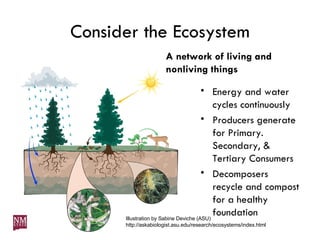
Consider the Ecosystem A network of living and nonliving things Energy and water cycles continuously Producers generate for Primary. Secondary, & Tertiary Consumers Decomposers recycle and compost for a healthy foundation Illustration by Sabine Deviche (ASU)  http://askabiologist.asu.edu/research/ecosystems/index.html
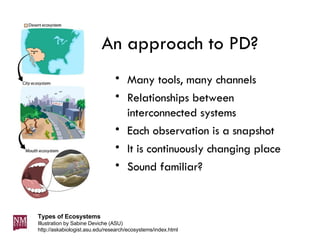
An approach to PD? Many tools, many channels Relationships between interconnected systems Each observation is a snapshot It is continuously changing place Sound familiar? Types of Ecosystems Illustration by Sabine Deviche (ASU)  http://askabiologist.asu.edu/research/ecosystems/index.html
Information Ecosystem “ Essentially, the Web is shifting from an international library of interlinked pages to an information ecosystem, where data circulate like nutrients in a rain forest.” From  Emerging Technology: Software upgrades promise to turn the Internet into a lush rain forest of information teeming with new life  by Steven Johnso retrieved from  http://discovermagazine.com/2005/oct/emerging-technology/
Can’t see the forest for the trees… Use of many tools, creation of massive amounts of content, need for channels of information dissemination. We needed something to help explain!  Ecosystem analogy helps us visualize and organize our experiences with teaching, learning, different audiences, professional development,  knowledge management , power of the web/web tools
eLearning Ecosystems PD Ecosystem http://retapedia.pbwiki.com  (under construction) Program Ecosystem (handout) http://otlo.pbwiki.com/eLearning-Ecosystem http://nmsu-otl.pbwiki.com Now let’s try to make some sense of the tools…
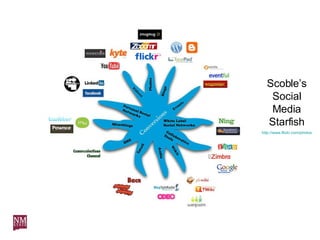
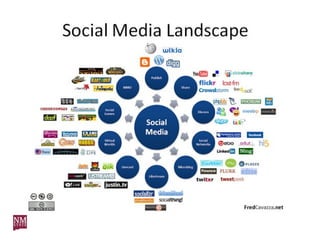
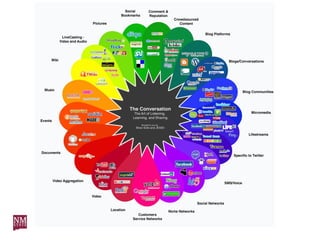
Scoble’s Social Media Starfish http://www.flickr.com/photos/dbarefoot/1814873464/


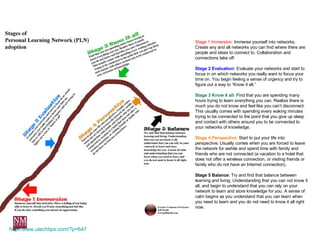
http://www.utechtips.com/?p=647 Stage 1 Immersion:  Immerse yourself into networks. Create any and all networks you can find where there are people and ideas to connect to. Collaboration and connections take off. Stage 2 Evaluation:  Evaluate your networks and start to focus in on which networks you really want to focus your time on. You begin feeling a sense of urgency and try to figure out a way to “Know it all.” Stage 3 Know it all:  Find that you are spending many hours trying to learn everything you can. Realize there is much you do not know and feel like you can’t disconnect. This usually comes with spending every waking minutes trying to be connected to the point that you give up sleep and contact with others around you to be connected to your networks of knowledge. Stage 4 Perspective:  Start to put your life into perspective. Usually comes when you are forced to leave the network for awhile and spend time with family and friends who are not connected (a vacation to a hotel that does not offer a wireless connection, or visiting friends or family who do not have an Internet connection). Stage 5 Balance:  Try and find that balance between learning and living. Understanding that you can not know it all, and begin to understand that you can rely on your network to learn and store knowledge for you. A sense of calm begins as you understand that you can learn when you need to learn and you do not need to know it all right now.
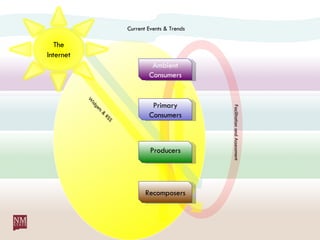
Current Events & Trends Widgets & RSS Facilitation and Assessment Recomposers Producers Primary Consumers Ambient Consumers The   Internet
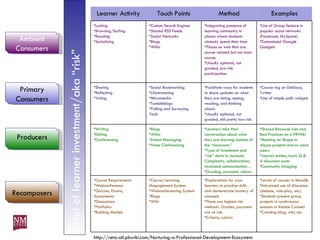
Level of learner investment/aka “risk” http://reta-otl.pbwiki.com/Nurturing-a-Professional-Development-Ecosystem Learner Activity Touch Points Method Examples Lurking Browsing/Surfing Reading Socializing Custom Search Engines Shared RSS Feeds Social Networks Blogs Wikis Integrating presence of  learning community in places where students already spend their time Places on web that are course related but not main course,  Usually optional, not graded, low-risk participation. Use of Group feature in popular social networks (Facebook, MySpace) Customized iGoogle Gadgets Sharing Reflecting Voting Social Bookmarking Lifestreaming Micromedia Tumbleblogs Polling and Surveying Tools Facilitate ways for students to share updates on what they are doing, seeing, reading, and thinking about.  Usually optional, not graded, still pretty low-risk.  Course tag on Delicious, Twitter Use of simple polls widgets Writing Editing Conferencing Blogs Wikis Instant Messaging Voice Conferencing Learners take their conversation about what they are learning outside of the “classroom.”  Type of investment and “risk” starts to increase. Complexity, collaboration, increased communication… Grading, payment, rubrics Shared Resource Lists and Best Practices on a PBWiki Meeting on Skype to discuss projects and or assist peers Journal entries, basic Q & A discussion posts Community blogging Course Requirements Webconference Quizzes, Exams, Assessments Discsussions Portfolios Building Models  Course/Learning Magagement System Webconferencing System Blogs Wiki Explorations for your learners to practice skills and demonstrate mastery of concepts These are highest risk methods. Grades, payment are at risk.  Criteria, rubrics Levels of courses in Moodle Advanced use of discussion (debate, role-play, etc.) Students present group projects in synchronous sessions in Adobe Connect Creating blog, wiki, etc. Recomposers Producers Primary Consumers Ambient Consumers
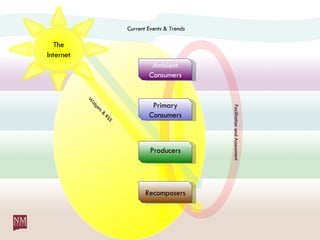
Current Events & Trends Widgets & RSS Facilitation and Assessment Recomposers Producers Primary Consumers Ambient Consumers The   Internet
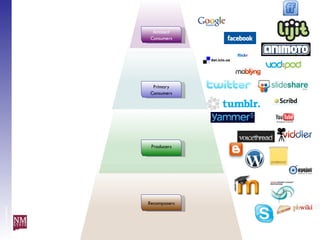
Level of investment Recomposers Producers Primary Consumers Ambient Consumers
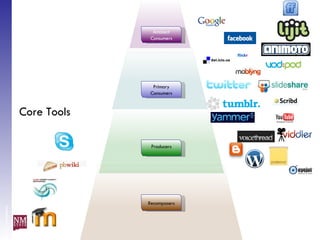
Level of investment Core Tools Recomposers Producers Primary Consumers Ambient Consumers
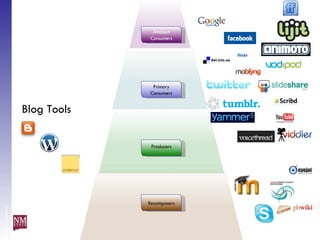
Level of investment Blog Tools Recomposers Producers Primary Consumers Ambient Consumers
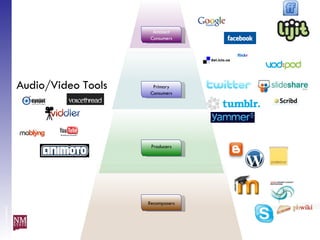
Level of investment Audio/Video Tools Recomposers Producers Primary Consumers Ambient Consumers
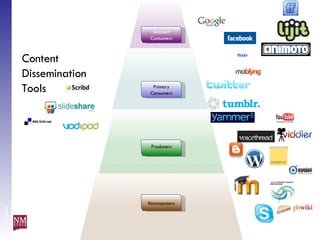
Level of investment Content Dissemination Tools Recomposers Producers Primary Consumers Ambient Consumers
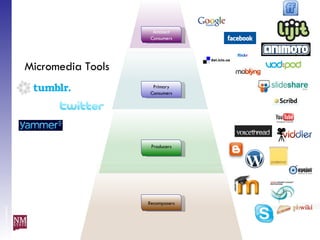
Level of investment Micromedia Tools Recomposers Producers Primary Consumers Ambient Consumers
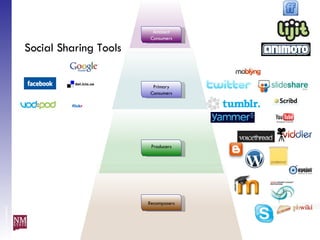
Level of investment Social Sharing Tools Recomposers Producers Primary Consumers Ambient Consumers
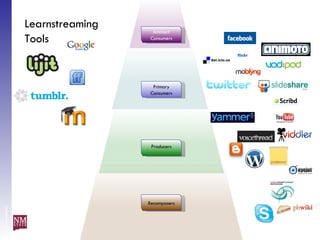
Level of investment Learnstreaming Tools Recomposers Producers Primary Consumers Ambient Consumers
Care, Feeding and Nurturing the Knowledge Ecology What does a healthy ecosystem include and how do you grow it? membership (the people, roles, engagement), high levels of communication (synch & asynch) & interaction (teacher-student, student-content, student-student), individual & shared goals/purpose (relevance, research-based, authentic), social presence & identity, shared resources & knowledge,
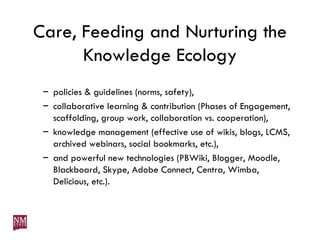
Care, Feeding and Nurturing the Knowledge Ecology policies & guidelines (norms, safety), collaborative learning & contribution (Phases of Engagement, scaffolding, group work, collaboration vs. cooperation), knowledge management (effective use of wikis, blogs, LCMS, archived webinars, social bookmarks, etc.), and powerful new technologies (PBWiki, Blogger, Moodle, Blackboard, Skype, Adobe Connect, Centra, Wimba, Delicious, etc.).
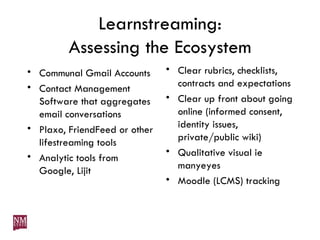
Learnstreaming: Assessing the Ecosystem Communal Gmail Accounts Contact Management Software that aggregates email conversations Plaxo, FriendFeed or other lifestreaming tools Analytic tools from Google, Lijit Clear rubrics, checklists, contracts and expectations Clear up front about going online (informed consent, identity issues, private/public wiki) Qualitative visual ie manyeyes Moodle (LCMS) tracking
Questions?  Thank you for listening! http://reta-otl.pbwiki.com http://reta.nmsu.edu http://webinars.nmsu.edu

NM TIE Presentation on PD Ecosystems

  • 1.
    Nurturing a ProfessionalDevelopment Ecosystem Julia Parra Holly Rae Bemis-Schurtz Susan D. Ceppi-Bussmann New Mexico State University RETA (Regional Educational Technology Assistance) Program
  • 2.
    Agenda OnlineTeaching and Learning Professional Development Programs (Why? What?) The Ecosystem as Approach and Analogy Making Sense of the Tools The Ecosystem as Model
  • 3.
    Why OTL PDPrograms? "I believe within my lifetime pure face-to-face instruction will be seen as professional malpractice.” From How Technology Might Affect Teaching by Chris Dede retrieved from http://mac10.umc.pitt.edu/u/FMPro?-db=ustory&-lay=a&-format=d.html&storyid=7857&-Find
  • 4.
    The Flip beginsin 2012 “ Given the current trajectory of substitution, about 80% of courses taken in 2024 will have been taught online in a student-centric way.” From Disrupting Class by Clayton M. Christensen, Michael B. Horn, & Curtis W. Johnson
  • 5.
    OTL PD ProgramsOnline Teaching and Learning Opportunities http://otlo.pbwiki.com IDEAL-NM eTeacher Preparation http://nmeteachers.blogspot.com Online Teaching and Learning Graduate Certificate http://nmsu-otl.pbwiki.com/ OpenLight http://openlight.pbwiki.com/ More... http://reta.nmsu.edu/partnerships/index.html
  • 6.
    Consider the EcosystemA network of living and nonliving things Energy and water cycles continuously Producers generate for Primary. Secondary, & Tertiary Consumers Decomposers recycle and compost for a healthy foundation Illustration by Sabine Deviche (ASU) http://askabiologist.asu.edu/research/ecosystems/index.html
  • 7.
    An approach toPD? Many tools, many channels Relationships between interconnected systems Each observation is a snapshot It is continuously changing place Sound familiar? Types of Ecosystems Illustration by Sabine Deviche (ASU) http://askabiologist.asu.edu/research/ecosystems/index.html
  • 8.
    Information Ecosystem “Essentially, the Web is shifting from an international library of interlinked pages to an information ecosystem, where data circulate like nutrients in a rain forest.” From Emerging Technology: Software upgrades promise to turn the Internet into a lush rain forest of information teeming with new life by Steven Johnso retrieved from http://discovermagazine.com/2005/oct/emerging-technology/
  • 9.
    Can’t see theforest for the trees… Use of many tools, creation of massive amounts of content, need for channels of information dissemination. We needed something to help explain! Ecosystem analogy helps us visualize and organize our experiences with teaching, learning, different audiences, professional development, knowledge management , power of the web/web tools
  • 10.
    eLearning Ecosystems PDEcosystem http://retapedia.pbwiki.com (under construction) Program Ecosystem (handout) http://otlo.pbwiki.com/eLearning-Ecosystem http://nmsu-otl.pbwiki.com Now let’s try to make some sense of the tools…
  • 11.
    Scoble’s Social MediaStarfish http://www.flickr.com/photos/dbarefoot/1814873464/
  • 12.
  • 13.
  • 14.
  • 15.
    http://www.utechtips.com/?p=647 Stage 1Immersion: Immerse yourself into networks. Create any and all networks you can find where there are people and ideas to connect to. Collaboration and connections take off. Stage 2 Evaluation: Evaluate your networks and start to focus in on which networks you really want to focus your time on. You begin feeling a sense of urgency and try to figure out a way to “Know it all.” Stage 3 Know it all: Find that you are spending many hours trying to learn everything you can. Realize there is much you do not know and feel like you can’t disconnect. This usually comes with spending every waking minutes trying to be connected to the point that you give up sleep and contact with others around you to be connected to your networks of knowledge. Stage 4 Perspective: Start to put your life into perspective. Usually comes when you are forced to leave the network for awhile and spend time with family and friends who are not connected (a vacation to a hotel that does not offer a wireless connection, or visiting friends or family who do not have an Internet connection). Stage 5 Balance: Try and find that balance between learning and living. Understanding that you can not know it all, and begin to understand that you can rely on your network to learn and store knowledge for you. A sense of calm begins as you understand that you can learn when you need to learn and you do not need to know it all right now.
  • 16.
    Current Events &Trends Widgets & RSS Facilitation and Assessment Recomposers Producers Primary Consumers Ambient Consumers The Internet
  • 17.
    Level of learnerinvestment/aka “risk” http://reta-otl.pbwiki.com/Nurturing-a-Professional-Development-Ecosystem Learner Activity Touch Points Method Examples Lurking Browsing/Surfing Reading Socializing Custom Search Engines Shared RSS Feeds Social Networks Blogs Wikis Integrating presence of learning community in places where students already spend their time Places on web that are course related but not main course, Usually optional, not graded, low-risk participation. Use of Group feature in popular social networks (Facebook, MySpace) Customized iGoogle Gadgets Sharing Reflecting Voting Social Bookmarking Lifestreaming Micromedia Tumbleblogs Polling and Surveying Tools Facilitate ways for students to share updates on what they are doing, seeing, reading, and thinking about. Usually optional, not graded, still pretty low-risk. Course tag on Delicious, Twitter Use of simple polls widgets Writing Editing Conferencing Blogs Wikis Instant Messaging Voice Conferencing Learners take their conversation about what they are learning outside of the “classroom.” Type of investment and “risk” starts to increase. Complexity, collaboration, increased communication… Grading, payment, rubrics Shared Resource Lists and Best Practices on a PBWiki Meeting on Skype to discuss projects and or assist peers Journal entries, basic Q & A discussion posts Community blogging Course Requirements Webconference Quizzes, Exams, Assessments Discsussions Portfolios Building Models Course/Learning Magagement System Webconferencing System Blogs Wiki Explorations for your learners to practice skills and demonstrate mastery of concepts These are highest risk methods. Grades, payment are at risk. Criteria, rubrics Levels of courses in Moodle Advanced use of discussion (debate, role-play, etc.) Students present group projects in synchronous sessions in Adobe Connect Creating blog, wiki, etc. Recomposers Producers Primary Consumers Ambient Consumers
  • 18.
    Current Events &Trends Widgets & RSS Facilitation and Assessment Recomposers Producers Primary Consumers Ambient Consumers The Internet
  • 19.
    Level of investmentRecomposers Producers Primary Consumers Ambient Consumers
  • 20.
    Level of investmentCore Tools Recomposers Producers Primary Consumers Ambient Consumers
  • 21.
    Level of investmentBlog Tools Recomposers Producers Primary Consumers Ambient Consumers
  • 22.
    Level of investmentAudio/Video Tools Recomposers Producers Primary Consumers Ambient Consumers
  • 23.
    Level of investmentContent Dissemination Tools Recomposers Producers Primary Consumers Ambient Consumers
  • 24.
    Level of investmentMicromedia Tools Recomposers Producers Primary Consumers Ambient Consumers
  • 25.
    Level of investmentSocial Sharing Tools Recomposers Producers Primary Consumers Ambient Consumers
  • 26.
    Level of investmentLearnstreaming Tools Recomposers Producers Primary Consumers Ambient Consumers
  • 27.
    Care, Feeding andNurturing the Knowledge Ecology What does a healthy ecosystem include and how do you grow it? membership (the people, roles, engagement), high levels of communication (synch & asynch) & interaction (teacher-student, student-content, student-student), individual & shared goals/purpose (relevance, research-based, authentic), social presence & identity, shared resources & knowledge,
  • 28.
    Care, Feeding andNurturing the Knowledge Ecology policies & guidelines (norms, safety), collaborative learning & contribution (Phases of Engagement, scaffolding, group work, collaboration vs. cooperation), knowledge management (effective use of wikis, blogs, LCMS, archived webinars, social bookmarks, etc.), and powerful new technologies (PBWiki, Blogger, Moodle, Blackboard, Skype, Adobe Connect, Centra, Wimba, Delicious, etc.).
  • 29.
    Learnstreaming: Assessing theEcosystem Communal Gmail Accounts Contact Management Software that aggregates email conversations Plaxo, FriendFeed or other lifestreaming tools Analytic tools from Google, Lijit Clear rubrics, checklists, contracts and expectations Clear up front about going online (informed consent, identity issues, private/public wiki) Qualitative visual ie manyeyes Moodle (LCMS) tracking
  • 30.
    Questions? Thankyou for listening! http://reta-otl.pbwiki.com http://reta.nmsu.edu http://webinars.nmsu.edu