BS3001 Human Computer Interaction Usability Evaluation formative techniques By Jenny Le Peuple 2007 Edited by Dr K. Dudman 2008  Revised by Pen Lister 2009
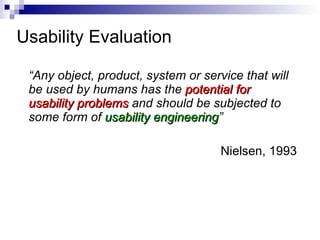
Usability Evaluation  “ Any object, product, system or service that will be used by humans has the  potential for usability problems  and should be subjected to some form of  usability engineering ” Nielsen, 1993
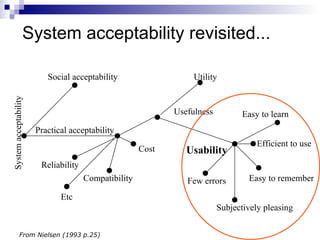
System acceptability revisited... System acceptability Social acceptability Practical acceptability Efficient to use Cost Compatibility Reliability Etc Utility Usefulness From Nielsen (1993 p.25) Usability Easy to learn Easy to remember Few errors Subjectively pleasing
Usability evaluation OR Functionality testing Testing, objective: test  functionality  of system identify & fix bugs, faulty logic etc Evaluation, objective: test  usability  of system can users achieve their goals in terms of: effectiveness efficiency productivity safety user satisfaction ...
Usability problems Functionality testing  is clearly important;  we focus on  usability evaluation  in this module Many examples of poor interface design Many products (not just IT-based) released with apparently little or no usability evaluation conducted
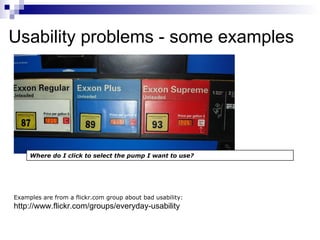
Usability problems - some examples Examples are from a flickr.com group about bad usability:  http://www.flickr.com/groups/everyday-usability Where do I click to select the pump I want to use?
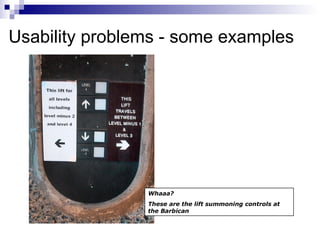
Usability problems - some examples Whaaa? These are the lift summoning controls at the Barbican
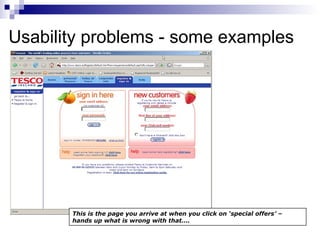
Usability problems - some examples This is the page you arrive at when you click on ‘special offers’ – hands up what is wrong with that….
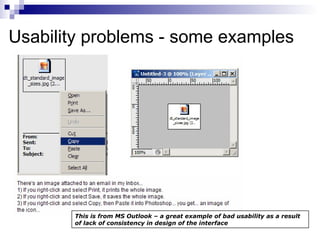
Usability problems - some examples This is from MS Outlook – a great example of bad usability as a result of lack of consistency in design of the interface
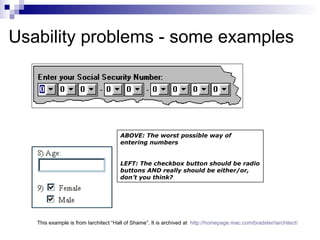
Usability problems - some examples ABOVE: The worst possible way of entering numbers LEFT: The checkbox button should be radio buttons AND really should be either/or, don’t you think?  This example is from Iarchitect “Hall of Shame”. It is archived at  http://homepage.mac.com/bradster/iarchitect/
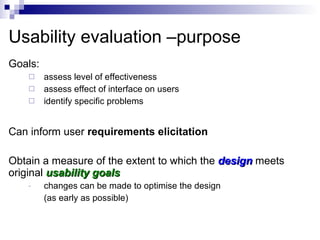
Usability evaluation –purpose Goals: assess level of effectiveness  assess effect of interface on users identify specific problems Can inform user  requirements elicitation Obtain a measure of the extent to which the  design   meets original  usability goals changes can be made to optimise the design  (as early as possible)
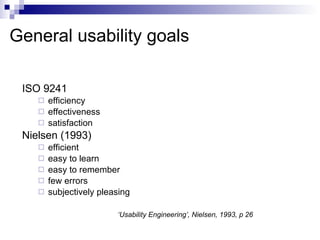
General usability goals ISO 9241 efficiency effectiveness satisfaction Nielsen (1993) efficient easy to learn easy to remember few errors subjectively pleasing ‘ Usability Engineering’, Nielsen, 1993, p 26
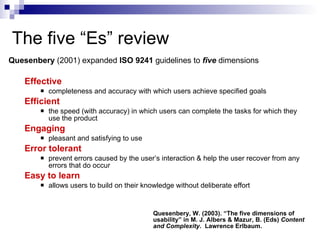
The five “Es” review Quesenbery  (2001) expanded  ISO 9241  guidelines to  five   dimensions   Effective completeness and accuracy with which users achieve specified goals  Efficient the speed (with accuracy) in which users can complete the tasks for which they use the product  Engaging pleasant and satisfying to use  Error tolerant prevent errors caused by the user’s interaction & help the user recover from any errors that do occur Easy to learn allows users to build on their knowledge without deliberate effort  Quesenbery, W. (2003). “The five dimensions of usability” in M. J. Albers & Mazur, B. (Eds)  Content and Complexity .  Lawrence Erlbaum.
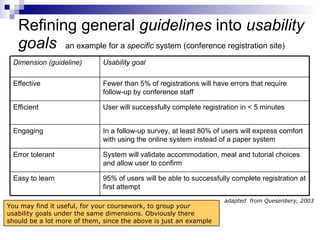
Refining general  guidelines  into  usability goals   an example for a  specific  system (conference registration site) adapted  from Quesenbery, 2003 You may find it useful, for your coursework, to group  your  usability goals under the same dimensions. Obviously there should be a lot more of them, since the above is just an example  Dimension (guideline) Usability goal Effective Fewer than 5% of registrations will have errors that require follow-up by conference staff Efficient User will successfully complete registration in < 5 minutes Engaging In a follow-up survey, at least 80% of users will express comfort with using the online system instead of a paper system  Error tolerant System will validate accommodation, meal and tutorial choices and allow user to confirm Easy to learn 95% of users will be able to successfully complete registration at first attempt
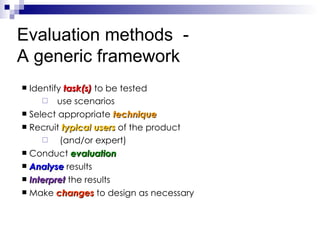
Identify  task(s)  to be tested  use scenarios Select appropriate  technique Recruit  typical users  of the product (and/or expert) Conduct  evaluation Analyse   results Interpret   the results Make  changes   to design as necessary Evaluation methods  -  A generic framework
E valuation - techniques Large number of tools available  Various classification schemes Karat (1998) Nielsen (1993) see Christie  et al  (1995) for an overview Some techniques are multipurpose  Prototyping  can be used:  to elicit requirements;  for design purposes  for evaluation (sometimes simultaneously)
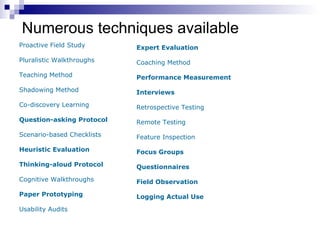
Numerous techniques available Proactive Field Study Pluralistic Walkthroughs Teaching Method Shadowing Method Co-discovery Learning Question-asking Protocol Scenario-based Checklists Heuristic Evaluation Thinking-aloud Protocol Cognitive Walkthroughs Paper Prototyping  Usability Audits Expert Evaluation Coaching Method Performance Measurement Interviews Retrospective Testing Remote Testing Feature Inspection Focus Groups Questionnaires Field Observation Logging Actual Use
Evaluation methods  - approaches Hewitt (1986) makes distinction between: formative  evaluation & summative  evaluation
Formative  evaluation - characteristics Carried out  early   in design process changes cheaper, easier to implement  Should be  iterative Provides informal, usually  qualitative   indications of usability Often employs “ quick & dirty ” techniques relatively easy relatively low cost results relatively quick to analyse & interpret
Summative  evaluation - characteristics Carried out in  final   stages of design process Usually provides objective (often  quantitative)  measures of usability, e.g. to compare different designs for marketing purposes Generally employs more “scientific” techniques: expertise needed to apply can be costly can be complex to analyse By now,  too late  to make  major   changes
Developing an evaluation plan Need to relate technique/tool to stage of product development Key issues: setting  usability goals  (otherwise there is nothing to measure against) selecting technique(s) selecting members of evaluation team logistical issues etc...
Issues Usability goals need to be  specific  &  measurable:  WHAT ARE YOU TESTING? Techniques multiple? (convergent validity)  WHICH METHODS WILL YOU USE? HOW MANY, CAN YOU COMPARE THEM MEANINGFULLY? Evaluation team interface designers users UI specialists/experts Logistical resources equipment subjects accommodation etc. timescales ethical considerations
Quantitative & qualitative data Quantitative  Relatively  objective   e.g. how many mistakes have been made how long to complete task Qualitative Relatively  subjective   e.g. user’s attitude to software think about which techniques you could use to obtain  measurements   of the above
Writing up an  evaluation report Whatever techniques are used: type of technique should be explained  (& why chosen) include a description of the process e.g. why who where when etc. raw data should be: recorded accurately summarised in report  (e.g. in a table) data can then be: analysed  interpreted: what do the results  mean  (the hard part – on their own, numbers mean little) what changes need to be made in the light of your findings?
Writing up an  evaluation report How to write the report: Introduction Tasks to be tested User Group(s) Methods Analysis and Results  Discussion  Conclusion  Appendices: ALL raw data, example questionnaires, interview scripts, copies of paper prototypes (if used), audio & video files if made etc * Remember, when carrying out research of this type, it is important to make a statement about privacy, confidentiality and anonymity of participants. This would be a legal requirement of any ‘real’ research.
Conclusion: Any usability evaluation is better than none Each iteration will reveal  more flaws Need not involve end users at all stages  e.g. expert appraisal can give useful findings Need not be expensive or take a lot of time  e.g. Nielsen's “Discount Usability Engineering”  (‘Usability Engineering’, Nielsen, 1993, p 17; “Lost our lease Usability testing”, in ‘Don’t Make Me Think, Steve Krug, 2000, p143-144) Many different methods available do some research for your projects e.g.  paper prototyping   is a type of  formative evaluation
Activities Read:  Chapter 6 “Usability Evaluation: formative techniques” in  Le Peuple, J. & Scane,  R. (2003).  User Interface Design . Crucial. Visit:   UPA (Usability Professionals Association)  http://www.upassoc.org/upa_publications/jus/2005_november/formative.html and download/ read  the article “ Towards the Design of Effective Formative Test   Reports”  (it may be useful for your coursework). UserDesign http://www.userdesign.com/usability_uem.html and  read  the comparisons between different evaluation methods. James Hom’s Usability Methods Toolbox http://jthom.best.vwh.net/usability/ WQ Usability (Whitney Quesenbery’s company website) http://www.wqusability.com/articles/getting-started.html lots  of useful material to download and read, especially relating to the “5 Es”)
References/further reading #1 Beyer, H. & Holtzblatt (1997)  Contextual Design : A Customer-Centered Approach to Systems Designs.  Morgan Kaufmann Publishers . Christie, B., Scane, R. & Collyer, J. (1995) “Evaluation of human-computer interaction at the user interface to advanced IT systems” in J.R. Wilson,. & N. Corlett, Eds.  Evaluation of Human work: A Practical Ergonomics Methodology  (2nd edition). Taylor and Francis,  Dix, A. et al  (1998)  Human-Computer Interaction  (2nd Edition). Prentice Hall Europe.  Faulkner, X. (2000)  Usability Engineering,  Macmillan Press Ltd. Forsythe, C. Grose, E. & Ratner, J., Eds. (1998)  Human Factors and Web Development . Lawrence Erlbaum Associates. Hewitt, T (1986) “Iterative evaluation” in M.D. Harrison & A.F. Monks, (Eds.)  People and Computers: Designing for Usability , Proceedings of the Second Conference of the BCS HCI Specialist Group. Karat, J. (1988) “Software Evaluation Methodologies” in M. Helander, Ed.  Handbook of Human-Computer Interaction . Elsevier Science Publishers.
References/further reading #2 Le Peuple, J. & Scane, R. (2003). User Interface Design. Crucial. Mayhew, D.J. (1999)  The Usability Engineering Lifecycle: A Practitioner's Handbook for User Interface Design . Morgan Kaufmann Nielsen, J. (1993)  Usability Engineering . AP Professional. Nielsen, J & Mack, R. L., Eds. (1994)  Usability Inspection Methods.  John Wiley & Sons, Inc. Norman, D.A. (1988)  The Design of Everyday Things,  Basic Books. (First published as  The Psychology of Everyday Things ). Preece, J.  et al  (1995)  Human-Computer Interaction.  Addison-Wesley. Quesenbery, W. (2003). “The five dimensions of usability” in M. J. Albers & Mazur, B. (Eds)  Content and Complexity .  Lawrence Erlbaum. Rubin, J. (1994)  Handbook of Usability Testing: How to Plan, Design, and Conduct Effective Tests.  John Wiley & Sons
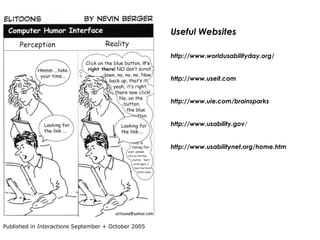
Useful Websites http://www.worldusabilityday.org/ http://www.useit.com http://www.uie.com/brainsparks http://www.usability.gov / http://www.usabilitynet.org/home.htm Published in  Interactions  September + October 2005
End

Uid formative evaluation

  • 1.
    BS3001 Human ComputerInteraction Usability Evaluation formative techniques By Jenny Le Peuple 2007 Edited by Dr K. Dudman 2008 Revised by Pen Lister 2009
  • 2.
    Usability Evaluation “ Any object, product, system or service that will be used by humans has the potential for usability problems and should be subjected to some form of usability engineering ” Nielsen, 1993
  • 3.
    System acceptability revisited...System acceptability Social acceptability Practical acceptability Efficient to use Cost Compatibility Reliability Etc Utility Usefulness From Nielsen (1993 p.25) Usability Easy to learn Easy to remember Few errors Subjectively pleasing
  • 4.
    Usability evaluation ORFunctionality testing Testing, objective: test functionality of system identify & fix bugs, faulty logic etc Evaluation, objective: test usability of system can users achieve their goals in terms of: effectiveness efficiency productivity safety user satisfaction ...
  • 5.
    Usability problems Functionalitytesting is clearly important; we focus on usability evaluation in this module Many examples of poor interface design Many products (not just IT-based) released with apparently little or no usability evaluation conducted
  • 6.
    Usability problems -some examples Examples are from a flickr.com group about bad usability: http://www.flickr.com/groups/everyday-usability Where do I click to select the pump I want to use?
  • 7.
    Usability problems -some examples Whaaa? These are the lift summoning controls at the Barbican
  • 8.
    Usability problems -some examples This is the page you arrive at when you click on ‘special offers’ – hands up what is wrong with that….
  • 9.
    Usability problems -some examples This is from MS Outlook – a great example of bad usability as a result of lack of consistency in design of the interface
  • 10.
    Usability problems -some examples ABOVE: The worst possible way of entering numbers LEFT: The checkbox button should be radio buttons AND really should be either/or, don’t you think? This example is from Iarchitect “Hall of Shame”. It is archived at http://homepage.mac.com/bradster/iarchitect/
  • 11.
    Usability evaluation –purposeGoals: assess level of effectiveness assess effect of interface on users identify specific problems Can inform user requirements elicitation Obtain a measure of the extent to which the design meets original usability goals changes can be made to optimise the design (as early as possible)
  • 12.
    General usability goalsISO 9241 efficiency effectiveness satisfaction Nielsen (1993) efficient easy to learn easy to remember few errors subjectively pleasing ‘ Usability Engineering’, Nielsen, 1993, p 26
  • 13.
    The five “Es”review Quesenbery (2001) expanded ISO 9241 guidelines to five dimensions Effective completeness and accuracy with which users achieve specified goals Efficient the speed (with accuracy) in which users can complete the tasks for which they use the product Engaging pleasant and satisfying to use Error tolerant prevent errors caused by the user’s interaction & help the user recover from any errors that do occur Easy to learn allows users to build on their knowledge without deliberate effort Quesenbery, W. (2003). “The five dimensions of usability” in M. J. Albers & Mazur, B. (Eds) Content and Complexity . Lawrence Erlbaum.
  • 14.
    Refining general guidelines into usability goals an example for a specific system (conference registration site) adapted from Quesenbery, 2003 You may find it useful, for your coursework, to group your usability goals under the same dimensions. Obviously there should be a lot more of them, since the above is just an example Dimension (guideline) Usability goal Effective Fewer than 5% of registrations will have errors that require follow-up by conference staff Efficient User will successfully complete registration in < 5 minutes Engaging In a follow-up survey, at least 80% of users will express comfort with using the online system instead of a paper system Error tolerant System will validate accommodation, meal and tutorial choices and allow user to confirm Easy to learn 95% of users will be able to successfully complete registration at first attempt
  • 15.
    Identify task(s) to be tested use scenarios Select appropriate technique Recruit typical users of the product (and/or expert) Conduct evaluation Analyse results Interpret the results Make changes to design as necessary Evaluation methods - A generic framework
  • 16.
    E valuation -techniques Large number of tools available Various classification schemes Karat (1998) Nielsen (1993) see Christie et al (1995) for an overview Some techniques are multipurpose Prototyping can be used: to elicit requirements; for design purposes for evaluation (sometimes simultaneously)
  • 17.
    Numerous techniques availableProactive Field Study Pluralistic Walkthroughs Teaching Method Shadowing Method Co-discovery Learning Question-asking Protocol Scenario-based Checklists Heuristic Evaluation Thinking-aloud Protocol Cognitive Walkthroughs Paper Prototyping Usability Audits Expert Evaluation Coaching Method Performance Measurement Interviews Retrospective Testing Remote Testing Feature Inspection Focus Groups Questionnaires Field Observation Logging Actual Use
  • 18.
    Evaluation methods - approaches Hewitt (1986) makes distinction between: formative evaluation & summative evaluation
  • 19.
    Formative evaluation- characteristics Carried out early in design process changes cheaper, easier to implement Should be iterative Provides informal, usually qualitative indications of usability Often employs “ quick & dirty ” techniques relatively easy relatively low cost results relatively quick to analyse & interpret
  • 20.
    Summative evaluation- characteristics Carried out in final stages of design process Usually provides objective (often quantitative) measures of usability, e.g. to compare different designs for marketing purposes Generally employs more “scientific” techniques: expertise needed to apply can be costly can be complex to analyse By now, too late to make major changes
  • 21.
    Developing an evaluationplan Need to relate technique/tool to stage of product development Key issues: setting usability goals (otherwise there is nothing to measure against) selecting technique(s) selecting members of evaluation team logistical issues etc...
  • 22.
    Issues Usability goalsneed to be specific & measurable: WHAT ARE YOU TESTING? Techniques multiple? (convergent validity) WHICH METHODS WILL YOU USE? HOW MANY, CAN YOU COMPARE THEM MEANINGFULLY? Evaluation team interface designers users UI specialists/experts Logistical resources equipment subjects accommodation etc. timescales ethical considerations
  • 23.
    Quantitative & qualitativedata Quantitative Relatively objective e.g. how many mistakes have been made how long to complete task Qualitative Relatively subjective e.g. user’s attitude to software think about which techniques you could use to obtain measurements of the above
  • 24.
    Writing up an evaluation report Whatever techniques are used: type of technique should be explained (& why chosen) include a description of the process e.g. why who where when etc. raw data should be: recorded accurately summarised in report (e.g. in a table) data can then be: analysed interpreted: what do the results mean (the hard part – on their own, numbers mean little) what changes need to be made in the light of your findings?
  • 25.
    Writing up an evaluation report How to write the report: Introduction Tasks to be tested User Group(s) Methods Analysis and Results Discussion Conclusion Appendices: ALL raw data, example questionnaires, interview scripts, copies of paper prototypes (if used), audio & video files if made etc * Remember, when carrying out research of this type, it is important to make a statement about privacy, confidentiality and anonymity of participants. This would be a legal requirement of any ‘real’ research.
  • 26.
    Conclusion: Any usabilityevaluation is better than none Each iteration will reveal more flaws Need not involve end users at all stages e.g. expert appraisal can give useful findings Need not be expensive or take a lot of time e.g. Nielsen's “Discount Usability Engineering” (‘Usability Engineering’, Nielsen, 1993, p 17; “Lost our lease Usability testing”, in ‘Don’t Make Me Think, Steve Krug, 2000, p143-144) Many different methods available do some research for your projects e.g. paper prototyping is a type of formative evaluation
  • 27.
    Activities Read: Chapter 6 “Usability Evaluation: formative techniques” in Le Peuple, J. & Scane, R. (2003). User Interface Design . Crucial. Visit: UPA (Usability Professionals Association) http://www.upassoc.org/upa_publications/jus/2005_november/formative.html and download/ read the article “ Towards the Design of Effective Formative Test Reports” (it may be useful for your coursework). UserDesign http://www.userdesign.com/usability_uem.html and read the comparisons between different evaluation methods. James Hom’s Usability Methods Toolbox http://jthom.best.vwh.net/usability/ WQ Usability (Whitney Quesenbery’s company website) http://www.wqusability.com/articles/getting-started.html lots of useful material to download and read, especially relating to the “5 Es”)
  • 28.
    References/further reading #1Beyer, H. & Holtzblatt (1997) Contextual Design : A Customer-Centered Approach to Systems Designs. Morgan Kaufmann Publishers . Christie, B., Scane, R. & Collyer, J. (1995) “Evaluation of human-computer interaction at the user interface to advanced IT systems” in J.R. Wilson,. & N. Corlett, Eds. Evaluation of Human work: A Practical Ergonomics Methodology (2nd edition). Taylor and Francis, Dix, A. et al (1998) Human-Computer Interaction (2nd Edition). Prentice Hall Europe. Faulkner, X. (2000) Usability Engineering, Macmillan Press Ltd. Forsythe, C. Grose, E. & Ratner, J., Eds. (1998) Human Factors and Web Development . Lawrence Erlbaum Associates. Hewitt, T (1986) “Iterative evaluation” in M.D. Harrison & A.F. Monks, (Eds.) People and Computers: Designing for Usability , Proceedings of the Second Conference of the BCS HCI Specialist Group. Karat, J. (1988) “Software Evaluation Methodologies” in M. Helander, Ed. Handbook of Human-Computer Interaction . Elsevier Science Publishers.
  • 29.
    References/further reading #2Le Peuple, J. & Scane, R. (2003). User Interface Design. Crucial. Mayhew, D.J. (1999) The Usability Engineering Lifecycle: A Practitioner's Handbook for User Interface Design . Morgan Kaufmann Nielsen, J. (1993) Usability Engineering . AP Professional. Nielsen, J & Mack, R. L., Eds. (1994) Usability Inspection Methods. John Wiley & Sons, Inc. Norman, D.A. (1988) The Design of Everyday Things, Basic Books. (First published as The Psychology of Everyday Things ). Preece, J. et al (1995) Human-Computer Interaction. Addison-Wesley. Quesenbery, W. (2003). “The five dimensions of usability” in M. J. Albers & Mazur, B. (Eds) Content and Complexity . Lawrence Erlbaum. Rubin, J. (1994) Handbook of Usability Testing: How to Plan, Design, and Conduct Effective Tests. John Wiley & Sons
  • 30.
    Useful Websites http://www.worldusabilityday.org/http://www.useit.com http://www.uie.com/brainsparks http://www.usability.gov / http://www.usabilitynet.org/home.htm Published in Interactions September + October 2005
  • 31.