DOCKER SWARM 1.12
By Tanmay Mehra
DOCKER RECAP…
• Docker is an open platform for developing, shipping, and
running applications.

• The lightweight nature of containers, which run without the
extra load of a hypervisor, means you can get more out of your
hardware.

• Docker daemon, docker client, docker Host and docker
registry.

• Docker images, containers, networks and volumes.
DOCKER SWARM 1.12
• Docker (starting from version 1.12) can run in two modes, classical
and swarm mode.

• A swarm is a cluster of Docker engines, or nodes, where you deploy
services.

• Docker Swarm provides native clustering capabilities to turn a group
of Docker engines into a single, virtual Docker Engine.

• The Docker Engine CLI and API include commands to manage swarm
nodes (e.g., add or remove nodes), and deploy and orchestrate
services across the swarm.
APPLICATION, SERVICES AND
NETWORKS
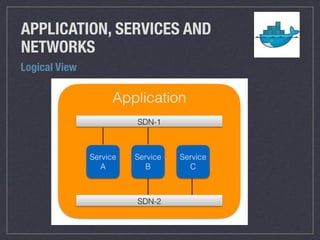
• In the context of Docker and Docker Swarm, an application is made up
of one to many services running on one to multiple of software defined
networks (SDN).

• Each service can be “attached” to one or many networks. The
communication between the services happens over a network.

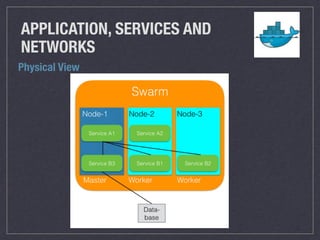
• Lets see the logical and the physical architecture of the application
running on docker swarm nodes.
APPLICATION, SERVICES AND
NETWORKS
Logical View
APPLICATION, SERVICES AND
NETWORKS
Physical View
DOCKER SWARM COMPONENTS
• NODES : A node is an instance of Docker Engine participating in a
swarm.

• There are two types of nodes : Manager node and Worker Node.

• To deploy your application to a swarm, you submit a service definition
to a manager node. The manager node dispatches units of work called
tasks to worker nodes.

• Manager nodes also perform the orchestration and cluster management
functions required to maintain the desired state of the swarm.

• Worker nodes receive and execute tasks dispatched from manager
nodes.
DOCKER SWARM COMPONENTS
• SERVICE : A service is the definition of the tasks to execute on the
worker nodes. It is the central structure of the swarm system and
the primary root of user interaction with the swarm.

• In the replicated services model, the swarm manager distributes
a specific number of replica tasks among the nodes based upon
the scale you set in the desired state.

• For global services, the swarm runs one task for the service on
every available node in the cluster.

• TASK : A task carries a Docker container and the commands to
run inside the container. It is the atomic scheduling unit of swarm.
DOCKER SWARM 1.12 FEATURES
• LOAD BALANCING : The swarm manager uses ingress load
balancing to expose the services you want to make available
externally to the swarm.

• The swarm manager can automatically assign the service a
PublishedPort or you can configure a PublishedPort for the service.

• Swarm mode has an internal DNS component that automatically
assigns each service in the swarm a DNS entry.

• The swarm manager uses internal load balancing to distribute
requests among services within the cluster based upon the DNS
name of the service.
DOCKER SWARM 1.12 FEATURES
• HIGH SCALABILITY AND PERFORMANCE : Swarm is production
ready and tested to scale up to one thousand (1,000) nodes and fifty
thousand (50,000) containers with no performance degradation in
spinning up incremental containers onto the node cluster.

• FAILOVER AND HIGH AVAILABILITY : Ensure a highly available
Swarm Manager. Create multiple Swarm masters and specify
policies on leader election in case the primary master experiences a
failure.

• FLEXIBLE CONTAINER SCHEDULING : The built-in scheduler has
several filters such as node tags, affinity and strategies like spread,
binpack and many more.
SWARM DEMO
• Create a master node

• Create two worker nodes

• Join nodes with master node

• Create a docker service 

• Inspect a service

• Access a service on published port

• scale a docker service

• Upgrade service image (Rolling updates)

• Drain a node

• stop a node

• remove nodes
SWARM DEMO
• Running multiple service in Docker swarm

• Create a docker network

• Create service foo

• Create service bar

• Access service bar inside foo (Load Balancing)
Thank you for listening !!

Dokcer swarm

  • 1.
  • 2.
    DOCKER RECAP… • Dockeris an open platform for developing, shipping, and running applications. • The lightweight nature of containers, which run without the extra load of a hypervisor, means you can get more out of your hardware. • Docker daemon, docker client, docker Host and docker registry. • Docker images, containers, networks and volumes.
  • 3.
    DOCKER SWARM 1.12 •Docker (starting from version 1.12) can run in two modes, classical and swarm mode. • A swarm is a cluster of Docker engines, or nodes, where you deploy services. • Docker Swarm provides native clustering capabilities to turn a group of Docker engines into a single, virtual Docker Engine. • The Docker Engine CLI and API include commands to manage swarm nodes (e.g., add or remove nodes), and deploy and orchestrate services across the swarm.
  • 4.
    APPLICATION, SERVICES AND NETWORKS •In the context of Docker and Docker Swarm, an application is made up of one to many services running on one to multiple of software defined networks (SDN). • Each service can be “attached” to one or many networks. The communication between the services happens over a network. • Lets see the logical and the physical architecture of the application running on docker swarm nodes.
  • 5.
  • 6.
  • 7.
    DOCKER SWARM COMPONENTS •NODES : A node is an instance of Docker Engine participating in a swarm. • There are two types of nodes : Manager node and Worker Node. • To deploy your application to a swarm, you submit a service definition to a manager node. The manager node dispatches units of work called tasks to worker nodes. • Manager nodes also perform the orchestration and cluster management functions required to maintain the desired state of the swarm. • Worker nodes receive and execute tasks dispatched from manager nodes.
  • 8.
    DOCKER SWARM COMPONENTS •SERVICE : A service is the definition of the tasks to execute on the worker nodes. It is the central structure of the swarm system and the primary root of user interaction with the swarm. • In the replicated services model, the swarm manager distributes a specific number of replica tasks among the nodes based upon the scale you set in the desired state. • For global services, the swarm runs one task for the service on every available node in the cluster. • TASK : A task carries a Docker container and the commands to run inside the container. It is the atomic scheduling unit of swarm.
  • 9.
    DOCKER SWARM 1.12FEATURES • LOAD BALANCING : The swarm manager uses ingress load balancing to expose the services you want to make available externally to the swarm. • The swarm manager can automatically assign the service a PublishedPort or you can configure a PublishedPort for the service. • Swarm mode has an internal DNS component that automatically assigns each service in the swarm a DNS entry. • The swarm manager uses internal load balancing to distribute requests among services within the cluster based upon the DNS name of the service.
  • 10.
    DOCKER SWARM 1.12FEATURES • HIGH SCALABILITY AND PERFORMANCE : Swarm is production ready and tested to scale up to one thousand (1,000) nodes and fifty thousand (50,000) containers with no performance degradation in spinning up incremental containers onto the node cluster. • FAILOVER AND HIGH AVAILABILITY : Ensure a highly available Swarm Manager. Create multiple Swarm masters and specify policies on leader election in case the primary master experiences a failure. • FLEXIBLE CONTAINER SCHEDULING : The built-in scheduler has several filters such as node tags, affinity and strategies like spread, binpack and many more.
  • 11.
    SWARM DEMO • Createa master node • Create two worker nodes • Join nodes with master node • Create a docker service • Inspect a service • Access a service on published port • scale a docker service • Upgrade service image (Rolling updates) • Drain a node • stop a node • remove nodes
  • 12.
    SWARM DEMO • Runningmultiple service in Docker swarm • Create a docker network • Create service foo • Create service bar • Access service bar inside foo (Load Balancing)
  • 13.
    Thank you forlistening !!