Container
Orchestration with
Docker Swarm
And TRAEFIK
Jakub Hajek / Cometari

Technical consultant & Founder
DevOps Congress, Wrocław, October 19th, 2019
Introduction
• I am the owner and technical consultant working for Cometari
• I have been system admin since 1998.
• Cometari is an agency implementing DevOps culture, providing consultancy,
workshops and software services.
• Our areas of expertise are DevOps, Elastic Stack (log analysis), Cloud
Computing.
• We are very deeply involved in the travel tech industry, however our solutions
go much further than just integrating travel API’s.
— Jakub Hajek
“I strongly believe that implementing DevOps
culture, across the entire organisation, should
provide measurable value and solve the real
issue rather than generate a new one.”
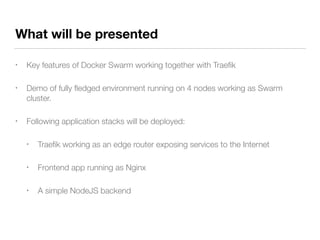
What will be presented
• Key features of Docker Swarm working together with Traefik
• Demo of fully fledged environment running on 4 nodes working as Swarm
cluster.
• Following application stacks will be deployed:
• Traefik working as an edge router exposing services to the Internet
• Frontend app running as Nginx
• A simple NodeJS backend
DOCKER SWARM key features
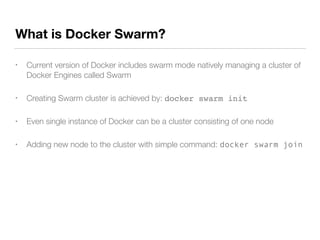
What is Docker Swarm?
• Current version of Docker includes swarm mode natively managing a cluster of
Docker Engines called Swarm
• Creating Swarm cluster is achieved by: docker swarm init
• Even single instance of Docker can be a cluster consisting of one node
• Adding new node to the cluster with simple command: docker swarm join
Decentralized design
RPC:
- - HTTP/2 + PROTOBUF GOOGLE
- - TWO WAY COMMUNICATION
- - BI-DIRECTIONAL STREAMING
- - BUILT IN AUTHENTICATION
- - VERSIONED
Worker Manager Leader
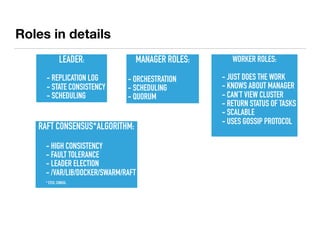
Roles in details
MANAGER ROLES:
- ORCHESTRATION
- SCHEDULING
- QUORUM
LEADER:
- - REPLICATION LOG
- - STATE CONSISTENCY
- - SCHEDULING
WORKER ROLES:
- - JUST DOES THE WORK
- - KNOWS ABOUT MANAGER
- - CAN’T VIEW CLUSTER
- - RETURN STATUS OF TASKS
- - SCALABLE
- - USES GOSSIP PROTOCOL
RAFT CONSENSUS*ALGORITHM:
- - HIGH CONSISTENCY
- - FAULT TOLERANCE
- - LEADER ELECTION
- - /VAR/LIB/DOCKER/SWARM/RAFT
-
* ETCD, CONSUL,
Declarative service model
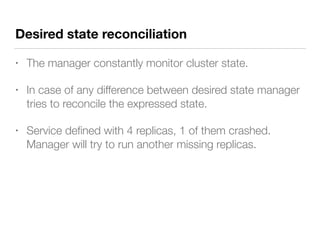
Desired state reconciliation
• The manager constantly monitor cluster state.
• In case of any difference between desired state manager
tries to reconcile the expressed state.
• Service defined with 4 replicas, 1 of them crashed.
Manager will try to run another missing replicas.
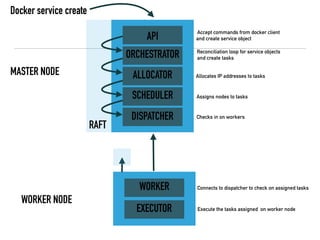
WORKER NODE
MASTER NODE
API
ORCHESTRATOR
ALLOCATOR
SCHEDULER
DISPATCHER
WORKER
EXECUTOR
RAFT
Accept commands from docker client
and create service object
Reconciliation loop for service objects
and create tasks
Allocates IP addresses to tasks
Assigns nodes to tasks
Checks in on workers
Connects to dispatcher to check on assigned tasks
Execute the tasks assigned on worker node
Docker service create
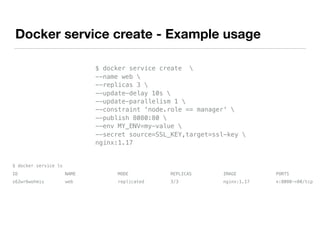
Docker service create - Example usage
$ docker service create 
--name web 
--replicas 3 
--update-delay 10s 
--update-parallelism 1 
--constraint 'node.role == manager' 
--publish 8080:80 
--env MY_ENV=my-value 
--secret source=SSL_KEY,target=ssl-key 
nginx:1.17
$ docker service ls
ID NAME MODE REPLICAS IMAGE PORTS
s62wr6wohmis web replicated 3/3 nginx:1.17 *:8080->80/tcp
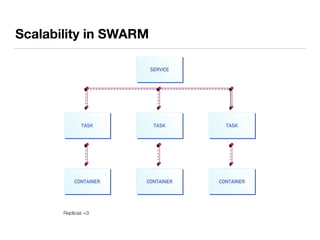
Replicas =3
Scalability in SWARM
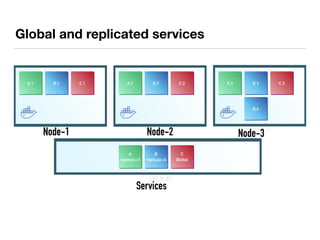
Global and replicated services
Node-1 Node-2 Node-3
Services
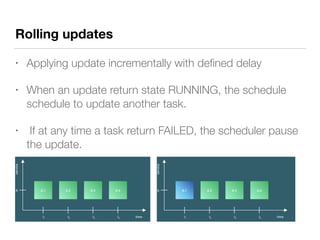
Rolling updates
• Applying update incrementally with defined delay
• When an update return state RUNNING, the schedule
schedule to update another task.
• If at any time a task return FAILED, the scheduler pause
the update.
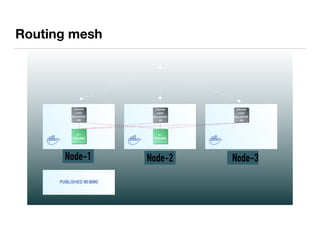
Routing mesh
Node-1 Node-3Node-2
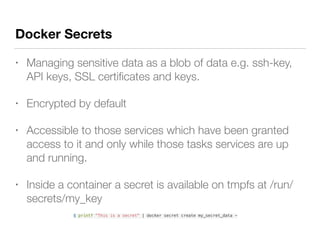
Docker Secrets
• Managing sensitive data as a blob of data e.g. ssh-key,
API keys, SSL certificates and keys.
• Encrypted by default
• Accessible to those services which have been granted
access to it and only while those tasks services are up
and running.
• Inside a container a secret is available on tmpfs at /run/
secrets/my_key
$ printf "This is a secret" | docker secret create my_secret_data -
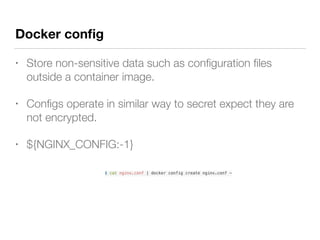
Docker config
• Store non-sensitive data such as configuration files
outside a container image.
• Configs operate in similar way to secret expect they are
not encrypted.
• ${NGINX_CONFIG:-1}
$ cat nginx.conf | docker config create nginx.conf -
More features…
• Secure by default, TLS encryption
• Constraints
• Placement preferences
• Load balancing: DNSRR, VIP
• Service Discovery, internal DNS server
• Multi host networking, overlay network with encryption (IPSEC)
• Stacks with multiple services - compose file
• Environment variables
TRAEFIK key features
• Modern HTTP reverse proxy and load balancer for micro services working with
Docker Swarm and Kubernetes - just need to point Traefik into your
orchestrator
• Continuously update configuration, no restarts required
• HTTP and TCP services
• Integration with Let’s Encrypt!
• Immutable image deployed on a cluster
• Configuration done via Docker labels on a service level
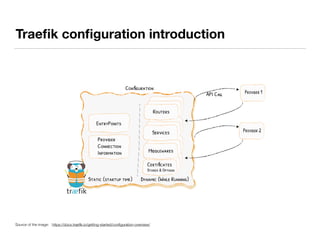
Traefik configuration introduction
Source of the image: https://docs.traefik.io/getting-started/configuration-overview/
Demo environment
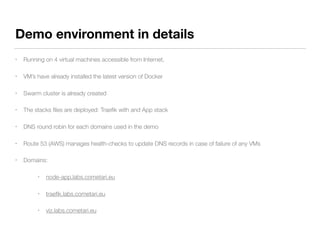
Demo environment in details
• Running on 4 virtual machines accessible from Internet,
• VM’s have already installed the latest version of Docker
• Swarm cluster is already created
• The stacks files are deployed: Traefik with and App stack
• DNS round robin for each domains used in the demo
• Route 53 (AWS) manages health-checks to update DNS records in case of failure of any VMs
• Domains:
• node-app.labs.cometari.eu
• traefik.labs.cometari.eu
• viz.labs.cometari.eu
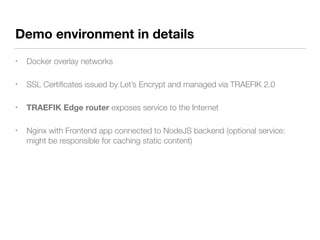
• Docker overlay networks
• SSL Certificates issued by Let’s Encrypt and managed via TRAEFIK 2.0
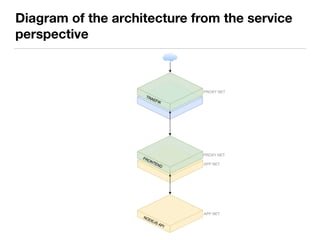
• TRAEFIK Edge router exposes service to the Internet
• Nginx with Frontend app connected to NodeJS backend (optional service:
might be responsible for caching static content)
Demo environment in details
Diagram of demo environment
Diagram of the architecture from the service
perspective
SHOW ME THE CODE!
Overview of STACK FILES!
Summary
• Fully fledged example of multi tier application stacks
• Straightforward configuration, everything is code!
• Immutable images, custom configuration managed by injecting environment
variables
• Easy way to scale up / down a service
• Automatically exposed new services thanks to TRAEFIK, no need to prepare
manually a config files
• Managing of SSL certs is managed in an easy way!
• Infrastructure as code!
Links
• The source code is available at https://github.com/jakubhajek/traefik-swarm
• The official Traefik documentation: https://docs.traefik.io/v2.0/
• The official Docker Swarm documentation: https://docs.docker.com/engine/
swarm/
• Compose file version 3 references: https://docs.docker.com/compose/
compose-file/
Thank You!
Jakub Hajek
@_jakubhajek
kuba@cometari.com

Docker Swarm and Traefik 2.0

  • 1.
    Container Orchestration with Docker Swarm AndTRAEFIK Jakub Hajek / Cometari Technical consultant & Founder DevOps Congress, Wrocław, October 19th, 2019
  • 2.
    Introduction • I amthe owner and technical consultant working for Cometari • I have been system admin since 1998. • Cometari is an agency implementing DevOps culture, providing consultancy, workshops and software services. • Our areas of expertise are DevOps, Elastic Stack (log analysis), Cloud Computing. • We are very deeply involved in the travel tech industry, however our solutions go much further than just integrating travel API’s.
  • 3.
    — Jakub Hajek “Istrongly believe that implementing DevOps culture, across the entire organisation, should provide measurable value and solve the real issue rather than generate a new one.”
  • 4.
    What will bepresented • Key features of Docker Swarm working together with Traefik • Demo of fully fledged environment running on 4 nodes working as Swarm cluster. • Following application stacks will be deployed: • Traefik working as an edge router exposing services to the Internet • Frontend app running as Nginx • A simple NodeJS backend
  • 5.
  • 6.
    What is DockerSwarm? • Current version of Docker includes swarm mode natively managing a cluster of Docker Engines called Swarm • Creating Swarm cluster is achieved by: docker swarm init • Even single instance of Docker can be a cluster consisting of one node • Adding new node to the cluster with simple command: docker swarm join
  • 7.
    Decentralized design RPC: - -HTTP/2 + PROTOBUF GOOGLE - - TWO WAY COMMUNICATION - - BI-DIRECTIONAL STREAMING - - BUILT IN AUTHENTICATION - - VERSIONED Worker Manager Leader
  • 8.
    Roles in details MANAGERROLES: - ORCHESTRATION - SCHEDULING - QUORUM LEADER: - - REPLICATION LOG - - STATE CONSISTENCY - - SCHEDULING WORKER ROLES: - - JUST DOES THE WORK - - KNOWS ABOUT MANAGER - - CAN’T VIEW CLUSTER - - RETURN STATUS OF TASKS - - SCALABLE - - USES GOSSIP PROTOCOL RAFT CONSENSUS*ALGORITHM: - - HIGH CONSISTENCY - - FAULT TOLERANCE - - LEADER ELECTION - - /VAR/LIB/DOCKER/SWARM/RAFT - * ETCD, CONSUL,
  • 9.
  • 10.
    Desired state reconciliation •The manager constantly monitor cluster state. • In case of any difference between desired state manager tries to reconcile the expressed state. • Service defined with 4 replicas, 1 of them crashed. Manager will try to run another missing replicas.
  • 11.
    WORKER NODE MASTER NODE API ORCHESTRATOR ALLOCATOR SCHEDULER DISPATCHER WORKER EXECUTOR RAFT Acceptcommands from docker client and create service object Reconciliation loop for service objects and create tasks Allocates IP addresses to tasks Assigns nodes to tasks Checks in on workers Connects to dispatcher to check on assigned tasks Execute the tasks assigned on worker node Docker service create
  • 12.
    Docker service create- Example usage $ docker service create --name web --replicas 3 --update-delay 10s --update-parallelism 1 --constraint 'node.role == manager' --publish 8080:80 --env MY_ENV=my-value --secret source=SSL_KEY,target=ssl-key nginx:1.17 $ docker service ls ID NAME MODE REPLICAS IMAGE PORTS s62wr6wohmis web replicated 3/3 nginx:1.17 *:8080->80/tcp
  • 13.
  • 14.
    Global and replicatedservices Node-1 Node-2 Node-3 Services
  • 15.
    Rolling updates • Applyingupdate incrementally with defined delay • When an update return state RUNNING, the schedule schedule to update another task. • If at any time a task return FAILED, the scheduler pause the update.
  • 16.
  • 17.
    Docker Secrets • Managingsensitive data as a blob of data e.g. ssh-key, API keys, SSL certificates and keys. • Encrypted by default • Accessible to those services which have been granted access to it and only while those tasks services are up and running. • Inside a container a secret is available on tmpfs at /run/ secrets/my_key $ printf "This is a secret" | docker secret create my_secret_data -
  • 18.
    Docker config • Storenon-sensitive data such as configuration files outside a container image. • Configs operate in similar way to secret expect they are not encrypted. • ${NGINX_CONFIG:-1} $ cat nginx.conf | docker config create nginx.conf -
  • 19.
    More features… • Secureby default, TLS encryption • Constraints • Placement preferences • Load balancing: DNSRR, VIP • Service Discovery, internal DNS server • Multi host networking, overlay network with encryption (IPSEC) • Stacks with multiple services - compose file • Environment variables
  • 20.
  • 21.
    TRAEFIK key features •Modern HTTP reverse proxy and load balancer for micro services working with Docker Swarm and Kubernetes - just need to point Traefik into your orchestrator • Continuously update configuration, no restarts required • HTTP and TCP services • Integration with Let’s Encrypt! • Immutable image deployed on a cluster • Configuration done via Docker labels on a service level
  • 22.
    Traefik configuration introduction Sourceof the image: https://docs.traefik.io/getting-started/configuration-overview/
  • 23.
  • 24.
    Demo environment indetails • Running on 4 virtual machines accessible from Internet, • VM’s have already installed the latest version of Docker • Swarm cluster is already created • The stacks files are deployed: Traefik with and App stack • DNS round robin for each domains used in the demo • Route 53 (AWS) manages health-checks to update DNS records in case of failure of any VMs • Domains: • node-app.labs.cometari.eu • traefik.labs.cometari.eu • viz.labs.cometari.eu
  • 25.
    • Docker overlaynetworks • SSL Certificates issued by Let’s Encrypt and managed via TRAEFIK 2.0 • TRAEFIK Edge router exposes service to the Internet • Nginx with Frontend app connected to NodeJS backend (optional service: might be responsible for caching static content) Demo environment in details
  • 26.
    Diagram of demoenvironment
  • 27.
    Diagram of thearchitecture from the service perspective
  • 28.
    SHOW ME THECODE! Overview of STACK FILES!
  • 29.
    Summary • Fully fledgedexample of multi tier application stacks • Straightforward configuration, everything is code! • Immutable images, custom configuration managed by injecting environment variables • Easy way to scale up / down a service • Automatically exposed new services thanks to TRAEFIK, no need to prepare manually a config files • Managing of SSL certs is managed in an easy way! • Infrastructure as code!
  • 30.
    Links • The sourcecode is available at https://github.com/jakubhajek/traefik-swarm • The official Traefik documentation: https://docs.traefik.io/v2.0/ • The official Docker Swarm documentation: https://docs.docker.com/engine/ swarm/ • Compose file version 3 references: https://docs.docker.com/compose/ compose-file/
  • 31.
  • 32.