What is
Data Driven Product?Docker and Orchestration
A.Akkus
Agenda
1. What is the Docker?
2. Docker CLI & Docker HTTP API
3. Docker Machine
4. Docker Compose
5. Docker Swarm
6. Docker for Development Env.
7. Demo
What is the Docker?
• Docker is the world’s leading software container platform.
• Docker simplifies software delivery by making it easy to build, ship, and run distributed
applications.
• Eliminate the “it works on my machine” problem once and for all.
• Deploy both microservices and traditional apps anywhere without costly rewrites.
• From one to thousands of containers without breaking a sweat.
• Secure by default.
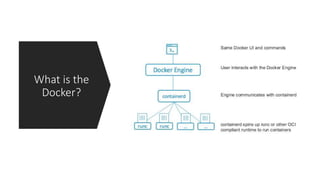
What is the
Docker?
Dockerfile
FROM java:8
VOLUME /tmp
ADD target/challenge-0.0.1-SNAPSHOT.jar challenge.jar
RUN bash -c 'touch /challenge.jar’
EXPOSE 8080
ENTRYPOINT ["java","-jar","/challenge.jar"]
Best practices for writing Dockerfiles
• Containers should be ephemeral
• Use a .dockerignore file
• Avoid installing unnecessary packages
• Each container should have only one concern
• Minimize the number of layers
• Sort multi-line arguments
• Use the multi-stage build
Docker CLI
• To list available commands, either run docker with no parameters or execute docker help.
$ docker
Usage: docker [OPTIONS] COMMAND [ARG...] docker [ --help | -v | --version ]
A self-sufficient runtime for containers.
…….
• Quick demo.
Docker HTTP API
• By default, a unix domain socket (or IPC socket) is created at /var/run/docker.sock
• If you need to access the Docker daemon remotely, you need to enable the tcp Socket.
• You can do following items;
* Run a container
* Update a container
* List and manage containers
* Print the logs of a specific container
* Pull images
* List a network
…..
….
Docker Machine
• Docker Machine allows you to create Docker hosts on your
computer, on cloud providers, and inside your own data center.
• It creates servers, installs Docker on them, and then configures
the Docker client to talk to them.
• Common commands for Docker Machine;
* create, ls, ssh, scp, inspect, env, start/stop/kill, rm, ip
Docker Compose
• Docker Compose is a tool that allows you to define and run
applications with one or more Docker containers.
• Typically, an application would consist of multiple containers such as
one for the web server, another for the application server, and
another one for the database.
• With Compose, a multi-container application can be easily defined
in a single file.
• All the containers required for the application can be then started
and managed with a single command.
For example; docker-compose up or docker-compose up -d
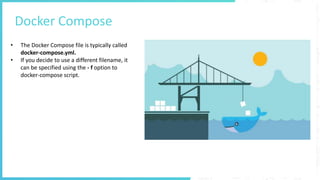
Docker Compose
• The Docker Compose file is typically called
docker-compose.yml.
• If you decide to use a different filename, it
can be specified using the - f option to
docker-compose script.
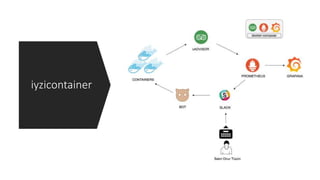
iyzicontainer
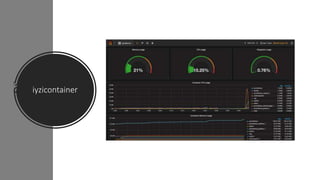
iyzicontainer
Docker Swarm
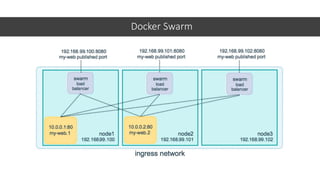
• The cluster management and orchestration features embedded in the Docker Engine are built using SwarmKit.
• You enable swarm mode for an engine by either initializing a swarm or joining an existing swarm.
• Declarative service model.
• Scaling.
• Desired state reconciliation.
• Multi-host networking.
• Service discovery.
• Load balancing.
• Secure by default.
• Rolling updates.
• Configurable Updates.
Docker Swarm
Docker Swarm - Raft
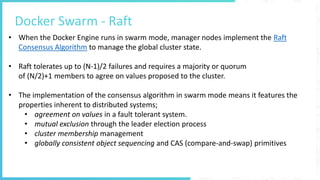
• When the Docker Engine runs in swarm mode, manager nodes implement the Raft
Consensus Algorithm to manage the global cluster state.
• Raft tolerates up to (N-1)/2 failures and requires a majority or quorum
of (N/2)+1 members to agree on values proposed to the cluster.
• The implementation of the consensus algorithm in swarm mode means it features the
properties inherent to distributed systems;
• agreement on values in a fault tolerant system.
• mutual exclusion through the leader election process
• cluster membership management
• globally consistent object sequencing and CAS (compare-and-swap) primitives
Docker for Development Environment
• Docker containers wrap up a piece of software in a complete filesystem that
contains everything it needs to run: code, runtime, system tools, system libraries —
anything you can install on a server. This guarantees that it will always execute the
same, regardless of the environment it is running in.
• docker-compose up –d
./run-test.sh
docker-compose down
Demo
• A sample app that uses a Java Spring Boot backend connected to a database to
display a fictitious art shop with a React front-end.
• We’ve 3 swarm nodes(one manager and two worker)
https://github.com/AlicanAkkus/atsea-sample-shop-app
Links
• Docker;
• https://docs.docker.com/get-started/
• https://alicanakkus.github.io/blog/docker/docker-introduction
• https://alicanakkus.github.io/blog/docker/docker-images
• https://alicanakkus.github.io/blog/docker/docker-containers
• https://alicanakkus.github.io/blog/docker/springboot-for-docker
• https://alicanakkus.github.io/blog/docker/docker-network
• https://alicanakkus.github.io/blog/docker/docker-volume
• https://alicanakkus.github.io/blog/docker/docker-compose-en
• Docker hub;
• https://hub.docker.com
• Raft;
• http://thesecretlivesofdata.com/raft/
Thanks

Everything you need to know about Docker

  • 1.
    What is Data DrivenProduct?Docker and Orchestration A.Akkus
  • 2.
    Agenda 1. What isthe Docker? 2. Docker CLI & Docker HTTP API 3. Docker Machine 4. Docker Compose 5. Docker Swarm 6. Docker for Development Env. 7. Demo
  • 3.
    What is theDocker? • Docker is the world’s leading software container platform. • Docker simplifies software delivery by making it easy to build, ship, and run distributed applications. • Eliminate the “it works on my machine” problem once and for all. • Deploy both microservices and traditional apps anywhere without costly rewrites. • From one to thousands of containers without breaking a sweat. • Secure by default.
  • 4.
  • 6.
    Dockerfile FROM java:8 VOLUME /tmp ADDtarget/challenge-0.0.1-SNAPSHOT.jar challenge.jar RUN bash -c 'touch /challenge.jar’ EXPOSE 8080 ENTRYPOINT ["java","-jar","/challenge.jar"]
  • 7.
    Best practices forwriting Dockerfiles • Containers should be ephemeral • Use a .dockerignore file • Avoid installing unnecessary packages • Each container should have only one concern • Minimize the number of layers • Sort multi-line arguments • Use the multi-stage build
  • 8.
    Docker CLI • Tolist available commands, either run docker with no parameters or execute docker help. $ docker Usage: docker [OPTIONS] COMMAND [ARG...] docker [ --help | -v | --version ] A self-sufficient runtime for containers. ……. • Quick demo.
  • 9.
    Docker HTTP API •By default, a unix domain socket (or IPC socket) is created at /var/run/docker.sock • If you need to access the Docker daemon remotely, you need to enable the tcp Socket. • You can do following items; * Run a container * Update a container * List and manage containers * Print the logs of a specific container * Pull images * List a network ….. ….
  • 10.
    Docker Machine • DockerMachine allows you to create Docker hosts on your computer, on cloud providers, and inside your own data center. • It creates servers, installs Docker on them, and then configures the Docker client to talk to them. • Common commands for Docker Machine; * create, ls, ssh, scp, inspect, env, start/stop/kill, rm, ip
  • 11.
    Docker Compose • DockerCompose is a tool that allows you to define and run applications with one or more Docker containers. • Typically, an application would consist of multiple containers such as one for the web server, another for the application server, and another one for the database. • With Compose, a multi-container application can be easily defined in a single file. • All the containers required for the application can be then started and managed with a single command. For example; docker-compose up or docker-compose up -d
  • 12.
    Docker Compose • TheDocker Compose file is typically called docker-compose.yml. • If you decide to use a different filename, it can be specified using the - f option to docker-compose script.
  • 13.
  • 14.
  • 15.
    Docker Swarm • Thecluster management and orchestration features embedded in the Docker Engine are built using SwarmKit. • You enable swarm mode for an engine by either initializing a swarm or joining an existing swarm. • Declarative service model. • Scaling. • Desired state reconciliation. • Multi-host networking. • Service discovery. • Load balancing. • Secure by default. • Rolling updates. • Configurable Updates.
  • 16.
  • 17.
    Docker Swarm -Raft • When the Docker Engine runs in swarm mode, manager nodes implement the Raft Consensus Algorithm to manage the global cluster state. • Raft tolerates up to (N-1)/2 failures and requires a majority or quorum of (N/2)+1 members to agree on values proposed to the cluster. • The implementation of the consensus algorithm in swarm mode means it features the properties inherent to distributed systems; • agreement on values in a fault tolerant system. • mutual exclusion through the leader election process • cluster membership management • globally consistent object sequencing and CAS (compare-and-swap) primitives
  • 18.
    Docker for DevelopmentEnvironment • Docker containers wrap up a piece of software in a complete filesystem that contains everything it needs to run: code, runtime, system tools, system libraries — anything you can install on a server. This guarantees that it will always execute the same, regardless of the environment it is running in. • docker-compose up –d ./run-test.sh docker-compose down
  • 19.
    Demo • A sampleapp that uses a Java Spring Boot backend connected to a database to display a fictitious art shop with a React front-end. • We’ve 3 swarm nodes(one manager and two worker) https://github.com/AlicanAkkus/atsea-sample-shop-app
  • 20.
    Links • Docker; • https://docs.docker.com/get-started/ •https://alicanakkus.github.io/blog/docker/docker-introduction • https://alicanakkus.github.io/blog/docker/docker-images • https://alicanakkus.github.io/blog/docker/docker-containers • https://alicanakkus.github.io/blog/docker/springboot-for-docker • https://alicanakkus.github.io/blog/docker/docker-network • https://alicanakkus.github.io/blog/docker/docker-volume • https://alicanakkus.github.io/blog/docker/docker-compose-en • Docker hub; • https://hub.docker.com • Raft; • http://thesecretlivesofdata.com/raft/
  • 21.