Authored by Sangtong Peesing
Docker Products
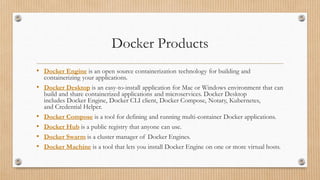
• Docker Engine is an open source containerization technology for building and
containerizing your applications.
• Docker Desktop is an easy-to-install application for Mac or Windows environment that can
build and share containerized applications and microservices. Docker Desktop
includes Docker Engine, Docker CLI client, Docker Compose, Notary, Kubernetes,
and Credential Helper.
• Docker Compose is a tool for defining and running multi-container Docker applications.
• Docker Hub is a public registry that anyone can use.
• Docker Swarm is a cluster manager of Docker Engines.
• Docker Machine is a tool that lets you install Docker Engine on one or more virtual hosts.
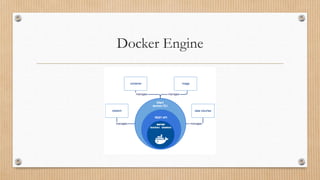
Docker Engine
Docker Engine
Docker architecture (1/2)
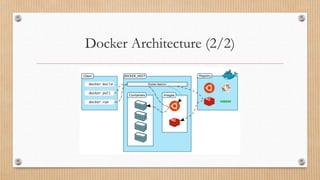
• Docker Daemon (dockerd) listens for Docker API requests and manages
Docker objects.
• Docker Client (docker) is the primary way that many Docker users interact
with Docker. The docker command uses the Docker API.
• Docker Registry stores Docker images. Docker is configured to look for
images on Docker Hub by default.
• Docker Objects such as images, containers, networks, and volumes.
Docker Architecture (2/2)
Docker Objects
Docker Objects Description
images An image is a read-only template with instructions for creating a Docker container.
containers A container is a runnable instance of an image. When a container is removed, any
changes to its state that are not stored in persistent storage disappear.
networks A network connects docker containers and services together.
volumes Volumes are the preferred mechanism for persisting data generated by and used by
Docker containers.
Volumes
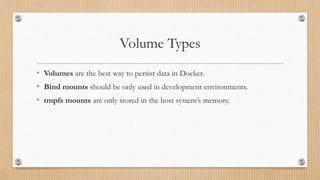
Volume Types
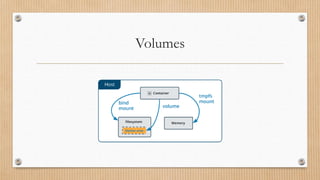
• Volumes are the best way to persist data in Docker.
• Bind mounts should be only used in development environments.
• tmpfs mounts are only stored in the host system’s memory.
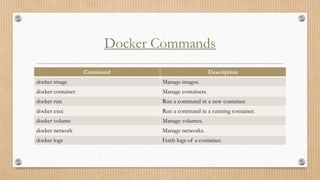
Docker Commands
Command Description
docker image Manage images.
docker container Manage containers.
docker run Run a command in a new container.
docker exec Run a command in a running container.
docker volume Manage volumes.
docker network Manage networks.
docker logs Fetch logs of a container.
Docker Swarm
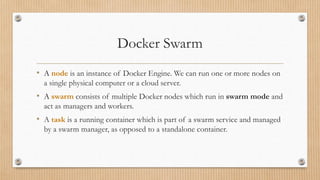
Docker Swarm
• A node is an instance of Docker Engine. We can run one or more nodes on
a single physical computer or a cloud server.
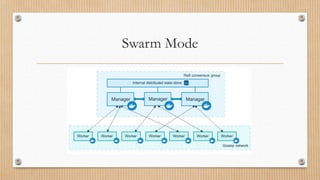
• A swarm consists of multiple Docker nodes which run in swarm mode and
act as managers and workers.
• A task is a running container which is part of a swarm service and managed
by a swarm manager, as opposed to a standalone container.
Swarm Mode
Manager Nodes
• Manager nodes handle cluster management tasks:
• Maintaining a cluster state.
• Scheduling services.
• Serving swarm mode HTTP API endpoints.
• To take advantage of swarm mode’s fault-tolerance features, we can have multiple
manager nodes to recover from the failure of a manager node without downtime.
• An N manager cluster tolerates the loss of at most (N-1)/2 managers.
• Docker recommends a maximum of seven manager nodes for a swarm.
Swarm Management Commands
Command Description
docker swarm Manage swarm mode.
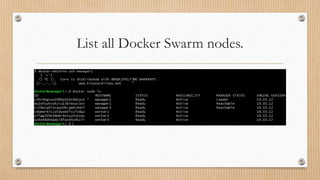
docker node Manage Docker Swarm nodes.
docker service Manage Docker Swarm services.
docker stack Manage stacks of Docker Swarm services.
Docker Machine
Docker Machine (1/2)
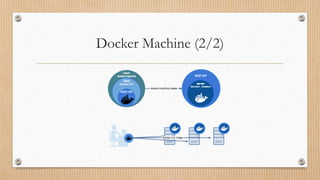
Docker Machine is a tool that lets you install Docker Engine on one or
more virtual hosts and manage the hosts with docker-machine commands.
Docker Machine (2/2)
Docker Machine Installation
1. Run the command below with Git Bash program.
$ if [[ ! -d "$HOME/bin" ]]; then mkdir -p "$HOME/bin"; fi 
&& base=https://github.com/docker/machine/releases/download/v0.16.2 
&& curl -L $base/docker-machine-Windows-x86_64.exe > "$HOME/bin/docker-machine.exe" 
&& chmod +x "$HOME/bin/docker-machine.exe"
2. Check the installation by displaying the Docker Machine version.
$ docker-machine version
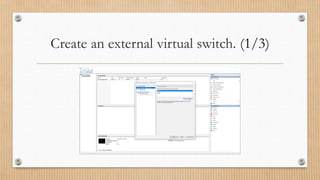
Create an external virtual switch. (1/3)
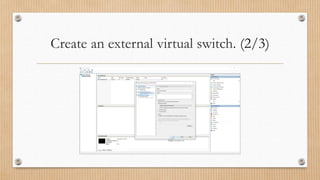
Create an external virtual switch. (2/3)
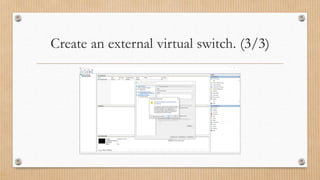
Create an external virtual switch. (3/3)
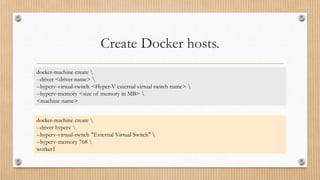
Create Docker hosts.
docker-machine create 
--driver <driver name> 
--hyperv-virtual-switch <Hyper-V external virtual switch name> 
--hyperv-memory <size of memory in MB> 
<machine name>
docker-machine create 
--driver hyperv 
--hyperv-virtual-switch "External Virtual Switch" 
--hyperv-memory 768 
worker1
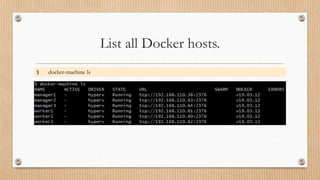
List all Docker hosts.
$ docker-machine ls
Swarm Cluster
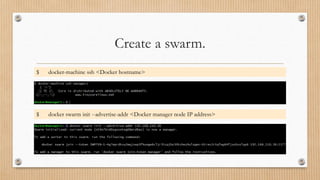
Create a swarm.
$ docker-machine ssh <Docker hostname>
$ docker swarm init --advertise-addr <Docker manager node IP address>
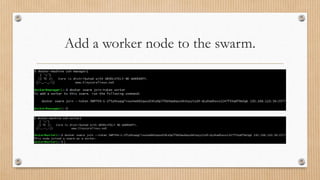
Add a worker node to the swarm.
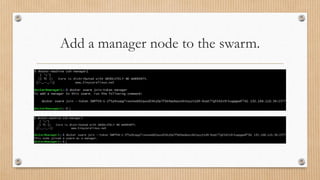
Add a manager node to the swarm.
Swarm Nodes
List all Docker Swarm nodes.
AVAILABILITY
• Active means that the scheduler can assign tasks to the node.
• Pause means that the scheduler does not assign new tasks to the node, but
existing tasks remain running.
• Drain means that the scheduler does not assign new tasks to the node. The
scheduler shuts down any existing tasks and schedules them on an available
node.
MANAGER STATUS
• No value indicates a worker node that does not participate in swarm management.
• Leader means that the node is the primary manager node that makes all swarm
management and orchestration decisions for the swarm.
• Reachable means that the node is a manager node participating in the Raft
consensus quorum. If the leader node becomes unavailable, the node is eligible for
election as the new leader.
• Unavailable means that the node is a manager that cannot communicate with other
managers. If a manager node becomes unavailable, you should either join a new
manager node to the swarm or promote a worker node to be a manager.
Service Deployment
Deploy a service in the swarm.
$ docker service create --name <service name> <image name> [command] [arguments…]
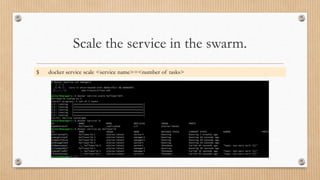
Scale the service in the swarm.
$ docker service scale <service name>=<number of tasks>
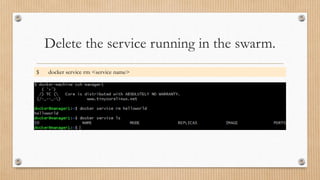
Delete the service running in the swarm.
$ docker service rm <service name>
Stack Deployment
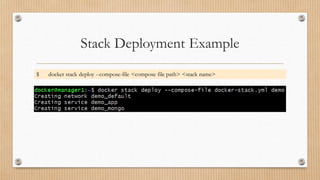
Stack Deployment Example
$ docker stack deploy --compose-file <compose file path> <stack name>
Troubleshooting
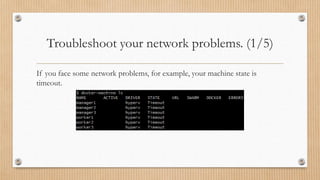
Troubleshoot your network problems. (1/5)
If you face some network problems, for example, your machine state is
timeout.
Troubleshoot your network problems. (2/5)
These are steps that you can follow.
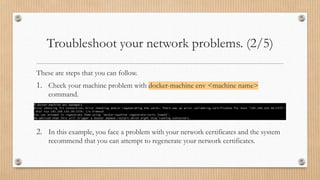
1. Check your machine problem with docker-machine env <machine name>
command.
2. In this example, you face a problem with your network certificates and the system
recommend that you can attempt to regenerate your network certificates.
Troubleshoot your network problems. (3/5)
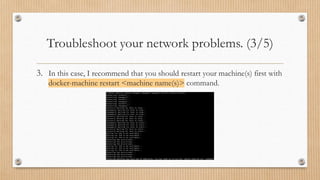
3. In this case, I recommend that you should restart your machine(s) first with
docker-machine restart <machine name(s)> command.
Troubleshoot your network problems. (4/5)
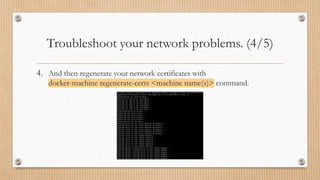
4. And then regenerate your network certificates with
docker-machine regenerate-certs <machine name(s)> command.
Troubleshoot your network problems. (5/5)
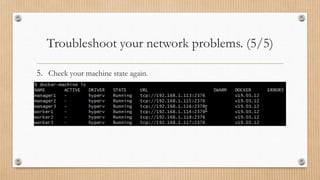
5. Check your machine state again.
Thank you

Docker

  • 1.
  • 2.
    Docker Products • DockerEngine is an open source containerization technology for building and containerizing your applications. • Docker Desktop is an easy-to-install application for Mac or Windows environment that can build and share containerized applications and microservices. Docker Desktop includes Docker Engine, Docker CLI client, Docker Compose, Notary, Kubernetes, and Credential Helper. • Docker Compose is a tool for defining and running multi-container Docker applications. • Docker Hub is a public registry that anyone can use. • Docker Swarm is a cluster manager of Docker Engines. • Docker Machine is a tool that lets you install Docker Engine on one or more virtual hosts.
  • 3.
  • 4.
  • 5.
    Docker architecture (1/2) •Docker Daemon (dockerd) listens for Docker API requests and manages Docker objects. • Docker Client (docker) is the primary way that many Docker users interact with Docker. The docker command uses the Docker API. • Docker Registry stores Docker images. Docker is configured to look for images on Docker Hub by default. • Docker Objects such as images, containers, networks, and volumes.
  • 6.
  • 7.
    Docker Objects Docker ObjectsDescription images An image is a read-only template with instructions for creating a Docker container. containers A container is a runnable instance of an image. When a container is removed, any changes to its state that are not stored in persistent storage disappear. networks A network connects docker containers and services together. volumes Volumes are the preferred mechanism for persisting data generated by and used by Docker containers.
  • 8.
  • 9.
    Volume Types • Volumesare the best way to persist data in Docker. • Bind mounts should be only used in development environments. • tmpfs mounts are only stored in the host system’s memory.
  • 10.
    Docker Commands Command Description dockerimage Manage images. docker container Manage containers. docker run Run a command in a new container. docker exec Run a command in a running container. docker volume Manage volumes. docker network Manage networks. docker logs Fetch logs of a container.
  • 11.
  • 12.
    Docker Swarm • Anode is an instance of Docker Engine. We can run one or more nodes on a single physical computer or a cloud server. • A swarm consists of multiple Docker nodes which run in swarm mode and act as managers and workers. • A task is a running container which is part of a swarm service and managed by a swarm manager, as opposed to a standalone container.
  • 13.
  • 14.
    Manager Nodes • Managernodes handle cluster management tasks: • Maintaining a cluster state. • Scheduling services. • Serving swarm mode HTTP API endpoints. • To take advantage of swarm mode’s fault-tolerance features, we can have multiple manager nodes to recover from the failure of a manager node without downtime. • An N manager cluster tolerates the loss of at most (N-1)/2 managers. • Docker recommends a maximum of seven manager nodes for a swarm.
  • 15.
    Swarm Management Commands CommandDescription docker swarm Manage swarm mode. docker node Manage Docker Swarm nodes. docker service Manage Docker Swarm services. docker stack Manage stacks of Docker Swarm services.
  • 16.
  • 17.
    Docker Machine (1/2) DockerMachine is a tool that lets you install Docker Engine on one or more virtual hosts and manage the hosts with docker-machine commands.
  • 18.
  • 19.
    Docker Machine Installation 1.Run the command below with Git Bash program. $ if [[ ! -d "$HOME/bin" ]]; then mkdir -p "$HOME/bin"; fi && base=https://github.com/docker/machine/releases/download/v0.16.2 && curl -L $base/docker-machine-Windows-x86_64.exe > "$HOME/bin/docker-machine.exe" && chmod +x "$HOME/bin/docker-machine.exe" 2. Check the installation by displaying the Docker Machine version. $ docker-machine version
  • 20.
    Create an externalvirtual switch. (1/3)
  • 21.
    Create an externalvirtual switch. (2/3)
  • 22.
    Create an externalvirtual switch. (3/3)
  • 23.
    Create Docker hosts. docker-machinecreate --driver <driver name> --hyperv-virtual-switch <Hyper-V external virtual switch name> --hyperv-memory <size of memory in MB> <machine name> docker-machine create --driver hyperv --hyperv-virtual-switch "External Virtual Switch" --hyperv-memory 768 worker1
  • 24.
    List all Dockerhosts. $ docker-machine ls
  • 25.
  • 26.
    Create a swarm. $docker-machine ssh <Docker hostname> $ docker swarm init --advertise-addr <Docker manager node IP address>
  • 27.
    Add a workernode to the swarm.
  • 28.
    Add a managernode to the swarm.
  • 29.
  • 30.
    List all DockerSwarm nodes.
  • 31.
    AVAILABILITY • Active meansthat the scheduler can assign tasks to the node. • Pause means that the scheduler does not assign new tasks to the node, but existing tasks remain running. • Drain means that the scheduler does not assign new tasks to the node. The scheduler shuts down any existing tasks and schedules them on an available node.
  • 32.
    MANAGER STATUS • Novalue indicates a worker node that does not participate in swarm management. • Leader means that the node is the primary manager node that makes all swarm management and orchestration decisions for the swarm. • Reachable means that the node is a manager node participating in the Raft consensus quorum. If the leader node becomes unavailable, the node is eligible for election as the new leader. • Unavailable means that the node is a manager that cannot communicate with other managers. If a manager node becomes unavailable, you should either join a new manager node to the swarm or promote a worker node to be a manager.
  • 33.
  • 34.
    Deploy a servicein the swarm. $ docker service create --name <service name> <image name> [command] [arguments…]
  • 35.
    Scale the servicein the swarm. $ docker service scale <service name>=<number of tasks>
  • 36.
    Delete the servicerunning in the swarm. $ docker service rm <service name>
  • 37.
  • 38.
    Stack Deployment Example $docker stack deploy --compose-file <compose file path> <stack name>
  • 39.
  • 40.
    Troubleshoot your networkproblems. (1/5) If you face some network problems, for example, your machine state is timeout.
  • 41.
    Troubleshoot your networkproblems. (2/5) These are steps that you can follow. 1. Check your machine problem with docker-machine env <machine name> command. 2. In this example, you face a problem with your network certificates and the system recommend that you can attempt to regenerate your network certificates.
  • 42.
    Troubleshoot your networkproblems. (3/5) 3. In this case, I recommend that you should restart your machine(s) first with docker-machine restart <machine name(s)> command.
  • 43.
    Troubleshoot your networkproblems. (4/5) 4. And then regenerate your network certificates with docker-machine regenerate-certs <machine name(s)> command.
  • 44.
    Troubleshoot your networkproblems. (5/5) 5. Check your machine state again.
  • 45.