Docker is a platform for developing and running applications within containers. Containers allow applications to be packaged with all their dependencies and run consistently across different computing environments. The Docker platform includes Docker Engine for running containers, Docker images which are templates for containers, and Docker registries for storing images. When running, a container is isolated from other containers and the host machine. Docker uses a client-server architecture with Docker Engine running as a daemon process and CLI client for interacting with it.
CONTAINER
• Before goingto docker let us know about Container
• Container: A container is a standard unit of software that
packages up code and all its dependencies, so the application
runs quickly and reliably from one computing environment to
another.
• Container images become containers at runtime and in the case
of Docker containers - images become containers when they
run on Docker Engine.
• Available for both Linux and Windows-based applications,
3.
CONTAINER IMAGE
• Acontainer image is a self-contained piece of software that has
everything in it needed to run – code, tools, and resources.
WHAT IS DOCKER?
•Docker is an open platform for developing, shipping, and
running applications. Docker enables you to separate your
applications from your infrastructure so you can deliver
software quickly.
• With Docker, you can manage your infrastructure in the same
ways you manage your applications. By taking advantage of
Docker’s methodologies for shipping, testing, and deploying
code quickly, you can significantly reduce the delay between
writing code and running it in production.
13.
DOCKER PLATFORM
• Dockerprovides the ability to package and run an application in a
loosely isolated environment called a container.
• The isolation and security allow you to run many containers
simultaneously on a given host.
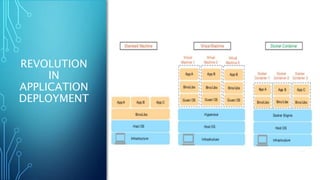
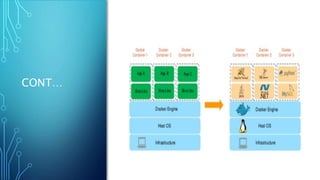
• Containers are lightweight because they don’t need the extra load of
a hypervisor but run directly within the host machine’s kernel.
• This means you can run more containers on a given hardware
combination than if you were using virtual machines. You can even
run Docker containers within host machines that are actually virtual
machines
14.
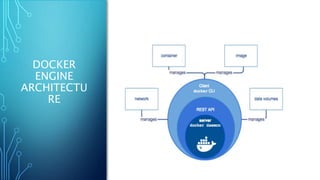
DOCKER ENGINE
Docker Engineis a client-server application with these major
components:
• A server which is a type of long-running program called a
daemon process (the dockerd command).
• A REST API which specifies interfaces that programs can use to
talk to the daemon and instruct it what to do.
• A command line interface (CLI) client (the docker command).
DOCKER ARCHITECTURE
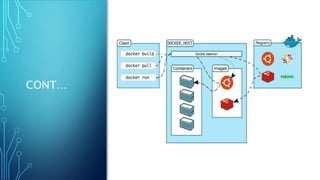
• Dockeruses a client-server architecture.
• The Docker client talks to the Docker daemon, which does the
heavy lifting of building, running, and distributing your Docker
containers.
• The Docker client and daemon can run on the same system, or
you can connect a Docker client to a remote Docker daemon.
• The Docker client and daemon communicate using a REST API,
over UNIX sockets or a network interface.
DOCKER REGISTRIES
• ADocker registry stores Docker images.
• Docker Hub is a public registry that anyone can use, and
Docker is configured to look for images on Docker Hub by
default. You can even run your own private registry.
• When you use the docker pull or docker run commands, the
required images are pulled from your configured registry.
• When you use the docker push command, your image is pushed
to your configured registry.
19.
DOCKER OBJECTS
• Whenyou use Docker, you are creating and using images,
containers, networks, volumes, plugins, and other objects.
20.
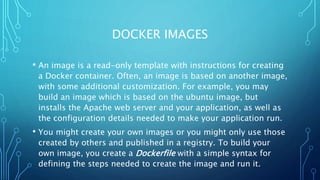
DOCKER IMAGES
• Animage is a read-only template with instructions for creating
a Docker container. Often, an image is based on another image,
with some additional customization. For example, you may
build an image which is based on the ubuntu image, but
installs the Apache web server and your application, as well as
the configuration details needed to make your application run.
• You might create your own images or you might only use those
created by others and published in a registry. To build your
own image, you create a Dockerfile with a simple syntax for
defining the steps needed to create the image and run it.
21.
DOCKER CONTAINERS
• Acontainer is a runnable instance of an image. You can create, start,
stop, move, or delete a container using the Docker API or CLI. You can
connect a container to one or more networks, attach storage to it, or
even create a new image based on its current state.
• By default, a container is relatively well isolated from other containers
and its host machine. You can control how isolated a container’s
network, storage, or other underlying subsystems are from other
containers or from the host machine.
• A container is defined by its image as well as any configuration
options you provide to it when you create or start it. When a container
is removed, any changes to its state that are not stored in persistent
22.
DOCKER SERVICES
• Servicesallow you to scale containers across multiple Docker
daemons, which all work together as a swarm with multiple
managers and workers.
• Each member of a swarm is a Docker daemon, and all the
daemons communicate using the Docker API.
• A service allows you to define the desired state, such as the
number of replicas of the service that must be available at any
given time.