Docker Swarm Mode
Learn and Share
Clarence Bakirtzidis 12/08/2016
Image credit: http://blog.arungupta.me/wp-content/uploads/2015/11/docker-swarm-logo.png
What is a Docker swarm?
• A group of Docker Hosts arranged in a cluster
• Allows for deployment of containers into the cluster without
necessarily caring about which specific hosts these containers run
on (see: “pets vs. cattle”)
• Docker 1.11 and earlier had no built in swarm capability
• A separate component, “Docker Swarm”, could be used in
conjunction with a group of Docker hosts to turn them into a swarm
What is Docker “swarm mode”?
• “Docker Engine 1.12 includes swarm mode for natively managing a cluster of Docker Engines called
a Swarm. Use the Docker CLI to create a swarm, deploy application services to a swarm, and
manage swarm behavior.” [1]
• Differences to the previous Docker Swarm include:
• Swarm mode is built-in to the Docker Engine and is simpler to setup
• Implements desired state reconciliation with better failure handling
• Built-in load-balancing of service instances with DNS service discovery
• Supports rolling updates for services
• Service is a first-class construct in the Docker Engine
• Secure by default (automatic TLS mutual authentication and encryption between nodes)
[1] https://docs.docker.com/engine/swarm
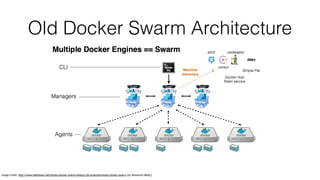
Old Docker Swarm Architecture
Image Credit: http://www.slideshare.net/Docker/docker-online-meetup-28-productionready-docker-swarm (by Alexandre Beslic)
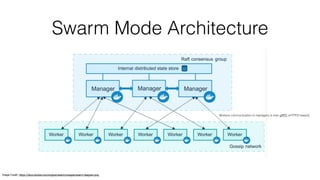
Swarm Mode Architecture
Image Credit: https://docs.docker.com/engine/swarm/images/swarm-diagram.png
Workers communication to managers is over gRPC (HTTP/2 based)
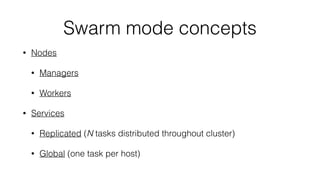
Swarm mode concepts
• Nodes
• Managers
• Workers
• Services
• Replicated (N tasks distributed throughout cluster)
• Global (one task per host)
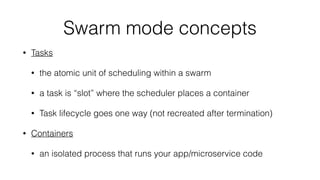
Swarm mode concepts
• Tasks
• the atomic unit of scheduling within a swarm
• a task is “slot” where the scheduler places a container
• Task lifecycle goes one way (not recreated after termination)
• Containers
• an isolated process that runs your app/microservice code
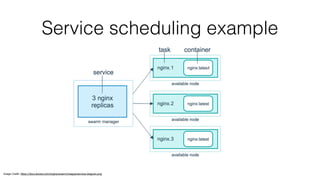
Service scheduling example
Image Credit: https://docs.docker.com/engine/swarm/images/services-diagram.png
Creating a swarm
• Docker CLI includes new commands:
• docker swarm init …
• Initialise the first manager (activate swarm mode)
• docker swarm join …
• Add additional managers or workers to the swarm
Managing swarm nodes
• docker node [promote|demote] …
• docker node rm …
• docker node ps …
• docker node update …
Deploying services to the swarm
• docker service create [--replicas n] [—mode replicated|global] …
• docke service inspect …
• docker service ls …
• docker service rm …
• docker service ps …
Scaling and updating services
• docker service scale SERVICE=REPLICAS [SERVICE=REPLICAS...]
• docker service update …
Maintenance support
• Docker swarm mode supporting rolling updates
• Stop the first task
• Schedule update for the stopped task
• Start the container for the updated task
• Configurable update failure action (pause, continue)
• Nodes (managers or workers) can be put into DRAIN availability
• Gracefully shuts down tasks and prevents future tasks from being schedule on node
• Creates new tasks on other available node(s) to satisfy desire state for service
Handling failures
• Failed tasks
• New tasks are automatically created on other available node(s)
• Failed nodes
• Manager
• New leader is elected if quorum of more than half of the manager nodes are available
• Manually create a new manager or promote a worker to a manager
• New tasks are automatically created on other available node(s)
• Worker
• New tasks are automatically created on other available node(s)
Demo
• https://github.com/clarenceb/swarmmode-dojo
Other features
• Distributed Application Bundles (DAB)
• Experimental feature in 1.12
• Can create via Compose 1.8: docker-compose build
• Deploy DAB via: docker stack deploy
The End
• Next steps
• Try out the Swarm mode tutorial at:

https://docs.docker.com/engine/swarm/swarm-tutorial/

swarmmode-dojo

  • 1.
    Docker Swarm Mode Learnand Share Clarence Bakirtzidis 12/08/2016 Image credit: http://blog.arungupta.me/wp-content/uploads/2015/11/docker-swarm-logo.png
  • 2.
    What is aDocker swarm? • A group of Docker Hosts arranged in a cluster • Allows for deployment of containers into the cluster without necessarily caring about which specific hosts these containers run on (see: “pets vs. cattle”) • Docker 1.11 and earlier had no built in swarm capability • A separate component, “Docker Swarm”, could be used in conjunction with a group of Docker hosts to turn them into a swarm
  • 3.
    What is Docker“swarm mode”? • “Docker Engine 1.12 includes swarm mode for natively managing a cluster of Docker Engines called a Swarm. Use the Docker CLI to create a swarm, deploy application services to a swarm, and manage swarm behavior.” [1] • Differences to the previous Docker Swarm include: • Swarm mode is built-in to the Docker Engine and is simpler to setup • Implements desired state reconciliation with better failure handling • Built-in load-balancing of service instances with DNS service discovery • Supports rolling updates for services • Service is a first-class construct in the Docker Engine • Secure by default (automatic TLS mutual authentication and encryption between nodes) [1] https://docs.docker.com/engine/swarm
  • 4.
    Old Docker SwarmArchitecture Image Credit: http://www.slideshare.net/Docker/docker-online-meetup-28-productionready-docker-swarm (by Alexandre Beslic)
  • 5.
    Swarm Mode Architecture ImageCredit: https://docs.docker.com/engine/swarm/images/swarm-diagram.png Workers communication to managers is over gRPC (HTTP/2 based)
  • 6.
    Swarm mode concepts •Nodes • Managers • Workers • Services • Replicated (N tasks distributed throughout cluster) • Global (one task per host)
  • 7.
    Swarm mode concepts •Tasks • the atomic unit of scheduling within a swarm • a task is “slot” where the scheduler places a container • Task lifecycle goes one way (not recreated after termination) • Containers • an isolated process that runs your app/microservice code
  • 8.
    Service scheduling example ImageCredit: https://docs.docker.com/engine/swarm/images/services-diagram.png
  • 9.
    Creating a swarm •Docker CLI includes new commands: • docker swarm init … • Initialise the first manager (activate swarm mode) • docker swarm join … • Add additional managers or workers to the swarm
  • 10.
    Managing swarm nodes •docker node [promote|demote] … • docker node rm … • docker node ps … • docker node update …
  • 11.
    Deploying services tothe swarm • docker service create [--replicas n] [—mode replicated|global] … • docke service inspect … • docker service ls … • docker service rm … • docker service ps …
  • 12.
    Scaling and updatingservices • docker service scale SERVICE=REPLICAS [SERVICE=REPLICAS...] • docker service update …
  • 13.
    Maintenance support • Dockerswarm mode supporting rolling updates • Stop the first task • Schedule update for the stopped task • Start the container for the updated task • Configurable update failure action (pause, continue) • Nodes (managers or workers) can be put into DRAIN availability • Gracefully shuts down tasks and prevents future tasks from being schedule on node • Creates new tasks on other available node(s) to satisfy desire state for service
  • 14.
    Handling failures • Failedtasks • New tasks are automatically created on other available node(s) • Failed nodes • Manager • New leader is elected if quorum of more than half of the manager nodes are available • Manually create a new manager or promote a worker to a manager • New tasks are automatically created on other available node(s) • Worker • New tasks are automatically created on other available node(s)
  • 15.
  • 16.
    Other features • DistributedApplication Bundles (DAB) • Experimental feature in 1.12 • Can create via Compose 1.8: docker-compose build • Deploy DAB via: docker stack deploy
  • 17.
    The End • Nextsteps • Try out the Swarm mode tutorial at:
 https://docs.docker.com/engine/swarm/swarm-tutorial/