Presenter Name : Ajeet Singh Raina
Presented Date: Aug 20, 2016
Presented at: Docker Bangalore Meetup #22
Service Discovery &
Load-Balancing under Docker 1.12
2
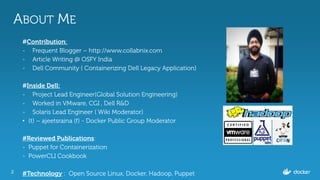
ABOUT ME
#Contribution:
- Frequent Blogger – http://www.collabnix.com
- Article Writing @ OSFY India
- Dell Community ( Containerizing Dell Legacy Application)
#Inside Dell:
- Project Lead Engineer(Global Solution Engineering)
- Worked in VMware, CGI , Dell R&D
- Solaris Lead Engineer ( Wiki Moderator)
• (t) – ajeetsraina (f) - Docker Public Group Moderator
#Reviewed Publications:
- Puppet for Containerization
- PowerCLI Cookbook
#Technology : Open Source Linux, Docker, Hadoop, Puppet
3
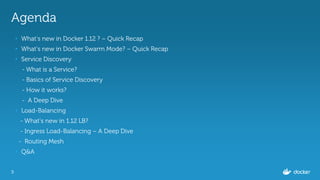
Agenda
• What’s new in Docker 1.12 ? – Quick Recap
• What’s new in Docker Swarm Mode? – Quick Recap
• Service Discovery
- What is a Service?
- Basics of Service Discovery
- How it works?
- A Deep Dive
• Load-Balancing
- What’s new in 1.12 LB?
- Ingress Load-Balancing – A Deep Dive
- Routing Mesh
• Q&A
4
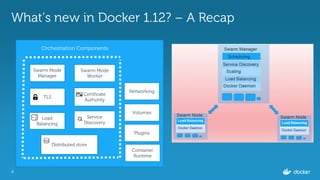
What’s new in Docker 1.12? – A Recap
Swarm Mode
Manager
TLS
Swarm Mode
Worker
Certificate
Authority
Load
Balancing
Service
Discovery
Distributed store
Volumes
Networking
Plugins
Container
Runtime
Orchestration Components
5
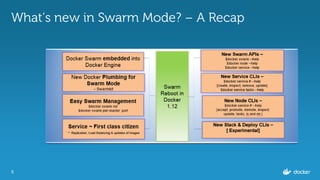
What’s new in Swarm Mode? – A Recap
6
Evolution of Service Discovery
Docker 1.9
/etc/hosts and
/etc/resolv.conf
~ for the cluster service.
Cons:
- Corrupted /etc/hosts
- Lacking of Load-
Balancing Feature
- Complex way of Service
Discovery
Docker 1.10/1.11
- Embedded DNS
--network-alias=ALIAS
--link=CONTAINER_NAME:ALIAS
--dns=[IP_ADDRESS...]
--dns-search=DOMAIN
Cons:
- Service Discovery through
External Discovery backend
like Consul, zookeeper etc.
Docker 1.12
- No External Service Discovery
Backend Required
- Service Discovery plumbed
directly into $docker service
- Service Discovery by Unqualified
names.(Un-FQDN)
- Provided by Embedded DNS
- Highly Available
- Ability to discover both the
services and tasks
-.
7
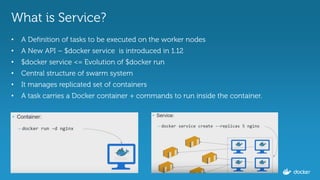
What is Service?
• A Definition of tasks to be executed on the worker nodes
• A New API – $docker service is introduced in 1.12
• $docker service <= Evolution of $docker run
• Central structure of swarm system
• It manages replicated set of containers
• A task carries a Docker container + commands to run inside the container.
8
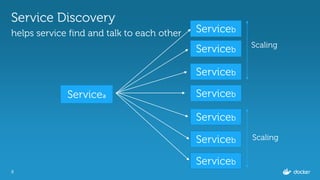
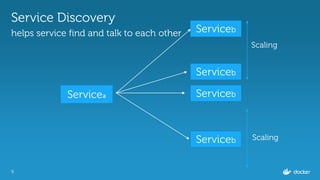
Service Discovery
helps service find and talk to each other
Serviceа Serviceb
Serviceb
Serviceb
Serviceb
Serviceb
Serviceb
Serviceb
Scaling
Scaling
9
Service Discovery
helps service find and talk to each other
Serviceа Serviceb
Serviceb
Serviceb
Serviceb
Scaling
Scaling
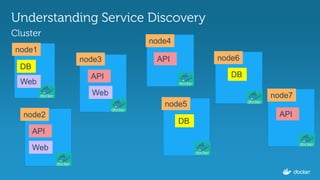
Understanding Service Discovery
Cluster
node1
node3
node2
node4
node5
node6
node7
DB
DB
DBAPI
API
API
Web
Web
Web
API
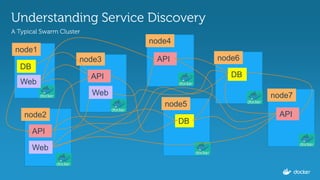
Understanding Service Discovery
A Typical Swarm Cluster
node1
node3
node2
node4
node5
node6
node7
DB
DB
DBAPI
API
API
Web
Web
Web
API
12
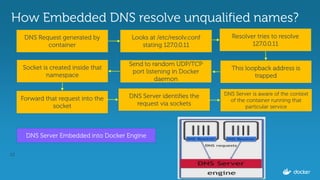
How Embedded DNS resolve unqualified names?
DNS Server Embedded into Docker Engine
DNS Request generated by
container
Resolver tries to resolve
127.0.0.11
This loopback address is
trapped
Send to random UDP/TCP
port listening in Docker
daemon
Socket is created inside that
namespace
Forward that request into the
socket
DNS Server identifies the
request via sockets
DNS Server is aware of the context
of the container running that
particular service
Looks at /etc/resolv.conf
stating 127.0.0.11
13
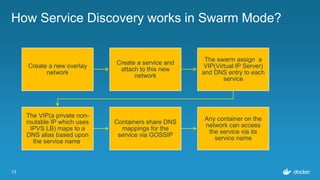
How Service Discovery works in Swarm Mode?
Create a new overlay
network
Create a service and
attach to this new
network
The swarm assign a
VIP(Virtual IP Server)
and DNS entry to each
service
The VIP(a private non-
routable IP which uses
IPVS LB) maps to a
DNS alias based upon
the service name.
Containers share DNS
mappings for the
service via GOSSIP
Any container on the
network can access
the service via its
service name
14
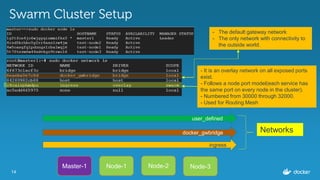
Swarm Cluster Setup
Master-1 Node-1 Node-3Node-2
ingress
docker_gwbridge
user_defined
Networks
- It is an overlay network on all exposed ports
exist.
- Follows a node port model(each service has
the same port on every node in the cluster).
- Numbered from 30000 through 32000.
- Used for Routing Mesh
- The default gateway network
- The only network with connectivity to
the outside world.
15
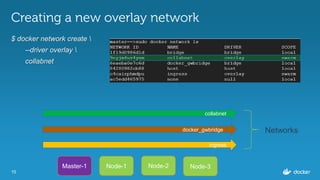
Creating a new overlay network
$ docker network create 
--driver overlay 
collabnet
Master-1
ingress
docker_gwbridge
Node-1 Node-3Node-2
collabnet
Networks
16
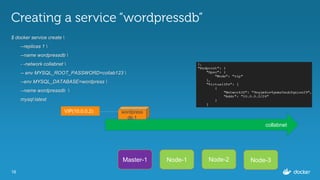
Creating a service “wordpressdb”
$ docker service create 
--replicas 1 
--name wordpressdb 
- -network collabnet 
-- env MYSQL_ROOT_PASSWORD=collab123 
--env MYSQL_DATABASE=wordpress 
--name wordpressdb 
mysql:latest
Master-1 Node-1 Node-3Node-2
collabnet
wordpress
db.1
VIP(10.0.0.2)
17
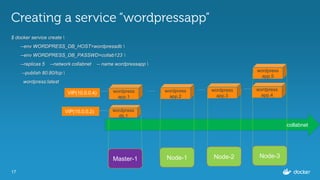
Creating a service “wordpressapp”
$ docker service create 
--env WORDPRESS_DB_HOST=wordpressdb 
--env WORDPRESS_DB_PASSWD=collab123 
--replicas 5 --network collabnet -- name wordpressapp 
--publish 80:80/tcp 
wordpress:latest
Master-1 Node-1 Node-3Node-2
collabnet
wordpress
db.1
VIP(10.0.0.2)
wordpress
app.1
wordpress
app.5
wordpress
app.4
wordpress
app.2
wordpress
app.3
VIP(10.0.0.4)
18
Inspecting the services
$ docker service inspect 
--format=='{{json .Endpoint.VirtualIPs}}' 
wordpressapp
[{"NetworkID":"c4caizphmdpuhm1gjdle8eaal","Addr":"10.255.0.7/16"},
{"NetworkID":"9eyjm4uv4ynmz0aubfqxise29","Addr":"10.0.0.4/24"}]
$ docker service inspect 
--format=='{{json .Endpoint.VirtualIPs}}' 
wordpressdb
[{"NetworkID":"9eyjm4uv4ynmz0aubfqxise29","Addr":"10.0.0.2/24"}]
19
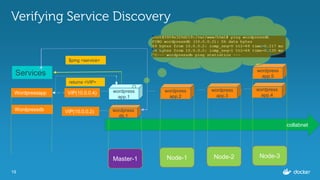
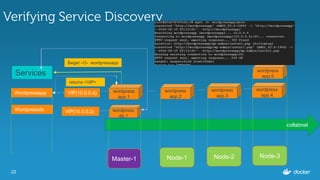
Verifying Service Discovery
Master-1 Node-1 Node-3Node-2
collabnet
wordpress
db.1
VIP(10.0.0.2)
wordpress
app.1
wordpress
app.5
wordpress
app.4
wordpress
app.2
wordpress
app.3
VIP(10.0.0.4)Wordpressapp
Wordpressdb
Services
$ping <service>
returns <VIP>
20
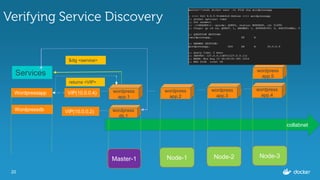
Verifying Service Discovery
Master-1 Node-1 Node-3Node-2
collabnet
wordpress
db.1
VIP(10.0.0.2)
wordpress
app.1
wordpress
app.5
wordpress
app.4
wordpress
app.2
wordpress
app.3
VIP(10.0.0.4)Wordpressapp
Wordpressdb
Services
$dig <service>
returns <VIP>
21
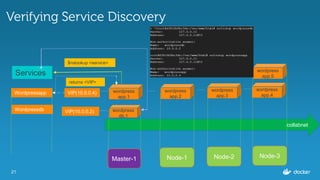
Verifying Service Discovery
Master-1 Node-1 Node-3Node-2
collabnet
wordpress
db.1
VIP(10.0.0.2)
wordpress
app.1
wordpress
app.5
wordpress
app.4
wordpress
app.2
wordpress
app.3
VIP(10.0.0.4)Wordpressapp
Wordpressdb
Services
$nslookup <service>
returns <VIP>
22
Verifying Service Discovery
Master-1 Node-1 Node-3Node-2
collabnet
wordpress
db.1
VIP(10.0.0.2)
wordpress
app.1
wordpress
app.5
wordpress
app.4
wordpress
app.2
wordpress
app.3
VIP(10.0.0.4)Wordpressapp
Wordpressdb
Services
$wget –O- wordpressapp
returns <VIP>
23
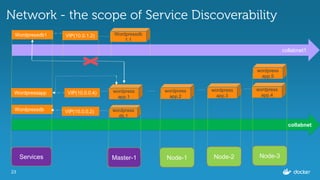
Network - the scope of Service Discoverability
Master-1 Node-1 Node-3Node-2
collabnet
wordpress
db.1
VIP(10.0.0.2)
wordpress
app.1
wordpress
app.5
wordpress
app.4
wordpress
app.2
wordpress
app.3
VIP(10.0.0.4)Wordpressapp
Wordpressdb
collabnet1
Wordpressdb
1.1
Wordpressdb1 VIP(10.0.1.2)
Services
Load-Balancing under
Docker 1.12
25
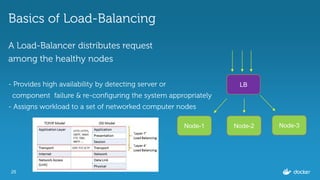
Basics of Load-Balancing
A Load-Balancer distributes request
among the healthy nodes
- Provides high availability by detecting server or
component failure & re-configuring the system appropriately
- Assigns workload to a set of networked computer nodes
LB
Node-1 Node-3Node-2
26
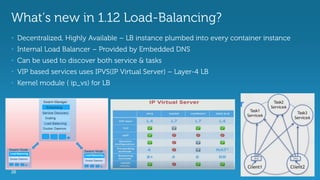
What’s new in 1.12 Load-Balancing?
• Decentralized, Highly Available – LB instance plumbed into every container instance
• Internal Load Balancer – Provided by Embedded DNS
• Can be used to discover both service & tasks
• VIP based services uses IPVS(IP Virtual Server) – Layer-4 LB
• Kernel module ( ip_vs) for LB
27
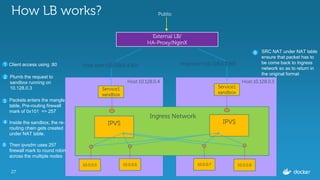
How LB works?
External LB/
HA-Proxy/NginX
Host-port:{10.128.0.4:80} Host-port:{10.128.0.3:80}
Service1
sandbox
IPVS
Service1
sandbox
IPVS
10.0.0.5 10.0.0.6 10.0.0.7 10.0.0.8
Ingress Network
Host:10.128.0.4 Host:10.128.0.3
Public
1 Client access using :80
Plumb the request to
sandbox running on
10.128.0.3
2
3 Packets enters the mangle
table, Pre-routing firewall
mark of 0x101 => 257
Inside the sandbox, the re-
routing chain gets created
under NAT table.
Then ipvsdm uses 257
firewall mark to round robin
across the multiple nodes
4
6
5
SRC NAT under NAT table
ensure that packet has to
be come back to Ingress
network so as to return in
the original format
28
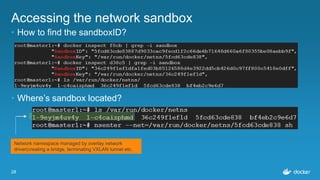
Accessing the network sandbox
• How to find the sandboxID?
• Where’s sandbox located?
Network namespace managed by overlay network
driver(creating a bridge, terminating VXLAN tunnel etc.
29
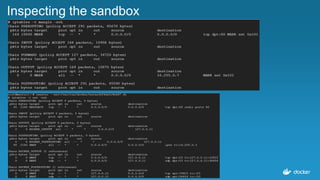
Inspecting the sandbox
30
Routing Mesh
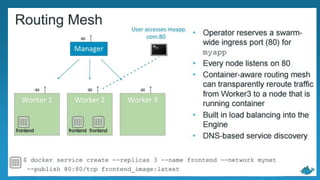
• Routing Mesh is NOT Load-Balancer
• Routing Mesh makes use of LB aspects
• It provides global publish port for a given service
• Built-in routing mesh for edge routing
• Worker nodes themselves participate in ingress routing mesh
• Port management at global Swarm Cluster level.
31
THANK YOU

Service Discovery & Load-Balancing under Docker 1.12.0 @ Docker Meetup #22

  • 1.
    Presenter Name :Ajeet Singh Raina Presented Date: Aug 20, 2016 Presented at: Docker Bangalore Meetup #22 Service Discovery & Load-Balancing under Docker 1.12
  • 2.
    2 ABOUT ME #Contribution: - FrequentBlogger – http://www.collabnix.com - Article Writing @ OSFY India - Dell Community ( Containerizing Dell Legacy Application) #Inside Dell: - Project Lead Engineer(Global Solution Engineering) - Worked in VMware, CGI , Dell R&D - Solaris Lead Engineer ( Wiki Moderator) • (t) – ajeetsraina (f) - Docker Public Group Moderator #Reviewed Publications: - Puppet for Containerization - PowerCLI Cookbook #Technology : Open Source Linux, Docker, Hadoop, Puppet
  • 3.
    3 Agenda • What’s newin Docker 1.12 ? – Quick Recap • What’s new in Docker Swarm Mode? – Quick Recap • Service Discovery - What is a Service? - Basics of Service Discovery - How it works? - A Deep Dive • Load-Balancing - What’s new in 1.12 LB? - Ingress Load-Balancing – A Deep Dive - Routing Mesh • Q&A
  • 4.
    4 What’s new inDocker 1.12? – A Recap Swarm Mode Manager TLS Swarm Mode Worker Certificate Authority Load Balancing Service Discovery Distributed store Volumes Networking Plugins Container Runtime Orchestration Components
  • 5.
    5 What’s new inSwarm Mode? – A Recap
  • 6.
    6 Evolution of ServiceDiscovery Docker 1.9 /etc/hosts and /etc/resolv.conf ~ for the cluster service. Cons: - Corrupted /etc/hosts - Lacking of Load- Balancing Feature - Complex way of Service Discovery Docker 1.10/1.11 - Embedded DNS --network-alias=ALIAS --link=CONTAINER_NAME:ALIAS --dns=[IP_ADDRESS...] --dns-search=DOMAIN Cons: - Service Discovery through External Discovery backend like Consul, zookeeper etc. Docker 1.12 - No External Service Discovery Backend Required - Service Discovery plumbed directly into $docker service - Service Discovery by Unqualified names.(Un-FQDN) - Provided by Embedded DNS - Highly Available - Ability to discover both the services and tasks -.
  • 7.
    7 What is Service? •A Definition of tasks to be executed on the worker nodes • A New API – $docker service is introduced in 1.12 • $docker service <= Evolution of $docker run • Central structure of swarm system • It manages replicated set of containers • A task carries a Docker container + commands to run inside the container.
  • 8.
    8 Service Discovery helps servicefind and talk to each other Serviceа Serviceb Serviceb Serviceb Serviceb Serviceb Serviceb Serviceb Scaling Scaling
  • 9.
    9 Service Discovery helps servicefind and talk to each other Serviceа Serviceb Serviceb Serviceb Serviceb Scaling Scaling
  • 10.
  • 11.
    Understanding Service Discovery ATypical Swarm Cluster node1 node3 node2 node4 node5 node6 node7 DB DB DBAPI API API Web Web Web API
  • 12.
    12 How Embedded DNSresolve unqualified names? DNS Server Embedded into Docker Engine DNS Request generated by container Resolver tries to resolve 127.0.0.11 This loopback address is trapped Send to random UDP/TCP port listening in Docker daemon Socket is created inside that namespace Forward that request into the socket DNS Server identifies the request via sockets DNS Server is aware of the context of the container running that particular service Looks at /etc/resolv.conf stating 127.0.0.11
  • 13.
    13 How Service Discoveryworks in Swarm Mode? Create a new overlay network Create a service and attach to this new network The swarm assign a VIP(Virtual IP Server) and DNS entry to each service The VIP(a private non- routable IP which uses IPVS LB) maps to a DNS alias based upon the service name. Containers share DNS mappings for the service via GOSSIP Any container on the network can access the service via its service name
  • 14.
    14 Swarm Cluster Setup Master-1Node-1 Node-3Node-2 ingress docker_gwbridge user_defined Networks - It is an overlay network on all exposed ports exist. - Follows a node port model(each service has the same port on every node in the cluster). - Numbered from 30000 through 32000. - Used for Routing Mesh - The default gateway network - The only network with connectivity to the outside world.
  • 15.
    15 Creating a newoverlay network $ docker network create --driver overlay collabnet Master-1 ingress docker_gwbridge Node-1 Node-3Node-2 collabnet Networks
  • 16.
    16 Creating a service“wordpressdb” $ docker service create --replicas 1 --name wordpressdb - -network collabnet -- env MYSQL_ROOT_PASSWORD=collab123 --env MYSQL_DATABASE=wordpress --name wordpressdb mysql:latest Master-1 Node-1 Node-3Node-2 collabnet wordpress db.1 VIP(10.0.0.2)
  • 17.
    17 Creating a service“wordpressapp” $ docker service create --env WORDPRESS_DB_HOST=wordpressdb --env WORDPRESS_DB_PASSWD=collab123 --replicas 5 --network collabnet -- name wordpressapp --publish 80:80/tcp wordpress:latest Master-1 Node-1 Node-3Node-2 collabnet wordpress db.1 VIP(10.0.0.2) wordpress app.1 wordpress app.5 wordpress app.4 wordpress app.2 wordpress app.3 VIP(10.0.0.4)
  • 18.
    18 Inspecting the services $docker service inspect --format=='{{json .Endpoint.VirtualIPs}}' wordpressapp [{"NetworkID":"c4caizphmdpuhm1gjdle8eaal","Addr":"10.255.0.7/16"}, {"NetworkID":"9eyjm4uv4ynmz0aubfqxise29","Addr":"10.0.0.4/24"}] $ docker service inspect --format=='{{json .Endpoint.VirtualIPs}}' wordpressdb [{"NetworkID":"9eyjm4uv4ynmz0aubfqxise29","Addr":"10.0.0.2/24"}]
  • 19.
    19 Verifying Service Discovery Master-1Node-1 Node-3Node-2 collabnet wordpress db.1 VIP(10.0.0.2) wordpress app.1 wordpress app.5 wordpress app.4 wordpress app.2 wordpress app.3 VIP(10.0.0.4)Wordpressapp Wordpressdb Services $ping <service> returns <VIP>
  • 20.
    20 Verifying Service Discovery Master-1Node-1 Node-3Node-2 collabnet wordpress db.1 VIP(10.0.0.2) wordpress app.1 wordpress app.5 wordpress app.4 wordpress app.2 wordpress app.3 VIP(10.0.0.4)Wordpressapp Wordpressdb Services $dig <service> returns <VIP>
  • 21.
    21 Verifying Service Discovery Master-1Node-1 Node-3Node-2 collabnet wordpress db.1 VIP(10.0.0.2) wordpress app.1 wordpress app.5 wordpress app.4 wordpress app.2 wordpress app.3 VIP(10.0.0.4)Wordpressapp Wordpressdb Services $nslookup <service> returns <VIP>
  • 22.
    22 Verifying Service Discovery Master-1Node-1 Node-3Node-2 collabnet wordpress db.1 VIP(10.0.0.2) wordpress app.1 wordpress app.5 wordpress app.4 wordpress app.2 wordpress app.3 VIP(10.0.0.4)Wordpressapp Wordpressdb Services $wget –O- wordpressapp returns <VIP>
  • 23.
    23 Network - thescope of Service Discoverability Master-1 Node-1 Node-3Node-2 collabnet wordpress db.1 VIP(10.0.0.2) wordpress app.1 wordpress app.5 wordpress app.4 wordpress app.2 wordpress app.3 VIP(10.0.0.4)Wordpressapp Wordpressdb collabnet1 Wordpressdb 1.1 Wordpressdb1 VIP(10.0.1.2) Services
  • 24.
  • 25.
    25 Basics of Load-Balancing ALoad-Balancer distributes request among the healthy nodes - Provides high availability by detecting server or component failure & re-configuring the system appropriately - Assigns workload to a set of networked computer nodes LB Node-1 Node-3Node-2
  • 26.
    26 What’s new in1.12 Load-Balancing? • Decentralized, Highly Available – LB instance plumbed into every container instance • Internal Load Balancer – Provided by Embedded DNS • Can be used to discover both service & tasks • VIP based services uses IPVS(IP Virtual Server) – Layer-4 LB • Kernel module ( ip_vs) for LB
  • 27.
    27 How LB works? ExternalLB/ HA-Proxy/NginX Host-port:{10.128.0.4:80} Host-port:{10.128.0.3:80} Service1 sandbox IPVS Service1 sandbox IPVS 10.0.0.5 10.0.0.6 10.0.0.7 10.0.0.8 Ingress Network Host:10.128.0.4 Host:10.128.0.3 Public 1 Client access using :80 Plumb the request to sandbox running on 10.128.0.3 2 3 Packets enters the mangle table, Pre-routing firewall mark of 0x101 => 257 Inside the sandbox, the re- routing chain gets created under NAT table. Then ipvsdm uses 257 firewall mark to round robin across the multiple nodes 4 6 5 SRC NAT under NAT table ensure that packet has to be come back to Ingress network so as to return in the original format
  • 28.
    28 Accessing the networksandbox • How to find the sandboxID? • Where’s sandbox located? Network namespace managed by overlay network driver(creating a bridge, terminating VXLAN tunnel etc.
  • 29.
  • 30.
    30 Routing Mesh • RoutingMesh is NOT Load-Balancer • Routing Mesh makes use of LB aspects • It provides global publish port for a given service • Built-in routing mesh for edge routing • Worker nodes themselves participate in ingress routing mesh • Port management at global Swarm Cluster level.
  • 31.
  • 32.