Document Management Options
for Abila MIP Fund Accounting
Live Webinar:
Webinar Audio:
You can dial the telephone numbers located on your webinar panel.
Or listen in using your headphones or computer speakers.
Welcome!
Webinar Details
• Presentation is roughly 50 minutes
• All phone lines are muted – but we want to hear from you!
• We will have about 10 minutes for questions after the
presentation. Please type your questions in the box located at
the bottom of your webinar panel.
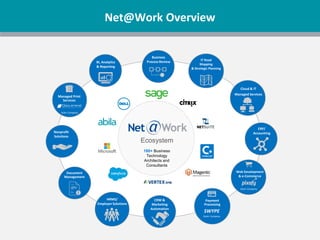
180+ Business
Technology
Architects and
Consultants
IT Road
Mapping
& Strategic Planning
Business
Process Review
Ecosystem
BI, Analytics
& Reporting
Cloud & IT
Managed Services
ERP/
Accounting
Web Development
& e-Commerce
Sister Company
Payment
Processing
SWYPE
Sister Company
CRM &
Marketing
Automation
HRMS/
Employer Solutions
Document
Management
Nonprofit
Solutions
Managed Print
Services
Sister Company
Net@Work Overview
Today’s Presenters
Jane Houle
Net@Work - Nonprofit Solutions
Team Leader
Your MIP Business Partner
Today’s Agenda
• What is document management?
• Identifying what features are important to
your organization
• What options do you have for Abila MIP?
• How do you evaluate your options?
• Steps to a successful implementation
• Questions?
What is Electronic Document Management?
Document management is the capture, storage and retrieval of
documents that your organization already uses every day.
An electronic document management system can be used to capture and
organize all of these documents into easy-to-find electronic documents.
You can scan paper documents or obtain electronic files to be either stored
in the system or linked from another system. A document management
system has the power to tie these documents together.
The documents could be indexed by department, grant, vendor, purchase
order number or any other concept that makes business sense to your
organization. Unlike folders in a file cabinet, document management
systems store documents in electronic folders that can be indexed by
multiple pieces of information. This gives users the ability to search and
retrieve documents based upon different criteria.
What is AP Automation?
AP automation is the is the capture, storage and retrieval of invoices,
purchase orders, payments and documents that your organization and
expands the tasks of processing vendor invoices and payments beyond
the borders of the accounting department, modifying the processes
involved (i.e., entry, approval routing, payment, and reconciliation).
Automating the invoice payment process.
• Invoice Capture: Receives paper or electronic invoices, captures
important data, and inputs into a workflow or payment system
OCR – Optical Recognition allows for a system to read information from a
scanned document and translate it into the filed for data entry
• Workflow/Approval: Routes invoice for approval
• Payment and Reconciliation: Processes vendor payments via a number
of payment methods (AP Card, ACH, check, wire, Supply Chain Finance)
What is AP Automation?
What does AP Automation mean to your organization?
• Automated entry of invoice information
• Exception Invoices routed to proper workbasket for processing
and review
Electronically route invoices for review/approval using workflows
• More time for exception handling and vendor analysis
• No manual filing or retrieval
• Complete audit trail
Define Features & Benefits Important to your Organization
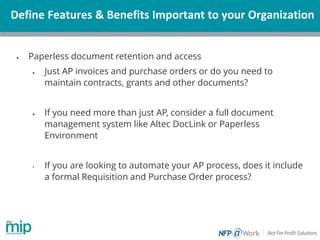
• Paperless document retention and access
• Just AP invoices and purchase orders or do you need to
maintain contracts, grants and other documents?
• If you need more than just AP, consider a full document
management system like Altec DocLink or Paperless
Environment
• If you are looking to automate your AP process, does it include
a formal Requisition and Purchase Order process?
Define Features & Benefits Important to your Organization
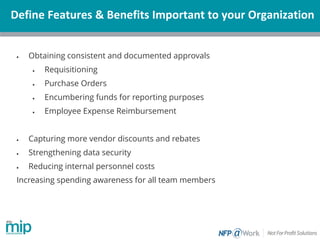
• Obtaining consistent and documented approvals
• Requisitioning
• Purchase Orders
• Encumbering funds for reporting purposes
• Employee Expense Reimbursement
• Capturing more vendor discounts and rebates
• Strengthening data security
• Reducing internal personnel costs
Increasing spending awareness for all team members
Define Features & Benefits Important to your Organization
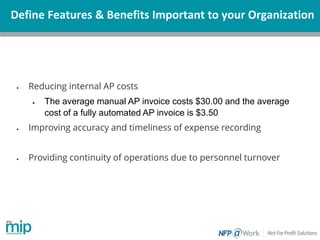
• Reducing internal AP costs
• The average manual AP invoice costs $30.00 and the average
cost of a fully automated AP invoice is $3.50
• Improving accuracy and timeliness of expense recording
• Providing continuity of operations due to personnel turnover
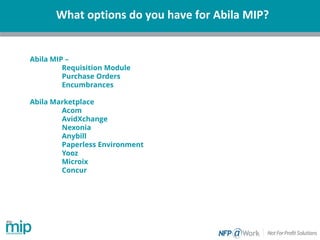
What options do you have for Abila MIP?
Abila MIP –
Requisition Module
Purchase Orders
Encumbrances
Abila Marketplace
Acom
AvidXchange
Nexonia
Anybill
Paperless Environment
Yooz
Microix
Concur
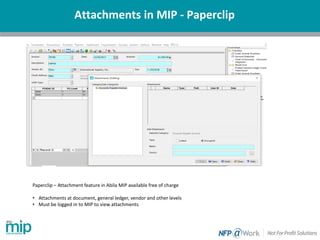
Attachments in MIP - Paperclip
Paperclip – Attachment feature in Abila MIP available free of charge
• Attachments at document, general ledger, vendor and other levels
• Must be logged in to MIP to view attachments.
How do you evaluate your options?
Define the objective of the project
Include others in the organization outside of accounting in this process. As
you go through the process of discovery with others in your organization
and hear about pain points, your original concept of needs may change.
Be open to redefining the problem
As accountants we know AP is often painful because of the number of
times paper gets touched, but does that mean you need a full AP
automation system? Perhaps the better solution is a document
management system. It is very important to clearly identify and solve the
issues that are costing you time and money.
How do you evaluate your options?
Compile a list of questions to ask during demonstrations.
Sales engineers typically use a standard presentation, so be ready to ask
questions that relate directly to your needs and priorities. Some of the
more common questions to ask are:
· How often are updates made to the software?
· Are these updates part of the maintenance agreement?
· How many versions of the software are supported and can they make
the update decision?
· What support options exist, such as chat, access to a knowledge base
or toll-free live dialogue?
Be sure to ask for other nonprofit references
Microix
Microix, Inc. is a long-standing development partner with Abila
and has a built a suite of add-on modules that enhance and
extend the base functionality of MIP Fund Accounting™.
Requisition adds a purchase request, purchase order, and AP
invoice approval capability to MIP with an integrated Inventory
module option for organizations that need it.
This module is unique to other AP automation products in that it
only works with MIP Fund Accounting™ being present.
The Microix modules reside in a separate SQL database with
access to MIP data through an application programming
interface.
Microix
Microix
.
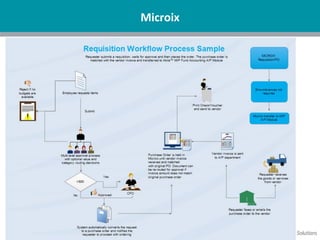
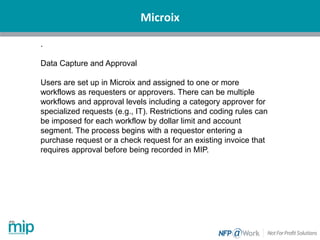
Data Capture and Approval
Users are set up in Microix and assigned to one or more
workflows as requesters or approvers. There can be multiple
workflows and approval levels including a category approver for
specialized requests (e.g., IT). Restrictions and coding rules can
be imposed for each workflow by dollar limit and account
segment. The process begins with a requestor entering a
purchase request or a check request for an existing invoice that
requires approval before being recorded in MIP.
Microix
Microix
Microix
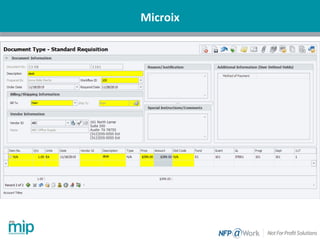
Upon completing the approval process the purchase
request becomes a purchase order that the requester
emails or faxes to the vendor. An approved check request
automatically creates an invoice in accounts payable. A
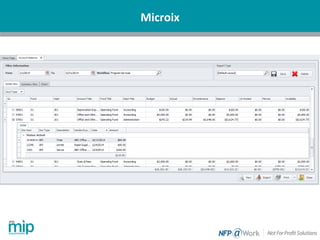
budget encumbrance can be established in MIP for
organizations that require that functionality. Dashboards
showing document processing status and alerts keep
requesters, approvers and accounting informed.
Receipt of goods or services are matched with the
originating purchase order and then the invoice with the
result of automatically creating an invoice in MIP and
liquidating any encumbrance.
Payment of invoices remains a function of MIP. This
means accounting staff would remain the main contact for
research and resolution to vendor questions.
Steps to Implement
• 1) Get Everyone on the Same Page
• Agree on the goal
• 2) Establish an Implementation Team
• Include non-financial staff, IT and end users
• 3) Develop Workflow
• Take extra time to review current workflow or modify
• 4) Timeline
• Make it realistic and take in account other deadlines
• 5) Measured Approach
• Break it out in pieces rather than doing everything at once
• 7) Use the 80/20 Rule
• Don’t get hung up on figuring out how to treat the exceptions to the
rule
• 8) Front-Line Staff Testing –Don’t forget the end users!
• 9) Select a Test Group – Set up a pilot program to start with
Upcoming at Net@Work
• Upcoming:
• Year End Processing Webinar
• December 19 at 2pm Eastern
• Suggestions for 2018??? Email me
Please type in
your questions
Any Questions?
Questions about your software? Need training or consulting services? Interested in another module for added functionality?
Thank You For Attending!
Jane Houle
Net@Work - Nonprofit Solutions
Team Leader
Email: jhoule@netatwork.com
Phone: 312-651-0364
800-719-3307
www.netatwork.com
netatwork.com/blog
Net@Work YouTube
Follow us on Twitter: @netatwork_corp
Follow Net@Work on LinkedIn
Follow Net@Work on Google+
Follow Net@Work on Facebook
Connect
with us
Julie Archer | Net@Work
jarcher@netatwork.com
417-520-3718
David Marks | Net@Work
dmarks@netatwork.com
646-517-6164
Customer Account Managers:
Danae Knapp
Net@Work - Nonprofit Solutions
Business Analyst / Consultant
dknapp@netatwork.com
Phone: 417-520-3717

Document Management Options for Abila MIP

  • 1.
    Document Management Options forAbila MIP Fund Accounting Live Webinar: Webinar Audio: You can dial the telephone numbers located on your webinar panel. Or listen in using your headphones or computer speakers. Welcome!
  • 2.
    Webinar Details • Presentationis roughly 50 minutes • All phone lines are muted – but we want to hear from you! • We will have about 10 minutes for questions after the presentation. Please type your questions in the box located at the bottom of your webinar panel.
  • 3.
    180+ Business Technology Architects and Consultants ITRoad Mapping & Strategic Planning Business Process Review Ecosystem BI, Analytics & Reporting Cloud & IT Managed Services ERP/ Accounting Web Development & e-Commerce Sister Company Payment Processing SWYPE Sister Company CRM & Marketing Automation HRMS/ Employer Solutions Document Management Nonprofit Solutions Managed Print Services Sister Company Net@Work Overview
  • 4.
    Today’s Presenters Jane Houle Net@Work- Nonprofit Solutions Team Leader Your MIP Business Partner
  • 5.
    Today’s Agenda • Whatis document management? • Identifying what features are important to your organization • What options do you have for Abila MIP? • How do you evaluate your options? • Steps to a successful implementation • Questions?
  • 6.
    What is ElectronicDocument Management? Document management is the capture, storage and retrieval of documents that your organization already uses every day. An electronic document management system can be used to capture and organize all of these documents into easy-to-find electronic documents. You can scan paper documents or obtain electronic files to be either stored in the system or linked from another system. A document management system has the power to tie these documents together. The documents could be indexed by department, grant, vendor, purchase order number or any other concept that makes business sense to your organization. Unlike folders in a file cabinet, document management systems store documents in electronic folders that can be indexed by multiple pieces of information. This gives users the ability to search and retrieve documents based upon different criteria.
  • 7.
    What is APAutomation? AP automation is the is the capture, storage and retrieval of invoices, purchase orders, payments and documents that your organization and expands the tasks of processing vendor invoices and payments beyond the borders of the accounting department, modifying the processes involved (i.e., entry, approval routing, payment, and reconciliation). Automating the invoice payment process. • Invoice Capture: Receives paper or electronic invoices, captures important data, and inputs into a workflow or payment system OCR – Optical Recognition allows for a system to read information from a scanned document and translate it into the filed for data entry • Workflow/Approval: Routes invoice for approval • Payment and Reconciliation: Processes vendor payments via a number of payment methods (AP Card, ACH, check, wire, Supply Chain Finance)
  • 8.
    What is APAutomation? What does AP Automation mean to your organization? • Automated entry of invoice information • Exception Invoices routed to proper workbasket for processing and review Electronically route invoices for review/approval using workflows • More time for exception handling and vendor analysis • No manual filing or retrieval • Complete audit trail
  • 9.
    Define Features &Benefits Important to your Organization • Paperless document retention and access • Just AP invoices and purchase orders or do you need to maintain contracts, grants and other documents? • If you need more than just AP, consider a full document management system like Altec DocLink or Paperless Environment • If you are looking to automate your AP process, does it include a formal Requisition and Purchase Order process?
  • 10.
    Define Features &Benefits Important to your Organization • Obtaining consistent and documented approvals • Requisitioning • Purchase Orders • Encumbering funds for reporting purposes • Employee Expense Reimbursement • Capturing more vendor discounts and rebates • Strengthening data security • Reducing internal personnel costs Increasing spending awareness for all team members
  • 11.
    Define Features &Benefits Important to your Organization • Reducing internal AP costs • The average manual AP invoice costs $30.00 and the average cost of a fully automated AP invoice is $3.50 • Improving accuracy and timeliness of expense recording • Providing continuity of operations due to personnel turnover
  • 12.
    What options doyou have for Abila MIP? Abila MIP – Requisition Module Purchase Orders Encumbrances Abila Marketplace Acom AvidXchange Nexonia Anybill Paperless Environment Yooz Microix Concur
  • 13.
    Attachments in MIP- Paperclip Paperclip – Attachment feature in Abila MIP available free of charge • Attachments at document, general ledger, vendor and other levels • Must be logged in to MIP to view attachments.
  • 14.
    How do youevaluate your options? Define the objective of the project Include others in the organization outside of accounting in this process. As you go through the process of discovery with others in your organization and hear about pain points, your original concept of needs may change. Be open to redefining the problem As accountants we know AP is often painful because of the number of times paper gets touched, but does that mean you need a full AP automation system? Perhaps the better solution is a document management system. It is very important to clearly identify and solve the issues that are costing you time and money.
  • 15.
    How do youevaluate your options? Compile a list of questions to ask during demonstrations. Sales engineers typically use a standard presentation, so be ready to ask questions that relate directly to your needs and priorities. Some of the more common questions to ask are: · How often are updates made to the software? · Are these updates part of the maintenance agreement? · How many versions of the software are supported and can they make the update decision? · What support options exist, such as chat, access to a knowledge base or toll-free live dialogue? Be sure to ask for other nonprofit references
  • 16.
    Microix Microix, Inc. isa long-standing development partner with Abila and has a built a suite of add-on modules that enhance and extend the base functionality of MIP Fund Accounting™. Requisition adds a purchase request, purchase order, and AP invoice approval capability to MIP with an integrated Inventory module option for organizations that need it. This module is unique to other AP automation products in that it only works with MIP Fund Accounting™ being present. The Microix modules reside in a separate SQL database with access to MIP data through an application programming interface.
  • 17.
  • 18.
    Microix . Data Capture andApproval Users are set up in Microix and assigned to one or more workflows as requesters or approvers. There can be multiple workflows and approval levels including a category approver for specialized requests (e.g., IT). Restrictions and coding rules can be imposed for each workflow by dollar limit and account segment. The process begins with a requestor entering a purchase request or a check request for an existing invoice that requires approval before being recorded in MIP.
  • 19.
  • 20.
  • 21.
    Microix Upon completing theapproval process the purchase request becomes a purchase order that the requester emails or faxes to the vendor. An approved check request automatically creates an invoice in accounts payable. A budget encumbrance can be established in MIP for organizations that require that functionality. Dashboards showing document processing status and alerts keep requesters, approvers and accounting informed. Receipt of goods or services are matched with the originating purchase order and then the invoice with the result of automatically creating an invoice in MIP and liquidating any encumbrance. Payment of invoices remains a function of MIP. This means accounting staff would remain the main contact for research and resolution to vendor questions.
  • 22.
    Steps to Implement •1) Get Everyone on the Same Page • Agree on the goal • 2) Establish an Implementation Team • Include non-financial staff, IT and end users • 3) Develop Workflow • Take extra time to review current workflow or modify • 4) Timeline • Make it realistic and take in account other deadlines • 5) Measured Approach • Break it out in pieces rather than doing everything at once • 7) Use the 80/20 Rule • Don’t get hung up on figuring out how to treat the exceptions to the rule • 8) Front-Line Staff Testing –Don’t forget the end users! • 9) Select a Test Group – Set up a pilot program to start with
  • 23.
    Upcoming at Net@Work •Upcoming: • Year End Processing Webinar • December 19 at 2pm Eastern • Suggestions for 2018??? Email me
  • 24.
    Please type in yourquestions Any Questions?
  • 25.
    Questions about yoursoftware? Need training or consulting services? Interested in another module for added functionality? Thank You For Attending! Jane Houle Net@Work - Nonprofit Solutions Team Leader Email: jhoule@netatwork.com Phone: 312-651-0364 800-719-3307 www.netatwork.com netatwork.com/blog Net@Work YouTube Follow us on Twitter: @netatwork_corp Follow Net@Work on LinkedIn Follow Net@Work on Google+ Follow Net@Work on Facebook Connect with us Julie Archer | Net@Work jarcher@netatwork.com 417-520-3718 David Marks | Net@Work dmarks@netatwork.com 646-517-6164 Customer Account Managers: Danae Knapp Net@Work - Nonprofit Solutions Business Analyst / Consultant dknapp@netatwork.com Phone: 417-520-3717