Accounts Payable Automation for
EBS or PeopleSoft with
Oracle WebCenter
Brian “Bex” Huff
Chief Software Architect
2
Agenda
 Common pain points and challenges
 Solution: AP process automation
 Software required for the solution
 Which level of automation is cost effective?
 Screenshots
 Case study
 Questions?
3
AP Problem Overview
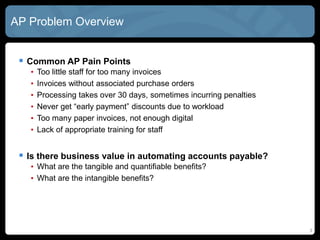
 Common AP Pain Points
• Too little staff for too many invoices
• Invoices without associated purchase orders
• Processing takes over 30 days, sometimes incurring penalties
• Never get “early payment” discounts due to workload
• Too many paper invoices, not enough digital
• Lack of appropriate training for staff
 Is there business value in automating accounts payable?
• What are the tangible and quantifiable benefits?
• What are the intangible benefits?
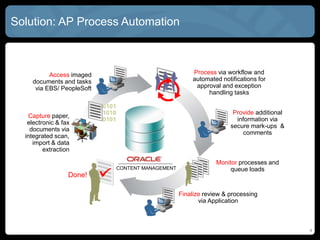
Solution: AP Process Automation
4
Done!
CONTENT MANAGEMENT
Provide additional
information via
secure mark-ups &
comments
Finalize review & processing
via Application
Capture paper,
electronic & fax
documents via
integrated scan,
import & data
extraction
Access imaged
documents and tasks
via EBS/ PeopleSoft
Process via workflow and
automated notifications for
approval and exception
handling tasks
Monitor processes and
queue loads
5
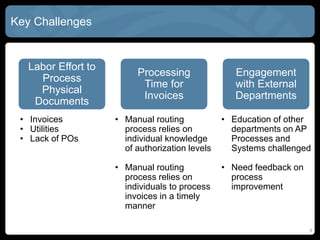
Key Challenges
Labor Effort to
Process
Physical
Documents
Processing
Time for
Invoices
Engagement
with External
Departments
• Invoices
• Utilities
• Lack of POs
• Manual routing
process relies on
individual knowledge
of authorization levels
• Manual routing
process relies on
individuals to process
invoices in a timely
manner
• Education of other
departments on AP
Processes and
Systems challenged
• Need feedback on
process
improvement
6
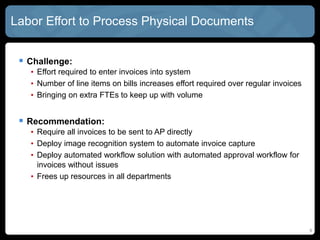
Labor Effort to Process Physical Documents
 Challenge:
• Effort required to enter invoices into system
• Number of line items on bills increases effort required over regular invoices
• Bringing on extra FTEs to keep up with volume
 Recommendation:
• Require all invoices to be sent to AP directly
• Deploy image recognition system to automate invoice capture
• Deploy automated workflow solution with automated approval workflow for
invoices without issues
• Frees up resources in all departments
7
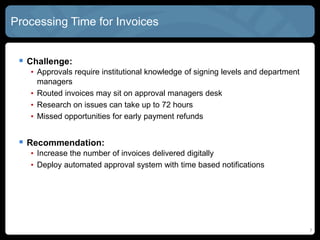
Processing Time for Invoices
 Challenge:
• Approvals require institutional knowledge of signing levels and department
managers
• Routed invoices may sit on approval managers desk
• Research on issues can take up to 72 hours
• Missed opportunities for early payment refunds
 Recommendation:
• Increase the number of invoices delivered digitally
• Deploy automated approval system with time based notifications
8
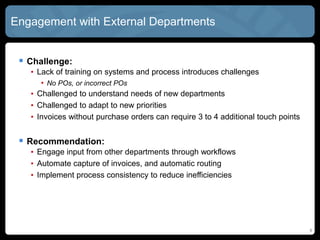
Engagement with External Departments
 Challenge:
• Lack of training on systems and process introduces challenges
• No POs, or incorrect POs
• Challenged to understand needs of new departments
• Challenged to adapt to new priorities
• Invoices without purchase orders can require 3 to 4 additional touch points
 Recommendation:
• Engage input from other departments through workflows
• Automate capture of invoices, and automatic routing
• Implement process consistency to reduce inefficiencies
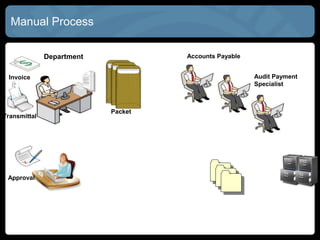
Manual Process
Department
Invoice
Accounts Payable
Approval
Transmittal
Packet
Audit Payment
Specialist
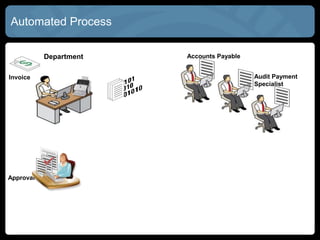
Automated Process
Department
Invoice
Accounts Payable
Approval
Audit Payment
Specialist
11
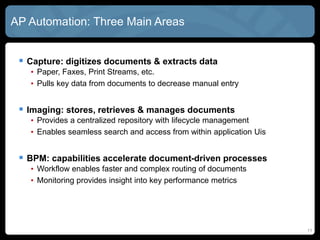
AP Automation: Three Main Areas
 Capture: digitizes documents & extracts data
• Paper, Faxes, Print Streams, etc.
• Pulls key data from documents to decrease manual entry
 Imaging: stores, retrieves & manages documents
• Provides a centralized repository with lifecycle management
• Enables seamless search and access from within application Uis
 BPM: capabilities accelerate document-driven processes
• Workflow enables faster and complex routing of documents
• Monitoring provides insight into key performance metrics
12
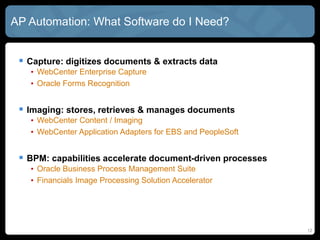
AP Automation: What Software do I Need?
 Capture: digitizes documents & extracts data
• WebCenter Enterprise Capture
• Oracle Forms Recognition
 Imaging: stores, retrieves & manages documents
• WebCenter Content / Imaging
• WebCenter Application Adapters for EBS and PeopleSoft
 BPM: capabilities accelerate document-driven processes
• Oracle Business Process Management Suite
• Financials Image Processing Solution Accelerator
13
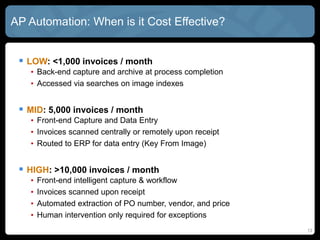
AP Automation: When is it Cost Effective?
 LOW: <1,000 invoices / month
• Back-end capture and archive at process completion
• Accessed via searches on image indexes
 MID: 5,000 invoices / month
• Front-end Capture and Data Entry
• Invoices scanned centrally or remotely upon receipt
• Routed to ERP for data entry (Key From Image)
 HIGH: >10,000 invoices / month
• Front-end intelligent capture & workflow
• Invoices scanned upon receipt
• Automated extraction of PO number, vendor, and price
• Human intervention only required for exceptions
14
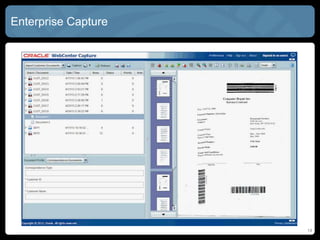
Enterprise Capture
15
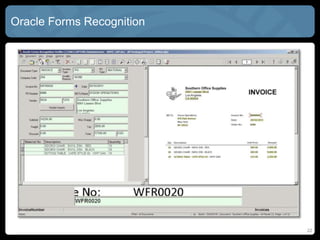
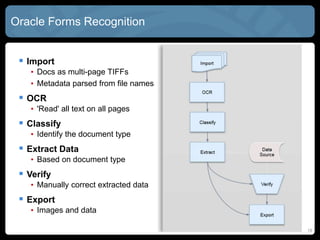
Oracle Forms Recognition
 Import
• Docs as multi-page TIFFs
• Metadata parsed from file names
 OCR
• 'Read' all text on all pages
 Classify
• Identify the document type
 Extract Data
• Based on document type
 Verify
• Manually correct extracted data
 Export
• Images and data
16
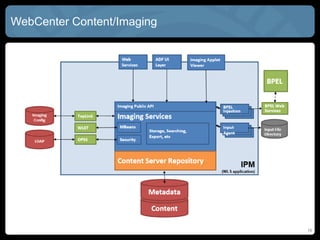
WebCenter Content/Imaging
17
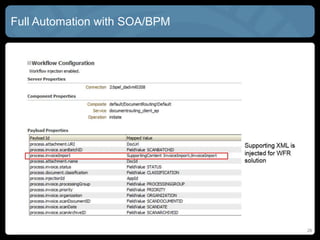
SOA/BPEL Connectors to EBS/PSFT
 External processes can pass metadata fields into payloads
 The UI maps between BPEL and metadata fields and can support
in-line values:
• http://host:port/imaging/faces/Pages/UrlTools.jspx?ToolName=ExecuteSea
rch&SearchName=[Claims]&ClaimNum=[CNum]
18
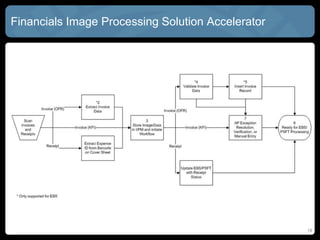
Financials Image Processing Solution Accelerator
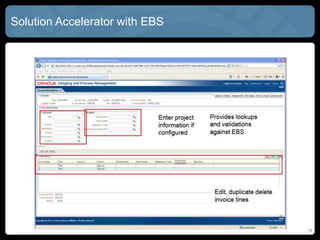
Solution Accelerator with EBS
19
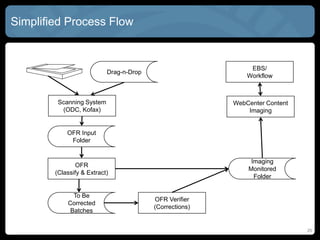
Simplified Process Flow
20
Scanning System
(ODC, Kofax)
Drag-n-Drop
OFR Input
Folder
OFR
(Classify & Extract)
To Be
Corrected
Batches
OFR Verifier
(Corrections)
Imaging
Monitored
Folder
WebCenter Content
Imaging
EBS/
Workflow
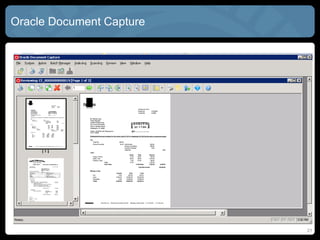
Oracle Document Capture
21
Oracle Forms Recognition
22
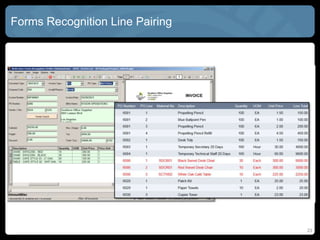
Forms Recognition Line Pairing
23
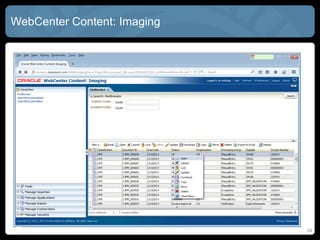
WebCenter Content: Imaging
24
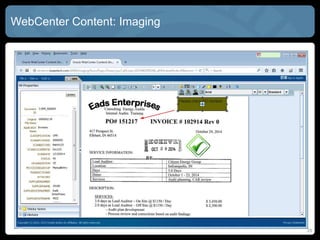
WebCenter Content: Imaging
25
Full Automation with SOA/BPM
26
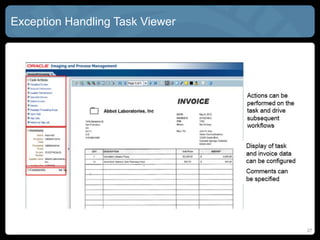
Exception Handling Task Viewer
27
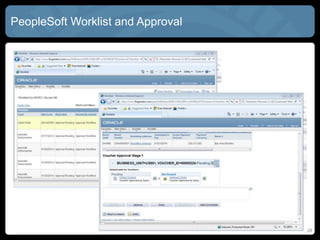
PeopleSoft Worklist and Approval
28
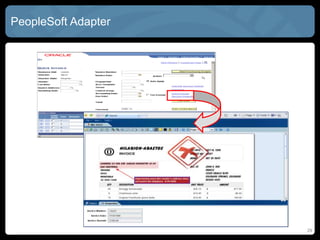
PeopleSoft Adapter
29
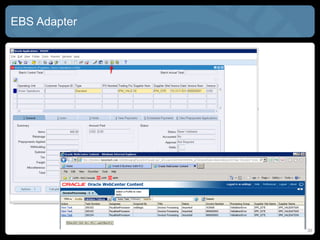
EBS Adapter
30
31
Case Study: AP Automation for Energy Utility
 Centralize AP receiving
 Require invoices to have POs
 Deploy automated forms recognition solution
 Deploy automated AP Workflow solution
32
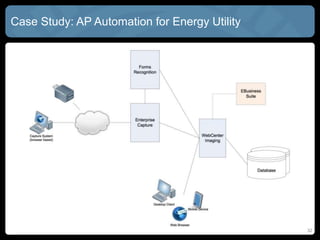
Case Study: AP Automation for Energy Utility
33
Business Case: Tangible Benefits
 Reduction in transactional labor activities
• Redirect to higher level activities
 Reduction in paper, storage, and handling
 Reduction in audit and compliance costs
• Automation of document lifecycle and retention
 Capture of incremental early payment refunds
• Early payments that can be captured today
 Capture of potential early payment refunds
• Early payments that can’t be captured today
34
Business Case: Intangible Benefits
 Improved relationships with vendors and suppliers
 Increased interaction with departments outside of AP
• Less time spent tracking down POs and contracts for AP
 Improved financial controls, security and auditability
• Document access, viewing, changes, printing, version control
 Increased employee job satisfaction
• More time for higher value activities
• Are we getting the best deal from our vendors?
35
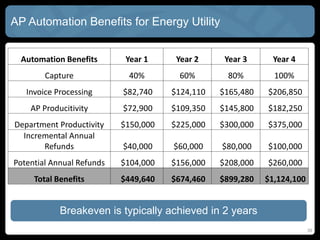
AP Automation Benefits for Energy Utility
Automation Benefits Year 1 Year 2 Year 3 Year 4
Capture 40% 60% 80% 100%
Invoice Processing $82,740 $124,110 $165,480 $206,850
AP Producitivity $72,900 $109,350 $145,800 $182,250
Department Productivity $150,000 $225,000 $300,000 $375,000
Incremental Annual
Refunds $40,000 $60,000 $80,000 $100,000
Potential Annual Refunds $104,000 $156,000 $208,000 $260,000
Total Benefits $449,640 $674,460 $899,280 $1,124,100
Breakeven is typically achieved in 2 years
36
 My Company: http://bezzotech.com
 My Blog: http://bexhuff.com
 My Self: bex@bezzotech.com
Questions?

AP Automation for EBS or PeopleSoft with Oracle WebCenter

  • 1.
    Accounts Payable Automationfor EBS or PeopleSoft with Oracle WebCenter Brian “Bex” Huff Chief Software Architect
  • 2.
    2 Agenda  Common painpoints and challenges  Solution: AP process automation  Software required for the solution  Which level of automation is cost effective?  Screenshots  Case study  Questions?
  • 3.
    3 AP Problem Overview Common AP Pain Points • Too little staff for too many invoices • Invoices without associated purchase orders • Processing takes over 30 days, sometimes incurring penalties • Never get “early payment” discounts due to workload • Too many paper invoices, not enough digital • Lack of appropriate training for staff  Is there business value in automating accounts payable? • What are the tangible and quantifiable benefits? • What are the intangible benefits?
  • 4.
    Solution: AP ProcessAutomation 4 Done! CONTENT MANAGEMENT Provide additional information via secure mark-ups & comments Finalize review & processing via Application Capture paper, electronic & fax documents via integrated scan, import & data extraction Access imaged documents and tasks via EBS/ PeopleSoft Process via workflow and automated notifications for approval and exception handling tasks Monitor processes and queue loads
  • 5.
    5 Key Challenges Labor Effortto Process Physical Documents Processing Time for Invoices Engagement with External Departments • Invoices • Utilities • Lack of POs • Manual routing process relies on individual knowledge of authorization levels • Manual routing process relies on individuals to process invoices in a timely manner • Education of other departments on AP Processes and Systems challenged • Need feedback on process improvement
  • 6.
    6 Labor Effort toProcess Physical Documents  Challenge: • Effort required to enter invoices into system • Number of line items on bills increases effort required over regular invoices • Bringing on extra FTEs to keep up with volume  Recommendation: • Require all invoices to be sent to AP directly • Deploy image recognition system to automate invoice capture • Deploy automated workflow solution with automated approval workflow for invoices without issues • Frees up resources in all departments
  • 7.
    7 Processing Time forInvoices  Challenge: • Approvals require institutional knowledge of signing levels and department managers • Routed invoices may sit on approval managers desk • Research on issues can take up to 72 hours • Missed opportunities for early payment refunds  Recommendation: • Increase the number of invoices delivered digitally • Deploy automated approval system with time based notifications
  • 8.
    8 Engagement with ExternalDepartments  Challenge: • Lack of training on systems and process introduces challenges • No POs, or incorrect POs • Challenged to understand needs of new departments • Challenged to adapt to new priorities • Invoices without purchase orders can require 3 to 4 additional touch points  Recommendation: • Engage input from other departments through workflows • Automate capture of invoices, and automatic routing • Implement process consistency to reduce inefficiencies
  • 9.
  • 10.
  • 11.
    11 AP Automation: ThreeMain Areas  Capture: digitizes documents & extracts data • Paper, Faxes, Print Streams, etc. • Pulls key data from documents to decrease manual entry  Imaging: stores, retrieves & manages documents • Provides a centralized repository with lifecycle management • Enables seamless search and access from within application Uis  BPM: capabilities accelerate document-driven processes • Workflow enables faster and complex routing of documents • Monitoring provides insight into key performance metrics
  • 12.
    12 AP Automation: WhatSoftware do I Need?  Capture: digitizes documents & extracts data • WebCenter Enterprise Capture • Oracle Forms Recognition  Imaging: stores, retrieves & manages documents • WebCenter Content / Imaging • WebCenter Application Adapters for EBS and PeopleSoft  BPM: capabilities accelerate document-driven processes • Oracle Business Process Management Suite • Financials Image Processing Solution Accelerator
  • 13.
    13 AP Automation: Whenis it Cost Effective?  LOW: <1,000 invoices / month • Back-end capture and archive at process completion • Accessed via searches on image indexes  MID: 5,000 invoices / month • Front-end Capture and Data Entry • Invoices scanned centrally or remotely upon receipt • Routed to ERP for data entry (Key From Image)  HIGH: >10,000 invoices / month • Front-end intelligent capture & workflow • Invoices scanned upon receipt • Automated extraction of PO number, vendor, and price • Human intervention only required for exceptions
  • 14.
  • 15.
    15 Oracle Forms Recognition Import • Docs as multi-page TIFFs • Metadata parsed from file names  OCR • 'Read' all text on all pages  Classify • Identify the document type  Extract Data • Based on document type  Verify • Manually correct extracted data  Export • Images and data
  • 16.
  • 17.
    17 SOA/BPEL Connectors toEBS/PSFT  External processes can pass metadata fields into payloads  The UI maps between BPEL and metadata fields and can support in-line values: • http://host:port/imaging/faces/Pages/UrlTools.jspx?ToolName=ExecuteSea rch&SearchName=[Claims]&ClaimNum=[CNum]
  • 18.
    18 Financials Image ProcessingSolution Accelerator
  • 19.
  • 20.
    Simplified Process Flow 20 ScanningSystem (ODC, Kofax) Drag-n-Drop OFR Input Folder OFR (Classify & Extract) To Be Corrected Batches OFR Verifier (Corrections) Imaging Monitored Folder WebCenter Content Imaging EBS/ Workflow
  • 21.
  • 22.
  • 23.
  • 24.
  • 25.
  • 26.
  • 27.
  • 28.
  • 29.
  • 30.
  • 31.
    31 Case Study: APAutomation for Energy Utility  Centralize AP receiving  Require invoices to have POs  Deploy automated forms recognition solution  Deploy automated AP Workflow solution
  • 32.
    32 Case Study: APAutomation for Energy Utility
  • 33.
    33 Business Case: TangibleBenefits  Reduction in transactional labor activities • Redirect to higher level activities  Reduction in paper, storage, and handling  Reduction in audit and compliance costs • Automation of document lifecycle and retention  Capture of incremental early payment refunds • Early payments that can be captured today  Capture of potential early payment refunds • Early payments that can’t be captured today
  • 34.
    34 Business Case: IntangibleBenefits  Improved relationships with vendors and suppliers  Increased interaction with departments outside of AP • Less time spent tracking down POs and contracts for AP  Improved financial controls, security and auditability • Document access, viewing, changes, printing, version control  Increased employee job satisfaction • More time for higher value activities • Are we getting the best deal from our vendors?
  • 35.
    35 AP Automation Benefitsfor Energy Utility Automation Benefits Year 1 Year 2 Year 3 Year 4 Capture 40% 60% 80% 100% Invoice Processing $82,740 $124,110 $165,480 $206,850 AP Producitivity $72,900 $109,350 $145,800 $182,250 Department Productivity $150,000 $225,000 $300,000 $375,000 Incremental Annual Refunds $40,000 $60,000 $80,000 $100,000 Potential Annual Refunds $104,000 $156,000 $208,000 $260,000 Total Benefits $449,640 $674,460 $899,280 $1,124,100 Breakeven is typically achieved in 2 years
  • 36.
    36  My Company:http://bezzotech.com  My Blog: http://bexhuff.com  My Self: bex@bezzotech.com Questions?