Performance Comparison Between
Linux Containers and Virtual
Machines
Venue: 2015 International Conference
on Advances in Computer Engineering
and Applications
Agenda
• What is virtualization?
• Virtualization technologies
• Comparing the technologies
• Conclusion
What is virtualization?
• virtual machine (VM) is an emulation of a
particular computer system.
• VM is a common way to run different services in
the cloud.
• Main benefits of virtualizations are:
– Portable deployment (fast application delivery)
– Scale and deploy with ease
– Hardware independence
– Isolation
– Secure user environment
– ….
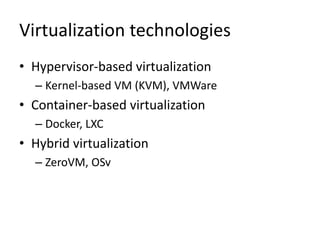
Virtualization technologies
• Hypervisor-based virtualization
– Kernel-based VM (KVM), VMWare
• Container-based virtualization
– Docker, LXC
• Hybrid virtualization
– ZeroVM, OSv
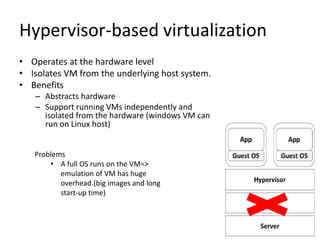
Hypervisor-based virtualization
• Operates at the hardware level
• Isolates VM from the underlying host system.
• Benefits
– Abstracts hardware
– Support running VMs independently and
isolated from the hardware (windows VM can
run on Linux host)
Problems
• A full OS runs on the VM=>
emulation of VM has huge
overhead.(big images and long
start-up time)
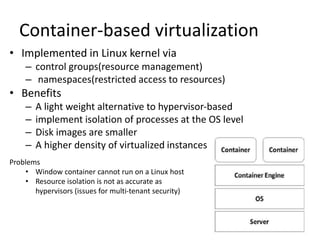
Container-based virtualization
• Implemented in Linux kernel via
– control groups(resource management)
– namespaces(restricted access to resources)
• Benefits
– A light weight alternative to hypervisor-based
– implement isolation of processes at the OS level
– Disk images are smaller
– A higher density of virtualized instances
Problems
• Window container cannot run on a Linux host
• Resource isolation is not as accurate as
hypervisors (issues for multi-tenant security)
Comparing the technologies-
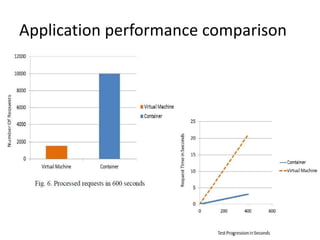
performance comparison
• In this paper, Docker is used for running
containers.
• The set up:
– Two physical servers (OS: Ubuntu14.04, RAM: 2GB) for hosting
docker and VM.
– front-end= application server hosting Joomla
– Back-end= database server hosting Postgres
– Jmeter is used for stress testing Joomla by sending
simultaneous requests to Joomla.
Application performance comparison
Comparing the technologies-
Scalability comparison
• For container scalability test, use Kebernetes cluster manager to scale the
the Docker host on the 2 physical servers.
• For VM scalability test, The application is deployed in an AWS EC2 with
auto scaling enabled.
• The set up:
– AWS EC2 for cloud and a physical server to host docker.
– Application = a load balanced WordPress application
– Jmeter is used for stressing and trigger the scaling
Scalability comparison
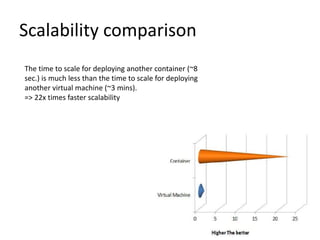
The time to scale for deploying another container (~8
sec.) is much less than the time to scale for deploying
another virtual machine (~3 mins).
=> 22x times faster scalability
Conclusion
• Containers out performed virtual machines
both in terms of scalability and performance.
• Containers are better for application
deployment.
• However, using containers for applications
with business critical data may reveal security
breaches.

Performance comparison between Linux Containers and Virtual Machines

  • 1.
    Performance Comparison Between LinuxContainers and Virtual Machines Venue: 2015 International Conference on Advances in Computer Engineering and Applications
  • 2.
    Agenda • What isvirtualization? • Virtualization technologies • Comparing the technologies • Conclusion
  • 3.
    What is virtualization? •virtual machine (VM) is an emulation of a particular computer system. • VM is a common way to run different services in the cloud. • Main benefits of virtualizations are: – Portable deployment (fast application delivery) – Scale and deploy with ease – Hardware independence – Isolation – Secure user environment – ….
  • 4.
    Virtualization technologies • Hypervisor-basedvirtualization – Kernel-based VM (KVM), VMWare • Container-based virtualization – Docker, LXC • Hybrid virtualization – ZeroVM, OSv
  • 5.
    Hypervisor-based virtualization • Operatesat the hardware level • Isolates VM from the underlying host system. • Benefits – Abstracts hardware – Support running VMs independently and isolated from the hardware (windows VM can run on Linux host) Problems • A full OS runs on the VM=> emulation of VM has huge overhead.(big images and long start-up time)
  • 6.
    Container-based virtualization • Implementedin Linux kernel via – control groups(resource management) – namespaces(restricted access to resources) • Benefits – A light weight alternative to hypervisor-based – implement isolation of processes at the OS level – Disk images are smaller – A higher density of virtualized instances Problems • Window container cannot run on a Linux host • Resource isolation is not as accurate as hypervisors (issues for multi-tenant security)
  • 7.
    Comparing the technologies- performancecomparison • In this paper, Docker is used for running containers. • The set up: – Two physical servers (OS: Ubuntu14.04, RAM: 2GB) for hosting docker and VM. – front-end= application server hosting Joomla – Back-end= database server hosting Postgres – Jmeter is used for stress testing Joomla by sending simultaneous requests to Joomla.
  • 8.
  • 9.
    Comparing the technologies- Scalabilitycomparison • For container scalability test, use Kebernetes cluster manager to scale the the Docker host on the 2 physical servers. • For VM scalability test, The application is deployed in an AWS EC2 with auto scaling enabled. • The set up: – AWS EC2 for cloud and a physical server to host docker. – Application = a load balanced WordPress application – Jmeter is used for stressing and trigger the scaling
  • 10.
    Scalability comparison The timeto scale for deploying another container (~8 sec.) is much less than the time to scale for deploying another virtual machine (~3 mins). => 22x times faster scalability
  • 11.
    Conclusion • Containers outperformed virtual machines both in terms of scalability and performance. • Containers are better for application deployment. • However, using containers for applications with business critical data may reveal security breaches.

Editor's Notes

  • #4 Potable deployement: you fix all the deployement bug on your setting in a virtual machine and then you ship it to what ever cloud provider and by realizing resources that application can be deployed