



Index
• What is Docker toolbox?
• MySQL using toolbox
What's in the toolbox
• Docker Client
• Docker Machine
• Docker Compose (Mac only)
• Docker Kitematic
• VirtualBox
Because the Docker daemon uses Linux-specific kernel features, you can’t run Docker natively in OS X.
Instead, you must use docker-machine to create and attach to a virtual machine (VM).
This machine is a Linux VM that hosts Docker for you on your Mac.
Docker daemon이 Linux에서만 돌릴수 있기 때문에 Linux VM 이 꼭 필요!!
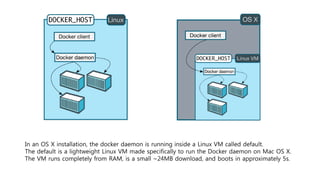
In an OS X installation, the docker daemon is running inside a Linux VM called default.
The default is a lightweight Linux VM made specifically to run the Docker daemon on Mac OS X.
The VM runs completely from RAM, is a small ~24MB download, and boots in approximately 5s.
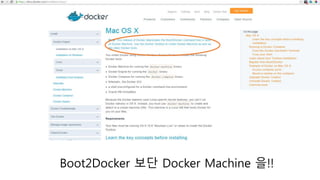
In the past….
Boot2Docker 보단 Docker Machine 을!!
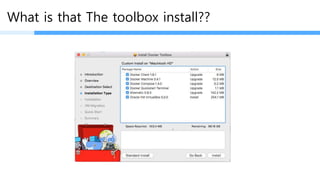
What is that The toolbox install??
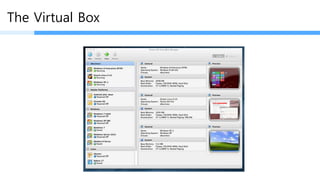
The Virtual Box
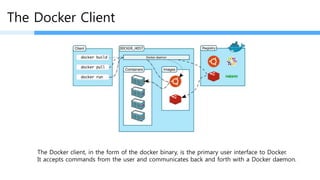
The Docker Client
The Docker client, in the form of the docker binary, is the primary user interface to Docker.
It accepts commands from the user and communicates back and forth with a Docker daemon.
Docker daemon 과의 Interface 를 위한 시스템!!!
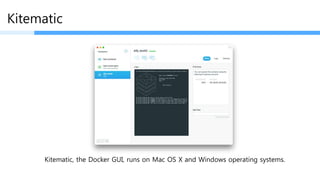
Kitematic
Kitematic, the Docker GUI, runs on Mac OS X and Windows operating systems.
Overview of Docker Compose
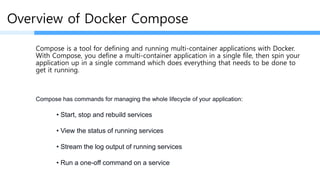
Compose is a tool for defining and running multi-container applications with Docker.
With Compose, you define a multi-container application in a single file, then spin your
application up in a single command which does everything that needs to be done to
get it running.
• Start, stop and rebuild services
• View the status of running services
• Stream the log output of running services
• Run a one-off command on a service
Compose has commands for managing the whole lifecycle of your application:
Overview of Docker Compose
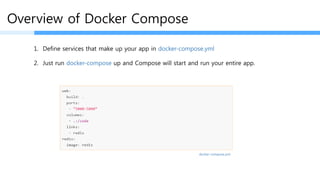
1. Define services that make up your app in docker-compose.yml
2. $ docker-compose up
docker-compose.yml
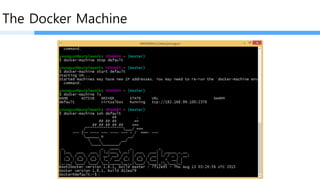
The Docker Machine
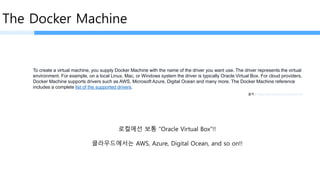
To create a virtual machine, you supply Docker Machine with the name of the driver you want use. The driver represents the virtual
environment. For example, on a local Linux, Mac, or Windows system the driver is typically Oracle Virtual Box. For cloud providers,
Docker Machine supports drivers such as AWS, Microsoft Azure, Digital Ocean and many more. The Docker Machine reference
includes a complete list of the supported drivers.
출처 : https://docs.docker.com/machine/
로컬에선 보통 “Oracle Virtual Box”!!
클라우드에서는 AWS, Azure, Digital Ocean, and so on!!
$ docker-machine create 
--driver digitalocean 
--digitalocean-access-token 0ab77166d407f479c6701652cee3a46830fef4 
staging
Creating SSH key... Creating Digital Ocean droplet...
To see how to connect Docker to this machine, run: docker-machine env staging
$ docker-machine ls
NAME ACTIVE DRIVER STATE URL
dev virtualbox Running tcp://192.168.99.103:2376
staging * digitalocean Running tcp://104.236.50.118:2376
The Docker Machine
•start, inspect, stop, and restart a host
•upgrade the Docker client and daemon
•configure a Docker client to talk to your host
Once you create one or more Docker hosts, Docker Machine supplies a number of commands for
managing them. Using these commands you can
Virtaul Machine 이미지를 껐다, 켰다, 생성했다, 지웠다 등등…
The Docker Machine
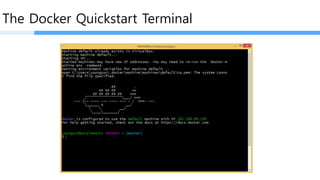
The Docker Quickstart Terminal
I’ve recently been tinkering with Docker, after seeing how popular it’s become and I’m convinced
it’s the future of infrastructure and development. By removing the virtual machine operating
system layer, it makes it a lot easier to move around apps and their data.
It’s good to see Docker Toolbox, as I had indeed found getting started in the past was a little
painful and confusing.
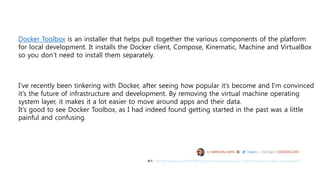
Docker Toolbox is an installer that helps pull together the various components of the platform
for local development. It installs the Docker client, Compose, Kinematic, Machine and VirtualBox
so you don’t need to install them separately.
출처 : http://thenextweb.com/dd/2015/08/13/docker-toolbox-makes-it-easier-to-get-started-with-containers-in-development/
The End~

Docker toolbox

  • 2.
    Index • What isDocker toolbox? • MySQL using toolbox
  • 3.
    What's in thetoolbox • Docker Client • Docker Machine • Docker Compose (Mac only) • Docker Kitematic • VirtualBox Because the Docker daemon uses Linux-specific kernel features, you can’t run Docker natively in OS X. Instead, you must use docker-machine to create and attach to a virtual machine (VM). This machine is a Linux VM that hosts Docker for you on your Mac. Docker daemon이 Linux에서만 돌릴수 있기 때문에 Linux VM 이 꼭 필요!!
  • 4.
    In an OSX installation, the docker daemon is running inside a Linux VM called default. The default is a lightweight Linux VM made specifically to run the Docker daemon on Mac OS X. The VM runs completely from RAM, is a small ~24MB download, and boots in approximately 5s.
  • 5.
  • 6.
  • 7.
    What is thatThe toolbox install??
  • 8.
  • 9.
    The Docker Client TheDocker client, in the form of the docker binary, is the primary user interface to Docker. It accepts commands from the user and communicates back and forth with a Docker daemon. Docker daemon 과의 Interface 를 위한 시스템!!!
  • 10.
    Kitematic Kitematic, the DockerGUI, runs on Mac OS X and Windows operating systems.
  • 11.
    Overview of DockerCompose Compose is a tool for defining and running multi-container applications with Docker. With Compose, you define a multi-container application in a single file, then spin your application up in a single command which does everything that needs to be done to get it running. • Start, stop and rebuild services • View the status of running services • Stream the log output of running services • Run a one-off command on a service Compose has commands for managing the whole lifecycle of your application:
  • 12.
    Overview of DockerCompose 1. Define services that make up your app in docker-compose.yml 2. $ docker-compose up docker-compose.yml
  • 13.
    The Docker Machine Tocreate a virtual machine, you supply Docker Machine with the name of the driver you want use. The driver represents the virtual environment. For example, on a local Linux, Mac, or Windows system the driver is typically Oracle Virtual Box. For cloud providers, Docker Machine supports drivers such as AWS, Microsoft Azure, Digital Ocean and many more. The Docker Machine reference includes a complete list of the supported drivers. 출처 : https://docs.docker.com/machine/ 로컬에선 보통 “Oracle Virtual Box”!! 클라우드에서는 AWS, Azure, Digital Ocean, and so on!!
  • 14.
    $ docker-machine create --driver digitalocean --digitalocean-access-token 0ab77166d407f479c6701652cee3a46830fef4 staging Creating SSH key... Creating Digital Ocean droplet... To see how to connect Docker to this machine, run: docker-machine env staging $ docker-machine ls NAME ACTIVE DRIVER STATE URL dev virtualbox Running tcp://192.168.99.103:2376 staging * digitalocean Running tcp://104.236.50.118:2376
  • 15.
    The Docker Machine •start,inspect, stop, and restart a host •upgrade the Docker client and daemon •configure a Docker client to talk to your host Once you create one or more Docker hosts, Docker Machine supplies a number of commands for managing them. Using these commands you can Virtaul Machine 이미지를 껐다, 켰다, 생성했다, 지웠다 등등…
  • 16.
  • 17.
  • 18.
    I’ve recently beentinkering with Docker, after seeing how popular it’s become and I’m convinced it’s the future of infrastructure and development. By removing the virtual machine operating system layer, it makes it a lot easier to move around apps and their data. It’s good to see Docker Toolbox, as I had indeed found getting started in the past was a little painful and confusing. Docker Toolbox is an installer that helps pull together the various components of the platform for local development. It installs the Docker client, Compose, Kinematic, Machine and VirtualBox so you don’t need to install them separately. 출처 : http://thenextweb.com/dd/2015/08/13/docker-toolbox-makes-it-easier-to-get-started-with-containers-in-development/
  • 20.