DOCKER 1.11 OVERVIEW
Presenter Name: Sreenivas Makam
Presented at: Docker Meetup Bangalore
Presentation Date: June 4, 2016
About me
• Senior Engineering Manager at Cisco
Systems Data Center group
• Author of “Mastering CoreOS”
https://www.packtpub.com/networki
ng-and-servers/mastering-coreos/ )
• Docker
Captain(https://www.docker.com/co
mmunity/docker-captains )
• Blog:
https://sreeninet.wordpress.com/
• Code: https://github.com/smakam
• Linkedin:
https://in.linkedin.com/in/sreenivas
makam
• Twitter: @srmakam
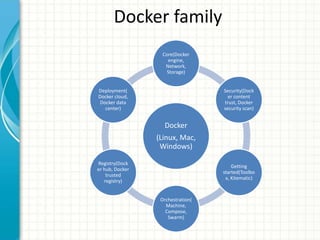
Docker family
Docker
(Linux, Mac,
Windows)
Core(Docker
engine,
Network,
Storage)
Security(Dock
er content
trust, Docker
security scan)
Getting
started(Toolbo
x, Kitematic)
Orchestration(
Machine,
Compose,
Swarm)
Registry(Dock
er hub, Docker
trusted
registry)
Deployment(
Docker cloud,
Docker data
center)
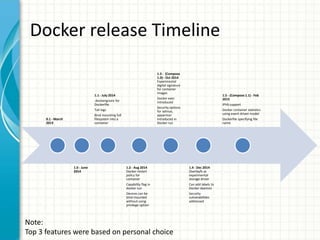
Docker release Timeline
0.1 - March
2013
1.0 -
June
2014
1.1 - July 2014
.dockerignore
for Dockerfile
Tail logs
Bind mounting
full filesystem
into a
container
1.2 - Aug
2014 Docker
restart policy
for container
Capability flag
in docker run
Devices can
be bind
mounted
without using
privilege
option
1.3 -
(Compose 1.0)
- Oct 2014
Experimental
digital
signature for
container
images
Docker exec
introduced
Security
options for
selinux,
apparmor
introduced in
Docker run
1.4 - Dec 2014
Overlayfs as
experimental
storage driver
Can add labels
to Docker
daemon
Security
vulnerabilities
addressed
1.5 - (Compose 1.1) -
Feb 2015
IPV6 support
Docker container
statistics using event
driven model
Dockerfile specifying
file name
Note:
Top 3 features were based on personal choice
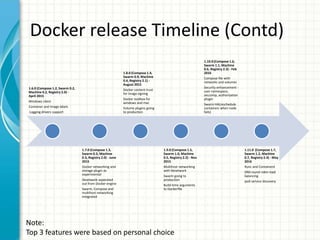
Docker release Timeline (Contd)
1.6.0 (Compose 1.2,
Swarm 0.2, Machine 0.2,
Registry 2.0) - April 2015
Windows client
Container and Image
labels
Logging drivers support
1.7.0 (Compose
1.3, Swarm 0.3,
Machine 0.3,
Registry 2.0) - June
2015
Docker networking
and storage plugin
as experimental
libnetwork
seperated out from
Docker engine
Swarm, Compose
and multihost
networking
integrated
1.8.0 (Compose
1.4, Swarm 0.9,
Machine 0.4,
Registry 2.1) -
August 2015
Docker content
trust for image
signing
Docker toolbox for
windows and mac
Volume plugins
going to
production
1.9.0 (Compose
1.5, Swarm 1.0,
Machine 0.5,
Registry 2.2) - Nov
2015
Multihost
networking with
libnetwork
Swarm going to
production
Build-time
arguments to
Dockerfile
1.10.0 (Compose 1.6,
Swarm 1.1, Machine
0.6, Registry 2.3) - Feb
2016
Compose file with
networks and volumes
Security enhancement
- user namespace,
seccomp,
authorization plugin
Swarm HA(reschedule
containers when node
fails)
1.11.0 (Compose
1.7, Swarm 1.2,
Machine 0.7,
Registry 2.4) -
May 2016
Runc and
Containerd
DNS round robin
load balancing
ipv6 service
discovery
Note:
Top 3 features were based on personal choice
Docker 1.11 feature summary
• Runc and Containerd plumbing
• Built-in load balancing using DNS roundrobin
• Service discovery for ipv6
• Experimental macvlan and ipvlan network plugins
• Labels for networks and volumes
• Yubikey based hardware signing of Container images
moves from experimental to stable
• Container rescheduling in Swarm moves from
experimental to stable
Runc and Containerd
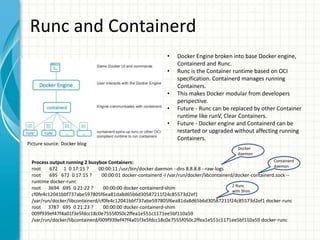
• Docker Engine broken into base Docker engine,
Containerd and Runc.
• Runc is the Container runtime based on OCI
specification. Containerd manages running
Containers.
• This makes Docker modular from developers
perspective.
• Future - Runc can be replaced by other Container
runtime like runV, Clear Containers.
• Future - Docker engine and Containerd can be
restarted or upgraded without affecting running
Containers.
Process output running 2 busybox Containers:
root 672 1 0 17:15 ? 00:00:11 /usr/bin/docker daemon --dns 8.8.8.8 --raw-logs
root 695 672 0 17:15 ? 00:00:01 docker-containerd -l /var/run/docker/libcontainerd/docker-containerd.sock --
runtime docker-runc
root 3694 695 0 21:22 ? 00:00:00 docker-containerd-shim
cf0fe4c12041bbf737abe597805f6ea81da8d65b6d30587211f24c85573d2ef1
/var/run/docker/libcontainerd/cf0fe4c12041bbf737abe597805f6ea81da8d65b6d30587211f24c85573d2ef1 docker-runc
root 3787 695 0 21:23 ? 00:00:00 docker-containerd-shim
009f939ef47f4a01f3e5fdcc18c0e7555f050c2ffea1e551c1171ee5bf110a59
/var/run/docker/libcontainerd/009f939ef47f4a01f3e5fdcc18c0e7555f050c2ffea1e551c1171ee5bf110a59 docker-runc
Docker
daemon
Containerd
daemon
2 Runc
with Shim
Picture source: Docker blog
DNS load balancing
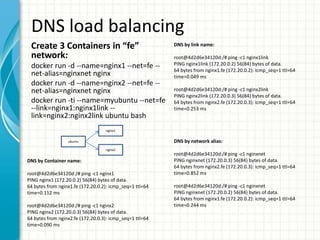
Create 3 Containers in “fe”
network:
docker run -d --name=nginx1 --net=fe --
net-alias=nginxnet nginx
docker run -d --name=nginx2 --net=fe --
net-alias=nginxnet nginx
docker run -ti --name=myubuntu --net=fe
--link=nginx1:nginx1link --
link=nginx2:nginx2link ubuntu bash
DNS by network alias:
root@4d2d6e34120d:/# ping -c1 nginxnet
PING nginxnet (172.20.0.3) 56(84) bytes of data.
64 bytes from nginx2.fe (172.20.0.3): icmp_seq=1 ttl=64
time=0.852 ms
root@4d2d6e34120d:/# ping -c1 nginxnet
PING nginxnet (172.20.0.2) 56(84) bytes of data.
64 bytes from nginx1.fe (172.20.0.2): icmp_seq=1 ttl=64
time=0.244 ms
DNS by Container name:
root@4d2d6e34120d:/# ping -c1 nginx1
PING nginx1 (172.20.0.2) 56(84) bytes of data.
64 bytes from nginx1.fe (172.20.0.2): icmp_seq=1 ttl=64
time=0.112 ms
root@4d2d6e34120d:/# ping -c1 nginx2
PING nginx2 (172.20.0.3) 56(84) bytes of data.
64 bytes from nginx2.fe (172.20.0.3): icmp_seq=1 ttl=64
time=0.090 ms
DNS by link name:
root@4d2d6e34120d:/# ping -c1 nginx1link
PING nginx1link (172.20.0.2) 56(84) bytes of data.
64 bytes from nginx1.fe (172.20.0.2): icmp_seq=1 ttl=64
time=0.049 ms
root@4d2d6e34120d:/# ping -c1 nginx2link
PING nginx2link (172.20.0.3) 56(84) bytes of data.
64 bytes from nginx2.fe (172.20.0.3): icmp_seq=1 ttl=64
time=0.253 ms
ubuntu
nginx1
nginx2
IPV6 Service Discovery
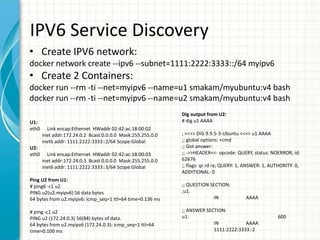
• Create IPV6 network:
docker network create --ipv6 --subnet=1111:2222:3333::/64 myipv6
• Create 2 Containers:
docker run --rm -ti --net=myipv6 --name=u1 smakam/myubuntu:v4 bash
docker run --rm -ti --net=myipv6 --name=u2 smakam/myubuntu:v4 bash
Dig output from U2:
# dig u1 AAAA
; <<>> DiG 9.9.5-3-Ubuntu <<>> u1 AAAA
;; global options: +cmd
;; Got answer:
;; ->>HEADER<<- opcode: QUERY, status: NOERROR, id:
62676
;; flags: qr rd ra; QUERY: 1, ANSWER: 1, AUTHORITY: 0,
ADDITIONAL: 0
;; QUESTION SECTION:
;u1.
IN AAAA
;; ANSWER SECTION:
u1. 600
IN AAAA
1111:2222:3333::2
U1:
eth0 Link encap:Ethernet HWaddr 02:42:ac:18:00:02
inet addr:172.24.0.2 Bcast:0.0.0.0 Mask:255.255.0.0
inet6 addr: 1111:2222:3333::2/64 Scope:Global
U2:
eth0 Link encap:Ethernet HWaddr 02:42:ac:18:00:03
inet addr:172.24.0.3 Bcast:0.0.0.0 Mask:255.255.0.0
inet6 addr: 1111:2222:3333::3/64 Scope:Global
Ping U2 from U1:
# ping6 -c1 u2
PING u2(u2.myipv6) 56 data bytes
64 bytes from u2.myipv6: icmp_seq=1 ttl=64 time=0.136 ms
# ping -c1 u2
PING u2 (172.24.0.3) 56(84) bytes of data.
64 bytes from u2.myipv6 (172.24.0.3): icmp_seq=1 ttl=64
time=0.100 ms
Labels for Networks and Volumes
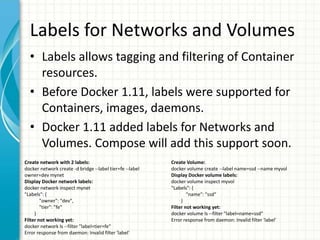
• Labels allows tagging and filtering of Container
resources.
• Before Docker 1.11, labels were supported for
Containers, images, daemons.
• Docker 1.11 added labels for Networks and
Volumes. Compose will add this support soon.
Create network with 2 labels:
docker network create -d bridge --label tier=fe --label
owner=dev mynet
Display Docker network labels:
docker network inspect mynet
"Labels": {
"owner": "dev",
"tier": "fe"
}
Filter not working yet:
docker network ls --filter "label=tier=fe"
Error response from daemon: Invalid filter 'label'
Create Volume:
docker volume create --label name=ssd --name myvol
Display Docker volume labels:
docker volume inspect myvol
"Labels": {
"name": "ssd"
}
Filter not working yet:
docker volume ls --filter "label=name=ssd"
Error response from daemon: Invalid filter 'label'
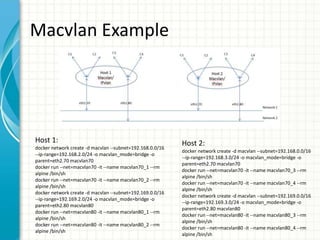
Macvlan, ipvlan
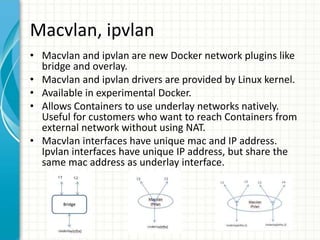
• Macvlan and ipvlan are new Docker network plugins like
bridge and overlay.
• Macvlan and ipvlan drivers are provided by Linux kernel.
• Available in experimental Docker.
• Allows Containers to use underlay networks natively.
Useful for customers who want to reach Containers from
external network without using NAT.
• Macvlan interfaces have unique mac and IP address.
Ipvlan interfaces have unique IP address, but share the
same mac address as underlay interface.
Macvlan Example
Host 1:
docker network create -d macvlan --subnet=192.168.0.0/16
--ip-range=192.168.2.0/24 -o macvlan_mode=bridge -o
parent=eth2.70 macvlan70
docker run --net=macvlan70 -it --name macvlan70_1 --rm
alpine /bin/sh
docker run --net=macvlan70 -it --name macvlan70_2 --rm
alpine /bin/sh
docker network create -d macvlan --subnet=192.169.0.0/16
--ip-range=192.169.2.0/24 -o macvlan_mode=bridge -o
parent=eth2.80 macvlan80
docker run --net=macvlan80 -it --name macvlan80_1 --rm
alpine /bin/sh
docker run --net=macvlan80 -it --name macvlan80_2 --rm
alpine /bin/sh
Host 2:
docker network create -d macvlan --subnet=192.168.0.0/16
--ip-range=192.168.3.0/24 -o macvlan_mode=bridge -o
parent=eth2.70 macvlan70
docker run --net=macvlan70 -it --name macvlan70_3 --rm
alpine /bin/sh
docker run --net=macvlan70 -it --name macvlan70_4 --rm
alpine /bin/sh
docker network create -d macvlan --subnet=192.169.0.0/16
--ip-range=192.169.3.0/24 -o macvlan_mode=bridge -o
parent=eth2.80 macvlan80
docker run --net=macvlan80 -it --name macvlan80_3 --rm
alpine /bin/sh
docker run --net=macvlan80 -it --name macvlan80_4 --rm
alpine /bin/sh
References
• Docker 1.11 release blog (https://blog.docker.com/2016/04/docker-engine-1-11-
runc/ )
• Docker 1.11 Online meetup (https://blog.docker.com/2016/04/docker-online-
meetup-37-docker-1-11/, https://blog.docker.com/2016/05/docker-sf-1-11-
meetup/ )
• Runc (http://runc.io/)
• Containerd(https://containerd.tools/)
• Labels for non-Container
resources(https://github.com/docker/docker/issues/20356)
• Experimental Macvlan,
ipvlan(https://github.com/docker/docker/blob/master/experimental/vlan-
networks.md)
• Blog on macvlan, ipvlan(https://sreeninet.wordpress.com/2016/05/29/docker-
macvlan-and-ipvlan-network-plugins/,
https://sreeninet.wordpress.com/2016/05/29/macvlan-and-ipvlan/)
• Swarm Container
rescheduling(https://docs.docker.com/swarm/scheduler/rescheduling/)
• Docker Yubikey hardware signing(https://blog.docker.com/2015/11/docker-
content-trust-yubikey/)

Docker 1.11 Presentation

  • 1.
    DOCKER 1.11 OVERVIEW PresenterName: Sreenivas Makam Presented at: Docker Meetup Bangalore Presentation Date: June 4, 2016
  • 2.
    About me • SeniorEngineering Manager at Cisco Systems Data Center group • Author of “Mastering CoreOS” https://www.packtpub.com/networki ng-and-servers/mastering-coreos/ ) • Docker Captain(https://www.docker.com/co mmunity/docker-captains ) • Blog: https://sreeninet.wordpress.com/ • Code: https://github.com/smakam • Linkedin: https://in.linkedin.com/in/sreenivas makam • Twitter: @srmakam
  • 3.
    Docker family Docker (Linux, Mac, Windows) Core(Docker engine, Network, Storage) Security(Dock ercontent trust, Docker security scan) Getting started(Toolbo x, Kitematic) Orchestration( Machine, Compose, Swarm) Registry(Dock er hub, Docker trusted registry) Deployment( Docker cloud, Docker data center)
  • 4.
    Docker release Timeline 0.1- March 2013 1.0 - June 2014 1.1 - July 2014 .dockerignore for Dockerfile Tail logs Bind mounting full filesystem into a container 1.2 - Aug 2014 Docker restart policy for container Capability flag in docker run Devices can be bind mounted without using privilege option 1.3 - (Compose 1.0) - Oct 2014 Experimental digital signature for container images Docker exec introduced Security options for selinux, apparmor introduced in Docker run 1.4 - Dec 2014 Overlayfs as experimental storage driver Can add labels to Docker daemon Security vulnerabilities addressed 1.5 - (Compose 1.1) - Feb 2015 IPV6 support Docker container statistics using event driven model Dockerfile specifying file name Note: Top 3 features were based on personal choice
  • 5.
    Docker release Timeline(Contd) 1.6.0 (Compose 1.2, Swarm 0.2, Machine 0.2, Registry 2.0) - April 2015 Windows client Container and Image labels Logging drivers support 1.7.0 (Compose 1.3, Swarm 0.3, Machine 0.3, Registry 2.0) - June 2015 Docker networking and storage plugin as experimental libnetwork seperated out from Docker engine Swarm, Compose and multihost networking integrated 1.8.0 (Compose 1.4, Swarm 0.9, Machine 0.4, Registry 2.1) - August 2015 Docker content trust for image signing Docker toolbox for windows and mac Volume plugins going to production 1.9.0 (Compose 1.5, Swarm 1.0, Machine 0.5, Registry 2.2) - Nov 2015 Multihost networking with libnetwork Swarm going to production Build-time arguments to Dockerfile 1.10.0 (Compose 1.6, Swarm 1.1, Machine 0.6, Registry 2.3) - Feb 2016 Compose file with networks and volumes Security enhancement - user namespace, seccomp, authorization plugin Swarm HA(reschedule containers when node fails) 1.11.0 (Compose 1.7, Swarm 1.2, Machine 0.7, Registry 2.4) - May 2016 Runc and Containerd DNS round robin load balancing ipv6 service discovery Note: Top 3 features were based on personal choice
  • 6.
    Docker 1.11 featuresummary • Runc and Containerd plumbing • Built-in load balancing using DNS roundrobin • Service discovery for ipv6 • Experimental macvlan and ipvlan network plugins • Labels for networks and volumes • Yubikey based hardware signing of Container images moves from experimental to stable • Container rescheduling in Swarm moves from experimental to stable
  • 7.
    Runc and Containerd •Docker Engine broken into base Docker engine, Containerd and Runc. • Runc is the Container runtime based on OCI specification. Containerd manages running Containers. • This makes Docker modular from developers perspective. • Future - Runc can be replaced by other Container runtime like runV, Clear Containers. • Future - Docker engine and Containerd can be restarted or upgraded without affecting running Containers. Process output running 2 busybox Containers: root 672 1 0 17:15 ? 00:00:11 /usr/bin/docker daemon --dns 8.8.8.8 --raw-logs root 695 672 0 17:15 ? 00:00:01 docker-containerd -l /var/run/docker/libcontainerd/docker-containerd.sock -- runtime docker-runc root 3694 695 0 21:22 ? 00:00:00 docker-containerd-shim cf0fe4c12041bbf737abe597805f6ea81da8d65b6d30587211f24c85573d2ef1 /var/run/docker/libcontainerd/cf0fe4c12041bbf737abe597805f6ea81da8d65b6d30587211f24c85573d2ef1 docker-runc root 3787 695 0 21:23 ? 00:00:00 docker-containerd-shim 009f939ef47f4a01f3e5fdcc18c0e7555f050c2ffea1e551c1171ee5bf110a59 /var/run/docker/libcontainerd/009f939ef47f4a01f3e5fdcc18c0e7555f050c2ffea1e551c1171ee5bf110a59 docker-runc Docker daemon Containerd daemon 2 Runc with Shim Picture source: Docker blog
  • 8.
    DNS load balancing Create3 Containers in “fe” network: docker run -d --name=nginx1 --net=fe -- net-alias=nginxnet nginx docker run -d --name=nginx2 --net=fe -- net-alias=nginxnet nginx docker run -ti --name=myubuntu --net=fe --link=nginx1:nginx1link -- link=nginx2:nginx2link ubuntu bash DNS by network alias: root@4d2d6e34120d:/# ping -c1 nginxnet PING nginxnet (172.20.0.3) 56(84) bytes of data. 64 bytes from nginx2.fe (172.20.0.3): icmp_seq=1 ttl=64 time=0.852 ms root@4d2d6e34120d:/# ping -c1 nginxnet PING nginxnet (172.20.0.2) 56(84) bytes of data. 64 bytes from nginx1.fe (172.20.0.2): icmp_seq=1 ttl=64 time=0.244 ms DNS by Container name: root@4d2d6e34120d:/# ping -c1 nginx1 PING nginx1 (172.20.0.2) 56(84) bytes of data. 64 bytes from nginx1.fe (172.20.0.2): icmp_seq=1 ttl=64 time=0.112 ms root@4d2d6e34120d:/# ping -c1 nginx2 PING nginx2 (172.20.0.3) 56(84) bytes of data. 64 bytes from nginx2.fe (172.20.0.3): icmp_seq=1 ttl=64 time=0.090 ms DNS by link name: root@4d2d6e34120d:/# ping -c1 nginx1link PING nginx1link (172.20.0.2) 56(84) bytes of data. 64 bytes from nginx1.fe (172.20.0.2): icmp_seq=1 ttl=64 time=0.049 ms root@4d2d6e34120d:/# ping -c1 nginx2link PING nginx2link (172.20.0.3) 56(84) bytes of data. 64 bytes from nginx2.fe (172.20.0.3): icmp_seq=1 ttl=64 time=0.253 ms ubuntu nginx1 nginx2
  • 9.
    IPV6 Service Discovery •Create IPV6 network: docker network create --ipv6 --subnet=1111:2222:3333::/64 myipv6 • Create 2 Containers: docker run --rm -ti --net=myipv6 --name=u1 smakam/myubuntu:v4 bash docker run --rm -ti --net=myipv6 --name=u2 smakam/myubuntu:v4 bash Dig output from U2: # dig u1 AAAA ; <<>> DiG 9.9.5-3-Ubuntu <<>> u1 AAAA ;; global options: +cmd ;; Got answer: ;; ->>HEADER<<- opcode: QUERY, status: NOERROR, id: 62676 ;; flags: qr rd ra; QUERY: 1, ANSWER: 1, AUTHORITY: 0, ADDITIONAL: 0 ;; QUESTION SECTION: ;u1. IN AAAA ;; ANSWER SECTION: u1. 600 IN AAAA 1111:2222:3333::2 U1: eth0 Link encap:Ethernet HWaddr 02:42:ac:18:00:02 inet addr:172.24.0.2 Bcast:0.0.0.0 Mask:255.255.0.0 inet6 addr: 1111:2222:3333::2/64 Scope:Global U2: eth0 Link encap:Ethernet HWaddr 02:42:ac:18:00:03 inet addr:172.24.0.3 Bcast:0.0.0.0 Mask:255.255.0.0 inet6 addr: 1111:2222:3333::3/64 Scope:Global Ping U2 from U1: # ping6 -c1 u2 PING u2(u2.myipv6) 56 data bytes 64 bytes from u2.myipv6: icmp_seq=1 ttl=64 time=0.136 ms # ping -c1 u2 PING u2 (172.24.0.3) 56(84) bytes of data. 64 bytes from u2.myipv6 (172.24.0.3): icmp_seq=1 ttl=64 time=0.100 ms
  • 10.
    Labels for Networksand Volumes • Labels allows tagging and filtering of Container resources. • Before Docker 1.11, labels were supported for Containers, images, daemons. • Docker 1.11 added labels for Networks and Volumes. Compose will add this support soon. Create network with 2 labels: docker network create -d bridge --label tier=fe --label owner=dev mynet Display Docker network labels: docker network inspect mynet "Labels": { "owner": "dev", "tier": "fe" } Filter not working yet: docker network ls --filter "label=tier=fe" Error response from daemon: Invalid filter 'label' Create Volume: docker volume create --label name=ssd --name myvol Display Docker volume labels: docker volume inspect myvol "Labels": { "name": "ssd" } Filter not working yet: docker volume ls --filter "label=name=ssd" Error response from daemon: Invalid filter 'label'
  • 11.
    Macvlan, ipvlan • Macvlanand ipvlan are new Docker network plugins like bridge and overlay. • Macvlan and ipvlan drivers are provided by Linux kernel. • Available in experimental Docker. • Allows Containers to use underlay networks natively. Useful for customers who want to reach Containers from external network without using NAT. • Macvlan interfaces have unique mac and IP address. Ipvlan interfaces have unique IP address, but share the same mac address as underlay interface.
  • 12.
    Macvlan Example Host 1: dockernetwork create -d macvlan --subnet=192.168.0.0/16 --ip-range=192.168.2.0/24 -o macvlan_mode=bridge -o parent=eth2.70 macvlan70 docker run --net=macvlan70 -it --name macvlan70_1 --rm alpine /bin/sh docker run --net=macvlan70 -it --name macvlan70_2 --rm alpine /bin/sh docker network create -d macvlan --subnet=192.169.0.0/16 --ip-range=192.169.2.0/24 -o macvlan_mode=bridge -o parent=eth2.80 macvlan80 docker run --net=macvlan80 -it --name macvlan80_1 --rm alpine /bin/sh docker run --net=macvlan80 -it --name macvlan80_2 --rm alpine /bin/sh Host 2: docker network create -d macvlan --subnet=192.168.0.0/16 --ip-range=192.168.3.0/24 -o macvlan_mode=bridge -o parent=eth2.70 macvlan70 docker run --net=macvlan70 -it --name macvlan70_3 --rm alpine /bin/sh docker run --net=macvlan70 -it --name macvlan70_4 --rm alpine /bin/sh docker network create -d macvlan --subnet=192.169.0.0/16 --ip-range=192.169.3.0/24 -o macvlan_mode=bridge -o parent=eth2.80 macvlan80 docker run --net=macvlan80 -it --name macvlan80_3 --rm alpine /bin/sh docker run --net=macvlan80 -it --name macvlan80_4 --rm alpine /bin/sh
  • 13.
    References • Docker 1.11release blog (https://blog.docker.com/2016/04/docker-engine-1-11- runc/ ) • Docker 1.11 Online meetup (https://blog.docker.com/2016/04/docker-online- meetup-37-docker-1-11/, https://blog.docker.com/2016/05/docker-sf-1-11- meetup/ ) • Runc (http://runc.io/) • Containerd(https://containerd.tools/) • Labels for non-Container resources(https://github.com/docker/docker/issues/20356) • Experimental Macvlan, ipvlan(https://github.com/docker/docker/blob/master/experimental/vlan- networks.md) • Blog on macvlan, ipvlan(https://sreeninet.wordpress.com/2016/05/29/docker- macvlan-and-ipvlan-network-plugins/, https://sreeninet.wordpress.com/2016/05/29/macvlan-and-ipvlan/) • Swarm Container rescheduling(https://docs.docker.com/swarm/scheduler/rescheduling/) • Docker Yubikey hardware signing(https://blog.docker.com/2015/11/docker- content-trust-yubikey/)

Editor's Notes

  • #4 Plumbing – Runc, Containerd, Notary
  • #14 Microsoft Confidential