DESIGN HACKSDIY
Hosted by Adobe Spark
@PegFitzpatrick
#DIYdesign
DESIGN HACKSDIY
@PegFitzpatrick
Social Media Strategist
Co-author, The Art of Social Media
DESIGN HACKSDIY
Why video is so important
Learn how to create an explainer video
Use still images to create a cool video
Easily add voiceovers for your video
Load one video into another one -
then edit it multiple times
During this webinar you’ll learn tips and tricks that will
help you create your own fantastic videos.
We're going to cover:
DESIGN HACKSDIY
After watching a video, 64% of
users are more likely to buy a
product online, according to
ComScore
DESIGN HACKSDIY
Step one:
Get ready for (more) video!
It's not as hard as you think!
Communicate your brand message
Be relevant to your industry
Including a video on a landing page can increase
conversion by 80%
Work anywhere!
Spark video works on desktop, iOS mobile, and iOS tablet.
PhoneTablet
DESIGN HACKSDIY
DESIGN HACKSDIY
According to Visible Measures,
20% of viewers will click away
from a video in 10 seconds or fewer
DESIGN HACKSDIY
Make the first ten seconds count
People listen with sound off
Add text to your video
Use "thing+caption" in Spark
Make two versions and split test before
boosting big campaigns
DESIGN HACKSDIY
Use still images to create slides
DESIGN HACKSDIY
Add voiceovers by slide
DESIGN HACKSDIY
Add video from your camera roll
DESIGN HACKSDIY
Continue video clip on next slide
VIDEO TOOL BOX
Librestock.com for photos
Adobe Spark
BenSound.com for music
DESIGN HACKSDIY
DESIGN HACKSDIY
Power tip:
Download your
video and upload
to YouTube
or Facebook
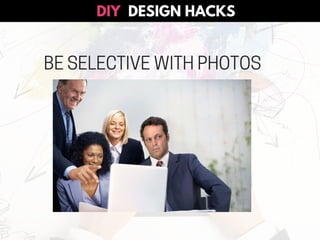
BE SELECTIVE WITH PHOTOS
DESIGN HACKSDIY
GRAB FREE STOCK PHOTOS
Unsplash.com
Librestock.com
Finda.Photo
Flickr.com
PAID: Stocksy.com
DESIGN HACKSDIY
click to try
Adobe Spark
DESIGN IT!
DESIGN HACKSDIY
Click for the demo!
Peg Fitzpatrick + Adobe Spark
DESIGN HACKSDIY

DIY Design for Video!