How to keep 
students 
wide awake 
& 
attentive 
in the classroom? 
TECHNOLOGY has answer: 
SMART CLASSROOMS
Before taking the 
final call to the 
question….. 
Let’s study a few 
backdrops of 
traditional 
classrooms. 
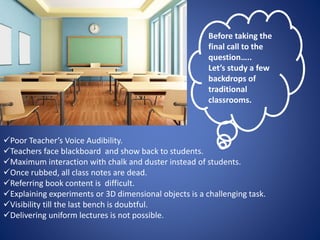
Poor Teacher’s Voice Audibility. 
Teachers face blackboard and show back to students. 
Maximum interaction with chalk and duster instead of students. 
Once rubbed, all class notes are dead. 
Referring book content is difficult. 
Explaining experiments or 3D dimensional objects is a challenging task. 
Visibility till the last bench is doubtful. 
Delivering uniform lectures is not possible.
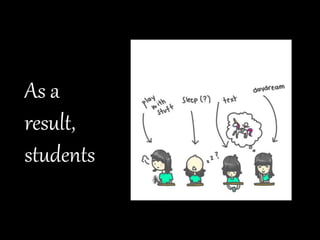
As a 
result, 
students
Teaching & Learning Experience becomes… 
but, don’t worry…….
TECHNOLOGY is … 
LIFE LINE 
The Innovation. Smart Classrooms
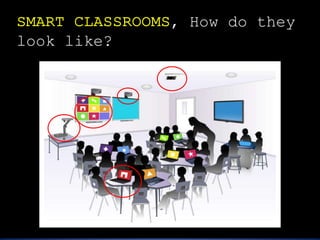
, How do they 
look like?
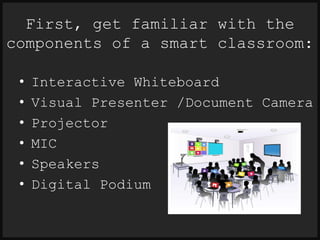
First, get familiar with the 
components of a smart classroom: 
• Interactive Whiteboard 
• Visual Presenter /Document Camera 
• Projector 
• MIC 
• Speakers 
• Digital Podium
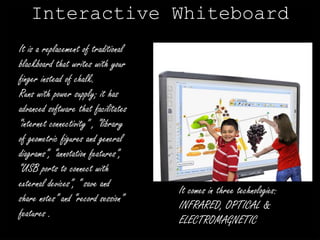
Interactive Whiteboard 
It is a replacement of traditional 
blackboard that writes with your 
finger instead of chalk. 
Runs with power supply; it has 
advanced software that facilitates 
“internet connectivity” , “library 
of geometric figures and general 
diagrams”, “annotation features”, 
“USB ports to connect with 
external devices”, “ save and 
share notes” and “record session” 
features . 
It comes in three technologies: 
INFRARED, OPTICAL & 
ELECTROMAGNETIC
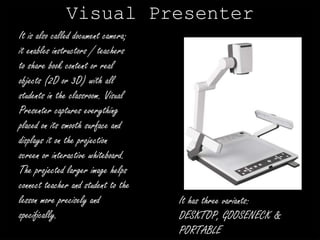
Visual Presenter 
It is also called document camera; 
it enables instructors / teachers 
to share book content or real 
objects (2D or 3D) with all 
students in the classroom. Visual 
Presenter captures everything 
placed on its smooth surface and 
displays it on the projection 
screen or interactive whiteboard. 
The projected larger image helps 
connect teacher and student to the 
lesson more precisely and 
specifically. 
It has three variants: 
DESKTOP, GOOSENECK & 
PORTABLE
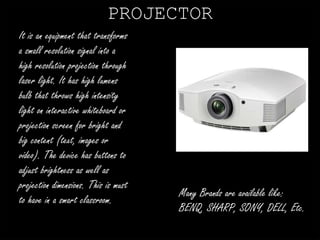
PROJECTOR 
It is an equipment that transforms 
a small resolution signal into a 
high resolution projection through 
laser light. It has high lumens 
bulb that throws high intensity 
light on interactive whiteboard or 
projection screen for bright and 
big content (text, images or 
video). The device has buttons to 
adjust brightness as well as 
projection dimensions. This is must 
to have in a smart classroom. 
Many Brands are available like: 
BENQ, SHARP, SONY, DELL, Etc.
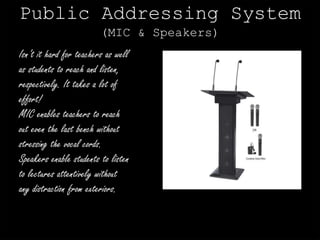
Public Addressing System 
(MIC & Speakers) 
Isn’t it hard for teachers as well 
as students to reach and listen, 
respectively. It takes a lot of 
effort! 
MIC enables teachers to reach 
out even the last bench without 
stressing the vocal cords. 
Speakers enable students to listen 
to lectures attentively without 
any distraction from exteriors.
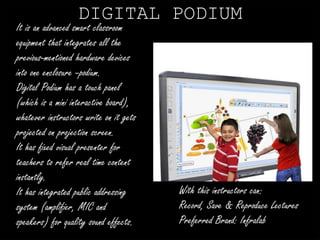
DIGITAL PODIUM 
It is an advanced smart classroom 
equipment that integrates all the 
previous-mentioned hardware devices 
into one enclosure –podium. 
Digital Podium has a touch panel 
(which is a mini interactive board), 
whatever instructors write on it gets 
projected on projection screen. 
It has fixed visual presenter for 
teachers to refer real time content 
instantly. 
It has integrated public addressing 
system (amplifier, MIC and 
speakers) for quality sound effects. 
With this instructors can: 
Record, Save & Reproduce Lectures 
Preferred Brand: Infralab
Gadgets are zero without human’s 
100 % 
contribution 
What makes Smart Classroom 
concept successful and ensure 100% 
interaction between teacher & 
students? 
Equipments or Something else… 
let’s see..
Q1: 
What if teacher 
does not know 
how to use 
computer?
Q2: 
What if teacher 
is unfamiliar 
with internet?
Q3: 
What if teacher 
does not have 
digital 
coursework 
content?
Q4: 
What if teacher 
is 
resistant/lazy 
to practice 
technology?
Q5: 
What if teacher 
does not know 
how to operate 
smart classroom 
equipments?
This is reality! 
Smart Classrooms are a show-business for 
institutes to sell maximum seats. 
TEACHERS don’t get official 
training to use interactive 
whiteboards, visual presenters 
and digital podiums. 
Smart Classroom Equipments are just hanged 
on walls to brag about, but not to use.
#TRAINING 
#Enforcement through mandate 
#Perfect Installation & Demonstration 
are the easy solutions to meet the challenges 
of implementing technology in education system.
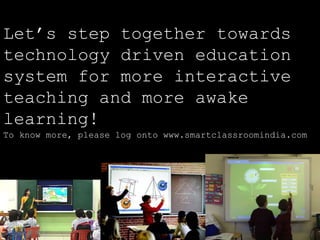
Let’s step together towards 
technology driven education 
system for more interactive 
teaching and more awake 
learning! 
To know more, please log onto www.smartclassroomindia.com

Smart Classroom Equipments for Digital Teaching & Learnng

  • 1.
    How to keep students wide awake & attentive in the classroom? TECHNOLOGY has answer: SMART CLASSROOMS
  • 2.
    Before taking the final call to the question….. Let’s study a few backdrops of traditional classrooms. Poor Teacher’s Voice Audibility. Teachers face blackboard and show back to students. Maximum interaction with chalk and duster instead of students. Once rubbed, all class notes are dead. Referring book content is difficult. Explaining experiments or 3D dimensional objects is a challenging task. Visibility till the last bench is doubtful. Delivering uniform lectures is not possible.
  • 3.
    As a result, students
  • 4.
    Teaching & LearningExperience becomes… but, don’t worry…….
  • 5.
    TECHNOLOGY is … LIFE LINE The Innovation. Smart Classrooms
  • 6.
    , How dothey look like?
  • 7.
    First, get familiarwith the components of a smart classroom: • Interactive Whiteboard • Visual Presenter /Document Camera • Projector • MIC • Speakers • Digital Podium
  • 8.
    Interactive Whiteboard Itis a replacement of traditional blackboard that writes with your finger instead of chalk. Runs with power supply; it has advanced software that facilitates “internet connectivity” , “library of geometric figures and general diagrams”, “annotation features”, “USB ports to connect with external devices”, “ save and share notes” and “record session” features . It comes in three technologies: INFRARED, OPTICAL & ELECTROMAGNETIC
  • 9.
    Visual Presenter Itis also called document camera; it enables instructors / teachers to share book content or real objects (2D or 3D) with all students in the classroom. Visual Presenter captures everything placed on its smooth surface and displays it on the projection screen or interactive whiteboard. The projected larger image helps connect teacher and student to the lesson more precisely and specifically. It has three variants: DESKTOP, GOOSENECK & PORTABLE
  • 10.
    PROJECTOR It isan equipment that transforms a small resolution signal into a high resolution projection through laser light. It has high lumens bulb that throws high intensity light on interactive whiteboard or projection screen for bright and big content (text, images or video). The device has buttons to adjust brightness as well as projection dimensions. This is must to have in a smart classroom. Many Brands are available like: BENQ, SHARP, SONY, DELL, Etc.
  • 11.
    Public Addressing System (MIC & Speakers) Isn’t it hard for teachers as well as students to reach and listen, respectively. It takes a lot of effort! MIC enables teachers to reach out even the last bench without stressing the vocal cords. Speakers enable students to listen to lectures attentively without any distraction from exteriors.
  • 12.
    DIGITAL PODIUM Itis an advanced smart classroom equipment that integrates all the previous-mentioned hardware devices into one enclosure –podium. Digital Podium has a touch panel (which is a mini interactive board), whatever instructors write on it gets projected on projection screen. It has fixed visual presenter for teachers to refer real time content instantly. It has integrated public addressing system (amplifier, MIC and speakers) for quality sound effects. With this instructors can: Record, Save & Reproduce Lectures Preferred Brand: Infralab
  • 13.
    Gadgets are zerowithout human’s 100 % contribution What makes Smart Classroom concept successful and ensure 100% interaction between teacher & students? Equipments or Something else… let’s see..
  • 14.
    Q1: What ifteacher does not know how to use computer?
  • 15.
    Q2: What ifteacher is unfamiliar with internet?
  • 16.
    Q3: What ifteacher does not have digital coursework content?
  • 17.
    Q4: What ifteacher is resistant/lazy to practice technology?
  • 18.
    Q5: What ifteacher does not know how to operate smart classroom equipments?
  • 19.
    This is reality! Smart Classrooms are a show-business for institutes to sell maximum seats. TEACHERS don’t get official training to use interactive whiteboards, visual presenters and digital podiums. Smart Classroom Equipments are just hanged on walls to brag about, but not to use.
  • 20.
    #TRAINING #Enforcement throughmandate #Perfect Installation & Demonstration are the easy solutions to meet the challenges of implementing technology in education system.
  • 21.
    Let’s step togethertowards technology driven education system for more interactive teaching and more awake learning! To know more, please log onto www.smartclassroomindia.com