DONE BY: SHARIFA AL HASANI KHADIJA AL AJMI BADRIYA AL BuSAIDI
 
 
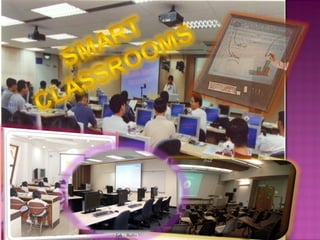
  Electronically enhanced lecture classrooms use computers, multimedia, network technology. Are also called digital or new media classrooms. Use interactive teaching and different types of visual equipments.
1.Computers 2.LCD Projectors 3.Laptops 4.DVD player 5.VCR 6.Laptop cart (Podium) 7.White board CRESTRON TOUCH PANELS  8.Microphones
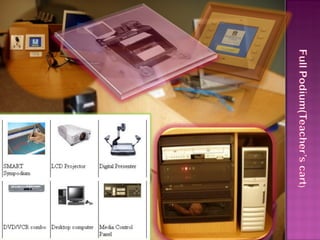
Crestron Touch Panel Interface Ceiling-mounted LCD projector  Windows computer with network access  Samsung Digital Document Camera VHS/DVD Combo Deck  Laptop cables
 
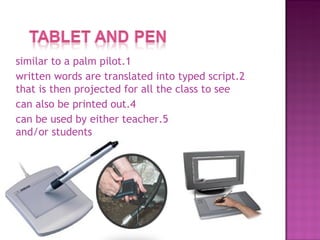
1.similar to a palm pilot 2.written words are translated into typed script that is then projected for all the class to see 4.can also be printed out 5.can be used by either teacher and/or students
1.Allows for communication between different schools in different countries 2.Professors can place Power points and notes online for students 3.Assists teachers in presenting their information 4.Easier student/professor communication 5.Allows students to focus more on the content of the lecture instead of taking notes 6.Allows for more active participation of students
1.costly to integrate into schooling 2.maintenance of equipment and rooms is costly 3.Under privileged schools do not have access to the technology 4.Teachers lack training/technical difficulties
1.Set your lighting first to insure that both your projected images are visible as well as your personal lecture notes. 2.Make sure that all the students have access to their devices that they are asked to use. 3.Make sure that all the devises work properly. 4.Remember to power off all equipment before leaving the room.
 

smart class rooms

  • 1.
    DONE BY: SHARIFAAL HASANI KHADIJA AL AJMI BADRIYA AL BuSAIDI
  • 2.
  • 3.
  • 4.
      Electronically enhancedlecture classrooms use computers, multimedia, network technology. Are also called digital or new media classrooms. Use interactive teaching and different types of visual equipments.
  • 5.
    1.Computers 2.LCD Projectors3.Laptops 4.DVD player 5.VCR 6.Laptop cart (Podium) 7.White board CRESTRON TOUCH PANELS 8.Microphones
  • 6.
    Crestron Touch PanelInterface Ceiling-mounted LCD projector Windows computer with network access Samsung Digital Document Camera VHS/DVD Combo Deck Laptop cables
  • 7.
  • 8.
    1.similar to apalm pilot 2.written words are translated into typed script that is then projected for all the class to see 4.can also be printed out 5.can be used by either teacher and/or students
  • 9.
    1.Allows for communicationbetween different schools in different countries 2.Professors can place Power points and notes online for students 3.Assists teachers in presenting their information 4.Easier student/professor communication 5.Allows students to focus more on the content of the lecture instead of taking notes 6.Allows for more active participation of students
  • 10.
    1.costly to integrateinto schooling 2.maintenance of equipment and rooms is costly 3.Under privileged schools do not have access to the technology 4.Teachers lack training/technical difficulties
  • 11.
    1.Set your lightingfirst to insure that both your projected images are visible as well as your personal lecture notes. 2.Make sure that all the students have access to their devices that they are asked to use. 3.Make sure that all the devises work properly. 4.Remember to power off all equipment before leaving the room.
  • 12.