DigitalRadiography
1GOOD AFTERNOON..
DIGITAL
RADIOGRAPHY
BY DR. REVATH VYAS
DEVULAPALLI
DigitalRadiography
2
Content
DigitalRadiography
3
Introduction & History
Equipment
Digital Image acquisition
• Types of receptor
• CCD
• CMOS
• Flat panel detectors
• PSP
Content
DigitalRadiography
4
Digital Image Processing
Digital Radiographic Image Storage
Digital Image Communication
Advantage and Disadvantages – Overall
Conclusion
Introduction
 Since the discovery of X-rays in 1895, film has been the
primary medium for capturing, displaying, and storing
radiographic images.
 It is a technology that dental practitioners are the most
familiar and comfortable with in terms of technique and
interpretation.
 Digital radiography is the latest advancement in dental
imaging and is slowly being adopted by the dental
profession.
DigitalRadiography
5
The Journal of Contemporary Dental Practice 2002 3(4):1-13
Introduction
 Digital imaging incorporates computer technology in the
capture, display, enhancement, and storage of direct
radiographic images.
 Digital imaging offers some distinct advantages over film,
but like any emerging technology, it presents new and
different challenges for the practitioner to overcome.
DigitalRadiography
6
The Journal of Contemporary Dental Practice 2002 3(4):1-13
DigitalRadiography
7
Radiography
Analog Digital
Scanner
(X-ray digitizer)
Computed
Radiography (CR)
Direct Digital
Radiography (DR or
DDR)
 A conventional system uses x-ray film to create a latent
image.
 The film is then processed, creating a manifest image that
can be interpreted by a physician.
 It is later stored in the file room (physical storage for
archival)
DigitalRadiography
8
 Method is film-based.
 Method may uses intensifying screens.
 Film is placed between two screens.
 Screens emit light when x-rays strike them.
 Film is processed chemically.
 Processed film is viewed on view-box (lightbox).
DigitalRadiography
9
DigitalRadiography
10
Chemical
Processing in film
radiography
Problems with Film ?
 10% of films are not available when we want them!
 15% of films are “hard” to locate or find!
 25% of films are “misplaced” or not retrievable (misfiled).
 10% of films are lost (referrals, residents, etc.)
 Recent study – physicians spend two weeks/year (100
hours/year) trying to locate or find the films they need.
DigitalRadiography
11
DigitalRadiography
12
Radiography
Analog Digital
Scanner
(X-ray digitizer)
Computed
Radiography (CR)
Direct Digital
Radiography (DR or
DDR)
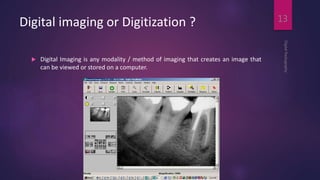
Digital imaging or Digitization ?
 Digital Imaging is any modality / method of imaging that creates an image that
can be viewed or stored on a computer.
DigitalRadiography
13
Pixel
 In digital imaging, a pixel [picture element] is the smallest
controllable element of a picture represented on the
screen
DigitalRadiography
14
[Internet] [cited 2014 Apr 10]. Available from
http://en.wikipedia.org/wiki/Pixel
Pixel
DigitalRadiography
15
[Internet] [cited 2014 Apr 10]. Available from
http://en.wikipedia.org/wiki/Pixel
Pixel
DigitalRadiography
16
[Internet] [cited 2014 Apr 10]. Available from
http://en.wikipedia.org/wiki/Pixel
Analogue to Digital Conversion
 The term digital in digital imaging refers to the numeric
format of the image content and its discreteness.
 Conventional film images can be considered an analog
medium in which differences in the size and distribution
of black metallic silver result in a continuous density
spectrum.
DigitalRadiography
17
White SC, Pharoah MJ, Oral Radiology Principles and Interpretation,
6th Edition Mosby 2009
Analogue to Digital Conversion
 Digital images are numeric and discrete in two ways:
(1) in terms of the spatial distribution of the picture elements (pixels)
and
(2) in terms of the different shades of gray of each of the pixels.
DigitalRadiography
18
White SC, Pharoah MJ, Oral Radiology Principles and Interpretation,
6th Edition Mosby 2009
Analogue to Digital Conversion
 A digital image consists of a large collection of individual pixels organized in a
matrix of rows and columns.
 Production of a digital image requires a process called analog to digital
conversion (ADC)
DigitalRadiography
19
White SC, Pharoah MJ, Oral Radiology Principles and Interpretation,
6th Edition Mosby 2009
ADC consists of 2 steps
Quantization
Sampling
DigitalRadiography
20
White SC, Pharoah MJ, Oral Radiology Principles and Interpretation,
6th Edition Mosby 2009
Sampling
 Sampling means that a small range of voltage values are
grouped together as a single value
DigitalRadiography
21
White SC, Pharoah MJ, Oral Radiology Principles and Interpretation,
6th Edition Mosby 2009
Sampling
 Narrow sampling better mimics
the original signal but leads to
larger memory requirements for
the resulting digital image
DigitalRadiography
22
White SC, Pharoah MJ, Oral Radiology Principles and Interpretation,
6th Edition Mosby 2009
Quantization
 Once sampled, every sampled signal is assigned a value.
 For the clinician to see the image, the computer organizes
the pixels in their proper locations and displays a shade of
gray that corresponds to the number that was assigned
during the quantization step.
DigitalRadiography
23
White SC, Pharoah MJ, Oral Radiology Principles and Interpretation,
6th Edition Mosby 2009
Quantization
DigitalRadiography
24
White SC, Pharoah MJ, Oral Radiology Principles and Interpretation,
6th Edition Mosby 2009
Equipment
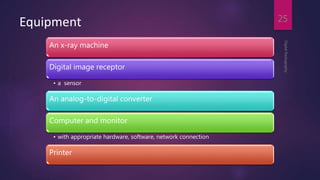
An x-ray machine
Digital image receptor
• a sensor
An analog-to-digital converter
Computer and monitor
• with appropriate hardware, software, network connection
Printer
DigitalRadiography
25
DigitalRadiography
26
Lanc¸a L, Silva A, Digital Imaging Systems for Plain Radiography,
Springer 2013
Digital Radiography
Direct Indirect
DigitalRadiography
27
The Journal of Contemporary Dental Practice 2002 3(4):1-13
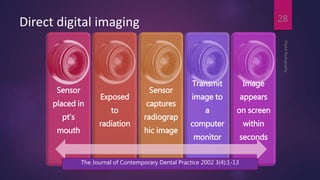
Direct digital imaging
DigitalRadiography
28
Sensor
placed in
pt’s
mouth
Exposed
to
radiation
Sensor
captures
radiograp
hic image
Transmit
image to
a
computer
monitor
Image
appears
on screen
within
seconds
The Journal of Contemporary Dental Practice 2002 3(4):1-13
Indirect digital imaging
Exisiting Xray film
digitized using
CCD camera
Scans the image
Digitizes displays
on computer
monitor
DigitalRadiography
29
The Journal of Contemporary Dental Practice 2002 3(4):1-13
Types of digital image receptor
DigitalRadiography
30
White SC, Pharoah MJ, Oral Radiology Principles and Interpretation,
6th Edition Mosby 2009
1. Solid state technology:
• Charge coupled device
• Complementory metal oxide semiconductors
• Flat panel detectors
2. Photostimulable phosphor plate
Digital image receptors
DigitalRadiography
31
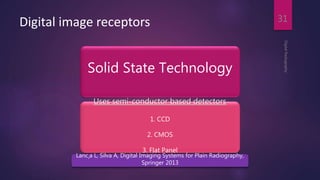
Solid State Technology
Uses semi-conductor based detectors
1. CCD
2. CMOS
3. Flat Panel
Lanc¸a L, Silva A, Digital Imaging Systems for Plain Radiography,
Springer 2013
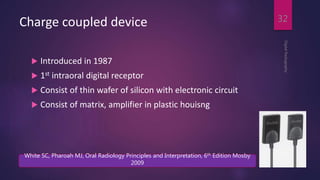
Charge coupled device
 Introduced in 1987
 1st intraoral digital receptor
 Consist of thin wafer of silicon with electronic circuit
 Consist of matrix, amplifier in plastic houisng
DigitalRadiography
32
White SC, Pharoah MJ, Oral Radiology Principles and Interpretation, 6th Edition Mosby
2009
 A number of manufacturers produce detectors with varying active sensor areas
roughly corresponding to the different sizes of intraoral film
DigitalRadiography
33
DigitalRadiography
34
Whaites E, Essentials of Dental Radiography and Radiology, 4th edition,
2007
Structure
DigitalRadiography
35
Structure
DigitalRadiography
36
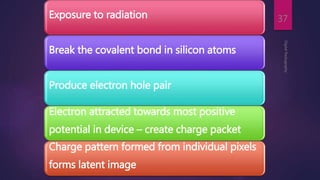
Exposure to radiation
Break the covalent bond in silicon atoms
Produce electron hole pair
Electron attracted towards most positive
potential in device – create charge packet
Charge pattern formed from individual pixels
forms latent image
DigitalRadiography
37
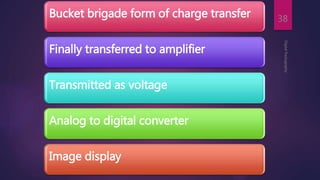
Bucket brigade form of charge transfer
Finally transferred to amplifier
Transmitted as voltage
Analog to digital converter
Image display
DigitalRadiography
38
Valence Band
Mechanism
DigitalRadiography
39
+e-
e-
Photoelectric absorption in Silicon
Conduction Band
e-
+
DigitalRadiography
40
[Internet] [cited 2014 Apr 10]. Available from
http://www.vikdhillon.staff.shef.ac.uk/teaching/phy217/detectors
DigitalRadiography
41
[Internet] [cited 2014 Apr 10]. Available from
http://www.vikdhillon.staff.shef.ac.uk/teaching/phy217/detectors
DigitalRadiography
42
[Internet] [cited 2014 Apr 10]. Available from
http://www.vikdhillon.staff.shef.ac.uk/teaching/phy217/detectors
DigitalRadiography
43
DigitalRadiography
44
DigitalRadiography
45
Bucket brigade form of charge transfer
Finally transferred to amplifier
Transmitted as voltage
Analog to digital converter
Image display
DigitalRadiography
46
DigitalRadiography
47
CCD
 Detectors without flaws are relatively expensive to produce,
and expense of the detector increases with increasing matrix
size (total number of pixels).
 Pixel size varies from 20 microns to 70 microns. Smaller pixel
size increases the cost of the receptor.
 CCDs have also been made in linear arrays of a few pixels
wide and many pixels long for panoramic and cephalometric
imaging.
DigitalRadiography
48
White SC, Pharoah MJ, Oral Radiology Principles and Interpretation,
6th Edition Mosby 2009
DigitalRadiography
49
CCD Linear
array
made up of few
px wide and
many px long
Area array
White SC, Pharoah MJ, Oral Radiology Principles and Interpretation,
6th Edition Mosby 2009
Linear array
DigitalRadiography
50
Whaites E, Essentials of Dental Radiography and Radiology, 4th edition,
2007
Area array
DigitalRadiography
51
Whaites E, Essentials of Dental Radiography and Radiology, 4th edition,
2007
Advantages
DigitalRadiography
52
Intact images or real time image production and display.
Consistent quality
X ray sensitivity is 80% greater than conventional film.
Elimination of hazardous chemicals used in film processing and lead
foil.
Computer aided diagnosis
Disadvantages
DigitalRadiography
53
High initial cost of system
Unknown life expectancy of CCD sensor
Rigidity and thickness of the sensor
Decreased resolution
CCDS cannot be sterilized
Hard copy images fade with time
Disadvantages
DigitalRadiography
54
Image manipulation can be time consuming.
The sensor may not be well tolerated by patients -more time-
consuming
The cable attached to the sensor is easily damaged and may
interfere with sensor
Actual area available for image capture may be as little as
60% of the sensor area
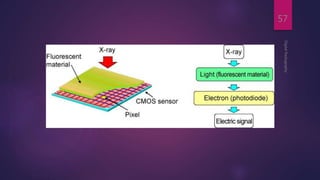
Complementary metal oxide semiconductors
DigitalRadiography
55
Each pixel is isolated from its neighboring pixels
and connected to transistor
Electron hole pair generated within pixel
Charge transfer to transistor in form of voltage
Each transistor voltage is read out separately by
frame grabber
Stored and displayed as digital gray value
Whaites E, Essentials of Dental Radiography and Radiology, 4th edition, 2007
DigitalRadiography
56
AD
C
DigitalRadiography
57
Scintillator
 A scintillator is a material that exhibits scintillation — the
property of luminescence when excited by ionizing
radiation.
 Luminescent materials, when struck by an incoming
particle, absorb its energy and scintillate, (i.e., re-emit the
absorbed energy in the form of light)
DigitalRadiography
58
[Internet] [cited 2014 Apr 10]. Available from
http://en.wikipedia.org/wiki/Scintillator
DigitalRadiography
59
Lanc¸a L, Silva A, Digital Imaging Systems for Plain Radiography,
Springer 2013
 These sensors do not require charge transfer, resulting in
increased sensor reliability and lifespan.
 Require less system power to operate and are less
expensive to manufacture
 Low cost
 Fixed pattern of noise
 Smaller active area
DigitalRadiography
60
CCD CMOS
POWER COSUMPTION. 400mw 40mw
SENSITIVITY TO LIGHT Excellent Excellent
SENSITIVITY TO X RAYS High Unknown
PIXEL SIZE. 40 micron 25 micron
COST. High Medium
MANUFACTURE. Expensive Cheap
BREAKAGE RESISTANCE Low Medium
DYNAMIC RANGE Excellent Excellent
NOISE. Low High
READOUT. Complex Simple
EFFICACY. Excellent Fair
DigitalRadiography
61
Flat panel detector
 Used for medical imaging, extraoral imaging device
 Provide large matrix area with pixel of less than 100 µm
 Allows imaging of larger areas including head
 2 types: direct
indirect
DigitalRadiography
62
Lanc¸a L, Silva A, Digital Imaging Systems for Plain Radiography,
Springer 2013
Flat panel detector
DigitalRadiography
63
Indirect
flat
panel
detector:
sensitive to visible light
use intensifying screen to
convert X-ray to light
Photoconductor material - aSi
Lanc¸a L, Silva A, Digital Imaging Systems for Plain Radiography,
Springer 2013
Flat panel detector
DigitalRadiography
64
Direct
flat
panel
detector
use selenium
for efficient X-
rays absorption
Lanc¸a L, Silva A, Digital Imaging Systems for Plain Radiography,
Springer 2013
Flat panel detector
 It is a “sandwich” constructions consisting of a scintillator
layer, an amorphous silicon photodiode circuitry layer, and
a TFT array.
DigitalRadiography
65
White SC, Pharoah MJ, Oral Radiology Principles and Interpretation,
6th Edition Mosby 2009
Thin Film Transistor (TFT)
 It is a special kind of field-effect transistor made by
depositing thin films of an active semiconductor layer
 A transistor is a semiconductor device used to amplify and
switch electronic signals and electrical power. It is
composed of semiconductor material with at least three
terminals for connection to an external circuit.
DigitalRadiography
66
[Internet] [cited 2014 Apr 10]. Available from
http://en.wikipedia.org/wiki/Thin-film_transistor
Flat panel detector
 When x-ray photons reach the scintillator, visible light
proportional to the incident energy is emitted and then
recorded by an array of photodiodes and converted to
electrical charges.
 These charges are then read out by a TFT array similar to
that of direct conversion DR systems.
DigitalRadiography
67
Lanc¸a L, Silva A, Digital Imaging Systems for Plain Radiography,
Springer 2013
Flat Panel Structure
DigitalRadiography
68
Lanc¸a L, Silva A, Digital Imaging Systems for Plain Radiography,
Springer 2013
Advantages
 Real-time process
 With a time lapse between exposure and image display of
less than 10 seconds.
DigitalRadiography
69
Disadvantages
 Large in size so cannot be used intraorally
 Expensive
DigitalRadiography
70
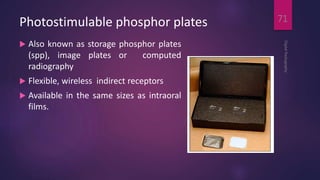
Photostimulable phosphor plates
 Also known as storage phosphor plates
(spp), image plates or computed
radiography
 Flexible, wireless indirect receptors
 Available in the same sizes as intraoral
films.
DigitalRadiography
71
Structure
 The PSP material used for radiographic imaging is “
europium doped” barium fluorohalide.
 Barium in combination with iodine, chlorine, or bromine
forms a crystal lattice.
 The addition of europium (Eu + 2 ) creates imperfections
in this lattice.
DigitalRadiography
72
White SC, Pharoah MJ, Oral Radiology Principles and Interpretation, 6th Edition Mosby
2009
Structure
DigitalRadiography
73
Whaites E, Essentials of Dental Radiography and Radiology, 4th edition,
2007
Mechanism
 When exposed to a sufficiently energetic source of
radiation, valence electrons in europium can absorb
energy and move into the conduction band.
 These electrons migrate to nearby halogen vacancies (F-
centers) in the fluorohalide lattice and may become
trapped there in a metastable state.
DigitalRadiography
74
White SC, Pharoah MJ, Oral Radiology Principles and Interpretation, 6th Edition Mosby
2009
Valence Band e-
Plate
prepared
Plate
exposed
X ray
photon
F Center
Eu+2  Eu+3Eu+2
F Center
Conduction Band
Whaites E,
Essentials
of Dental
Radiograph
y and
Radiology,
4th edition,
2007
Mechanism
 While in this state, the number of trapped electrons is proportional to x-ray
exposure and represents a latent image.
 When stimulated by red light of around 600 nm, the barium fluorohalide releases
trapped electrons to the conduction band.
DigitalRadiography
76
Whaites E, Essentials of Dental Radiography and Radiology, 4th edition,
2007
Mechanism
 When an electron returns to the Eu + 3 ion, energy is released in the green
spectrum between 300 and 500 nm
DigitalRadiography
77
Whaites E, Essentials of Dental Radiography and Radiology, 4th edition,
2007
Valence Band e-
Plate
prepared
Plate
exposed
Plate
processed
laser
Photomultiplier
tube
X ray
photon
F Center
Eu+2 Eu+3Eu+2  Eu+3Eu+2
F Center F Center
Conduction Band
Whaites E,
Essentials
of Dental
Radiograph
y and
Radiology,
4th edition,
2007
Mechanism
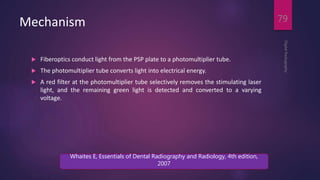
 Fiberoptics conduct light from the PSP plate to a photomultiplier tube.
 The photomultiplier tube converts light into electrical energy.
 A red filter at the photomultiplier tube selectively removes the stimulating laser
light, and the remaining green light is detected and converted to a varying
voltage.
DigitalRadiography
79
Whaites E, Essentials of Dental Radiography and Radiology, 4th edition,
2007
PROCEDURE
DigitalRadiography
80
PROCEDURE
DigitalRadiography
81
Stationary plate scans
 Method for "reading" the latent images on PSP plates.
 A rapidly rotating multifaceted mirror that reflects a beam of red laser light.
 As the mirror revolves, the laser light sweeps across the plate. The plate is
advanced and the adjacent line of phosphor is scanned.
DigitalRadiography
82
White SC, Pharoah MJ, Oral Radiology Principles and Interpretation, 6th Edition Mosby
2009
 Slow scan direction – direction of psp plate
 Fast scan direction – direction of laser light
DigitalRadiography
83
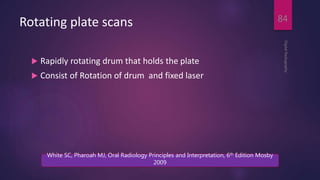
Rotating plate scans
 Rapidly rotating drum that holds the plate
 Consist of Rotation of drum and fixed laser
DigitalRadiography
84
White SC, Pharoah MJ, Oral Radiology Principles and Interpretation, 6th Edition Mosby
2009
Advantages
Storage phosphor plates can be reused indefinitely
Receptor is cordless & flexible
Linear or logarithmic response to radiation is available
There is wide exposure range & fewer retakes
Less radiation is required
DigitalRadiography
85
Advantages
DigitalRadiography
86
No chemical processing required
Image processing of acquired images is available
Images can be transferred to easily
Images can be easily & inexpensively stored & retrieved
Computed aided diagnosis
Disadvantages
Receptors must be erased before reuse
High initial cost of the equipment
The spatial resolution of film exceeds
Some of the image processing routines are time – intensive
Phosphor plates must be packaged in sterile envelopes
possibility of transfer of contaminated material to patient's mouth if integrity of plate's protective envelope is
jeopardized
DigitalRadiography
87
Imaging processing
 Any operation that acts to improve, restore, analyze or in
some way change a digital image is a form of image
processing.
 Some of these operations are integrated in the image
acquisition and image management software and are hidden
from the user.
 Others are controlled by the user with the intention to
improve the quality of the image or to analyze its contents.
DigitalRadiography
88
Imaging processing
DigitalRadiography
89
Image restoration
Image enhancement
Image analysis
Image compression
Image restoration
 Raw data enter computer
 Preprocessing -- Image corrected for known defects
 Adjustment of image intensities
 Substitution of defective pixels
 Preprocessing operations set by manufacturer
DigitalRadiography
90
Image restoration
 Depending on the quality of the sensor and the choices
made by the manufacturer, a variety of other operations
maybe applied to the image before it becomes visible on
the display.
 They are executed very rapidly and are unnoticed by the
user.
DigitalRadiography
91
White SC, Pharoah MJ, Oral Radiology Principles and Interpretation, 6th Edition Mosby
2009
Imaging processing
DigitalRadiography
92
Image restoration
Image enhancement
Image analysis
Image compression
Brightness
DigitalRadiography
93
White SC, Pharoah MJ, Oral Radiology Principles and Interpretation, 6th Edition Mosby
2009
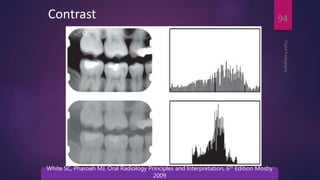
Contrast
DigitalRadiography
94
White SC, Pharoah MJ, Oral Radiology Principles and Interpretation, 6th Edition Mosby
2009
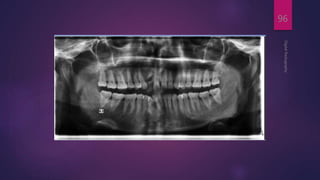
Negative Conversion
 Useful in visualizing the trabecular pattern of bone
 pulp canal and chamber anatomy
DigitalRadiography
95
DigitalRadiography
96
DigitalRadiography
97
Colour:
DigitalRadiography
98
Whaites E, Essentials of Dental Radiography and Radiology, 4th edition,
2007
Imaging processing
DigitalRadiography
99
Image restoration
Image enhancement
Image analysis
Image compression
DigitalRadiography
100
White SC, Pharoah MJ, Oral Radiology Principles and Interpretation, 6th Edition Mosby
2009
b) Diagnosis:
 Three basic steps of image analysis are :
 Segmentation - most critical step.
 Feature extraction
 Object classification.
 The goal of segmentation is to simplify the image and
reduce it to its basic components.
 This involves subdividing the image, thus separating
objects from the background.
DigitalRadiography
101
b) Diagnosis:
 Objects of interest are defined by the diagnostic task, for
example, a tooth, a carious lesion, a bone level, or an
implant.
 A unique set of values for a certain combination of
features can lead to classification of the object.
 Automated cephalometric landmark identification is an
example.
DigitalRadiography
102
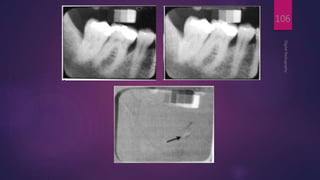
 Dental subtraction radiography (Ruttimann et al, 1981)
was found to be a feasible method that increases the
accuracy of detection of density changes between serial
radiographs
DigitalRadiography
103
 When two images of the same object are registered and
the image intensities of corresponding pixels are
subtracted, a uniform difference image is produced.
 If there is a change in the radiographic attenuation
between the baseline and follow-up examination, this
change shows up as a brighter area when the change
represents gain and as a darker area when the change
represents loss
DigitalRadiography
104
 The strength of digital subtraction radiography (DSR) is
that it cancels out the complex anatomic background
against which this change occurs.
 Subtraction radiography requires two images , which are
exposed with the same geometry
DigitalRadiography
105
DigitalRadiography
106
Imaging processing
DigitalRadiography
107
Image restoration
Image enhancement
Image analysis
Image compression
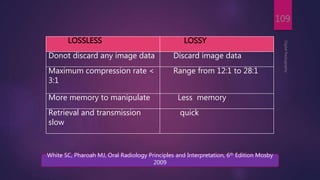
Image compression
 Process of file reduction.
 To reduce computer storage space and facilitate image
retrieval and transmission.
 Compression becomes a more important issue as the
number of patient records and image files to be stored
increases over time
 Two types: lossless and lossy
DigitalRadiography
108
White SC, Pharoah MJ, Oral Radiology Principles and Interpretation, 6th Edition Mosby
2009
DigitalRadiography
109
LOSSLESS LOSSY
Donot discard any image data Discard image data
Maximum compression rate <
3:1
Range from 12:1 to 28:1
More memory to manipulate Less memory
Retrieval and transmission
slow
quick
White SC, Pharoah MJ, Oral Radiology Principles and Interpretation, 6th Edition Mosby
2009
Laser Printer
DigitalRadiography
110
Image Storage:
 The use of digital imaging in dentistry requires an image
archiving and management system that is very different
from conventional radiography.
 Storage of diagnostic images on magnetic or optical media
raises a number of new issues that must be considered.
 The file size of dental digital radiographs varies
considerably, ranging from 200 KB for intra oral images to
as much as 6 MB for extraoral images.
DigitalRadiography
111
White SC, Pharoah MJ, Oral Radiology Principles and Interpretation, 6th Edition Mosby
2009
Image Storage:
 Once in a digital format, critical image data can be deleted
or modified.
 The backup media suitable for external storage of digital
radiographs include external hard drives, digital types,
CDs and DVDs.
DigitalRadiography
112
White SC, Pharoah MJ, Oral Radiology Principles and Interpretation, 6th Edition Mosby
2009
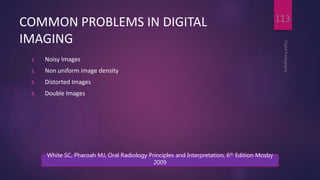
COMMON PROBLEMS IN DIGITAL
IMAGING
1. Noisy Images
2. Non uniform image density
3. Distorted Images
4. Double Images
DigitalRadiography
113
White SC, Pharoah MJ, Oral Radiology Principles and Interpretation, 6th Edition Mosby
2009
Noisy Images
DigitalRadiography
114
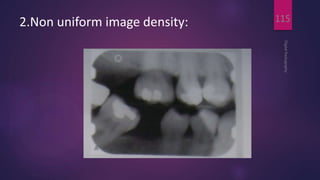
2.Non uniform image density:
DigitalRadiography
115
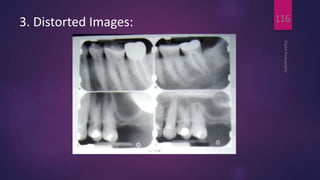
3. Distorted Images:
DigitalRadiography
116
4. Double Images:
DigitalRadiography
117
Damaged Image receptors:
 Scratched phosphor surface mimicking root canal filling
A and retake B.
DigitalRadiography
118
 Image artifacts
resulting from
excessive bending of
the PSP plate and
excessive bending has
resulted in permanent
damage to the
phosphor plate
DigitalRadiography
119
 PSP circular artifact as a
result of plate damage and
localized swelling of the
protective coating from
disinfectant solution on
work surface
DigitalRadiography
120
 PSP image artifact resulting
from plate surface
contamination
 This artifact was caused by a
glove powder smudge that
prevented proper scanning
of the affected area of the
PSP plate.
DigitalRadiography
121
 Malfunctioning
CCD sensor
resulting from
rough handling
(dropped sensor)
 The sensor
produces
geometric image
artifacts
DigitalRadiography
122
 Improper use of image processing
tools, such as filters, may result in
false-positive findings. An edge
enhancement filter was applied to
the panoramic image, which
produced radiolucencies at
restoration edges simulating
recurrent caries
 These radiolucencies are not
present in a follow-up intraoral
image
DigitalRadiography
123
DigitalRadiography
124
Imaging Step Film CCD/CMOS PSP
Receptor
preparation. None
1) Place protective
plastic sleeve over
receptor
2) Receptor must be
connected to
computer and patient
identifying
information entered
for
acquisition/archiving
software
1) Erase plates
2) Package plates in
protective plastic
envelope
Receptor
placement.
1) Film holding
devices
2) Film may be
bent to
accommodate
anatomy
1) Specialised receptor
holder
2) Inflexible and
bulkiness
3) Receptor cable
4) Discomfort
1) Film holding
devices
2) Bending of
receptor may
irreversibly damage
it
Exposure.
Simple exposure
Computer must be
activated before
exposure
Simple exposure
DigitalRadiography
125
Imaging Step Film CCD/CMOS PSP
Processing.
1) Dark room
2) Processing
chemicals
3) Processing time
4) Hazardous
wastes
Image acquisation and
display is almost
immediate
1) Dim light envt
2) Processor must be
programmed with
patient and detector
information so that
images are identified,
preprocessed and
stored properly
Display
Preparation.
Film mounts 1) Software – digital mount 1) Individual mount
2) Digitally rotated
Display
1) A room with
subdued lighting
and a masked
viewbox
2) Any light source
1) subdued lighting
2) A computer and display with app. Software
3) Size of the display restrict the no. of images
Image
Duplication.
Inferior to original
and sometimes non-
diagnostic
1. Electronic copies may be stored on variety of media
without loss of image quality
2. Output on Film or paper is inferior and non-diagnostic
ADVANTAGES OF
DIGITAL IMAGING
DigitalRadiography
126
Dose reduction
 Dose reductions of up to 90 per cent compared to E speed
film have been reported by some authors in the diagnosis of
caries.
 Although some researchers do claim dose reductions
compared with conventional extra-oral film, in practice the
background noise rises to unacceptable levels.
 It is now accepted that there is no appreciable reduction
compared with films used in conjunction with rare earth
intensifying screens.
DigitalRadiography
127
Dentomaxillofacial Radiology 1995; 24: 250
Image manipulation
 This is perhaps the greatest advantage of digital imaging
over conventional film.
 It involves selecting the information of greatest diagnostic
value and suppressing the rest.
 Manufacturers provide software programmes with many
different processing tools, however some are more useful
than others and these include:
DigitalRadiography
128
Dentomaxillofacial Radiology 2012,41(3)203-210
1. Contrast enhancement
 This can effectively compensate for over or under
exposure of the digital image.
 It has been shown that contrast enhancement of CCD
devices were more accurate than E-speed film for
detecting simulated caries under orthodontic bands
DigitalRadiography
129
The British Journal of Radiology 1991,64(763)591-595
2. Measurements
 Digital callipers, rulers and protractors are some of the
many tools available for image analysis.
 Many authors have reported on their application in
cephalometric analysis.
 The images can also be superimposed onto each other
and onto digital photographs.
DigitalRadiography
130
Journal of Endodontics 2007, 33(1) 1–6
3. 3-D reconstruction
 This application can be theoretically used to reconstruct
intra- and extra-oral images.
 The uses range from profiling root canals to visualizing
facial fractures in all three dimensions.
DigitalRadiography
131
Brennan J. Journal of Orthodontics 2002 (29) 66–69
4. Filtration
 The addition of filters to the airspace around the face can
clarify the soft tissue profile if the original soft tissue
image was poor
DigitalRadiography
132
Brennan J. Journal of Orthodontics 2002 (29) 66–69
Time
 Much time is gained especially with the CCD system
where the image is displayed at the chairside immediately
post exposure.
 Although a lag time between scanning and the
appearance of an image exists with the PSP method it is
still substantially faster than conventional developing
processes in general use.
DigitalRadiography
133
Brennan J. Journal of Orthodontics 2002 (29) 66–69
Storage
 Storage was initially a problem before the development of
DVDs and CD ROMs as three peri-apical images would fill
a floppy disc.
 However, now a CD ROM can hold over 30,000 images.
 This means that images can be stored cheaply and
indefinitely.
DigitalRadiography
134
Brennan J. Journal of Orthodontics 2002 (29) 66–69
Teleradiology
 Teleradiology is the transmission of radiological patient
images, such as x-rays, CTs, and MRIs, from one location
to another for the purposes of sharing studies with other
radiologists and physicians.
 This had the advantages of not losing radiographs in the
post and saving time if an urgent appointment is required.
DigitalRadiography
135
Environmentally friendly
 No processing chemicals are used or disposed of. Both
CCD sensors and the PSP plates are capable of being
reused for many thousands of exposures.
 They can, however, become scratched and damaged if not
handled carefully.
DigitalRadiography
136
Brennan J. Journal of Orthodontics 2002 (29) 66–69
Medico-legal
 Many insurance companies in the USA are accepting
digital images as valid attachments when the claims are
electronically claimed.
DigitalRadiography
137
Dentomaxillofacial Radiology 2000, 12(4)292-297
DISADVANTAGES OF
DIGITAL IMAGING
DigitalRadiography
138
Cost
Currently the cost of
Intra oral sensor – 1.2 – 2 lakh
Extra oral machins – 10 - 15 lakh
DigitalRadiography
139
Sensor dimensions
 These are still quite bulky for the CCD system and
awkward to position due to trailing fibre optic wires.
 The original problem of small sensor active areas has
been rectified and the same amount of information can
be captured as conventional film.
DigitalRadiography
140
Brennan J. Journal of Orthodontics 2002 (29) 66–69
Cross-infection control
 Each intra-oral sensor and plate must be covered by a
plastic bag, and this bag is changed between patients.
 However, if they become directly contaminated there is
no way of sterilizing them and they should be discarded
regardless of expense.
DigitalRadiography
141
Brennan J. Journal of Orthodontics 2002 (29) 66–69
Medico-legal
 Concerns have been raised in the past about the ability to
manipulate the images for fraudulent purposes.
 Manufacturers of software programmes have installed
‘audit trails’, which can track down and recover the
original image.
DigitalRadiography
142
Dentomaxillofacial Radiology 2000, 12(4)292-297
Conclusion
 The technology is now available to run a practice almost paper free.
 It is theoretically possible to store clinical notes, photographs,
radiographs, and study models on disc, and refer or consult online.
 Research is also continuing into the development of a credit card sized
‘smart card’, which could carry a patient’s medical and dental notes
along with their radiographic images.
 It is important that advances in technology are accepted and the benefits
that they produce utilized in order that clinical practice and patient care
continue to improve.
DigitalRadiography
143
Thank You…
DigitalRadiography
144

Digital imaging IN DENTISTRY

  • 1.
  • 2.
    DIGITAL RADIOGRAPHY BY DR. REVATHVYAS DEVULAPALLI DigitalRadiography 2
  • 3.
    Content DigitalRadiography 3 Introduction & History Equipment DigitalImage acquisition • Types of receptor • CCD • CMOS • Flat panel detectors • PSP
  • 4.
    Content DigitalRadiography 4 Digital Image Processing DigitalRadiographic Image Storage Digital Image Communication Advantage and Disadvantages – Overall Conclusion
  • 5.
    Introduction  Since thediscovery of X-rays in 1895, film has been the primary medium for capturing, displaying, and storing radiographic images.  It is a technology that dental practitioners are the most familiar and comfortable with in terms of technique and interpretation.  Digital radiography is the latest advancement in dental imaging and is slowly being adopted by the dental profession. DigitalRadiography 5 The Journal of Contemporary Dental Practice 2002 3(4):1-13
  • 6.
    Introduction  Digital imagingincorporates computer technology in the capture, display, enhancement, and storage of direct radiographic images.  Digital imaging offers some distinct advantages over film, but like any emerging technology, it presents new and different challenges for the practitioner to overcome. DigitalRadiography 6 The Journal of Contemporary Dental Practice 2002 3(4):1-13
  • 7.
  • 8.
     A conventionalsystem uses x-ray film to create a latent image.  The film is then processed, creating a manifest image that can be interpreted by a physician.  It is later stored in the file room (physical storage for archival) DigitalRadiography 8
  • 9.
     Method isfilm-based.  Method may uses intensifying screens.  Film is placed between two screens.  Screens emit light when x-rays strike them.  Film is processed chemically.  Processed film is viewed on view-box (lightbox). DigitalRadiography 9
  • 10.
  • 11.
    Problems with Film?  10% of films are not available when we want them!  15% of films are “hard” to locate or find!  25% of films are “misplaced” or not retrievable (misfiled).  10% of films are lost (referrals, residents, etc.)  Recent study – physicians spend two weeks/year (100 hours/year) trying to locate or find the films they need. DigitalRadiography 11
  • 12.
  • 13.
    Digital imaging orDigitization ?  Digital Imaging is any modality / method of imaging that creates an image that can be viewed or stored on a computer. DigitalRadiography 13
  • 14.
    Pixel  In digitalimaging, a pixel [picture element] is the smallest controllable element of a picture represented on the screen DigitalRadiography 14 [Internet] [cited 2014 Apr 10]. Available from http://en.wikipedia.org/wiki/Pixel
  • 15.
    Pixel DigitalRadiography 15 [Internet] [cited 2014Apr 10]. Available from http://en.wikipedia.org/wiki/Pixel
  • 16.
    Pixel DigitalRadiography 16 [Internet] [cited 2014Apr 10]. Available from http://en.wikipedia.org/wiki/Pixel
  • 17.
    Analogue to DigitalConversion  The term digital in digital imaging refers to the numeric format of the image content and its discreteness.  Conventional film images can be considered an analog medium in which differences in the size and distribution of black metallic silver result in a continuous density spectrum. DigitalRadiography 17 White SC, Pharoah MJ, Oral Radiology Principles and Interpretation, 6th Edition Mosby 2009
  • 18.
    Analogue to DigitalConversion  Digital images are numeric and discrete in two ways: (1) in terms of the spatial distribution of the picture elements (pixels) and (2) in terms of the different shades of gray of each of the pixels. DigitalRadiography 18 White SC, Pharoah MJ, Oral Radiology Principles and Interpretation, 6th Edition Mosby 2009
  • 19.
    Analogue to DigitalConversion  A digital image consists of a large collection of individual pixels organized in a matrix of rows and columns.  Production of a digital image requires a process called analog to digital conversion (ADC) DigitalRadiography 19 White SC, Pharoah MJ, Oral Radiology Principles and Interpretation, 6th Edition Mosby 2009
  • 20.
    ADC consists of2 steps Quantization Sampling DigitalRadiography 20 White SC, Pharoah MJ, Oral Radiology Principles and Interpretation, 6th Edition Mosby 2009
  • 21.
    Sampling  Sampling meansthat a small range of voltage values are grouped together as a single value DigitalRadiography 21 White SC, Pharoah MJ, Oral Radiology Principles and Interpretation, 6th Edition Mosby 2009
  • 22.
    Sampling  Narrow samplingbetter mimics the original signal but leads to larger memory requirements for the resulting digital image DigitalRadiography 22 White SC, Pharoah MJ, Oral Radiology Principles and Interpretation, 6th Edition Mosby 2009
  • 23.
    Quantization  Once sampled,every sampled signal is assigned a value.  For the clinician to see the image, the computer organizes the pixels in their proper locations and displays a shade of gray that corresponds to the number that was assigned during the quantization step. DigitalRadiography 23 White SC, Pharoah MJ, Oral Radiology Principles and Interpretation, 6th Edition Mosby 2009
  • 24.
    Quantization DigitalRadiography 24 White SC, PharoahMJ, Oral Radiology Principles and Interpretation, 6th Edition Mosby 2009
  • 25.
    Equipment An x-ray machine Digitalimage receptor • a sensor An analog-to-digital converter Computer and monitor • with appropriate hardware, software, network connection Printer DigitalRadiography 25
  • 26.
    DigitalRadiography 26 Lanc¸a L, SilvaA, Digital Imaging Systems for Plain Radiography, Springer 2013
  • 27.
    Digital Radiography Direct Indirect DigitalRadiography 27 TheJournal of Contemporary Dental Practice 2002 3(4):1-13
  • 28.
    Direct digital imaging DigitalRadiography 28 Sensor placedin pt’s mouth Exposed to radiation Sensor captures radiograp hic image Transmit image to a computer monitor Image appears on screen within seconds The Journal of Contemporary Dental Practice 2002 3(4):1-13
  • 29.
    Indirect digital imaging ExisitingXray film digitized using CCD camera Scans the image Digitizes displays on computer monitor DigitalRadiography 29 The Journal of Contemporary Dental Practice 2002 3(4):1-13
  • 30.
    Types of digitalimage receptor DigitalRadiography 30 White SC, Pharoah MJ, Oral Radiology Principles and Interpretation, 6th Edition Mosby 2009 1. Solid state technology: • Charge coupled device • Complementory metal oxide semiconductors • Flat panel detectors 2. Photostimulable phosphor plate
  • 31.
    Digital image receptors DigitalRadiography 31 SolidState Technology Uses semi-conductor based detectors 1. CCD 2. CMOS 3. Flat Panel Lanc¸a L, Silva A, Digital Imaging Systems for Plain Radiography, Springer 2013
  • 32.
    Charge coupled device Introduced in 1987  1st intraoral digital receptor  Consist of thin wafer of silicon with electronic circuit  Consist of matrix, amplifier in plastic houisng DigitalRadiography 32 White SC, Pharoah MJ, Oral Radiology Principles and Interpretation, 6th Edition Mosby 2009
  • 33.
     A numberof manufacturers produce detectors with varying active sensor areas roughly corresponding to the different sizes of intraoral film DigitalRadiography 33
  • 34.
    DigitalRadiography 34 Whaites E, Essentialsof Dental Radiography and Radiology, 4th edition, 2007
  • 35.
  • 36.
  • 37.
    Exposure to radiation Breakthe covalent bond in silicon atoms Produce electron hole pair Electron attracted towards most positive potential in device – create charge packet Charge pattern formed from individual pixels forms latent image DigitalRadiography 37
  • 38.
    Bucket brigade formof charge transfer Finally transferred to amplifier Transmitted as voltage Analog to digital converter Image display DigitalRadiography 38
  • 39.
  • 40.
    DigitalRadiography 40 [Internet] [cited 2014Apr 10]. Available from http://www.vikdhillon.staff.shef.ac.uk/teaching/phy217/detectors
  • 41.
    DigitalRadiography 41 [Internet] [cited 2014Apr 10]. Available from http://www.vikdhillon.staff.shef.ac.uk/teaching/phy217/detectors
  • 42.
    DigitalRadiography 42 [Internet] [cited 2014Apr 10]. Available from http://www.vikdhillon.staff.shef.ac.uk/teaching/phy217/detectors
  • 43.
  • 44.
  • 45.
  • 46.
    Bucket brigade formof charge transfer Finally transferred to amplifier Transmitted as voltage Analog to digital converter Image display DigitalRadiography 46
  • 47.
  • 48.
    CCD  Detectors withoutflaws are relatively expensive to produce, and expense of the detector increases with increasing matrix size (total number of pixels).  Pixel size varies from 20 microns to 70 microns. Smaller pixel size increases the cost of the receptor.  CCDs have also been made in linear arrays of a few pixels wide and many pixels long for panoramic and cephalometric imaging. DigitalRadiography 48 White SC, Pharoah MJ, Oral Radiology Principles and Interpretation, 6th Edition Mosby 2009
  • 49.
    DigitalRadiography 49 CCD Linear array made upof few px wide and many px long Area array White SC, Pharoah MJ, Oral Radiology Principles and Interpretation, 6th Edition Mosby 2009
  • 50.
    Linear array DigitalRadiography 50 Whaites E,Essentials of Dental Radiography and Radiology, 4th edition, 2007
  • 51.
    Area array DigitalRadiography 51 Whaites E,Essentials of Dental Radiography and Radiology, 4th edition, 2007
  • 52.
    Advantages DigitalRadiography 52 Intact images orreal time image production and display. Consistent quality X ray sensitivity is 80% greater than conventional film. Elimination of hazardous chemicals used in film processing and lead foil. Computer aided diagnosis
  • 53.
    Disadvantages DigitalRadiography 53 High initial costof system Unknown life expectancy of CCD sensor Rigidity and thickness of the sensor Decreased resolution CCDS cannot be sterilized Hard copy images fade with time
  • 54.
    Disadvantages DigitalRadiography 54 Image manipulation canbe time consuming. The sensor may not be well tolerated by patients -more time- consuming The cable attached to the sensor is easily damaged and may interfere with sensor Actual area available for image capture may be as little as 60% of the sensor area
  • 55.
    Complementary metal oxidesemiconductors DigitalRadiography 55 Each pixel is isolated from its neighboring pixels and connected to transistor Electron hole pair generated within pixel Charge transfer to transistor in form of voltage Each transistor voltage is read out separately by frame grabber Stored and displayed as digital gray value Whaites E, Essentials of Dental Radiography and Radiology, 4th edition, 2007
  • 56.
  • 57.
  • 58.
    Scintillator  A scintillatoris a material that exhibits scintillation — the property of luminescence when excited by ionizing radiation.  Luminescent materials, when struck by an incoming particle, absorb its energy and scintillate, (i.e., re-emit the absorbed energy in the form of light) DigitalRadiography 58 [Internet] [cited 2014 Apr 10]. Available from http://en.wikipedia.org/wiki/Scintillator
  • 59.
    DigitalRadiography 59 Lanc¸a L, SilvaA, Digital Imaging Systems for Plain Radiography, Springer 2013
  • 60.
     These sensorsdo not require charge transfer, resulting in increased sensor reliability and lifespan.  Require less system power to operate and are less expensive to manufacture  Low cost  Fixed pattern of noise  Smaller active area DigitalRadiography 60
  • 61.
    CCD CMOS POWER COSUMPTION.400mw 40mw SENSITIVITY TO LIGHT Excellent Excellent SENSITIVITY TO X RAYS High Unknown PIXEL SIZE. 40 micron 25 micron COST. High Medium MANUFACTURE. Expensive Cheap BREAKAGE RESISTANCE Low Medium DYNAMIC RANGE Excellent Excellent NOISE. Low High READOUT. Complex Simple EFFICACY. Excellent Fair DigitalRadiography 61
  • 62.
    Flat panel detector Used for medical imaging, extraoral imaging device  Provide large matrix area with pixel of less than 100 µm  Allows imaging of larger areas including head  2 types: direct indirect DigitalRadiography 62 Lanc¸a L, Silva A, Digital Imaging Systems for Plain Radiography, Springer 2013
  • 63.
    Flat panel detector DigitalRadiography 63 Indirect flat panel detector: sensitiveto visible light use intensifying screen to convert X-ray to light Photoconductor material - aSi Lanc¸a L, Silva A, Digital Imaging Systems for Plain Radiography, Springer 2013
  • 64.
    Flat panel detector DigitalRadiography 64 Direct flat panel detector useselenium for efficient X- rays absorption Lanc¸a L, Silva A, Digital Imaging Systems for Plain Radiography, Springer 2013
  • 65.
    Flat panel detector It is a “sandwich” constructions consisting of a scintillator layer, an amorphous silicon photodiode circuitry layer, and a TFT array. DigitalRadiography 65 White SC, Pharoah MJ, Oral Radiology Principles and Interpretation, 6th Edition Mosby 2009
  • 66.
    Thin Film Transistor(TFT)  It is a special kind of field-effect transistor made by depositing thin films of an active semiconductor layer  A transistor is a semiconductor device used to amplify and switch electronic signals and electrical power. It is composed of semiconductor material with at least three terminals for connection to an external circuit. DigitalRadiography 66 [Internet] [cited 2014 Apr 10]. Available from http://en.wikipedia.org/wiki/Thin-film_transistor
  • 67.
    Flat panel detector When x-ray photons reach the scintillator, visible light proportional to the incident energy is emitted and then recorded by an array of photodiodes and converted to electrical charges.  These charges are then read out by a TFT array similar to that of direct conversion DR systems. DigitalRadiography 67 Lanc¸a L, Silva A, Digital Imaging Systems for Plain Radiography, Springer 2013
  • 68.
    Flat Panel Structure DigitalRadiography 68 Lanc¸aL, Silva A, Digital Imaging Systems for Plain Radiography, Springer 2013
  • 69.
    Advantages  Real-time process With a time lapse between exposure and image display of less than 10 seconds. DigitalRadiography 69
  • 70.
    Disadvantages  Large insize so cannot be used intraorally  Expensive DigitalRadiography 70
  • 71.
    Photostimulable phosphor plates Also known as storage phosphor plates (spp), image plates or computed radiography  Flexible, wireless indirect receptors  Available in the same sizes as intraoral films. DigitalRadiography 71
  • 72.
    Structure  The PSPmaterial used for radiographic imaging is “ europium doped” barium fluorohalide.  Barium in combination with iodine, chlorine, or bromine forms a crystal lattice.  The addition of europium (Eu + 2 ) creates imperfections in this lattice. DigitalRadiography 72 White SC, Pharoah MJ, Oral Radiology Principles and Interpretation, 6th Edition Mosby 2009
  • 73.
    Structure DigitalRadiography 73 Whaites E, Essentialsof Dental Radiography and Radiology, 4th edition, 2007
  • 74.
    Mechanism  When exposedto a sufficiently energetic source of radiation, valence electrons in europium can absorb energy and move into the conduction band.  These electrons migrate to nearby halogen vacancies (F- centers) in the fluorohalide lattice and may become trapped there in a metastable state. DigitalRadiography 74 White SC, Pharoah MJ, Oral Radiology Principles and Interpretation, 6th Edition Mosby 2009
  • 75.
    Valence Band e- Plate prepared Plate exposed Xray photon F Center Eu+2  Eu+3Eu+2 F Center Conduction Band Whaites E, Essentials of Dental Radiograph y and Radiology, 4th edition, 2007
  • 76.
    Mechanism  While inthis state, the number of trapped electrons is proportional to x-ray exposure and represents a latent image.  When stimulated by red light of around 600 nm, the barium fluorohalide releases trapped electrons to the conduction band. DigitalRadiography 76 Whaites E, Essentials of Dental Radiography and Radiology, 4th edition, 2007
  • 77.
    Mechanism  When anelectron returns to the Eu + 3 ion, energy is released in the green spectrum between 300 and 500 nm DigitalRadiography 77 Whaites E, Essentials of Dental Radiography and Radiology, 4th edition, 2007
  • 78.
    Valence Band e- Plate prepared Plate exposed Plate processed laser Photomultiplier tube Xray photon F Center Eu+2 Eu+3Eu+2  Eu+3Eu+2 F Center F Center Conduction Band Whaites E, Essentials of Dental Radiograph y and Radiology, 4th edition, 2007
  • 79.
    Mechanism  Fiberoptics conductlight from the PSP plate to a photomultiplier tube.  The photomultiplier tube converts light into electrical energy.  A red filter at the photomultiplier tube selectively removes the stimulating laser light, and the remaining green light is detected and converted to a varying voltage. DigitalRadiography 79 Whaites E, Essentials of Dental Radiography and Radiology, 4th edition, 2007
  • 80.
  • 81.
  • 82.
    Stationary plate scans Method for "reading" the latent images on PSP plates.  A rapidly rotating multifaceted mirror that reflects a beam of red laser light.  As the mirror revolves, the laser light sweeps across the plate. The plate is advanced and the adjacent line of phosphor is scanned. DigitalRadiography 82 White SC, Pharoah MJ, Oral Radiology Principles and Interpretation, 6th Edition Mosby 2009
  • 83.
     Slow scandirection – direction of psp plate  Fast scan direction – direction of laser light DigitalRadiography 83
  • 84.
    Rotating plate scans Rapidly rotating drum that holds the plate  Consist of Rotation of drum and fixed laser DigitalRadiography 84 White SC, Pharoah MJ, Oral Radiology Principles and Interpretation, 6th Edition Mosby 2009
  • 85.
    Advantages Storage phosphor platescan be reused indefinitely Receptor is cordless & flexible Linear or logarithmic response to radiation is available There is wide exposure range & fewer retakes Less radiation is required DigitalRadiography 85
  • 86.
    Advantages DigitalRadiography 86 No chemical processingrequired Image processing of acquired images is available Images can be transferred to easily Images can be easily & inexpensively stored & retrieved Computed aided diagnosis
  • 87.
    Disadvantages Receptors must beerased before reuse High initial cost of the equipment The spatial resolution of film exceeds Some of the image processing routines are time – intensive Phosphor plates must be packaged in sterile envelopes possibility of transfer of contaminated material to patient's mouth if integrity of plate's protective envelope is jeopardized DigitalRadiography 87
  • 88.
    Imaging processing  Anyoperation that acts to improve, restore, analyze or in some way change a digital image is a form of image processing.  Some of these operations are integrated in the image acquisition and image management software and are hidden from the user.  Others are controlled by the user with the intention to improve the quality of the image or to analyze its contents. DigitalRadiography 88
  • 89.
    Imaging processing DigitalRadiography 89 Image restoration Imageenhancement Image analysis Image compression
  • 90.
    Image restoration  Rawdata enter computer  Preprocessing -- Image corrected for known defects  Adjustment of image intensities  Substitution of defective pixels  Preprocessing operations set by manufacturer DigitalRadiography 90
  • 91.
    Image restoration  Dependingon the quality of the sensor and the choices made by the manufacturer, a variety of other operations maybe applied to the image before it becomes visible on the display.  They are executed very rapidly and are unnoticed by the user. DigitalRadiography 91 White SC, Pharoah MJ, Oral Radiology Principles and Interpretation, 6th Edition Mosby 2009
  • 92.
    Imaging processing DigitalRadiography 92 Image restoration Imageenhancement Image analysis Image compression
  • 93.
    Brightness DigitalRadiography 93 White SC, PharoahMJ, Oral Radiology Principles and Interpretation, 6th Edition Mosby 2009
  • 94.
    Contrast DigitalRadiography 94 White SC, PharoahMJ, Oral Radiology Principles and Interpretation, 6th Edition Mosby 2009
  • 95.
    Negative Conversion  Usefulin visualizing the trabecular pattern of bone  pulp canal and chamber anatomy DigitalRadiography 95
  • 96.
  • 97.
  • 98.
    Colour: DigitalRadiography 98 Whaites E, Essentialsof Dental Radiography and Radiology, 4th edition, 2007
  • 99.
    Imaging processing DigitalRadiography 99 Image restoration Imageenhancement Image analysis Image compression
  • 100.
    DigitalRadiography 100 White SC, PharoahMJ, Oral Radiology Principles and Interpretation, 6th Edition Mosby 2009
  • 101.
    b) Diagnosis:  Threebasic steps of image analysis are :  Segmentation - most critical step.  Feature extraction  Object classification.  The goal of segmentation is to simplify the image and reduce it to its basic components.  This involves subdividing the image, thus separating objects from the background. DigitalRadiography 101
  • 102.
    b) Diagnosis:  Objectsof interest are defined by the diagnostic task, for example, a tooth, a carious lesion, a bone level, or an implant.  A unique set of values for a certain combination of features can lead to classification of the object.  Automated cephalometric landmark identification is an example. DigitalRadiography 102
  • 103.
     Dental subtractionradiography (Ruttimann et al, 1981) was found to be a feasible method that increases the accuracy of detection of density changes between serial radiographs DigitalRadiography 103
  • 104.
     When twoimages of the same object are registered and the image intensities of corresponding pixels are subtracted, a uniform difference image is produced.  If there is a change in the radiographic attenuation between the baseline and follow-up examination, this change shows up as a brighter area when the change represents gain and as a darker area when the change represents loss DigitalRadiography 104
  • 105.
     The strengthof digital subtraction radiography (DSR) is that it cancels out the complex anatomic background against which this change occurs.  Subtraction radiography requires two images , which are exposed with the same geometry DigitalRadiography 105
  • 106.
  • 107.
    Imaging processing DigitalRadiography 107 Image restoration Imageenhancement Image analysis Image compression
  • 108.
    Image compression  Processof file reduction.  To reduce computer storage space and facilitate image retrieval and transmission.  Compression becomes a more important issue as the number of patient records and image files to be stored increases over time  Two types: lossless and lossy DigitalRadiography 108 White SC, Pharoah MJ, Oral Radiology Principles and Interpretation, 6th Edition Mosby 2009
  • 109.
    DigitalRadiography 109 LOSSLESS LOSSY Donot discardany image data Discard image data Maximum compression rate < 3:1 Range from 12:1 to 28:1 More memory to manipulate Less memory Retrieval and transmission slow quick White SC, Pharoah MJ, Oral Radiology Principles and Interpretation, 6th Edition Mosby 2009
  • 110.
  • 111.
    Image Storage:  Theuse of digital imaging in dentistry requires an image archiving and management system that is very different from conventional radiography.  Storage of diagnostic images on magnetic or optical media raises a number of new issues that must be considered.  The file size of dental digital radiographs varies considerably, ranging from 200 KB for intra oral images to as much as 6 MB for extraoral images. DigitalRadiography 111 White SC, Pharoah MJ, Oral Radiology Principles and Interpretation, 6th Edition Mosby 2009
  • 112.
    Image Storage:  Oncein a digital format, critical image data can be deleted or modified.  The backup media suitable for external storage of digital radiographs include external hard drives, digital types, CDs and DVDs. DigitalRadiography 112 White SC, Pharoah MJ, Oral Radiology Principles and Interpretation, 6th Edition Mosby 2009
  • 113.
    COMMON PROBLEMS INDIGITAL IMAGING 1. Noisy Images 2. Non uniform image density 3. Distorted Images 4. Double Images DigitalRadiography 113 White SC, Pharoah MJ, Oral Radiology Principles and Interpretation, 6th Edition Mosby 2009
  • 114.
  • 115.
    2.Non uniform imagedensity: DigitalRadiography 115
  • 116.
  • 117.
  • 118.
    Damaged Image receptors: Scratched phosphor surface mimicking root canal filling A and retake B. DigitalRadiography 118
  • 119.
     Image artifacts resultingfrom excessive bending of the PSP plate and excessive bending has resulted in permanent damage to the phosphor plate DigitalRadiography 119
  • 120.
     PSP circularartifact as a result of plate damage and localized swelling of the protective coating from disinfectant solution on work surface DigitalRadiography 120
  • 121.
     PSP imageartifact resulting from plate surface contamination  This artifact was caused by a glove powder smudge that prevented proper scanning of the affected area of the PSP plate. DigitalRadiography 121
  • 122.
     Malfunctioning CCD sensor resultingfrom rough handling (dropped sensor)  The sensor produces geometric image artifacts DigitalRadiography 122
  • 123.
     Improper useof image processing tools, such as filters, may result in false-positive findings. An edge enhancement filter was applied to the panoramic image, which produced radiolucencies at restoration edges simulating recurrent caries  These radiolucencies are not present in a follow-up intraoral image DigitalRadiography 123
  • 124.
    DigitalRadiography 124 Imaging Step FilmCCD/CMOS PSP Receptor preparation. None 1) Place protective plastic sleeve over receptor 2) Receptor must be connected to computer and patient identifying information entered for acquisition/archiving software 1) Erase plates 2) Package plates in protective plastic envelope Receptor placement. 1) Film holding devices 2) Film may be bent to accommodate anatomy 1) Specialised receptor holder 2) Inflexible and bulkiness 3) Receptor cable 4) Discomfort 1) Film holding devices 2) Bending of receptor may irreversibly damage it Exposure. Simple exposure Computer must be activated before exposure Simple exposure
  • 125.
    DigitalRadiography 125 Imaging Step FilmCCD/CMOS PSP Processing. 1) Dark room 2) Processing chemicals 3) Processing time 4) Hazardous wastes Image acquisation and display is almost immediate 1) Dim light envt 2) Processor must be programmed with patient and detector information so that images are identified, preprocessed and stored properly Display Preparation. Film mounts 1) Software – digital mount 1) Individual mount 2) Digitally rotated Display 1) A room with subdued lighting and a masked viewbox 2) Any light source 1) subdued lighting 2) A computer and display with app. Software 3) Size of the display restrict the no. of images Image Duplication. Inferior to original and sometimes non- diagnostic 1. Electronic copies may be stored on variety of media without loss of image quality 2. Output on Film or paper is inferior and non-diagnostic
  • 126.
  • 127.
    Dose reduction  Dosereductions of up to 90 per cent compared to E speed film have been reported by some authors in the diagnosis of caries.  Although some researchers do claim dose reductions compared with conventional extra-oral film, in practice the background noise rises to unacceptable levels.  It is now accepted that there is no appreciable reduction compared with films used in conjunction with rare earth intensifying screens. DigitalRadiography 127 Dentomaxillofacial Radiology 1995; 24: 250
  • 128.
    Image manipulation  Thisis perhaps the greatest advantage of digital imaging over conventional film.  It involves selecting the information of greatest diagnostic value and suppressing the rest.  Manufacturers provide software programmes with many different processing tools, however some are more useful than others and these include: DigitalRadiography 128 Dentomaxillofacial Radiology 2012,41(3)203-210
  • 129.
    1. Contrast enhancement This can effectively compensate for over or under exposure of the digital image.  It has been shown that contrast enhancement of CCD devices were more accurate than E-speed film for detecting simulated caries under orthodontic bands DigitalRadiography 129 The British Journal of Radiology 1991,64(763)591-595
  • 130.
    2. Measurements  Digitalcallipers, rulers and protractors are some of the many tools available for image analysis.  Many authors have reported on their application in cephalometric analysis.  The images can also be superimposed onto each other and onto digital photographs. DigitalRadiography 130 Journal of Endodontics 2007, 33(1) 1–6
  • 131.
    3. 3-D reconstruction This application can be theoretically used to reconstruct intra- and extra-oral images.  The uses range from profiling root canals to visualizing facial fractures in all three dimensions. DigitalRadiography 131 Brennan J. Journal of Orthodontics 2002 (29) 66–69
  • 132.
    4. Filtration  Theaddition of filters to the airspace around the face can clarify the soft tissue profile if the original soft tissue image was poor DigitalRadiography 132 Brennan J. Journal of Orthodontics 2002 (29) 66–69
  • 133.
    Time  Much timeis gained especially with the CCD system where the image is displayed at the chairside immediately post exposure.  Although a lag time between scanning and the appearance of an image exists with the PSP method it is still substantially faster than conventional developing processes in general use. DigitalRadiography 133 Brennan J. Journal of Orthodontics 2002 (29) 66–69
  • 134.
    Storage  Storage wasinitially a problem before the development of DVDs and CD ROMs as three peri-apical images would fill a floppy disc.  However, now a CD ROM can hold over 30,000 images.  This means that images can be stored cheaply and indefinitely. DigitalRadiography 134 Brennan J. Journal of Orthodontics 2002 (29) 66–69
  • 135.
    Teleradiology  Teleradiology isthe transmission of radiological patient images, such as x-rays, CTs, and MRIs, from one location to another for the purposes of sharing studies with other radiologists and physicians.  This had the advantages of not losing radiographs in the post and saving time if an urgent appointment is required. DigitalRadiography 135
  • 136.
    Environmentally friendly  Noprocessing chemicals are used or disposed of. Both CCD sensors and the PSP plates are capable of being reused for many thousands of exposures.  They can, however, become scratched and damaged if not handled carefully. DigitalRadiography 136 Brennan J. Journal of Orthodontics 2002 (29) 66–69
  • 137.
    Medico-legal  Many insurancecompanies in the USA are accepting digital images as valid attachments when the claims are electronically claimed. DigitalRadiography 137 Dentomaxillofacial Radiology 2000, 12(4)292-297
  • 138.
  • 139.
    Cost Currently the costof Intra oral sensor – 1.2 – 2 lakh Extra oral machins – 10 - 15 lakh DigitalRadiography 139
  • 140.
    Sensor dimensions  Theseare still quite bulky for the CCD system and awkward to position due to trailing fibre optic wires.  The original problem of small sensor active areas has been rectified and the same amount of information can be captured as conventional film. DigitalRadiography 140 Brennan J. Journal of Orthodontics 2002 (29) 66–69
  • 141.
    Cross-infection control  Eachintra-oral sensor and plate must be covered by a plastic bag, and this bag is changed between patients.  However, if they become directly contaminated there is no way of sterilizing them and they should be discarded regardless of expense. DigitalRadiography 141 Brennan J. Journal of Orthodontics 2002 (29) 66–69
  • 142.
    Medico-legal  Concerns havebeen raised in the past about the ability to manipulate the images for fraudulent purposes.  Manufacturers of software programmes have installed ‘audit trails’, which can track down and recover the original image. DigitalRadiography 142 Dentomaxillofacial Radiology 2000, 12(4)292-297
  • 143.
    Conclusion  The technologyis now available to run a practice almost paper free.  It is theoretically possible to store clinical notes, photographs, radiographs, and study models on disc, and refer or consult online.  Research is also continuing into the development of a credit card sized ‘smart card’, which could carry a patient’s medical and dental notes along with their radiographic images.  It is important that advances in technology are accepted and the benefits that they produce utilized in order that clinical practice and patient care continue to improve. DigitalRadiography 143
  • 144.