Digital Image Processing
By:
Mr. Ajay Kumar
Assistant Professor
Department of Computer Science and Engineering
SRM Institute of Science & Technology, Vadapalani
UNIT-1
Introduction:
• An image is a visual representation of an
object, a person, or a scene.
• A digital image is a two-dimensional function
f(x, y), where x, y are spatial (plane)
coordinates.
• Amplitude of f at any pair of coordinates (x,y)
is called intensity or gray level of the image at
that point.
Continue……
• When x,y and intensity values of f are all finite,
discrete quantities, then we call the image a
digital image.
• A digital image is composed of picture
elements called pixels.
• Pixels are the smallest sample of an image.
Continue…..
• The field of digital image processing refers
to processing digital images by means of a
digital computer
Advantages of Digital Image:
• The processing of image is faster and cost
effective.
• Digital images can be effectively stored and
efficiently transmitted from one place to
another.
• After shooting, one can immediately see if the
image is good or not.
• Reproduction of digital image is faster and
cheaper.
Disadvantages of Digital Image:
• Misuse of copyright has become easier because
image can be copied from internet.
• A digital file cannot be enlarged beyond a certain
size without compromising on quality.
• The memory required to store and process good
quality digital images is very high.
• For real time implementation of digital image
processing algorithms, the processor has to be
very fast because the volume of data is very high.
Steps in Digital Image Processing:
Continue…..
• The succession from image processing to computer vision can be
categorized into Low-level, Mid-level, and High-level processes
• Low-level process involves the image pre-processing operations
such as contrast enhancement, noise reduction, and image
sharpening. In this process, the both inputs and outputs are
characterized by the images
• Mid-level processes involve the operations such as segmentation,
representation & description, and classification of objects. In case
of Mid-level process, the input is characterized by images and
output is characterized by the attributes (features) extracted from
the output images such as edges, contours, and identity
• The High-level processes are carried out to make the sense,
understanding, and autonomous navigation of individual objects
for vision
Image Acquisition
• Image acquisition is the first fundamental step
in image processing which gives an idea
regarding the origin of digital images.
• It consists of sensors and cameras that acquire
the pictures. Moreover, this stage involves the
pre-processing task such as image scaling
Image Enhancement
• Image enhancement is the process of improvement of
digital image quality required for visual inspection or
machine analysis.
• The enhancement techniques are interactive and
application oriented. For example, a method is used for
enhancing the medical images or X-ray images may not
be suitable for enhancement of remote sensing images.
• In image enhancement, the main goal is to improve
certain image features for better analysis and image
display.
• It includes the process like contrast and edge
enhancement, noise filtering, sharpening and magnifying.
Image Restoration
• Image restoration is a process which deals with improving
the appearance of an image.
• Image restoration refers to removal or minimization of
degradations from the images.
• This process includes de-blurring of degraded images due to
the limitations of sensors or its surrounding environment.
• The images are restored to its original quality by inverting
the physical degradation parameters such as defocus, linear
motion, atmospheric degradation and additive noise, etc.
• Thus, image restoration is an objective as it is based on the
mathematical or probabilistic models of image degradation.
Enhancement Vs. Restoration
Enhancement
• It gives better visual
perception.
• No model required.
• It is subjective process.
• Image enhancement is a
cosmetic procedure i.e. it does
not add any extra information
to the original image. It merely
improves the subjective quality
of the images by work in with
the existing data.
• Contrast stretching, histogram
equalization etc. are some
enhancement techniques.
Restoration
• It removes effects of sensing
environment.
• Mathematical model of
degradation is needed.
• It is an objective process.
• Restoration tries to reconstruct
by using a priori knowledge of
the degradation phenomena.
Restoration hence deals with
getting an optimal estimate of
the desired result
• Inverse filtering, wiener
filtering, de-noising are some
restoration techniques.
Color Image Processing
• Color image processing is an area that has been attracting the
attention because of the significant increase in the use of color
images in the variety of applications such mobile phone,
internet, etc.
• Multi-resolution processing is also the fundamental step for
representing the images in various degree of resolution
• Multi-resolution processing is a technique to make a very large
image presentable on the device that cannot hold the data in
memory.
• When the images are processed at multiple resolutions, the
discrete wavelet transform (DWT), a mathematical tool is
generally preferred.
Image compression
• Image compression is an essential process for
archiving image data and its transfer on the network,
etc.
• There are various techniques available for image
compression like lossy and lossless compressions.
• JPEG (Joint Photographic Experts Group) is one of
most popular image compression techniques. This
technique uses a discrete cosine transformation (DCT)
based compression
• The wavelet based compression techniques are
generally used for higher compression ratios with
minimal loss of data.
Morphological Processing
• Morphological processing is a technique for
analysis and processing of geometrical
structure based on set theory and commonly
applied to digital images.
• It is used for extracting the image components
which are useful for representation and
description of region shape, such as skeleton,
boundaries, etc.
Segmentation
• Image segmentation is the process of
partitioning a digital image into its multiple
segments or objects.
• The motivation behind the segmentation
process is to simplify or change the
representation of an image into something that
is more meaningful and easier to analyze.
• It is typically used to locate objects and
boundaries.
Representation and Description
• Representation and description follow the output of a
segmentation process.
• The segmented raw pixels data is required to represent and
describe in a suitable form for the computer processing.
• The segmented region can be represented in term of its
external characteristics such as boundaries or in term of its
internal characteristics.
• The representation scheme is part of the task of making the
raw data useful to a computer.
• The description task is used to describe the region based on
the chosen representation.
• For example, a segmented region can be represented by its
external characteristics such as boundaries, and the boundary
can be described by its length.
Object Recognition
• Recognition is the process of assigning a
particular label based on the description of an
object.
• Here, it is important to note that the output
can be viewed at the end of any stage.
• Moreover, the image processing applications
may not necessarily require all the
fundamental steps which are shown in Figure.
Components of An Image Processing System
Continue…..
• Image Sensors: Image sensors senses the intensity,
amplitude, co-ordinates and other features of the
images and passes the result to the image processing
hardware. It includes the problem domain.
• Image Processing Hardware: Image processing
hardware is the dedicated hardware that is used to
process the instructions obtained from the image
sensors. It passes the result to general purpose
computer.
• Computer: Computer used in the image processing
system is the general purpose computer that is used by
us in our daily life.
Continue…..
• Image Processing Software: Image processing
software is the software that includes all the
mechanisms and algorithms that are used in image
processing system.
• Mass Storage: Mass storage stores the pixels of the
images during the processing.
• Hard Copy Device: Once the image is processed then
it is stored in the hard copy device. It can be a pen
drive or any external ROM device.
• Image Display: It includes the monitor or display
screen that displays the processed images.
• Network: Network is the connection of all the above
elements of the image processing system.
Elements of Visual Perception
• The field of digital image processing is built on the
foundation of mathematical and probabilistic formulation,
but human intuition and analysis play the main role to make
the selection between various techniques, and the choice or
selection is basically made on subjective, visual judgments.
• In human visual perception, the eyes act as the sensor or
camera, neurons act as the connecting cable and the brain
acts as the processor.
• The basic elements of visual perceptions are:
1. Structure of Eye
2. Image Formation in the Eye
3. Brightness Adaptation and Discrimination
Structure of Eye:
• The human eye is a slightly asymmetrical sphere with
an average diameter of the length of 20mm to 25mm.
• The eye is just like a camera. The external object is seen
as the camera take the picture of any object.
• Light enters the eye through a small hole called the
pupil, a black looking aperture having the quality of
contraction of eye when exposed to bright light and is
focused on the retina which is like a camera film.
• The lens, iris, and cornea are nourished by clear fluid,
know as anterior chamber. The fluid flows from ciliary
body to the pupil and is absorbed through the channels
in the angle of the anterior chamber. The delicate
balance of aqueous production and absorption controls
pressure within the eye.
• Cones in eye number between 6 to 7 million
which are highly sensitive to colors. Human
visualizes the colored image in daylight due to
these cones. The cone vision is also called as
photopic or bright-light vision.
• Rods in the eye are much larger between 75 to
150 million and are distributed over the retinal
surface. Rods are not involved in the color
vision and are sensitive to low levels of
illumination.
Image Formation in the Eye:
• When the lens of the eye focus an image of the outside world onto a
light-sensitive membrane in the back of the eye, called retina the image
is formed.
• The distance between the lens and the retina is about 17mm and the
focal length is approximately 14mm to 17mm.
Brightness Adaptation and Discrimination:
• Digital images are displayed as a
discrete set of intensities.
• The eyes ability to discriminate
black and white at different
intensity levels is an important
consideration in presenting
image processing result.
• The range of light intensity levels
to which the human visual
system can adapt is of the order
of 1010
from the scotopic
threshold to the glare limit. In a
photopic vision, the range is
about 106
.
Image Sensing and Acquisition
• An image sensor is a device that converts an
optical image to an electrical signal. It is mostly
used in digital cameras and other imaging devices.
• Image acquisition is the creation of digital images,
such as physical scene or of the interior structure
of an object. The term is often assumed to suggest
or include the processing, compression, storage,
printing and display of such images.
• There are 3 principal
sensor arrangements
(produce an electrical
output proportional
to light intensity).
– (i) Single imaging
Sensor
– (ii) Line sensor
– (iii )Array sensor
Image Acquisition using a single sensor
• The most common sensor of
this type is the photodiode,
which is constructed of silicon
materials and whose output
voltage waveform is
proportional to light.
• The use of a filter in front of a
sensor improves selectivity.
• In order to generate a 2-D
image using a single sensor,
there have to be relative
displacements in both the x-
and y-directions between the
sensor and the area to be
imaged
Image Acquisition using Sensor Strips
• The strip provides imaging elements in one direction. Motion perpendicular to
the strip provides imaging in the other direction.
• This is the type of arrangement used in most flatbed scanners.
• Sensing devices with 4000 or more in-line sensors are possible.
• In-line sensors are used routinely in airborne imaging applications, in which the
imaging system is mounted on an aircraft that flies at a constant altitude and
speed over the geographical area to be imaged.
• One-dimensional imaging sensor strips that respond to various bands of the
electromagnetic spectrum are mounted perpendicular to the direction of flight.
• The imaging strip gives one line of an image at a time, and the motion of the
strip completes the other dimension of a two-dimensional image
• In-line sensors are used routinely in airborne imaging applications, in which the
imaging system is mounted on an aircraft that flies at a constant altitude and
speed over the geographical area to be imaged.
• This is the basis for medical and industrial computerized axial tomography
(CAT) imaging.
Image Acquisition using Sensor Arrays
• This type of arrangement is found in digital cameras.
• A typical sensor for these cameras is a CCD array, which can be
manufactured with a broad range of sensing properties and can
be packaged in rugged arrays of 4000 * 4000 elements or more.
• The response of each sensor is proportional to the integral of
the light energy projected onto the surface of the sensor, a
property that is used in astronomical and other applications
requiring low noise images.
• The first function performed by the imaging system is to collect
the incoming energy and focus it onto an image plane.
• If the illumination is light, the front end of the imaging system
is a lens, which projects the viewed scene onto the lens focal
plane.
• The sensor array, which is coincident with the focal plane,
produces outputs proportional to the integral of the light
received at each sensor
Image Sampling and Quantization
• Sampling and quantization are the two
important processes used to convert
continuous analog image into digital image.
• Sampling: Digitizing the co-ordinate value is
called sampling.
• Quantization: Digitizing the amplitude value is
called quantization.
• To convert a continuous image f(x, y) into
digital form, we have to sample the function in
both co-ordinates and amplitude.
Sampling:
• The process of digitizing the co-ordinate values is called
Sampling.
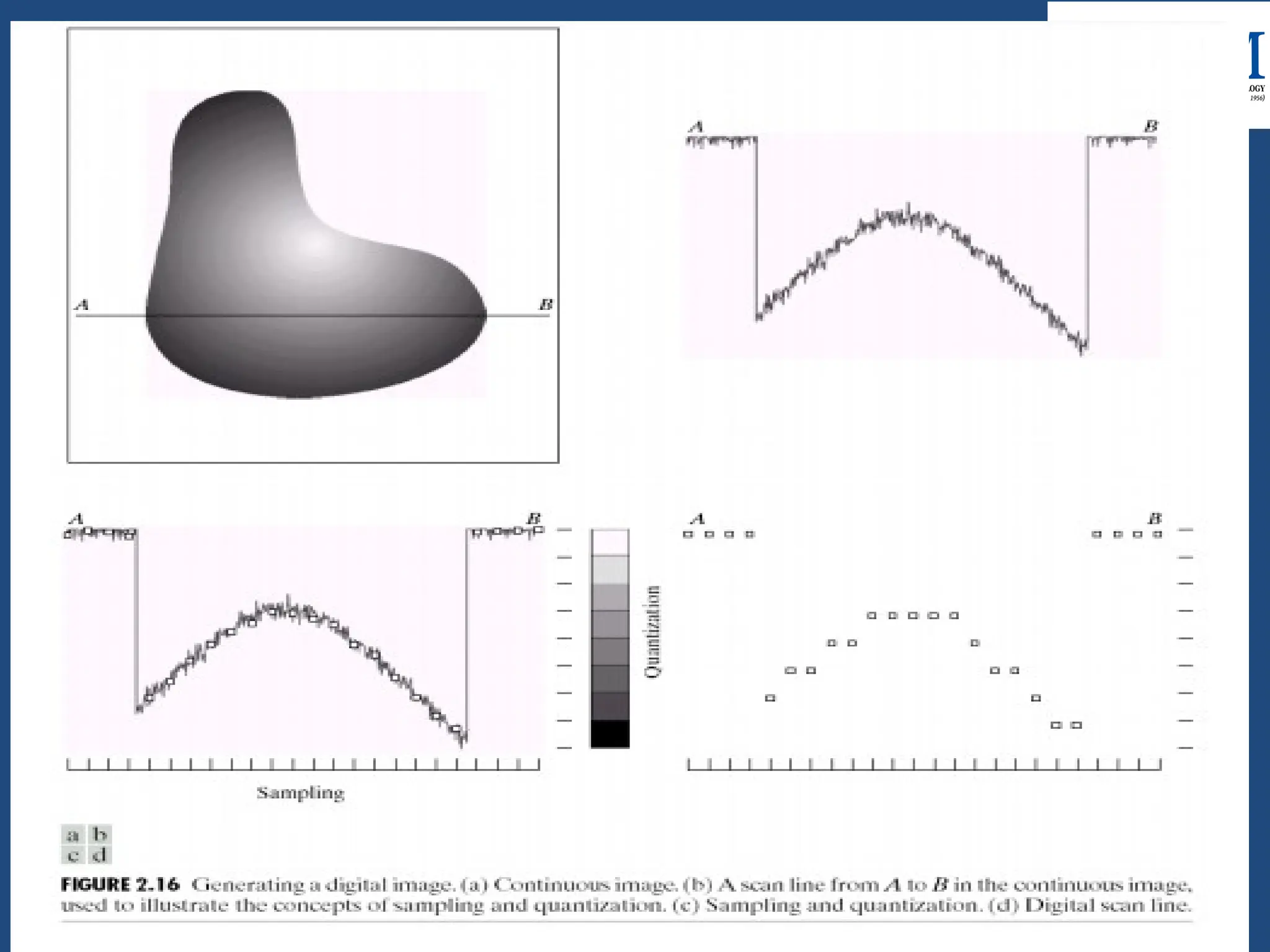
• A continuous image f(x, y) is normally approximated by
equally spaced samples arranged in the form of a NxM
array where each elements of the array is a discrete
quantity.
• The sampling rate of digitizer determines the spatial
resolution of digitized image.
• Finer the sampling (i.e. increasing M and N), the better
the approximation of continuous image function f(x, y).
Quantization :
• The process of digitizing the amplitude values is called
Quantization.
• Magnitude of sampled image is expressed as the digital
values in Image processing.
• No of quantization levels should be high enough for
human perception of the fine details in the image.
• Most digital IP devices uses quantization into k equal
intervals.
• If b-bits are used,
No. of quantization levels = k = 2b2b
• 8 bits/pixels are used commonly.
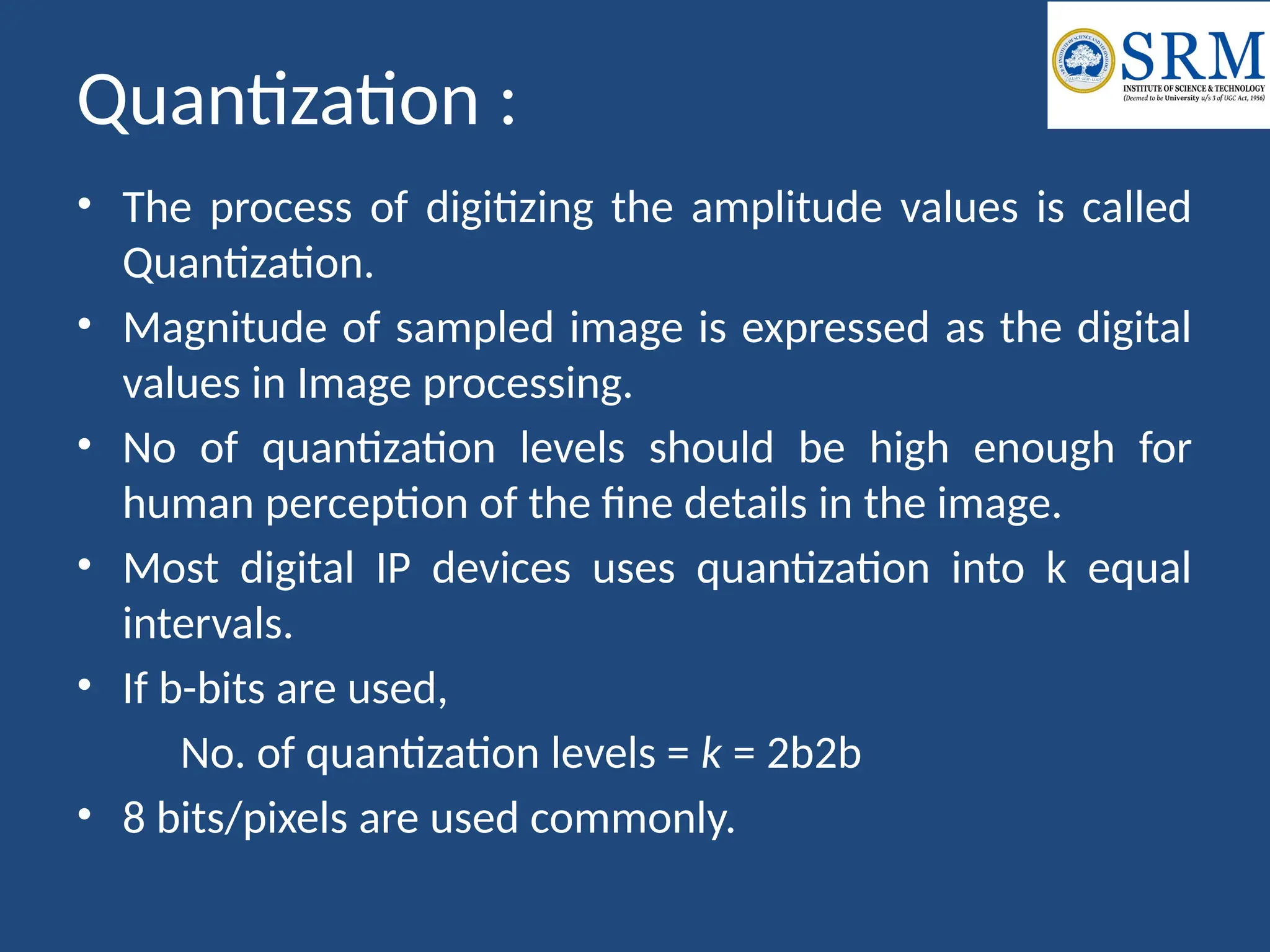
Description of fig-2.16
The one dimensional function shown in fig 2.16(b) is a
plot of amplitude (gray level) values of the continuous
image along the line segment AB in fig 2.16(a). The
random variation is due to the image noise. To sample
this function, we take equally spaced samples along
line AB as shown in fig 2.16 (c).In order to form a
digital function, the gray level values also must be
converted(quantizes) into discrete quantities. The right
side of fig 2.16 (c) shows the gray level scale divided
into eight discrete levels, ranging from black to white.
The result of both sampling and quantization are
shown in fig 2.16 (d).
Difference between Image Sampling and
Quantization:
SAMPLING
• Digitization of co-ordinate values.
• x-axis(time) – discretized.
• y-axis(amplitude) – continuous.
• Sampling is done prior to the
quantization process.
• It determines the spatial
resolution of the digitized images.
• A single amplitude value is
selected from different values of
the time interval to represent it.
QUANTIZATION
• Digitization of amplitude values.
• x-axis(time) – continuous.
• y-axis(amplitude) – discretized.
• Quantization is done after the
sampling process.
• It determines the number of
grey levels in the digitized
images.
• Values representing the time
intervals are rounded off to
create a defined set of possible
amplitude values.
Relationship between Pixels
Neighbors of a Pixel:
• In a 2-D coordinate system each pixel
p in an image can be identified by a
pair of spatial coordinates (x, y).
• A pixel p has two horizontal neighbors
(x−1, y), (x+1, y) and two vertical
neighbors (x, y−1), (x, y+1). These 4
pixels together constitute the 4-
neighbors of pixel p, denoted as N4(p).
• The pixel p also has 4 diagonal
neighbors which are: (x+1, y+1), (x+1,
y−1), (x−1, y+ 1), (x−1, y−1). The set of
4 diagonal neighbors forms the
diagonal neighborhood denoted as
ND(p). The set of 8 pixels surrounding
the pixel p forms the 8-neighborhood
denoted as N8(p). We have N8(p) =
N4(p) N
∪ D(p).
Adjacency:
• The concept of adjacency has a slightly different meaning
from neighborhood. Adjacency takes into account not just
spatial neighborhood but also intensity groups. Suppose
we define a set S={0,L-1} of intensities which are
considered to belong to the same group. Two pixels p and
q will be termed adjacent if both of them have intensities
from set S and both also conform to some definition of
neighborhood.
• 4 Adjacency: Two pixels p and q are termed as 4-adjacent
if they have intensities from set S and q belongs to N4(p).
• 8 Adjacency: Two pixels p and q are termed as 4-adjacent
if they have intensities from set S and q belongs to N8(p).
Mixed adjacency or m-adjacency:
Path:
• A (digital) path (or curve) from pixel p with coordinates
(x0,y0) to pixel q with coordinates (xn, yn) is a
sequence of distinct pixels with coordinates
(x0, y0), (x1, y1), …, (xn, yn)
where (xi yi) and (xi-1, yi-1) are adjacent for 1 ≤ i ≤ n.
– Here n is the length of the path.
– If (x0, y0) = (xn, yn), the path is closed path.
– We can define 4-, 8-, and m-paths based on the type of
adjacency used.
Connected components:
Let S represent a subset of pixels in an image. Two pixels
p and q are said to be connected in S if there exists a
path between them consisting entirely of pixels in S. For
any pixel p in S, the set of pixels connected to it in S is
called a connected component of S. If it has only one
connected component, then set S is called connected
set.
A Region R is a subset of pixels in an image such that all
pixels in R form a connected component.
A Boundary of a region R is the set of pixels in the region
that have one or more neighbors that are not in R. If R
happens to be an entire image, then its boundary is
defined as the set of pixels in the first and last rows and
columns of the image
Distance Measure
For pixels p,q and z, with coordinates (x,y),(s,t)
and (v,w), repectively, D is a distance function if
(a) D( p,q) ≥ 0 (D(p,q)=0 iff p=q)
(b) D(p,q)= D(q,p)
(c) D(p,z) ≤ D(p,q) + D(q,z)
The distance between two pixels p and q with
coordinates (x1, y1), (x2, y2) respectively can be
formulated in several ways:
Euclidean Distance=
Introduction to Image Processing Toolbox in
MATLAB
• Read Image Data into the Workspace
– RGB = imread('football.jpg');
– Whos
• Read an indexed image into the workspace. imread uses two
variables to store an indexed image in the workspace: one for
the image and another for its associated
colormap. imread always reads the colormap into a matrix of
class double, even though the image array itself may be of
class uint8 or uint16.
– [X,map] = imread('trees.tif');
– whos

Introduction to Medical Imaging Applications

  • 1.
    Digital Image Processing By: Mr.Ajay Kumar Assistant Professor Department of Computer Science and Engineering SRM Institute of Science & Technology, Vadapalani
  • 2.
    UNIT-1 Introduction: • An imageis a visual representation of an object, a person, or a scene. • A digital image is a two-dimensional function f(x, y), where x, y are spatial (plane) coordinates. • Amplitude of f at any pair of coordinates (x,y) is called intensity or gray level of the image at that point.
  • 3.
    Continue…… • When x,yand intensity values of f are all finite, discrete quantities, then we call the image a digital image. • A digital image is composed of picture elements called pixels. • Pixels are the smallest sample of an image.
  • 4.
    Continue….. • The fieldof digital image processing refers to processing digital images by means of a digital computer
  • 5.
    Advantages of DigitalImage: • The processing of image is faster and cost effective. • Digital images can be effectively stored and efficiently transmitted from one place to another. • After shooting, one can immediately see if the image is good or not. • Reproduction of digital image is faster and cheaper.
  • 6.
    Disadvantages of DigitalImage: • Misuse of copyright has become easier because image can be copied from internet. • A digital file cannot be enlarged beyond a certain size without compromising on quality. • The memory required to store and process good quality digital images is very high. • For real time implementation of digital image processing algorithms, the processor has to be very fast because the volume of data is very high.
  • 8.
    Steps in DigitalImage Processing:
  • 9.
    Continue….. • The successionfrom image processing to computer vision can be categorized into Low-level, Mid-level, and High-level processes • Low-level process involves the image pre-processing operations such as contrast enhancement, noise reduction, and image sharpening. In this process, the both inputs and outputs are characterized by the images • Mid-level processes involve the operations such as segmentation, representation & description, and classification of objects. In case of Mid-level process, the input is characterized by images and output is characterized by the attributes (features) extracted from the output images such as edges, contours, and identity • The High-level processes are carried out to make the sense, understanding, and autonomous navigation of individual objects for vision
  • 10.
    Image Acquisition • Imageacquisition is the first fundamental step in image processing which gives an idea regarding the origin of digital images. • It consists of sensors and cameras that acquire the pictures. Moreover, this stage involves the pre-processing task such as image scaling
  • 11.
    Image Enhancement • Imageenhancement is the process of improvement of digital image quality required for visual inspection or machine analysis. • The enhancement techniques are interactive and application oriented. For example, a method is used for enhancing the medical images or X-ray images may not be suitable for enhancement of remote sensing images. • In image enhancement, the main goal is to improve certain image features for better analysis and image display. • It includes the process like contrast and edge enhancement, noise filtering, sharpening and magnifying.
  • 12.
    Image Restoration • Imagerestoration is a process which deals with improving the appearance of an image. • Image restoration refers to removal or minimization of degradations from the images. • This process includes de-blurring of degraded images due to the limitations of sensors or its surrounding environment. • The images are restored to its original quality by inverting the physical degradation parameters such as defocus, linear motion, atmospheric degradation and additive noise, etc. • Thus, image restoration is an objective as it is based on the mathematical or probabilistic models of image degradation.
  • 13.
    Enhancement Vs. Restoration Enhancement •It gives better visual perception. • No model required. • It is subjective process. • Image enhancement is a cosmetic procedure i.e. it does not add any extra information to the original image. It merely improves the subjective quality of the images by work in with the existing data. • Contrast stretching, histogram equalization etc. are some enhancement techniques. Restoration • It removes effects of sensing environment. • Mathematical model of degradation is needed. • It is an objective process. • Restoration tries to reconstruct by using a priori knowledge of the degradation phenomena. Restoration hence deals with getting an optimal estimate of the desired result • Inverse filtering, wiener filtering, de-noising are some restoration techniques.
  • 14.
    Color Image Processing •Color image processing is an area that has been attracting the attention because of the significant increase in the use of color images in the variety of applications such mobile phone, internet, etc. • Multi-resolution processing is also the fundamental step for representing the images in various degree of resolution • Multi-resolution processing is a technique to make a very large image presentable on the device that cannot hold the data in memory. • When the images are processed at multiple resolutions, the discrete wavelet transform (DWT), a mathematical tool is generally preferred.
  • 15.
    Image compression • Imagecompression is an essential process for archiving image data and its transfer on the network, etc. • There are various techniques available for image compression like lossy and lossless compressions. • JPEG (Joint Photographic Experts Group) is one of most popular image compression techniques. This technique uses a discrete cosine transformation (DCT) based compression • The wavelet based compression techniques are generally used for higher compression ratios with minimal loss of data.
  • 16.
    Morphological Processing • Morphologicalprocessing is a technique for analysis and processing of geometrical structure based on set theory and commonly applied to digital images. • It is used for extracting the image components which are useful for representation and description of region shape, such as skeleton, boundaries, etc.
  • 17.
    Segmentation • Image segmentationis the process of partitioning a digital image into its multiple segments or objects. • The motivation behind the segmentation process is to simplify or change the representation of an image into something that is more meaningful and easier to analyze. • It is typically used to locate objects and boundaries.
  • 18.
    Representation and Description •Representation and description follow the output of a segmentation process. • The segmented raw pixels data is required to represent and describe in a suitable form for the computer processing. • The segmented region can be represented in term of its external characteristics such as boundaries or in term of its internal characteristics. • The representation scheme is part of the task of making the raw data useful to a computer. • The description task is used to describe the region based on the chosen representation. • For example, a segmented region can be represented by its external characteristics such as boundaries, and the boundary can be described by its length.
  • 19.
    Object Recognition • Recognitionis the process of assigning a particular label based on the description of an object. • Here, it is important to note that the output can be viewed at the end of any stage. • Moreover, the image processing applications may not necessarily require all the fundamental steps which are shown in Figure.
  • 20.
    Components of AnImage Processing System
  • 21.
    Continue….. • Image Sensors:Image sensors senses the intensity, amplitude, co-ordinates and other features of the images and passes the result to the image processing hardware. It includes the problem domain. • Image Processing Hardware: Image processing hardware is the dedicated hardware that is used to process the instructions obtained from the image sensors. It passes the result to general purpose computer. • Computer: Computer used in the image processing system is the general purpose computer that is used by us in our daily life.
  • 22.
    Continue….. • Image ProcessingSoftware: Image processing software is the software that includes all the mechanisms and algorithms that are used in image processing system. • Mass Storage: Mass storage stores the pixels of the images during the processing. • Hard Copy Device: Once the image is processed then it is stored in the hard copy device. It can be a pen drive or any external ROM device. • Image Display: It includes the monitor or display screen that displays the processed images. • Network: Network is the connection of all the above elements of the image processing system.
  • 23.
    Elements of VisualPerception • The field of digital image processing is built on the foundation of mathematical and probabilistic formulation, but human intuition and analysis play the main role to make the selection between various techniques, and the choice or selection is basically made on subjective, visual judgments. • In human visual perception, the eyes act as the sensor or camera, neurons act as the connecting cable and the brain acts as the processor. • The basic elements of visual perceptions are: 1. Structure of Eye 2. Image Formation in the Eye 3. Brightness Adaptation and Discrimination
  • 24.
  • 25.
    • The humaneye is a slightly asymmetrical sphere with an average diameter of the length of 20mm to 25mm. • The eye is just like a camera. The external object is seen as the camera take the picture of any object. • Light enters the eye through a small hole called the pupil, a black looking aperture having the quality of contraction of eye when exposed to bright light and is focused on the retina which is like a camera film. • The lens, iris, and cornea are nourished by clear fluid, know as anterior chamber. The fluid flows from ciliary body to the pupil and is absorbed through the channels in the angle of the anterior chamber. The delicate balance of aqueous production and absorption controls pressure within the eye.
  • 26.
    • Cones ineye number between 6 to 7 million which are highly sensitive to colors. Human visualizes the colored image in daylight due to these cones. The cone vision is also called as photopic or bright-light vision. • Rods in the eye are much larger between 75 to 150 million and are distributed over the retinal surface. Rods are not involved in the color vision and are sensitive to low levels of illumination.
  • 27.
    Image Formation inthe Eye: • When the lens of the eye focus an image of the outside world onto a light-sensitive membrane in the back of the eye, called retina the image is formed. • The distance between the lens and the retina is about 17mm and the focal length is approximately 14mm to 17mm.
  • 28.
    Brightness Adaptation andDiscrimination: • Digital images are displayed as a discrete set of intensities. • The eyes ability to discriminate black and white at different intensity levels is an important consideration in presenting image processing result. • The range of light intensity levels to which the human visual system can adapt is of the order of 1010 from the scotopic threshold to the glare limit. In a photopic vision, the range is about 106 .
  • 29.
    Image Sensing andAcquisition • An image sensor is a device that converts an optical image to an electrical signal. It is mostly used in digital cameras and other imaging devices. • Image acquisition is the creation of digital images, such as physical scene or of the interior structure of an object. The term is often assumed to suggest or include the processing, compression, storage, printing and display of such images.
  • 30.
    • There are3 principal sensor arrangements (produce an electrical output proportional to light intensity). – (i) Single imaging Sensor – (ii) Line sensor – (iii )Array sensor
  • 31.
    Image Acquisition usinga single sensor • The most common sensor of this type is the photodiode, which is constructed of silicon materials and whose output voltage waveform is proportional to light. • The use of a filter in front of a sensor improves selectivity. • In order to generate a 2-D image using a single sensor, there have to be relative displacements in both the x- and y-directions between the sensor and the area to be imaged
  • 32.
    Image Acquisition usingSensor Strips • The strip provides imaging elements in one direction. Motion perpendicular to the strip provides imaging in the other direction. • This is the type of arrangement used in most flatbed scanners. • Sensing devices with 4000 or more in-line sensors are possible. • In-line sensors are used routinely in airborne imaging applications, in which the imaging system is mounted on an aircraft that flies at a constant altitude and speed over the geographical area to be imaged. • One-dimensional imaging sensor strips that respond to various bands of the electromagnetic spectrum are mounted perpendicular to the direction of flight. • The imaging strip gives one line of an image at a time, and the motion of the strip completes the other dimension of a two-dimensional image • In-line sensors are used routinely in airborne imaging applications, in which the imaging system is mounted on an aircraft that flies at a constant altitude and speed over the geographical area to be imaged. • This is the basis for medical and industrial computerized axial tomography (CAT) imaging.
  • 34.
  • 35.
    • This typeof arrangement is found in digital cameras. • A typical sensor for these cameras is a CCD array, which can be manufactured with a broad range of sensing properties and can be packaged in rugged arrays of 4000 * 4000 elements or more. • The response of each sensor is proportional to the integral of the light energy projected onto the surface of the sensor, a property that is used in astronomical and other applications requiring low noise images. • The first function performed by the imaging system is to collect the incoming energy and focus it onto an image plane. • If the illumination is light, the front end of the imaging system is a lens, which projects the viewed scene onto the lens focal plane. • The sensor array, which is coincident with the focal plane, produces outputs proportional to the integral of the light received at each sensor
  • 37.
    Image Sampling andQuantization • Sampling and quantization are the two important processes used to convert continuous analog image into digital image. • Sampling: Digitizing the co-ordinate value is called sampling. • Quantization: Digitizing the amplitude value is called quantization. • To convert a continuous image f(x, y) into digital form, we have to sample the function in both co-ordinates and amplitude.
  • 38.
    Sampling: • The processof digitizing the co-ordinate values is called Sampling. • A continuous image f(x, y) is normally approximated by equally spaced samples arranged in the form of a NxM array where each elements of the array is a discrete quantity. • The sampling rate of digitizer determines the spatial resolution of digitized image. • Finer the sampling (i.e. increasing M and N), the better the approximation of continuous image function f(x, y).
  • 39.
    Quantization : • Theprocess of digitizing the amplitude values is called Quantization. • Magnitude of sampled image is expressed as the digital values in Image processing. • No of quantization levels should be high enough for human perception of the fine details in the image. • Most digital IP devices uses quantization into k equal intervals. • If b-bits are used, No. of quantization levels = k = 2b2b • 8 bits/pixels are used commonly.
  • 41.
    Description of fig-2.16 Theone dimensional function shown in fig 2.16(b) is a plot of amplitude (gray level) values of the continuous image along the line segment AB in fig 2.16(a). The random variation is due to the image noise. To sample this function, we take equally spaced samples along line AB as shown in fig 2.16 (c).In order to form a digital function, the gray level values also must be converted(quantizes) into discrete quantities. The right side of fig 2.16 (c) shows the gray level scale divided into eight discrete levels, ranging from black to white. The result of both sampling and quantization are shown in fig 2.16 (d).
  • 42.
    Difference between ImageSampling and Quantization: SAMPLING • Digitization of co-ordinate values. • x-axis(time) – discretized. • y-axis(amplitude) – continuous. • Sampling is done prior to the quantization process. • It determines the spatial resolution of the digitized images. • A single amplitude value is selected from different values of the time interval to represent it. QUANTIZATION • Digitization of amplitude values. • x-axis(time) – continuous. • y-axis(amplitude) – discretized. • Quantization is done after the sampling process. • It determines the number of grey levels in the digitized images. • Values representing the time intervals are rounded off to create a defined set of possible amplitude values.
  • 43.
    Relationship between Pixels Neighborsof a Pixel: • In a 2-D coordinate system each pixel p in an image can be identified by a pair of spatial coordinates (x, y). • A pixel p has two horizontal neighbors (x−1, y), (x+1, y) and two vertical neighbors (x, y−1), (x, y+1). These 4 pixels together constitute the 4- neighbors of pixel p, denoted as N4(p). • The pixel p also has 4 diagonal neighbors which are: (x+1, y+1), (x+1, y−1), (x−1, y+ 1), (x−1, y−1). The set of 4 diagonal neighbors forms the diagonal neighborhood denoted as ND(p). The set of 8 pixels surrounding the pixel p forms the 8-neighborhood denoted as N8(p). We have N8(p) = N4(p) N ∪ D(p).
  • 44.
    Adjacency: • The conceptof adjacency has a slightly different meaning from neighborhood. Adjacency takes into account not just spatial neighborhood but also intensity groups. Suppose we define a set S={0,L-1} of intensities which are considered to belong to the same group. Two pixels p and q will be termed adjacent if both of them have intensities from set S and both also conform to some definition of neighborhood. • 4 Adjacency: Two pixels p and q are termed as 4-adjacent if they have intensities from set S and q belongs to N4(p). • 8 Adjacency: Two pixels p and q are termed as 4-adjacent if they have intensities from set S and q belongs to N8(p).
  • 45.
    Mixed adjacency orm-adjacency:
  • 46.
    Path: • A (digital)path (or curve) from pixel p with coordinates (x0,y0) to pixel q with coordinates (xn, yn) is a sequence of distinct pixels with coordinates (x0, y0), (x1, y1), …, (xn, yn) where (xi yi) and (xi-1, yi-1) are adjacent for 1 ≤ i ≤ n. – Here n is the length of the path. – If (x0, y0) = (xn, yn), the path is closed path. – We can define 4-, 8-, and m-paths based on the type of adjacency used.
  • 47.
    Connected components: Let Srepresent a subset of pixels in an image. Two pixels p and q are said to be connected in S if there exists a path between them consisting entirely of pixels in S. For any pixel p in S, the set of pixels connected to it in S is called a connected component of S. If it has only one connected component, then set S is called connected set. A Region R is a subset of pixels in an image such that all pixels in R form a connected component. A Boundary of a region R is the set of pixels in the region that have one or more neighbors that are not in R. If R happens to be an entire image, then its boundary is defined as the set of pixels in the first and last rows and columns of the image
  • 48.
    Distance Measure For pixelsp,q and z, with coordinates (x,y),(s,t) and (v,w), repectively, D is a distance function if (a) D( p,q) ≥ 0 (D(p,q)=0 iff p=q) (b) D(p,q)= D(q,p) (c) D(p,z) ≤ D(p,q) + D(q,z) The distance between two pixels p and q with coordinates (x1, y1), (x2, y2) respectively can be formulated in several ways: Euclidean Distance=
  • 49.
    Introduction to ImageProcessing Toolbox in MATLAB • Read Image Data into the Workspace – RGB = imread('football.jpg'); – Whos • Read an indexed image into the workspace. imread uses two variables to store an indexed image in the workspace: one for the image and another for its associated colormap. imread always reads the colormap into a matrix of class double, even though the image array itself may be of class uint8 or uint16. – [X,map] = imread('trees.tif'); – whos