FUNDAMENTAL STEPS IN
DIGITAL IMAGE
PROCESSING
Visit
https://buzztech.in
Study Electronics
and
Communication
Engineering
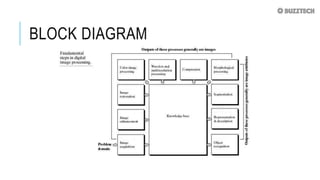
BLOCK DIAGRAM
1. IMAGE ACQUISITION
 In image processing, it is defined as the action of
retrieving an image from some source, usually a hardware-
based source for processing.
 It is the first step in the workflow sequence because,
without an image, no processing is possible. The image that
is acquired is completely unprocessed. In image acquisition
using pre-processing such as scaling is done.
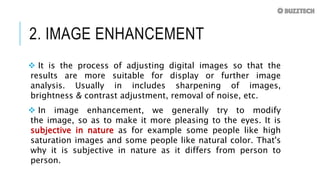
2. IMAGE ENHANCEMENT
 It is the process of adjusting digital images so that the
results are more suitable for display or further image
analysis. Usually in includes sharpening of images,
brightness & contrast adjustment, removal of noise, etc.
 In image enhancement, we generally try to modify
the image, so as to make it more pleasing to the eyes. It is
subjective in nature as for example some people like high
saturation images and some people like natural color. That's
why it is subjective in nature as it differs from person to
person.
3. IMAGE RESTORATION
 It is the process of recovering an image that has been
degraded by some knowledge of degraded function H and
the additive noise term.
 Unlike image enhancement, image restoration is completely
objective in nature.
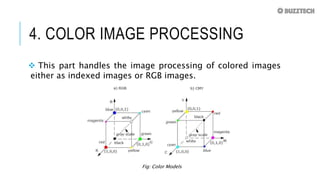
4. COLOR IMAGE PROCESSING
 This part handles the image processing of colored images
either as indexed images or RGB images.
Fig: Color Models
5. WAVELETS AND
MULTIRESOLUTION PROCESSING
 Wavelets are small waves of limited duration which are
used to calculate wavelet transform which provides time-
frequency information.
 Wavelets lead to multiresolution processing in which
images are represented in various degrees of resolution.
6. COMPRESSION
 Compression deals with the techniques for reducing the
storage space required to save an image or the bandwidth
required to transmit it.
 This is particularly useful for displaying images on the
internet as if the size of the image is large, then it uses more
bandwidth (data) to display the image from the server and
also increases the loading speed of the website.
7. MORPHOLOGICAL PROCESSING
 It deals with extracting image components that are useful in
representation and description of shape.
 It includes basic morphological operations like erosion and
dilation. As seen from the block diagram above that the outputs of
morphological processing generally are image attributes.
8. SEGMENTATION
 It is the process of partitioning a digital image into
multiple segments. It is generally used to locate
objects and boundaries in objects.
9. REPRESENTATION AND
DESCRIPTION
 Representation deals with converting the data into a suitable
form for computer processing.
 Boundary representation: it is used when the focus is on external shape
characteristics e.g. corners
 Regional representation: it is used when the focus in on internal properties
e.g. texture
 Description deals with extracting attributes that
 results in some quantitative information of interest
 is used for differentiating one class of objects from others
10. RECOGNITION
 It is the process that assigns a label (e.g. car)
to an object based on its description.
Knowledge Base: Knowledge about a problem domain
is coded into an image processing in the form of the
knowledge database.

Fundamental steps in Digital Image Processing

  • 1.
    FUNDAMENTAL STEPS IN DIGITALIMAGE PROCESSING Visit https://buzztech.in Study Electronics and Communication Engineering
  • 2.
  • 3.
    1. IMAGE ACQUISITION In image processing, it is defined as the action of retrieving an image from some source, usually a hardware- based source for processing.  It is the first step in the workflow sequence because, without an image, no processing is possible. The image that is acquired is completely unprocessed. In image acquisition using pre-processing such as scaling is done.
  • 4.
    2. IMAGE ENHANCEMENT It is the process of adjusting digital images so that the results are more suitable for display or further image analysis. Usually in includes sharpening of images, brightness & contrast adjustment, removal of noise, etc.  In image enhancement, we generally try to modify the image, so as to make it more pleasing to the eyes. It is subjective in nature as for example some people like high saturation images and some people like natural color. That's why it is subjective in nature as it differs from person to person.
  • 5.
    3. IMAGE RESTORATION It is the process of recovering an image that has been degraded by some knowledge of degraded function H and the additive noise term.  Unlike image enhancement, image restoration is completely objective in nature.
  • 6.
    4. COLOR IMAGEPROCESSING  This part handles the image processing of colored images either as indexed images or RGB images. Fig: Color Models
  • 7.
    5. WAVELETS AND MULTIRESOLUTIONPROCESSING  Wavelets are small waves of limited duration which are used to calculate wavelet transform which provides time- frequency information.  Wavelets lead to multiresolution processing in which images are represented in various degrees of resolution.
  • 8.
    6. COMPRESSION  Compressiondeals with the techniques for reducing the storage space required to save an image or the bandwidth required to transmit it.  This is particularly useful for displaying images on the internet as if the size of the image is large, then it uses more bandwidth (data) to display the image from the server and also increases the loading speed of the website.
  • 9.
    7. MORPHOLOGICAL PROCESSING It deals with extracting image components that are useful in representation and description of shape.  It includes basic morphological operations like erosion and dilation. As seen from the block diagram above that the outputs of morphological processing generally are image attributes.
  • 10.
    8. SEGMENTATION  Itis the process of partitioning a digital image into multiple segments. It is generally used to locate objects and boundaries in objects.
  • 11.
    9. REPRESENTATION AND DESCRIPTION Representation deals with converting the data into a suitable form for computer processing.  Boundary representation: it is used when the focus is on external shape characteristics e.g. corners  Regional representation: it is used when the focus in on internal properties e.g. texture  Description deals with extracting attributes that  results in some quantitative information of interest  is used for differentiating one class of objects from others
  • 12.
    10. RECOGNITION  Itis the process that assigns a label (e.g. car) to an object based on its description. Knowledge Base: Knowledge about a problem domain is coded into an image processing in the form of the knowledge database.