Beginning Office
  Instructor: Mrs. Wei
 awei@bishopamat.org
    Extension: 5896

     Welcome
                         1
QR code for                               Homework
  my Email                                 Web Link


                                          Class Website


Textbook Study Guide Website
 http://irc.emcp.com/index.php?
 titleID=2629&title=Benchmark%20Series:
 %20Microsoft%20Office%202010
Something about Mrs. Wei

   Lover of computers
   Master degree in Computer Education
   12 years Computer teachers at AMAT
   Business Dept. Chairman
   Classes I teach: B.Office/Adv.
    Office/Basic Web Design/Advanced
    Web Design


                                          3
Expectations for Students
   Keep up with all lessons and take an
    active role in learning.
   Complete and turn in all coursework.
   Save all works in the flash drive or online
    portfolio space.
   Ask for help when you need assistance
   Respect peers, instructors and yourself
   Follow the Acceptable Use Policy
   Use all equipment properly, safely, and as
    directed by your instructor
Take an Active Role
   From School:
     A 7-week progress Report Card
     A14-week progress Report Card

     A semester Report Card.

   Parents:
     Check grade online regularly to
      participate in their learning.
     Go to the library for

         Students schedules
         Parent code to parent protal
Philosophy of Teaching
   Learning should be challenging and fun
   High expectation but realistic goals
   Shared wisdom
      No shortcut to knowledge

      Teacher + Parents = Good students! 


                                              6
Our Material  - Open Heart
   Always positive

   Always productive

   Always passionate

   Keep open-minded

   Enthusiastic and confident
                                 7
Course Objectives
   Learn
       Most common used business
        software – Office 2010
         Excel- spreadsheet
         Access – DBMA

         PowerPoint – Presentation


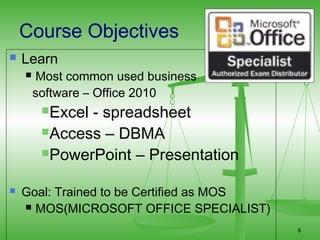
   Goal: Trained to be Certified as MOS
     MOS(MICROSOFT OFFICE SPECIALIST)

                                           8
Material Needed
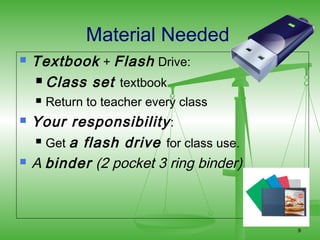
   Textbook + Flash Drive:
     Class set textbook

       Return to teacher every class
   Your responsibility :
     Get a flash drive for class use.

   A binder (2 pocket 3 ring binder)


                                         9
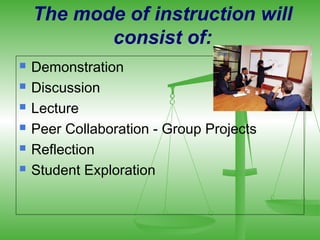
The mode of instruction will
           consist of:
   Demonstration
   Discussion
   Lecture
   Peer Collaboration - Group Projects
   Reflection
   Student Exploration
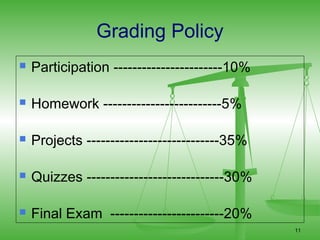
Grading Policy
   Participation -----------------------10%

   Homework -------------------------5%

   Projects ----------------------------35%

   Quizzes -----------------------------30%

   Final Exam ------------------------20%
                                               11
Citizenship– 10%

   Rule of Thumb for Citizenship
       Pay attention
       Follow instruction
       Cooperative learning
       Show enthusiasm

   Grade starts from 70.

                                    12
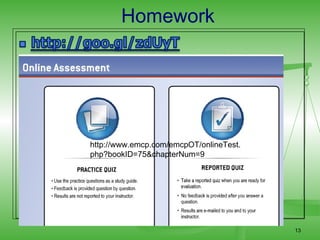
Homework


http://www.emcp.com/emcpOT/onlineTest.
php?bookID=75&chapterNum=9


                                         13
Hands on Projects - 35%
   Step by step
   Review q’s to build concepts
   Individual and practical projects to
    perform skills.
   We evaluate projects in class.
       Save your projects in disks only
       If you receive 4 out of 4, you are
        perfect!
   No homework.
                                             14
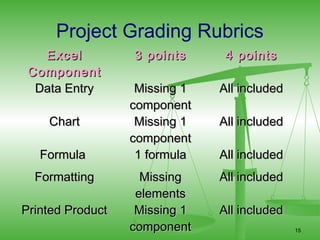
Project Grading Rubrics
   Excel          3 points      4 points
 Component
  Data Entry       Missing 1   All included
                  component
    Chart          Missing 1   All included
                  component
   Formula         1 formula   All included
  Formatting        Missing    All included
                   elements
Printed Product    Missing 1   All included
                  component                   15
Quizzes – 30%
     1 quiz will be given after every
      2-3 lessons
     Quiz
         test
         Projects
     Group activity and mid-term
      projects

                                    16
Final Exam – 20%

   1st quarter final – Excel projects

   2nd quarter final – Three applications
       EXCEL, ACCESS, POWERPOINT.


                                             17
Required Accounts for the Class
   Schoology site: schoology.com
   Google Account
   Evernote Account
Course Resources:

 Online  Interactive Website
  Learning.
 Articles and forum discussion
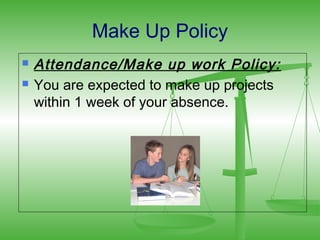
Make Up Policy
   Attendance/Make up work Policy:
   You are expected to make up projects
    within 1 week of your absence.
For Fast students:
   Some students will be able to complete
    assignments literally two or even three
    times as quickly as an average student.
   I need you to be responsible for keeping
    your mind busy by either bringing work
    from other classes or use the programs in
    the computer to sharpen up your skills.
Contacting home
   I have had good luck keeping parents
    informed of how you are doing in class.
   I will email progress reports home often,
    likely every Friday after we have 2+
    grades entered.
   If there is a behavior problem in the
    classroom, I will likely email or call home
    before giving a detention.
Class Rules
   Respect teacher and peers
   Always keep your hand and feet to yourself
   Cherish the equipments in this class like your
    own
   Cooperate with each other, compete only
    against yourself
Lab Policy
   Gum , food, and drinks are not welcome to
    me and computers.
   $2 fine will be collected and you know why.
   Computers, chairs, and desks are school
    property. Take care of them!
   Headphone and CD not allowed – we are
    very busy!!
   Computers are for beginning office 2003 only,
    not for your homework due next period.
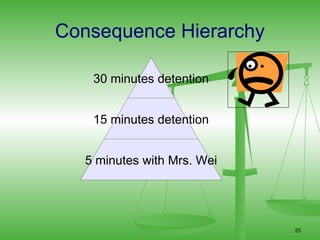
Consequence Hierarchy

    30 minutes detention


    15 minutes detention


   5 minutes with Mrs. Wei


                             25
Q & A Time

  Any questions?


     ?? ?
       ?
                   26

Beginning office wei's back to school

  • 1.
    Beginning Office Instructor: Mrs. Wei awei@bishopamat.org Extension: 5896 Welcome 1
  • 2.
    QR code for Homework my Email Web Link Class Website Textbook Study Guide Website http://irc.emcp.com/index.php? titleID=2629&title=Benchmark%20Series: %20Microsoft%20Office%202010
  • 3.
    Something about Mrs.Wei  Lover of computers  Master degree in Computer Education  12 years Computer teachers at AMAT  Business Dept. Chairman  Classes I teach: B.Office/Adv. Office/Basic Web Design/Advanced Web Design 3
  • 4.
    Expectations for Students  Keep up with all lessons and take an active role in learning.  Complete and turn in all coursework.  Save all works in the flash drive or online portfolio space.  Ask for help when you need assistance  Respect peers, instructors and yourself  Follow the Acceptable Use Policy  Use all equipment properly, safely, and as directed by your instructor
  • 5.
    Take an ActiveRole  From School:  A 7-week progress Report Card  A14-week progress Report Card  A semester Report Card.  Parents:  Check grade online regularly to participate in their learning.  Go to the library for  Students schedules  Parent code to parent protal
  • 6.
    Philosophy of Teaching  Learning should be challenging and fun  High expectation but realistic goals  Shared wisdom  No shortcut to knowledge  Teacher + Parents = Good students!  6
  • 7.
    Our Material - Open Heart  Always positive  Always productive  Always passionate  Keep open-minded  Enthusiastic and confident 7
  • 8.
    Course Objectives  Learn  Most common used business software – Office 2010 Excel- spreadsheet Access – DBMA PowerPoint – Presentation  Goal: Trained to be Certified as MOS  MOS(MICROSOFT OFFICE SPECIALIST) 8
  • 9.
    Material Needed  Textbook + Flash Drive:  Class set textbook  Return to teacher every class  Your responsibility :  Get a flash drive for class use.  A binder (2 pocket 3 ring binder) 9
  • 10.
    The mode ofinstruction will consist of:  Demonstration  Discussion  Lecture  Peer Collaboration - Group Projects  Reflection  Student Exploration
  • 11.
    Grading Policy  Participation -----------------------10%  Homework -------------------------5%  Projects ----------------------------35%  Quizzes -----------------------------30%  Final Exam ------------------------20% 11
  • 12.
    Citizenship– 10%  Rule of Thumb for Citizenship  Pay attention  Follow instruction  Cooperative learning  Show enthusiasm  Grade starts from 70. 12
  • 13.
  • 14.
    Hands on Projects- 35%  Step by step  Review q’s to build concepts  Individual and practical projects to perform skills.  We evaluate projects in class.  Save your projects in disks only  If you receive 4 out of 4, you are perfect!  No homework. 14
  • 15.
    Project Grading Rubrics Excel 3 points 4 points Component Data Entry Missing 1 All included component Chart Missing 1 All included component Formula 1 formula All included Formatting Missing All included elements Printed Product Missing 1 All included component 15
  • 16.
    Quizzes – 30%  1 quiz will be given after every 2-3 lessons  Quiz  test  Projects  Group activity and mid-term projects 16
  • 17.
    Final Exam –20%  1st quarter final – Excel projects  2nd quarter final – Three applications  EXCEL, ACCESS, POWERPOINT. 17
  • 18.
    Required Accounts forthe Class  Schoology site: schoology.com  Google Account  Evernote Account
  • 19.
    Course Resources:  Online Interactive Website Learning.  Articles and forum discussion
  • 20.
    Make Up Policy  Attendance/Make up work Policy:  You are expected to make up projects within 1 week of your absence.
  • 21.
    For Fast students:  Some students will be able to complete assignments literally two or even three times as quickly as an average student.  I need you to be responsible for keeping your mind busy by either bringing work from other classes or use the programs in the computer to sharpen up your skills.
  • 22.
    Contacting home  I have had good luck keeping parents informed of how you are doing in class.  I will email progress reports home often, likely every Friday after we have 2+ grades entered.  If there is a behavior problem in the classroom, I will likely email or call home before giving a detention.
  • 23.
    Class Rules  Respect teacher and peers  Always keep your hand and feet to yourself  Cherish the equipments in this class like your own  Cooperate with each other, compete only against yourself
  • 24.
    Lab Policy  Gum , food, and drinks are not welcome to me and computers.  $2 fine will be collected and you know why.  Computers, chairs, and desks are school property. Take care of them!  Headphone and CD not allowed – we are very busy!!  Computers are for beginning office 2003 only, not for your homework due next period.
  • 25.
    Consequence Hierarchy 30 minutes detention 15 minutes detention 5 minutes with Mrs. Wei 25
  • 26.
    Q & ATime Any questions? ?? ? ? 26

Editor's Notes

  • #15 No pains, no gains.