Page 1ProjectFolder-AreaFolder-Name-Date-DesktopPublishing-Author
Summary of the Customer Care Concept
Customer Attention Model – Architecture
Front Office (Online)
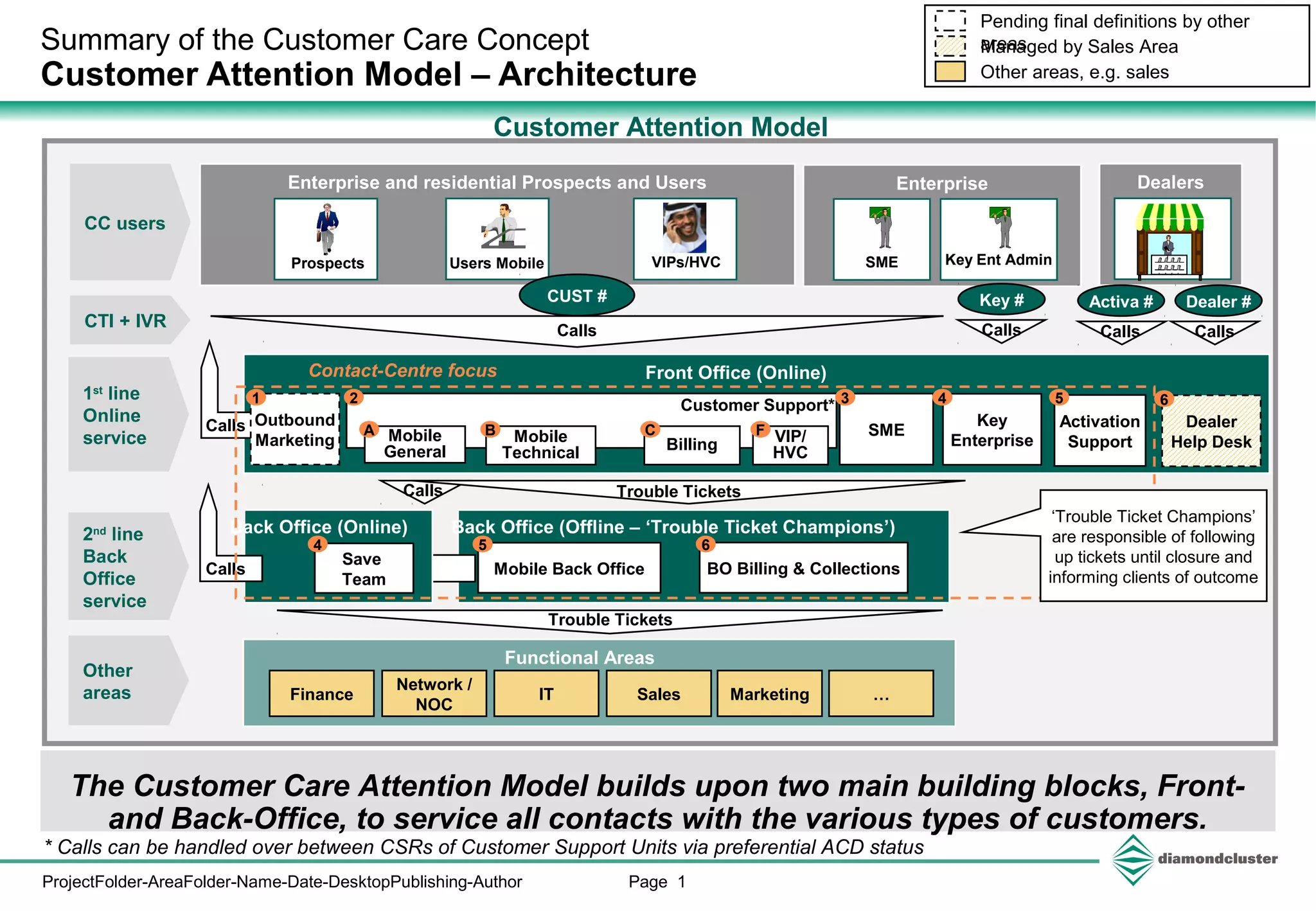
The Customer Care Attention Model builds upon two main building blocks, Front-
and Back-Office, to service all contacts with the various types of customers.
Back Office (Offline – ‘Trouble Ticket Champions’)
Enterprise and residential Prospects and Users
Users Mobile
Functional Areas
Finance
Network /
NOC
IT Sales Marketing
SME
Contact-Centre focus
Prospects
Mobile
Technical Billing
Mobile
General
Mobile Back Office BO Billing & Collections
Customer Attention Model
Other areas, e.g. sales
Managed by Sales Area
Pending final definitions by other
areas
1st
line
Online
service
2nd
line
Back
Office
service
Other
areas
CC users
A B C
3
5 6
VIPs/HVC
…
Dealer
Help Desk
Dealers
Key
Enterprise
CUST # Dealer #
Calls
4
Calls Trouble Tickets
CTI + IVR
Trouble Tickets
CallsCalls
2
Calls
Back Office (Online)
Save
Team
Calls
* Calls can be handled over between CSRs of Customer Support Units via preferential ACD status
4
‘Trouble Ticket Champions’
are responsible of following
up tickets until closure and
informing clients of outcome
Enterprise
Key Ent Admin
Outbound
Marketing
1
Activation
Support
5
SME
VIP/
HVC
F
64Customer Support*
Activa #Key #
Calls
Page 2ProjectFolder-AreaFolder-Name-Date-DesktopPublishing-Author - Work in Progress -
Detailed Contact Center Design Guidelines
Overview of items to be detailed in Customer Attention Model
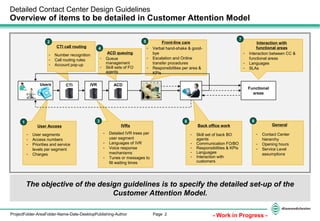
The objective of the design guidelines is to specify the detailed set-up of the
Customer Attention Model.
Functional
areas
Users
1 3 6
2 5
7
4
- User segments
- Access numbers
- Priorities and service
levels per segment
- Charges
User Access
- Detailed IVR trees per
user segment
- Languages of IVR
- Voice response
mechanisms
- Tunes or messages to
fill waiting times
IVRs
- Skill set of back BO
agents
- Communication FO/BO
- Responsibilities & KPIs
- Languages
- Interaction with
customers
Back office work
- Number recognition
- Call routing rules
- Account pop-up
CTI call routing
- Queue
management
- Skill sets of FO
agents
ACD queuing
- Verbal hand-shake & good-
bye
- Escalation and Online
transfer procedures
- Responsibilities per area &
KPIs
Front-line care
- Interaction between CC &
functional areas
- Languages
- SLAs
Interaction with
functional areas
CTI IVR ACD
- Contact Center
hierarchy
- Opening hours
- Service Level
assumptions
General
8
Page 3ProjectFolder-AreaFolder-Name-Date-DesktopPublishing-Author - Work in Progress -
Customer Care
Conceptual view of the attention model
Non-exhaustive
NR Number recognition
Front
office
teams
Mobile3)
BillingActiva-
tion
(1)
Includes home customers and enterprise users.
(2)
Includes personal customers and enterprise users.
Inbound contact
Customer
type
IVR (call
reasons)
ACD
Queue
Dealers Mobile(2)
External VIPs
Prospect
IVR
5
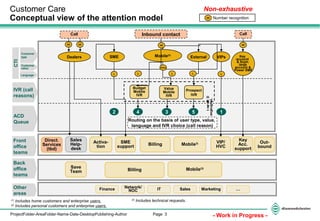
Routing on the basis of user type, value,
language and IVR choice (call reason)
CTI
Language
Customer
value
Different
Languages
L
VIP/
HVC
SME
support
SME Key
account
& Soph.
large
account &
Power SME
Sales
Help-
desk
Billing Mobile(3)
Back
office
teams
Save
Team
FinanceOther
areas
Network/
NOC IT Sales Marketing …
1
Key
Acc.
support
Out-
bound
2
L
(3)
Includes technical requests.
NR
Direct.
Services
(tbd)
Budget
Mobile
IVR
Value
Mobile
IVR
Value
L L
4 3
L
Call
NR
Call
NR NR
Page 4ProjectFolder-AreaFolder-Name-Date-DesktopPublishing-Author
Key account
administrator
Detailed Contact Center Design Guidelines
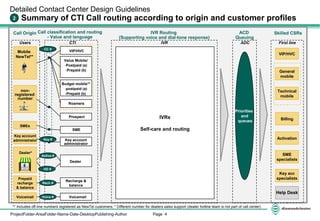
Summary of CTI Call routing according to origin and customer profiles2
Users CTI
VIP/HVC
Budget mobile**
-postpaid (a)
-Prepaid (b)
Roamers
Mobile
NewTel**
non-
registered
number
Value Mobile/
-Postpaid (a)
-Prepaid (b)
Call classification and routing
- Value and language
Call Origin Skilled CSRs
** Includes off-line numbers registered as NewTel customers; * Different number for dealers sales support (dealer hotline team is not part of call center)
IVRs
Self-care and routing
ADCIVR
IVR Routing
(Supporting voice and dial-tone response)
ACD
Queuing
Priorities
and
queues
Prospect
Prepaid
recharge
& balance
Recharge &
balance
SMEs
SME
Key account
administrator
Activa #
Key #
Rech #
Voicemail VoicemailVoice #
CC #
First line
General
mobile
VIP/HVC
Technical
mobile
Billing
Activation
SME
specialists
Key acc
specialists
Help Desk
Dealer*
Dealer
HD #
Page 5ProjectFolder-AreaFolder-Name-Date-DesktopPublishing-Author
Self care IVR 2.1x
Prio
3
Prio
3
Detailed Contact Center Design Guidelines
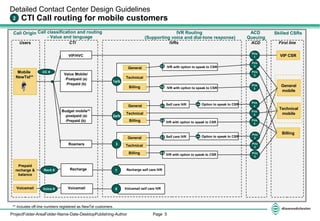
CTI Call routing for mobile customers2
Users CTI IVRs ACD
VIP/HVC
Budget mobile**
-postpaid (a)
-Prepaid (b)
Mobile
NewTel**
First line
Value Mobile/
-Postpaid (a)
-Prepaid (b)
General
Technical
Billing
Prio
3
VIP CSR
General
mobile
Technical
mobile
Call classification and routing
- Value and language
Call Origin
1a/b
Prio
1
IVR Routing
(Supporting voice and dial-tone response)
ACD
Queuing
Skilled CSRs
** Includes off-line numbers registered as NewTel customers.
IVR with option to speak to CSR
Option to speak to CSR
Prio
4
1.1 IVR with option to speak to CSR
IVR with option to speak to CSR
General
Technical
Billing
2a/b
1.3
Prio
42.1
2.3 Prio
4
Roamers
Billing
General
Technical
Billing
3
Self care IVR 3.1x Option to speak to CSR3.1
IVR with option to speak to CSR
3.3
Prio
3
Prio
3
Prio
3
CC #
Prepaid
recharge &
balance
Recharge Recharge self care IVRRech #
Voicemail VoicemailVoice # Voicemail self care IVR
7
8
Page 6ProjectFolder-AreaFolder-Name-Date-DesktopPublishing-Author
Detailed Contact Center Design Guidelines
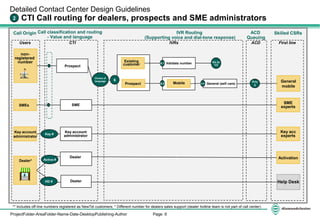
CTI Call routing for dealers, prospects and SME administrators2
Users CTI IVRs ACD First line
Call classification and routing
- Value and language
Call Origin IVR Routing
(Supporting voice and dial-tone response)
ACD
Queuing
Skilled CSRs
** Includes off-line numbers registered as NewTel customers; * Different number for dealers sales support (dealer hotline team is not part of call center)
Existing
customer
Prospect
Prio
5
non-
registered
number
Prospect
SMEs SME
Mobile
Validate number6.1 Go to
1/2
6.2 6.2x General (self care)
SME
experts
Choice of
language General
mobile
Key account
administrator
Key account
administrator
Key acc
expertsKey #
ActivationActiva #
Help Desk
Dealer
Dealer
Dealer*
HD #
6
Page 7ProjectFolder-AreaFolder-Name-Date-DesktopPublishing-Author
9. Previous menu
1. Activate service 1
9. Previous menu
0. Agent (general mobile)
9. Previous menu
0. Agent (general mobile)
9. Previous menu
0. Agent (general mobile)
1. For value service 1
3. For value service 3
1. Promotion activation
Detailed Contact Center Design Guidelines
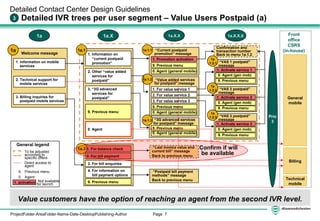
Detailed IVR trees per user segment – Value Users Postpaid (a)3
Welcome message
Front
office
CSRS
(in-house)
1a 1a.X 1a.X.X
1a
Value customers have the option of reaching an agent from the second IVR level.
General
mobile
Technical
mobile
Billing
1a.1.1
1a.1.3
1a.1.2
“Postpaid bill payment
methods” message
Back to previous menu
Confirmation and
transaction number
Back to menu 1a.1.2
1a
.1.2.2
1a
.1.2.3
1a.X.X.X
1a
.1.2.1
2. Technical support for
mobile services
3. Billing inquiries for
postpaid mobile services
1. Information on mobile
services
4. For information on
bill payment options
2. For bill payment
3. For bill enquiries
1. For balance check1a.3
1. Information on
“current postpaid
promotion”
2. Other “value added
services for
postpaid”
3. “3G advanced
services for
postpaid”
9. Previous menu
0. Agent
Prio
3
“VAS 1 postpaid”
message
9. Previous menu
1. Activate service 2
“VAS 2 postpaid”
message
9. Previous menu
1. Activate service 3
“VAS 3 postpaid”
message
1a.1 “Current postpaid
promotion” message
“Value added services
for postpaid” message
“3G advanced services
for postpaid” message
2. For value service 2
9. Previous menu
“Last invoice value and
current bill” message
Back to previous menu
General legend
To be adjusted
according to
specific offers
Direct access to
agent
9. Previous menu
0. Agent
1. activation Not available
for launch
0. Agent (gen mob)
0. Agent (gen mob)
0. Agent (gen mob)
Confirm if will
be available
Page 8ProjectFolder-AreaFolder-Name-Date-DesktopPublishing-Author
9. Previous menu
1. Activate service 1
Confirmation and
transaction number
Back to menu 1a.1.2
“VAS 1 prepaid”
message
9. Previous menu
1. Activate service 2
“VAS 2 prepaid”
message
9. Previous menu
1. Activate service 3
“VAS 3 prepaid”
message
0. Agent (gen mob)
0. Agent (gen mob)
0. Agent (gen mob)9. Previous menu
0. Agent (general mobile)
9. Previous menu
0. Agent (general mobile)
9. Previous menu
0. Agent (general mobile)
1. For value service 1
3. For value service 3
1. Promotion activation
2. Technical support for
mobile services
3. Billing inquiries for
prepaid mobile services
4. Fixed services
… see IVR tree 4
Detailed Contact Center Design Guidelines
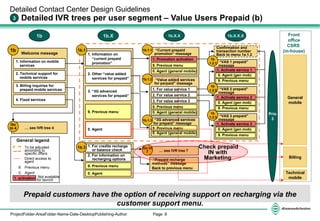
Detailed IVR trees per user segment – Value Users Prepaid (b)3
Welcome message
Front
office
CSRS
(in-house)
1b 1b.X 1b.X.X
1b
Prepaid customers have the option of receiving support on recharging via the
customer support menu.
General
mobile
Technical
mobile
Billing
1b.1.1
1b.1.3
1b.1.2
“Prepaid recharge
methods” message
Back to previous menu
1b
.1.2.2
1b
.1.2.3
1b.X.X.X
Go
to 4
1b
.1.2.11. Information on mobile
services
1. For credits recharge
or balance check
2. For information on
recharging options
9. Previous menu
0. Agent
1b.3
1. Information on
“current prepaid
promotion”
2. Other “value added
services for prepaid”
3. “3G advanced
services for prepaid”
9. Previous menu
0. Agent
Prio
3
1b.1 “Current prepaid
promotion” message
“Value added services
for perpaid” message
“3G advanced services
for prepaid” message
2. For value service 2
… see IVR tree 7
Go to
7
General legend
To be adjusted
according to
specific offers
Direct access to
agent
9. Previous menu
0. Agent
1. activation Not available
for launch
Check prepaid
IN with
Marketing
Page 9ProjectFolder-AreaFolder-Name-Date-DesktopPublishing-Author
“Postpaid bill payment
methods” message
Back to previous menu
4. For information on
bill payment options
2. For bill payment
3. For bill enquiries
1. For balance check
9. Previous menu
“Last invoice value and
current bill” message
Back to previous menu
9. Previous menu
0. Agent (general mobile)
9. Previous menu
0. Agent (general mobile)
9. Previous menu
0. Agent (general mobile)
1. For value service 1
3. For value service 3
1. Promotion activation
2. Technical support for
mobile services
3. Billing inquiries for
postpaid mobile services
4. Fixed services
… see IVR tree 4
Detailed Contact Center Design Guidelines
Detailed IVR trees per user segment – Budget Users Postpaid (a)3
Welcome message
Front office
CSRS
(outsourced)
2a 2a.X 2a.X.X
2a
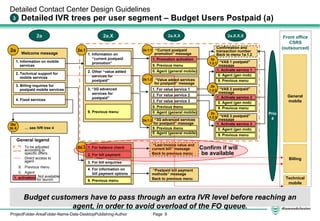
Budget customers have to pass through an extra IVR level before reaching an
agent, in order to avoid overload of the FO queue.
General
mobile
Technical
mobile
Billing
2a.1.1
2a.1.3
2a.1.2
2a.X.X.X
Go
to 4
1. Information on mobile
services
1. Information on
“current postpaid
promotion”
2. Other “value added
services for
postpaid”
3. “3G advanced
services for
postpaid”
9. Previous menu Prio
4
2a.1 “Current postpaid
promotion” message
“Value added services
for postpaid” message
“3G advanced services
for postpaid” message
2. For value service 2
General legend
To be adjusted
according to
specific offers
Direct access to
agent
9. Previous menu
0. Agent
1. activation Not available
for launch
2a.3
9. Previous menu
1. Activate service 1
Confirmation and
transaction number
Back to menu 1a.1.2
“VAS 1 postpaid”
message
9. Previous menu
1. Activate service 2
“VAS 2 postpaid”
message
9. Previous menu
1. Activate service 3
“VAS 3 postpaid”
message
0. Agent (gen mob)
0. Agent (gen mob)
0. Agent (gen mob)
2a
.1.2.2
2a
.1.2.3
2a
.1.2.1
Confirm if will
be available
Page 10ProjectFolder-AreaFolder-Name-Date-DesktopPublishing-Author
“Prepaid recharge
methods” message
Back to previous menu
1. For credits recharge
or balance check
2. For information on
recharging options
9. Previous menu
0. Agent
… see IVR tree 7
Go to
7
9. Previous menu
1. Activate service 1
Confirmation and
transaction number
Back to menu 1a.1.2
“VAS 1 prepaid”
message
9. Previous menu
1. Activate service 2
“VAS 2 prepaid”
message
9. Previous menu
1. Activate service 3
“VAS 3 prepaid”
message
0. Agent (gen mob)
0. Agent (gen mob)
0. Agent (gen mob)9. Previous menu
0. Agent (general mobile)
9. Previous menu
0. Agent (general mobile)
9. Previous menu
0. Agent (general mobile)
1. For value service 1
3. For value service 3
1. Promotion activation
2. Technical support for
mobile services
3. Billing inquiries for
prepaid mobile services
4. Fixed services
… see IVR tree 4
Detailed Contact Center Design Guidelines
Detailed IVR trees per user segment – Budget Users Prepaid (b)3
Welcome message
Front office
CSRS
(outsourced)
2b 2b.X 2b.X.X
2b
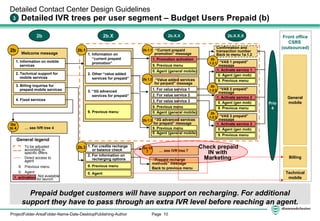
Prepaid budget customers will have support on recharging. For additional
support they have to pass through an extra IVR level before reaching an agent.
General
mobile
Technical
mobile
Billing
2b.1.1
2b.1.3
2b.1.2
2b
.1.2.2
2b
.1.2.3
2b.X.X.X
Go
to 4
2b
.1.2.11. Information on mobile
services
2b.3
1. Information on
“current prepaid
promotion”
2. Other “value added
services for prepaid”
3. “3G advanced
services for prepaid”
9. Previous menu
Prio
4
2b.1 “Current prepaid
promotion” message
“Value added services
for perpaid” message
“3G advanced services
for prepaid” message
2. For value service 2
General legend
To be adjusted
according to
specific offers
Direct access to
agent
9. Previous menu
0. Agent
1. activation Not available
for launch
Check prepaid
IN with
Marketing
Page 11ProjectFolder-AreaFolder-Name-Date-DesktopPublishing-Author
3. Information on acquiring
a temporary local mobile
line
4. Information on roaming
billing
Detailed Contact Center Design Guidelines
Detailed IVR trees per user segment – Roamers3
Welcome message
Front office
CSRS
(in-house)
3 3.X
3
General
mobile
Technical
mobile
Billing
1. Mobile services
information on roaming
9. Previous menu
3.1
“Mobile roaming
services” message
9. Previous menu
3.3
“Acquiring a temporary
local mobile line”
message
0. Agent
9. Previous menu
3.1
“Roaming billing”
message
0. Agent
Roamers have technical support and information on roaming services and offers
of temporary local mobile services via the IVR.
General legend
To be adjusted
according to
specific offers
Direct access to
agent
9. Previous menu
0. Agent
1. activation Not available
for launch
0. Agent
2. Technical problem on
roaming
Prio
3
Page 12ProjectFolder-AreaFolder-Name-Date-DesktopPublishing-Author
Mobile
General
3. Prospect customer
Detailed Contact Center Design Guidelines
Detailed IVR trees per user segment – Unrecognized lines3
Welcome message
Front office
CSRS
(in-house)
6 6.X 6.X.X
6
1. Existing customer calling
for mobile services
1. For consumer
postpaid mobile
services
6.3
9. Previous menu
5.3.1 “Postpaid Mobile/
promotion” message
0. Agent
0. Previous menu
6.1
“Type mobile number”
customer validation
Language
selection
… see adequate IVR tree
1a/1b/2a/2b
Go
to …
Unrecognized calls can receive information on consumer or enterprise offers.
4. For Enterprise
services
General legend
To be adjusted
according to
specific offers
Direct access to
agent
9. Previous menu
0. Agent
1. activation Not available
for launch
9. Previous menu
5.3.4 “Enterprise” message
0. Agent
2. For consumer prepaid
mobile services
9. Previous menu
5.3.2 “Prepaid mobile/
promotion” message
0. Agent
Prio
5
Page 13ProjectFolder-AreaFolder-Name-Date-DesktopPublishing-Author
2. Information on how to
recharge a prepaid
mobile line
Detailed Contact Center Design Guidelines
Detailed IVR trees – Prepaid recharge and balance check3
Welcome message
Credit balance message
7 7.X
7
1. Prepaid mobile recharge
“Type your prepaid card
number followed by #”
message on new balance
7.1
message on different
ways of recharging a
prepaid mobile line
Goes back to previous
menu
7.2
Front office
CSRS
General
mobile
Technical
mobile
Billing
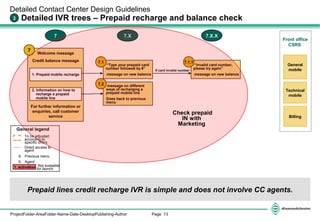
Prepaid lines credit recharge IVR is simple and does not involve CC agents.
“Invalid card number,
please try again”
message on new balance
7.1.1
If card invalid number
7.X.X
General legend
To be adjusted
according to
specific offers
Direct access to
agent
9. Previous menu
0. Agent
1. activation Not available
for launch
For further information or
enquiries, call customer
service
Check prepaid
IN with
Marketing

Detailed ivr v02 mms v4_mobile

  • 1.
    Page 1ProjectFolder-AreaFolder-Name-Date-DesktopPublishing-Author Summary ofthe Customer Care Concept Customer Attention Model – Architecture Front Office (Online) The Customer Care Attention Model builds upon two main building blocks, Front- and Back-Office, to service all contacts with the various types of customers. Back Office (Offline – ‘Trouble Ticket Champions’) Enterprise and residential Prospects and Users Users Mobile Functional Areas Finance Network / NOC IT Sales Marketing SME Contact-Centre focus Prospects Mobile Technical Billing Mobile General Mobile Back Office BO Billing & Collections Customer Attention Model Other areas, e.g. sales Managed by Sales Area Pending final definitions by other areas 1st line Online service 2nd line Back Office service Other areas CC users A B C 3 5 6 VIPs/HVC … Dealer Help Desk Dealers Key Enterprise CUST # Dealer # Calls 4 Calls Trouble Tickets CTI + IVR Trouble Tickets CallsCalls 2 Calls Back Office (Online) Save Team Calls * Calls can be handled over between CSRs of Customer Support Units via preferential ACD status 4 ‘Trouble Ticket Champions’ are responsible of following up tickets until closure and informing clients of outcome Enterprise Key Ent Admin Outbound Marketing 1 Activation Support 5 SME VIP/ HVC F 64Customer Support* Activa #Key # Calls
  • 2.
    Page 2ProjectFolder-AreaFolder-Name-Date-DesktopPublishing-Author -Work in Progress - Detailed Contact Center Design Guidelines Overview of items to be detailed in Customer Attention Model The objective of the design guidelines is to specify the detailed set-up of the Customer Attention Model. Functional areas Users 1 3 6 2 5 7 4 - User segments - Access numbers - Priorities and service levels per segment - Charges User Access - Detailed IVR trees per user segment - Languages of IVR - Voice response mechanisms - Tunes or messages to fill waiting times IVRs - Skill set of back BO agents - Communication FO/BO - Responsibilities & KPIs - Languages - Interaction with customers Back office work - Number recognition - Call routing rules - Account pop-up CTI call routing - Queue management - Skill sets of FO agents ACD queuing - Verbal hand-shake & good- bye - Escalation and Online transfer procedures - Responsibilities per area & KPIs Front-line care - Interaction between CC & functional areas - Languages - SLAs Interaction with functional areas CTI IVR ACD - Contact Center hierarchy - Opening hours - Service Level assumptions General 8
  • 3.
    Page 3ProjectFolder-AreaFolder-Name-Date-DesktopPublishing-Author -Work in Progress - Customer Care Conceptual view of the attention model Non-exhaustive NR Number recognition Front office teams Mobile3) BillingActiva- tion (1) Includes home customers and enterprise users. (2) Includes personal customers and enterprise users. Inbound contact Customer type IVR (call reasons) ACD Queue Dealers Mobile(2) External VIPs Prospect IVR 5 Routing on the basis of user type, value, language and IVR choice (call reason) CTI Language Customer value Different Languages L VIP/ HVC SME support SME Key account & Soph. large account & Power SME Sales Help- desk Billing Mobile(3) Back office teams Save Team FinanceOther areas Network/ NOC IT Sales Marketing … 1 Key Acc. support Out- bound 2 L (3) Includes technical requests. NR Direct. Services (tbd) Budget Mobile IVR Value Mobile IVR Value L L 4 3 L Call NR Call NR NR
  • 4.
    Page 4ProjectFolder-AreaFolder-Name-Date-DesktopPublishing-Author Key account administrator DetailedContact Center Design Guidelines Summary of CTI Call routing according to origin and customer profiles2 Users CTI VIP/HVC Budget mobile** -postpaid (a) -Prepaid (b) Roamers Mobile NewTel** non- registered number Value Mobile/ -Postpaid (a) -Prepaid (b) Call classification and routing - Value and language Call Origin Skilled CSRs ** Includes off-line numbers registered as NewTel customers; * Different number for dealers sales support (dealer hotline team is not part of call center) IVRs Self-care and routing ADCIVR IVR Routing (Supporting voice and dial-tone response) ACD Queuing Priorities and queues Prospect Prepaid recharge & balance Recharge & balance SMEs SME Key account administrator Activa # Key # Rech # Voicemail VoicemailVoice # CC # First line General mobile VIP/HVC Technical mobile Billing Activation SME specialists Key acc specialists Help Desk Dealer* Dealer HD #
  • 5.
    Page 5ProjectFolder-AreaFolder-Name-Date-DesktopPublishing-Author Self careIVR 2.1x Prio 3 Prio 3 Detailed Contact Center Design Guidelines CTI Call routing for mobile customers2 Users CTI IVRs ACD VIP/HVC Budget mobile** -postpaid (a) -Prepaid (b) Mobile NewTel** First line Value Mobile/ -Postpaid (a) -Prepaid (b) General Technical Billing Prio 3 VIP CSR General mobile Technical mobile Call classification and routing - Value and language Call Origin 1a/b Prio 1 IVR Routing (Supporting voice and dial-tone response) ACD Queuing Skilled CSRs ** Includes off-line numbers registered as NewTel customers. IVR with option to speak to CSR Option to speak to CSR Prio 4 1.1 IVR with option to speak to CSR IVR with option to speak to CSR General Technical Billing 2a/b 1.3 Prio 42.1 2.3 Prio 4 Roamers Billing General Technical Billing 3 Self care IVR 3.1x Option to speak to CSR3.1 IVR with option to speak to CSR 3.3 Prio 3 Prio 3 Prio 3 CC # Prepaid recharge & balance Recharge Recharge self care IVRRech # Voicemail VoicemailVoice # Voicemail self care IVR 7 8
  • 6.
    Page 6ProjectFolder-AreaFolder-Name-Date-DesktopPublishing-Author Detailed ContactCenter Design Guidelines CTI Call routing for dealers, prospects and SME administrators2 Users CTI IVRs ACD First line Call classification and routing - Value and language Call Origin IVR Routing (Supporting voice and dial-tone response) ACD Queuing Skilled CSRs ** Includes off-line numbers registered as NewTel customers; * Different number for dealers sales support (dealer hotline team is not part of call center) Existing customer Prospect Prio 5 non- registered number Prospect SMEs SME Mobile Validate number6.1 Go to 1/2 6.2 6.2x General (self care) SME experts Choice of language General mobile Key account administrator Key account administrator Key acc expertsKey # ActivationActiva # Help Desk Dealer Dealer Dealer* HD # 6
  • 7.
    Page 7ProjectFolder-AreaFolder-Name-Date-DesktopPublishing-Author 9. Previousmenu 1. Activate service 1 9. Previous menu 0. Agent (general mobile) 9. Previous menu 0. Agent (general mobile) 9. Previous menu 0. Agent (general mobile) 1. For value service 1 3. For value service 3 1. Promotion activation Detailed Contact Center Design Guidelines Detailed IVR trees per user segment – Value Users Postpaid (a)3 Welcome message Front office CSRS (in-house) 1a 1a.X 1a.X.X 1a Value customers have the option of reaching an agent from the second IVR level. General mobile Technical mobile Billing 1a.1.1 1a.1.3 1a.1.2 “Postpaid bill payment methods” message Back to previous menu Confirmation and transaction number Back to menu 1a.1.2 1a .1.2.2 1a .1.2.3 1a.X.X.X 1a .1.2.1 2. Technical support for mobile services 3. Billing inquiries for postpaid mobile services 1. Information on mobile services 4. For information on bill payment options 2. For bill payment 3. For bill enquiries 1. For balance check1a.3 1. Information on “current postpaid promotion” 2. Other “value added services for postpaid” 3. “3G advanced services for postpaid” 9. Previous menu 0. Agent Prio 3 “VAS 1 postpaid” message 9. Previous menu 1. Activate service 2 “VAS 2 postpaid” message 9. Previous menu 1. Activate service 3 “VAS 3 postpaid” message 1a.1 “Current postpaid promotion” message “Value added services for postpaid” message “3G advanced services for postpaid” message 2. For value service 2 9. Previous menu “Last invoice value and current bill” message Back to previous menu General legend To be adjusted according to specific offers Direct access to agent 9. Previous menu 0. Agent 1. activation Not available for launch 0. Agent (gen mob) 0. Agent (gen mob) 0. Agent (gen mob) Confirm if will be available
  • 8.
    Page 8ProjectFolder-AreaFolder-Name-Date-DesktopPublishing-Author 9. Previousmenu 1. Activate service 1 Confirmation and transaction number Back to menu 1a.1.2 “VAS 1 prepaid” message 9. Previous menu 1. Activate service 2 “VAS 2 prepaid” message 9. Previous menu 1. Activate service 3 “VAS 3 prepaid” message 0. Agent (gen mob) 0. Agent (gen mob) 0. Agent (gen mob)9. Previous menu 0. Agent (general mobile) 9. Previous menu 0. Agent (general mobile) 9. Previous menu 0. Agent (general mobile) 1. For value service 1 3. For value service 3 1. Promotion activation 2. Technical support for mobile services 3. Billing inquiries for prepaid mobile services 4. Fixed services … see IVR tree 4 Detailed Contact Center Design Guidelines Detailed IVR trees per user segment – Value Users Prepaid (b)3 Welcome message Front office CSRS (in-house) 1b 1b.X 1b.X.X 1b Prepaid customers have the option of receiving support on recharging via the customer support menu. General mobile Technical mobile Billing 1b.1.1 1b.1.3 1b.1.2 “Prepaid recharge methods” message Back to previous menu 1b .1.2.2 1b .1.2.3 1b.X.X.X Go to 4 1b .1.2.11. Information on mobile services 1. For credits recharge or balance check 2. For information on recharging options 9. Previous menu 0. Agent 1b.3 1. Information on “current prepaid promotion” 2. Other “value added services for prepaid” 3. “3G advanced services for prepaid” 9. Previous menu 0. Agent Prio 3 1b.1 “Current prepaid promotion” message “Value added services for perpaid” message “3G advanced services for prepaid” message 2. For value service 2 … see IVR tree 7 Go to 7 General legend To be adjusted according to specific offers Direct access to agent 9. Previous menu 0. Agent 1. activation Not available for launch Check prepaid IN with Marketing
  • 9.
    Page 9ProjectFolder-AreaFolder-Name-Date-DesktopPublishing-Author “Postpaid billpayment methods” message Back to previous menu 4. For information on bill payment options 2. For bill payment 3. For bill enquiries 1. For balance check 9. Previous menu “Last invoice value and current bill” message Back to previous menu 9. Previous menu 0. Agent (general mobile) 9. Previous menu 0. Agent (general mobile) 9. Previous menu 0. Agent (general mobile) 1. For value service 1 3. For value service 3 1. Promotion activation 2. Technical support for mobile services 3. Billing inquiries for postpaid mobile services 4. Fixed services … see IVR tree 4 Detailed Contact Center Design Guidelines Detailed IVR trees per user segment – Budget Users Postpaid (a)3 Welcome message Front office CSRS (outsourced) 2a 2a.X 2a.X.X 2a Budget customers have to pass through an extra IVR level before reaching an agent, in order to avoid overload of the FO queue. General mobile Technical mobile Billing 2a.1.1 2a.1.3 2a.1.2 2a.X.X.X Go to 4 1. Information on mobile services 1. Information on “current postpaid promotion” 2. Other “value added services for postpaid” 3. “3G advanced services for postpaid” 9. Previous menu Prio 4 2a.1 “Current postpaid promotion” message “Value added services for postpaid” message “3G advanced services for postpaid” message 2. For value service 2 General legend To be adjusted according to specific offers Direct access to agent 9. Previous menu 0. Agent 1. activation Not available for launch 2a.3 9. Previous menu 1. Activate service 1 Confirmation and transaction number Back to menu 1a.1.2 “VAS 1 postpaid” message 9. Previous menu 1. Activate service 2 “VAS 2 postpaid” message 9. Previous menu 1. Activate service 3 “VAS 3 postpaid” message 0. Agent (gen mob) 0. Agent (gen mob) 0. Agent (gen mob) 2a .1.2.2 2a .1.2.3 2a .1.2.1 Confirm if will be available
  • 10.
    Page 10ProjectFolder-AreaFolder-Name-Date-DesktopPublishing-Author “Prepaid recharge methods”message Back to previous menu 1. For credits recharge or balance check 2. For information on recharging options 9. Previous menu 0. Agent … see IVR tree 7 Go to 7 9. Previous menu 1. Activate service 1 Confirmation and transaction number Back to menu 1a.1.2 “VAS 1 prepaid” message 9. Previous menu 1. Activate service 2 “VAS 2 prepaid” message 9. Previous menu 1. Activate service 3 “VAS 3 prepaid” message 0. Agent (gen mob) 0. Agent (gen mob) 0. Agent (gen mob)9. Previous menu 0. Agent (general mobile) 9. Previous menu 0. Agent (general mobile) 9. Previous menu 0. Agent (general mobile) 1. For value service 1 3. For value service 3 1. Promotion activation 2. Technical support for mobile services 3. Billing inquiries for prepaid mobile services 4. Fixed services … see IVR tree 4 Detailed Contact Center Design Guidelines Detailed IVR trees per user segment – Budget Users Prepaid (b)3 Welcome message Front office CSRS (outsourced) 2b 2b.X 2b.X.X 2b Prepaid budget customers will have support on recharging. For additional support they have to pass through an extra IVR level before reaching an agent. General mobile Technical mobile Billing 2b.1.1 2b.1.3 2b.1.2 2b .1.2.2 2b .1.2.3 2b.X.X.X Go to 4 2b .1.2.11. Information on mobile services 2b.3 1. Information on “current prepaid promotion” 2. Other “value added services for prepaid” 3. “3G advanced services for prepaid” 9. Previous menu Prio 4 2b.1 “Current prepaid promotion” message “Value added services for perpaid” message “3G advanced services for prepaid” message 2. For value service 2 General legend To be adjusted according to specific offers Direct access to agent 9. Previous menu 0. Agent 1. activation Not available for launch Check prepaid IN with Marketing
  • 11.
    Page 11ProjectFolder-AreaFolder-Name-Date-DesktopPublishing-Author 3. Informationon acquiring a temporary local mobile line 4. Information on roaming billing Detailed Contact Center Design Guidelines Detailed IVR trees per user segment – Roamers3 Welcome message Front office CSRS (in-house) 3 3.X 3 General mobile Technical mobile Billing 1. Mobile services information on roaming 9. Previous menu 3.1 “Mobile roaming services” message 9. Previous menu 3.3 “Acquiring a temporary local mobile line” message 0. Agent 9. Previous menu 3.1 “Roaming billing” message 0. Agent Roamers have technical support and information on roaming services and offers of temporary local mobile services via the IVR. General legend To be adjusted according to specific offers Direct access to agent 9. Previous menu 0. Agent 1. activation Not available for launch 0. Agent 2. Technical problem on roaming Prio 3
  • 12.
    Page 12ProjectFolder-AreaFolder-Name-Date-DesktopPublishing-Author Mobile General 3. Prospectcustomer Detailed Contact Center Design Guidelines Detailed IVR trees per user segment – Unrecognized lines3 Welcome message Front office CSRS (in-house) 6 6.X 6.X.X 6 1. Existing customer calling for mobile services 1. For consumer postpaid mobile services 6.3 9. Previous menu 5.3.1 “Postpaid Mobile/ promotion” message 0. Agent 0. Previous menu 6.1 “Type mobile number” customer validation Language selection … see adequate IVR tree 1a/1b/2a/2b Go to … Unrecognized calls can receive information on consumer or enterprise offers. 4. For Enterprise services General legend To be adjusted according to specific offers Direct access to agent 9. Previous menu 0. Agent 1. activation Not available for launch 9. Previous menu 5.3.4 “Enterprise” message 0. Agent 2. For consumer prepaid mobile services 9. Previous menu 5.3.2 “Prepaid mobile/ promotion” message 0. Agent Prio 5
  • 13.
    Page 13ProjectFolder-AreaFolder-Name-Date-DesktopPublishing-Author 2. Informationon how to recharge a prepaid mobile line Detailed Contact Center Design Guidelines Detailed IVR trees – Prepaid recharge and balance check3 Welcome message Credit balance message 7 7.X 7 1. Prepaid mobile recharge “Type your prepaid card number followed by #” message on new balance 7.1 message on different ways of recharging a prepaid mobile line Goes back to previous menu 7.2 Front office CSRS General mobile Technical mobile Billing Prepaid lines credit recharge IVR is simple and does not involve CC agents. “Invalid card number, please try again” message on new balance 7.1.1 If card invalid number 7.X.X General legend To be adjusted according to specific offers Direct access to agent 9. Previous menu 0. Agent 1. activation Not available for launch For further information or enquiries, call customer service Check prepaid IN with Marketing