© Copyright 2005, Parwan Electronics Corporation
What is Insight IVR?
Insight IVR is a powerful software that allows companies to
turn their vision of an interactive call flow into reality.
The software consists of two main parts:
- The Call Handling Engine - The Application Generator Insight IVR is built on a software platform that has been
developed over the last 20 years. The product has
been proven around the world to be flexible, robust, and
reliable.
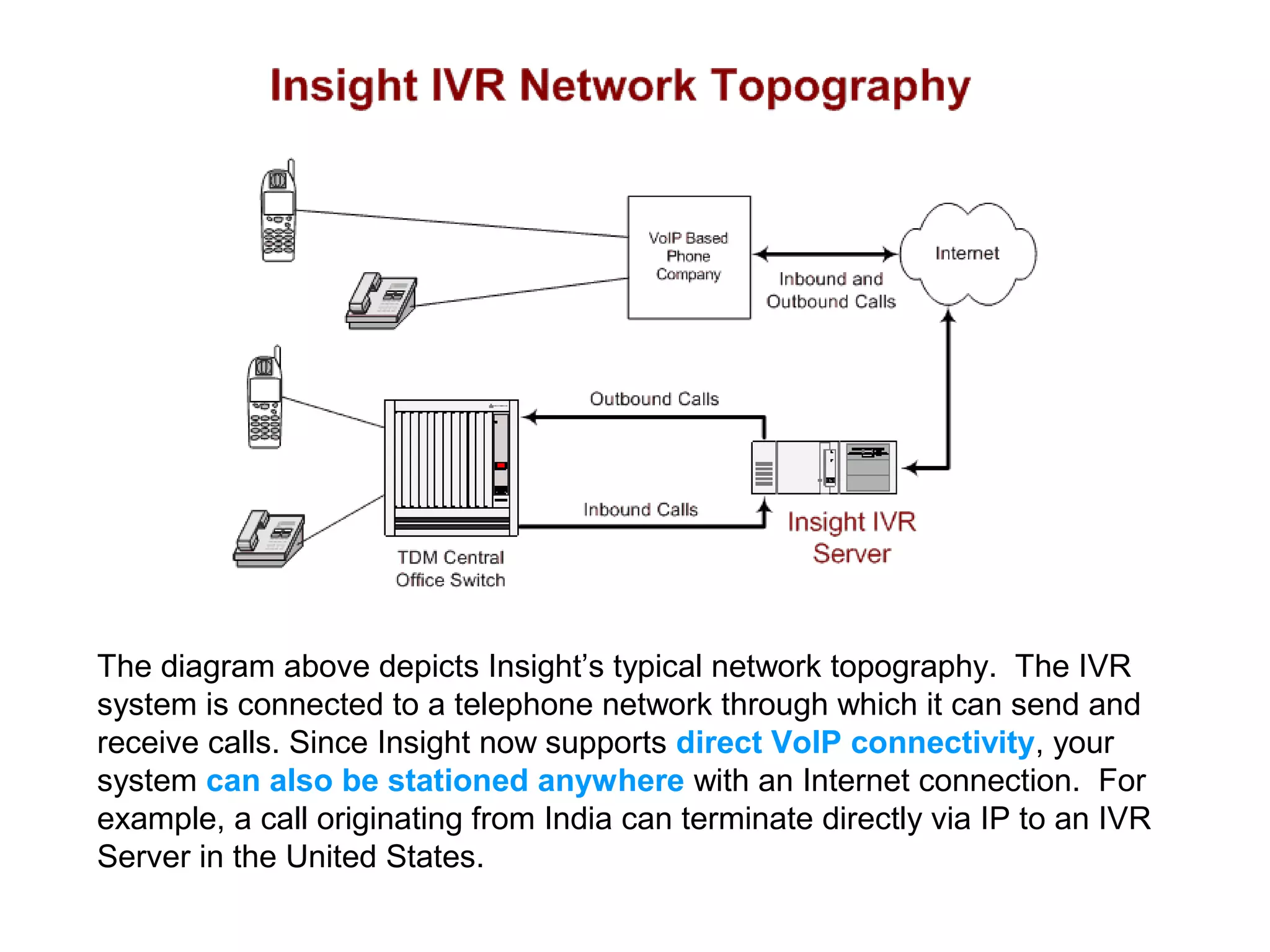
The diagram above depicts Insight’s typical network topography. The IVR
system is connected to a telephone network through which it can send and
receive calls. Since Insight now supports direct VoIP connectivity, your
system can also be stationed anywhere with an Internet connection. For
example, a call originating from India can terminate directly via IP to an IVR
Server in the United States.
The Call Handling Engine
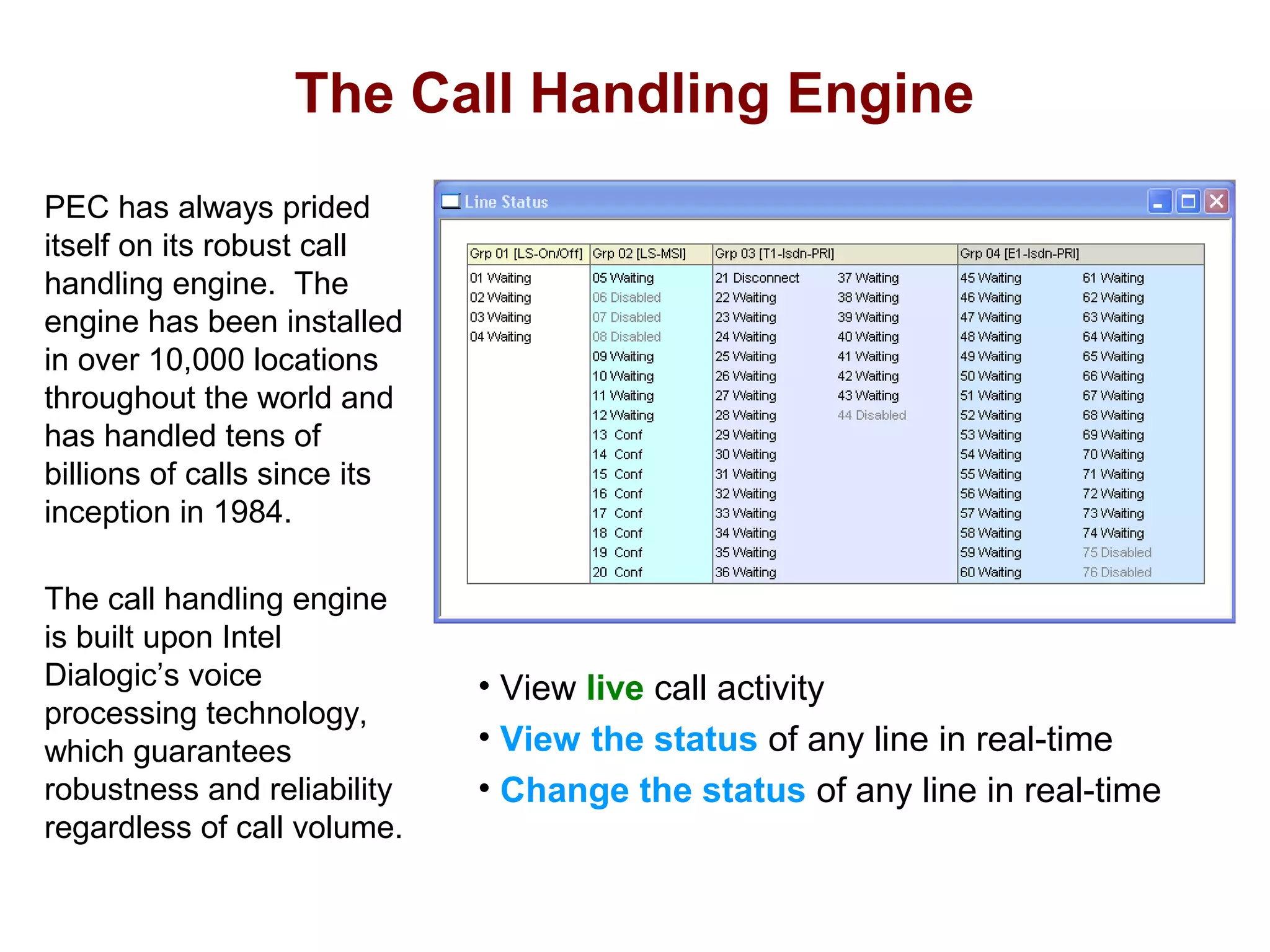
PEC has always prided
itself on its robust call
handling engine. The
engine has been installed
in over 10,000 locations
throughout the world and
has handled tens of
billions of calls since its
inception in 1984.
The call handling engine
is built upon Intel
Dialogic’s voice
processing technology,
which guarantees
robustness and reliability
regardless of call volume.

• View live call activity
• View the status of any line in real-time
• Change the status of any line in real-time
The Call Handling Engine

Viewing the Line Status
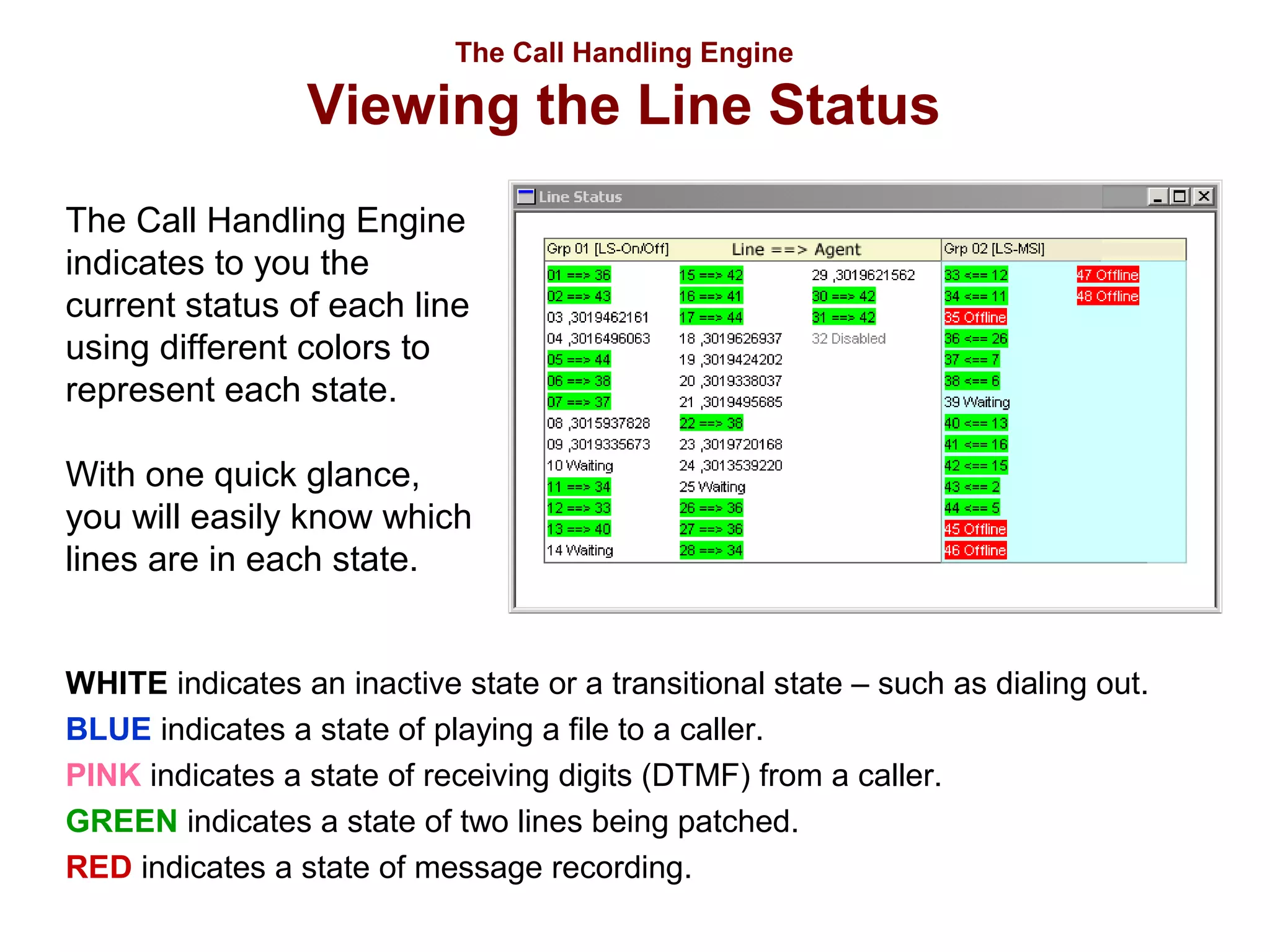
The Call Handling Engine
indicates to you the
current status of each line
using different colors to
represent each state.
With one quick glance,
you will easily know which
lines are in each state.
WHITE indicates an inactive state or a transitional state – such as dialing out.
BLUE indicates a state of playing a file to a caller.
PINK indicates a state of receiving digits (DTMF) from a caller.
GREEN indicates a state of two lines being patched.
RED indicates a state of message recording.
The Call Handling Engine

Individual Port Settings

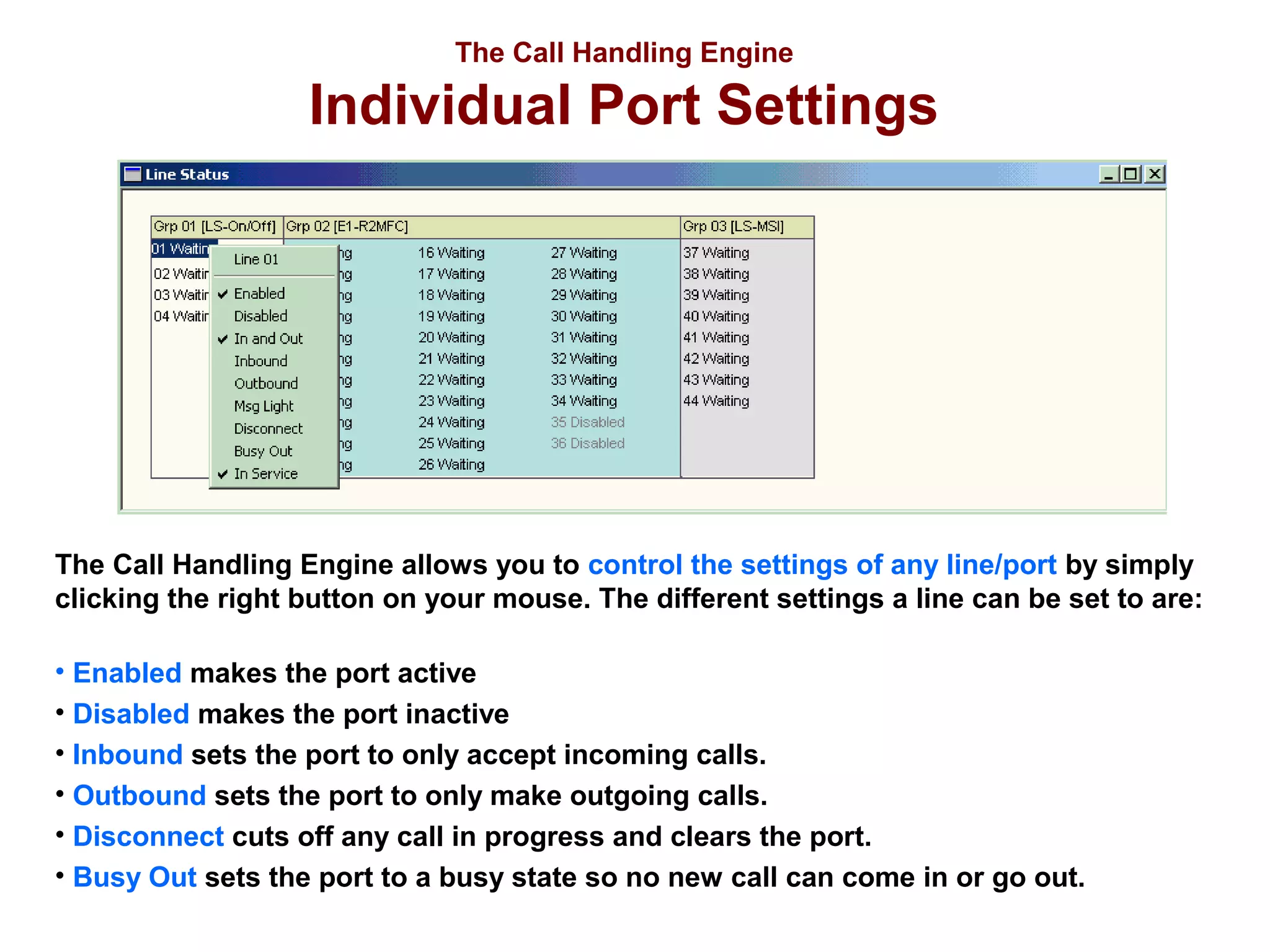
The Call Handling Engine allows you to control the settings of any line/port by simply
clicking the right button on your mouse. The different settings a line can be set to are:
• Enabled makes the port active
• Disabled makes the port inactive
• Inbound sets the port to only accept incoming calls.
• Outbound sets the port to only make outgoing calls.
• Disconnect cuts off any call in progress and clears the port.
• Busy Out sets the port to a busy state so no new call can come in or go out.
The Call Handling Engine

System Properties
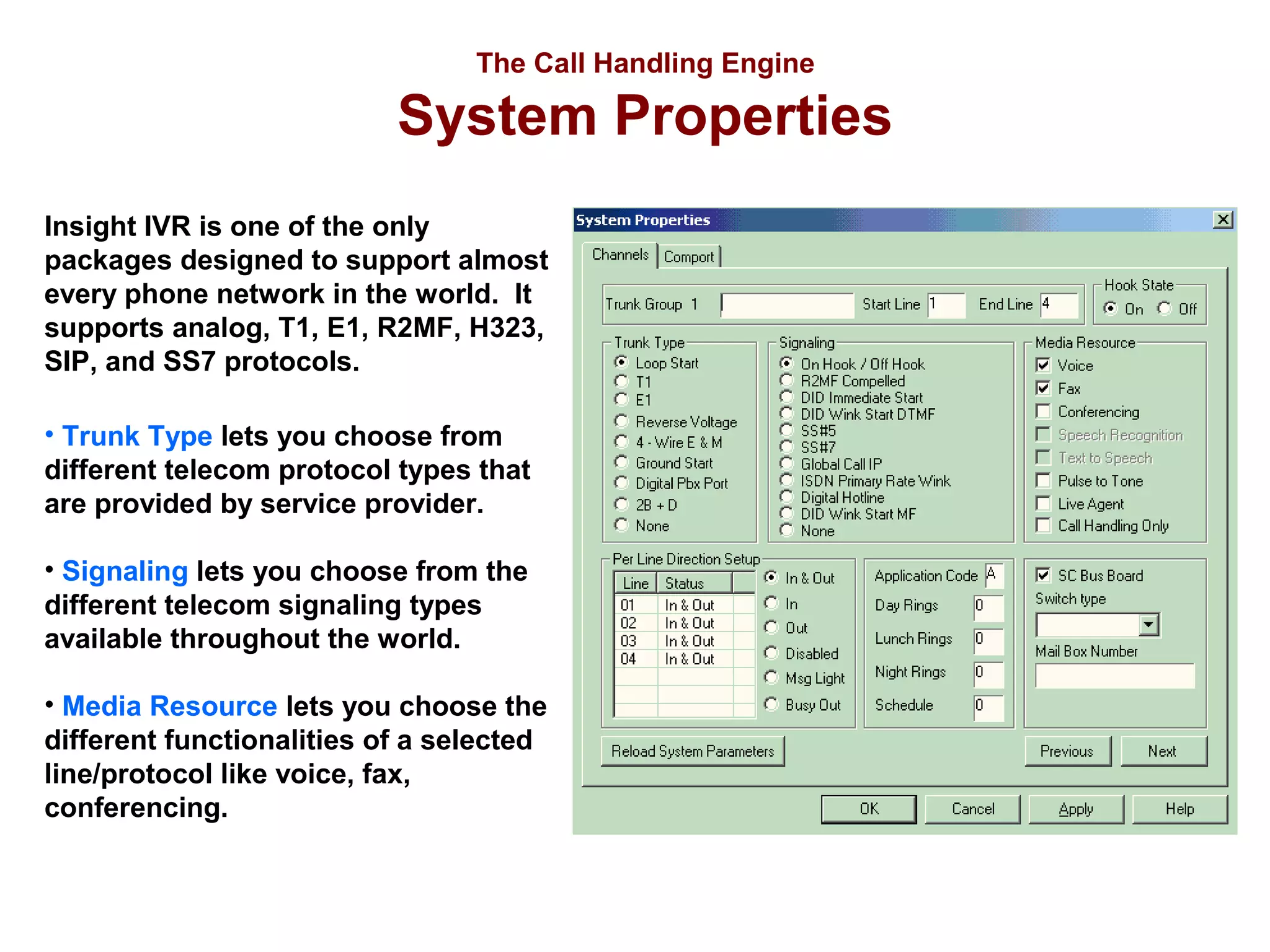
Insight IVR is one of the only
packages designed to support almost
every phone network in the world. It
supports analog, T1, E1, R2MF, H323,
SIP, and SS7 protocols.
• Trunk Type lets you choose from
different telecom protocol types that
are provided by service provider.
• Signaling lets you choose from the
different telecom signaling types
available throughout the world.
• Media Resource lets you choose the
different functionalities of a selected
line/protocol like voice, fax,
conferencing.
The Call Handling Engine

The Advantages
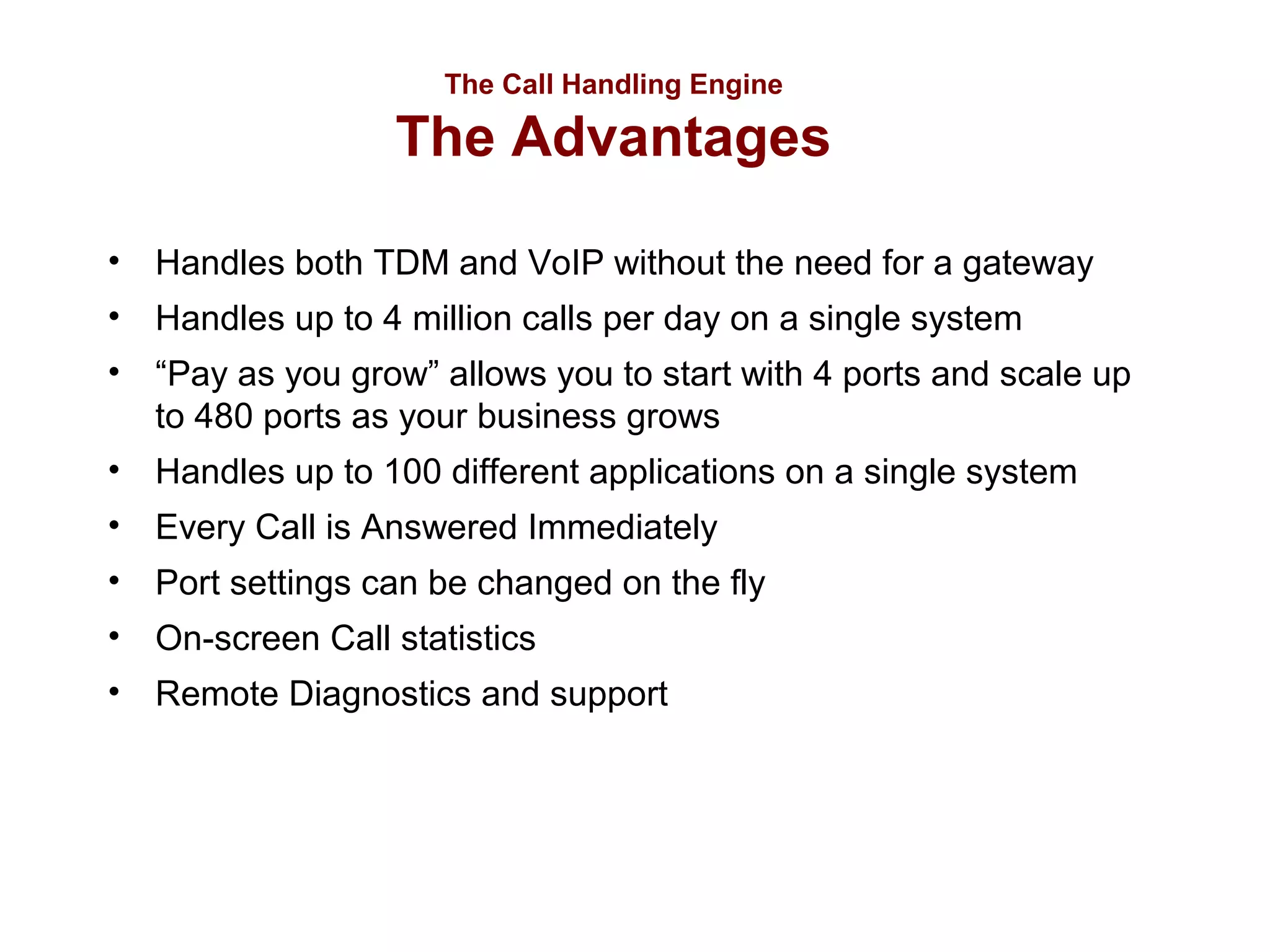
• Handles both TDM and VoIP without the need for a gateway
• Handles up to 4 million calls per day on a single system
• “Pay as you grow” allows you to start with 4 ports and scale up
to 480 ports as your business grows
• Handles up to 100 different applications on a single system
• Every Call is Answered Immediately
• Port settings can be changed on the fly
• On-screen Call statistics
• Remote Diagnostics and support
The Application Generator
Insight IVR allows you to easily design
and customize interactive telephone
applications using a simple drag and
drop interface.
Start out with a call flow sketch on paper
and within minutes you can build a fully
functional application that your clients
can call into.
The Application Generator

Insight Fast Build Kit

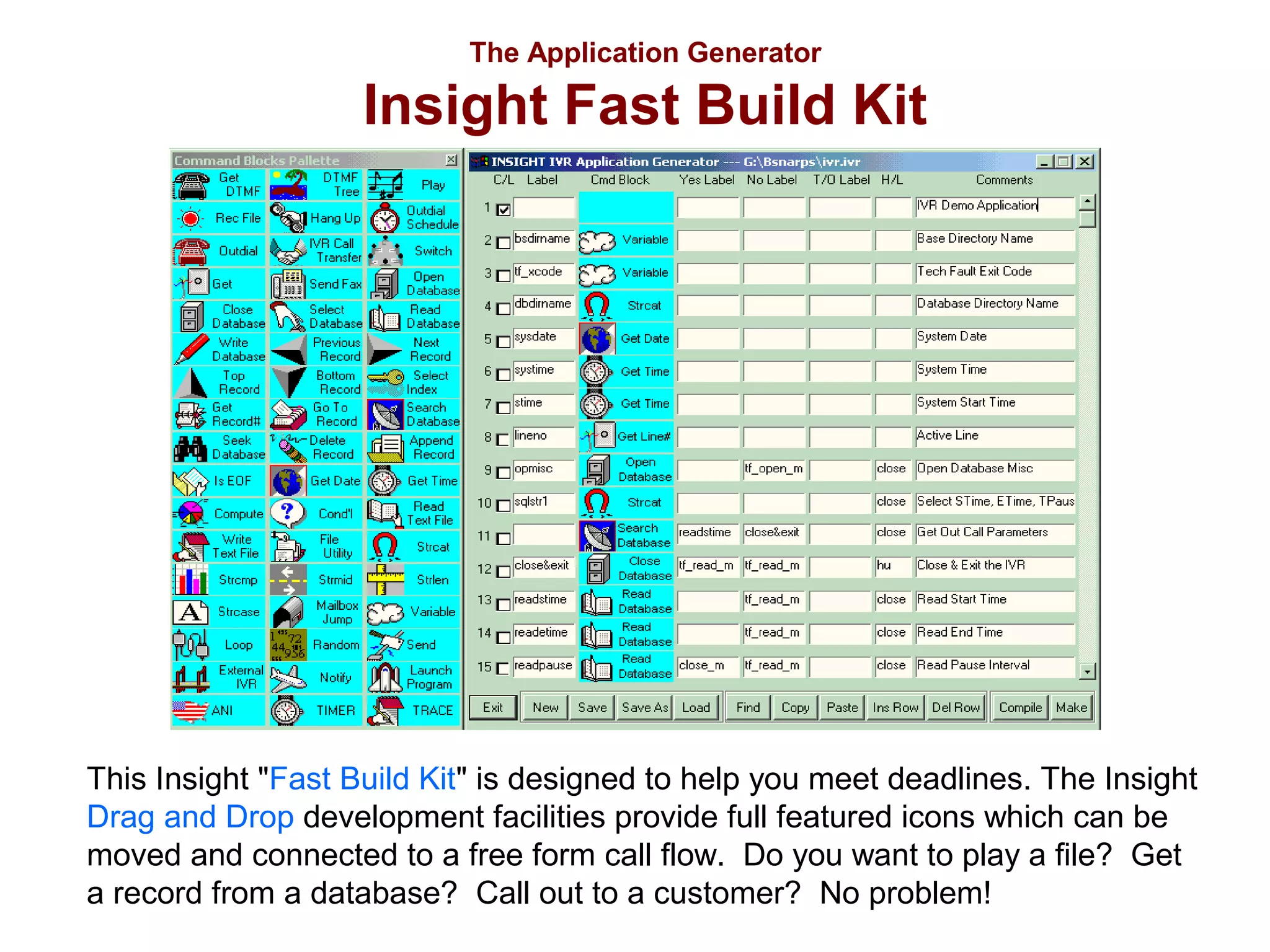
This Insight "Fast Build Kit" is designed to help you meet deadlines. The Insight
Drag and Drop development facilities provide full featured icons which can be
moved and connected to a free form call flow. Do you want to play a file? Get
a record from a database? Call out to a customer? No problem!
The Application Generator

System Features
•
•
•
•
•
•
•
•
•
•
•
•

Text to Speech
Speech Recognition
Touch Tone Detection
Database Interaction
Voice Messaging
Call Transferring
Voice To Email
Fax To Email
Email
Outdial
Read/Write Text File
Launch Program
System Features

Text to Speech
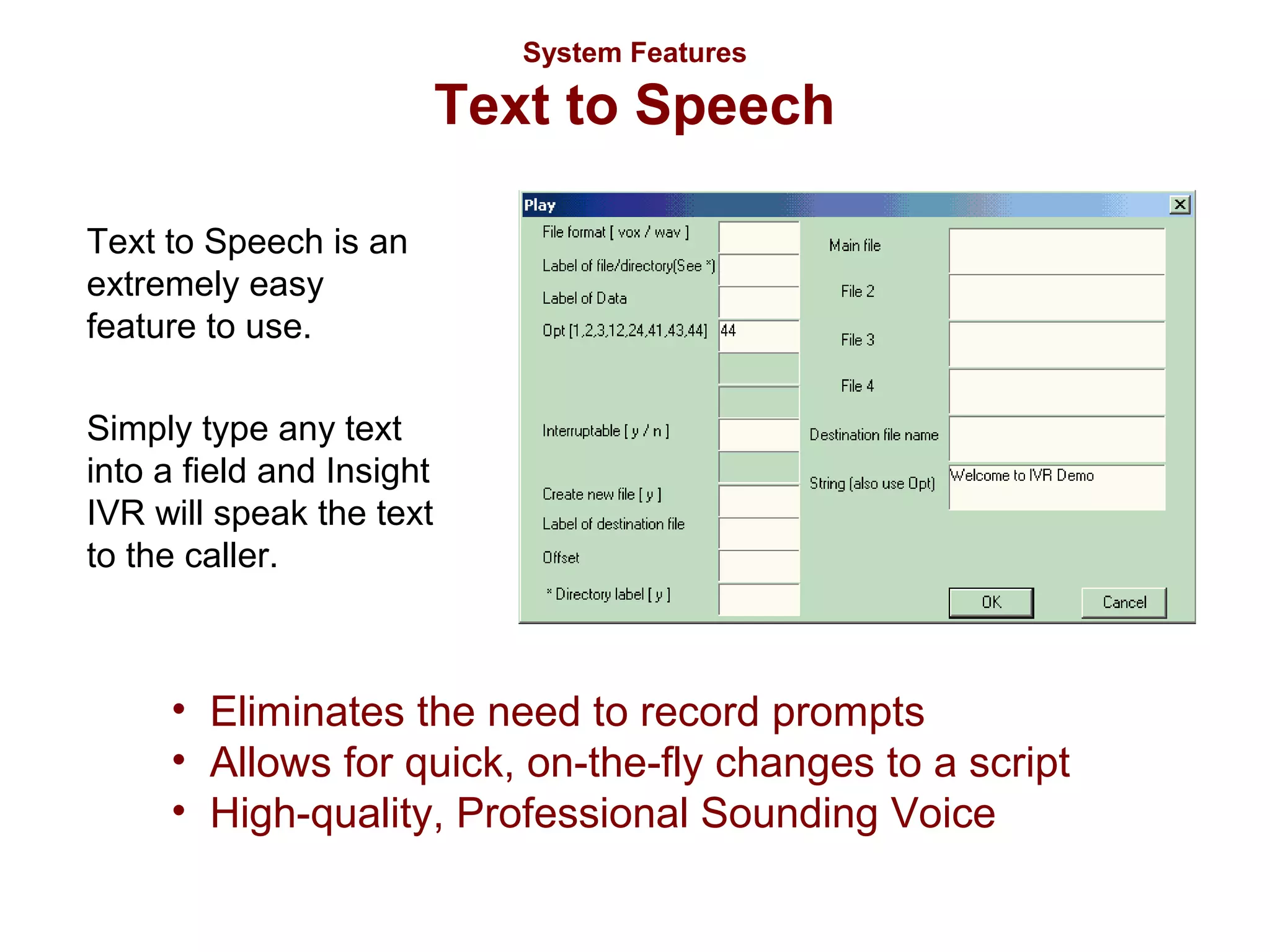
Text to Speech is an
extremely easy
feature to use.
Simply type any text
into a field and Insight
IVR will speak the text
to the caller.

• Eliminates the need to record prompts
• Allows for quick, on-the-fly changes to a script
• High-quality, Professional Sounding Voice
System Features

Speech Recognition
Insight IVR’s Speech Recognition feature
makes customer interaction with your system
quick, convenient, and simple.
Insight’s Speech Recognition module
recognizes words, names, spoken letters, and
numbers.
Callers can spell names, order products, enter
account numbers and zip codes, all without
entering a single touch tone on their phone.
System Features

Touch Tone Detection (Get DTMF)
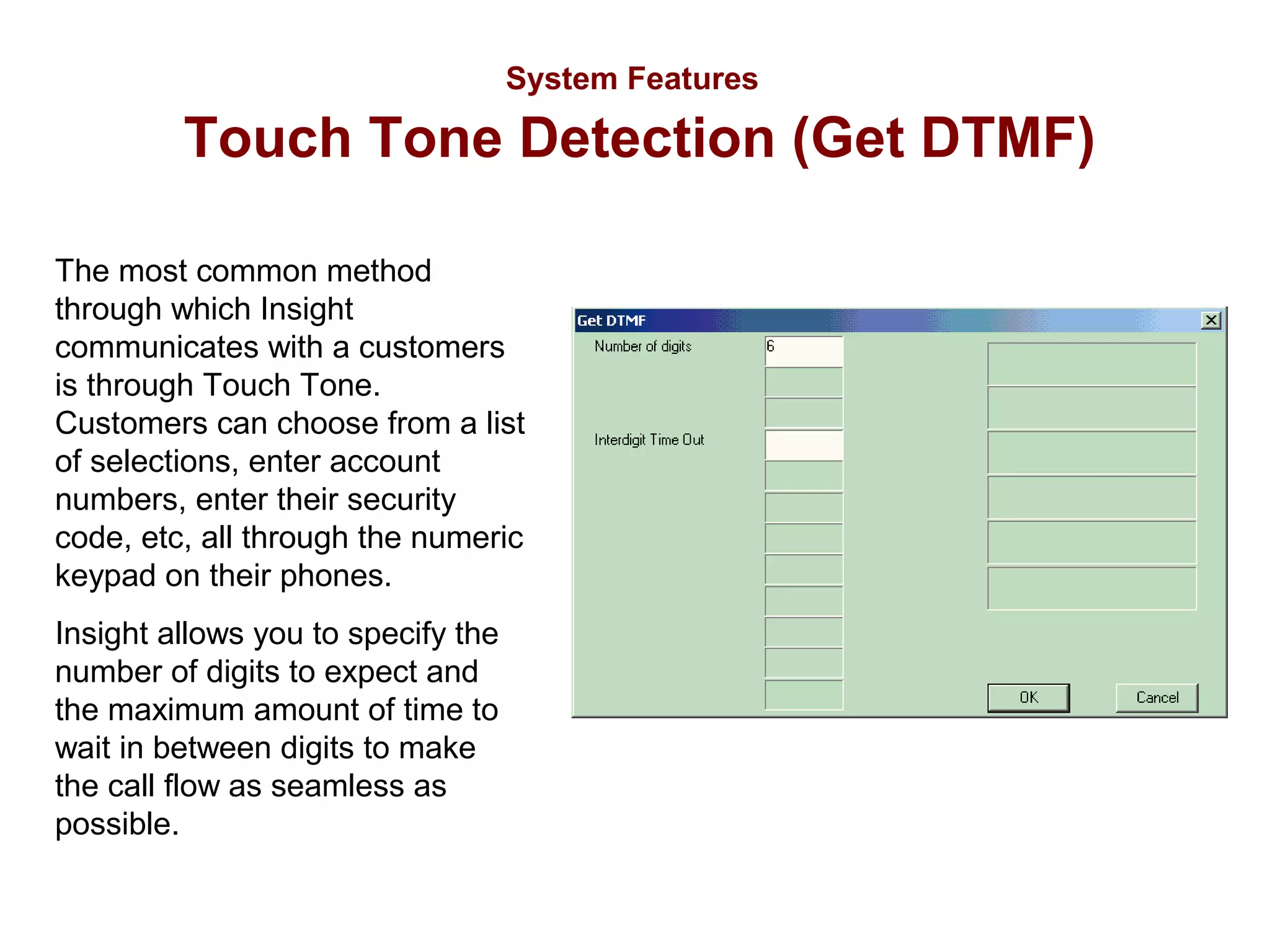
The most common method
through which Insight
communicates with a customers
is through Touch Tone.
Customers can choose from a list
of selections, enter account
numbers, enter their security
code, etc, all through the numeric
keypad on their phones.
Insight allows you to specify the
number of digits to expect and
the maximum amount of time to
wait in between digits to make
the call flow as seamless as
possible.
System Features

Database Interaction
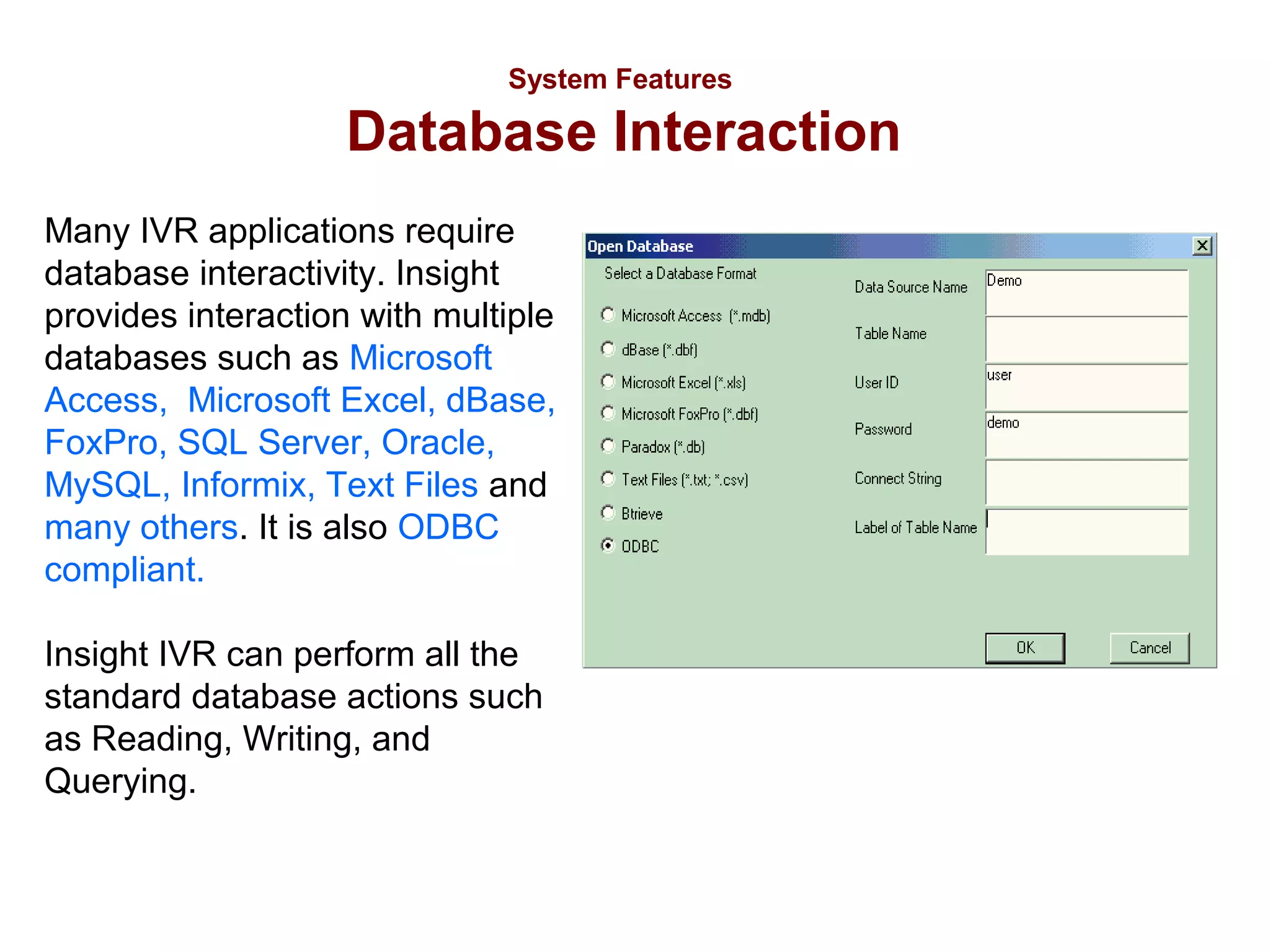
Many IVR applications require
database interactivity. Insight
provides interaction with multiple
databases such as Microsoft
Access, Microsoft Excel, dBase,
FoxPro, SQL Server, Oracle,
MySQL, Informix, Text Files and
many others. It is also ODBC
compliant.
Insight IVR can perform all the
standard database actions such
as Reading, Writing, and
Querying.
System Features

Voice Messaging
Insight IVR provides voice messaging capabilities
whereby callers can access the IVR system, leave
messages, retrieve messages, and review
messages. Each message is individually dated and
time stamped and kept in the order they were
received.
There is no limit to how long a message can be,
and as soon as the message is left, it is available
for your IVR application to access.
System Features

Call Transferring
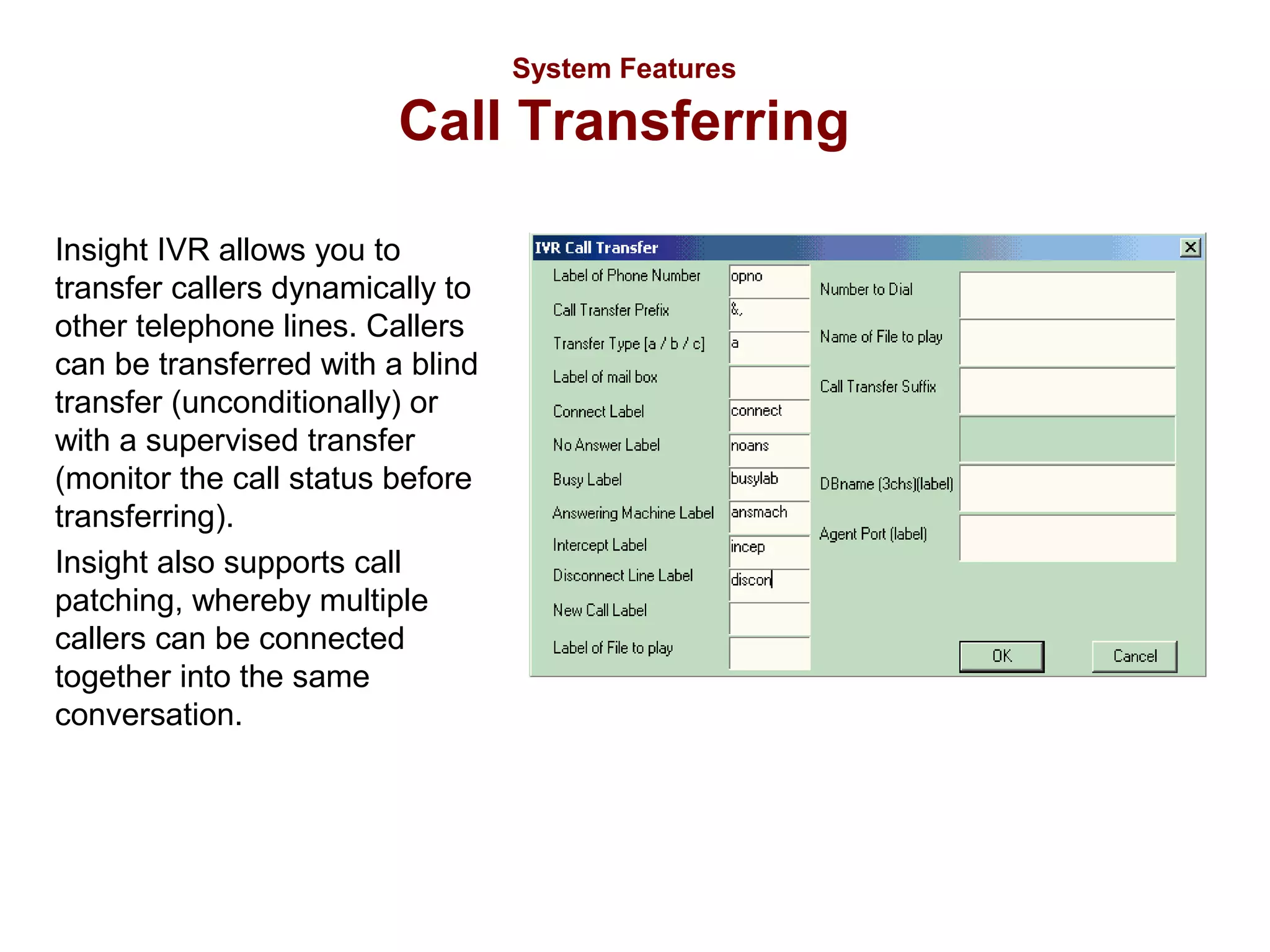
Insight IVR allows you to
transfer callers dynamically to
other telephone lines. Callers
can be transferred with a blind
transfer (unconditionally) or
with a supervised transfer
(monitor the call status before
transferring).
Insight also supports call
patching, whereby multiple
callers can be connected
together into the same
conversation.
System Features

Voice To Email
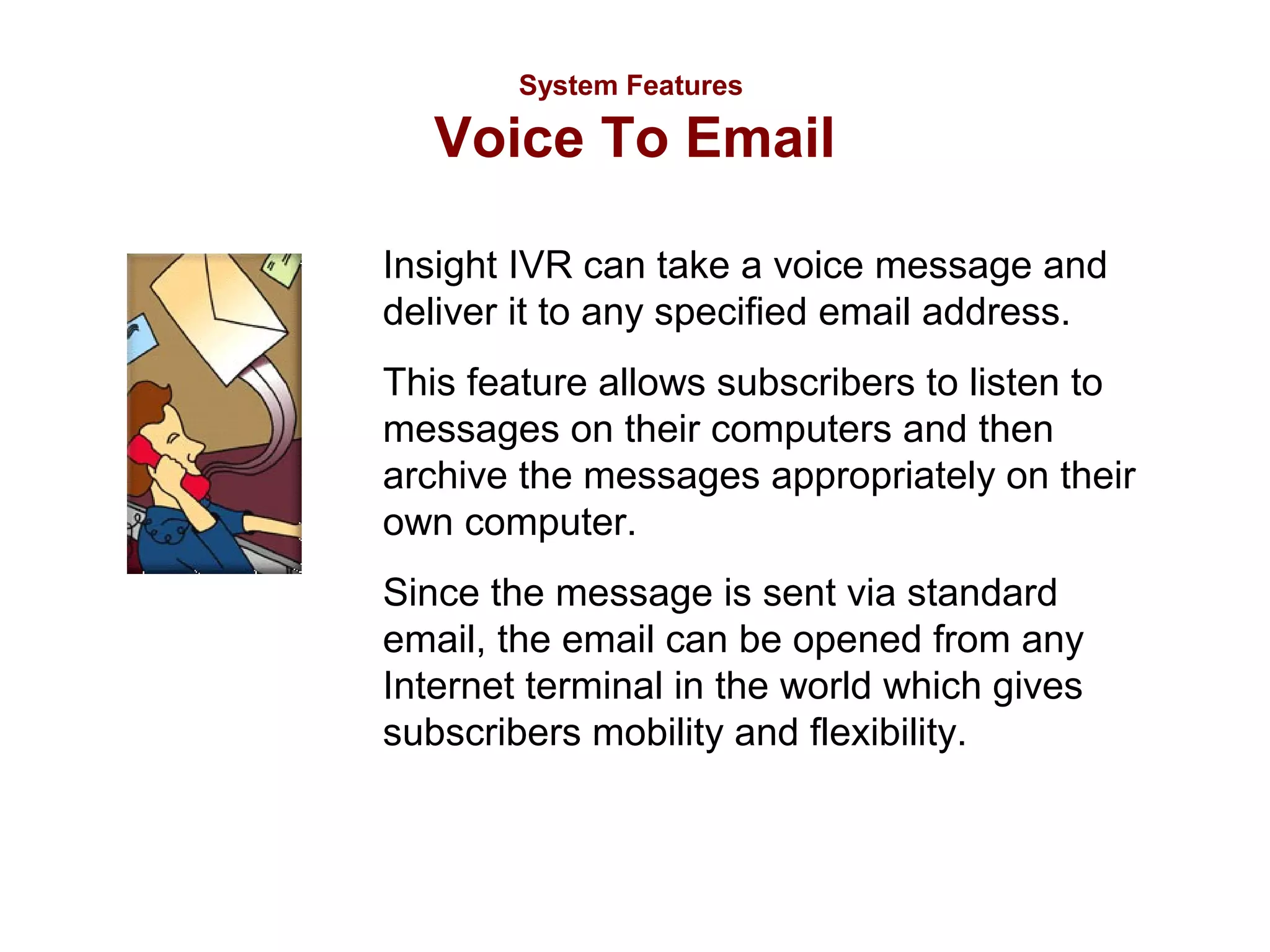
Insight IVR can take a voice message and
deliver it to any specified email address.
This feature allows subscribers to listen to
messages on their computers and then
archive the messages appropriately on their
own computer.
Since the message is sent via standard
email, the email can be opened from any
Internet terminal in the world which gives
subscribers mobility and flexibility.
System Features

Fax To Email
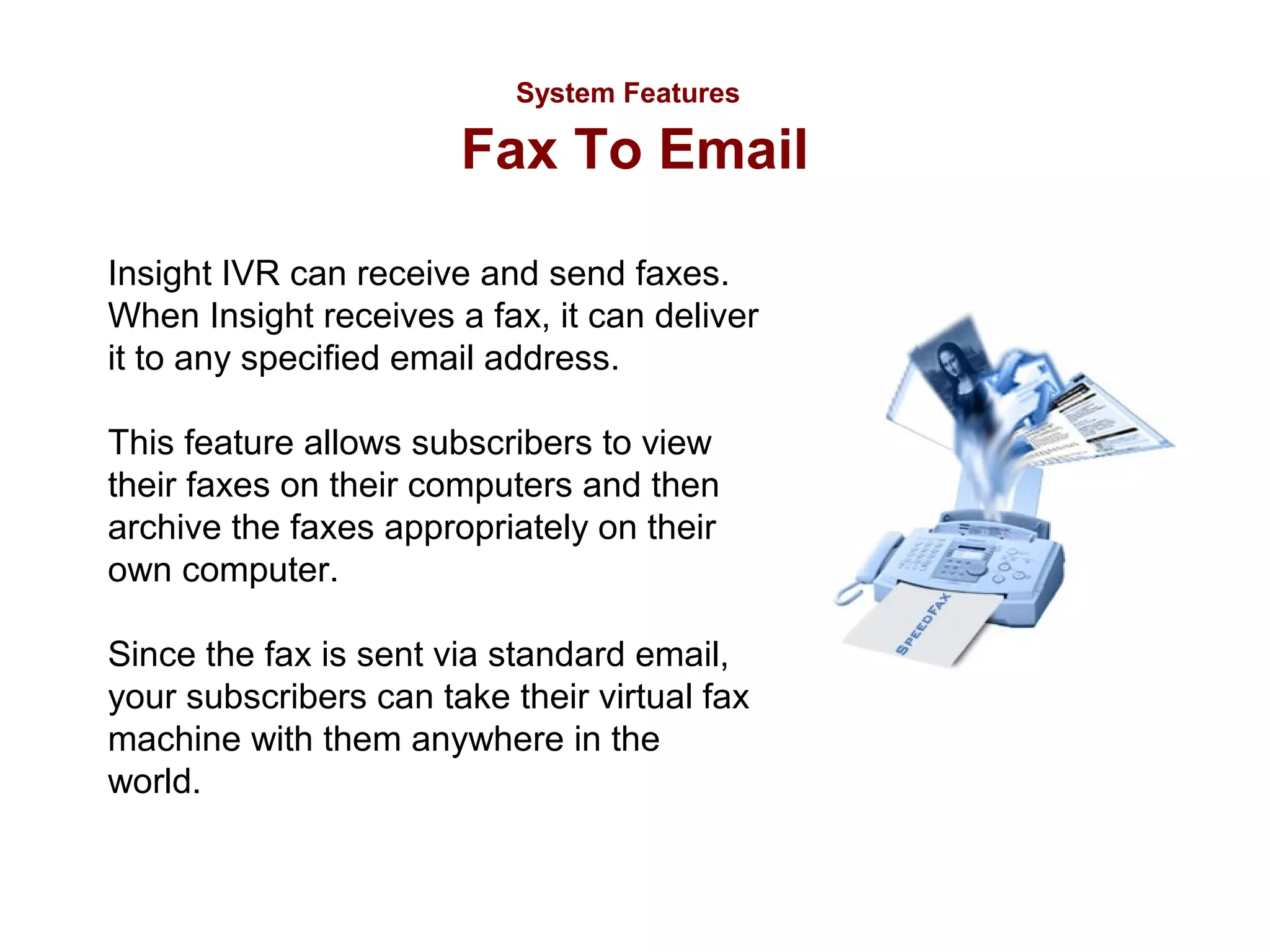
Insight IVR can receive and send faxes.
When Insight receives a fax, it can deliver
it to any specified email address.
This feature allows subscribers to view
their faxes on their computers and then
archive the faxes appropriately on their
own computer.
Since the fax is sent via standard email,
your subscribers can take their virtual fax
machine with them anywhere in the
world.
System Features

Email

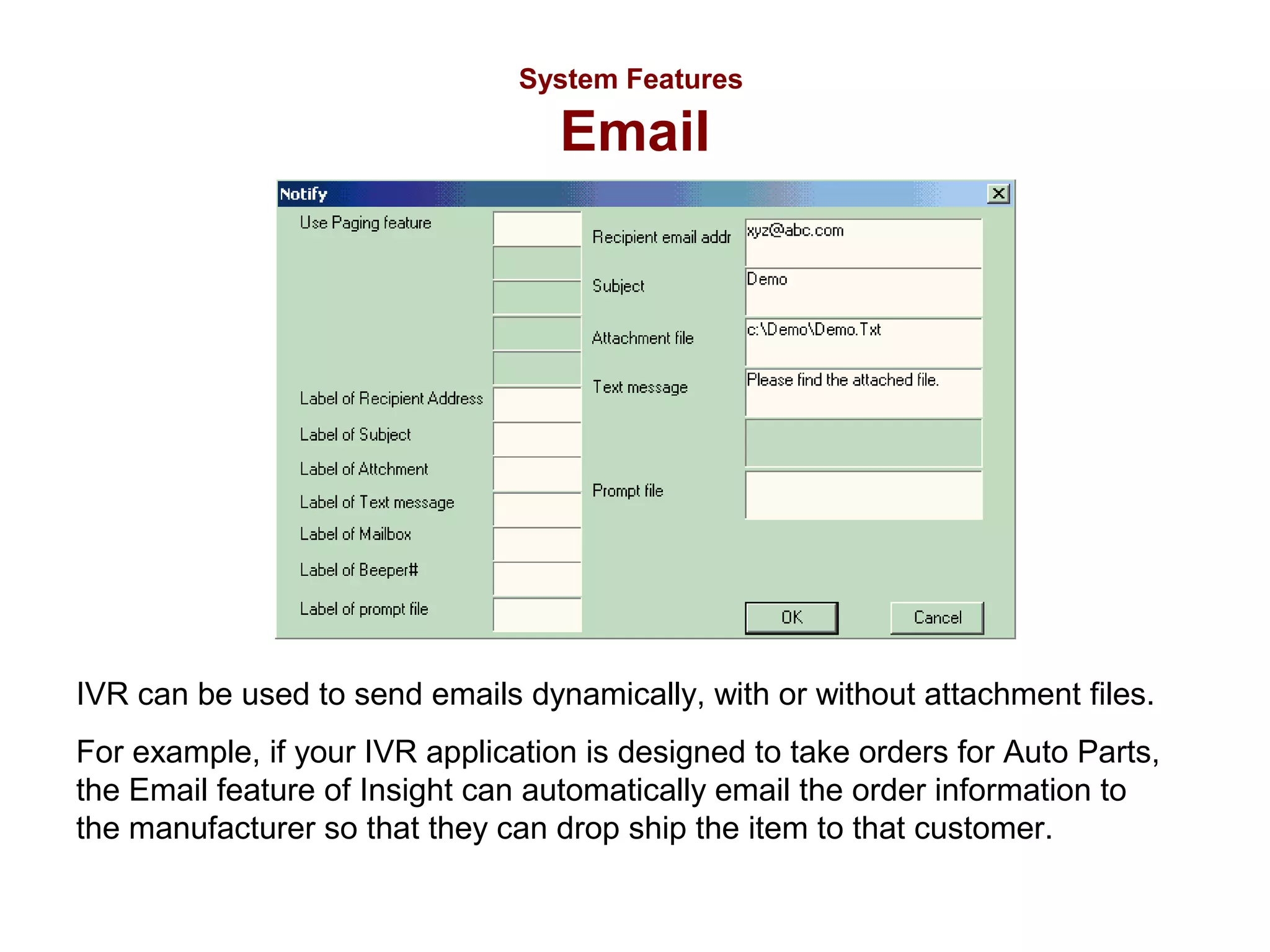
IVR can be used to send emails dynamically, with or without attachment files.
For example, if your IVR application is designed to take orders for Auto Parts,
the Email feature of Insight can automatically email the order information to
the manufacturer so that they can drop ship the item to that customer.
System Features

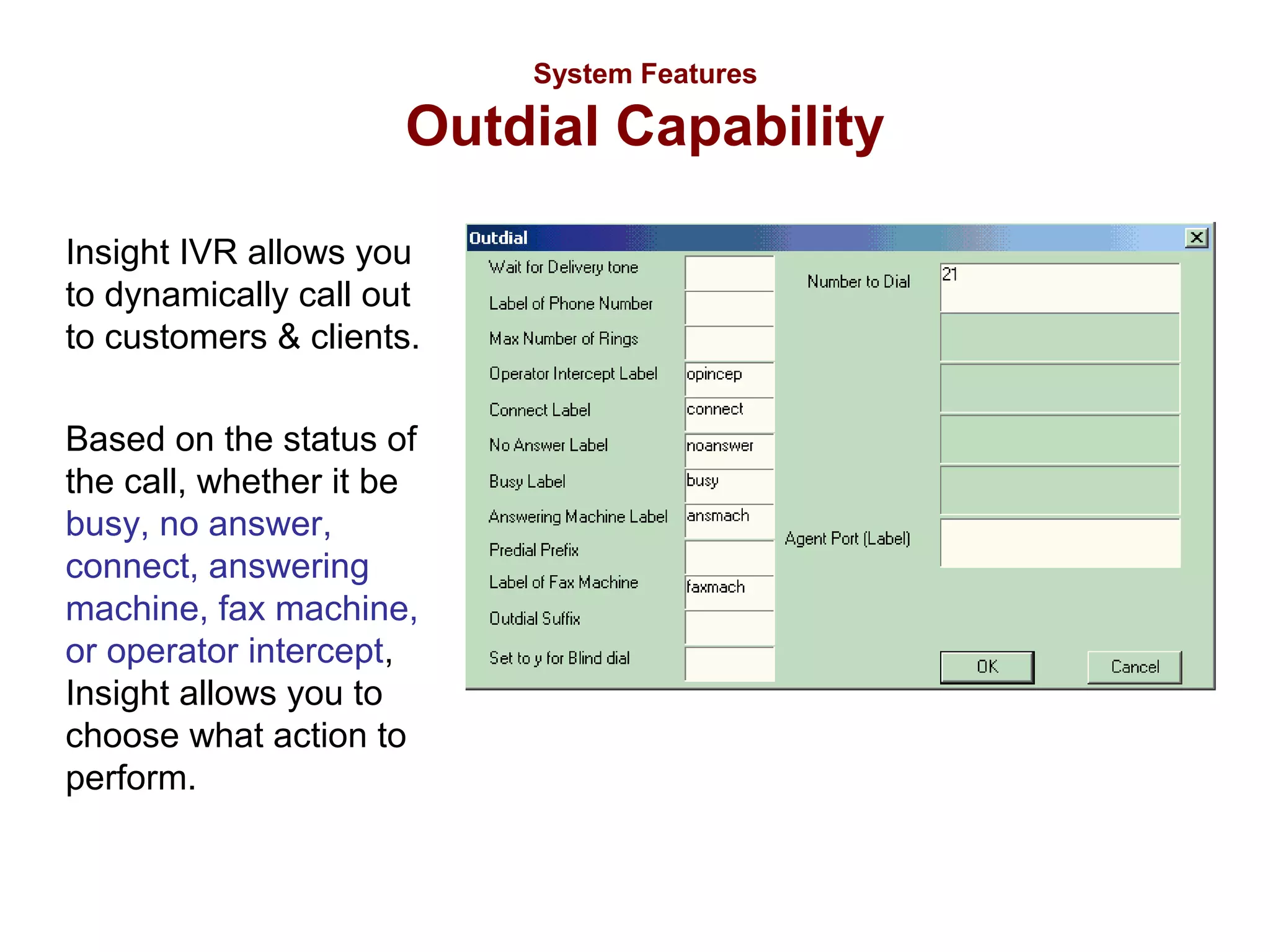
Outdial Capability
Insight IVR allows you
to dynamically call out
to customers & clients.
Based on the status of
the call, whether it be
busy, no answer,
connect, answering
machine, fax machine,
or operator intercept,
Insight allows you to
choose what action to
perform.
System Features

Read/Write Text File
Insight IVR allows you to read and write to
both text and CSV files.
This Read feature allows you to dynamically
read any information from a text file into your
application. This feature is often used for
data that is constantly changing.
The Write feature is usually used to keep a
call log or an event log of caller activity.
System Features

Launch Program
Insight IVR allows you to run
another program or call the
dispatch function of a DLL file
from within IVR. This feature
can be used in several
practical ways including
running Notepad, virus scan,
disk defragmenter, disk
backup, file compression (ZIP)
or any other program.
System Requirements
•
•
•
•
•
•
•
•
•
•

Windows 2000 Pro / XP Pro / 2003 Server
Pentium III 1 GHz or Higher
128 Megabytes of RAM.
20 GB Hard Drive
CD-ROM Drive.
Network Card
Modem
Database software (if application requires)
Intel Dialogic Boards or HMP Firmware
Insight IVR Software
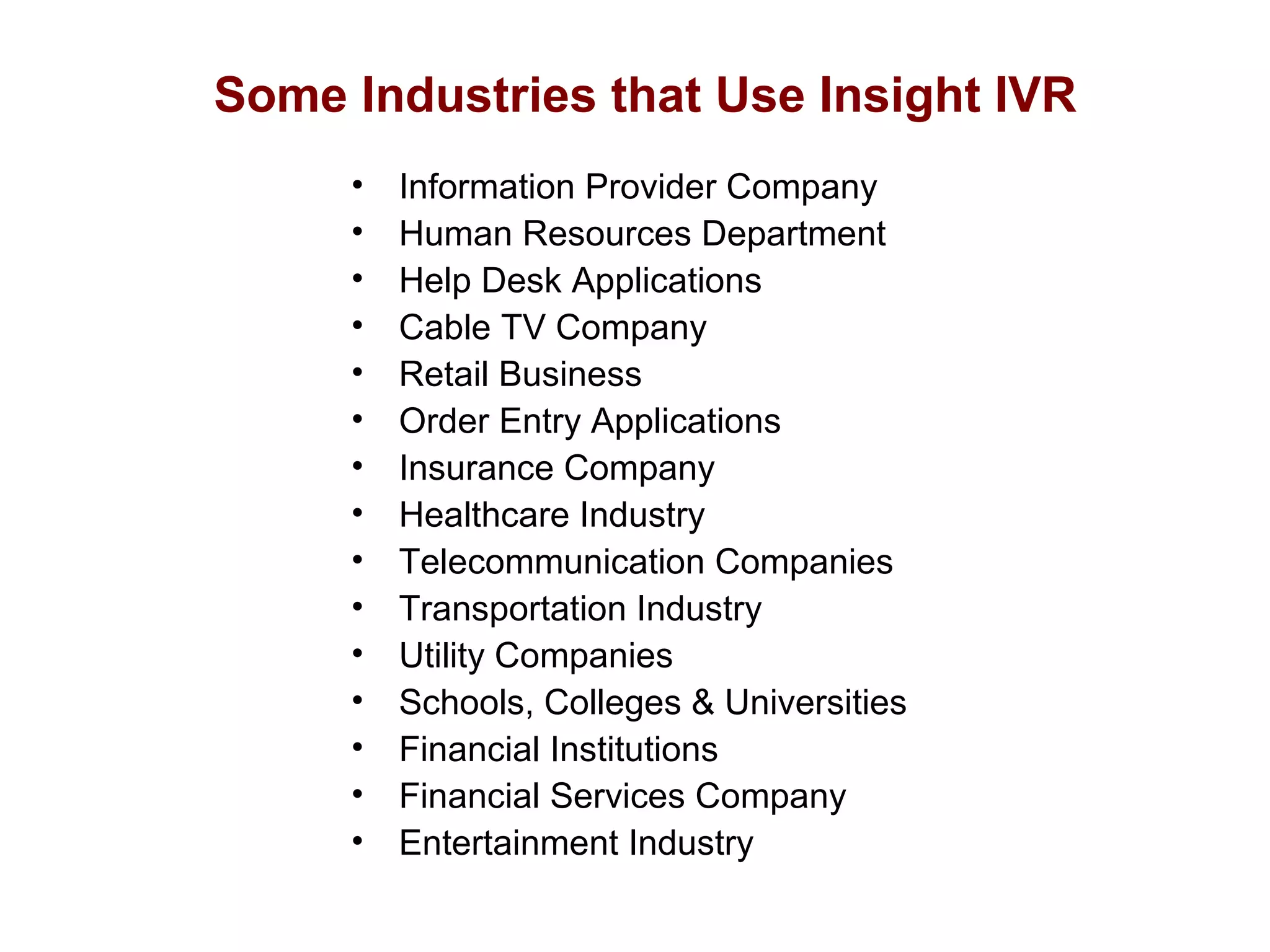
Some Industries that Use Insight IVR
•
•
•
•
•
•
•
•
•
•
•
•
•
•
•

Information Provider Company
Human Resources Department
Help Desk Applications
Cable TV Company
Retail Business
Order Entry Applications
Insurance Company
Healthcare Industry
Telecommunication Companies
Transportation Industry
Utility Companies
Schools, Colleges & Universities
Financial Institutions
Financial Services Company
Entertainment Industry
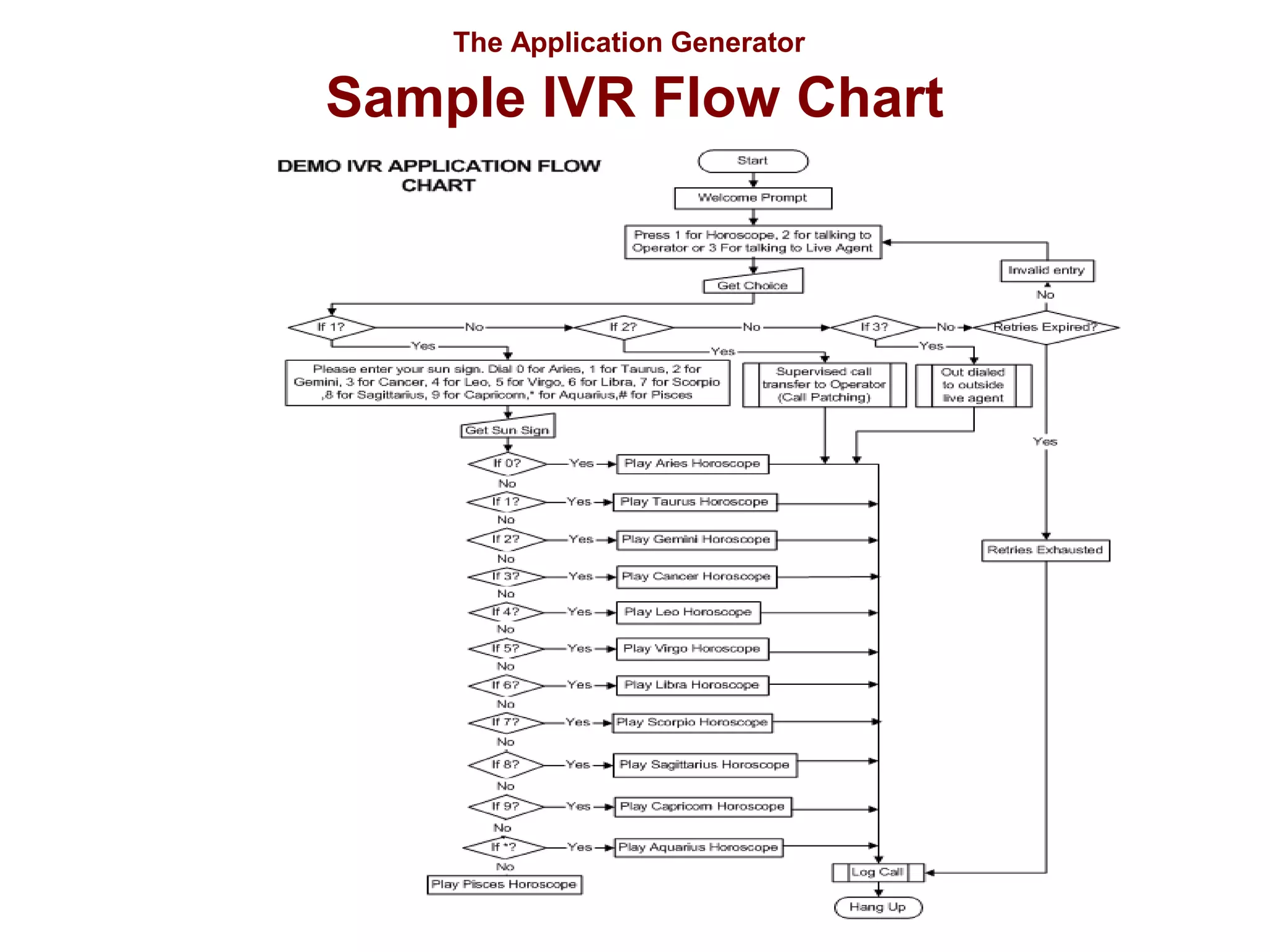
The Application Generator

Sample IVR Flow Chart
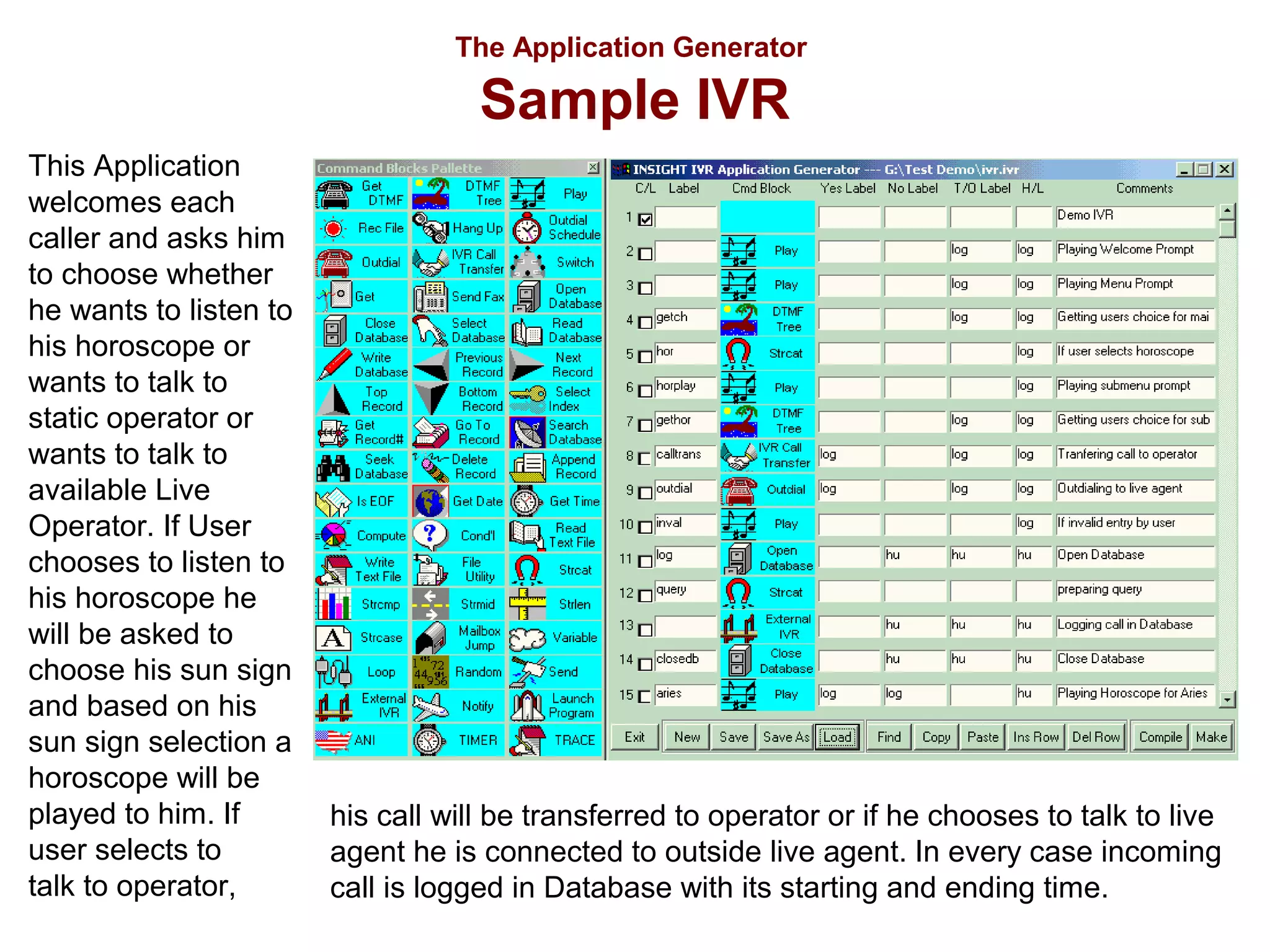
The Application Generator

Sample IVR
This Application
welcomes each
caller and asks him
to choose whether
he wants to listen to
his horoscope or
wants to talk to
static operator or
wants to talk to
available Live
Operator. If User
chooses to listen to
his horoscope he
will be asked to
choose his sun sign
and based on his
sun sign selection a
horoscope will be
played to him. If
user selects to
talk to operator,

his call will be transferred to operator or if he chooses to talk to live
agent he is connected to outside live agent. In every case incoming
call is logged in Database with its starting and ending time.
Real World Applications
•
•
•
•
•
•
•
•

Quiz
Music Messaging
Speech Recognition
Polling
Debit Card Platform
Zee Business Baazigar
Voice Messaging
Automatic Payment
Reminder
• Virtual Calling Card
• Customer Service
Real World Applications

Quiz
Customer Application
A Quiz game show was required based on the concept of famous
television game show “WHO WANTS TO BE MILLIONAIRE” for
PSTN Network.
The Insight Solution
The caller calls into a specified “quiz” number. Caller is asked
different questions one by one. Then the caller is informed of his
score (achieved from correct answers) at the end of each call, along
with his cumulative score over a period. The aim of the quiz is to
reward the caller who gets most questions right. The quiz contains
questions on topics like Movies, Sports and General Knowledge.
The questions are of varying toughness. Points are awarded to
customers according to the difficulty level of the question.
Real World Applications

Music Messaging
Customer Application
A unique song dedication service was required where a person can send a
desired song to another person with his personalized voice message.
The Insight Solution
Caller calls a predefined number which then takes him through an interactive
voice response system (IVRS). He then selects from various song
categories such as English songs / Arabic songs / Hindi Songs and then
from various sub categories such as Band songs / Modern songs / Film
songs etc. IVR then one by one plays the various songs under the selected
song category. Once the caller selects the desired song, he is prompted to
record his personalized message. Caller then enters his phone number,
destination number and specific date & time when he wants to send the
song. Selected song along with message will be played to destination
number on desired date and time.
Real World Applications

Railways Speech Recognition
Customer Application
Railway handles two kinds of enquiries viz., arrival/Departure Enquiry and Reservation
Status Enquiry. Earlier Both Arrival/Departure Enquiry and Reservation Status Enquiry
were handled manually. An application was required to automate it.
The Insight Solution
IVR asks caller whether he wants to enquire Arrival/Departure status or Reservation
Status. In case of reservation status, the call is handled by Reservation Status
Enquiry IVR. If caller opts for the Arrival / Departure Enquiry then the caller is asked
whether he knows the Train Number or he knows the Train Name. In case caller opts
for the Train Number option, he is asked to enter the Train Number from touch tone
phone and is informed of arrival/departure status of entered train number. If caller
opts for the Train Name option then the caller is asked to say the “Train Name” and
either “Arriving”, if he wants to know the arrival details of the Train or “Departing”, if he
wants to know the departure details of the Train. The caller’s speech is recognized
and the caller is informed of corresponding train details from database.
Real World Applications

Polling
Customer Application
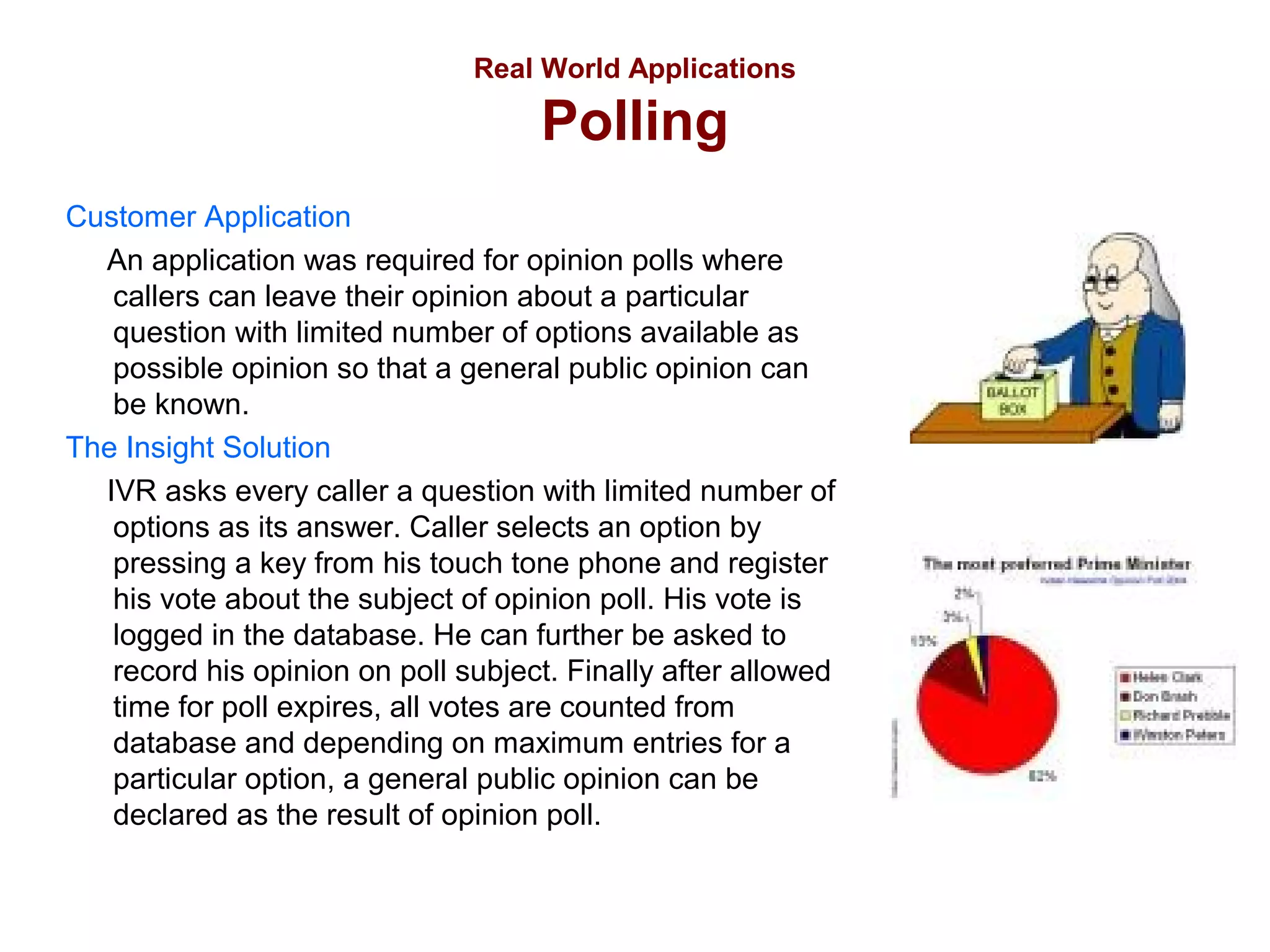
An application was required for opinion polls where
callers can leave their opinion about a particular
question with limited number of options available as
possible opinion so that a general public opinion can
be known.
The Insight Solution
IVR asks every caller a question with limited number of
options as its answer. Caller selects an option by
pressing a key from his touch tone phone and register
his vote about the subject of opinion poll. His vote is
logged in the database. He can further be asked to
record his opinion on poll subject. Finally after allowed
time for poll expires, all votes are counted from
database and depending on maximum entries for a
particular option, a general public opinion can be
declared as the result of opinion poll.
Real World Applications

Debit Card Platform
Customer Application
An application was required to provide functionality of
debit card which can be used by customers for shopping
or any such purpose where he needs to carry cash
otherwise.
The Insight Solution
Every Customer is provided with a unique card number.
An account is maintained for every card number. When
a customer uses it, he is authenticated through his
unique card number and his account balance is checked
so as to validate him for transaction he is willing to
commit. If all is validated, then his account is debited of
the money and the money is transferred to other
account (where money is expected to be transferred).
Real World Applications

Business Master
Customer Application
An application was required to register the callers and decide the level of
their IQ based on the correctness of answers given by him to the
questions as asked to him.
The Insight Solution
IVR asks caller about his personal information like age, sex, education,
employment, income, telephone number and asks caller to record his
name and address. Then IVR asks caller some random general
knowledge questions one by one and keeps count of his score based on
number correct answers given. At the end of the call, caller is informed of
his score and his IQ level is decided accordingly. If his IQ matches the
minimal criteria for entering next higher round, he is given a unique
registration number for further communication.
Real World Applications

Voice Messaging
Customer Application
A unique message dedication service was
required where a person can send a
personalized voice message to another person
for desired at a desired date and time .
The Insight Solution
Caller calls a predefined number which then
takes him through an interactive voice
response system (IVRS). There he is prompted
to record his personalized message. Caller
then enters his phone number, destination
number and specific date & time when he
wants to send the message. Message will be
played to destination number on desired date
and time and caller will be sent a confirmatory
SMS on his mobile of delivered message.
Real World Applications

Automatic Payment Reminder
Customer Application
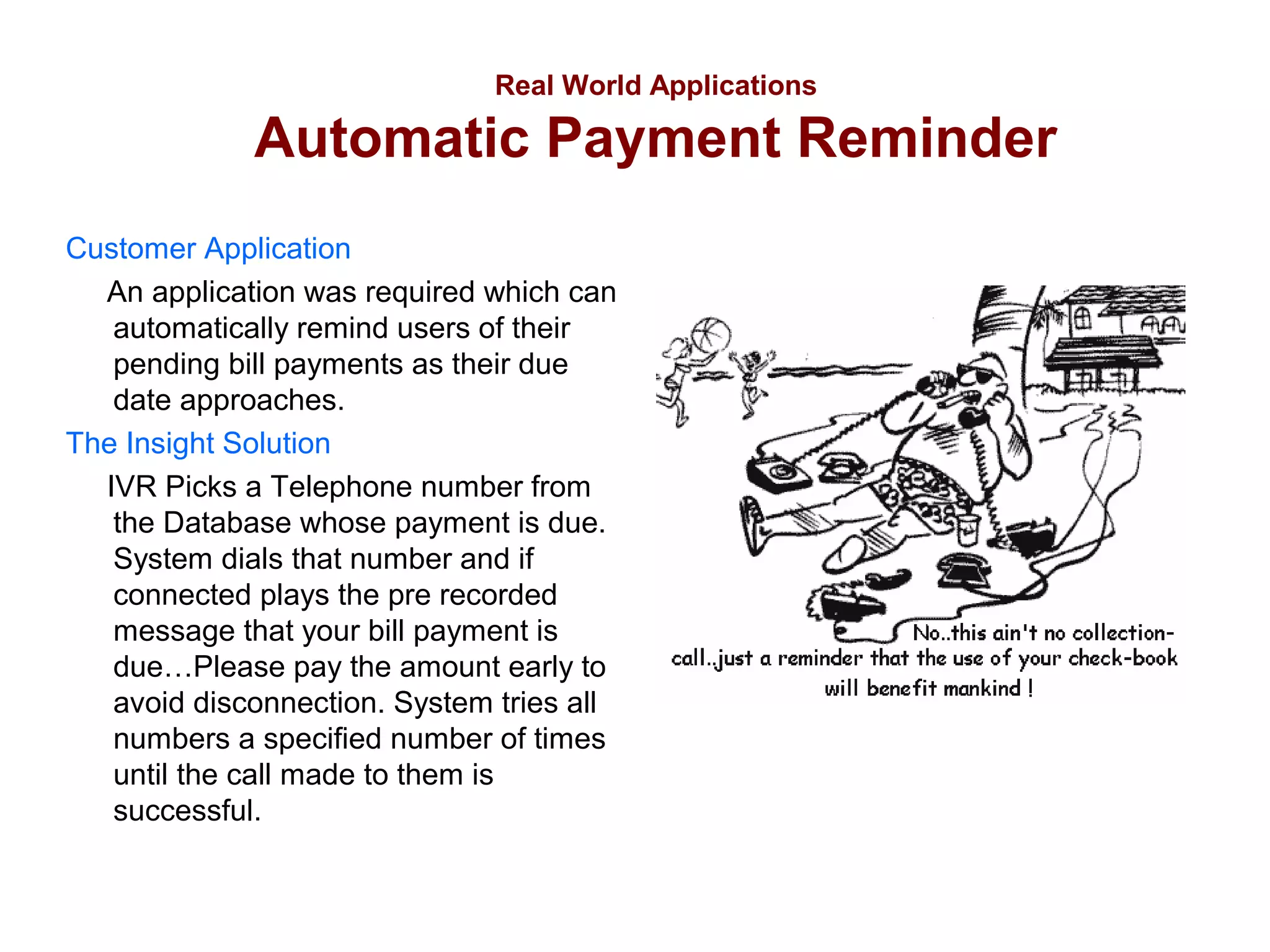
An application was required which can
automatically remind users of their
pending bill payments as their due
date approaches.
The Insight Solution
IVR Picks a Telephone number from
the Database whose payment is due.
System dials that number and if
connected plays the pre recorded
message that your bill payment is
due…Please pay the amount early to
avoid disconnection. System tries all
numbers a specified number of times
until the call made to them is
successful.
Real World Applications

Customer Service Application
Customer Application
An application was required to service the valid account
holders regarding their queries and alert them if they are
approaching their account expiry. Account Holder should be
given assistance even in night when no Customer Service
Representative is available.
The Insight Solution
IVR works differently according to day and night. During day hours, if an account
holder calls in with his query, he is authenticated through his account numbers.
If authenticated, he is reminded of approaching expiry of his account if time left
in expiration is less than 3 months and then he is connected to his particular
service representative for his Query. If his account has already expired then he
is connected to operator to renew his account. During night hours, if an account
holder calls in, he is asked to record his query with his account number. The
technical representative is immediately alerted of the message on his
mobile/pager. Technical representative can also call into the system to listen to
all the recorded messages and service them accordingly.

IVR presentation

  • 1.
    © Copyright 2005,Parwan Electronics Corporation
  • 2.
    What is InsightIVR? Insight IVR is a powerful software that allows companies to turn their vision of an interactive call flow into reality. The software consists of two main parts: - The Call Handling Engine - The Application Generator Insight IVR is built on a software platform that has been developed over the last 20 years. The product has been proven around the world to be flexible, robust, and reliable.
  • 3.
    The diagram abovedepicts Insight’s typical network topography. The IVR system is connected to a telephone network through which it can send and receive calls. Since Insight now supports direct VoIP connectivity, your system can also be stationed anywhere with an Internet connection. For example, a call originating from India can terminate directly via IP to an IVR Server in the United States.
  • 4.
    The Call HandlingEngine PEC has always prided itself on its robust call handling engine. The engine has been installed in over 10,000 locations throughout the world and has handled tens of billions of calls since its inception in 1984. The call handling engine is built upon Intel Dialogic’s voice processing technology, which guarantees robustness and reliability regardless of call volume. • View live call activity • View the status of any line in real-time • Change the status of any line in real-time
  • 5.
    The Call HandlingEngine Viewing the Line Status The Call Handling Engine indicates to you the current status of each line using different colors to represent each state. With one quick glance, you will easily know which lines are in each state. WHITE indicates an inactive state or a transitional state – such as dialing out. BLUE indicates a state of playing a file to a caller. PINK indicates a state of receiving digits (DTMF) from a caller. GREEN indicates a state of two lines being patched. RED indicates a state of message recording.
  • 6.
    The Call HandlingEngine Individual Port Settings The Call Handling Engine allows you to control the settings of any line/port by simply clicking the right button on your mouse. The different settings a line can be set to are: • Enabled makes the port active • Disabled makes the port inactive • Inbound sets the port to only accept incoming calls. • Outbound sets the port to only make outgoing calls. • Disconnect cuts off any call in progress and clears the port. • Busy Out sets the port to a busy state so no new call can come in or go out.
  • 7.
    The Call HandlingEngine System Properties Insight IVR is one of the only packages designed to support almost every phone network in the world. It supports analog, T1, E1, R2MF, H323, SIP, and SS7 protocols. • Trunk Type lets you choose from different telecom protocol types that are provided by service provider. • Signaling lets you choose from the different telecom signaling types available throughout the world. • Media Resource lets you choose the different functionalities of a selected line/protocol like voice, fax, conferencing.
  • 8.
    The Call HandlingEngine The Advantages • Handles both TDM and VoIP without the need for a gateway • Handles up to 4 million calls per day on a single system • “Pay as you grow” allows you to start with 4 ports and scale up to 480 ports as your business grows • Handles up to 100 different applications on a single system • Every Call is Answered Immediately • Port settings can be changed on the fly • On-screen Call statistics • Remote Diagnostics and support
  • 9.
    The Application Generator InsightIVR allows you to easily design and customize interactive telephone applications using a simple drag and drop interface. Start out with a call flow sketch on paper and within minutes you can build a fully functional application that your clients can call into.
  • 10.
    The Application Generator InsightFast Build Kit This Insight "Fast Build Kit" is designed to help you meet deadlines. The Insight Drag and Drop development facilities provide full featured icons which can be moved and connected to a free form call flow. Do you want to play a file? Get a record from a database? Call out to a customer? No problem!
  • 11.
    The Application Generator SystemFeatures • • • • • • • • • • • • Text to Speech Speech Recognition Touch Tone Detection Database Interaction Voice Messaging Call Transferring Voice To Email Fax To Email Email Outdial Read/Write Text File Launch Program
  • 12.
    System Features Text toSpeech Text to Speech is an extremely easy feature to use. Simply type any text into a field and Insight IVR will speak the text to the caller. • Eliminates the need to record prompts • Allows for quick, on-the-fly changes to a script • High-quality, Professional Sounding Voice
  • 13.
    System Features Speech Recognition InsightIVR’s Speech Recognition feature makes customer interaction with your system quick, convenient, and simple. Insight’s Speech Recognition module recognizes words, names, spoken letters, and numbers. Callers can spell names, order products, enter account numbers and zip codes, all without entering a single touch tone on their phone.
  • 14.
    System Features Touch ToneDetection (Get DTMF) The most common method through which Insight communicates with a customers is through Touch Tone. Customers can choose from a list of selections, enter account numbers, enter their security code, etc, all through the numeric keypad on their phones. Insight allows you to specify the number of digits to expect and the maximum amount of time to wait in between digits to make the call flow as seamless as possible.
  • 15.
    System Features Database Interaction ManyIVR applications require database interactivity. Insight provides interaction with multiple databases such as Microsoft Access, Microsoft Excel, dBase, FoxPro, SQL Server, Oracle, MySQL, Informix, Text Files and many others. It is also ODBC compliant. Insight IVR can perform all the standard database actions such as Reading, Writing, and Querying.
  • 16.
    System Features Voice Messaging InsightIVR provides voice messaging capabilities whereby callers can access the IVR system, leave messages, retrieve messages, and review messages. Each message is individually dated and time stamped and kept in the order they were received. There is no limit to how long a message can be, and as soon as the message is left, it is available for your IVR application to access.
  • 17.
    System Features Call Transferring InsightIVR allows you to transfer callers dynamically to other telephone lines. Callers can be transferred with a blind transfer (unconditionally) or with a supervised transfer (monitor the call status before transferring). Insight also supports call patching, whereby multiple callers can be connected together into the same conversation.
  • 18.
    System Features Voice ToEmail Insight IVR can take a voice message and deliver it to any specified email address. This feature allows subscribers to listen to messages on their computers and then archive the messages appropriately on their own computer. Since the message is sent via standard email, the email can be opened from any Internet terminal in the world which gives subscribers mobility and flexibility.
  • 19.
    System Features Fax ToEmail Insight IVR can receive and send faxes. When Insight receives a fax, it can deliver it to any specified email address. This feature allows subscribers to view their faxes on their computers and then archive the faxes appropriately on their own computer. Since the fax is sent via standard email, your subscribers can take their virtual fax machine with them anywhere in the world.
  • 20.
    System Features Email IVR canbe used to send emails dynamically, with or without attachment files. For example, if your IVR application is designed to take orders for Auto Parts, the Email feature of Insight can automatically email the order information to the manufacturer so that they can drop ship the item to that customer.
  • 21.
    System Features Outdial Capability InsightIVR allows you to dynamically call out to customers & clients. Based on the status of the call, whether it be busy, no answer, connect, answering machine, fax machine, or operator intercept, Insight allows you to choose what action to perform.
  • 22.
    System Features Read/Write TextFile Insight IVR allows you to read and write to both text and CSV files. This Read feature allows you to dynamically read any information from a text file into your application. This feature is often used for data that is constantly changing. The Write feature is usually used to keep a call log or an event log of caller activity.
  • 23.
    System Features Launch Program InsightIVR allows you to run another program or call the dispatch function of a DLL file from within IVR. This feature can be used in several practical ways including running Notepad, virus scan, disk defragmenter, disk backup, file compression (ZIP) or any other program.
  • 24.
    System Requirements • • • • • • • • • • Windows 2000Pro / XP Pro / 2003 Server Pentium III 1 GHz or Higher 128 Megabytes of RAM. 20 GB Hard Drive CD-ROM Drive. Network Card Modem Database software (if application requires) Intel Dialogic Boards or HMP Firmware Insight IVR Software
  • 25.
    Some Industries thatUse Insight IVR • • • • • • • • • • • • • • • Information Provider Company Human Resources Department Help Desk Applications Cable TV Company Retail Business Order Entry Applications Insurance Company Healthcare Industry Telecommunication Companies Transportation Industry Utility Companies Schools, Colleges & Universities Financial Institutions Financial Services Company Entertainment Industry
  • 26.
  • 27.
    The Application Generator SampleIVR This Application welcomes each caller and asks him to choose whether he wants to listen to his horoscope or wants to talk to static operator or wants to talk to available Live Operator. If User chooses to listen to his horoscope he will be asked to choose his sun sign and based on his sun sign selection a horoscope will be played to him. If user selects to talk to operator, his call will be transferred to operator or if he chooses to talk to live agent he is connected to outside live agent. In every case incoming call is logged in Database with its starting and ending time.
  • 28.
    Real World Applications • • • • • • • • Quiz MusicMessaging Speech Recognition Polling Debit Card Platform Zee Business Baazigar Voice Messaging Automatic Payment Reminder • Virtual Calling Card • Customer Service
  • 29.
    Real World Applications Quiz CustomerApplication A Quiz game show was required based on the concept of famous television game show “WHO WANTS TO BE MILLIONAIRE” for PSTN Network. The Insight Solution The caller calls into a specified “quiz” number. Caller is asked different questions one by one. Then the caller is informed of his score (achieved from correct answers) at the end of each call, along with his cumulative score over a period. The aim of the quiz is to reward the caller who gets most questions right. The quiz contains questions on topics like Movies, Sports and General Knowledge. The questions are of varying toughness. Points are awarded to customers according to the difficulty level of the question.
  • 30.
    Real World Applications MusicMessaging Customer Application A unique song dedication service was required where a person can send a desired song to another person with his personalized voice message. The Insight Solution Caller calls a predefined number which then takes him through an interactive voice response system (IVRS). He then selects from various song categories such as English songs / Arabic songs / Hindi Songs and then from various sub categories such as Band songs / Modern songs / Film songs etc. IVR then one by one plays the various songs under the selected song category. Once the caller selects the desired song, he is prompted to record his personalized message. Caller then enters his phone number, destination number and specific date & time when he wants to send the song. Selected song along with message will be played to destination number on desired date and time.
  • 31.
    Real World Applications RailwaysSpeech Recognition Customer Application Railway handles two kinds of enquiries viz., arrival/Departure Enquiry and Reservation Status Enquiry. Earlier Both Arrival/Departure Enquiry and Reservation Status Enquiry were handled manually. An application was required to automate it. The Insight Solution IVR asks caller whether he wants to enquire Arrival/Departure status or Reservation Status. In case of reservation status, the call is handled by Reservation Status Enquiry IVR. If caller opts for the Arrival / Departure Enquiry then the caller is asked whether he knows the Train Number or he knows the Train Name. In case caller opts for the Train Number option, he is asked to enter the Train Number from touch tone phone and is informed of arrival/departure status of entered train number. If caller opts for the Train Name option then the caller is asked to say the “Train Name” and either “Arriving”, if he wants to know the arrival details of the Train or “Departing”, if he wants to know the departure details of the Train. The caller’s speech is recognized and the caller is informed of corresponding train details from database.
  • 32.
    Real World Applications Polling CustomerApplication An application was required for opinion polls where callers can leave their opinion about a particular question with limited number of options available as possible opinion so that a general public opinion can be known. The Insight Solution IVR asks every caller a question with limited number of options as its answer. Caller selects an option by pressing a key from his touch tone phone and register his vote about the subject of opinion poll. His vote is logged in the database. He can further be asked to record his opinion on poll subject. Finally after allowed time for poll expires, all votes are counted from database and depending on maximum entries for a particular option, a general public opinion can be declared as the result of opinion poll.
  • 33.
    Real World Applications DebitCard Platform Customer Application An application was required to provide functionality of debit card which can be used by customers for shopping or any such purpose where he needs to carry cash otherwise. The Insight Solution Every Customer is provided with a unique card number. An account is maintained for every card number. When a customer uses it, he is authenticated through his unique card number and his account balance is checked so as to validate him for transaction he is willing to commit. If all is validated, then his account is debited of the money and the money is transferred to other account (where money is expected to be transferred).
  • 34.
    Real World Applications BusinessMaster Customer Application An application was required to register the callers and decide the level of their IQ based on the correctness of answers given by him to the questions as asked to him. The Insight Solution IVR asks caller about his personal information like age, sex, education, employment, income, telephone number and asks caller to record his name and address. Then IVR asks caller some random general knowledge questions one by one and keeps count of his score based on number correct answers given. At the end of the call, caller is informed of his score and his IQ level is decided accordingly. If his IQ matches the minimal criteria for entering next higher round, he is given a unique registration number for further communication.
  • 35.
    Real World Applications VoiceMessaging Customer Application A unique message dedication service was required where a person can send a personalized voice message to another person for desired at a desired date and time . The Insight Solution Caller calls a predefined number which then takes him through an interactive voice response system (IVRS). There he is prompted to record his personalized message. Caller then enters his phone number, destination number and specific date & time when he wants to send the message. Message will be played to destination number on desired date and time and caller will be sent a confirmatory SMS on his mobile of delivered message.
  • 36.
    Real World Applications AutomaticPayment Reminder Customer Application An application was required which can automatically remind users of their pending bill payments as their due date approaches. The Insight Solution IVR Picks a Telephone number from the Database whose payment is due. System dials that number and if connected plays the pre recorded message that your bill payment is due…Please pay the amount early to avoid disconnection. System tries all numbers a specified number of times until the call made to them is successful.
  • 37.
    Real World Applications CustomerService Application Customer Application An application was required to service the valid account holders regarding their queries and alert them if they are approaching their account expiry. Account Holder should be given assistance even in night when no Customer Service Representative is available. The Insight Solution IVR works differently according to day and night. During day hours, if an account holder calls in with his query, he is authenticated through his account numbers. If authenticated, he is reminded of approaching expiry of his account if time left in expiration is less than 3 months and then he is connected to his particular service representative for his Query. If his account has already expired then he is connected to operator to renew his account. During night hours, if an account holder calls in, he is asked to record his query with his account number. The technical representative is immediately alerted of the message on his mobile/pager. Technical representative can also call into the system to listen to all the recorded messages and service them accordingly.

Editor's Notes