Developing Rich Interfaces in JavaFX for
Ultrabooks
Bruno Borges
Felipe Pedroso
Agenda
• The future of PCs
• JavaFX and Touch Support
• Using JNI to work with sensors
2
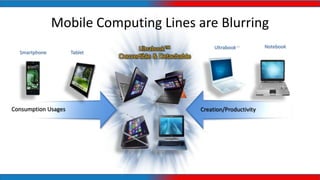
Mobile Computing Lines are Blurring
Ultrabook™
Convertible & Detachable
Ultrabook™
TabletSmartphone
Consumption Usages Creation/Productivity
Notebook
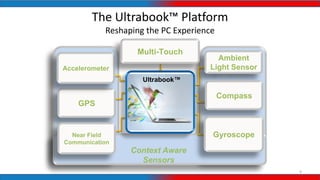
The Ultrabook™ Platform
Reshaping the PC Experience
4
Ambient
Light Sensor
GPS
Compass
Near Field
Communication
Gyroscope
Ultrabook™
Accelerometer
Multi-Touch
Context Aware
Sensors
OK, they have all those features…
… but how can we implement them using Java?
To allow users to TOUCH my Java App...
6
• Should I use...
– AWT?
– Swing?
– SWT?
• Actually, you can use them but...
– They aren’t made for multi-touch (OK, there’s a way to do it)
– You must optimize your UI controls to be more ‘touch friendly’
• So, how to do it in a simple and easy way?
7
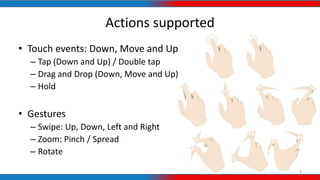
Actions supported
• Touch events: Down, Move and Up
– Tap (Down and Up) / Double tap
– Drag and Drop (Down, Move and Up)
– Hold
• Gestures
– Swipe: Up, Down, Left and Right
– Zoom: Pinch / Spread
– Rotate
8
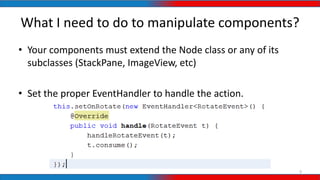
What I need to do to manipulate components?
• Your components must extend the Node class or any of its
subclasses (StackPane, ImageView, etc)
• Set the proper EventHandler to handle the action.
9
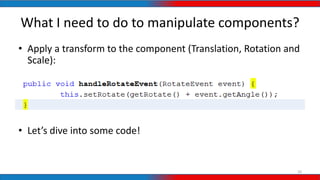
What I need to do to manipulate components?
10
• Apply a transform to the component (Translation, Rotation and
Scale):
• Let’s dive into some code!
What about the sensors?
JNI, I choose you!
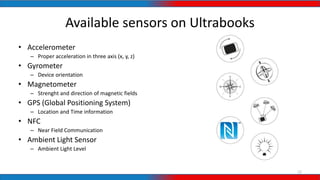
Available sensors on Ultrabooks
• Accelerometer
– Proper acceleration in three axis (x, y, z)
• Gyrometer
– Device orientation
• Magnetometer
– Strenght and direction of magnetic fields
• GPS (Global Positioning System)
– Location and Time information
• NFC
– Near Field Communication
• Ambient Light Sensor
– Ambient Light Level
12
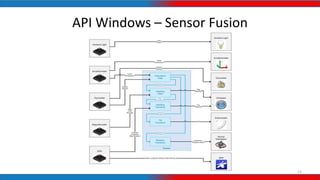
API Windows – Sensor Fusion
13
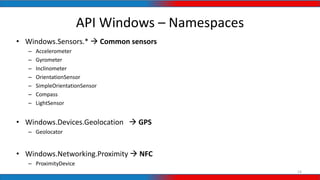
API Windows – Namespaces
• Windows.Sensors.*  Common sensors
– Accelerometer
– Gyrometer
– Inclinometer
– OrientationSensor
– SimpleOrientationSensor
– Compass
– LightSensor
• Windows.Devices.Geolocation  GPS
– Geolocator
• Windows.Networking.Proximity  NFC
– ProximityDevice
14
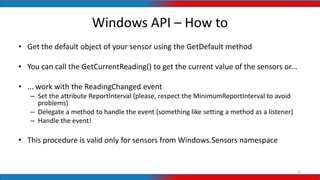
Windows API – How to
• Get the default object of your sensor using the GetDefault method
• You can call the GetCurrentReading() to get the current value of the sensors or...
• ... work with the ReadingChanged event
– Set the attribute ReportInterval (please, respect the MinimumReportInterval to avoid
problems)
– Delegate a method to handle the event (something like setting a method as a listener)
– Handle the event!
• This procedure is valid only for sensors from Windows.Sensors namespace
15
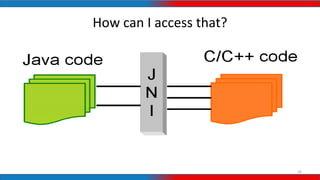
How can I access that?
16
Using JNI to access the sensors from
Windows.Sensors
1. [Java] Create a native method to register the object that will
handle the events that come from the sensor
2. Generate the header file using javah
3. [C++] Create a DLL Project in Visual Studio with the DLLs and
namespaces of the Windows 8 APIS
4. [C++] Use a variable to keep a reference to the object and the ID
(GetMethodID) of the method that will handle the event
17
Using JNI to access the sensors from
Windows.Sensors
5. [C++] Initialize the sensor and delegate a C++ method to handle
the event
6. [C++] Redirect the delegate method call to the Java method using
the function CallVoidMethod with the following parameters: the
Java Object, the method ID and it’s parameters
7. [Java] Handle the event! 
A lot of text? Please, show me the code!
18
What about Linux?
• Touch works fine, but there aren’t clear APIs to read sensors. If
you know how to do it, let’s work together!
19
Wants to know more about Intel Software?
http://software.intel.com/en-us/
20
Windows Community
http://software.intel.com/en-us/windows
21
www.javafxcommunity.com
22
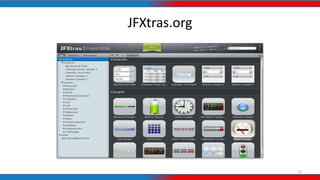
JFXtras.org
23
Take aways
• The PC experience is being reshaped
• JavaFX + Touch = AWESOME
• Using JNI to access the sensors can be LEGENDARY!
Any doubts?
(if yes, the answer is 42)
Thanks a lot!
Bruno Borges
facebook.com/brunocborges
@brunoborges
Felipe Pedroso
facebook.com/felipe.a.pedroso
@felipeapedroso

Developing Rich Interfaces in JavaFX for Ultrabooks

  • 1.
    Developing Rich Interfacesin JavaFX for Ultrabooks Bruno Borges Felipe Pedroso
  • 2.
    Agenda • The futureof PCs • JavaFX and Touch Support • Using JNI to work with sensors 2
  • 3.
    Mobile Computing Linesare Blurring Ultrabook™ Convertible & Detachable Ultrabook™ TabletSmartphone Consumption Usages Creation/Productivity Notebook
  • 4.
    The Ultrabook™ Platform Reshapingthe PC Experience 4 Ambient Light Sensor GPS Compass Near Field Communication Gyroscope Ultrabook™ Accelerometer Multi-Touch Context Aware Sensors
  • 5.
    OK, they haveall those features… … but how can we implement them using Java?
  • 6.
    To allow usersto TOUCH my Java App... 6 • Should I use... – AWT? – Swing? – SWT? • Actually, you can use them but... – They aren’t made for multi-touch (OK, there’s a way to do it) – You must optimize your UI controls to be more ‘touch friendly’ • So, how to do it in a simple and easy way?
  • 7.
  • 8.
    Actions supported • Touchevents: Down, Move and Up – Tap (Down and Up) / Double tap – Drag and Drop (Down, Move and Up) – Hold • Gestures – Swipe: Up, Down, Left and Right – Zoom: Pinch / Spread – Rotate 8
  • 9.
    What I needto do to manipulate components? • Your components must extend the Node class or any of its subclasses (StackPane, ImageView, etc) • Set the proper EventHandler to handle the action. 9
  • 10.
    What I needto do to manipulate components? 10 • Apply a transform to the component (Translation, Rotation and Scale): • Let’s dive into some code!
  • 11.
    What about thesensors? JNI, I choose you!
  • 12.
    Available sensors onUltrabooks • Accelerometer – Proper acceleration in three axis (x, y, z) • Gyrometer – Device orientation • Magnetometer – Strenght and direction of magnetic fields • GPS (Global Positioning System) – Location and Time information • NFC – Near Field Communication • Ambient Light Sensor – Ambient Light Level 12
  • 13.
    API Windows –Sensor Fusion 13
  • 14.
    API Windows –Namespaces • Windows.Sensors.*  Common sensors – Accelerometer – Gyrometer – Inclinometer – OrientationSensor – SimpleOrientationSensor – Compass – LightSensor • Windows.Devices.Geolocation  GPS – Geolocator • Windows.Networking.Proximity  NFC – ProximityDevice 14
  • 15.
    Windows API –How to • Get the default object of your sensor using the GetDefault method • You can call the GetCurrentReading() to get the current value of the sensors or... • ... work with the ReadingChanged event – Set the attribute ReportInterval (please, respect the MinimumReportInterval to avoid problems) – Delegate a method to handle the event (something like setting a method as a listener) – Handle the event! • This procedure is valid only for sensors from Windows.Sensors namespace 15
  • 16.
    How can Iaccess that? 16
  • 17.
    Using JNI toaccess the sensors from Windows.Sensors 1. [Java] Create a native method to register the object that will handle the events that come from the sensor 2. Generate the header file using javah 3. [C++] Create a DLL Project in Visual Studio with the DLLs and namespaces of the Windows 8 APIS 4. [C++] Use a variable to keep a reference to the object and the ID (GetMethodID) of the method that will handle the event 17
  • 18.
    Using JNI toaccess the sensors from Windows.Sensors 5. [C++] Initialize the sensor and delegate a C++ method to handle the event 6. [C++] Redirect the delegate method call to the Java method using the function CallVoidMethod with the following parameters: the Java Object, the method ID and it’s parameters 7. [Java] Handle the event!  A lot of text? Please, show me the code! 18
  • 19.
    What about Linux? •Touch works fine, but there aren’t clear APIs to read sensors. If you know how to do it, let’s work together! 19
  • 20.
    Wants to knowmore about Intel Software? http://software.intel.com/en-us/ 20
  • 21.
  • 22.
  • 23.
  • 24.
    Take aways • ThePC experience is being reshaped • JavaFX + Touch = AWESOME • Using JNI to access the sensors can be LEGENDARY!
  • 25.
    Any doubts? (if yes,the answer is 42)
  • 26.
    Thanks a lot! BrunoBorges facebook.com/brunocborges @brunoborges Felipe Pedroso facebook.com/felipe.a.pedroso @felipeapedroso