Cost Optimization In AWS
Haris Zaheer Ahmed
AWS Solutions Architect
“Why is my AWS bill so high? I thought I should be saving more when I am on it.”
“How can I reduce AWS costs for Dev/QA environments?”
“What options do I have to bring down my AWS cost?”
The Challenge! Billing Surprises
Approaches for Cost Optimization
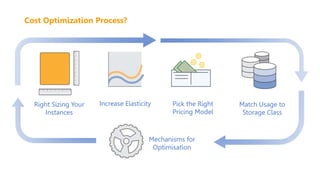
Right Sizing Your
Instances
Pick the Right
Pricing Model
Increase Elasticity
Mechanisms for
Optimisation
Match Usage to
Storage Class
Cost Optimization Process?
Pillar 1:
Right Sizing
Cheapest Instance / Best Performance
Monitor Usage
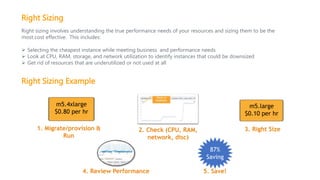
Right Sizing
Right sizing involves understanding the true performance needs of your resources and sizing them to be the
most cost effective. This includes:
 Selecting the cheapest instance while meeting business and performance needs
 Look at CPU, RAM, storage, and network utilization to identify instances that could be downsized
 Get rid of resources that are underutilized or not used at all
87%
Saving
m5.4xlarge
$0.80 per hr
m5.large
$0.10 per hr
2. Check (CPU, RAM,
network, disc)
1. Migrate/provision &
Run
3. Right Size
5. Save!
4. Review Performance
Right Sizing Example
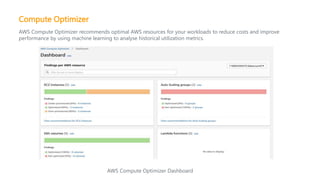
Compute Optimizer
AWS Compute Optimizer recommends optimal AWS resources for your workloads to reduce costs and improve
performance by using machine learning to analyse historical utilization metrics.
AWS Compute Optimizer Dashboard
Pillar 2:
Increase Elasticity
Autoscaling
Instance Scheduler
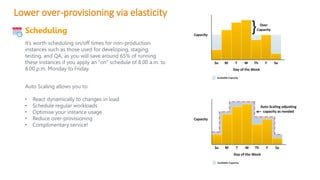
Lower over-provisioning via elasticity
Auto Scaling allows you to:
• React dynamically to changes in load
• Schedule regular workloads
• Optimise your instance usage
• Reduce over-provisioning
• Complimentary service!
Scheduling
It’s worth scheduling on/off times for non-production
instances such as those used for developing, staging,
testing, and QA, as you will save around 65% of running
these instances if you apply an “on” schedule of 8.00 a.m. to
8.00 p.m. Monday to Friday.
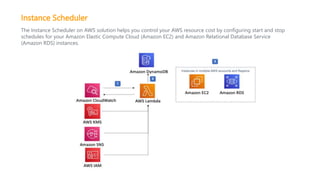
Instance Scheduler
The Instance Scheduler on AWS solution helps you control your AWS resource cost by configuring start and stop
schedules for your Amazon Elastic Compute Cloud (Amazon EC2) and Amazon Relational Database Service
(Amazon RDS) instances.
Pillar 3:
Leveraging the Right Pricing
Model
Reserved Instances
EC2 Spot
On-Demand
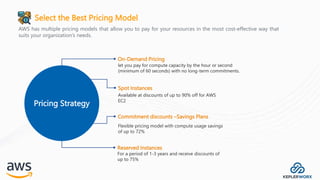
Select the Best Pricing Model
AWS has multiple pricing models that allow you to pay for your resources in the most cost-effective way that
suits your organization’s needs.
Pricing Strategy
On-Demand Pricing
let you pay for compute capacity by the hour or second
(minimum of 60 seconds) with no long-term commitments.
Spot Instances
Available at discounts of up to 90% off for AWS
EC2
Commitment discounts –Savings Plans
Flexible pricing model with compute usage savings
of up to 72%
Reserved Instances
For a period of 1-3 years and receive discounts of
up to 75%
Pillar 4:
Leveraging the Right Storage
Class
Elastic Block Storage
Simple Storage Service
EFS
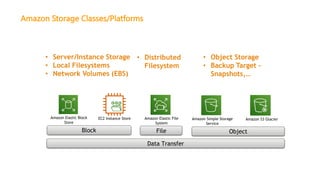
Amazon Storage Classes/Platforms
Data Transfer
• Server/Instance Storage
• Local Filesystems
• Network Volumes (EBS)
• Object Storage
• Backup Target –
Snapshots,…
• Distributed
Filesystem
Amazon Elastic File
System
Object
Amazon Simple Storage
Service
Amazon S3 Glacier
Amazon Elastic Block
Store
EC2 Instance Store
File
Block
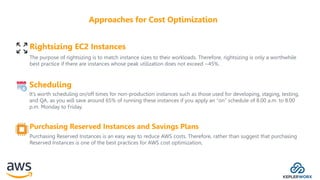
The purpose of rightsizing is to match instance sizes to their workloads. Therefore, rightsizing is only a worthwhile
best practice if there are instances whose peak utilization does not exceed ~45%.
Rightsizing EC2 Instances
Scheduling
It’s worth scheduling on/off times for non-production instances such as those used for developing, staging, testing,
and QA, as you will save around 65% of running these instances if you apply an “on” schedule of 8.00 a.m. to 8.00
p.m. Monday to Friday.
Purchasing Reserved Instances and Savings Plans
Purchasing Reserved Instances is an easy way to reduce AWS costs. Therefore, rather than suggest that purchasing
Reserved Instances is one of the best practices for AWS cost optimization,
Approaches for Cost Optimization
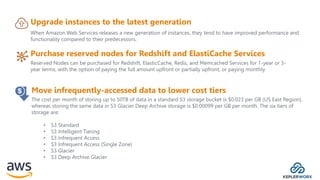
Reserved Nodes can be purchased for Redshift, ElasticCache, Redis, and Memcached Services for 1-year or 3-
year terms, with the option of paying the full amount upfront or partially upfront, or paying monthly.
Purchase reserved nodes for Redshift and ElastiCache Services
Upgrade instances to the latest generation
When Amazon Web Services releases a new generation of instances, they tend to have improved performance and
functionality compared to their predecessors.
The cost per month of storing up to 50TB of data in a standard S3 storage bucket is $0.023 per GB (US East Region),
whereas storing the same data in S3 Glacier Deep Archive storage is $0.00099 per GB per month. The six tiers of
storage are:
• S3 Standard
• S3 Intelligent Tiering
• S3 Infrequent Access
• S3 Infrequent Access (Single Zone)
• S3 Glacier
• S3 Deep Archive Glacier
Move infrequently-accessed data to lower cost tiers
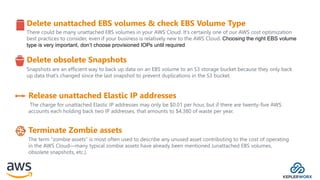
Snapshots are an efficient way to back up data on an EBS volume to an S3 storage bucket because they only back
up data that’s changed since the last snapshot to prevent duplications in the S3 bucket.
Delete obsolete Snapshots
Delete unattached EBS volumes & check EBS Volume Type
There could be many unattached EBS volumes in your AWS Cloud. It’s certainly one of our AWS cost optimization
best practices to consider, even if your business is relatively new to the AWS Cloud. Choosing the right EBS volume
type is very important, don’t choose provisioned IOPs until required
The charge for unattached Elastic IP addresses may only be $0.01 per hour, but if there are twenty-five AWS
accounts each holding back two IP addresses, that amounts to $4,380 of waste per year.
Release unattached Elastic IP addresses
The term “zombie assets” is most often used to describe any unused asset contributing to the cost of operating
in the AWS Cloud—many typical zombie assets have already been mentioned (unattached EBS volumes,
obsolete snapshots, etc.).
Terminate Zombie assets
AWS Lambda
Serverless is a great way to reduce the cost of running applications. Lambda functions, by nature, make it very
easy to use the exact amount of resources we need at any given point.
With AWS Lambda, you only pay for the time your code is running. More time means more money. The best
part about this billing model is that it removes virtually all of the guesswork that used to go into planning your
infrastructure costs
AWS Billing Analysis Best Practices
Bestpracticesthatwillhelpyou stayontopofyour spending
Pillar 5:
Mechanisms for Cost
Optimization
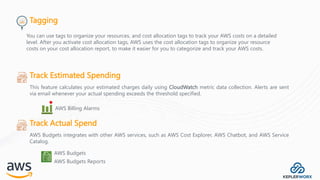
Tagging
Track Estimated Spending
This feature calculates your estimated charges daily using CloudWatch metric data collection. Alerts are sent
via email whenever your actual spending exceeds the threshold specified.
AWS Billing Alarms
Track Actual Spend
AWS Budgets integrates with other AWS services, such as AWS Cost Explorer, AWS Chatbot, and AWS Service
Catalog.
AWS Budgets
AWS Budgets Reports
You can use tags to organize your resources, and cost allocation tags to track your AWS costs on a detailed
level. After you activate cost allocation tags, AWS uses the cost allocation tags to organize your resource
costs on your cost allocation report, to make it easier for you to categorize and track your AWS costs.
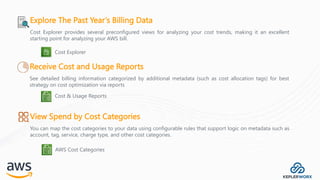
Explore The Past Year’s Billing Data
Cost Explorer provides several preconfigured views for analyzing your cost trends, making it an excellent
starting point for analyzing your AWS bill.
Cost Explorer
Receive Cost and Usage Reports
See detailed billing information categorized by additional metadata (such as cost allocation tags) for best
strategy on cost optimization via reports
Cost & Usage Reports
View Spend by Cost Categories
You can map the cost categories to your data using configurable rules that support logic on metadata such as
account, tag, service, charge type, and other cost categories.
AWS Cost Categories
Monitor Cost Anomalies
AWS Cost Anomaly Detection to create cost monitors powered by machine learning that detect the root cause
of anomalous spending.
AWS Cost Anomaly Detection
Reduce Resource Waste
AWS Trusted Advisor
Review Billing and Cost Logs
Stay up-to-date on AWS pricing, including AWS price cuts, new instance launches, and new service
announcements.
AWS Price Update notification
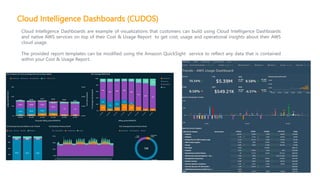
Cloud Intelligence Dashboards (CUDOS)
Cloud Intelligence Dashboards are example of visualizations that customers can build using Cloud Intelligence Dashboards
and native AWS services on top of their Cost & Usage Report to get cost, usage and operational insights about their AWS
cloud usage.
The provided report templates can be modified using the Amazon QuickSight service to reflect any data that is contained
within your Cost & Usage Report.
Here is a checklist
Makesureyou’refollowingtherightsteps ?
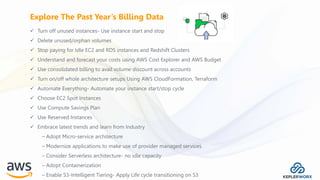
 Turn off unused instances- Use instance start and stop
 Delete unused/orphan volumes
 Stop paying for Idle EC2 and RDS instances and Redshift Clusters
 Understand and forecast your costs using AWS Cost Explorer and AWS Budget
 Use consolidated billing to avail volume discount across accounts
 Turn on/off whole architecture setups Using AWS CloudFormation, Terraform
 Automate Everything- Automate your instance start/stop cycle
 Choose EC2 Spot Instances
 Use Compute Savings Plan
 Use Reserved Instances
 Embrace latest trends and learn from Industry
– Adopt Micro-service architecture
– Modernize applications to make use of provider managed services.
– Consider Serverless architecture- no idle capacity
– Adopt Containerization
– Enable S3-Intelligent Tiering- Apply Life cycle transitioning on S3
Explore The Past Year’s Billing Data

AWS Cloud Cost Optimization Presentation.pptx

  • 1.
    Cost Optimization InAWS Haris Zaheer Ahmed AWS Solutions Architect
  • 2.
    “Why is myAWS bill so high? I thought I should be saving more when I am on it.” “How can I reduce AWS costs for Dev/QA environments?” “What options do I have to bring down my AWS cost?” The Challenge! Billing Surprises
  • 3.
    Approaches for CostOptimization
  • 4.
    Right Sizing Your Instances Pickthe Right Pricing Model Increase Elasticity Mechanisms for Optimisation Match Usage to Storage Class Cost Optimization Process?
  • 5.
    Pillar 1: Right Sizing CheapestInstance / Best Performance Monitor Usage
  • 6.
    Right Sizing Right sizinginvolves understanding the true performance needs of your resources and sizing them to be the most cost effective. This includes:  Selecting the cheapest instance while meeting business and performance needs  Look at CPU, RAM, storage, and network utilization to identify instances that could be downsized  Get rid of resources that are underutilized or not used at all 87% Saving m5.4xlarge $0.80 per hr m5.large $0.10 per hr 2. Check (CPU, RAM, network, disc) 1. Migrate/provision & Run 3. Right Size 5. Save! 4. Review Performance Right Sizing Example
  • 7.
    Compute Optimizer AWS ComputeOptimizer recommends optimal AWS resources for your workloads to reduce costs and improve performance by using machine learning to analyse historical utilization metrics. AWS Compute Optimizer Dashboard
  • 8.
  • 9.
    Lower over-provisioning viaelasticity Auto Scaling allows you to: • React dynamically to changes in load • Schedule regular workloads • Optimise your instance usage • Reduce over-provisioning • Complimentary service! Scheduling It’s worth scheduling on/off times for non-production instances such as those used for developing, staging, testing, and QA, as you will save around 65% of running these instances if you apply an “on” schedule of 8.00 a.m. to 8.00 p.m. Monday to Friday.
  • 10.
    Instance Scheduler The InstanceScheduler on AWS solution helps you control your AWS resource cost by configuring start and stop schedules for your Amazon Elastic Compute Cloud (Amazon EC2) and Amazon Relational Database Service (Amazon RDS) instances.
  • 11.
    Pillar 3: Leveraging theRight Pricing Model Reserved Instances EC2 Spot On-Demand
  • 12.
    Select the BestPricing Model AWS has multiple pricing models that allow you to pay for your resources in the most cost-effective way that suits your organization’s needs. Pricing Strategy On-Demand Pricing let you pay for compute capacity by the hour or second (minimum of 60 seconds) with no long-term commitments. Spot Instances Available at discounts of up to 90% off for AWS EC2 Commitment discounts –Savings Plans Flexible pricing model with compute usage savings of up to 72% Reserved Instances For a period of 1-3 years and receive discounts of up to 75%
  • 13.
    Pillar 4: Leveraging theRight Storage Class Elastic Block Storage Simple Storage Service EFS
  • 14.
    Amazon Storage Classes/Platforms DataTransfer • Server/Instance Storage • Local Filesystems • Network Volumes (EBS) • Object Storage • Backup Target – Snapshots,… • Distributed Filesystem Amazon Elastic File System Object Amazon Simple Storage Service Amazon S3 Glacier Amazon Elastic Block Store EC2 Instance Store File Block
  • 15.
    The purpose ofrightsizing is to match instance sizes to their workloads. Therefore, rightsizing is only a worthwhile best practice if there are instances whose peak utilization does not exceed ~45%. Rightsizing EC2 Instances Scheduling It’s worth scheduling on/off times for non-production instances such as those used for developing, staging, testing, and QA, as you will save around 65% of running these instances if you apply an “on” schedule of 8.00 a.m. to 8.00 p.m. Monday to Friday. Purchasing Reserved Instances and Savings Plans Purchasing Reserved Instances is an easy way to reduce AWS costs. Therefore, rather than suggest that purchasing Reserved Instances is one of the best practices for AWS cost optimization, Approaches for Cost Optimization
  • 16.
    Reserved Nodes canbe purchased for Redshift, ElasticCache, Redis, and Memcached Services for 1-year or 3- year terms, with the option of paying the full amount upfront or partially upfront, or paying monthly. Purchase reserved nodes for Redshift and ElastiCache Services Upgrade instances to the latest generation When Amazon Web Services releases a new generation of instances, they tend to have improved performance and functionality compared to their predecessors. The cost per month of storing up to 50TB of data in a standard S3 storage bucket is $0.023 per GB (US East Region), whereas storing the same data in S3 Glacier Deep Archive storage is $0.00099 per GB per month. The six tiers of storage are: • S3 Standard • S3 Intelligent Tiering • S3 Infrequent Access • S3 Infrequent Access (Single Zone) • S3 Glacier • S3 Deep Archive Glacier Move infrequently-accessed data to lower cost tiers
  • 17.
    Snapshots are anefficient way to back up data on an EBS volume to an S3 storage bucket because they only back up data that’s changed since the last snapshot to prevent duplications in the S3 bucket. Delete obsolete Snapshots Delete unattached EBS volumes & check EBS Volume Type There could be many unattached EBS volumes in your AWS Cloud. It’s certainly one of our AWS cost optimization best practices to consider, even if your business is relatively new to the AWS Cloud. Choosing the right EBS volume type is very important, don’t choose provisioned IOPs until required The charge for unattached Elastic IP addresses may only be $0.01 per hour, but if there are twenty-five AWS accounts each holding back two IP addresses, that amounts to $4,380 of waste per year. Release unattached Elastic IP addresses The term “zombie assets” is most often used to describe any unused asset contributing to the cost of operating in the AWS Cloud—many typical zombie assets have already been mentioned (unattached EBS volumes, obsolete snapshots, etc.). Terminate Zombie assets
  • 18.
    AWS Lambda Serverless isa great way to reduce the cost of running applications. Lambda functions, by nature, make it very easy to use the exact amount of resources we need at any given point. With AWS Lambda, you only pay for the time your code is running. More time means more money. The best part about this billing model is that it removes virtually all of the guesswork that used to go into planning your infrastructure costs
  • 19.
    AWS Billing AnalysisBest Practices Bestpracticesthatwillhelpyou stayontopofyour spending
  • 20.
    Pillar 5: Mechanisms forCost Optimization
  • 21.
    Tagging Track Estimated Spending Thisfeature calculates your estimated charges daily using CloudWatch metric data collection. Alerts are sent via email whenever your actual spending exceeds the threshold specified. AWS Billing Alarms Track Actual Spend AWS Budgets integrates with other AWS services, such as AWS Cost Explorer, AWS Chatbot, and AWS Service Catalog. AWS Budgets AWS Budgets Reports You can use tags to organize your resources, and cost allocation tags to track your AWS costs on a detailed level. After you activate cost allocation tags, AWS uses the cost allocation tags to organize your resource costs on your cost allocation report, to make it easier for you to categorize and track your AWS costs.
  • 22.
    Explore The PastYear’s Billing Data Cost Explorer provides several preconfigured views for analyzing your cost trends, making it an excellent starting point for analyzing your AWS bill. Cost Explorer Receive Cost and Usage Reports See detailed billing information categorized by additional metadata (such as cost allocation tags) for best strategy on cost optimization via reports Cost & Usage Reports View Spend by Cost Categories You can map the cost categories to your data using configurable rules that support logic on metadata such as account, tag, service, charge type, and other cost categories. AWS Cost Categories
  • 23.
    Monitor Cost Anomalies AWSCost Anomaly Detection to create cost monitors powered by machine learning that detect the root cause of anomalous spending. AWS Cost Anomaly Detection Reduce Resource Waste AWS Trusted Advisor Review Billing and Cost Logs Stay up-to-date on AWS pricing, including AWS price cuts, new instance launches, and new service announcements. AWS Price Update notification
  • 24.
    Cloud Intelligence Dashboards(CUDOS) Cloud Intelligence Dashboards are example of visualizations that customers can build using Cloud Intelligence Dashboards and native AWS services on top of their Cost & Usage Report to get cost, usage and operational insights about their AWS cloud usage. The provided report templates can be modified using the Amazon QuickSight service to reflect any data that is contained within your Cost & Usage Report.
  • 25.
    Here is achecklist Makesureyou’refollowingtherightsteps ?
  • 26.
     Turn offunused instances- Use instance start and stop  Delete unused/orphan volumes  Stop paying for Idle EC2 and RDS instances and Redshift Clusters  Understand and forecast your costs using AWS Cost Explorer and AWS Budget  Use consolidated billing to avail volume discount across accounts  Turn on/off whole architecture setups Using AWS CloudFormation, Terraform  Automate Everything- Automate your instance start/stop cycle  Choose EC2 Spot Instances  Use Compute Savings Plan  Use Reserved Instances  Embrace latest trends and learn from Industry – Adopt Micro-service architecture – Modernize applications to make use of provider managed services. – Consider Serverless architecture- no idle capacity – Adopt Containerization – Enable S3-Intelligent Tiering- Apply Life cycle transitioning on S3 Explore The Past Year’s Billing Data