Presented by
Govind Raj
1001227464
INTRODUCTION
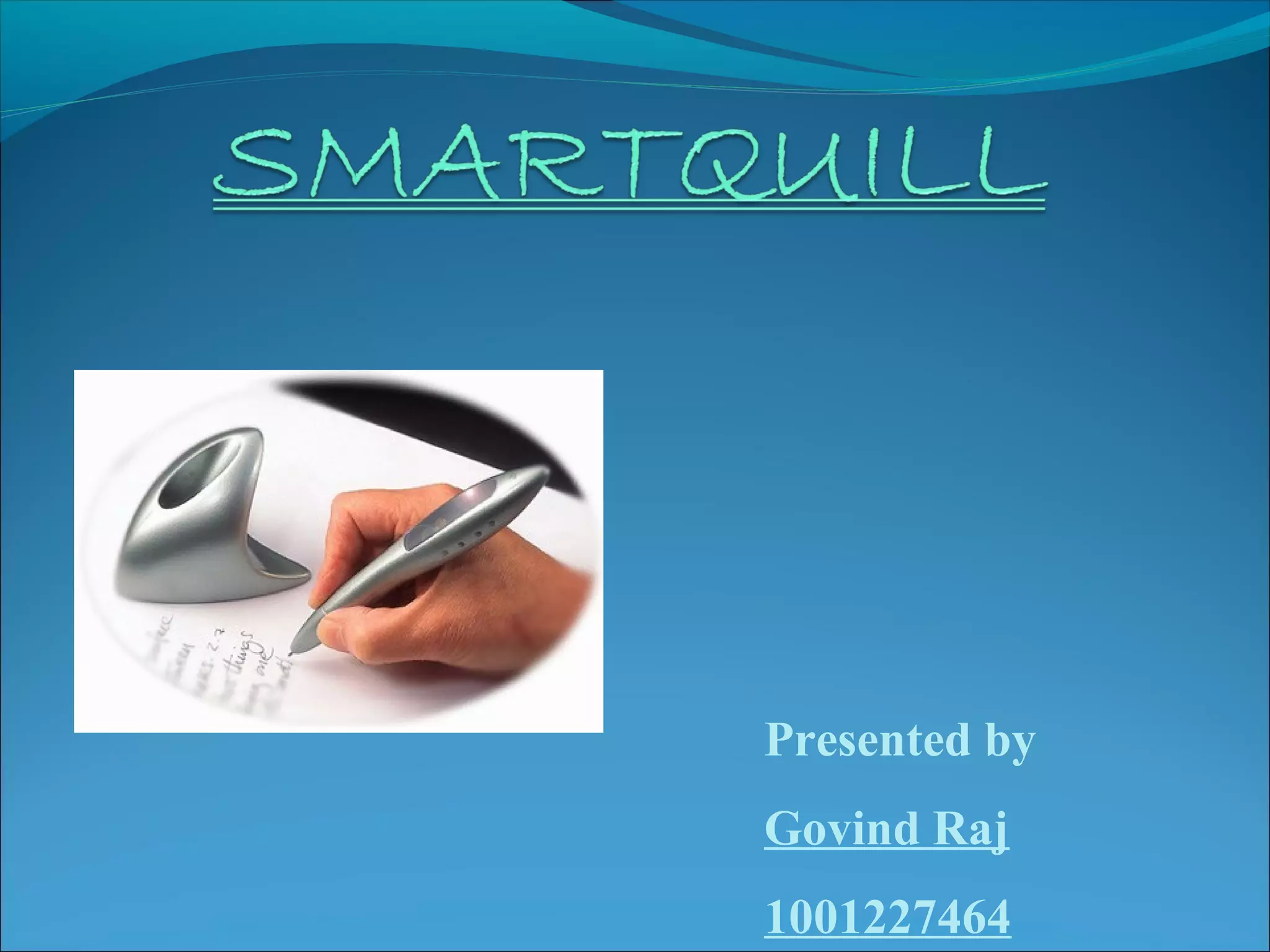
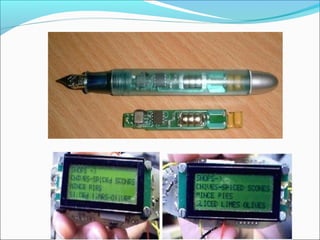
 Lyndsay Williams of Microsoft Research's

Cambridge UK lab is the inventor of Smart quill.
 It is a pen that is used to write and then transform to
computer text.
 Users don't have to write on a special pad in order to
record what they write.
 User can train the pen to recognize a particular

handwriting.
 Its really mobile, smaller size and skip the step of typing
up their notes.
WORKING OF SMARTQUILL
Push a button on the pen and start recording.
It does not need a screen to work.
small four-line screen to read the information stored in

the pen.
10 pages of notes can be stored.
A tiny light at the tip.
When the pen is kept idle for some time, power gets
automatically off.
FEATURES
Display technology used in smart quill.
Handwriting and signature verification.
Memory and power.
DISPLAY TECHNOLOGY

 Technology used for display is Kopin Corp’s Cyber

Display technology.
 Cyber Display is a ¼ inch diagonal LCD that uses the

circuitry built on a silicon wafer, then removed and
mounted to glass.
HANDWRITING RECOGNITION
There are 2 techniques used for this purpose :


Accelerometer technology.



Handwriting recognition software.
ACCELEROMETER TECHNOLOGY
It is used for measuring motion.
A tiny accelerometer in a pen could be used to detect

the stops and starts, arcs and loops of handwriting.,
and transmit this information to a small
microprocessor that would make sense of it as a text.

Invisible writing in air is achieved through this

unique technology

It records movement by using the earth's gravity

system.
TYPES OF ACCELEROMETER
 There are 2 types of accelerometer :

1. Two Axes Accelerometer : This
accelerometer measures acceleration in two axes.
ex: ADXL202 Accelerometer.
2. Three Axes Accelerator : This accelerometer
measures acceleration in three axes.
ex: Tronics +/- 2g accelerometer.
HANDWRITING RECOGNITION
SOFTWARE
Handwriting recognition software constitutes two

major phases:
1. Handwriting transcription.
2. Handwriting recognition.
Handwriting transcription
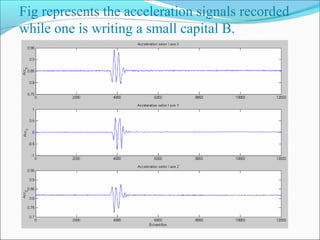
 In this phase, the recorded acceleration signals are then

transcripted to it’s original form by simple double
integration method.
Method:
 In order for this principle to work properly, we have to
solve two main problems:
 Firstly, we have to know pen’s spatial orientation in
order to withdraw the earth gravity component to the
measured accelerations.
 Secondly, we have to succeed in the double integration,
which is to solve all the derivation problems due to this
method.
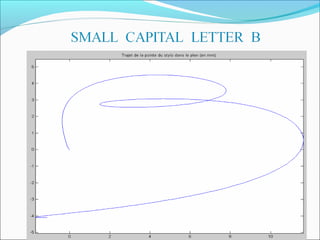
Fig represents the acceleration signals recorded
while one is writing a small capital B.
Handwriting Recognition
Method:

 The first step -1- consists in creating the reference

database for the characters as for the signature.
 The second step is the recognition process
1. For the creation of database, each symbol was
reproduced several times and a mean normalized
symbol was computed.
2. For recognition process, the unknown symbol is
first normalized, the distance between this symbol and
the entire database symbol is computed. Then the
unknown symbol is recognized as the one with the
lowest distance.
MEMORY
 Smart Quill has 4MB EEPROM memory.
 At a time, up to 10 pages of notes can be stored

locally on the pen.

POWER
 It makes use of AAA battery.
 This battery run for about 25hrs.
 The pen exhibits automatic turn on/off system.
APPLICATIONS
 The information stored in the pen can be input to

other devices such as mobile phones, printers,
modems, desktop computers etc for different
applications.



It also provides handheld computer applications
such as digital diary, contacts, calculators etc.

 Smart Quill can be used for voice record and supports

speech recognition.



Smart Quill also allows third party to add on
applications.
ADVANTAGES
One of the major asset is that Smart Quill does not need a

screen to work.

 Security –It is made possible through two facilities:

a. It enables handwriting recognition .User can train the
pen to recognize particular handwriting style.

b. It enables signature verification. Hence Passwords could be
entered in the form of signatures
 Power saving

a. Small screen size requires less battery power .
b. No movement of the pen causes auto power down.

 Smart Quill is all mobile, smaller in size and enables one-handed

use.
DISADVANTAGES
 It has accelerometer errors.
 It is inconvenient for persons with hand

tremulous.
 Bigger size than a normal pen.
 Errors are introduced in the system due to thermal
variations in the spring.
CONCLUSION
 The future of Smart Quill ensures all computation power

the user needs right inside the pen.

 Reducing the size of handheld computers can only be

taken so far before they become unusable. Keyboards
become so tiny you require needle-like fingers to operate
them and screens that need constant cursor controls to
read simple text.

 The introduction of Smart Quill is the best solution for

this problem.

 The day may come when we loose our distinctions

between the devices we use to interact with our computer
and the computer themselves.
BIBILOGRAPHY
 B.Milner, “Handwriting Recognition using acceleration based

motion detection”,IEEE ref.1999/041,1999

Anoto Website: www.anoto.com
www.google.com
BT Website :www.smartquill.com
Smartquill
Smartquill

Smartquill

  • 1.
  • 2.
    INTRODUCTION  Lyndsay Williamsof Microsoft Research's Cambridge UK lab is the inventor of Smart quill.  It is a pen that is used to write and then transform to computer text.  Users don't have to write on a special pad in order to record what they write.  User can train the pen to recognize a particular handwriting.  Its really mobile, smaller size and skip the step of typing up their notes.
  • 3.
    WORKING OF SMARTQUILL Pusha button on the pen and start recording. It does not need a screen to work. small four-line screen to read the information stored in the pen. 10 pages of notes can be stored. A tiny light at the tip. When the pen is kept idle for some time, power gets automatically off.
  • 4.
    FEATURES Display technology usedin smart quill. Handwriting and signature verification. Memory and power.
  • 5.
    DISPLAY TECHNOLOGY  Technologyused for display is Kopin Corp’s Cyber Display technology.  Cyber Display is a ¼ inch diagonal LCD that uses the circuitry built on a silicon wafer, then removed and mounted to glass.
  • 6.
    HANDWRITING RECOGNITION There are2 techniques used for this purpose :  Accelerometer technology.  Handwriting recognition software.
  • 7.
    ACCELEROMETER TECHNOLOGY It isused for measuring motion. A tiny accelerometer in a pen could be used to detect the stops and starts, arcs and loops of handwriting., and transmit this information to a small microprocessor that would make sense of it as a text. Invisible writing in air is achieved through this unique technology It records movement by using the earth's gravity system.
  • 8.
    TYPES OF ACCELEROMETER There are 2 types of accelerometer : 1. Two Axes Accelerometer : This accelerometer measures acceleration in two axes. ex: ADXL202 Accelerometer. 2. Three Axes Accelerator : This accelerometer measures acceleration in three axes. ex: Tronics +/- 2g accelerometer.
  • 10.
    HANDWRITING RECOGNITION SOFTWARE Handwriting recognitionsoftware constitutes two major phases: 1. Handwriting transcription. 2. Handwriting recognition.
  • 11.
    Handwriting transcription  Inthis phase, the recorded acceleration signals are then transcripted to it’s original form by simple double integration method. Method:  In order for this principle to work properly, we have to solve two main problems:  Firstly, we have to know pen’s spatial orientation in order to withdraw the earth gravity component to the measured accelerations.  Secondly, we have to succeed in the double integration, which is to solve all the derivation problems due to this method.
  • 13.
    Fig represents theacceleration signals recorded while one is writing a small capital B.
  • 14.
    Handwriting Recognition Method:  Thefirst step -1- consists in creating the reference database for the characters as for the signature.  The second step is the recognition process 1. For the creation of database, each symbol was reproduced several times and a mean normalized symbol was computed. 2. For recognition process, the unknown symbol is first normalized, the distance between this symbol and the entire database symbol is computed. Then the unknown symbol is recognized as the one with the lowest distance.
  • 15.
    MEMORY  Smart Quillhas 4MB EEPROM memory.  At a time, up to 10 pages of notes can be stored locally on the pen. POWER  It makes use of AAA battery.  This battery run for about 25hrs.  The pen exhibits automatic turn on/off system.
  • 16.
    APPLICATIONS  The informationstored in the pen can be input to other devices such as mobile phones, printers, modems, desktop computers etc for different applications.  It also provides handheld computer applications such as digital diary, contacts, calculators etc.  Smart Quill can be used for voice record and supports speech recognition.  Smart Quill also allows third party to add on applications.
  • 17.
    ADVANTAGES One of themajor asset is that Smart Quill does not need a screen to work.  Security –It is made possible through two facilities: a. It enables handwriting recognition .User can train the pen to recognize particular handwriting style. b. It enables signature verification. Hence Passwords could be entered in the form of signatures  Power saving a. Small screen size requires less battery power . b. No movement of the pen causes auto power down.  Smart Quill is all mobile, smaller in size and enables one-handed use.
  • 18.
    DISADVANTAGES  It hasaccelerometer errors.  It is inconvenient for persons with hand tremulous.  Bigger size than a normal pen.  Errors are introduced in the system due to thermal variations in the spring.
  • 19.
    CONCLUSION  The futureof Smart Quill ensures all computation power the user needs right inside the pen.  Reducing the size of handheld computers can only be taken so far before they become unusable. Keyboards become so tiny you require needle-like fingers to operate them and screens that need constant cursor controls to read simple text.  The introduction of Smart Quill is the best solution for this problem.  The day may come when we loose our distinctions between the devices we use to interact with our computer and the computer themselves.
  • 20.
    BIBILOGRAPHY  B.Milner, “HandwritingRecognition using acceleration based motion detection”,IEEE ref.1999/041,1999 Anoto Website: www.anoto.com www.google.com BT Website :www.smartquill.com