Software Services
WCF and RESTful WCF

Presented By: Santhosh Janagam
September 2013
AGENDA

•
•
•
•
•
•
•
•
•
•
•
•

Introduction to WCF
WCF Architecture
Web Services Vs WCF
WCF Fundamental
Endpoint
ABC’s of Service
WCF Hosting
Metadata Exchange
Metadata Exchange Endpoint
Instance Management
Transfer Mode
Buffered Vs Streamed Transfer

•
•
•
•
•
•
•
•
•

Resource-Oriented Architecture
REST
REST Principles
webHttpBinding
WebServiceHost
[WebGet] And [WebInvoke]
UriTemplate
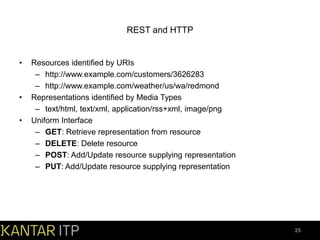
REST and HTTP
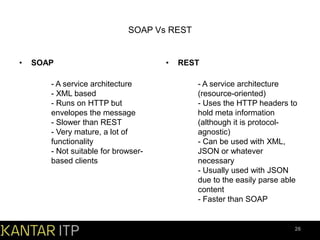
SOAP Vs REST

2
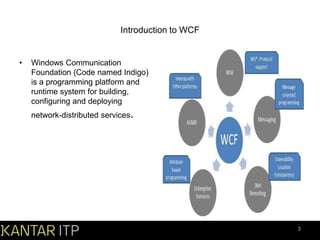
Introduction to WCF

•

Windows Communication
Foundation (Code named Indigo)
is a programming platform and
runtime system for building,
configuring and deploying
network-distributed services.

3
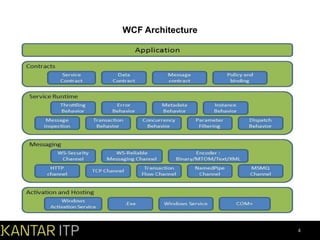
WCF Architecture

4
Web Service Vs WCF
Features

Web Service

WCF

Hosting

It can be hosted in IIS

It can be hosted in IIS, windows
activation service, Self-hosting,
Windows service

Programming

[WebService] attribute has to be
added to the class

[ServiceContraact] attribute has to be
added to the class

Model

[WebMethod] attribute represents the
method exposed to client

[OperationContract] attribute
represents the method exposed to
client

Operation

One-way, Request- Response are the
different operations supported in web
service

One-Way, Request-Response,
Duplex are different type of
operations supported in WCF

XML

System.Xml.serialization name space
is used for serialization

System.Runtime.Serialization
namespace is used for serialization

Encoding

XML 1.0, MTOM(Message
Transmission Optimization
Mechanism), DIME, Custom

XML 1.0, MTOM, Binary, Custom

Transports

Can be accessed through HTTP,
TCP, Custom

Can be accessed through HTTP,
TCP, Named pipes, MSMQ,P2P,
Custom

Protocols

Security

Security, Reliable messaging,
Transactions

5
WCF Fundamental

•
•
•
•
•

End Point
Bindings and Behaviour
Contracts and Service host
Message and Channel
WCF client and Metadata

6
End Point

•

•

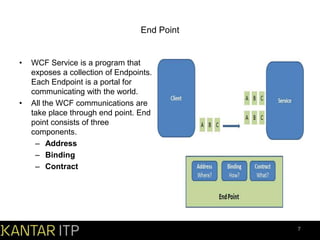
WCF Service is a program that
exposes a collection of Endpoints.
Each Endpoint is a portal for
communicating with the world.
All the WCF communications are
take place through end point. End
point consists of three
components.
– Address
– Binding
– Contract

7
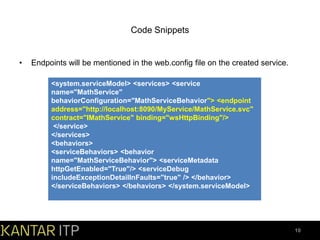
ABC’s of Service

• Address:
Basically URL, specifies where this WCF service is hosted .Client will use this
url to connect to the service. e.g
http://localhost:8090/MyService/SimpleCalculator.svc

• Binding:
Binding will describes how client will communicate with service. There are different
protocols available for the WCF to communicate to the Client. You can mention the
protocol type based on your requirements
– Transport
– Encoding(optional)
– Protocol(optional)

Types of Binding:
– BasicHttpBinding, WSHttpBinding, NetNamedPipeBinding etc.

8
Contract
Collection of operation that specifies what
the endpoint will communicate with outside
world. Usually name of the Interface will be
mentioned in the Contract, so the client
application will be aware of the operations
which are exposed to the client. Each
operation is a simple exchange pattern
such as one-way, duplex and request/reply.

Mainly there are four types of contracts
available in WCF

–
–
–
–

[ServiceContract()]
public interface ISimpleCalculator {
[OperationContract()]
int Add(int num1, int num2);
}
[DataContract]
public class Employee {
private string m_Name;
[DataMember]
public string Name { get { return m_Name; }
set { m_Name = value; } }

[MessageContract]

Service Contract
public class EmployeeDetails {
Operation Contract
[MessageHeader] public string EmpID;
Data Contract
[MessageBodyMember] public string
Message Contract
Name;}
Fault Contract
public int Add(int num1, int num2) { //Do something CustomException
ex = new CustomException(); ex.Title = "Error Funtion:Add()";
ex.InnerException = "Inner exception message from serice";
ex.StackTrace = "Stack Trace message from service."; throw new
FaultException(ex,"Reason: Testing the Fault contract") ;
9
Code Snippets

•

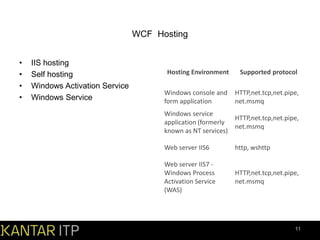
Endpoints will be mentioned in the web.config file on the created service.
<system.serviceModel> <services> <service
name="MathService"
behaviorConfiguration="MathServiceBehavior"> <endpoint
address="http://localhost:8090/MyService/MathService.svc"
contract="IMathService" binding="wsHttpBinding"/>
</service>
</services>
<behaviors>
<serviceBehaviors> <behavior
name="MathServiceBehavior"> <serviceMetadata
httpGetEnabled="True"/> <serviceDebug
includeExceptionDetailInFaults="true" /> </behavior>
</serviceBehaviors> </behaviors> </system.serviceModel>

10
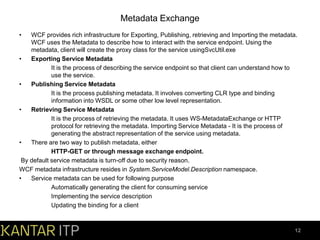
WCF Hosting
•
•
•
•

IIS hosting
Self hosting
Windows Activation Service
Windows Service

Hosting Environment

Supported protocol

Windows console and
form application

HTTP,net.tcp,net.pipe,
net.msmq

Windows service
application (formerly
known as NT services)

HTTP,net.tcp,net.pipe,
net.msmq

Web server IIS6

http, wshttp

Web server IIS7 Windows Process
Activation Service
(WAS)

HTTP,net.tcp,net.pipe,
net.msmq

11
Metadata Exchange
•

WCF provides rich infrastructure for Exporting, Publishing, retrieving and Importing the metadata.
WCF uses the Metadata to describe how to interact with the service endpoint. Using the
metadata, client will create the proxy class for the service usingSvcUtil.exe
•
Exporting Service Metadata
It is the process of describing the service endpoint so that client can understand how to
use the service.
•
Publishing Service Metadata
It is the process publishing metadata. It involves converting CLR type and binding
information into WSDL or some other low level representation.
•
Retrieving Service Metadata
It is the process of retrieving the metadata. It uses WS-MetadataExchange or HTTP
protocol for retrieving the metadata. Importing Service Metadata - It is the process of
generating the abstract representation of the service using metadata.
•
There are two way to publish metadata, either
HTTP-GET or through message exchange endpoint.
By default service metadata is turn-off due to security reason.
WCF metadata infrastructure resides in System.ServiceModel.Description namespace.
•
Service metadata can be used for following purpose
Automatically generating the client for consuming service
Implementing the service description
Updating the binding for a client

12
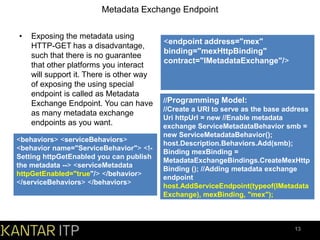
Metadata Exchange Endpoint
•

Exposing the metadata using
HTTP-GET has a disadvantage,
such that there is no guarantee
that other platforms you interact
will support it. There is other way
of exposing the using special
endpoint is called as Metadata
Exchange Endpoint. You can have
as many metadata exchange
endpoints as you want.

<behaviors> <serviceBehaviors>
<behavior name="ServiceBehavior"> <!Setting httpGetEnabled you can publish
the metadata --> <serviceMetadata
httpGetEnabled="true"/> </behavior>
</serviceBehaviors> </behaviors>

<endpoint address="mex"
binding="mexHttpBinding"
contract="IMetadataExchange"/>

//Programming Model:
//Create a URI to serve as the base address
Uri httpUrl = new //Enable metadata
exchange ServiceMetadataBehavior smb =
new ServiceMetadataBehavior();
host.Description.Behaviors.Add(smb);
Binding mexBinding =
MetadataExchangeBindings.CreateMexHttp
Binding (); //Adding metadata exchange
endpoint
host.AddServiceEndpoint(typeof(IMetadata
Exchange), mexBinding, "mex");

13
Instance Management

•

•

Instance management refers to the
way a service handles a request from
a client. Instance management is set
of techniques WCF uses to bind client
request to service instance, governing
which service instance handles which
client request. It is necessary because
application will differ in their need for
scalability, performance, durability,
transaction and queued calls.
Basically there are three instance
modes in WCF:
1) Per-Call instance mode
2) Per-Session instance mode
3) Singleton Instance Mode

[ServiceContract()]
public interface IMyService {
[OperationContract]
int MyMethod(); }
[ServiceBehavior(InstanceContextM
ode=InstanceContextMode.Single)]
public class MyService:IMyService {
public int MyMethod() { //Do
something } }
14
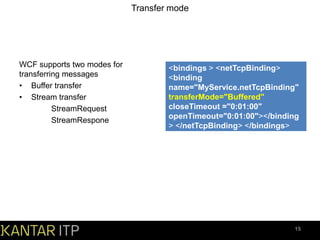
Transfer mode

WCF supports two modes for
transferring messages
• Buffer transfer
• Stream transfer
StreamRequest
StreamRespone

<bindings > <netTcpBinding>
<binding
name="MyService.netTcpBinding"
transferMode="Buffered"
closeTimeout ="0:01:00"
openTimeout="0:01:00"></binding
> </netTcpBinding> </bindings>

15
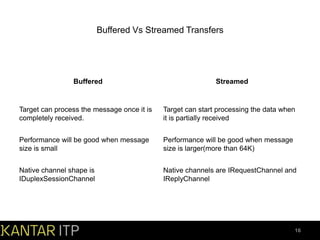
Buffered Vs Streamed Transfers

Buffered

Streamed

Target can process the message once it is
completely received.

Target can start processing the data when
it is partially received

Performance will be good when message
size is small

Performance will be good when message
size is larger(more than 64K)

Native channel shape is
IDuplexSessionChannel

Native channels are IRequestChannel and
IReplyChannel

16
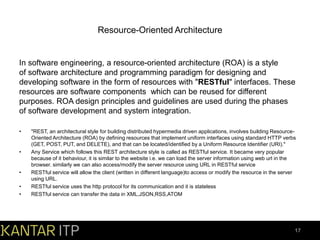
Resource-Oriented Architecture

In software engineering, a resource-oriented architecture (ROA) is a style
of software architecture and programming paradigm for designing and
developing software in the form of resources with "RESTful" interfaces. These
resources are software components which can be reused for different
purposes. ROA design principles and guidelines are used during the phases
of software development and system integration.
•

•

•
•
•

"REST, an architectural style for building distributed hypermedia driven applications, involves building ResourceOriented Architecture (ROA) by defining resources that implement uniform interfaces using standard HTTP verbs
(GET, POST, PUT, and DELETE), and that can be located/identified by a Uniform Resource Identifier (URI)."
Any Service which follows this REST architecture style is called as RESTful service. It became very popular
because of it behaviour, it is similar to the website i.e. we can load the server information using web url in the
browser. similarly we can also access/modify the server resource using URL in RESTful service
RESTful service will allow the client (written in different language)to access or modify the resource in the server
using URL.
RESTful service uses the http protocol for its communication and it is stateless
RESTful service can transfer the data in XML,JSON,RSS,ATOM

17
REpresentational State Transfer

•

•

Fully Defined in Dissertation of R.T. Fielding
– Fielding is co-author of HTTP RFC2616
– Generalized Description of Web Architecture
REST is about
– Resources
• Everything can be identified with an identifier
• Identifier space forms uniform interface

– Representations
•
•
•
•

Everything has one or more representations
Resources are manipulated by transferring representations
one or more representations
Resources are manipulated by transferring representations

18
REST Principles
•

•

•

All communication is stateless
– Client process holds per-request state
– Server process holds no state
– Resources map to state
Requests are independent
– Representations are composite
– Client state transforms to next state by navigating links
Manipulation by Transfer of Representations
– Uniform interface
– All resource manipulation is done in the same way

19
webHttpBinding

•

•

New “web-friendly” WCF Binding in Fx 3.5
– Allows for the development of RESTful services
– Does not use SOAP envelopes
– HTTP and HTTPS Transports Only
Supports several wire formats:
– XML
– JSON
– Binary (streams)

20
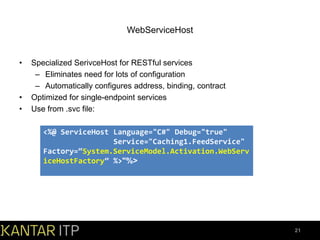
WebServiceHost

•

•
•

Specialized SerivceHost for RESTful services
– Eliminates need for lots of configuration
– Automatically configures address, binding, contract
Optimized for single-endpoint services
Use from .svc file:
<%@ ServiceHost Language="C#" Debug="true"
Service="Caching1.FeedService"
Factory=“System.ServiceModel.Activation.WebServ
iceHostFactory” %>"%>

21
[WebGet] And [WebInvoke]

•

•

•

Binds a WCF operation to URI
space and HTTP method
Indicate the HTTP Method for the operation
– WebGet – Don’t make me write it
– WebInvoke – All verbs other than GET (Method parameter takes in the
name of the Verb)
Other Parameters
– BodyStyle – Indicates whether the Request/ Response are wrapped or
not
– RequestFormat – Json or Xml
– ResponseFormat – Json or Xml
– UriTemplate – Rich binding to URI

22
UriTemplate

•

String that allows you to define
the structure of the URI, as well as
to define “Holes”
– The “Holes” are variables
– You Bind the template with parameters to
fill the holes

[OperationContract]
[WebGet(UriTemplate=“product/{productId}")]
Product GetProduct(int productId);

•

{productId} hole / variable gets bound
to productId parameter in operation

23
WebGet/WebInvoke Code Snippets

[OperationContract]
[WebGet( ResponseFormat=WebMessageFormat.Json,
UriTemplate=“product/{productId}")]
ProductData GetProduct(int productId);

[OperationContract]
[WebInvoke( Method=“PUT",
ResponseFormat=WebMessageFormat.Json,
UriTemplate=“product/{productId}")]
Product UpdateProduct(int productId, product p);

24
REST and HTTP

•

•
•

Resources identified by URIs
– http://www.example.com/customers/3626283
– http://www.example.com/weather/us/wa/redmond
Representations identified by Media Types
– text/html, text/xml, application/rss+xml, image/png
Uniform Interface
– GET: Retrieve representation from resource
– DELETE: Delete resource
– POST: Add/Update resource supplying representation
– PUT: Add/Update resource supplying representation

25
SOAP Vs REST

•

SOAP

- A service architecture
- XML based
- Runs on HTTP but
envelopes the message
- Slower than REST
- Very mature, a lot of
functionality
- Not suitable for browserbased clients

•

REST

- A service architecture
(resource-oriented)
- Uses the HTTP headers to
hold meta information
(although it is protocolagnostic)
- Can be used with XML,
JSON or whatever
necessary
- Usually used with JSON
due to the easily parse able
content
- Faster than SOAP

26
27

A presentation on WCF & REST

  • 1.
    Software Services WCF andRESTful WCF Presented By: Santhosh Janagam September 2013
  • 2.
    AGENDA • • • • • • • • • • • • Introduction to WCF WCFArchitecture Web Services Vs WCF WCF Fundamental Endpoint ABC’s of Service WCF Hosting Metadata Exchange Metadata Exchange Endpoint Instance Management Transfer Mode Buffered Vs Streamed Transfer • • • • • • • • • Resource-Oriented Architecture REST REST Principles webHttpBinding WebServiceHost [WebGet] And [WebInvoke] UriTemplate REST and HTTP SOAP Vs REST 2
  • 3.
    Introduction to WCF • WindowsCommunication Foundation (Code named Indigo) is a programming platform and runtime system for building, configuring and deploying network-distributed services. 3
  • 4.
  • 5.
    Web Service VsWCF Features Web Service WCF Hosting It can be hosted in IIS It can be hosted in IIS, windows activation service, Self-hosting, Windows service Programming [WebService] attribute has to be added to the class [ServiceContraact] attribute has to be added to the class Model [WebMethod] attribute represents the method exposed to client [OperationContract] attribute represents the method exposed to client Operation One-way, Request- Response are the different operations supported in web service One-Way, Request-Response, Duplex are different type of operations supported in WCF XML System.Xml.serialization name space is used for serialization System.Runtime.Serialization namespace is used for serialization Encoding XML 1.0, MTOM(Message Transmission Optimization Mechanism), DIME, Custom XML 1.0, MTOM, Binary, Custom Transports Can be accessed through HTTP, TCP, Custom Can be accessed through HTTP, TCP, Named pipes, MSMQ,P2P, Custom Protocols Security Security, Reliable messaging, Transactions 5
  • 6.
    WCF Fundamental • • • • • End Point Bindingsand Behaviour Contracts and Service host Message and Channel WCF client and Metadata 6
  • 7.
    End Point • • WCF Serviceis a program that exposes a collection of Endpoints. Each Endpoint is a portal for communicating with the world. All the WCF communications are take place through end point. End point consists of three components. – Address – Binding – Contract 7
  • 8.
    ABC’s of Service •Address: Basically URL, specifies where this WCF service is hosted .Client will use this url to connect to the service. e.g http://localhost:8090/MyService/SimpleCalculator.svc • Binding: Binding will describes how client will communicate with service. There are different protocols available for the WCF to communicate to the Client. You can mention the protocol type based on your requirements – Transport – Encoding(optional) – Protocol(optional) Types of Binding: – BasicHttpBinding, WSHttpBinding, NetNamedPipeBinding etc. 8
  • 9.
    Contract Collection of operationthat specifies what the endpoint will communicate with outside world. Usually name of the Interface will be mentioned in the Contract, so the client application will be aware of the operations which are exposed to the client. Each operation is a simple exchange pattern such as one-way, duplex and request/reply. Mainly there are four types of contracts available in WCF – – – – [ServiceContract()] public interface ISimpleCalculator { [OperationContract()] int Add(int num1, int num2); } [DataContract] public class Employee { private string m_Name; [DataMember] public string Name { get { return m_Name; } set { m_Name = value; } } [MessageContract] Service Contract public class EmployeeDetails { Operation Contract [MessageHeader] public string EmpID; Data Contract [MessageBodyMember] public string Message Contract Name;} Fault Contract public int Add(int num1, int num2) { //Do something CustomException ex = new CustomException(); ex.Title = "Error Funtion:Add()"; ex.InnerException = "Inner exception message from serice"; ex.StackTrace = "Stack Trace message from service."; throw new FaultException(ex,"Reason: Testing the Fault contract") ; 9
  • 10.
    Code Snippets • Endpoints willbe mentioned in the web.config file on the created service. <system.serviceModel> <services> <service name="MathService" behaviorConfiguration="MathServiceBehavior"> <endpoint address="http://localhost:8090/MyService/MathService.svc" contract="IMathService" binding="wsHttpBinding"/> </service> </services> <behaviors> <serviceBehaviors> <behavior name="MathServiceBehavior"> <serviceMetadata httpGetEnabled="True"/> <serviceDebug includeExceptionDetailInFaults="true" /> </behavior> </serviceBehaviors> </behaviors> </system.serviceModel> 10
  • 11.
    WCF Hosting • • • • IIS hosting Selfhosting Windows Activation Service Windows Service Hosting Environment Supported protocol Windows console and form application HTTP,net.tcp,net.pipe, net.msmq Windows service application (formerly known as NT services) HTTP,net.tcp,net.pipe, net.msmq Web server IIS6 http, wshttp Web server IIS7 Windows Process Activation Service (WAS) HTTP,net.tcp,net.pipe, net.msmq 11
  • 12.
    Metadata Exchange • WCF providesrich infrastructure for Exporting, Publishing, retrieving and Importing the metadata. WCF uses the Metadata to describe how to interact with the service endpoint. Using the metadata, client will create the proxy class for the service usingSvcUtil.exe • Exporting Service Metadata It is the process of describing the service endpoint so that client can understand how to use the service. • Publishing Service Metadata It is the process publishing metadata. It involves converting CLR type and binding information into WSDL or some other low level representation. • Retrieving Service Metadata It is the process of retrieving the metadata. It uses WS-MetadataExchange or HTTP protocol for retrieving the metadata. Importing Service Metadata - It is the process of generating the abstract representation of the service using metadata. • There are two way to publish metadata, either HTTP-GET or through message exchange endpoint. By default service metadata is turn-off due to security reason. WCF metadata infrastructure resides in System.ServiceModel.Description namespace. • Service metadata can be used for following purpose Automatically generating the client for consuming service Implementing the service description Updating the binding for a client 12
  • 13.
    Metadata Exchange Endpoint • Exposingthe metadata using HTTP-GET has a disadvantage, such that there is no guarantee that other platforms you interact will support it. There is other way of exposing the using special endpoint is called as Metadata Exchange Endpoint. You can have as many metadata exchange endpoints as you want. <behaviors> <serviceBehaviors> <behavior name="ServiceBehavior"> <!Setting httpGetEnabled you can publish the metadata --> <serviceMetadata httpGetEnabled="true"/> </behavior> </serviceBehaviors> </behaviors> <endpoint address="mex" binding="mexHttpBinding" contract="IMetadataExchange"/> //Programming Model: //Create a URI to serve as the base address Uri httpUrl = new //Enable metadata exchange ServiceMetadataBehavior smb = new ServiceMetadataBehavior(); host.Description.Behaviors.Add(smb); Binding mexBinding = MetadataExchangeBindings.CreateMexHttp Binding (); //Adding metadata exchange endpoint host.AddServiceEndpoint(typeof(IMetadata Exchange), mexBinding, "mex"); 13
  • 14.
    Instance Management • • Instance managementrefers to the way a service handles a request from a client. Instance management is set of techniques WCF uses to bind client request to service instance, governing which service instance handles which client request. It is necessary because application will differ in their need for scalability, performance, durability, transaction and queued calls. Basically there are three instance modes in WCF: 1) Per-Call instance mode 2) Per-Session instance mode 3) Singleton Instance Mode [ServiceContract()] public interface IMyService { [OperationContract] int MyMethod(); } [ServiceBehavior(InstanceContextM ode=InstanceContextMode.Single)] public class MyService:IMyService { public int MyMethod() { //Do something } } 14
  • 15.
    Transfer mode WCF supportstwo modes for transferring messages • Buffer transfer • Stream transfer StreamRequest StreamRespone <bindings > <netTcpBinding> <binding name="MyService.netTcpBinding" transferMode="Buffered" closeTimeout ="0:01:00" openTimeout="0:01:00"></binding > </netTcpBinding> </bindings> 15
  • 16.
    Buffered Vs StreamedTransfers Buffered Streamed Target can process the message once it is completely received. Target can start processing the data when it is partially received Performance will be good when message size is small Performance will be good when message size is larger(more than 64K) Native channel shape is IDuplexSessionChannel Native channels are IRequestChannel and IReplyChannel 16
  • 17.
    Resource-Oriented Architecture In softwareengineering, a resource-oriented architecture (ROA) is a style of software architecture and programming paradigm for designing and developing software in the form of resources with "RESTful" interfaces. These resources are software components which can be reused for different purposes. ROA design principles and guidelines are used during the phases of software development and system integration. • • • • • "REST, an architectural style for building distributed hypermedia driven applications, involves building ResourceOriented Architecture (ROA) by defining resources that implement uniform interfaces using standard HTTP verbs (GET, POST, PUT, and DELETE), and that can be located/identified by a Uniform Resource Identifier (URI)." Any Service which follows this REST architecture style is called as RESTful service. It became very popular because of it behaviour, it is similar to the website i.e. we can load the server information using web url in the browser. similarly we can also access/modify the server resource using URL in RESTful service RESTful service will allow the client (written in different language)to access or modify the resource in the server using URL. RESTful service uses the http protocol for its communication and it is stateless RESTful service can transfer the data in XML,JSON,RSS,ATOM 17
  • 18.
    REpresentational State Transfer • • FullyDefined in Dissertation of R.T. Fielding – Fielding is co-author of HTTP RFC2616 – Generalized Description of Web Architecture REST is about – Resources • Everything can be identified with an identifier • Identifier space forms uniform interface – Representations • • • • Everything has one or more representations Resources are manipulated by transferring representations one or more representations Resources are manipulated by transferring representations 18
  • 19.
    REST Principles • • • All communicationis stateless – Client process holds per-request state – Server process holds no state – Resources map to state Requests are independent – Representations are composite – Client state transforms to next state by navigating links Manipulation by Transfer of Representations – Uniform interface – All resource manipulation is done in the same way 19
  • 20.
    webHttpBinding • • New “web-friendly” WCFBinding in Fx 3.5 – Allows for the development of RESTful services – Does not use SOAP envelopes – HTTP and HTTPS Transports Only Supports several wire formats: – XML – JSON – Binary (streams) 20
  • 21.
    WebServiceHost • • • Specialized SerivceHost forRESTful services – Eliminates need for lots of configuration – Automatically configures address, binding, contract Optimized for single-endpoint services Use from .svc file: <%@ ServiceHost Language="C#" Debug="true" Service="Caching1.FeedService" Factory=“System.ServiceModel.Activation.WebServ iceHostFactory” %>"%> 21
  • 22.
    [WebGet] And [WebInvoke] • • • Bindsa WCF operation to URI space and HTTP method Indicate the HTTP Method for the operation – WebGet – Don’t make me write it – WebInvoke – All verbs other than GET (Method parameter takes in the name of the Verb) Other Parameters – BodyStyle – Indicates whether the Request/ Response are wrapped or not – RequestFormat – Json or Xml – ResponseFormat – Json or Xml – UriTemplate – Rich binding to URI 22
  • 23.
    UriTemplate • String that allowsyou to define the structure of the URI, as well as to define “Holes” – The “Holes” are variables – You Bind the template with parameters to fill the holes [OperationContract] [WebGet(UriTemplate=“product/{productId}")] Product GetProduct(int productId); • {productId} hole / variable gets bound to productId parameter in operation 23
  • 24.
    WebGet/WebInvoke Code Snippets [OperationContract] [WebGet(ResponseFormat=WebMessageFormat.Json, UriTemplate=“product/{productId}")] ProductData GetProduct(int productId); [OperationContract] [WebInvoke( Method=“PUT", ResponseFormat=WebMessageFormat.Json, UriTemplate=“product/{productId}")] Product UpdateProduct(int productId, product p); 24
  • 25.
    REST and HTTP • • • Resourcesidentified by URIs – http://www.example.com/customers/3626283 – http://www.example.com/weather/us/wa/redmond Representations identified by Media Types – text/html, text/xml, application/rss+xml, image/png Uniform Interface – GET: Retrieve representation from resource – DELETE: Delete resource – POST: Add/Update resource supplying representation – PUT: Add/Update resource supplying representation 25
  • 26.
    SOAP Vs REST • SOAP -A service architecture - XML based - Runs on HTTP but envelopes the message - Slower than REST - Very mature, a lot of functionality - Not suitable for browserbased clients • REST - A service architecture (resource-oriented) - Uses the HTTP headers to hold meta information (although it is protocolagnostic) - Can be used with XML, JSON or whatever necessary - Usually used with JSON due to the easily parse able content - Faster than SOAP 26
  • 27.