“ I am a Dumb developer”
Things to know! Data Connectivity Role of LCDS Data Management Web Service Remote Service ( RPC ?) Proxy Service  JMS (pub-sub model) What’s that “I” in RIA?
Game begins! What is BlazeDS? Java remoting and Messaging Technology. Enables developers to connect to back-end distributed data and push data in real-time to Adobe Flex and Adobe AIR applications Open Source From SOAP to AMF (Action Message Format) 10 times faster than XML based protocols, how? Previously known as Adobe LCDS
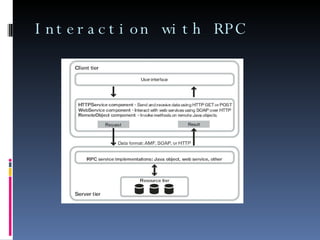
Interaction with RPC
Using RPC components Instead of Contacting services, RPC components contact  “Destinations” Destination: Manageable Service Endpoints  Managed using XML based configuration file “ Remote Object” not possible without BlazeDS  Adobe Flash Player blocks request to any external hosts, solution?
Understanding RPC  Crossdomain.xml   required  ( For apps that are not using BlazeDS ) XML file that indicates Data and documents are available to SWF files served from certain/all domains Must be in “web root” of the server
AMF – “10 times faster” Compact binary format for data serialization/ deserialization and remote method invocation.  Object encoding controls how objects are represented in Action Message Format (AMF).  Representation that can be transferred over HTTP/HTTPS.  As data size increases the performance benefits of using BlazeDS increase exponentially. 
Fast, How? AMF improves performance by Dramatically compressing the size of data transferred. Parsing binary data into objects in memory far more efficiently than parsing XML data.
Quick Brief Message Agents Message Producers & Consumers Exchange messages through a common destination Channel and endpoints Formats, Translates messages into network-specific form. Delivers to the endpoint (on the server) Server-Side Channel Unmarshals messages Configuration settings ( XML files) at runtime Message Broker Routes messages to the appropriate service based on its type Channel Types
Configuration file Channel Configuration Configure channels using services-config.xml AMF protocol use an optimization technique Assign channel at runtime( AS Code) by creating a ChannelSet object, and adding a channel to it. Var cs:ChannelSet = new ChannelSet(); Var channel:Channel = new AMFChannel(“name”, endpoint) cs.addChannel(channel); Remoteobject.channelSet = cs;
Remote Object component Access methods of server-side java objects. No need to specify 0bjects as operations in web services Use RemoteObject component in MXML/AS Server - Proxied access to an RPC service Communication happens over a “destination” Configured in the remoting-config.xml  RPC method or URL, channel,  adapter Asynchronous communication AsyncToken object
Configure other Service Http Service and web service use proxy-service.xml Limit access to specific URL Provide Security
Things overlooked How adapters are created? How serialization happens between AS and Java? How to pass parameters to remote objects? Use <mx:method> How is data polled? Long Polling  Polling  Real-time polling
Configuring BlazeDS Tomcat Unzip the blazeds-turnkey file on to your C: drive Blazeds comes with Tomcat default. Create a new application: C:\blazeds\tomcat\webapps Copy & paste the META-INF, WEB-INF folder from the samples (zip) file.  Store all your java class files in WEB-INF/classes folder Configure remoting-config.xml under WEB-INF/flex/  for all your remoting related details (destinations) Create a <property/> and a specify a <source/>  Configure messaging-config.xml under WEB-INF/flex for all your messaging (real-time) by adding your destination For all other service related details use the proxy-config.xml Give references of all these xml files in services-config.xml (done by default) Run your application http://<localhost/ip>:<portno>/<appname>
Configure BlazeDS with Jboss Create a new project : {jboss_root}/server/default/deploy  Put your war/ear/sar folder here or create a folder with “.war” type Include the META-INF & WEB-INF folder in the war  Restart your server if it does not “Hot deploy” Run your application http://<localhost/ip>:<portno>/<appname>
Hmmm… I don’t remember anything?? Questions?

BlazeDS

  • 1.
  • 2.
    “ I ama Dumb developer”
  • 3.
    Things to know!Data Connectivity Role of LCDS Data Management Web Service Remote Service ( RPC ?) Proxy Service JMS (pub-sub model) What’s that “I” in RIA?
  • 4.
    Game begins! Whatis BlazeDS? Java remoting and Messaging Technology. Enables developers to connect to back-end distributed data and push data in real-time to Adobe Flex and Adobe AIR applications Open Source From SOAP to AMF (Action Message Format) 10 times faster than XML based protocols, how? Previously known as Adobe LCDS
  • 5.
  • 6.
    Using RPC componentsInstead of Contacting services, RPC components contact “Destinations” Destination: Manageable Service Endpoints Managed using XML based configuration file “ Remote Object” not possible without BlazeDS Adobe Flash Player blocks request to any external hosts, solution?
  • 7.
    Understanding RPC Crossdomain.xml required ( For apps that are not using BlazeDS ) XML file that indicates Data and documents are available to SWF files served from certain/all domains Must be in “web root” of the server
  • 8.
    AMF – “10times faster” Compact binary format for data serialization/ deserialization and remote method invocation. Object encoding controls how objects are represented in Action Message Format (AMF). Representation that can be transferred over HTTP/HTTPS. As data size increases the performance benefits of using BlazeDS increase exponentially. 
  • 9.
    Fast, How? AMFimproves performance by Dramatically compressing the size of data transferred. Parsing binary data into objects in memory far more efficiently than parsing XML data.
  • 10.
    Quick Brief MessageAgents Message Producers & Consumers Exchange messages through a common destination Channel and endpoints Formats, Translates messages into network-specific form. Delivers to the endpoint (on the server) Server-Side Channel Unmarshals messages Configuration settings ( XML files) at runtime Message Broker Routes messages to the appropriate service based on its type Channel Types
  • 11.
    Configuration file ChannelConfiguration Configure channels using services-config.xml AMF protocol use an optimization technique Assign channel at runtime( AS Code) by creating a ChannelSet object, and adding a channel to it. Var cs:ChannelSet = new ChannelSet(); Var channel:Channel = new AMFChannel(“name”, endpoint) cs.addChannel(channel); Remoteobject.channelSet = cs;
  • 12.
    Remote Object componentAccess methods of server-side java objects. No need to specify 0bjects as operations in web services Use RemoteObject component in MXML/AS Server - Proxied access to an RPC service Communication happens over a “destination” Configured in the remoting-config.xml RPC method or URL, channel, adapter Asynchronous communication AsyncToken object
  • 13.
    Configure other ServiceHttp Service and web service use proxy-service.xml Limit access to specific URL Provide Security
  • 14.
    Things overlooked Howadapters are created? How serialization happens between AS and Java? How to pass parameters to remote objects? Use <mx:method> How is data polled? Long Polling Polling Real-time polling
  • 15.
    Configuring BlazeDS TomcatUnzip the blazeds-turnkey file on to your C: drive Blazeds comes with Tomcat default. Create a new application: C:\blazeds\tomcat\webapps Copy & paste the META-INF, WEB-INF folder from the samples (zip) file. Store all your java class files in WEB-INF/classes folder Configure remoting-config.xml under WEB-INF/flex/ for all your remoting related details (destinations) Create a <property/> and a specify a <source/> Configure messaging-config.xml under WEB-INF/flex for all your messaging (real-time) by adding your destination For all other service related details use the proxy-config.xml Give references of all these xml files in services-config.xml (done by default) Run your application http://<localhost/ip>:<portno>/<appname>
  • 16.
    Configure BlazeDS withJboss Create a new project : {jboss_root}/server/default/deploy Put your war/ear/sar folder here or create a folder with “.war” type Include the META-INF & WEB-INF folder in the war Restart your server if it does not “Hot deploy” Run your application http://<localhost/ip>:<portno>/<appname>
  • 17.
    Hmmm… I don’tremember anything?? Questions?