



SEARCH ENGINE
OPTIMIZATION
TRAINING
DemandQuest
October 2016
TODAY’S AGENDA
1. Introduction
2. How Searching Has Evolved
3. What to expect today
4. How search engines work
5. What is SEO?
6. The SEO Pyramid
7. Local SEO
8. 30-Minute SEO Checkup
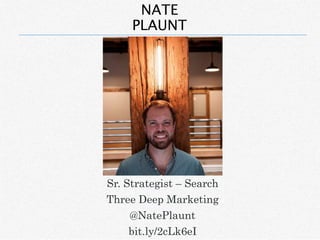
NATE
PLAUNT
Sr. Strategist – Search
Three Deep Marketing
@NatePlaunt
bit.ly/2cLk6eI
DOES SEARCH ENGINE OPTIMIZATION
REALLY MATTER?
Search Engine Optimization
FACT:
79% of search engine users say they
always/frequently click on the natural
search results.
ANATOMY OF A SERP
(SEARCH ENGINE RESULTS PAGE)
Paid Ads
Local / Map
Results
Organic
Results
• Organic traffic accounts for up to 64% of all
website traffic*
• Roughly 52,000 search queries happen on
Google - every SECOND!
• This translates into about 4.5 billion searches
every day**
ORGANIC SEARCH STATS
* Source: http://searchenginewatch.com/sew/study/2355020/organic-
search-accounts-for-up-to-64-of-website-traffic-study
** Source: http://www.internetlivestats.com/one-second/#google-band
DIFFERENT SEARCH ENGINE, DIFFERENT
RESULTS
U.S. SEARCH ENGINE MARKET
SHARE
*Source:
http://www.statista.com/statistics/267161/market-share-of-search-engines-in-the-united-states/
63.4 %
21.9 %
12.1 %
Everyone else 2.5 %
But the sandbox is
constantly changing…
• Each year, Google changes its search
algorithm around 500–600 times.*
• That’s roughly 1.5 changes
EVERY.
SINGLE.
DAY!
THE SHIFTING SANDBOX
• Source: https://moz.com/google-algorithm-change
BUT, THE ALGORITHM ISN’T THE ONLY THING
CHANGING…
SEARCHERS ARE CHANGING TOO
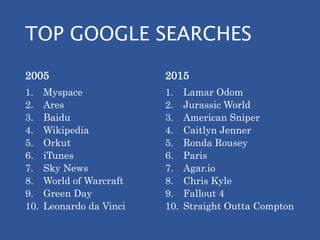
TOP GOOGLE SEARCHES
2005
1. Myspace
2. Ares
3. Baidu
4. Wikipedia
5. Orkut
6. iTunes
7. Sky News
8. World of Warcraft
9. Green Day
10. Leonardo da Vinci
2015
1. Lamar Odom
2. Jurassic World
3. American Sniper
4. Caitlyn Jenner
5. Ronda Rousey
6. Paris
7. Agar.io
8. Chris Kyle
9. Fallout 4
10. Straight Outta Compton
IN FACT, SEARCHERS ARE “EVOLVING”
THEY ARE LEARNING HOW TO INTERACT WITH
SEARCH ENGINES TO GET SOLUTIONS MORE QUICKLY
DOES SEO REALLY MATTER?
YES!
If you are not optimizing for search you
are already behind your competition.
WHAT TO EXPECT:
• A solid understanding of how search engines
operate
• Learn how to beat out your competition in the
search engine results
• Actionable tactics you can implement today
• Tools to implement optimizations
WHAT DID YOU SEARCH TODAY?
WEBSITES SINCE 1998
0
200,000,000
400,000,000
600,000,000
800,000,000
1,000,000,000
1,200,000,000
1998 1999 2000 2001 2002 2003 2004 2005 2006 2007 2008 2009 2010 2011 2012 2013 2014 2015 2016*
Websites
HOW SEARCH ENGINES WORK
HOW SEARCH
ENGINES WORK
WHAT IS SEO?
Search engine optimization
(SEO) is the process of affecting
the visibility of a website or a
web page in a search engine's
"natural" or un-paid ("organic")
search results.
• Source: Wikipedia
WHAT IS SEO? (SIMPLIFIED)
SEO is two things:
1. The practice of making your website as
accessible as possible to search engines and
human visitors.
2. Ensuring your website is as useful and
relevant as possible to your current and
prospective customers.
THINK OF YOUR WEBSITE AS A HOUSE
Ensure your site is
accessible to
humans and
search engines.
THINK OF YOUR WEBSITE AS A HOUSE
Ensure
your site is
relevant
and useful
to your
visitors.
THINK OF YOUR WEBSITE AS A HOUSE
SEARCH ENGINE OPTIMIZATION
101
Ensure your site
is accessible to
humans and
search engines.
Ensure your site is
relevant and useful
to your visitors.
PHASE 1: PLAN FOR
SUCCESS
PHASE 1: PLAN FOR
SUCCESS
1. What is the business goal you are trying to
achieve?
2. What are the key performance indicators
that tell you if you’re on or off track?
3. What are your baseline metrics?
4. What does your team look like?
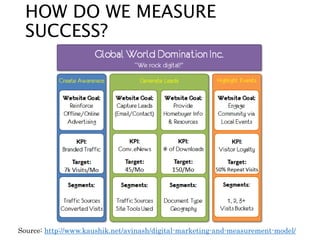
HOW DO WE MEASURE
SUCCESS?
Source: http://www.kaushik.net/avinash/digital-marketing-and-measurement-model/
HOW DO WE MEASURE
SUCCESS?
Source: http://www.kaushik.net/avinash/digital-marketing-and-measurement-model/
HOW DO WE MEASURE
SUCCESS?
Source: http://www.kaushik.net/avinash/digital-marketing-and-measurement-model/
HOW DO WE MEASURE
SUCCESS?
Source: http://www.kaushik.net/avinash/digital-marketing-and-measurement-model/
PHASE 1: YOUR TEAM
SEO
Project
Team
SEO
Dev.
P.M.
Analyst
TECHNICAL AND STRUCTURAL
FACTORS
• Goal: Ensure accessibility for Search
Engines & Users
• Foundation of your entire online presence,
so it’s important to get it right
• Search engines have very clear guidelines
for webmasters to follow when building
sites
TECHNICAL AND STRUCTURAL
FACTORS
WHAT TO LOOK FOR
• Can your entire website be
crawled?
• Is your website indexed by the
search engines?
• Does your website have any
errors?
• Is your page load time too
slow?
HOW YOU CAN DO THIS
• XML sitemap
• Accurate robots.txt file
• Google Search Console
• Page speed optimization
WHAT TO AVOID
Any unnecessary hurdle for the search
engines
• Flash
• iFrames
• Serving content via JavaScript
• URL Parameters
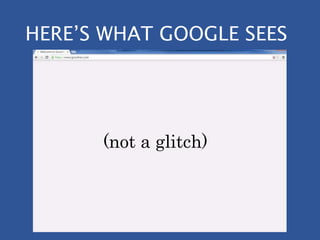
HERE’S WHAT HUMANS SEE
HERE’S WHAT GOOGLE SEES
(not a glitch)
ROBOTS.TXT FILE
The robots.txt file is a directive for all
“bots” visiting your site.
• It tells them
what URLs to
crawl or not
crawl
• Simple text file –
can be created
with notepad
ROBOTS.TXT FILE – *PRO TIP
Use the
Robots.txt
testing tool in
Google Search
Console to
troubleshoot
errors in your
file and to test
individual URLs
XML SITEMAP
The XML sitemap is a map of your website
that enables search engines to efficiently
crawl and index your site.
XML SITEMAP
Various tools can help you generate an
accurate and up-to-date sitemap:
• Screaming Frog Spider
• CMS plugins like Yoast
• Other web-based sitemap generators
- www.xml-sitemaps.com
WHY DOES SPEED MATTER?
In 2014, mobile search overtook desktop search.
• The gap between
mobile and
desktop will widen
• Fast page load
speed is critical to
optimizing for
mobile
• Page load in 2
seconds
MOBILE
April 21, 2015…
GOOGLE PAGESPEED
INSIGHTS
PageSpeed Insights is a free tool from Google that
gives you a prioritized roadmap on how to fix
speed issues on your site.
• https://developers.google.com/speed/pagespeed/insights
ON AND OFF PAGE FACTORS
ON AND OFF PAGE
FACTORS
• Goal: Demonstrate Relevance and Authority
• Search engines want to provide users with
search results that are relevant to their
query and authoritative in nature.
• Building upon a sound technical structure,
we make sure that search engines and users
are able to fully understand what various
pages on your website are all about.
On-page SEO refers to
factors that you can
control directly on your
website
Examples of on-page
factors are:
• Metadata
• Internal links
• Content
• Technical / Structural
Off-page SEO refers to
factors “out of your
control” on other
websites
Examples of off-page
factors are:
• Inbound links
• Social Media
• Mentions
• Local Directories
ON-PAGE vs. OFF-PAGE SEO
WHAT TO LOOK FOR
• Are your on-page elements
optimized?
• What keywords are you
ranking for?
• Who are your organic
competitors?
• Who is linking to you?
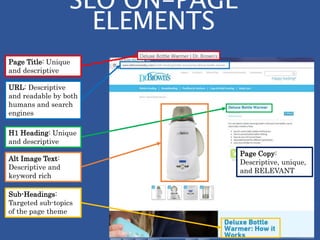
ON-PAGE SEO ELEMENTS
• URL
• Page Title
• H1 heading
• H2 headings
• Meta Description
• Page Copy
• Alternative image text
Page Title: Unique
and descriptive
URL: Descriptive
and readable by both
humans and search
engines
H1 Heading: Unique
and descriptive
Sub-Headings:
Targeted sub-topics
of the page theme
Page Copy:
Descriptive, unique,
and RELEVANT
Alt Image Text:
Descriptive and
keyword rich
SEO ON-PAGE
ELEMENTS
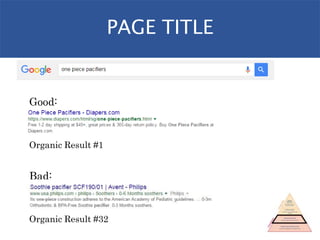
PAGE TITLE
Good:
Organic Result #1
Bad:
Organic Result #32
URL STRUCTURE
Good:
Organic Result #9
Bad:
Organic Result #94
WHAT KEYWORDS DO YOU
RANK FOR?
Ground Rules:
1. Don’t “Google yourself”
2. Use a keyword tracking tool
a) SEM Rush (freemium)
b) Bright Local (paid)
WHAT KEYWORDS DO YOU
RANK FOR?
OFF-PAGE SEO ELEMENTS
• Backlinks
• Link anchor text
• Citations or Mentions
• Competitors
INTERNAL vs. EXTERNAL
LINKS (BACKLINKS)
• Internal links refer
to links within
your site, such as
navigation links.
• External links
refer to links
outside of your
site, such as a link
from Wikipedia.
• Both are very
useful, but for
different reasons.
HOW DO BACKLINKS HELP?
• Backlinks act as
“votes” for pages on
your site.
• Generally
speaking, the more
links you have
from authoritative
sources, the more
your site is trusted,
and the better your
pages will rank.
YourWebsite.com
NewsSite.com RetailSite.com
IndustryBlog.com ShadySite.com
WHY INVEST IN LINK
BUILDING?
A technically sound site will only get you so
far.
Without links, it simply will not have the
equity or authority to be visible in search
engines.
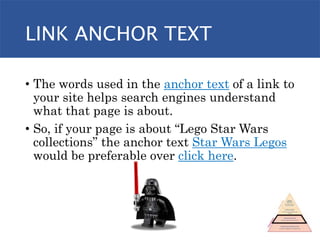
LINK ANCHOR TEXT
• The words used in the anchor text of a link to
your site helps search engines understand
what that page is about.
• So, if your page is about “Lego Star Wars
collections” the anchor text Star Wars Legos
would be preferable over click here.
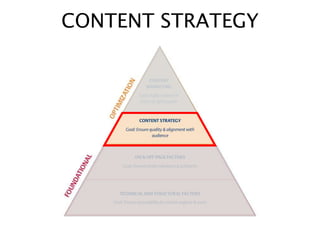
CONTENT STRATEGY
CONTENT STRATEGY
• Goal: Ensure Quality & Alignment with
Audience
• To convert visitors to prospects or
customers we need to have high quality
content that addresses their problems.
• Through keyword research and customer
understanding, we can determine the
topics that are of interest to your
customers and where you have the
opportunity to be competitive in search
engine results.
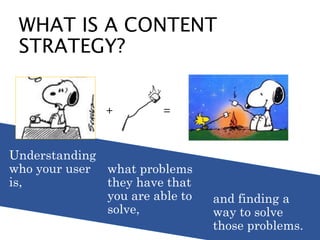
Understanding
who your user
is,
WHAT IS A CONTENT
STRATEGY?
+ =
what problems
they have that
you are able to
solve,
and finding a
way to solve
those problems.
WHAT IS A CONTENT
STRATEGY?
what problems
they have that
you are able to
solve,
WHAT TO LOOK FOR
• Am I speaking to my
customer in their language?
• Do I have the content they
are looking for?
• Where is there opportunity
to provide an answer to a
question?
HOW YOU CAN DO THIS
1. Identify buying personas or audience
segments
2. Understand the decision making
process
3. Keyword research
4. Content inventory
• Match existing content to
personas and steps in the
buying cycle.
• Identify areas that lack content
and fill gaps.
Content Inventory & Gap Analysis
VS.
Content Inventory &
Gap Analysis
URL Worker
Willy
Fashion
Freddy
Awareness Interest Consideration Purchase
Intent
/401-red-wing-
mens-6-inch-boot-
brown
x x x
/footwear/6-
hawthorne-8113-
08113
x x x
Awareness Interest Consideration Purchase
Intent
Worker
Willy
15 17 10 5
Fashion
Freddy
11 2 7 13
Content Inventory & Gap Analysis
CONTENT STRATEGY STEPS
1. Business Objectives
2. Persona / Buying Cycle Analysis
3. Content Audit
4. Gap Analysis
5. Recommendations
Content Marketing
CONTENT MARKETING
• Goal: Right Content in front of the Right
People in the Right Place at the Right Time
• Content Marketing is the practice of
distributing your content through various
channels.
• Get the right types of content to the right
audiences.
CONTENT MARKETING
LOCAL SEO
WHAT IS LOCAL SEO?
Local SEO is the process of making it as
easy as possible for prospective
customers to find information about your
company online, either when they search
specifically for your enterprise or for any
businesses that provides particular
goods and services nearby them.
• Source: LocalU.org
WHAT IS LOCAL SEO?
Enhancing the
visibility of your
business for
queries with
“local intent”
LOCAL SEO RANKING
FACTORS
• Link signals
• On-page signals
• Google My Business signals
• External location signals
• Behavioral signals
• Personalization signals
• Review signals
HOW YOU CAN DO THIS
• Ensure your contact info is present
• Acquire relevant local links
• Make sure your Google My Business page is
accurate and optimized
• Consistent NAP (Name, Address, Phone #)
• Create engaging, quality content
• Make your site the best in your area
• Ask for reviews!
GOOGLE LOCAL RANKINGS
(RIGHT FROM THE HORSE’S MOUTH)
Relevance
“Relevance refers to how well a local listing
matches what someone is searching for.
Adding complete and detailed business
information can help Google better
understand your business and match your
listing to relevant searches.”
Source: https://support.google.com/business/answer/7091
GOOGLE LOCAL RANKINGS
(RIGHT FROM THE HORSE’S MOUTH)
Distance
“Just like it sounds–how far is each potential
search result from the location term used in a
search? If a user doesn't specify a location in
their search, Google will calculate distance
based on what’s known about their location.”
Source: https://support.google.com/business/answer/7091
GOOGLE LOCAL RANKINGS
(RIGHT FROM THE HORSE’S MOUTH)
Prominence
“Prominence refers to how well-known a business is.
Some places are more prominent in the offline world,
and search results try to reflect this in local ranking.
Prominence is also based on information that Google
has about a business from across the web (like links,
articles, and directories). Google review count and
score are factored into local search ranking: more
reviews and positive ratings will probably improve a
business's local ranking.”
Source: https://support.google.com/business/answer/7091
CITATIONS
• Citations are essentially a mention of your
brand on another site like a listing directory.
• Yelp
• Yellow Pages
• City Search
CITATIONS
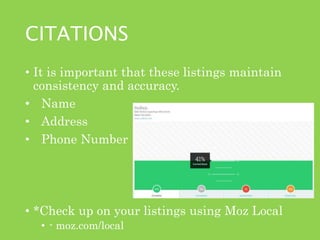
• It is important that these listings maintain
consistency and accuracy.
• Name
• Address
• Phone Number
• *Check up on your listings using Moz Local
• - moz.com/local
REVIEW
1. If done right, SEO is a distinct competitive
advantage
2. Get the foundation right
3. Optimize your pages and off-page presence
4. Strategically create and distribute content
5. Optimize for local visibility
TL;DR
MEASUREMENT &
IMPROVEMENTAnd then do it all over again!
30 MINUTE SEO CHECK UP
1. Analytics Platform (Google Analytics)
2. Google Search Console (formerly Webmaster
Tools)
3. Bing Webmaster Tools
4. Google
5. Screaming Frog Spider
6. Crawl Data Visualization Spreadsheet
7. Panguin Tool – by Barracuda Digital
8. Word, Excel, Google Docs, pen and paper, or
anything else you want to use to make a checklist
WHAT YOU NEED:
1. Google Analytics - https://www.google.com/analytics/
2. Google Search Console -
https://www.google.com/webmasters/tools/home
3. Bing Webmaster Tools -
http://www.bing.com/toolbox/webmaster
4. Google - https://www.google.com/
5. Screaming Frog Spider - http://www.screamingfrog.co.uk/
6. Crawl Data Visualization Spreadsheet -
http://bit.ly/1npByIE
7. Panguin Tool - http://barracuda.digital/panguin-tool/
WHAT YOU NEED:
30 MINUTE SEO CHECK UP:
STEPS
STEP #1:
CRAWL YOUR SITE WITH SCREAMING FROG
• Download Screaming Frog Spider
• http://www.screamingfrog.co.uk/seo-spider/
• Enter your domain into the box at the top and
hit Start
• *Pro Tip: exclude the “www” to capture info on
all subdomains
STEP 1: CRAWL YOUR SITE
• Download the Crawl Data Visualization
Worksheet
• http://www.threedeepmarketing.com/blog/visualizing-website-data-with-screaming-
frog
• Save your crawl once it’s complete
• Export the Crawl Overview Report as a .csv
file
• Copy and Paste into the “Data” tab of the
Crawl Data Visualization Worksheet
STEP 1: CRAWL YOUR SITE
Page Title: Unique
and descriptive
URL: Descriptive
and readable by both
humans and search
engines
H1 Heading: Unique
and descriptive
Sub-Headings (H2):
Targeted sub-topics
of the page theme
Page Copy:
Descriptive, unique,
and RELEVANT
Alt Image Text:
Descriptive and
keyword rich
SEO ON-PAGE
ELEMENTS
Meta Description:
The elevator pitch -
unique and
descriptive
• Take note of:
• Any redirection (3xx), broken links (4xx), and
server error (5xx) status codes
• URL Issues
• Page Title Issues
• Meta Description Issues
• Missing Heading Tags (H1, H2)
• Mark any issues down on your checklist
STEP 1: CRAWL YOUR SITE - OUTPUT
STEP #2:
GOOGLE SEARCH CONSOLE
• If you haven’t already, go verify your site in
Google Search Console –
https://www.google.com/webmasters/tools/home
• Once verified, click on your site to access the
Dashboard
STEP 2: GOOGLE SEARCH CONSOLE
• First stop here is to check out your crawl errors
report.
• Click on the section banner to access the
report
• This will bring you to a different screen
STEP 2: GOOGLE SEARCH CONSOLE
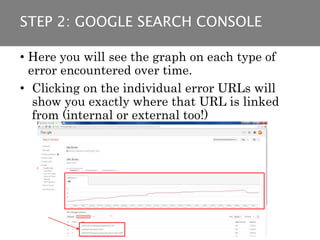
• Here you will see the graph on each type of
error encountered over time.
• Clicking on the individual error URLs will
show you exactly where that URL is linked
from (internal or external too!)
STEP 2: GOOGLE SEARCH CONSOLE
• Next, from the left-hand
navigation, head to the
HTML improvements area
• Here you’ll find a listing of
issues with various on-page
elements such as:
• Meta descriptions
• Title tags
• Non-indexable content
• Take note of any issues
reported here and mark
them in your checklist.
STEP 2: GOOGLE SEARCH CONSOLE
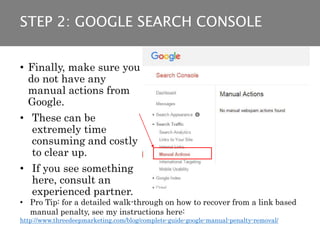
• Finally, make sure you
do not have any
manual actions from
Google.
• These can be
extremely time
consuming and costly
to clear up.
• If you see something
here, consult an
experienced partner.
• Pro Tip: for a detailed walk-through on how to recover from a link based
manual penalty, see my instructions here:
http://www.threedeepmarketing.com/blog/complete-guide-google-manual-penalty-removal/
STEP 2: GOOGLE SEARCH CONSOLE
STEP #3:
BING WEBMASTER TOOLS
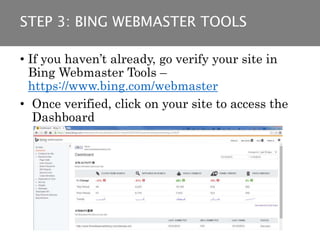
• If you haven’t already, go verify your site in
Bing Webmaster Tools –
https://www.bing.com/webmaster
• Once verified, click on your site to access the
Dashboard
STEP 3: BING WEBMASTER TOOLS
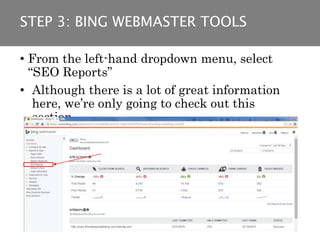
• From the left-hand dropdown menu, select
“SEO Reports”
• Although there is a lot of great information
here, we’re only going to check out this
section.
STEP 3: BING WEBMASTER TOOLS
• Here you’ll find a list of “SEO Suggestions”
• Clickable links to lists of URLs on which the
issue occurs.
• Prioritize the most severe issues and mark
them down in your workflow checklist.
STEP 3: BING WEBMASTER TOOLS
STEP #4:
CHECK YOUR ANALYTICS
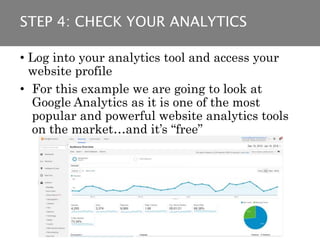
• Log into your analytics tool and access your
website profile
• For this example we are going to look at
Google Analytics as it is one of the most
popular and powerful website analytics tools
on the market…and it’s “free”
STEP 4: CHECK YOUR ANALYTICS
• Choose a period of
time you want to
analyze and compare
it to the previous
year.
• Drill down into the
Channels report
• Here you’ll see a
listing of traffic by
channel
• Next step is to click
on “Organic Search”
STEP 4: CHECK YOUR ANALYTICS
• Now change the Primary Dimension to
“Landing Page”
• Here you can see the year over year difference
in entrances per page from organic search
• Mark down any pages with drastic drops in
your checklist
STEP 4: CHECK YOUR ANALYTICS
STEP #5:
THE PANGUIN TOOL
• The Panguin Tool is a tool developed by a
company called Barracuda Digital
• It pulls in your organic data and overlays
when major updates to the Google algorithm
have occurred
• This is SUPER helpful when trying to
diagnose whether or not your site took a hit
• While you are logged into Google Analytics,
head over to http://barracuda.digital/panguin-
tool/ and follow the instructions to connect your
site’s analytics to the tool
STEP 5: THE PANGUIN TOOL
• Once connected you will see something like
this:
Color-coded lines
represent updates to
the Google algorithm
Toggle switches allow
you to turn off update
types
STEP 5: THE PANGUIN TOOL
• Mark down major traffic correlations
• Read up on the provided information about the
update
• List out possible solutions in your checklist
STEP 5: THE PANGUIN TOOL
STEP #6:
GOOGLE YOURSELF (BUT NOT LIKE THAT)
• Pull up google.com in your browser and use the “site:”
advanced search operator to check your indexation
• Example: “site:domain.com”
• How many pages are indexed?
• How does this compare to your actual page count?
• If it differs greatly, mark it down in your checklist.
STEP 6: GOOGLE YOURSELF (LIKE THIS)
NEXT STEPS:
• High priority issues include:
• Internal redirection – 301 and 302 status codes
• Broken links – 404 status codes
• Page Title issues
• Uncrawlable website
• Manual actions
• Medium priority issues include:
• H1 and H2 issues
• Pages with traffic loss YoY
• Low priority issues include:
• Meta Description issues
• Alt image text
PRIORITIZE YOUR CHECKLIST
1. Launch a crawl on your site with Screaming Frog
2. Download the Crawl Data Visualization spreadsheet
3. While crawl is running, log into Google Search
Console
4. After that, log into Bing Webmaster Tools
5. Check your crawl, if it’s done export the crawl
overview and load data into the Crawl Data
Visualization spreadsheet
6. Log into Google Analytics
7. While logged into GA, head over to the Panguin Tool
8. Check your indexation in Google
9. Mark down issues as you go
WORKFLOW TIMELINE AND REVIEW
THANK YOU!
NEXT UP: ADVANCED
SEO TACTICS
QUESTIONS?

Demand quest seo training

  • 1.
  • 2.
    TODAY’S AGENDA 1. Introduction 2.How Searching Has Evolved 3. What to expect today 4. How search engines work 5. What is SEO? 6. The SEO Pyramid 7. Local SEO 8. 30-Minute SEO Checkup
  • 3.
    NATE PLAUNT Sr. Strategist –Search Three Deep Marketing @NatePlaunt bit.ly/2cLk6eI
  • 4.
    DOES SEARCH ENGINEOPTIMIZATION REALLY MATTER?
  • 5.
    Search Engine Optimization FACT: 79%of search engine users say they always/frequently click on the natural search results.
  • 6.
    ANATOMY OF ASERP (SEARCH ENGINE RESULTS PAGE) Paid Ads Local / Map Results Organic Results
  • 7.
    • Organic trafficaccounts for up to 64% of all website traffic* • Roughly 52,000 search queries happen on Google - every SECOND! • This translates into about 4.5 billion searches every day** ORGANIC SEARCH STATS * Source: http://searchenginewatch.com/sew/study/2355020/organic- search-accounts-for-up-to-64-of-website-traffic-study ** Source: http://www.internetlivestats.com/one-second/#google-band
  • 8.
    DIFFERENT SEARCH ENGINE,DIFFERENT RESULTS
  • 9.
    U.S. SEARCH ENGINEMARKET SHARE *Source: http://www.statista.com/statistics/267161/market-share-of-search-engines-in-the-united-states/ 63.4 % 21.9 % 12.1 % Everyone else 2.5 %
  • 10.
    But the sandboxis constantly changing…
  • 11.
    • Each year,Google changes its search algorithm around 500–600 times.* • That’s roughly 1.5 changes EVERY. SINGLE. DAY! THE SHIFTING SANDBOX • Source: https://moz.com/google-algorithm-change
  • 12.
    BUT, THE ALGORITHMISN’T THE ONLY THING CHANGING… SEARCHERS ARE CHANGING TOO
  • 13.
    TOP GOOGLE SEARCHES 2005 1.Myspace 2. Ares 3. Baidu 4. Wikipedia 5. Orkut 6. iTunes 7. Sky News 8. World of Warcraft 9. Green Day 10. Leonardo da Vinci 2015 1. Lamar Odom 2. Jurassic World 3. American Sniper 4. Caitlyn Jenner 5. Ronda Rousey 6. Paris 7. Agar.io 8. Chris Kyle 9. Fallout 4 10. Straight Outta Compton
  • 14.
    IN FACT, SEARCHERSARE “EVOLVING” THEY ARE LEARNING HOW TO INTERACT WITH SEARCH ENGINES TO GET SOLUTIONS MORE QUICKLY
  • 16.
    DOES SEO REALLYMATTER? YES! If you are not optimizing for search you are already behind your competition.
  • 17.
    WHAT TO EXPECT: •A solid understanding of how search engines operate • Learn how to beat out your competition in the search engine results • Actionable tactics you can implement today • Tools to implement optimizations
  • 19.
    WHAT DID YOUSEARCH TODAY?
  • 21.
    WHAT DID YOUSEARCH TODAY?
  • 22.
    WEBSITES SINCE 1998 0 200,000,000 400,000,000 600,000,000 800,000,000 1,000,000,000 1,200,000,000 19981999 2000 2001 2002 2003 2004 2005 2006 2007 2008 2009 2010 2011 2012 2013 2014 2015 2016* Websites
  • 23.
  • 24.
  • 26.
    WHAT IS SEO? Searchengine optimization (SEO) is the process of affecting the visibility of a website or a web page in a search engine's "natural" or un-paid ("organic") search results. • Source: Wikipedia
  • 27.
    WHAT IS SEO?(SIMPLIFIED) SEO is two things: 1. The practice of making your website as accessible as possible to search engines and human visitors. 2. Ensuring your website is as useful and relevant as possible to your current and prospective customers.
  • 28.
    THINK OF YOURWEBSITE AS A HOUSE
  • 29.
    Ensure your siteis accessible to humans and search engines. THINK OF YOUR WEBSITE AS A HOUSE
  • 30.
    Ensure your site is relevant anduseful to your visitors. THINK OF YOUR WEBSITE AS A HOUSE
  • 31.
  • 32.
    Ensure your site isaccessible to humans and search engines. Ensure your site is relevant and useful to your visitors.
  • 33.
    PHASE 1: PLANFOR SUCCESS
  • 34.
    PHASE 1: PLANFOR SUCCESS 1. What is the business goal you are trying to achieve? 2. What are the key performance indicators that tell you if you’re on or off track? 3. What are your baseline metrics? 4. What does your team look like?
  • 35.
    HOW DO WEMEASURE SUCCESS? Source: http://www.kaushik.net/avinash/digital-marketing-and-measurement-model/
  • 36.
    HOW DO WEMEASURE SUCCESS? Source: http://www.kaushik.net/avinash/digital-marketing-and-measurement-model/
  • 37.
    HOW DO WEMEASURE SUCCESS? Source: http://www.kaushik.net/avinash/digital-marketing-and-measurement-model/
  • 38.
    HOW DO WEMEASURE SUCCESS? Source: http://www.kaushik.net/avinash/digital-marketing-and-measurement-model/
  • 39.
    PHASE 1: YOURTEAM SEO Project Team SEO Dev. P.M. Analyst
  • 40.
  • 41.
    • Goal: Ensureaccessibility for Search Engines & Users • Foundation of your entire online presence, so it’s important to get it right • Search engines have very clear guidelines for webmasters to follow when building sites TECHNICAL AND STRUCTURAL FACTORS
  • 42.
    WHAT TO LOOKFOR • Can your entire website be crawled? • Is your website indexed by the search engines? • Does your website have any errors? • Is your page load time too slow?
  • 43.
    HOW YOU CANDO THIS • XML sitemap • Accurate robots.txt file • Google Search Console • Page speed optimization
  • 44.
    WHAT TO AVOID Anyunnecessary hurdle for the search engines • Flash • iFrames • Serving content via JavaScript • URL Parameters
  • 45.
  • 46.
    HERE’S WHAT GOOGLESEES (not a glitch)
  • 47.
    ROBOTS.TXT FILE The robots.txtfile is a directive for all “bots” visiting your site. • It tells them what URLs to crawl or not crawl • Simple text file – can be created with notepad
  • 48.
    ROBOTS.TXT FILE –*PRO TIP Use the Robots.txt testing tool in Google Search Console to troubleshoot errors in your file and to test individual URLs
  • 49.
    XML SITEMAP The XMLsitemap is a map of your website that enables search engines to efficiently crawl and index your site.
  • 50.
    XML SITEMAP Various toolscan help you generate an accurate and up-to-date sitemap: • Screaming Frog Spider • CMS plugins like Yoast • Other web-based sitemap generators - www.xml-sitemaps.com
  • 51.
    WHY DOES SPEEDMATTER? In 2014, mobile search overtook desktop search. • The gap between mobile and desktop will widen • Fast page load speed is critical to optimizing for mobile • Page load in 2 seconds
  • 52.
  • 53.
    GOOGLE PAGESPEED INSIGHTS PageSpeed Insightsis a free tool from Google that gives you a prioritized roadmap on how to fix speed issues on your site. • https://developers.google.com/speed/pagespeed/insights
  • 54.
    ON AND OFFPAGE FACTORS
  • 55.
    ON AND OFFPAGE FACTORS • Goal: Demonstrate Relevance and Authority • Search engines want to provide users with search results that are relevant to their query and authoritative in nature. • Building upon a sound technical structure, we make sure that search engines and users are able to fully understand what various pages on your website are all about.
  • 56.
    On-page SEO refersto factors that you can control directly on your website Examples of on-page factors are: • Metadata • Internal links • Content • Technical / Structural Off-page SEO refers to factors “out of your control” on other websites Examples of off-page factors are: • Inbound links • Social Media • Mentions • Local Directories ON-PAGE vs. OFF-PAGE SEO
  • 57.
    WHAT TO LOOKFOR • Are your on-page elements optimized? • What keywords are you ranking for? • Who are your organic competitors? • Who is linking to you?
  • 58.
    ON-PAGE SEO ELEMENTS •URL • Page Title • H1 heading • H2 headings • Meta Description • Page Copy • Alternative image text
  • 59.
    Page Title: Unique anddescriptive URL: Descriptive and readable by both humans and search engines H1 Heading: Unique and descriptive Sub-Headings: Targeted sub-topics of the page theme Page Copy: Descriptive, unique, and RELEVANT Alt Image Text: Descriptive and keyword rich SEO ON-PAGE ELEMENTS
  • 60.
    PAGE TITLE Good: Organic Result#1 Bad: Organic Result #32
  • 61.
    URL STRUCTURE Good: Organic Result#9 Bad: Organic Result #94
  • 62.
    WHAT KEYWORDS DOYOU RANK FOR? Ground Rules: 1. Don’t “Google yourself” 2. Use a keyword tracking tool a) SEM Rush (freemium) b) Bright Local (paid)
  • 63.
    WHAT KEYWORDS DOYOU RANK FOR?
  • 64.
    OFF-PAGE SEO ELEMENTS •Backlinks • Link anchor text • Citations or Mentions • Competitors
  • 65.
    INTERNAL vs. EXTERNAL LINKS(BACKLINKS) • Internal links refer to links within your site, such as navigation links. • External links refer to links outside of your site, such as a link from Wikipedia. • Both are very useful, but for different reasons.
  • 66.
    HOW DO BACKLINKSHELP? • Backlinks act as “votes” for pages on your site. • Generally speaking, the more links you have from authoritative sources, the more your site is trusted, and the better your pages will rank. YourWebsite.com NewsSite.com RetailSite.com IndustryBlog.com ShadySite.com
  • 67.
    WHY INVEST INLINK BUILDING? A technically sound site will only get you so far. Without links, it simply will not have the equity or authority to be visible in search engines.
  • 68.
    LINK ANCHOR TEXT •The words used in the anchor text of a link to your site helps search engines understand what that page is about. • So, if your page is about “Lego Star Wars collections” the anchor text Star Wars Legos would be preferable over click here.
  • 69.
  • 70.
    CONTENT STRATEGY • Goal:Ensure Quality & Alignment with Audience • To convert visitors to prospects or customers we need to have high quality content that addresses their problems. • Through keyword research and customer understanding, we can determine the topics that are of interest to your customers and where you have the opportunity to be competitive in search engine results.
  • 71.
    Understanding who your user is, WHATIS A CONTENT STRATEGY? + = what problems they have that you are able to solve, and finding a way to solve those problems.
  • 72.
    WHAT IS ACONTENT STRATEGY? what problems they have that you are able to solve,
  • 73.
    WHAT TO LOOKFOR • Am I speaking to my customer in their language? • Do I have the content they are looking for? • Where is there opportunity to provide an answer to a question?
  • 74.
    HOW YOU CANDO THIS 1. Identify buying personas or audience segments 2. Understand the decision making process 3. Keyword research 4. Content inventory
  • 75.
    • Match existingcontent to personas and steps in the buying cycle. • Identify areas that lack content and fill gaps. Content Inventory & Gap Analysis VS.
  • 76.
    Content Inventory & GapAnalysis URL Worker Willy Fashion Freddy Awareness Interest Consideration Purchase Intent /401-red-wing- mens-6-inch-boot- brown x x x /footwear/6- hawthorne-8113- 08113 x x x Awareness Interest Consideration Purchase Intent Worker Willy 15 17 10 5 Fashion Freddy 11 2 7 13 Content Inventory & Gap Analysis
  • 77.
    CONTENT STRATEGY STEPS 1.Business Objectives 2. Persona / Buying Cycle Analysis 3. Content Audit 4. Gap Analysis 5. Recommendations
  • 78.
  • 79.
    CONTENT MARKETING • Goal:Right Content in front of the Right People in the Right Place at the Right Time • Content Marketing is the practice of distributing your content through various channels. • Get the right types of content to the right audiences.
  • 80.
  • 81.
  • 82.
    WHAT IS LOCALSEO? Local SEO is the process of making it as easy as possible for prospective customers to find information about your company online, either when they search specifically for your enterprise or for any businesses that provides particular goods and services nearby them. • Source: LocalU.org
  • 83.
    WHAT IS LOCALSEO? Enhancing the visibility of your business for queries with “local intent”
  • 84.
    LOCAL SEO RANKING FACTORS •Link signals • On-page signals • Google My Business signals • External location signals • Behavioral signals • Personalization signals • Review signals
  • 85.
    HOW YOU CANDO THIS • Ensure your contact info is present • Acquire relevant local links • Make sure your Google My Business page is accurate and optimized • Consistent NAP (Name, Address, Phone #) • Create engaging, quality content • Make your site the best in your area • Ask for reviews!
  • 86.
    GOOGLE LOCAL RANKINGS (RIGHTFROM THE HORSE’S MOUTH) Relevance “Relevance refers to how well a local listing matches what someone is searching for. Adding complete and detailed business information can help Google better understand your business and match your listing to relevant searches.” Source: https://support.google.com/business/answer/7091
  • 87.
    GOOGLE LOCAL RANKINGS (RIGHTFROM THE HORSE’S MOUTH) Distance “Just like it sounds–how far is each potential search result from the location term used in a search? If a user doesn't specify a location in their search, Google will calculate distance based on what’s known about their location.” Source: https://support.google.com/business/answer/7091
  • 88.
    GOOGLE LOCAL RANKINGS (RIGHTFROM THE HORSE’S MOUTH) Prominence “Prominence refers to how well-known a business is. Some places are more prominent in the offline world, and search results try to reflect this in local ranking. Prominence is also based on information that Google has about a business from across the web (like links, articles, and directories). Google review count and score are factored into local search ranking: more reviews and positive ratings will probably improve a business's local ranking.” Source: https://support.google.com/business/answer/7091
  • 89.
    CITATIONS • Citations areessentially a mention of your brand on another site like a listing directory. • Yelp • Yellow Pages • City Search
  • 90.
    CITATIONS • It isimportant that these listings maintain consistency and accuracy. • Name • Address • Phone Number • *Check up on your listings using Moz Local • - moz.com/local
  • 91.
  • 92.
    1. If doneright, SEO is a distinct competitive advantage 2. Get the foundation right 3. Optimize your pages and off-page presence 4. Strategically create and distribute content 5. Optimize for local visibility TL;DR
  • 93.
    MEASUREMENT & IMPROVEMENTAnd thendo it all over again!
  • 94.
    30 MINUTE SEOCHECK UP
  • 95.
    1. Analytics Platform(Google Analytics) 2. Google Search Console (formerly Webmaster Tools) 3. Bing Webmaster Tools 4. Google 5. Screaming Frog Spider 6. Crawl Data Visualization Spreadsheet 7. Panguin Tool – by Barracuda Digital 8. Word, Excel, Google Docs, pen and paper, or anything else you want to use to make a checklist WHAT YOU NEED:
  • 96.
    1. Google Analytics- https://www.google.com/analytics/ 2. Google Search Console - https://www.google.com/webmasters/tools/home 3. Bing Webmaster Tools - http://www.bing.com/toolbox/webmaster 4. Google - https://www.google.com/ 5. Screaming Frog Spider - http://www.screamingfrog.co.uk/ 6. Crawl Data Visualization Spreadsheet - http://bit.ly/1npByIE 7. Panguin Tool - http://barracuda.digital/panguin-tool/ WHAT YOU NEED:
  • 97.
    30 MINUTE SEOCHECK UP: STEPS
  • 98.
    STEP #1: CRAWL YOURSITE WITH SCREAMING FROG
  • 99.
    • Download ScreamingFrog Spider • http://www.screamingfrog.co.uk/seo-spider/ • Enter your domain into the box at the top and hit Start • *Pro Tip: exclude the “www” to capture info on all subdomains STEP 1: CRAWL YOUR SITE
  • 100.
    • Download theCrawl Data Visualization Worksheet • http://www.threedeepmarketing.com/blog/visualizing-website-data-with-screaming- frog • Save your crawl once it’s complete • Export the Crawl Overview Report as a .csv file • Copy and Paste into the “Data” tab of the Crawl Data Visualization Worksheet STEP 1: CRAWL YOUR SITE
  • 101.
    STEP 1: CRAWLYOUR SITE
  • 102.
    Page Title: Unique anddescriptive URL: Descriptive and readable by both humans and search engines H1 Heading: Unique and descriptive Sub-Headings (H2): Targeted sub-topics of the page theme Page Copy: Descriptive, unique, and RELEVANT Alt Image Text: Descriptive and keyword rich SEO ON-PAGE ELEMENTS Meta Description: The elevator pitch - unique and descriptive
  • 103.
    • Take noteof: • Any redirection (3xx), broken links (4xx), and server error (5xx) status codes • URL Issues • Page Title Issues • Meta Description Issues • Missing Heading Tags (H1, H2) • Mark any issues down on your checklist STEP 1: CRAWL YOUR SITE - OUTPUT
  • 104.
  • 105.
    • If youhaven’t already, go verify your site in Google Search Console – https://www.google.com/webmasters/tools/home • Once verified, click on your site to access the Dashboard STEP 2: GOOGLE SEARCH CONSOLE
  • 106.
    • First stophere is to check out your crawl errors report. • Click on the section banner to access the report • This will bring you to a different screen STEP 2: GOOGLE SEARCH CONSOLE
  • 107.
    • Here youwill see the graph on each type of error encountered over time. • Clicking on the individual error URLs will show you exactly where that URL is linked from (internal or external too!) STEP 2: GOOGLE SEARCH CONSOLE
  • 108.
    • Next, fromthe left-hand navigation, head to the HTML improvements area • Here you’ll find a listing of issues with various on-page elements such as: • Meta descriptions • Title tags • Non-indexable content • Take note of any issues reported here and mark them in your checklist. STEP 2: GOOGLE SEARCH CONSOLE
  • 109.
    • Finally, makesure you do not have any manual actions from Google. • These can be extremely time consuming and costly to clear up. • If you see something here, consult an experienced partner. • Pro Tip: for a detailed walk-through on how to recover from a link based manual penalty, see my instructions here: http://www.threedeepmarketing.com/blog/complete-guide-google-manual-penalty-removal/ STEP 2: GOOGLE SEARCH CONSOLE
  • 110.
  • 111.
    • If youhaven’t already, go verify your site in Bing Webmaster Tools – https://www.bing.com/webmaster • Once verified, click on your site to access the Dashboard STEP 3: BING WEBMASTER TOOLS
  • 112.
    • From theleft-hand dropdown menu, select “SEO Reports” • Although there is a lot of great information here, we’re only going to check out this section. STEP 3: BING WEBMASTER TOOLS
  • 113.
    • Here you’llfind a list of “SEO Suggestions” • Clickable links to lists of URLs on which the issue occurs. • Prioritize the most severe issues and mark them down in your workflow checklist. STEP 3: BING WEBMASTER TOOLS
  • 114.
  • 115.
    • Log intoyour analytics tool and access your website profile • For this example we are going to look at Google Analytics as it is one of the most popular and powerful website analytics tools on the market…and it’s “free” STEP 4: CHECK YOUR ANALYTICS
  • 116.
    • Choose aperiod of time you want to analyze and compare it to the previous year. • Drill down into the Channels report • Here you’ll see a listing of traffic by channel • Next step is to click on “Organic Search” STEP 4: CHECK YOUR ANALYTICS
  • 117.
    • Now changethe Primary Dimension to “Landing Page” • Here you can see the year over year difference in entrances per page from organic search • Mark down any pages with drastic drops in your checklist STEP 4: CHECK YOUR ANALYTICS
  • 118.
  • 119.
    • The PanguinTool is a tool developed by a company called Barracuda Digital • It pulls in your organic data and overlays when major updates to the Google algorithm have occurred • This is SUPER helpful when trying to diagnose whether or not your site took a hit • While you are logged into Google Analytics, head over to http://barracuda.digital/panguin- tool/ and follow the instructions to connect your site’s analytics to the tool STEP 5: THE PANGUIN TOOL
  • 120.
    • Once connectedyou will see something like this: Color-coded lines represent updates to the Google algorithm Toggle switches allow you to turn off update types STEP 5: THE PANGUIN TOOL
  • 121.
    • Mark downmajor traffic correlations • Read up on the provided information about the update • List out possible solutions in your checklist STEP 5: THE PANGUIN TOOL
  • 122.
    STEP #6: GOOGLE YOURSELF(BUT NOT LIKE THAT)
  • 123.
    • Pull upgoogle.com in your browser and use the “site:” advanced search operator to check your indexation • Example: “site:domain.com” • How many pages are indexed? • How does this compare to your actual page count? • If it differs greatly, mark it down in your checklist. STEP 6: GOOGLE YOURSELF (LIKE THIS)
  • 124.
  • 125.
    • High priorityissues include: • Internal redirection – 301 and 302 status codes • Broken links – 404 status codes • Page Title issues • Uncrawlable website • Manual actions • Medium priority issues include: • H1 and H2 issues • Pages with traffic loss YoY • Low priority issues include: • Meta Description issues • Alt image text PRIORITIZE YOUR CHECKLIST
  • 126.
    1. Launch acrawl on your site with Screaming Frog 2. Download the Crawl Data Visualization spreadsheet 3. While crawl is running, log into Google Search Console 4. After that, log into Bing Webmaster Tools 5. Check your crawl, if it’s done export the crawl overview and load data into the Crawl Data Visualization spreadsheet 6. Log into Google Analytics 7. While logged into GA, head over to the Panguin Tool 8. Check your indexation in Google 9. Mark down issues as you go WORKFLOW TIMELINE AND REVIEW
  • 127.
    THANK YOU! NEXT UP:ADVANCED SEO TACTICS QUESTIONS?

Editor's Notes

  • #8 Study conducted by Conductor in 2014
  • #9 This is because each search engine has its own ranking algorithm Google Over 200 “ranking factors” help to decide where your site ranks Roughly 10,000 sub-factors Bing Fewer ranking factors in algorithm Heavy reliance on social factors Search engines use a mathematical algorithm to serve up search results for any given query. They have to, because any given day, 15% of all searches have never been searched before That means that of the 3.5 billion queries that happen on Google, 525 million of them are brand new. There are over x factors that influence the algorithm, but let’s focus on the top ones…. Keep in mind that it is always changing….
  • #10 Data as of April 2016 Everyone else: AOL, Ask Jeeves
  • #11 As SEOs or people working in digital marketing, we are playing in Google’s Sandbox
  • #12 Study conducted by Conductor in 2014
  • #19  Poll Title: What is your company's biggest problem with SEO? https://www.polleverywhere.com/multiple_choice_polls/zGlXUfGdhmCl4iF
  • #21  This is a familiar image that most of us see everyday. When you type a search query into Google, how do those results come so fast? More importantly, what came up when you searched today?
  • #22 Search engines do not crawl the web in real time, they categorize web pages into their index for easy retrieval 16-20% of searches have never been searched before http://readwrite.com/2012/02/29/interview_changing_engines_mid-flight_qa_with_goog/#awesm=%7EoiNkM4tAX3xhbP 900,000,000 searches world wide
  • #23 There’s an incredible amount of information that search engines have to parse through -about 1.1 billion websites that Google has to crawl and keep track of. -compared to only 2.4 million in 1998 – when Google was first launched
  • #24 How do they do this…a mathematical algorithm (next slide)
  • #26 And instead of walking in, all you have to do is type
  • #45 In this step we’re really looking at making your site accessible Here are some things to avoid What happens when you have unnecessary road blocks for search engines?
  • #50 The XML sitemap is like the directory for your website. Search Engines use this like we use the directory in an office building – to more efficiently find what they are looking for.
  • #51 The XML sitemap is like the directory for your website. Search Engines use this like we use the directory in an office building – to more efficiently find what they are looking for.
  • #53 The XML sitemap is like the directory for your website. Search Engines use this like we use the directory in an office building – to more efficiently find what they are looking for.
  • #56 Search engines want to stay in business – to do so they need people coming back. To be people coming back they need to provide the best answers to questions.
  • #67 A shady link may be one that looks completely unnatural or comes from a totally unrelated site Search engines have filters that take the quality of links into account and tend to serve up pages with a trusted backlink profile Too many shady links can result in a penalty from Google so it’s best to just build links organically from providing the best content
  • #68 A shady link may be one that looks completely unnatural or comes from a totally unrelated site Search engines have filters that take the quality of links into account and tend to serve up pages with a trusted backlink profile Too many shady links can result in a penalty from Google so it’s best to just build links organically from providing the best content
  • #76 Gather all existing assets you have. Understand the landscape and move forward.
  • #77 Not all personas or steps are created equal. You should have content to support all of your personas at each step in the cycle, but you may focus on some areas more than others.
  • #81 Your website is not an online brochure, it is the solution to your customer’s problems.
  • #86 On-page signals Link signals Google My Business signals External location signals Behavioral signals Personalization signals Review signals
  • #89 For example, famous museums, landmark hotels, or well-known store brands that are familiar to many people are also likely to be prominent in local search results.
  • #96 All of these tools have much, much more to offer than the high level functionality that we are going to walk through so take time after to familiarize yourself with them
  • #97 Add URLs
  • #100 Warning: if your site has more than 500 URIs (Uniform Resource Identifier) – all website assets like pages, videos, images, files, etc. – you should buy a license to activate all features. - A license costs less than $12 / month
  • #104 Add Definitions
  • #106 Definition of GSC – It is the portal that Google uses to send you information pertaining to your site There is lots of good info here but we’re just going to look at a couple different areas
  • #114 Definition of GSC – It is the portal that Google uses to send you information pertaining to your site
  • #118 Note – it is usually easier to export to excel to manipulate the data
  • #121 Each color-coded line represents an update to the Google algorithm The toggle switches at the right allow you to turn off update types Clicking on a line will bring up an information box with specifics about that update and any related links with more information
  • #122 Each color-coded line represents an update to the Google algorithm The toggle switches at the right allow you to turn off
  • #124 Pro tip
  • #126 Pro tip
  • #127 Pro tip