| SEO 101 1
SEO 101
| SEO 101 2
Today’s Agenda:
• Introduction
• What to expect today
• How search engines work
• What is SEO?
• Foundational SEO
• On and off page basics
| SEO 101 3
Nate Plaunt
Sr. SEO Strategist
@NatePlaunt
bit.ly/1LoDdWN
Today’s Presenters
Taylor Pettis
Sr. Marketing
Manager
@tpettis
linkd.in/1dsZJAa
DOES SEARCH ENGINE OPTIMIZATION
REALLY MATTER?
| SEO 101 5
Organic Search is the #1 Driver of
Website Traffic
From a usage perspective, new studies have found
that organic search drives 64% of all web traffic.
| SEO 101 6
Search Engine Optimization
FACT:
79% of search engine users say they
always/frequently click on the natural search
results.
| SEO 101 7
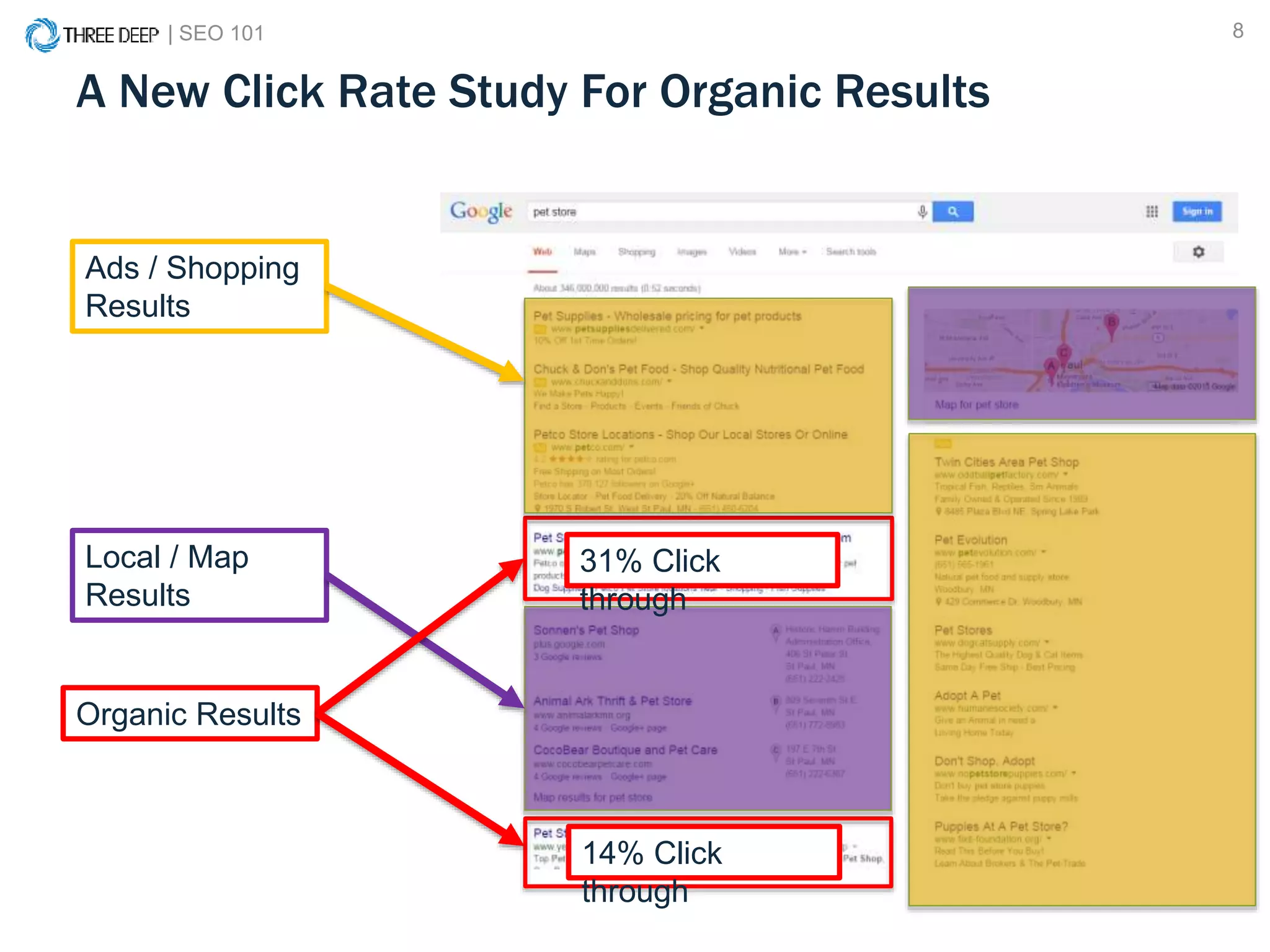
A New Click Rate Study For Organic Results
On average, 71.33% of searches resulted in a page one Google organic
click. Page two and three get only 5.59% of the clicks. On the first page
alone, the first 5 results account for 67.60% of all the clicks and the results
from 6 to 10 account for only 3.73%.
http://marketingland.com/new-click-rate-study-google-organic-results-102149
Page 1 = 71.33%
| SEO 101 8
A New Click Rate Study For Organic Results
Ads / Shopping
Results
Local / Map
Results
Organic Results
31% Click
through
14% Click
through
| SEO 101 9
Does SEO Really Matter?
YES!
If you are not optimizing for search you are
already behind your competition.
| SEO 101 10
What to Expect:
• A solid understanding of how search
engines operate
• Learn how to beat out your competition in
the search engine results
• Actionable tactics you can implement
today
• Tools to implement SEO
WHAT DID YOU SEARCH TODAY?
| SEO 101 12
What Did You Search Today?
| SEO 101 13
What Did You Search Today?
| SEO 101 14
| SEO 101 15
| SEO 101 16
How Search Engines Work
| SEO 101 17
• Over 200 “ranking factors” help to decide
where your site ranks
• Roughly 10,000 sub-factors
• Fewer ranking factors in algorithm
• Heavy reliance on social factors
Search Engine Algorithm Key Components
1
| SEO 101 18
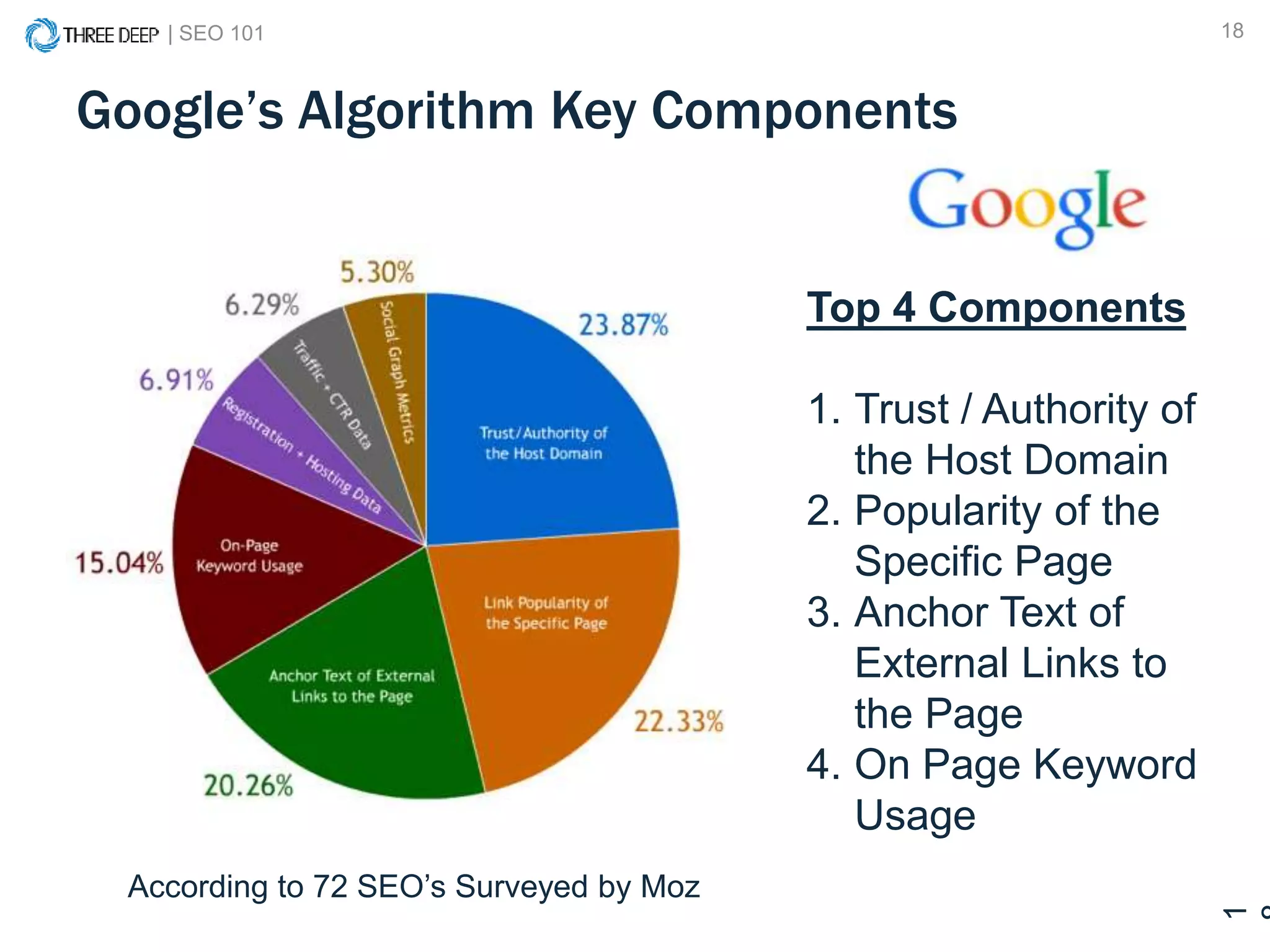
Google’s Algorithm Key Components
1
Top 4 Components
1. Trust / Authority of
the Host Domain
2. Popularity of the
Specific Page
3. Anchor Text of
External Links to
the Page
4. On Page Keyword
Usage
According to 72 SEO’s Surveyed by Moz
| SEO 101 19
U.S. Search Engine Market Share
http://www.statista.com/statistics/267161/market-share-of-search-engines-in-the-united-states/
64.2 %
20.2 %
12.7 %
Everyone else 2.9 %
| SEO 101 20
Not all results are organic
Organic
| SEO 101 21
What is SEO?
Search engine optimization
(SEO) is the process of affecting
the visibility of a website or a web
page in a search engine's
"natural" or un-paid ("organic")
search results.
Source: Wikipedia
| SEO 101 22
What is SEO? (Simplified)
SEO is two things:
1. The practice of making your website as
accessible as possible to search engines.
2. Ensuring your website is as useful and
relevant as possible to your current and
prospective customers.
SEARCH ENGINE OPTIMIZATION 101
THE BASICS
| SEO 101 24
SEO 101:
Ensure your site
is accessible to
search engines.
SEO 201:
Ensure your site is
relevant and useful
to your visitors.
| SEO 101 25
Technical and structural factors
| SEO 101 26
Technical and structural factors
• Goal: Ensure accessibility for Search
Engines & Users
• Foundation of your entire online
presence, so it’s important to get it right
• Search engines have very clear
guidelines for webmasters to follow when
building sites
| SEO 101 27
What To Look For
• Can your entire website be crawled?
• Is your website indexed by the search
engines?
• Does your website have any errors?
• Is your page load time too slow?
| SEO 101 28
How You Can Do This
• XML sitemap
• Accurate robots.txt file
• Google Search Console
• Page speed optimization
| SEO 101 29
What to Avoid
Any unnecessary hurdle for the search
engines
• Flash
• JavaScript
• URL Parameters
| SEO 101 30
Here’s What Humans See
| SEO 101 31
Here’s What Search Engines See
(not a glitch)
| SEO 101 32
XML Sitemap
The XML sitemap is a map of your website
that enables search engines to efficiently
crawl and index your site.
| SEO 101 33
XML Sitemap
Various tools can help you generate an
accurate and up-to-date sitemap:
• Screaming Frog Spider
• CMS plugins like Yoast
• Other web-based sitemap generators
- www.xml-sitemaps.com
| SEO 101 34
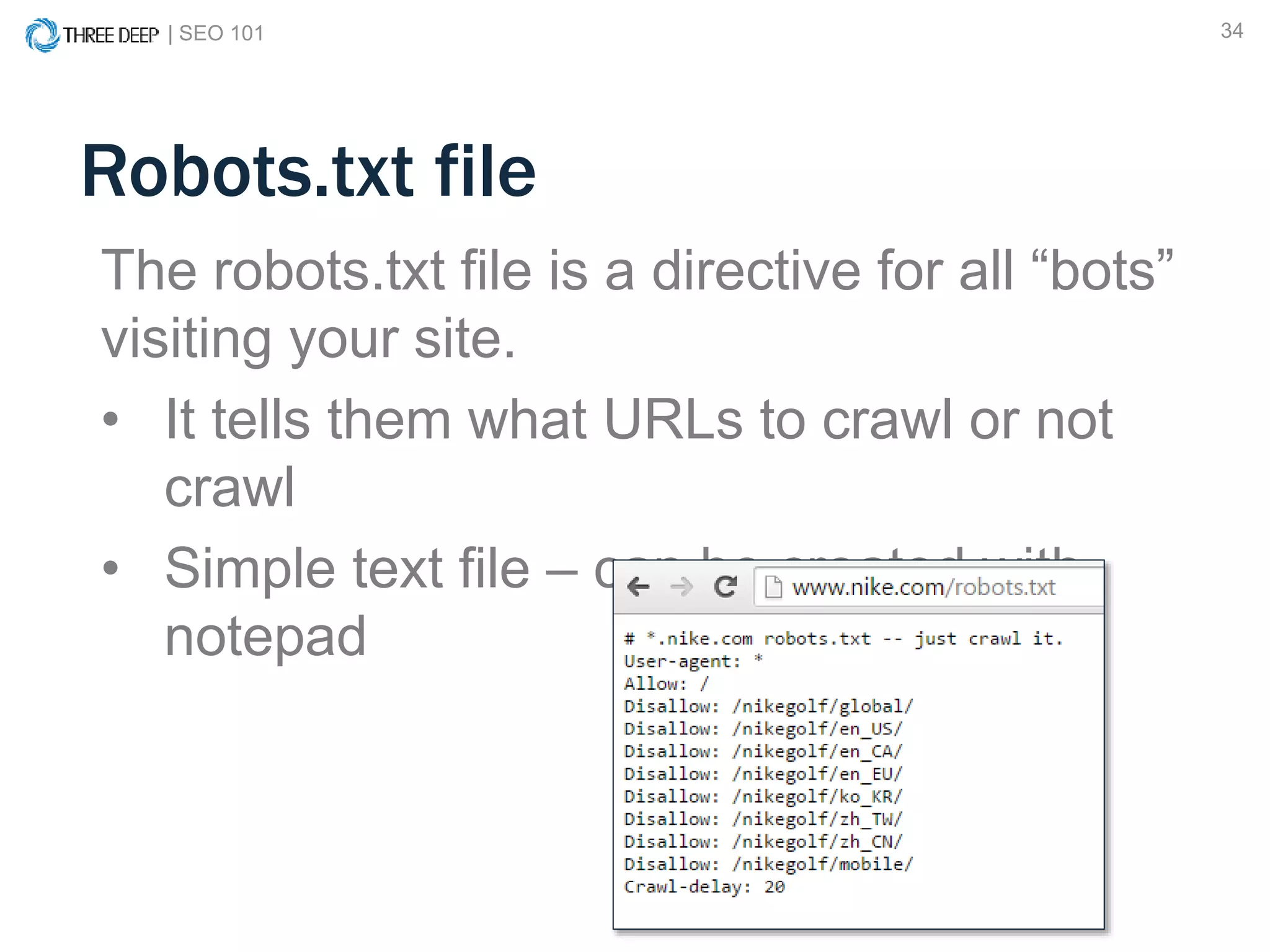
Robots.txt file
The robots.txt file is a directive for all “bots”
visiting your site.
• It tells them what URLs to crawl or not
crawl
• Simple text file – can be created with
notepad
| SEO 101 35
Robots.txt file – *Pro Tip
Use the
Robots.txt testing
tool in Google
Search Console
to troubleshoot
errors in you file
and to test
individual URLs
| SEO 101 36
Google Search Console
Google Search Console (formerly Google
Webmaster Tools) is a free resource with tons of
valuable information available to all website owners.
• https://www.google.com/webmasters/tools/home
| SEO 101 37
Why Does Speed Matter?
Last year, mobile search overtook desktop search.
• The gap between mobile and desktop will widen
• Fast page load speed is critical to optimizing for
mobile
• “Mobile-geddon”
| SEO 101 38
Google PageSpeed Insights
PageSpeed Insights is another free tool from
Google that gives you a prioritized roadmap on how
to fix speed issues on your site.
• https://developers.google.com/speed/pagespeed/insights
| SEO 101 39
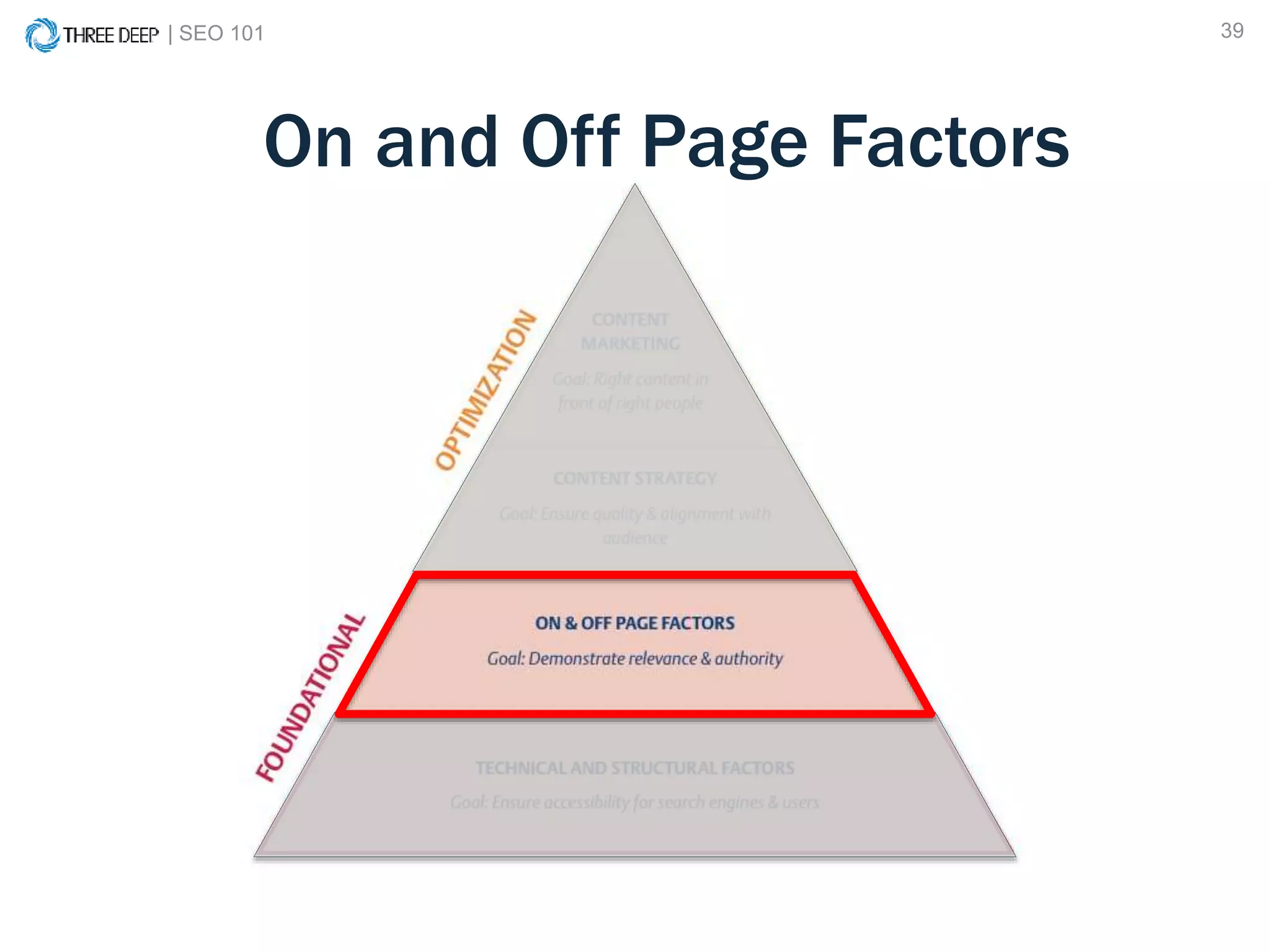
On and Off Page Factors
| SEO 101 40
On and Off Page Factors
• Goal: Demonstrate Relevance and
Authority
• Search engines want to provide users with
search results that are relevant to their
query and authoritative in nature.
• Building upon a sound technical structure,
we make sure that search engines and
users are able to fully understand what
various pages on your website are about.
| SEO 101 41
On-page SEO refers to
factors that you can
control directly on your
website
Examples of on-page
factors are:
• Metadata
• Internal links
• Content
• Technical / Structural
Off-page SEO refers to
factors “out of your
control” on other websites
Examples of off-page
factors are:
• Inbound links
• Social Media
• Mentions
• Local Directories
On-Page vs. Off-Page SEO
| SEO 101 42
What To Look For
• Are your on page elements optimized?
• What keywords are you ranking for?
• Who is linking to you?
• Who is linking to your competitors?
| SEO 101 43
On Page SEO Elements
• URL
• Page Title
• H1 heading
• H2 headings
• Meta Description
• Page Copy
• Alternative image text
| SEO 101 44
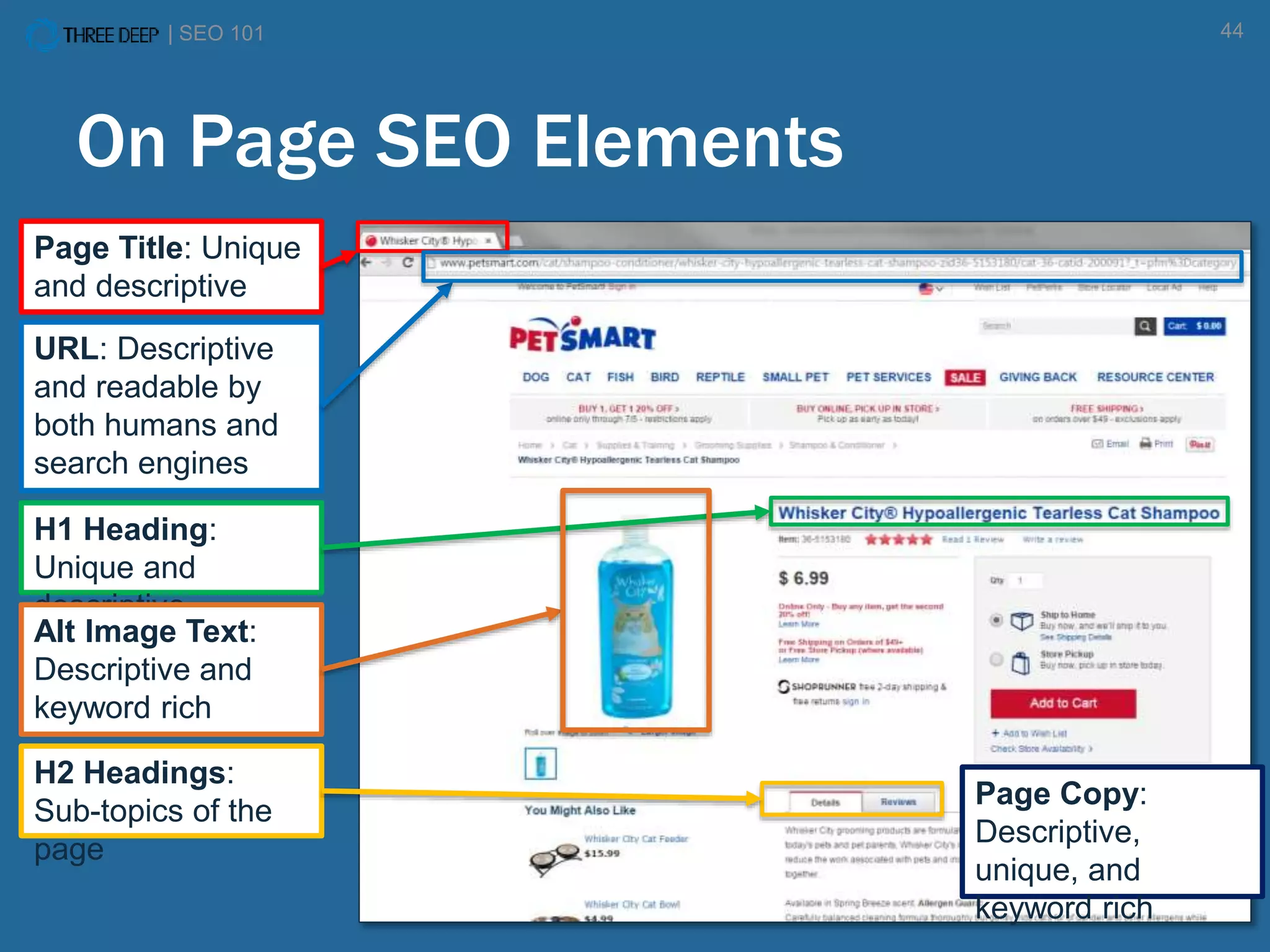
On Page SEO Elements
Page Title: Unique
and descriptive
URL: Descriptive
and readable by
both humans and
search engines
H1 Heading:
Unique and
descriptive
H2 Headings:
Sub-topics of the
page
Page Copy:
Descriptive,
unique, and
keyword rich
Alt Image Text:
Descriptive and
keyword rich
| SEO 101 45
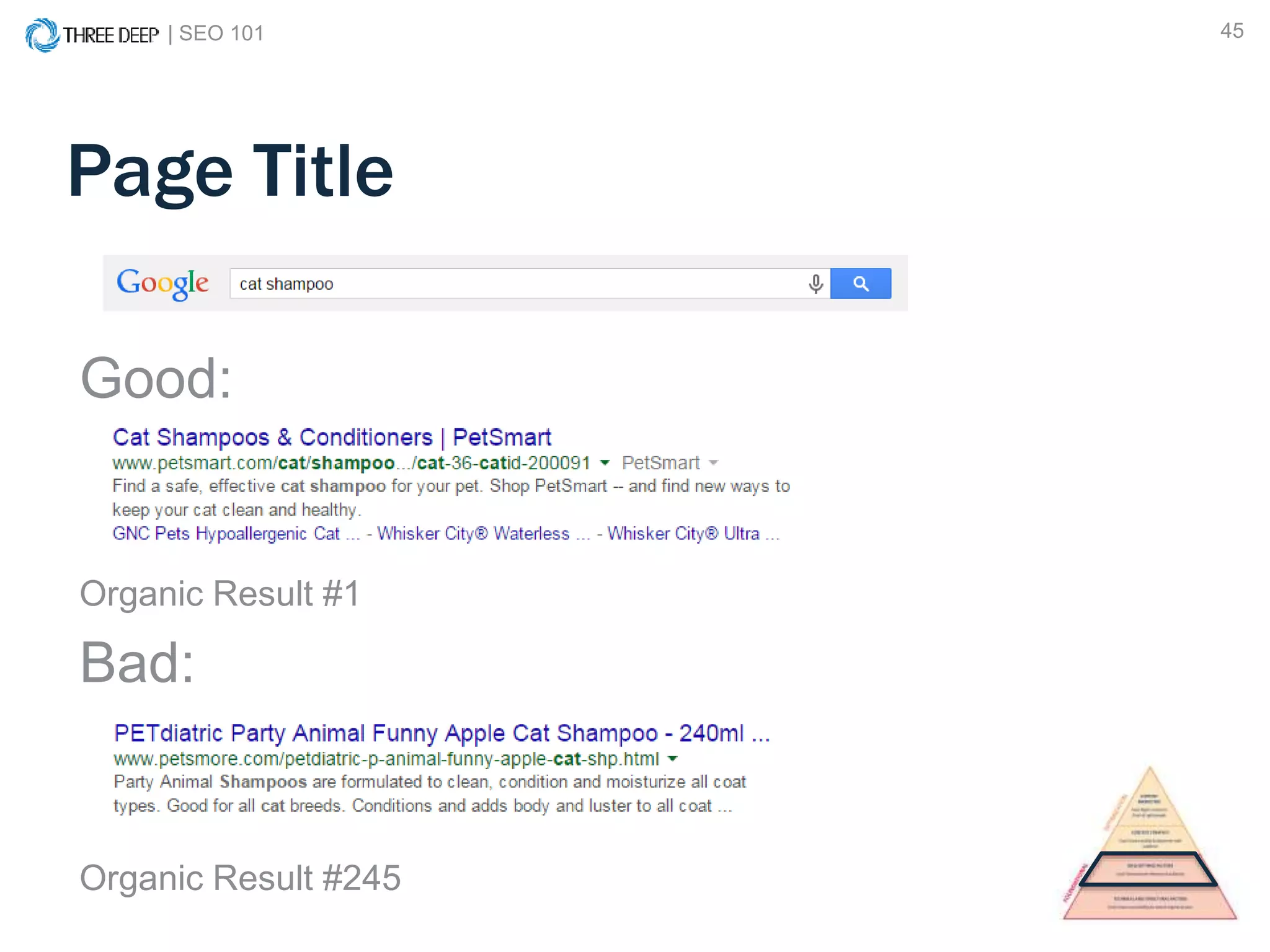
Page Title
Good:
Organic Result #1
Bad:
Organic Result #245
| SEO 101 46
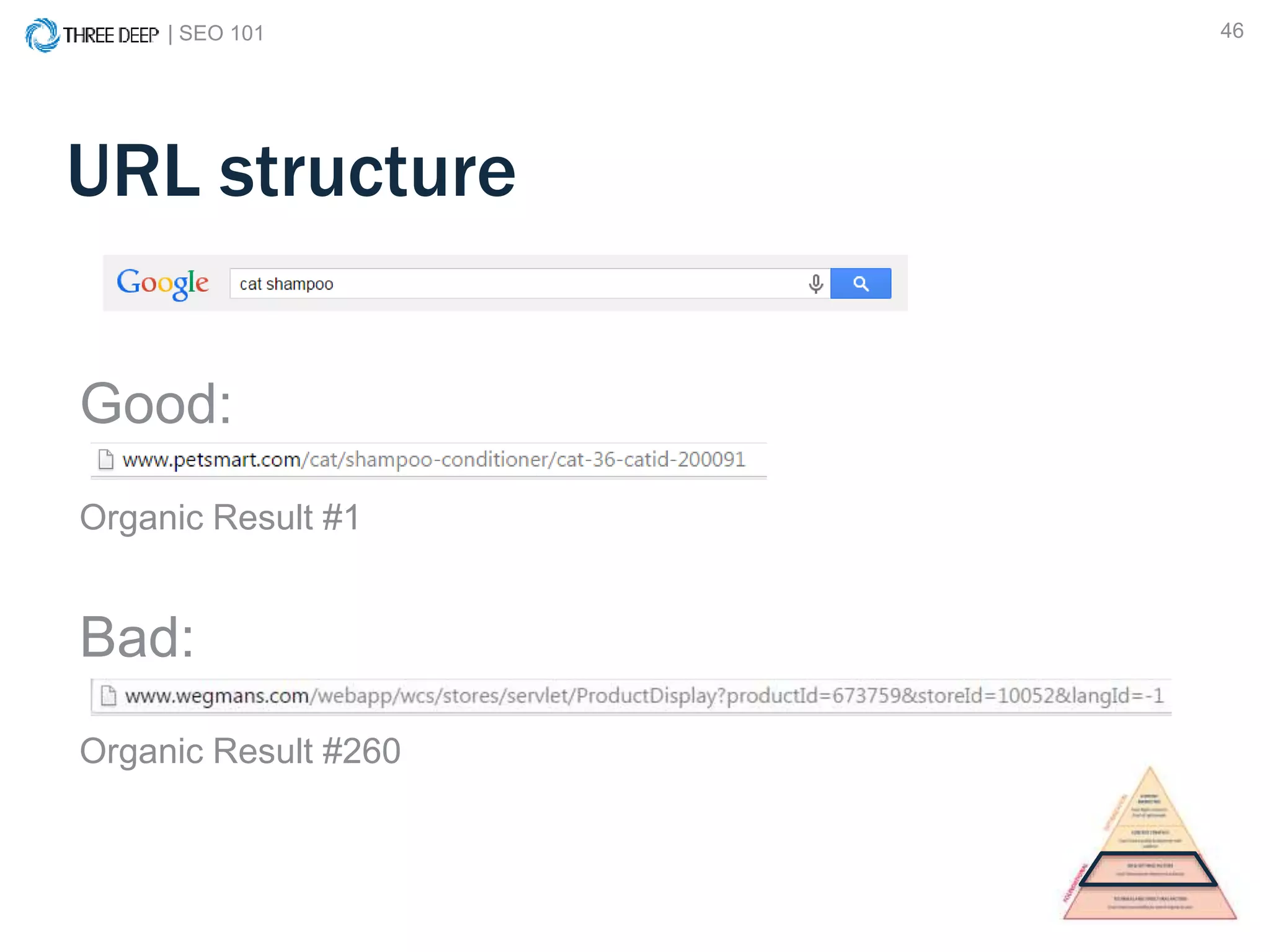
URL structure
Good:
Organic Result #1
Bad:
Organic Result #260
| SEO 101 47
On Page SEO Elements
Meta
Descriptions
| SEO 101 48
A Tale of Two Devices
| SEO 101 49
A Tale of Two Devices
| SEO 101 50
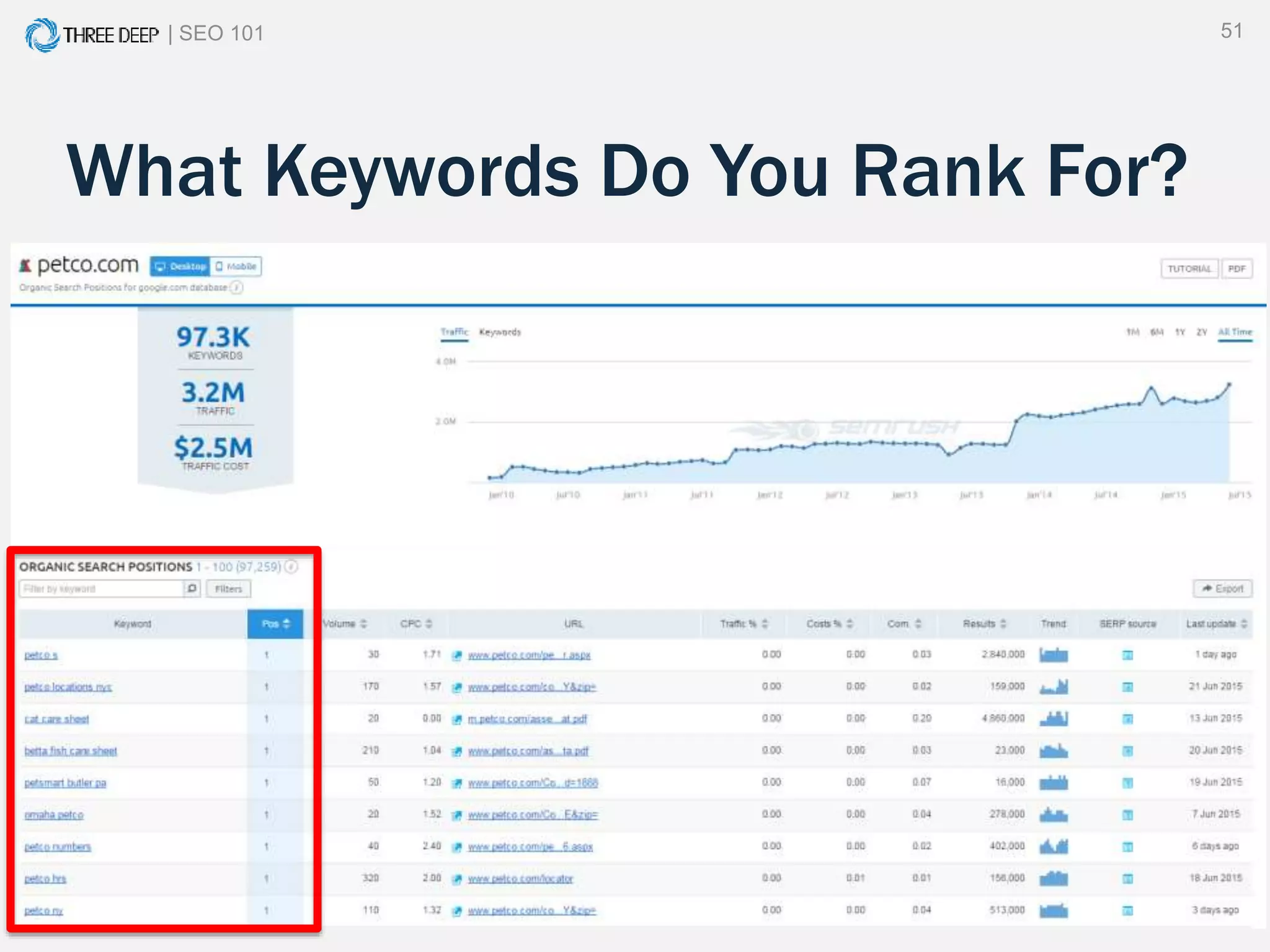
What Keywords Do You Rank For?
Ground Rules:
1. Don’t “Google yourself”
2. Use a keyword tracking tool
- SEM Rush (freemium)
- Bright Local (paid)
| SEO 101 51
What Keywords Do You Rank For?
| SEO 101 52
Off Page SEO Elements
• Backlinks
• Link anchor text
• Citations or Mentions
| SEO 101 53
Internal vs. External Links (Backlinks)
• Two types of links:
Internal and External.
• Internal links refer
to links within your
site, such as
navigation links.
• External links refer
to links outside of your
site, such as a link
from Wikipedia.
• Both are very
useful, but for different
reasons.
| SEO 101 54
How do Backlinks Help?
• Backlinks act as
“votes” for pages on
your site.
• Generally speaking,
the more links you
have from
authoritative sources,
the more your site is
trusted, and the better
your pages will rank.
YourWebsite.com
NewsSite.com ProductSite.com
IndustryBlog.com ShadySite.com
| SEO 101 55
Link Anchor Text
The words used in the anchor text of a link
to your site helps search engines
understand what that page is about.
So, if your site is about “Cats” the anchor
text cats would be preferable over click here.
| SEO 101 56
Who is linking to you?
Conduct a backlink
audit:
• Open your Google
Search Console
• Navigate to the “Links
to Your Site” section
• Check out who links
the most and to what
content
• *Pro Tip: this will help
| SEO 101 57
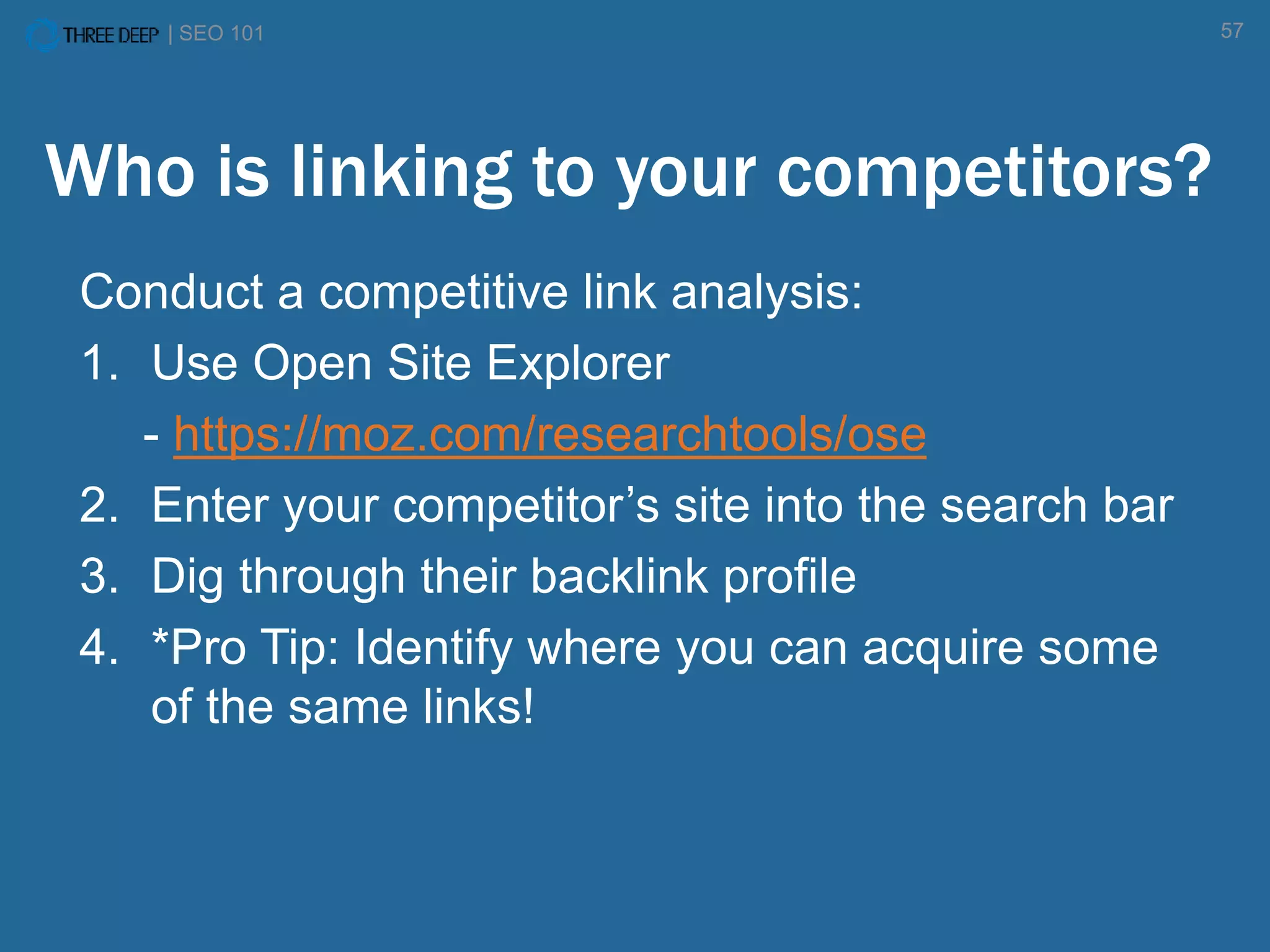
Who is linking to your competitors?
Conduct a competitive link analysis:
1. Use Open Site Explorer
- https://moz.com/researchtools/ose
2. Enter your competitor’s site into the search bar
3. Dig through their backlink profile
4. *Pro Tip: Identify where you can acquire some
of the same links!
| SEO 101 58
Citations
Citations are essentially a mention of your
brand on another site like a listing directory.
• Yelp
• Yellow Pages
• City Search
| SEO 101 59
Citations
It is important that these listings maintain
consistency and accuracy.
• Name
• Address
• Phone Number
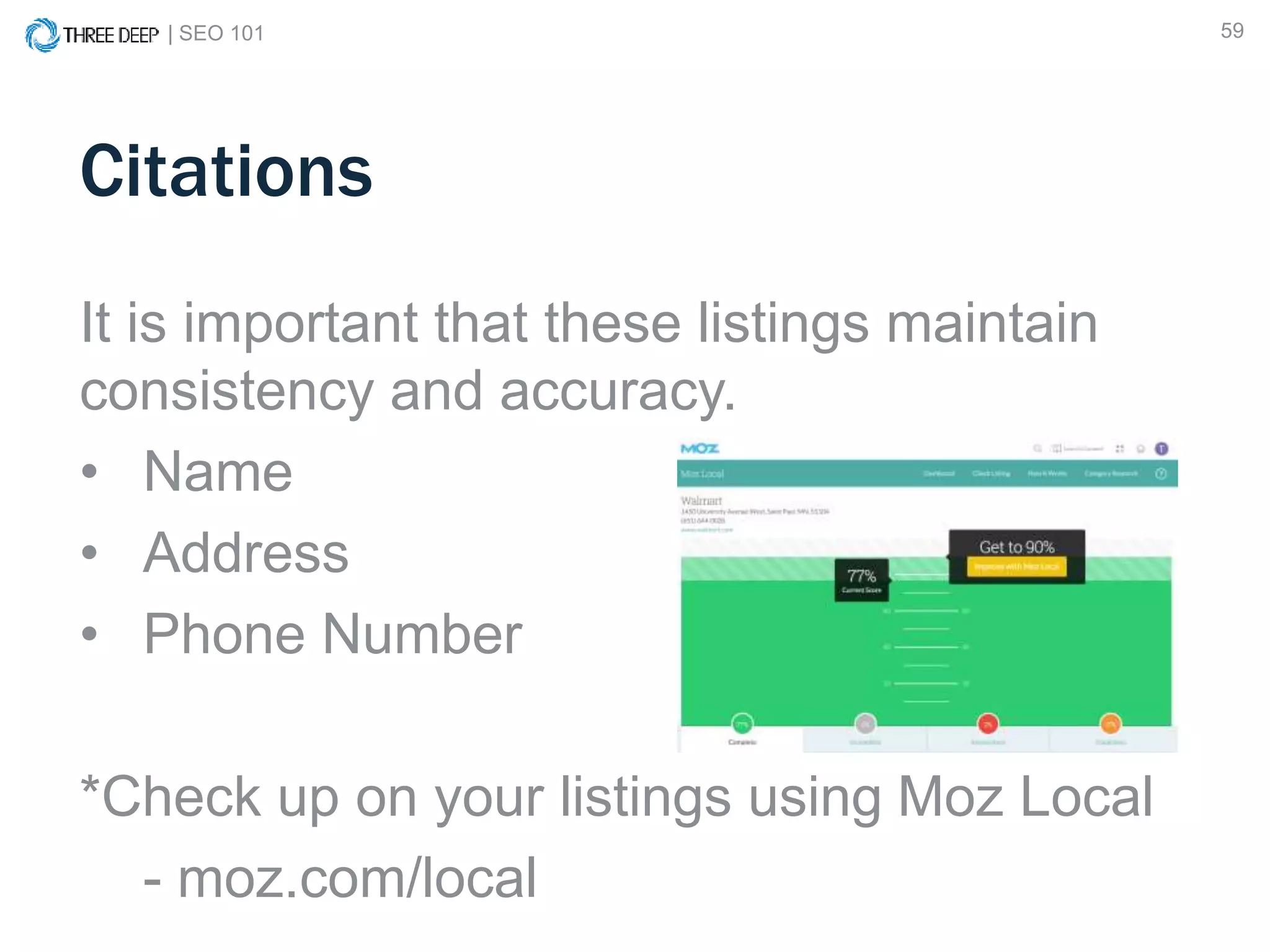
*Check up on your listings using Moz Local
- moz.com/local
REVIEW
| SEO 101 61
1. If done right, SEO is a distinct competitive
advantage
2. Get the foundation right
3. Optimize your pages
4. Optimize your off page presence
5. Move up the pyramid…
Review
| SEO 101 62
SEO 101:
Ensure your site
is accessible to
search engines.
SEO 201:
Ensure your site is
relevant and useful
to your visitors.
| SEO 101 63
Measurement and Improvement
| SEO 101 64
Questions?
| SEO 101 65
1. Google Search Console
2. Google PageSpeed Insights
3. Screaming Frog SEO Spider
4. Yoast plugin for WordPress
5. XML Sitemap Generator
6. SEM Rush
7. Bright Local
8. Open Site Explorer
9. Moz Local
Appendix – Tools Mentioned

Seo 101

  • 1.
    | SEO 1011 SEO 101
  • 2.
    | SEO 1012 Today’s Agenda: • Introduction • What to expect today • How search engines work • What is SEO? • Foundational SEO • On and off page basics
  • 3.
    | SEO 1013 Nate Plaunt Sr. SEO Strategist @NatePlaunt bit.ly/1LoDdWN Today’s Presenters Taylor Pettis Sr. Marketing Manager @tpettis linkd.in/1dsZJAa
  • 4.
    DOES SEARCH ENGINEOPTIMIZATION REALLY MATTER?
  • 5.
    | SEO 1015 Organic Search is the #1 Driver of Website Traffic From a usage perspective, new studies have found that organic search drives 64% of all web traffic.
  • 6.
    | SEO 1016 Search Engine Optimization FACT: 79% of search engine users say they always/frequently click on the natural search results.
  • 7.
    | SEO 1017 A New Click Rate Study For Organic Results On average, 71.33% of searches resulted in a page one Google organic click. Page two and three get only 5.59% of the clicks. On the first page alone, the first 5 results account for 67.60% of all the clicks and the results from 6 to 10 account for only 3.73%. http://marketingland.com/new-click-rate-study-google-organic-results-102149 Page 1 = 71.33%
  • 8.
    | SEO 1018 A New Click Rate Study For Organic Results Ads / Shopping Results Local / Map Results Organic Results 31% Click through 14% Click through
  • 9.
    | SEO 1019 Does SEO Really Matter? YES! If you are not optimizing for search you are already behind your competition.
  • 10.
    | SEO 10110 What to Expect: • A solid understanding of how search engines operate • Learn how to beat out your competition in the search engine results • Actionable tactics you can implement today • Tools to implement SEO
  • 11.
    WHAT DID YOUSEARCH TODAY?
  • 12.
    | SEO 10112 What Did You Search Today?
  • 13.
    | SEO 10113 What Did You Search Today?
  • 14.
  • 15.
  • 16.
    | SEO 10116 How Search Engines Work
  • 17.
    | SEO 10117 • Over 200 “ranking factors” help to decide where your site ranks • Roughly 10,000 sub-factors • Fewer ranking factors in algorithm • Heavy reliance on social factors Search Engine Algorithm Key Components 1
  • 18.
    | SEO 10118 Google’s Algorithm Key Components 1 Top 4 Components 1. Trust / Authority of the Host Domain 2. Popularity of the Specific Page 3. Anchor Text of External Links to the Page 4. On Page Keyword Usage According to 72 SEO’s Surveyed by Moz
  • 19.
    | SEO 10119 U.S. Search Engine Market Share http://www.statista.com/statistics/267161/market-share-of-search-engines-in-the-united-states/ 64.2 % 20.2 % 12.7 % Everyone else 2.9 %
  • 20.
    | SEO 10120 Not all results are organic Organic
  • 21.
    | SEO 10121 What is SEO? Search engine optimization (SEO) is the process of affecting the visibility of a website or a web page in a search engine's "natural" or un-paid ("organic") search results. Source: Wikipedia
  • 22.
    | SEO 10122 What is SEO? (Simplified) SEO is two things: 1. The practice of making your website as accessible as possible to search engines. 2. Ensuring your website is as useful and relevant as possible to your current and prospective customers.
  • 23.
  • 24.
    | SEO 10124 SEO 101: Ensure your site is accessible to search engines. SEO 201: Ensure your site is relevant and useful to your visitors.
  • 25.
    | SEO 10125 Technical and structural factors
  • 26.
    | SEO 10126 Technical and structural factors • Goal: Ensure accessibility for Search Engines & Users • Foundation of your entire online presence, so it’s important to get it right • Search engines have very clear guidelines for webmasters to follow when building sites
  • 27.
    | SEO 10127 What To Look For • Can your entire website be crawled? • Is your website indexed by the search engines? • Does your website have any errors? • Is your page load time too slow?
  • 28.
    | SEO 10128 How You Can Do This • XML sitemap • Accurate robots.txt file • Google Search Console • Page speed optimization
  • 29.
    | SEO 10129 What to Avoid Any unnecessary hurdle for the search engines • Flash • JavaScript • URL Parameters
  • 30.
    | SEO 10130 Here’s What Humans See
  • 31.
    | SEO 10131 Here’s What Search Engines See (not a glitch)
  • 32.
    | SEO 10132 XML Sitemap The XML sitemap is a map of your website that enables search engines to efficiently crawl and index your site.
  • 33.
    | SEO 10133 XML Sitemap Various tools can help you generate an accurate and up-to-date sitemap: • Screaming Frog Spider • CMS plugins like Yoast • Other web-based sitemap generators - www.xml-sitemaps.com
  • 34.
    | SEO 10134 Robots.txt file The robots.txt file is a directive for all “bots” visiting your site. • It tells them what URLs to crawl or not crawl • Simple text file – can be created with notepad
  • 35.
    | SEO 10135 Robots.txt file – *Pro Tip Use the Robots.txt testing tool in Google Search Console to troubleshoot errors in you file and to test individual URLs
  • 36.
    | SEO 10136 Google Search Console Google Search Console (formerly Google Webmaster Tools) is a free resource with tons of valuable information available to all website owners. • https://www.google.com/webmasters/tools/home
  • 37.
    | SEO 10137 Why Does Speed Matter? Last year, mobile search overtook desktop search. • The gap between mobile and desktop will widen • Fast page load speed is critical to optimizing for mobile • “Mobile-geddon”
  • 38.
    | SEO 10138 Google PageSpeed Insights PageSpeed Insights is another free tool from Google that gives you a prioritized roadmap on how to fix speed issues on your site. • https://developers.google.com/speed/pagespeed/insights
  • 39.
    | SEO 10139 On and Off Page Factors
  • 40.
    | SEO 10140 On and Off Page Factors • Goal: Demonstrate Relevance and Authority • Search engines want to provide users with search results that are relevant to their query and authoritative in nature. • Building upon a sound technical structure, we make sure that search engines and users are able to fully understand what various pages on your website are about.
  • 41.
    | SEO 10141 On-page SEO refers to factors that you can control directly on your website Examples of on-page factors are: • Metadata • Internal links • Content • Technical / Structural Off-page SEO refers to factors “out of your control” on other websites Examples of off-page factors are: • Inbound links • Social Media • Mentions • Local Directories On-Page vs. Off-Page SEO
  • 42.
    | SEO 10142 What To Look For • Are your on page elements optimized? • What keywords are you ranking for? • Who is linking to you? • Who is linking to your competitors?
  • 43.
    | SEO 10143 On Page SEO Elements • URL • Page Title • H1 heading • H2 headings • Meta Description • Page Copy • Alternative image text
  • 44.
    | SEO 10144 On Page SEO Elements Page Title: Unique and descriptive URL: Descriptive and readable by both humans and search engines H1 Heading: Unique and descriptive H2 Headings: Sub-topics of the page Page Copy: Descriptive, unique, and keyword rich Alt Image Text: Descriptive and keyword rich
  • 45.
    | SEO 10145 Page Title Good: Organic Result #1 Bad: Organic Result #245
  • 46.
    | SEO 10146 URL structure Good: Organic Result #1 Bad: Organic Result #260
  • 47.
    | SEO 10147 On Page SEO Elements Meta Descriptions
  • 48.
    | SEO 10148 A Tale of Two Devices
  • 49.
    | SEO 10149 A Tale of Two Devices
  • 50.
    | SEO 10150 What Keywords Do You Rank For? Ground Rules: 1. Don’t “Google yourself” 2. Use a keyword tracking tool - SEM Rush (freemium) - Bright Local (paid)
  • 51.
    | SEO 10151 What Keywords Do You Rank For?
  • 52.
    | SEO 10152 Off Page SEO Elements • Backlinks • Link anchor text • Citations or Mentions
  • 53.
    | SEO 10153 Internal vs. External Links (Backlinks) • Two types of links: Internal and External. • Internal links refer to links within your site, such as navigation links. • External links refer to links outside of your site, such as a link from Wikipedia. • Both are very useful, but for different reasons.
  • 54.
    | SEO 10154 How do Backlinks Help? • Backlinks act as “votes” for pages on your site. • Generally speaking, the more links you have from authoritative sources, the more your site is trusted, and the better your pages will rank. YourWebsite.com NewsSite.com ProductSite.com IndustryBlog.com ShadySite.com
  • 55.
    | SEO 10155 Link Anchor Text The words used in the anchor text of a link to your site helps search engines understand what that page is about. So, if your site is about “Cats” the anchor text cats would be preferable over click here.
  • 56.
    | SEO 10156 Who is linking to you? Conduct a backlink audit: • Open your Google Search Console • Navigate to the “Links to Your Site” section • Check out who links the most and to what content • *Pro Tip: this will help
  • 57.
    | SEO 10157 Who is linking to your competitors? Conduct a competitive link analysis: 1. Use Open Site Explorer - https://moz.com/researchtools/ose 2. Enter your competitor’s site into the search bar 3. Dig through their backlink profile 4. *Pro Tip: Identify where you can acquire some of the same links!
  • 58.
    | SEO 10158 Citations Citations are essentially a mention of your brand on another site like a listing directory. • Yelp • Yellow Pages • City Search
  • 59.
    | SEO 10159 Citations It is important that these listings maintain consistency and accuracy. • Name • Address • Phone Number *Check up on your listings using Moz Local - moz.com/local
  • 60.
  • 61.
    | SEO 10161 1. If done right, SEO is a distinct competitive advantage 2. Get the foundation right 3. Optimize your pages 4. Optimize your off page presence 5. Move up the pyramid… Review
  • 62.
    | SEO 10162 SEO 101: Ensure your site is accessible to search engines. SEO 201: Ensure your site is relevant and useful to your visitors.
  • 63.
    | SEO 10163 Measurement and Improvement
  • 64.
    | SEO 10164 Questions?
  • 65.
    | SEO 10165 1. Google Search Console 2. Google PageSpeed Insights 3. Screaming Frog SEO Spider 4. Yoast plugin for WordPress 5. XML Sitemap Generator 6. SEM Rush 7. Bright Local 8. Open Site Explorer 9. Moz Local Appendix – Tools Mentioned

Editor's Notes

  • #13  This is a familiar image that most of us see everyday. When you type a search query into Google, how do those results come so fast? More importantly, what came up when you searched today?
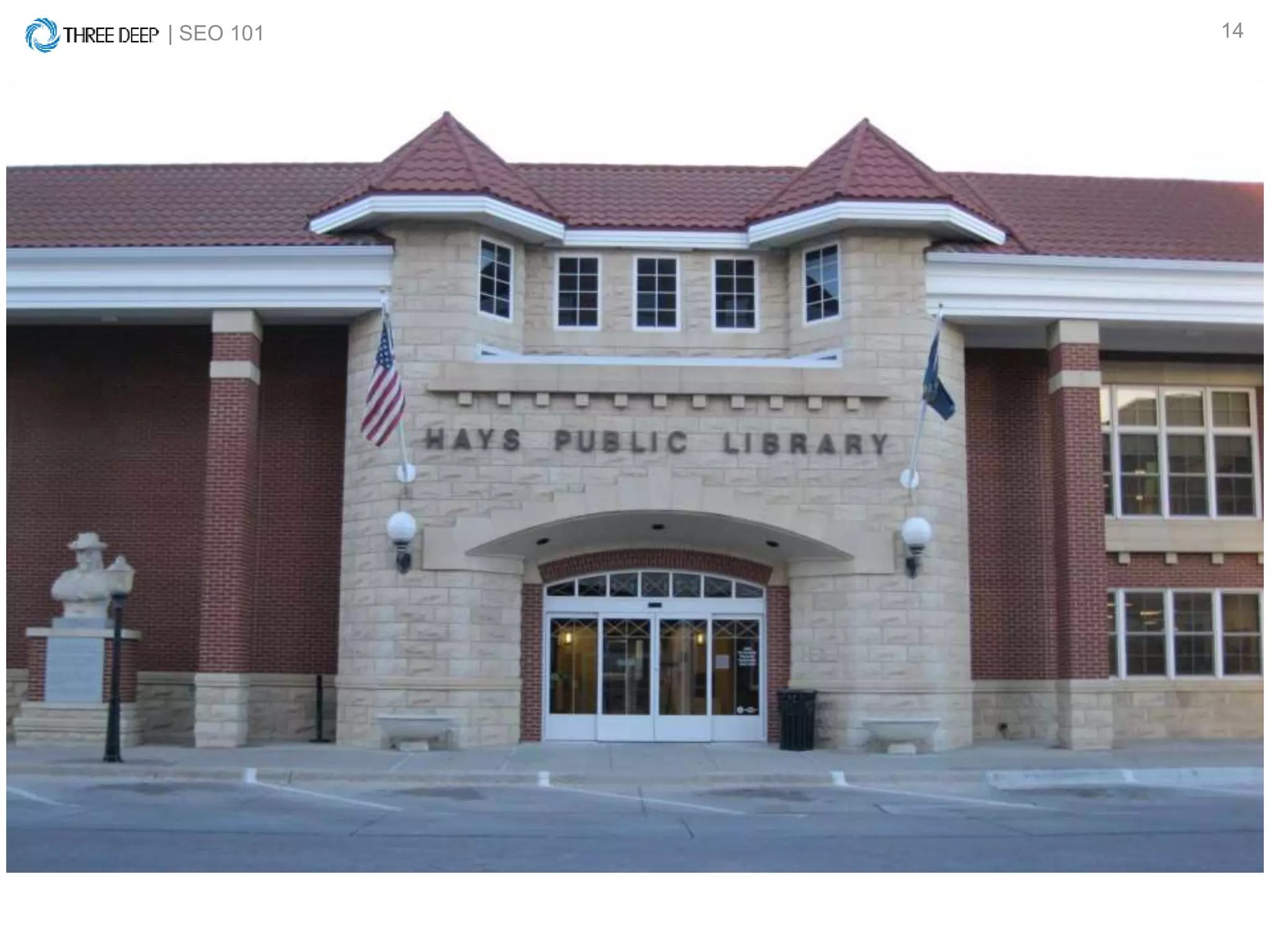
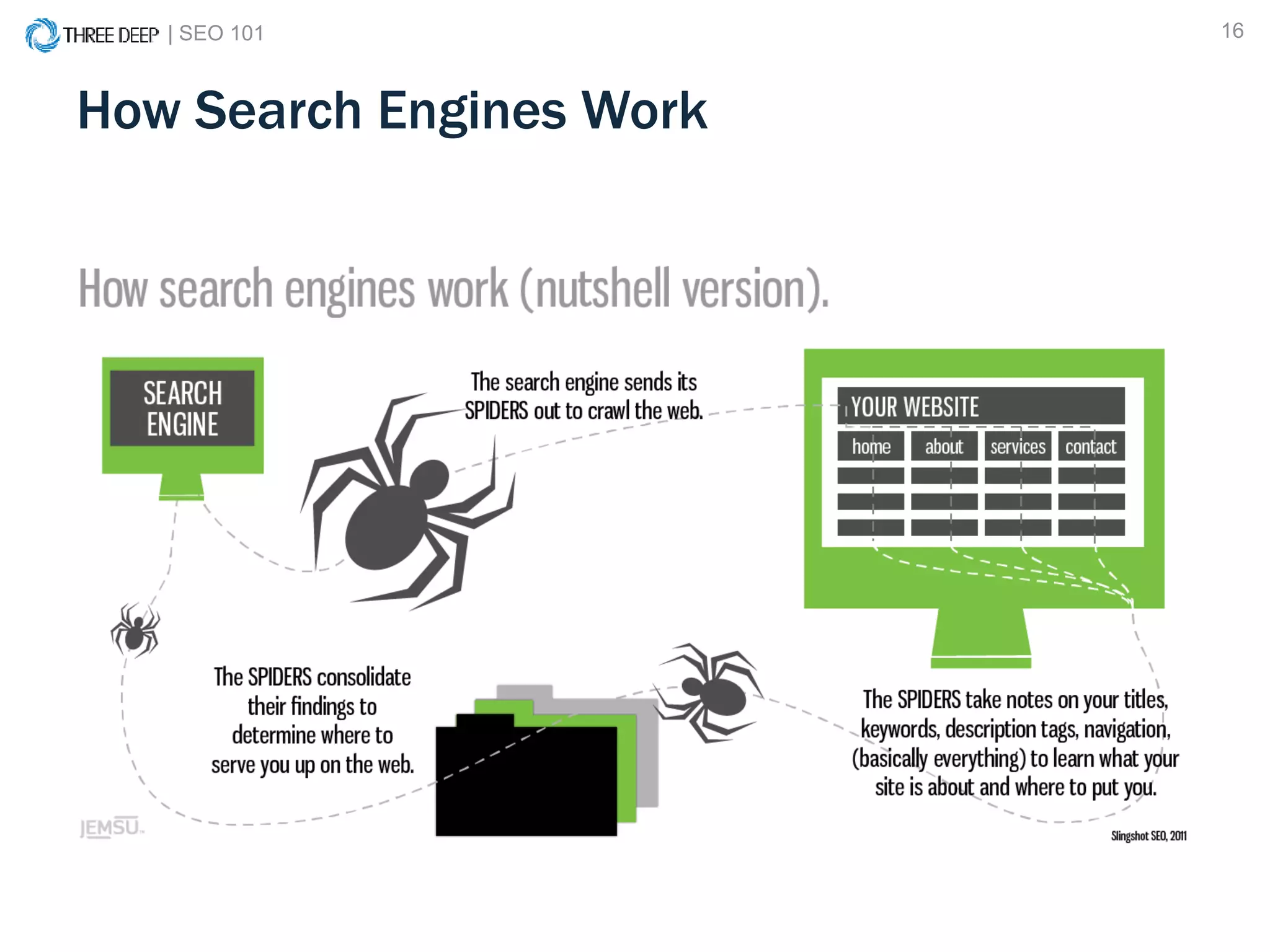
  • #14 Search engines do not crawl the web in real time, they categorize web pages in their index for easy retrieval
  • #15 Like a library of all known information on the web
  • #16 And instead of walking in, all you have to do is type
  • #17 How do they do this…a mathematical algorithm (next slide)
  • #18 Search engines use a mathematical algorithm to serve up search results for any given query. They have to, because any given day, 15% of all searches have never been searched before That means that of the 3.5 billion queries that happen on Google, 525 million of them are brand new. There are over x factors that influence the algorithm, but let’s focus on the top ones…. Keep in mind that it is always changing….
  • #19 There are over x factors that influence the algorithm, but let’s focus on the top ones…. Keep in mind that it is always changing….
  • #20 Data as of April 2015 Everyone else: AOL, Ask Jeeves
  • #21 Organic results compete with paid and image results Organic results are typically more trusted than ads That’s why the top organic results are so valuable
  • #30 In this step we’re really looking at making your site accessible Here are some things to avoid What happens when you have unnecessary road blocks for search engines?
  • #41 Search engines want to stay in business – to do so they need people coming back. To be people coming back they need to provide the best answers to questions.
  • #55 A shady link may be one that looks completely unnatural or comes from a totally unrelated site Search engines have filters that take the quality of links into account and tend to serve up pages with a trusted backlink profile Too many shady links can result in a penalty from Google so it’s best to just build links organically from providing the best content