

SEO
Search Engine Optimization
Presented By : Glorywebs
SEO - What is SEO
• SEO is sometimes also called SEO copyrighting because most
of the techniques that are used to promote sites in search
engines deal with text.
• SEO Stands for Search Engine Optimization.
• SEO is all about optimizing a web site for Search Engines.
• SEO is the process of designing and developing a web site to
rank well in search engine results.
• SEO is to improve the volume and quality of traffic to a web
site from search engines.
• SEO is a subset of search engine marketing.
• SEO is the art of ranking in the search engines.
• SEO is marketing by understanding how search algorithms
work and what human visitors might search.
How Search Engine Works ?
• Search engines perform several activities in order to deliver search
results
• Crawling - is the process of fetching all the web pages linked to a
web site. This task is performed by a software, called a crawler or a
spider (or Googlebot, as is the case with Google).
• Indexing - is the process of creating index for all the fetched web
pages and keeping them into a giant database from where it can
later be retrieved. Essentially, the process of indexing is identifying
the words and expressions that best describe the page and
assigning the page to particular keywords.
• Processing - When a search request comes, the search engine
processes it . i.e. it compares the search string in the search request
with the indexed pages in the database.
• Calculating Relevancy - Since it is likely that more than one pages
contains the search string, so the search engine starts calculating
the relevancy of each of the pages in its index to the search string.
• Retrieving Results - The last step in search engines' activities is
retrieving the best matched results. Basically, it is nothing more
than simply displaying them in the browser.
What is Search Engine Rank?
• When you search any keyword using a search
engine then it displays thousands of results found
in its database. A page ranking is measured by the
position of web pages displayed in the search
engine results. If Search engine is putting your web
page on first position then your web page rank will
be number 1 and it will be assumed as with a high
rank.
• SEO is the process of designing and developing a
web site to attend a high rank in search engine
results.
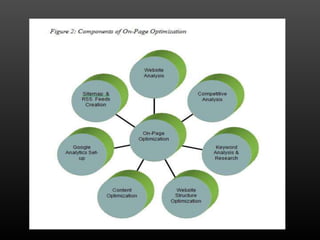
What is on-page and off-page
SEO
• There are two ways of doing SEO
• On-Page SEO- This includes providing good content,
good keywords selection. putting keywords on
correct places, giving appropriate title to every
page etc.
• Off-Page SEO - This includes link building,
increasing link popularity by submitting in open
directories, search engines, link exchange etc.
• Search Engines are very smart but after all they are
software and not human being who will read the content
of their interest. If you make your site too complicated
then Search Engine would not be able to parse the
content of your site properly and finally indexing would
not be efficient which will result in a low rank.
• The actual page content should have a keyword density
of about 10% and should weigh in at about 200 words -
but there are as many opinions about this as there are
SEO experts. Some say keyword density should be 5%
and some say it should be 20%. 10% works for me.
• Here are few guidelines which should be considered
while designing a web page.
• You should have more text content than HTML elements.
• No frames. They are the enemies of Search Engines and
Search Engines are Enemies of Frames.
• No ads if possible. Because most of the ads uses Java
Script which is not advised to be used.
• No JavaScript. If you need JavaScript, call it from an
external file rather than dumping the code in the HTML
file. JavaScript drop down menus prevent spiders from
crawling beyond your homepage. If you use them, be
sure to include text links at the bottom of the page.
• Nothing that does not fit perfectly into the page topic;
There should be no doubt in the search engine's mind
(or in he user's mind) what your page is about.
• No unnecessary directories. Keep your files as close to
the root as possible.
• No fancy stuff (Flash, Splash, Animated Gifs, Rollovers
etc.) unless absolutely necessary.
keywords
• Keyword Research
• The first step in any seo campaign is to do some
keyword research. There are many tools on the
web to help with basic keyword research (including
the free Google Keyword Research Tool
and SEMRUSH). You can use these tools to quickly
identify opportunities to get more traffic
How To Select Keywords
• The most important first search engine
optimization tip is to select keywords wisely. There
are a few items you will need to go through in order
to properly select keywords. Please use these in
sequence, and when you are done you will have
completed an SEO checklist and have seen our plan
of attack in action.
• To select keywords that you expect appropriate
Web surfers to use to locate your site, submit your
obvious keyword terms using our research tools
below to locate the top-ranked competing sites.
You should be able to validate that your
competitors for these search engine optimization
rankings appear.
How to Identify Competitor
Keywords
• It is critical that you identify the best search terms
and keywords used on your competitors' sites
(Step 1). To help in this keyword analysis effort we
offer SEO tips, advice and tools to research the
competition and query history information
available through several sources
«ALT» attributes in images
•
Any page image has a special optional attribute known as
"alternative text.” It is specified using the HTML «ALT» tag.
This text will be displayed if the browser fails to download
the image or if the browser image display is disabled. Search
engines save the value of image ALT attributes when they
parse (index) pages, but do not use it to rank search results.
Currently, the Google search engine takes into account
text in the ALT attributes of those images that are links to
other pages. The ALT attributes of other images are ignored.
There is no information regarding other search engines, but
we can assume that the situation is similar. We consider that
keywords can and should be used in ALT attributes, but this
practice is not vital for seo purposes.
Description Meta tag
•
This is used to specify page descriptions. It does not
influence the seo ranking process but it is very important. A
lot of search engines (including the largest one – Google)
display information from this tag in their search results if
this tag is present on a page and if its content matches the
content of the page and the search query.
Experience has shown that a high position in search
results does not always guarantee large numbers of visitors.
For example, if your competitors' search result description is
more attractive than the one for your site then search
engine users may choose their resource instead of yours.
That is why it is important that your Description Meta tag
text be brief, but informative and attractive. It must also
contain keywords appropriate to the page.
Content is King
• Frequent changes
• Content is probably the biggest driving force to high
ranking. It is paramount to have a descent amount
of quality content. It’s obvious that users love fresh
content, but search engines do as well. So a little
trick to apply when you don’t have a webpage that
has frequent updates is to search for rss feeds
matching your keywords. You can show these feeds
on your website, so you’ll content will stay fresh
and regularly updated! Generally, when a site is
frequently updated, this increases the probability
that the spider will revisit the site sooner.
Use a robots.txt file
• Make an empty file. Name it "robots.txt". Put it in the root
directory of your server; usually this is the same directory where
your index.html file is kept. (But not always - sometimes your
index.html file is in a sub-directory. In which case, make sure you
have a copy of the robots.txt file in the root directory - usually the
root directory is as high as you can go in the directory tree on
your server.
• While it is possible to set up a "robots.txt" file to exclude some or
all of the search engine robots, what you probably want it to do is
to allow every robot that comes along to index your site. If you do
want to exclude specific robots from indexing certain directories
or certain files, you will have to put some commands into the
robots.txt file. For more info than you probably want about the
use of the "robots.txt" file, go here. If you want every robot to be
able to index your site, just leave the robots.txt file completely
empty — but make sure it is there!
Off Page SEO
Off-Page SEO
• Blogging
• This is one of the most powerful ways to promote your
company/website online. Write a blog of your own for your
company/website and include lots of unique content. Be
precise in what you're trying to convey for the users in your
blog entry and promote your blog in blog directories and
blog search engines. You can also promote your
blog/website by posting comments in other service-related
blogs which allow links in the comments section that are
crawlable by the search engines (these blogs are commonly
identified as Do-Follow Blogs). If you're not very good at
writing content for blog posts, hire a guest blogger for your
blog and ask him/her to write precise and unique content so
that your blog can gain more credit from a search engine
point of view.
Forum Postings
• Forum Postings
• Create a forum/online discussion board of your
own and start a discussion or share topics with
your friends. You can also post/reply to a thread in
other service-related pre-existing forums that allow
links in your signature which can be crawled by the
search engines (aka "Do-Follow Forums").
Search Engine Submission
• Search Engine Submission
• Submit your website to the most popular search
engines like Google, Yahoo, MSN, Altavista, Alexa,
Alltheweb, Lycos, Excite, etc., to get listed for free.
Directory Submission
• Directory Submission
• Many people may say that directory submission is
dead. As far as I'm concerned it is still alive. It is
purely based on how effectively we are selecting
those directories and how efficiently we are
choosing the category for submission. Of course, I
agree that it gives quite delayed results, but it is
worth doing it. Submit your websites to the
topmost quality directories like DMOZ, Yahoo
Directory, Zoom Info, One Mission, Pegasus, etc.
Nowadays many web directories may offer paid
listings but don't go for it.
Photo Sharing
• Photo Sharing
• Publish/share your website product pictures and
make them public. Let your friends see them and
comment on them too, which will help drive traffic
towards your website. Do this in major photo
sharing websites like Flickr, Picasa, Photo Bucket,
Picli, etc.
Article Submission
• Article Submission
• Write articles of your own and submit them to
popular article sites like Ezine, Go Articles, Now
Public, Buzzle, etc. This will help you to attain some
deep links for your website (though it's usually a
slower process).
Press Release Promotion
• Press Release Promotion
• If you are a business/service provider then go for
PR submission in popular PR websites like
1888pressrelease, Open PR, PR Leap, etc. This will
help you to publish your site in Google News.
Classifieds Submission
• Classifieds Submission
• Do some classifieds submissions to advertise your
products for free. Try Craigslist and other major
classifieds sites like Kugli, Myspace, iMad espace,
Vivastre et, etc
E-mail
glorywebs@gmail.com
Glorywebs
www.glorywebs.com
THANKS

Seo.pptx new ppt

  • 1.
  • 2.
    SEO - Whatis SEO • SEO is sometimes also called SEO copyrighting because most of the techniques that are used to promote sites in search engines deal with text. • SEO Stands for Search Engine Optimization. • SEO is all about optimizing a web site for Search Engines. • SEO is the process of designing and developing a web site to rank well in search engine results. • SEO is to improve the volume and quality of traffic to a web site from search engines. • SEO is a subset of search engine marketing. • SEO is the art of ranking in the search engines. • SEO is marketing by understanding how search algorithms work and what human visitors might search.
  • 3.
    How Search EngineWorks ? • Search engines perform several activities in order to deliver search results • Crawling - is the process of fetching all the web pages linked to a web site. This task is performed by a software, called a crawler or a spider (or Googlebot, as is the case with Google). • Indexing - is the process of creating index for all the fetched web pages and keeping them into a giant database from where it can later be retrieved. Essentially, the process of indexing is identifying the words and expressions that best describe the page and assigning the page to particular keywords. • Processing - When a search request comes, the search engine processes it . i.e. it compares the search string in the search request with the indexed pages in the database. • Calculating Relevancy - Since it is likely that more than one pages contains the search string, so the search engine starts calculating the relevancy of each of the pages in its index to the search string. • Retrieving Results - The last step in search engines' activities is retrieving the best matched results. Basically, it is nothing more than simply displaying them in the browser.
  • 4.
    What is SearchEngine Rank? • When you search any keyword using a search engine then it displays thousands of results found in its database. A page ranking is measured by the position of web pages displayed in the search engine results. If Search engine is putting your web page on first position then your web page rank will be number 1 and it will be assumed as with a high rank. • SEO is the process of designing and developing a web site to attend a high rank in search engine results.
  • 5.
    What is on-pageand off-page SEO • There are two ways of doing SEO • On-Page SEO- This includes providing good content, good keywords selection. putting keywords on correct places, giving appropriate title to every page etc. • Off-Page SEO - This includes link building, increasing link popularity by submitting in open directories, search engines, link exchange etc.
  • 6.
    • Search Enginesare very smart but after all they are software and not human being who will read the content of their interest. If you make your site too complicated then Search Engine would not be able to parse the content of your site properly and finally indexing would not be efficient which will result in a low rank. • The actual page content should have a keyword density of about 10% and should weigh in at about 200 words - but there are as many opinions about this as there are SEO experts. Some say keyword density should be 5% and some say it should be 20%. 10% works for me. • Here are few guidelines which should be considered while designing a web page. • You should have more text content than HTML elements. • No frames. They are the enemies of Search Engines and Search Engines are Enemies of Frames.
  • 7.
    • No adsif possible. Because most of the ads uses Java Script which is not advised to be used. • No JavaScript. If you need JavaScript, call it from an external file rather than dumping the code in the HTML file. JavaScript drop down menus prevent spiders from crawling beyond your homepage. If you use them, be sure to include text links at the bottom of the page. • Nothing that does not fit perfectly into the page topic; There should be no doubt in the search engine's mind (or in he user's mind) what your page is about. • No unnecessary directories. Keep your files as close to the root as possible. • No fancy stuff (Flash, Splash, Animated Gifs, Rollovers etc.) unless absolutely necessary.
  • 9.
    keywords • Keyword Research •The first step in any seo campaign is to do some keyword research. There are many tools on the web to help with basic keyword research (including the free Google Keyword Research Tool and SEMRUSH). You can use these tools to quickly identify opportunities to get more traffic
  • 10.
    How To SelectKeywords • The most important first search engine optimization tip is to select keywords wisely. There are a few items you will need to go through in order to properly select keywords. Please use these in sequence, and when you are done you will have completed an SEO checklist and have seen our plan of attack in action.
  • 11.
    • To selectkeywords that you expect appropriate Web surfers to use to locate your site, submit your obvious keyword terms using our research tools below to locate the top-ranked competing sites. You should be able to validate that your competitors for these search engine optimization rankings appear.
  • 12.
    How to IdentifyCompetitor Keywords • It is critical that you identify the best search terms and keywords used on your competitors' sites (Step 1). To help in this keyword analysis effort we offer SEO tips, advice and tools to research the competition and query history information available through several sources
  • 13.
    «ALT» attributes inimages • Any page image has a special optional attribute known as "alternative text.” It is specified using the HTML «ALT» tag. This text will be displayed if the browser fails to download the image or if the browser image display is disabled. Search engines save the value of image ALT attributes when they parse (index) pages, but do not use it to rank search results. Currently, the Google search engine takes into account text in the ALT attributes of those images that are links to other pages. The ALT attributes of other images are ignored. There is no information regarding other search engines, but we can assume that the situation is similar. We consider that keywords can and should be used in ALT attributes, but this practice is not vital for seo purposes.
  • 14.
    Description Meta tag • Thisis used to specify page descriptions. It does not influence the seo ranking process but it is very important. A lot of search engines (including the largest one – Google) display information from this tag in their search results if this tag is present on a page and if its content matches the content of the page and the search query. Experience has shown that a high position in search results does not always guarantee large numbers of visitors. For example, if your competitors' search result description is more attractive than the one for your site then search engine users may choose their resource instead of yours. That is why it is important that your Description Meta tag text be brief, but informative and attractive. It must also contain keywords appropriate to the page.
  • 15.
    Content is King •Frequent changes • Content is probably the biggest driving force to high ranking. It is paramount to have a descent amount of quality content. It’s obvious that users love fresh content, but search engines do as well. So a little trick to apply when you don’t have a webpage that has frequent updates is to search for rss feeds matching your keywords. You can show these feeds on your website, so you’ll content will stay fresh and regularly updated! Generally, when a site is frequently updated, this increases the probability that the spider will revisit the site sooner.
  • 16.
    Use a robots.txtfile • Make an empty file. Name it "robots.txt". Put it in the root directory of your server; usually this is the same directory where your index.html file is kept. (But not always - sometimes your index.html file is in a sub-directory. In which case, make sure you have a copy of the robots.txt file in the root directory - usually the root directory is as high as you can go in the directory tree on your server. • While it is possible to set up a "robots.txt" file to exclude some or all of the search engine robots, what you probably want it to do is to allow every robot that comes along to index your site. If you do want to exclude specific robots from indexing certain directories or certain files, you will have to put some commands into the robots.txt file. For more info than you probably want about the use of the "robots.txt" file, go here. If you want every robot to be able to index your site, just leave the robots.txt file completely empty — but make sure it is there!
  • 18.
  • 19.
    Off-Page SEO • Blogging •This is one of the most powerful ways to promote your company/website online. Write a blog of your own for your company/website and include lots of unique content. Be precise in what you're trying to convey for the users in your blog entry and promote your blog in blog directories and blog search engines. You can also promote your blog/website by posting comments in other service-related blogs which allow links in the comments section that are crawlable by the search engines (these blogs are commonly identified as Do-Follow Blogs). If you're not very good at writing content for blog posts, hire a guest blogger for your blog and ask him/her to write precise and unique content so that your blog can gain more credit from a search engine point of view.
  • 20.
    Forum Postings • ForumPostings • Create a forum/online discussion board of your own and start a discussion or share topics with your friends. You can also post/reply to a thread in other service-related pre-existing forums that allow links in your signature which can be crawled by the search engines (aka "Do-Follow Forums").
  • 21.
    Search Engine Submission •Search Engine Submission • Submit your website to the most popular search engines like Google, Yahoo, MSN, Altavista, Alexa, Alltheweb, Lycos, Excite, etc., to get listed for free.
  • 22.
    Directory Submission • DirectorySubmission • Many people may say that directory submission is dead. As far as I'm concerned it is still alive. It is purely based on how effectively we are selecting those directories and how efficiently we are choosing the category for submission. Of course, I agree that it gives quite delayed results, but it is worth doing it. Submit your websites to the topmost quality directories like DMOZ, Yahoo Directory, Zoom Info, One Mission, Pegasus, etc. Nowadays many web directories may offer paid listings but don't go for it.
  • 23.
    Photo Sharing • PhotoSharing • Publish/share your website product pictures and make them public. Let your friends see them and comment on them too, which will help drive traffic towards your website. Do this in major photo sharing websites like Flickr, Picasa, Photo Bucket, Picli, etc.
  • 24.
    Article Submission • ArticleSubmission • Write articles of your own and submit them to popular article sites like Ezine, Go Articles, Now Public, Buzzle, etc. This will help you to attain some deep links for your website (though it's usually a slower process).
  • 25.
    Press Release Promotion •Press Release Promotion • If you are a business/service provider then go for PR submission in popular PR websites like 1888pressrelease, Open PR, PR Leap, etc. This will help you to publish your site in Google News.
  • 26.
    Classifieds Submission • ClassifiedsSubmission • Do some classifieds submissions to advertise your products for free. Try Craigslist and other major classifieds sites like Kugli, Myspace, iMad espace, Vivastre et, etc
  • 27.