Delivering High-Availability Web 
Services with NGINX Plus on AWS 
Owen Garrett 
Nginx, Inc. 
Scott Ward 
Amazon Web Services
Introductions and Agenda 
• Owen Garrett 
Head of Products, NGINX 
• Scott Ward 
Solutions Architect, Amazon Web Services
Introducing Amazon Web Services
A broad and deep platform that helps customers 
build sophisticated, scalable applications 
© 2014 Amazon.com, Inc. and its affiliates. All rights reserved. May not be copied, modified or distributed in whole or in part without the express consent of Amazon.com, Inc.
A Culture of Innovation: Experiment Often & Fail Without 
Risk
Who is using AWS and what are 
they using it for?
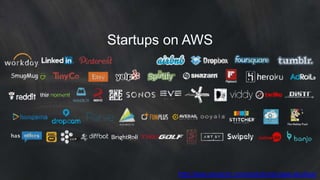
Startups on AWS 
http://aws.amazon.com/solutions/case-studies/
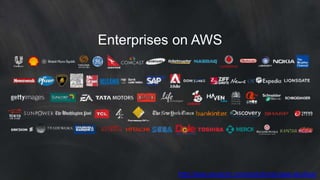
Enterprises on AWS 
http://aws.amazon.com/solutions/case-studies/
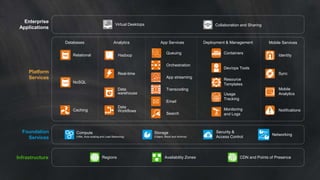
Foundation 
Services 
Infrastructure 
Storage 
(Object, Block and Archive) 
Regions Availability Zones 
Networking 
Collaboration and Sharing 
Security & 
Access Control 
Platform 
Services 
Databases 
Relational 
NoSQL 
Caching 
Analytics 
Hadoop 
Real-time 
Data 
warehouse 
App Services 
Queuing 
Orchestration 
App streaming 
Transcoding 
Email 
Search 
Deployment & Management 
Containers 
Dev/ops Tools 
Resource 
Templates 
Mobile Services 
Identity 
Sync 
Mobile 
Analytics 
Notifications 
Enterprise 
Applications 
Virtual Desktops 
Data 
Workflows 
Usage 
Tracking 
Monitoring 
and Logs 
Compute 
(VMs, Auto-scaling and Load Balancing) 
CDN and Points of Presence
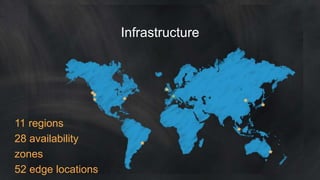
11 regions 
28 availability 
zones 
52 edge locations 
Infrastructure
AWS Services Overview 
Amazon EC2 – Virtual Servers & resizable compute capacity 
Auto Scaling – Scale compute resources up and down 
Elastic Load Balancing – Load balancer for compute instances 
Amazon Elastic Block Storage (EBS) – Block storage for EC2
AWS Service Overview 
AWS Identity and Access Management – AWS Account Access Controls 
Amazon Route 53 – Scalable Domain Name System 
Amazon CloudWatch – Resource and Application Monitoring
Breaking news - New services on AWS
Amazon EC2 Container Service 
Creates and manages clusters made up of Docker containers. It launches and 
terminates the containers and maintains complete information about the state 
of your cluster 
Automatically schedules containers to help find a balance between your 
resource needs and availability requirements 
Using EC2 Container Service you can simply launch & manage clusters with 
thousands of instances and schedule tens of thousands of containers across 
multiple Availability Zones 
Amazon EC2 Container Service launches your containers on your own EC2 
instances, so that you do not share resources with other customers, places 
your clusters in a VPC, and allows you to use your own VPC security groups 
and network ACLs. 
Your applications can make use of AWS features such as Elastic IP addresses, 
resource tags, and Virtual Private Cloud (VPC). 
http://aws.amazon.com/ecs/
AWS Code Deploy 
Deploys your released code to a "fleet" of EC2 instances 
Accommodate fleets that range in size from one instance all the way up to 
tens of thousands of instances 
Automatically schedules updates across multiple Availability Zones in 
order to maintain high availability during the deployment 
Application and Deployment groups described in YAML-formatted files 
Deployment groups identify EC2 instances by tags & can also reference 
Auto Scaling Groups 
Managed via AWS Management Console, CLI or APIs 
Can be used in conjunction with Chef recipes or Puppet scripts 
Deploy configuration from a variety of repositories (S3, GitHub, etc) 
https://aws.amazon.com/codedeploy/
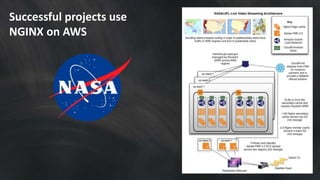
Successful projects use 
NGINX on AWS
INTRODUCING NGINX AND NGINX PLUS
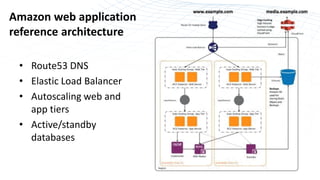
Amazon web application 
reference architecture 
• Route53 DNS 
• Elastic Load Balancer 
• Autoscaling web and 
app tiers 
• Active/standby 
databases
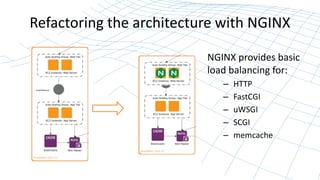
Refactoring the architecture with NGINX 
NGINX provides basic 
load balancing for: 
– HTTP 
– FastCGI 
– uWSGI 
– SCGI 
– memcache
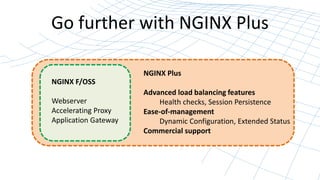
Go further with NGINX Plus 
NGINX F/OSS 
Webserver 
Accelerating Proxy 
Application Gateway 
NGINX Plus 
Advanced load balancing features 
Health checks, Session Persistence 
Ease-of-management 
Dynamic Configuration, Extended Status 
Commercial support
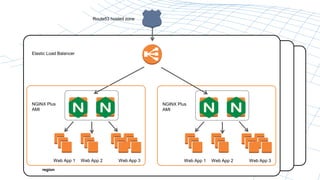
Elastic Load Balancer 
NGINX Plus 
AMI 
Web App 1 
region 
region 
region 
Route53 hosted zone 
Web App 2 Web App 3 
NGINX Plus 
AMI 
Web App 1 
Web App 2 Web App 3
Relevant NGINX Plus features 
• Content-based routing 
• Request Prioritization 
• Health Checks 
• Session Persistence 
• PROXY support 
• Dynamic Reconfiguration (inc DNS) 
• Extended Status
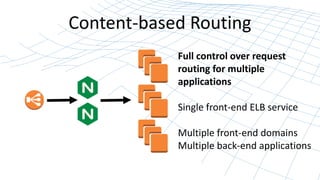
Content-based Routing 
Full control over request 
routing for multiple 
applications 
Single front-end ELB service 
Multiple front-end domains 
Multiple back-end applications
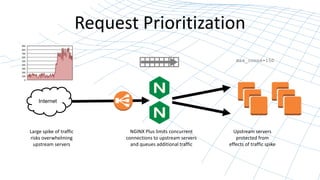
Request Prioritization 
Internet 
Large spike of traffic 
risks overwhelming 
upstream servers 
NGINX Plus limits concurrent 
connections to upstream servers 
and queues additional traffic 
max_conns=150 
Upstream servers 
protected from 
effects of traffic spike
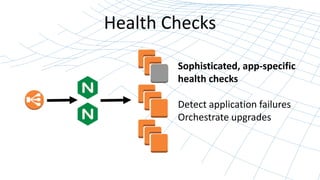
Health Checks 
Sophisticated, app-specific 
health checks 
Detect application failures 
Orchestrate upgrades
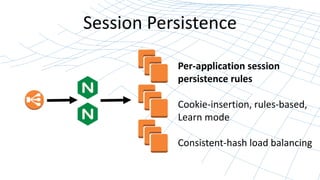
Session Persistence 
Per-application session 
persistence rules 
Cookie-insertion, rules-based, 
Learn mode 
Consistent-hash load balancing
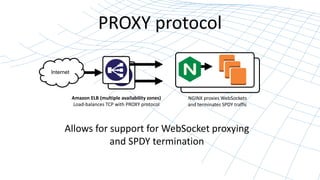
PROXY protocol 
Internet 
Amazon ELB (multiple availability zones) 
Load-balances TCP with PROXY protocol 
NGINX proxies WebSockets 
and terminates SPDY traffic 
Allows for support for WebSocket proxying 
and SPDY termination
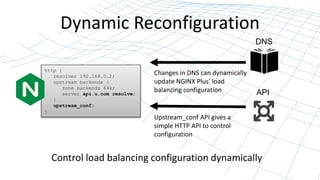
Dynamic Reconfiguration 
http { 
resolver 192.168.0.2; 
upstream backends { 
zone backends 64k; 
server api.u.com resolve; 
} 
upstream_conf; 
Control load balancing configuration dynamically 
} 
DNS 
Changes in DNS can dynamically 
update NGINX Plus’ load 
balancing configuration API 
Upstream_conf API gives a 
simple HTTP API to control 
configuration
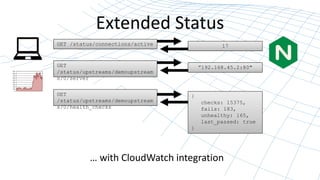
Extended Status 
GET /status/connections/active 17 
GET 
/status/upstreams/demoupstream 
s/0/server 
”192.168.45.2:80" 
{ 
checks: 15375, 
fails: 183, 
unhealthy: 165, 
last_passed: true 
} 
GET 
/status/upstreams/demoupstream 
s/0/health_checks 
… with CloudWatch integration
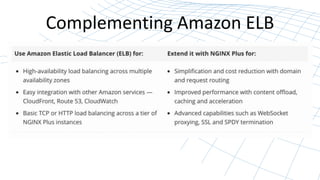
Complementing Amazon ELB
Monitoring with Cloudwatch 
Know what is going on with your 
environment at all times
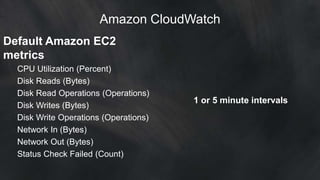
Amazon CloudWatch 
Default Amazon EC2 
metrics 
CPU Utilization (Percent) 
Disk Reads (Bytes) 
Disk Read Operations (Operations) 
Disk Writes (Bytes) 
Disk Write Operations (Operations) 
Network In (Bytes) 
Network Out (Bytes) 
Status Check Failed (Count) 
1 or 5 minute intervals
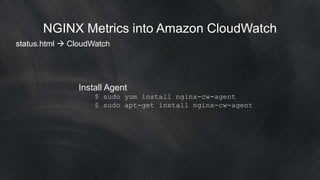
NGINX Metrics into Amazon CloudWatch 
status.html  CloudWatch 
Install Agent 
$ sudo yum install nginx-cw-agent 
$ sudo apt-get install nginx-cw-agent
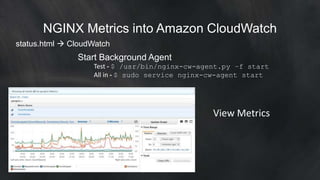
NGINX Metrics into Amazon CloudWatch 
status.html  CloudWatch 
Update Configuration 
$ /etc/nginx-cw-agent/nginx-cw-agent.ini 
[source1] 
name=exampleorg 
url=http://example.org/status 
[source2] 
name=examplecom 
url=http://example.com/status 
http_user=testuser 
http_pass=testpass
NGINX Metrics into Amazon CloudWatch 
status.html  CloudWatch 
Start Background Agent 
Test - $ /usr/bin/nginx-cw-agent.py –f start 
All in - $ sudo service nginx-cw-agent start 
View Metrics
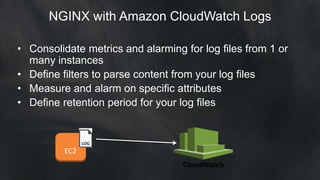
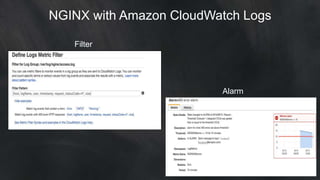
NGINX with Amazon CloudWatch Logs 
• Consolidate metrics and alarming for log files from 1 or 
many instances 
• Define filters to parse content from your log files 
• Measure and alarm on specific attributes 
• Define retention period for your log files 
EC2 
CloudWatch
NGINX with Amazon CloudWatch Logs 
Filter 
Alarm
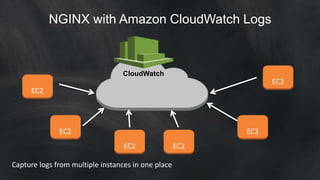
NGINX with Amazon CloudWatch Logs 
EC2 
EC2 
EC2 
CloudWatch 
EC2 EC2 
EC2 
Capture logs from multiple instances in one place
NEXT STEPS
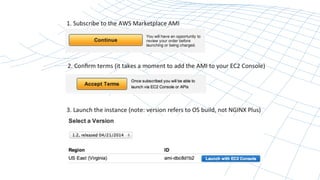
Get started with NGINX Plus AMI 
http://aws.amazon.com/marketplace
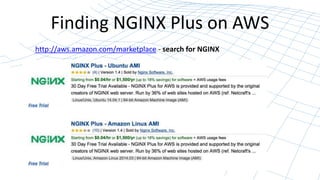
Finding NGINX Plus on AWS 
http://aws.amazon.com/marketplace - search for NGINX
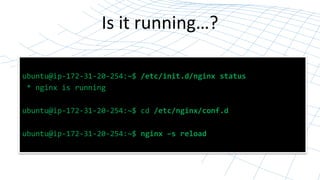
Is it running…? 
ubuntu@ip-172-31-20-254:~$ /etc/init.d/nginx status 
* nginx is running 
ubuntu@ip-172-31-20-254:~$ cd /etc/nginx/conf.d 
ubuntu@ip-172-31-20-254:~$ nginx –s reload
Check out the NGINX Plus 
on AWS whitepaper 
Partner Whitepapers: 
http://aws.amazon.com/whitepapers/ 
http://d0.awsstatic.com/whitepapers/AWS_NGINX 
_Plus-whitepaper-final_v4.pdf
THANK YOU

Delivering High-Availability Web Services with NGINX Plus on AWS

  • 1.
    Delivering High-Availability Web Services with NGINX Plus on AWS Owen Garrett Nginx, Inc. Scott Ward Amazon Web Services
  • 2.
    Introductions and Agenda • Owen Garrett Head of Products, NGINX • Scott Ward Solutions Architect, Amazon Web Services
  • 3.
  • 4.
    A broad anddeep platform that helps customers build sophisticated, scalable applications © 2014 Amazon.com, Inc. and its affiliates. All rights reserved. May not be copied, modified or distributed in whole or in part without the express consent of Amazon.com, Inc.
  • 5.
    A Culture ofInnovation: Experiment Often & Fail Without Risk
  • 6.
    Who is usingAWS and what are they using it for?
  • 7.
    Startups on AWS http://aws.amazon.com/solutions/case-studies/
  • 8.
    Enterprises on AWS http://aws.amazon.com/solutions/case-studies/
  • 9.
    Foundation Services Infrastructure Storage (Object, Block and Archive) Regions Availability Zones Networking Collaboration and Sharing Security & Access Control Platform Services Databases Relational NoSQL Caching Analytics Hadoop Real-time Data warehouse App Services Queuing Orchestration App streaming Transcoding Email Search Deployment & Management Containers Dev/ops Tools Resource Templates Mobile Services Identity Sync Mobile Analytics Notifications Enterprise Applications Virtual Desktops Data Workflows Usage Tracking Monitoring and Logs Compute (VMs, Auto-scaling and Load Balancing) CDN and Points of Presence
  • 10.
    11 regions 28availability zones 52 edge locations Infrastructure
  • 11.
    AWS Services Overview Amazon EC2 – Virtual Servers & resizable compute capacity Auto Scaling – Scale compute resources up and down Elastic Load Balancing – Load balancer for compute instances Amazon Elastic Block Storage (EBS) – Block storage for EC2
  • 12.
    AWS Service Overview AWS Identity and Access Management – AWS Account Access Controls Amazon Route 53 – Scalable Domain Name System Amazon CloudWatch – Resource and Application Monitoring
  • 13.
    Breaking news -New services on AWS
  • 14.
    Amazon EC2 ContainerService Creates and manages clusters made up of Docker containers. It launches and terminates the containers and maintains complete information about the state of your cluster Automatically schedules containers to help find a balance between your resource needs and availability requirements Using EC2 Container Service you can simply launch & manage clusters with thousands of instances and schedule tens of thousands of containers across multiple Availability Zones Amazon EC2 Container Service launches your containers on your own EC2 instances, so that you do not share resources with other customers, places your clusters in a VPC, and allows you to use your own VPC security groups and network ACLs. Your applications can make use of AWS features such as Elastic IP addresses, resource tags, and Virtual Private Cloud (VPC). http://aws.amazon.com/ecs/
  • 15.
    AWS Code Deploy Deploys your released code to a "fleet" of EC2 instances Accommodate fleets that range in size from one instance all the way up to tens of thousands of instances Automatically schedules updates across multiple Availability Zones in order to maintain high availability during the deployment Application and Deployment groups described in YAML-formatted files Deployment groups identify EC2 instances by tags & can also reference Auto Scaling Groups Managed via AWS Management Console, CLI or APIs Can be used in conjunction with Chef recipes or Puppet scripts Deploy configuration from a variety of repositories (S3, GitHub, etc) https://aws.amazon.com/codedeploy/
  • 16.
  • 17.
  • 18.
    Amazon web application reference architecture • Route53 DNS • Elastic Load Balancer • Autoscaling web and app tiers • Active/standby databases
  • 19.
    Refactoring the architecturewith NGINX NGINX provides basic load balancing for: – HTTP – FastCGI – uWSGI – SCGI – memcache
  • 20.
    Go further withNGINX Plus NGINX F/OSS Webserver Accelerating Proxy Application Gateway NGINX Plus Advanced load balancing features Health checks, Session Persistence Ease-of-management Dynamic Configuration, Extended Status Commercial support
  • 21.
    Elastic Load Balancer NGINX Plus AMI Web App 1 region region region Route53 hosted zone Web App 2 Web App 3 NGINX Plus AMI Web App 1 Web App 2 Web App 3
  • 22.
    Relevant NGINX Plusfeatures • Content-based routing • Request Prioritization • Health Checks • Session Persistence • PROXY support • Dynamic Reconfiguration (inc DNS) • Extended Status
  • 23.
    Content-based Routing Fullcontrol over request routing for multiple applications Single front-end ELB service Multiple front-end domains Multiple back-end applications
  • 24.
    Request Prioritization Internet Large spike of traffic risks overwhelming upstream servers NGINX Plus limits concurrent connections to upstream servers and queues additional traffic max_conns=150 Upstream servers protected from effects of traffic spike
  • 25.
    Health Checks Sophisticated,app-specific health checks Detect application failures Orchestrate upgrades
  • 26.
    Session Persistence Per-applicationsession persistence rules Cookie-insertion, rules-based, Learn mode Consistent-hash load balancing
  • 27.
    PROXY protocol Internet Amazon ELB (multiple availability zones) Load-balances TCP with PROXY protocol NGINX proxies WebSockets and terminates SPDY traffic Allows for support for WebSocket proxying and SPDY termination
  • 28.
    Dynamic Reconfiguration http{ resolver 192.168.0.2; upstream backends { zone backends 64k; server api.u.com resolve; } upstream_conf; Control load balancing configuration dynamically } DNS Changes in DNS can dynamically update NGINX Plus’ load balancing configuration API Upstream_conf API gives a simple HTTP API to control configuration
  • 29.
    Extended Status GET/status/connections/active 17 GET /status/upstreams/demoupstream s/0/server ”192.168.45.2:80" { checks: 15375, fails: 183, unhealthy: 165, last_passed: true } GET /status/upstreams/demoupstream s/0/health_checks … with CloudWatch integration
  • 30.
  • 31.
    Monitoring with Cloudwatch Know what is going on with your environment at all times
  • 32.
    Amazon CloudWatch DefaultAmazon EC2 metrics CPU Utilization (Percent) Disk Reads (Bytes) Disk Read Operations (Operations) Disk Writes (Bytes) Disk Write Operations (Operations) Network In (Bytes) Network Out (Bytes) Status Check Failed (Count) 1 or 5 minute intervals
  • 33.
    NGINX Metrics intoAmazon CloudWatch status.html  CloudWatch Install Agent $ sudo yum install nginx-cw-agent $ sudo apt-get install nginx-cw-agent
  • 34.
    NGINX Metrics intoAmazon CloudWatch status.html  CloudWatch Update Configuration $ /etc/nginx-cw-agent/nginx-cw-agent.ini [source1] name=exampleorg url=http://example.org/status [source2] name=examplecom url=http://example.com/status http_user=testuser http_pass=testpass
  • 35.
    NGINX Metrics intoAmazon CloudWatch status.html  CloudWatch Start Background Agent Test - $ /usr/bin/nginx-cw-agent.py –f start All in - $ sudo service nginx-cw-agent start View Metrics
  • 36.
    NGINX with AmazonCloudWatch Logs • Consolidate metrics and alarming for log files from 1 or many instances • Define filters to parse content from your log files • Measure and alarm on specific attributes • Define retention period for your log files EC2 CloudWatch
  • 37.
    NGINX with AmazonCloudWatch Logs Filter Alarm
  • 38.
    NGINX with AmazonCloudWatch Logs EC2 EC2 EC2 CloudWatch EC2 EC2 EC2 Capture logs from multiple instances in one place
  • 39.
  • 40.
    Get started withNGINX Plus AMI http://aws.amazon.com/marketplace
  • 41.
    Finding NGINX Pluson AWS http://aws.amazon.com/marketplace - search for NGINX
  • 43.
    Is it running…? ubuntu@ip-172-31-20-254:~$ /etc/init.d/nginx status * nginx is running ubuntu@ip-172-31-20-254:~$ cd /etc/nginx/conf.d ubuntu@ip-172-31-20-254:~$ nginx –s reload
  • 44.
    Check out theNGINX Plus on AWS whitepaper Partner Whitepapers: http://aws.amazon.com/whitepapers/ http://d0.awsstatic.com/whitepapers/AWS_NGINX _Plus-whitepaper-final_v4.pdf
  • 45.

Editor's Notes

  • #4 Slides 3-14 from http://www.slideshare.net/AmazonWebServices/nginx-plus-on-aws
  • #5  The broad and deep platform that is AWS. If want to build new businesses from scratch or move some/all workloads to cloud, need a broad array of services and features to make this happen and not have to piecemeal it AWS Platform started in 2006 and it has grown rapidly since that time. Today it is the underlying infrastructure for companies around the world including startups, enterprises, and government agencies. AWS has hundreds of thousands of customers in 190 countries around the world. A little background… After over a decade of building and running the highly scalable web application, Amazon.com, the company realized that it had developed a core competency in operating massive scale technology infrastructure and datacenters, and embarked on a much broader mission of serving a new customer segment—developers and businesses—with a platform of web services they can use to build sophisticated, scalable applications.  AWS is a comprehensive cloud services platform, offering compute power, storage, content delivery, and other functionality that enables businesses to cost-effectively deploy applications and services with greater flexibility, scalability, and reliability. The power of self-service through AWS means you can proactively address your internal plans and react to external demands when you choose and not have to wait for a salesperson to return your call. In response to customer needs and internal innovation on the customer’s behalf, In 2011, we released over 80 significant services and features; in 2012, nearly 160; and in 2013, 280. This trend does not show any sign of slowing.
  • #6 All of a sudden, w the possibility a reality that you can try new ideas: Move teams from learned helplessness where no point using shower cycles To a world where employees are motivated to think of new ideas for customers And instead of only getting these ideas from select senior folks, come from all over org People often ask us what does cloud mean for our IT people Reality is they don’t go away…work on value-added activities on top of infrastructure instead of undifferentiated racking and stacking Imo, better question is how do we empower more of our employees to invent/improve cust exp Truth is, people who work at enterprises want to invent as much as start-ups, just been hamstrung Cloud unleashes this innovation…lets you be more agile, get more ideas all over org, and RECRUIT more talented folks in process Better for customers, companies, and business—WIN ACROSS BOARD
  • #8 DropBox Pinterest AirBnB Flipboard
  • #9 Shell Netflix Samsung GE Philips Pfizer Bristol-Myers Squibb Intuit CBA Suncorp
  • #11 Quick focus on infrastructure because it is a key component that we will be discussing and utilizing throughout this presentation
  • #12 As you saw from the overall AWS platform and service overview slide there are a lot of services that AWS offers. What I am going to touch base on here are services that are going to be relevant to the rest of the discussion that I will be presenting on. Happy to dive into other components of the platform post presentation ELB Health Checks AutoScaling Health Checks
  • #13 As you saw from the overall AWS platform and service overview slide there are a lot of services that AWS offers. Route53- Route to infrastructure inside or outside of AWS * Routing – Latency, Geo, weighted round robin * health checks – DNS Failover. Route 53 monitors endpoint and if there is a failure traffic will be routed to an alternate endpoint
  • #14 Slides 3-14 from http://www.slideshare.net/AmazonWebServices/nginx-plus-on-aws
  • #15 If you are deploying NGINX using Docker containers the new functionality that is offered with the Amazon EC2 Container Service may be something you want to look into. This is a new service announced at the 2014 AWS re:Invent conference and is currently in a limited preview mode.
  • #16 If you are deploying NGINX configuration files or other code related to your NGINX environment then you may be interested in AWS Code Deploy. This is a new service announced at the 2014 AWS re:Invent conference and is currently in a limited preview mode.
  • #18 OWEN
  • #21 Top features: Health checks Session persistence
  • #22 NGINX Plus allows you to build this architecture… Mulesoft example
  • #31 Having highlighted the features, the ways that NGINX Plus will complement and extend ELB should be clear
  • #32 SCOTT
  • #37 This requires a small agent to be running on your EC2 instance. Either need to use an instance role or provide access keys
  • #39 CloudWatch logs allows you the ability to capture log files from your instances for further analysis. You could be capturing one log file from one instance or you could be capturing the same log file from many instances in a fleet. Cloudtrail logs gives you the ability to interpret the data in these log files and turn them into CloudWatch metrics. You can view the metrics graphically or create alarms based on the metrics that came from your log files
  • #40 OWEN