


Nginx
Geeta Vinnakota
What is nginx?
• Web Server & Proxy Server
• Modular: Specify the modules you want
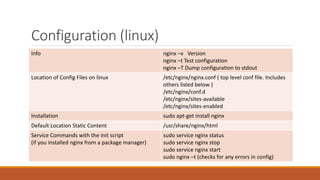
Configuration (linux)
Info nginx –v Version
nginx –t Test configuration
nginx –T Dump configuration to stdout
Location of Config Files on linux /etc/nginx/nginx.conf ( top level conf file. Includes
others listed below )
/etc/nginx/conf.d
/etc/nginx/sites-available
/etc/nginx/sites-enabled
Installation sudo apt-get install nginx
Default Location Static Content /usr/share/nginx/html
Service Commands with the init script
(if you installed nginx from a package manager)
sudo service nginx status
sudo service nginx stop
sudo service nginx start
sudo nginx –t (checks for any errors in config)
Default Top Level
Config File
/etc/nginx/nginx.conf
Default Application
level config file
Included in the top
level config
/etc/nginx/conf.d/de
fault.conf
Terminology
Terms Description
Module Modules are defined by directives
Types of Directives Simple, Block/Context
Simple Directive listen 80; name followed by parameter and semi-colon
Block/Context
Directive
Instead of semicolon, it ends with a set of additional instructions surrounded by
braces.
A context is a block with other directives within braces
Main Context http & events are in the main context.
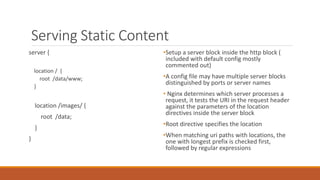
Serving Static Content
server {
location / {
root /data/www;
}
location /images/ {
root /data;
}
}
• Setup a server block inside the http block
( included with default config mostly
commented out)
• A config file may have multiple server
blocks distinguished by ports or server
names
• Nginx maps uri request header to a
resource using the location directive. ie It
tests the URI against the parameters of
the location directive inside the server
block.
• Root directive specifies the location
• When matching uri paths with locations,
the one with longest prefix is checked
first, followed by regular expressions
Nginx as Proxy Server
server {
location / {
proxy_pass
http://localhost:8080;
}
location /images/ {
root /data;
}
}
• As a proxy server, nginx receives
requests, sends them off to
another server. Retreives responses
and sends them to the client
• proxy_pass directive defines the
background server via the protocol,
domain & port
• In the code snippet, server block
handles all requests to images
locally & acts as a proxy and sends
any other request to the
background server
Location match
none prefix match
= exact match
~ case-sensitive regular expression match
~* case-insensitive reg exp match
^~ best non reg exp match (prefix or exact)
Useful Nginx variables for rewrite rules
• Request – ‘http://localhost:8080/test?a=3&b=4’
Variable Captures
$uri /test
$request_uri /test?a=3&b=4
$scheme http
$server_name
$request
^ All paths
Rewrite Rules
• Rewrite rule: Changes part of all of the URL in a client request
• Purpose: To let users know that the resources they’re requesting are
at a different location
• Directives: ‘return’ and ‘rewrite’
‘return’ directive
• Simpler and recommended to use of the two directives
• is enclosed in ‘server’ or ‘location’ context where the URL’s would
point
• return: Tells nginx to stop processing the request immediately and
send code 301(Moved permanently) and the specified rewritten url to
the client.
• Can be used when –
• Rewritten URL applies to every request that matches the server or location
block
• You can build the rewritten url with standard nginx variables
‘rewrite’ directive
• Also is enclosed in the ‘server’ or ‘location’ context that defines the
URLs to be rewritten
• Syntax: rewrite regex URL flag;
• regex – Original url must pass another test, before it can be rewritten
• Can only return 301 or 302. To return other codes you must include a
return directive after the rewrite directive
• Does not necessarily halt nginx processing
• Does not necessarily send a rewritten url to the client
• Normally runs through and processes the entire configuration block
‘rewrite’ contd
• ie If the rewritten url matches a subsequent directive, nginx performs
the indicated action on the rewritten url ( can rewrite it again )
• Unless planned carefully this can create loops ( upto a built-in limit of
10)
• Can be used when-
• elements in the original url without corresponding nginx variables need to be
captured
• change/add elements in the path

Nginx

  • 1.
  • 2.
    What is nginx? •Web Server & Proxy Server • Modular: Specify the modules you want
  • 3.
    Configuration (linux) Info nginx–v Version nginx –t Test configuration nginx –T Dump configuration to stdout Location of Config Files on linux /etc/nginx/nginx.conf ( top level conf file. Includes others listed below ) /etc/nginx/conf.d /etc/nginx/sites-available /etc/nginx/sites-enabled Installation sudo apt-get install nginx Default Location Static Content /usr/share/nginx/html Service Commands with the init script (if you installed nginx from a package manager) sudo service nginx status sudo service nginx stop sudo service nginx start sudo nginx –t (checks for any errors in config)
  • 4.
    Default Top Level ConfigFile /etc/nginx/nginx.conf
  • 5.
    Default Application level configfile Included in the top level config /etc/nginx/conf.d/de fault.conf
  • 6.
    Terminology Terms Description Module Modulesare defined by directives Types of Directives Simple, Block/Context Simple Directive listen 80; name followed by parameter and semi-colon Block/Context Directive Instead of semicolon, it ends with a set of additional instructions surrounded by braces. A context is a block with other directives within braces Main Context http & events are in the main context.
  • 7.
    Serving Static Content server{ location / { root /data/www; } location /images/ { root /data; } } • Setup a server block inside the http block ( included with default config mostly commented out) • A config file may have multiple server blocks distinguished by ports or server names • Nginx maps uri request header to a resource using the location directive. ie It tests the URI against the parameters of the location directive inside the server block. • Root directive specifies the location • When matching uri paths with locations, the one with longest prefix is checked first, followed by regular expressions
  • 8.
    Nginx as ProxyServer server { location / { proxy_pass http://localhost:8080; } location /images/ { root /data; } } • As a proxy server, nginx receives requests, sends them off to another server. Retreives responses and sends them to the client • proxy_pass directive defines the background server via the protocol, domain & port • In the code snippet, server block handles all requests to images locally & acts as a proxy and sends any other request to the background server
  • 9.
    Location match none prefixmatch = exact match ~ case-sensitive regular expression match ~* case-insensitive reg exp match ^~ best non reg exp match (prefix or exact)
  • 10.
    Useful Nginx variablesfor rewrite rules • Request – ‘http://localhost:8080/test?a=3&b=4’ Variable Captures $uri /test $request_uri /test?a=3&b=4 $scheme http $server_name $request ^ All paths
  • 11.
    Rewrite Rules • Rewriterule: Changes part of all of the URL in a client request • Purpose: To let users know that the resources they’re requesting are at a different location • Directives: ‘return’ and ‘rewrite’
  • 12.
    ‘return’ directive • Simplerand recommended to use of the two directives • is enclosed in ‘server’ or ‘location’ context where the URL’s would point • return: Tells nginx to stop processing the request immediately and send code 301(Moved permanently) and the specified rewritten url to the client. • Can be used when – • Rewritten URL applies to every request that matches the server or location block • You can build the rewritten url with standard nginx variables
  • 13.
    ‘rewrite’ directive • Alsois enclosed in the ‘server’ or ‘location’ context that defines the URLs to be rewritten • Syntax: rewrite regex URL flag; • regex – Original url must pass another test, before it can be rewritten • Can only return 301 or 302. To return other codes you must include a return directive after the rewrite directive • Does not necessarily halt nginx processing • Does not necessarily send a rewritten url to the client • Normally runs through and processes the entire configuration block
  • 14.
    ‘rewrite’ contd • ieIf the rewritten url matches a subsequent directive, nginx performs the indicated action on the rewritten url ( can rewrite it again ) • Unless planned carefully this can create loops ( upto a built-in limit of 10) • Can be used when- • elements in the original url without corresponding nginx variables need to be captured • change/add elements in the path