©2023 F5
1
Welcome to Unit 3
©2023 F5
2
üAttend all webinars
üComplete all hands-on labs
Use same email for all activities
Obtain Your Badge!
©2023 F5
3
üJoin #microservices-march
üGet help with Microservices
March questions
üConnect with NGINX experts
nginxcommunity Slack
©2023 F5
4
Agenda
1. Lecture
2. Q&A
3. Hands-On Lab with Office Hours
(only for live session – if you’re watching this on
demand, complete the lab on your own time)
©2023 F5
5
CHRISTOPHER HARRISON
Senior Enterprise Advocate
GitHub
@geektrainer
Meet the Speaker
What is DevOps?
DevOps is the union of people,
process and products to enable
continuous delivery of value to our
end users
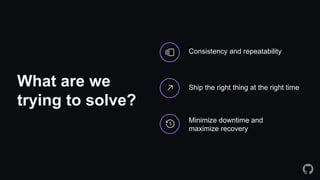
What are we
trying to solve?
Ship the right thing at the right time
Consistency and repeatability
Minimize downtime and
maximize recovery
How do we do
this?
Establish best practices
Identify stakeholders
Implement tools
Defining common
DevOps terms
Continuous integration
Ensuring new code follows patterns and doesn’t
break the build
Continuous delivery/deployment
Ensuring new code is pushed to hosting
environments
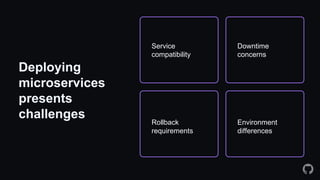
Deploying
microservices
presents
challenges
Downtime
concerns
Environment
differences
Service
compatibility
Rollback
requirements
100x
faster to set up a dev
environment
200x
more frequent code
deployments
2x
more likely to have
internal communities
of practice
7x
fewer failures on
deployments
8x
more likely to have
integrated security
Modern,
Collaborative
DevOps
Source: McKinsey
4-5x
Higher revenue
growth
Addressing deployment challenges
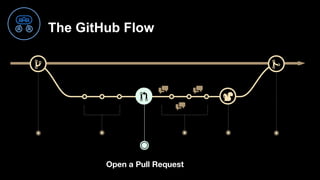
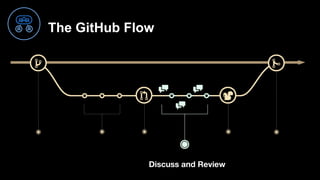
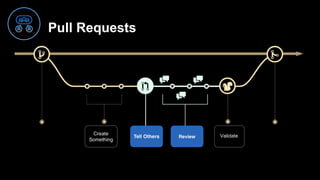
The GitHub flow
The GitHub Flow
Create a branch
The GitHub Flow
Add Commits
The GitHub Flow
Open a Pull Request
The GitHub Flow
Discuss and Review
The GitHub Flow
Validat
e
The GitHub Flow
Merge
Pull Requests
Validate
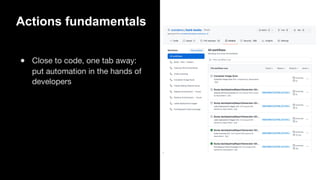
Automation with GitHub Actions
● Close to code, one tab away:
put automation in the hands of
developers
Actions fundamentals
● Close to code, one tab away:
put automation in the hands of
developers
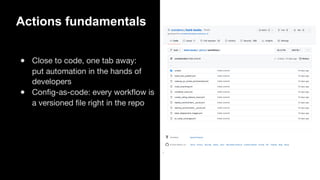
● Config-as-code: every workflow is
a versioned file right in the repo
Actions fundamentals
● Close to code, one tab away:
put automation in the hands of
developers
● Config-as-code: every workflow is
a versioned file right in the repo
● Fully integrated with full UX for
creation and observation of
workflows
Actions fundamentals
Azure Static Web Apps CI/CD
push:
branches:
- main
- staging
paths-ignore:
- 'podcast_audio/**'
pull_request:
types: [opened, synchronize, reopened, closed]
branches:
- main
- staging
paths-ignore:
- 'podcast_audio/**'
schedule:
- cron: '0 0 * * 0'
workflow_dispatch:
Run a workflow
on any GitHub event
Choose your
Trigger
Kick off workflows with GitHub events
like push, issue creation, or a new
release.
Runner:
A machine that runs
this job
Action:
Custom application
that performs a task
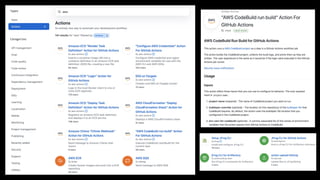
Write your own, or find one
from the GitHub Marketplace
If this happens
Then,
do this
Ensuring smooth deployment
Test the deployment before going live
Getting it all to
work correctly
Canary deployment
Blue/green deployment
Migrate traffic in stages to reduce downtime
©2023 F5
30
DEMO TIME
©2023 F5
31
Q&A
Where do we go
from here?
See what you can automate
Use branches to test new things
Explore the marketplace
©2023 F5
33
Lab Time!
1. Create non-work Azure and GitHub accounts (if you don’t already have them)
• Azure: There is a 30 free day trial that will let you do all the steps required in this lab.
• GitHub is 100% free for open source projects (which are used in this lab).
2. In On24, click link in Related Content box
3. Log into Instruqt using the same email address from your registration
4. Complete the lab
• Estimated Time: 30-40 minutes
• Max Time: 50 minutes
• Attempts: 3
5. Problems? Use webinar chat
How to Securely Manage Secrets in Containers
©2023 F5
34
• Progress bar:
• Progress in lab
• Time remaining
• Instruction pane is adjustable
• “Check” runs against a script
• Click “Finish” at end to
qualify for badge
Instruqt Basics
©2023 F5
35
Wrap Up
Accelerate Microservices Deployments with Automation

Accelerate Microservices Deployments with Automation