©2023 F5
1
Welcome to Unit 4
©2023 F5
2
üAttend all webinars
üComplete all hands-on labs
Use same email for all activities
Obtain Your Badge!
©2023 F5
3
üJoin #microservices-march
üGet help with Microservices
March questions
üConnect with NGINX experts
nginxcommunity Slack
©2023 F5
4
Agenda
1. Lecture
2. Q&A
3. Hands-On Lab with Office Hours
(only for live session – if you’re watching this on
demand, complete the lab on your own time)
©2023 F5
5
Meet the Speakers
DAVE McALLISTER
Sr. OSS Technical Evangelist
NGINX
JAVIER EVANS
Solutions Architect
NGINX
©2023 F5
6
Observability
©2023 F5
7
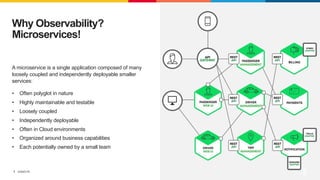
A microservice is a single application composed of many
loosely coupled and independently deployable smaller
services:
• Often polyglot in nature
• Highly maintainable and testable
• Loosely coupled
• Independently deployable
• Often in Cloud environments
• Organized around business capabilities
• Each potentially owned by a small team
Why Observability?
Microservices!
©2023 F5
8
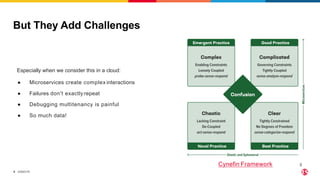
But They Add Challenges
Cynefin Framework 8
Especially when we consider this in a cloud:
● Microservices create complex interactions
● Failures don't exactly repeat
● Debugging multitenancy is painful
● So much data!
©2023 F5
9
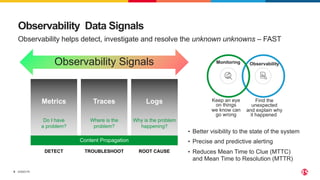
Observability Data Signals
Observability helps detect, investigate and resolve the unknown unknowns – FAST
Monitoring Observability
Keep an eye
on things
we know can
go wrong
Find the
unexpected
and explain why
it happened
Metrics
Do I have
a problem?
Traces
Where is the
problem?
Logs
Why is the problem
happening?
Observability Signals
DETECT TROUBLESHOOT ROOT CAUSE
• Better visibility to the state of the system
• Precise and predictive alerting
• Reduces Mean Time to Clue (MTTC)
and Mean Time to Resolution (MTTR)
Content Propagation
©2023 F5
10
• Avoid Lock In
– Ability to switch between observability technologies
• Ease of Use
– Reduction in friction for implementation
– Automated instrumentation when possible
• Visualization Tooling
– Ability to use and correlate data to make decisions
• Low Resource Use
Some Desired Observability Traits
©2023 F5
11
OpenTelemetry
©2023 F5
12
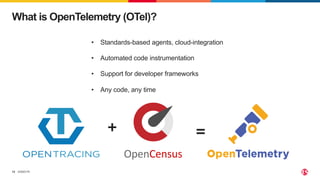
What is OpenTelemetry (OTel)?
• Standards-based agents, cloud-integration
• Automated code instrumentation
• Support for developer frameworks
• Any code, any time
+ =
OpenCensus
©2023 F5
13
Why Does OTel Matter?
•OpenTelemetry users build and own their collection
strategies, without vendor lock-in
•OpenTelemetry puts the focus on analytics not
collection
©2023 F5
14
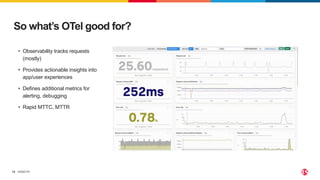
So what’s OTel good for?
• Observability tracks requests
(mostly)
• Provides actionable insights into
app/user experiences
• Defines additional metrics for
alerting, debugging
• Rapid MTTC, MTTR
©2023 F5
15
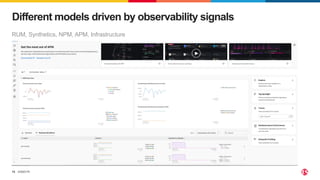
RUM, Synthetics, NPM, APM, Infrastructure
Different models driven by observability signals
©2023 F5
16
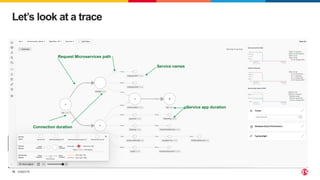
Let’s look at a trace
Request Microservices path
Service names
Connection duration
µService app duration
©2023 F5
17
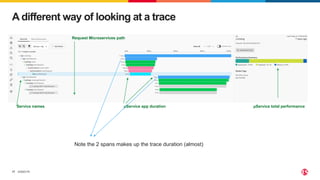
A different way of looking at a trace
Request Microservices path
Service names µService app duration µService total performance
Note the 2 spans makes up the trace duration (almost)
©2023 F5
18
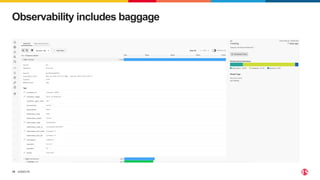
Observability includes baggage
©2023 F5
19
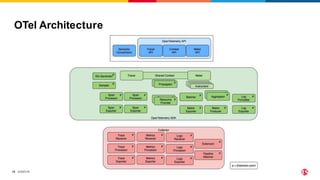
OTel Architecture
©2023 F5
20
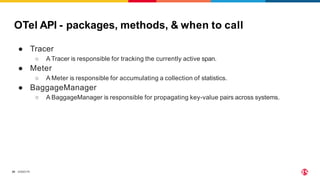
OTel API - packages, methods, & when to call
● Tracer
○ A Tracer is responsible for tracking the currently active span.
● Meter
○ A Meter is responsible for accumulating a collection of statistics.
● BaggageManager
○ A BaggageManager is responsible for propagating key-value pairs across systems.
©2023 F5
21
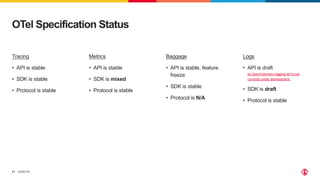
OTel Specification Status
Tracing
• API is stable
• SDK is stable
• Protocol is stable
Metrics
• API is stable
• SDK is mixed
• Protocol is stable
Baggage
• API is stable, feature
freeze
• SDK is stable
• Protocol is N/A
Logs
• API is draft
An OpenTelemetry logging API is not
currently under development.
• SDK is draft
• Protocol is stable
©2023 F5
22
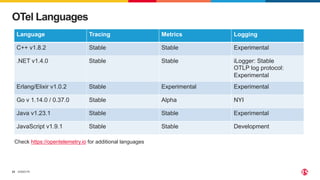
OTel Languages
Language Tracing Metrics Logging
C++ v1.8.2 Stable Stable Experimental
.NET v1.4.0 Stable Stable iLogger: Stable
OTLP log protocol:
Experimental
Erlang/Elixir v1.0.2 Stable Experimental Experimental
Go v 1.14.0 / 0.37.0 Stable Alpha NYI
Java v1.23.1 Stable Stable Experimental
JavaScript v1.9.1 Stable Stable Development
Check https://opentelemetry.io for additional languages
©2023 F5
23
Tracing
©2023 F5
24
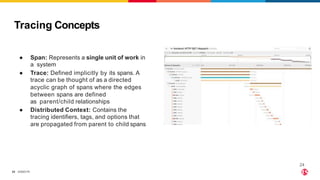
Tracing Concepts
● Span: Represents a single unit of work in
a system
● Trace: Defined implicitly by its spans. A
trace can be thought of as a directed
acyclic graph of spans where the edges
between spans are defined
as parent/child relationships
● Distributed Context: Contains the
tracing identifiers, tags, and options that
are propagated from parent to child spans
24
©2023 F5
25
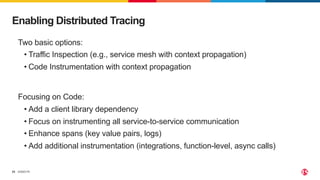
Enabling Distributed Tracing
Two basic options:
• Traffic Inspection (e.g., service mesh with context propagation)
• Code Instrumentation with context propagation
Focusing on Code:
• Add a client library dependency
• Focus on instrumenting all service-to-service communication
• Enhance spans (key value pairs, logs)
• Add additional instrumentation (integrations, function-level, async calls)
©2023 F5
26
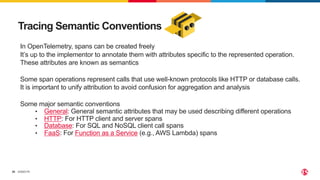
Tracing Semantic Conventions
In OpenTelemetry, spans can be created freely
It’s up to the implementor to annotate them with attributes specific to the represented operation.
These attributes are known as semantics
Some span operations represent calls that use well-known protocols like HTTP or database calls.
It is important to unify attribution to avoid confusion for aggregation and analysis
Some major semantic conventions
• General: General semantic attributes that may be used describing different operations
• HTTP: For HTTP client and server spans
• Database: For SQL and NoSQL client call spans
• FaaS: For Function as a Service (e.g., AWS Lambda) spans
©2023 F5
27
Metrics
©2023 F5
28
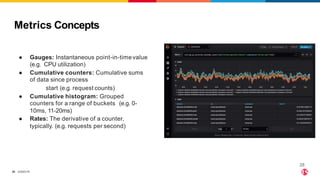
Metrics Concepts
● Gauges: Instantaneous point-in-timevalue
(e.g. CPU utilization)
● Cumulative counters: Cumulative sums
of data since process
start (e.g. request counts)
● Cumulative histogram: Grouped
counters for a range of buckets (e.g. 0-
10ms, 11-20ms)
● Rates: The derivative of a counter,
typically. (e.g. requests per second)
28
©2023 F5
29
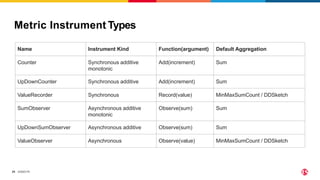
Metric Instrument Types
Name Instrument Kind Function(argument) Default Aggregation
Counter Synchronous additive
monotonic
Add(increment) Sum
UpDownCounter Synchronous additive Add(increment) Sum
ValueRecorder Synchronous Record(value) MinMaxSumCount / DDSketch
SumObserver Asynchronous additive
monotonic
Observe(sum) Sum
UpDownSumObserver Asynchronous additive Observe(sum) Sum
ValueObserver Asynchronous Observe(value) MinMaxSumCount / DDSketch
©2023 F5
30
Logs
©2023 F5
31
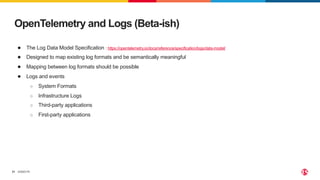
OpenTelemetry and Logs (Beta-ish)
● The Log Data Model Specification : https://opentelemetry.io/docs/reference/specification/logs/data-model/
● Designed to map existing log formats and be semantically meaningful
● Mapping between log formats should be possible
● Logs and events
○ System Formats
○ Infrastructure Logs
○ Third-party applications
○ First-party applications
©2023 F5
32
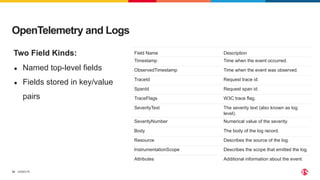
OpenTelemetry and Logs
Two Field Kinds:
● Named top-level fields
● Fields stored in key/value
pairs
Field Name Description
Timestamp Time when the event occurred.
ObservedTimestamp Time when the event was observed.
TraceId Request trace id.
SpanId Request span id.
TraceFlags W3C trace flag.
SeverityText The severity text (also known as log
level).
SeverityNumber Numerical value of the severity.
Body The body of the log record.
Resource Describes the source of the log.
InstrumentationScope Describes the scope that emitted the log.
Attributes Additional information about the event.
©2023 F5
33
Collector
©2023 F5
34
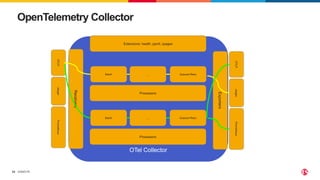
OpenTelemetry Collector
OTel Collector
Receivers
Exporters
Batch ... Queued Retry
Processors
Extensions: health, pprof, zpages
OTLP
Jaeger
Prometheus
OTLP
Jaeger
Prometheus
Batch ... Queued Retry
Processors
©2023 F5
35
Getting Started
©2023 F5
36
• Apps must be instrumented
• Must emit the desired observability signals
• You can use automatic instrumentation
• Your results may vary
• You can manually instrument your code
• You can use automatic and manual at the same time
Instrumenting
©2023 F5
37
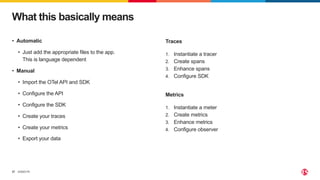
• Automatic
• Just add the appropriate files to the app.
This is language dependent
• Manual
• Import the OTel API and SDK
• Configure the API
• Configure the SDK
• Create your traces
• Create your metrics
• Export your data
What this basically means
Traces
1. Instantiate a tracer
2. Create spans
3. Enhance spans
4. Configure SDK
Metrics
1. Instantiate a meter
2. Create metrics
3. Enhance metrics
4. Configure observer
©2023 F5
38
The most effective debugging tool is still careful thought,
coupled with judiciously placed print statements.
-Brian Kernighan Unix for Beginners 1979
Observability is the new print statement
Closing Thoughts
©2023 F5
39
DEMO TIME
©2023 F5
40
Q&A
©2023 F5
41
Lab Time!
1. Click link in Related Content box
2. Log in using the same email address from your registration
3. Complete the lab
• Estimated Time: 30-40 minutes
• Max Time: 50 minutes
• Attempts: 3
4. Problems? Use webinar chat
How to Use OpenTelemetry Tracing to Understand Your Microservices
©2023 F5
42
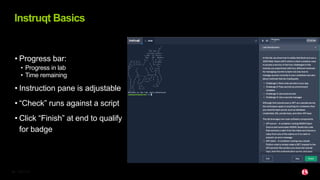
• Progress bar:
• Progress in lab
• Time remaining
• Instruction pane is adjustable
• “Check” runs against a script
• Click “Finish” at end to qualify
for badge
Instruqt Basics
©2023 F5
43
Wrap Up
Manage Microservices Chaos and Complexity with Observability

Manage Microservices Chaos and Complexity with Observability

  • 1.
  • 2.
    ©2023 F5 2 üAttend allwebinars üComplete all hands-on labs Use same email for all activities Obtain Your Badge!
  • 3.
    ©2023 F5 3 üJoin #microservices-march üGethelp with Microservices March questions üConnect with NGINX experts nginxcommunity Slack
  • 4.
    ©2023 F5 4 Agenda 1. Lecture 2.Q&A 3. Hands-On Lab with Office Hours (only for live session – if you’re watching this on demand, complete the lab on your own time)
  • 5.
    ©2023 F5 5 Meet theSpeakers DAVE McALLISTER Sr. OSS Technical Evangelist NGINX JAVIER EVANS Solutions Architect NGINX
  • 6.
  • 7.
    ©2023 F5 7 A microserviceis a single application composed of many loosely coupled and independently deployable smaller services: • Often polyglot in nature • Highly maintainable and testable • Loosely coupled • Independently deployable • Often in Cloud environments • Organized around business capabilities • Each potentially owned by a small team Why Observability? Microservices!
  • 8.
    ©2023 F5 8 But TheyAdd Challenges Cynefin Framework 8 Especially when we consider this in a cloud: ● Microservices create complex interactions ● Failures don't exactly repeat ● Debugging multitenancy is painful ● So much data!
  • 9.
    ©2023 F5 9 Observability DataSignals Observability helps detect, investigate and resolve the unknown unknowns – FAST Monitoring Observability Keep an eye on things we know can go wrong Find the unexpected and explain why it happened Metrics Do I have a problem? Traces Where is the problem? Logs Why is the problem happening? Observability Signals DETECT TROUBLESHOOT ROOT CAUSE • Better visibility to the state of the system • Precise and predictive alerting • Reduces Mean Time to Clue (MTTC) and Mean Time to Resolution (MTTR) Content Propagation
  • 10.
    ©2023 F5 10 • AvoidLock In – Ability to switch between observability technologies • Ease of Use – Reduction in friction for implementation – Automated instrumentation when possible • Visualization Tooling – Ability to use and correlate data to make decisions • Low Resource Use Some Desired Observability Traits
  • 11.
  • 12.
    ©2023 F5 12 What isOpenTelemetry (OTel)? • Standards-based agents, cloud-integration • Automated code instrumentation • Support for developer frameworks • Any code, any time + = OpenCensus
  • 13.
    ©2023 F5 13 Why DoesOTel Matter? •OpenTelemetry users build and own their collection strategies, without vendor lock-in •OpenTelemetry puts the focus on analytics not collection
  • 14.
    ©2023 F5 14 So what’sOTel good for? • Observability tracks requests (mostly) • Provides actionable insights into app/user experiences • Defines additional metrics for alerting, debugging • Rapid MTTC, MTTR
  • 15.
    ©2023 F5 15 RUM, Synthetics,NPM, APM, Infrastructure Different models driven by observability signals
  • 16.
    ©2023 F5 16 Let’s lookat a trace Request Microservices path Service names Connection duration µService app duration
  • 17.
    ©2023 F5 17 A differentway of looking at a trace Request Microservices path Service names µService app duration µService total performance Note the 2 spans makes up the trace duration (almost)
  • 18.
  • 19.
  • 20.
    ©2023 F5 20 OTel API- packages, methods, & when to call ● Tracer ○ A Tracer is responsible for tracking the currently active span. ● Meter ○ A Meter is responsible for accumulating a collection of statistics. ● BaggageManager ○ A BaggageManager is responsible for propagating key-value pairs across systems.
  • 21.
    ©2023 F5 21 OTel SpecificationStatus Tracing • API is stable • SDK is stable • Protocol is stable Metrics • API is stable • SDK is mixed • Protocol is stable Baggage • API is stable, feature freeze • SDK is stable • Protocol is N/A Logs • API is draft An OpenTelemetry logging API is not currently under development. • SDK is draft • Protocol is stable
  • 22.
    ©2023 F5 22 OTel Languages LanguageTracing Metrics Logging C++ v1.8.2 Stable Stable Experimental .NET v1.4.0 Stable Stable iLogger: Stable OTLP log protocol: Experimental Erlang/Elixir v1.0.2 Stable Experimental Experimental Go v 1.14.0 / 0.37.0 Stable Alpha NYI Java v1.23.1 Stable Stable Experimental JavaScript v1.9.1 Stable Stable Development Check https://opentelemetry.io for additional languages
  • 23.
  • 24.
    ©2023 F5 24 Tracing Concepts ●Span: Represents a single unit of work in a system ● Trace: Defined implicitly by its spans. A trace can be thought of as a directed acyclic graph of spans where the edges between spans are defined as parent/child relationships ● Distributed Context: Contains the tracing identifiers, tags, and options that are propagated from parent to child spans 24
  • 25.
    ©2023 F5 25 Enabling DistributedTracing Two basic options: • Traffic Inspection (e.g., service mesh with context propagation) • Code Instrumentation with context propagation Focusing on Code: • Add a client library dependency • Focus on instrumenting all service-to-service communication • Enhance spans (key value pairs, logs) • Add additional instrumentation (integrations, function-level, async calls)
  • 26.
    ©2023 F5 26 Tracing SemanticConventions In OpenTelemetry, spans can be created freely It’s up to the implementor to annotate them with attributes specific to the represented operation. These attributes are known as semantics Some span operations represent calls that use well-known protocols like HTTP or database calls. It is important to unify attribution to avoid confusion for aggregation and analysis Some major semantic conventions • General: General semantic attributes that may be used describing different operations • HTTP: For HTTP client and server spans • Database: For SQL and NoSQL client call spans • FaaS: For Function as a Service (e.g., AWS Lambda) spans
  • 27.
  • 28.
    ©2023 F5 28 Metrics Concepts ●Gauges: Instantaneous point-in-timevalue (e.g. CPU utilization) ● Cumulative counters: Cumulative sums of data since process start (e.g. request counts) ● Cumulative histogram: Grouped counters for a range of buckets (e.g. 0- 10ms, 11-20ms) ● Rates: The derivative of a counter, typically. (e.g. requests per second) 28
  • 29.
    ©2023 F5 29 Metric InstrumentTypes Name Instrument Kind Function(argument) Default Aggregation Counter Synchronous additive monotonic Add(increment) Sum UpDownCounter Synchronous additive Add(increment) Sum ValueRecorder Synchronous Record(value) MinMaxSumCount / DDSketch SumObserver Asynchronous additive monotonic Observe(sum) Sum UpDownSumObserver Asynchronous additive Observe(sum) Sum ValueObserver Asynchronous Observe(value) MinMaxSumCount / DDSketch
  • 30.
  • 31.
    ©2023 F5 31 OpenTelemetry andLogs (Beta-ish) ● The Log Data Model Specification : https://opentelemetry.io/docs/reference/specification/logs/data-model/ ● Designed to map existing log formats and be semantically meaningful ● Mapping between log formats should be possible ● Logs and events ○ System Formats ○ Infrastructure Logs ○ Third-party applications ○ First-party applications
  • 32.
    ©2023 F5 32 OpenTelemetry andLogs Two Field Kinds: ● Named top-level fields ● Fields stored in key/value pairs Field Name Description Timestamp Time when the event occurred. ObservedTimestamp Time when the event was observed. TraceId Request trace id. SpanId Request span id. TraceFlags W3C trace flag. SeverityText The severity text (also known as log level). SeverityNumber Numerical value of the severity. Body The body of the log record. Resource Describes the source of the log. InstrumentationScope Describes the scope that emitted the log. Attributes Additional information about the event.
  • 33.
  • 34.
    ©2023 F5 34 OpenTelemetry Collector OTelCollector Receivers Exporters Batch ... Queued Retry Processors Extensions: health, pprof, zpages OTLP Jaeger Prometheus OTLP Jaeger Prometheus Batch ... Queued Retry Processors
  • 35.
  • 36.
    ©2023 F5 36 • Appsmust be instrumented • Must emit the desired observability signals • You can use automatic instrumentation • Your results may vary • You can manually instrument your code • You can use automatic and manual at the same time Instrumenting
  • 37.
    ©2023 F5 37 • Automatic •Just add the appropriate files to the app. This is language dependent • Manual • Import the OTel API and SDK • Configure the API • Configure the SDK • Create your traces • Create your metrics • Export your data What this basically means Traces 1. Instantiate a tracer 2. Create spans 3. Enhance spans 4. Configure SDK Metrics 1. Instantiate a meter 2. Create metrics 3. Enhance metrics 4. Configure observer
  • 38.
    ©2023 F5 38 The mosteffective debugging tool is still careful thought, coupled with judiciously placed print statements. -Brian Kernighan Unix for Beginners 1979 Observability is the new print statement Closing Thoughts
  • 39.
  • 40.
  • 41.
    ©2023 F5 41 Lab Time! 1.Click link in Related Content box 2. Log in using the same email address from your registration 3. Complete the lab • Estimated Time: 30-40 minutes • Max Time: 50 minutes • Attempts: 3 4. Problems? Use webinar chat How to Use OpenTelemetry Tracing to Understand Your Microservices
  • 42.
    ©2023 F5 42 • Progressbar: • Progress in lab • Time remaining • Instruction pane is adjustable • “Check” runs against a script • Click “Finish” at end to qualify for badge Instruqt Basics
  • 43.