JUNE FANATICAL
SUPPORT FOR
AWS CUSTOMER
WEBINAR:
AMAZON EKS
• WARNING : This session
will be recorded !
AWS EKS
(ELASTIC
KUBERNETES
SERVICE)
4
AGENDA
• Introduction & Recap
• Kubernetes
• EKS
• ECR
• AWS & CONTAINERS
• Q & A (You can ask questions in
chat at anytime)
5
AGENDA
• Introduction & Recap
• Kubernetes
• EKS
• ECR
• AWS & CONTAINERS
• Q & A (You can ask questions in
chat at anytime)
6
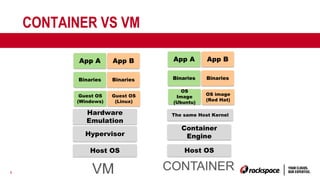
CONTAINER VS VM
Host OS
Hypervisor
App A
Binaries
Guest OS
(Windows)
App B
Binaries
Guest OS
(Linux)
Host OS
Container
Engine
App A
Binaries
OS
Image
(Ubuntu)
App B
Binaries
OS image
(Red Hat)
The same Host Kernel
VM CONTAINER
Hardware
Emulation
7
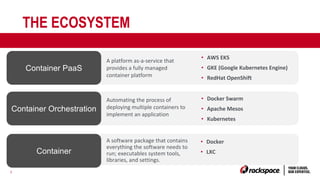
THE ECOSYSTEM
Container PaaS
A software package that contains
everything the software needs to
run; executables system tools,
libraries, and settings.
• Docker
• LXC
Container Orchestration
Container
Automating the process of
deploying multiple containers to
implement an application
• Docker Swarm
• Apache Mesos
• Kubernetes
A platform as-a-service that
provides a fully managed
container platform
• AWS EKS
• GKE (Google Kubernetes Engine)
• RedHat OpenShift
8
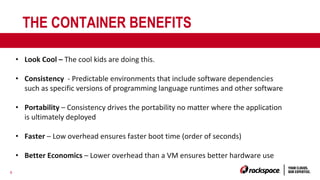
THE CONTAINER BENEFITS
• Look Cool – The cool kids are doing this.
• Consistency - Predictable environments that include software dependencies
such as specific versions of programming language runtimes and other software
• Portability – Consistency drives the portability no matter where the application
is ultimately deployed
• Faster – Low overhead ensures faster boot time (order of seconds)
• Better Economics – Lower overhead than a VM ensures better hardware use
9
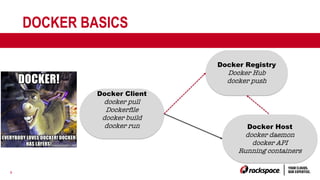
DOCKER BASICS
Docker Client
docker pull
Dockerfile
docker build
docker run
Docker Registry
Docker Hub
docker push
Docker Host
docker daemon
docker API
Running containers
10
DOCKER BASICS
• https://docs.docker.com/engine/getstarted/
• https://github.com/docker/labs
11
AGENDA
• Introduction & Recap
• Kubernetes
• EKS
• ECR
• AWS & CONTAINERS
• Q & A (You can ask questions in
chat at anytime)
12
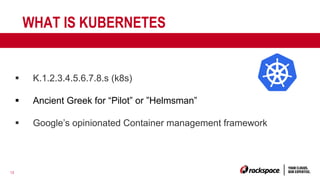
WHAT IS KUBERNETES
§ K.1.2.3.4.5.6.7.8.s (k8s)
§ Ancient Greek for “Pilot” or ”Helmsman”
§ Google’s opinionated Container management framework
13
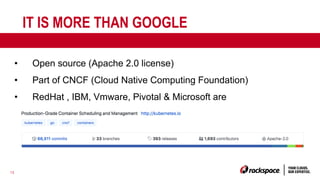
IT IS MORE THAN GOOGLE
• Open source (Apache 2.0 license)
• Part of CNCF (Cloud Native Computing Foundation)
• RedHat , IBM, Vmware, Pivotal & Microsoft are
contributing to it
14
AND IS WINNING…
§ The Container Management Battle
• Google has support for K8s
• Docker has support for K8s
• AWS has support for K8s
• Azure has support for K8s
• Red Hat Openshift uses K8s
15
KUBERNETES DESIGN GOALS
§ Primary goal is distributed micro services
§ But can cater for more traditional or stateful services
• Concept of statefulsets in 1.9/1.10 (persistent
storage, graceful deployment and termination,
network identifiers)
16
KUBERNETES DESIGN PRINCIPLES
§ Application defines/declares desired state, K8s maintains it
§ Lots of primitives to help with container-centric infrastructure
• Scheduling
• Auto-restarting/Auto-healing
• Application monitoring
• Service discovery & naming
• Secret management
• Storage
17
EXTENSIBLE
• Extensible – API for Plugins
• Calico/Flannel – Overlay networks
• CoreDNS – Service discovery using DNS
18
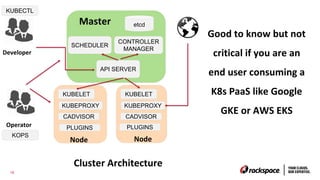
K8S DESIGN
18
Good to know but not
critical if you are an
end user consuming a
K8s PaaS like Google
GKE or AWS EKS
API SERVER
etcd
SCHEDULER
CONTROLLER
MANAGER
Master
KUBELET
KUBEPROXY
CADVISOR
Node
PLUGINS
KUBELET
KUBEPROXY
CADVISOR
Node
PLUGINS
Cluster Architecture
KUBECTL
Developer
Operator
KOPS
19
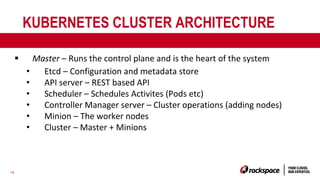
KUBERNETES CLUSTER ARCHITECTURE
§ Master – Runs the control plane and is the heart of the system
• Etcd – Configuration and metadata store
• API server – REST based API
• Scheduler – Schedules Activites (Pods etc)
• Controller Manager server – Cluster operations (adding nodes)
• Minion – The worker nodes
• Cluster – Master + Minions
20
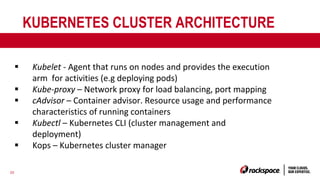
KUBERNETES CLUSTER ARCHITECTURE
§ Kubelet - Agent that runs on nodes and provides the execution
arm for activities (e.g deploying pods)
§ Kube-proxy – Network proxy for load balancing, port mapping
§ cAdvisor – Container advisor. Resource usage and performance
characteristics of running containers
§ Kubectl – Kubernetes CLI (cluster management and
deployment)
§ Kops – Kubernetes cluster manager
21
21
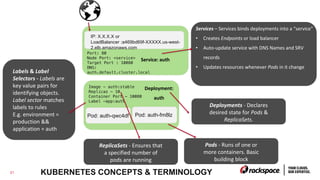
KUBERNETES CONCEPTS & TERMINOLOGY
Deployment:
auth
Image - auth:stable
Replicas - 10
Container Port - 10080
Label -app:auth
Pod: auth-fm8lzPod: auth-qwc4df
Deployments - Declares
desired state for Pods &
ReplicaSets.
Pods - Runs of one or
more containers. Basic
building block
ReplicaSets - Ensures that
a specified number of
pods are running
Service: auth
Port: 80
Node Port: <service>
Target Port : 10080
DNS:
auth.default.cluster.local
IP: X.X.X.X or
LoadBalancer :a469bd69f-XXXXX.us-west-
2.elb.amazonaws.com
Services – Services binds deployments into a “service”
• Creates Endpoints or load balancer
• Auto-update service with DNS Names and SRV
records
• Updates resources whenever Pods in it change
Labels & Label
Selectors - Labels are
key value pairs for
identifying objects.
Label sector matches
labels to rules
E.g. environment =
production &&
application = auth
22
22
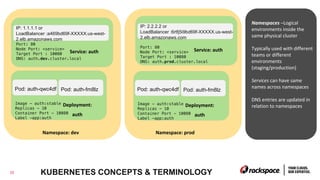
Deployment:
auth
Image - auth:stable
Replicas - 10
Container Port - 10080
Label -app:auth
Pod: auth-fm8lzPod: auth-qwc4df
Service: auth
IP: 1.1.1.1 or
LoadBalancer :a469bd69f-XXXXX.us-west-
2.elb.amazonaws.com
Namespace: dev
Deployment:
auth
Image - auth:stable
Replicas - 10
Container Port - 10080
Label -app:auth
Pod: auth-fm8lzPod: auth-qwc4df
Service: auth
Port: 80
Node Port: <service>
Target Port : 10080
DNS: auth.prod.cluster.local
IP: 2.2.2.2 or
LoadBalancer :6rtfj5i9bd69f-XXXXX.us-west-
2.elb.amazonaws.com
Namespace: prod
Port: 80
Node Port: <service>
Target Port : 10080
DNS: auth.dev.cluster.local
Namespaces –Logical
environments inside the
same physical cluster
Typically used with different
teams or different
environments
(staging/production)
Services can have same
names across namespaces
DNS entries are updated in
relation to namespaces
KUBERNETES CONCEPTS & TERMINOLOGY
23
KUBERNETES CONCEPTS & TERMINOLOGY
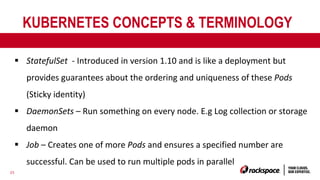
§ StatefulSet - Introduced in version 1.10 and is like a deployment but
provides guarantees about the ordering and uniqueness of these Pods
(Sticky identity)
§ DaemonSets – Run something on every node. E.g Log collection or storage
daemon
§ Job – Creates one of more Pods and ensures a specified number are
successful. Can be used to run multiple pods in parallel
24
AGENDA
• Introduction & Recap
• Kubernetes
• EKS
• ECR
• AWS & CONTAINERS
• Q & A (You can ask questions in
chat at anytime)
25
EKS (MANAGED KUBERNETES)
§ Fully managed Kubernetes cluster
§ High availability
§ Managed Upgrades
§ Automatically detects and replaces
unhealthy masters
§ Integrated
§ IAM Support
§ VPC Support
§ Autoscale models
§ Cloudwatch & Cloudtrail support
26
EKS (MANAGED KUBERNETES)
§ Certified Kubernetes Conformant
§ https://github.com/cncf/k8s-conformance
§ Kubernetes versions
• Currently 1.10
• Choice of 3 most recent versions (going forward)
• All the existing plugins and tooling from the Kubernetes
community supported on your workers
§ Open source theme
§ Many components are open source
27
EKS PRICING
• $0.20 per hour per cluster (About 144 per month)
• You also pay for worker node resources
- EC2 (instance sizes, reserved instances)
- EBS (Elastic Block Storage)
- Load balancer
- Bandwidth
28
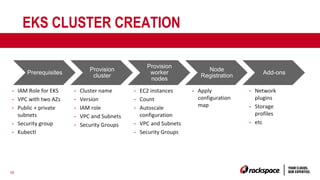
EKS CLUSTER CREATION
Prerequisites
Provision
cluster
Provision
worker
nodes
Node
Registration
Add-ons
- IAM Role for EKS
- VPC with two AZs
- Public + private
subnets
- Security group
- Kubectl
- Cluster name
- Version
- IAM role
- VPC and Subnets
- Security Groups
- EC2 instances
- Count
- Autoscale
configuration
- VPC and Subnets
- Security Groups
- Apply
configuration
map
- Network
plugins
- Storage
profiles
- etc
30
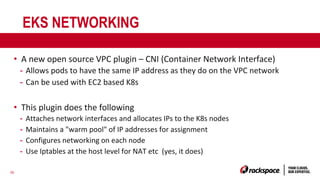
EKS NETWORKING
• A new open source VPC plugin – CNI (Container Network Interface)
- Allows pods to have the same IP address as they do on the VPC network
- Can be used with EC2 based K8s
• This plugin does the following
- Attaches network interfaces and allocates IPs to the K8s nodes
- Maintains a "warm pool" of IP addresses for assignment
- Configures networking on each node
- Use Iptables at the host level for NAT etc (yes, it does)
31
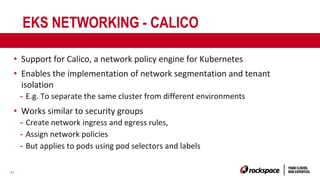
EKS NETWORKING - CALICO
• Support for Calico, a network policy engine for Kubernetes
• Enables the implementation of network segmentation and tenant
isolation
- E.g. To separate the same cluster from different environments
• Works similar to security groups
- Create network ingress and egress rules,
- Assign network policies
- But applies to pods using pod selectors and labels
32
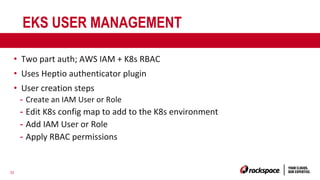
EKS USER MANAGEMENT
• Two part auth; AWS IAM + K8s RBAC
• Uses Heptio authenticator plugin
• User creation steps
- Create an IAM User or Role
- Edit K8s config map to add to the K8s environment
- Add IAM User or Role
- Apply RBAC permissions
33
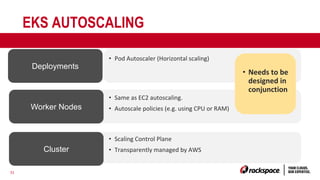
EKS AUTOSCALING
Deployments
• Scaling Control Plane
• Transparently managed by AWS
Worker Nodes
Cluster
• Same as EC2 autoscaling.
• Autoscale policies (e.g. using CPU or RAM)
• Pod Autoscaler (Horizontal scaling)
• Needs to be
designed in
conjunction
34
EKS LIMITATIONS & CONSIDERATIONS
• US West (Oregon) and US East (N.Virginia) only
• Limitations with ELB
- Native support for classic type
- Beta support for the application load balancer
- Alpha support for the network load balancer
• Limits to secondary IPs by instance types
- Impacts your Pod architecture
35
EKS LIMITATIONS & CONSIDERATIONS
• No Cloudwatch for the Cluster
- You can use your own plugins
• Security groups work at the ENI level and not the Pod
level. Limits isolation between Pods.
- Plugins like Calico can help overcome this
• Persistent volumes are limited to block(EBS). No EFS
support.
• No Fargate support
- Roadmap item for 2018
36
EKS(CONTAINER) BEST PRACTICES
• 12-factor app; https://12factor.net/ Best practices for
micro-services
• Have a logging strategy; i.e. consolidate logs from start
- Send application logs to Stdout and Stderr
37
EKS BEST PRACTICES
• Use separate clusters for environment separation
• Design networking requirements to match EC2 limits
• Autoscale models need to be careful consideration
(Deployments + EC2 autoscale)
• Version control Kubernetes configuration files
• Use Kubernetes labels and match them with AWS tags
38
EKS FURTHER READING PLAYING
• https://github.com/aws-samples/aws-workshop-for-kubernetes
• https://kubernetes.io/docs/setup/minikube/
39
AGENDA
• Introduction & Recap
• Kubernetes
• EKS
• ECR
• AWS & CONTAINERS
• Q & A (You can ask questions in
chat at anytime)
40
ECR
• Very simple service
• Same as Docker Hub
• Highly available Docker repository
• Integrated into IAM
• Lifecycle policies
41
ECR
• Only pay for data stored and the network transfer
• Can be used with on-premise Docker setups (with AWS cli)
• No public images (needs an IAM user)
• No private VPC endpoints (you are accessing over a public HTTPS
interface)
42
AGENDA
• Introduction & Recap
• Kubernetes
• EKS
• ECR
• AWS & CONTAINERS
• Q & A (You can ask questions in
chat at anytime)
43
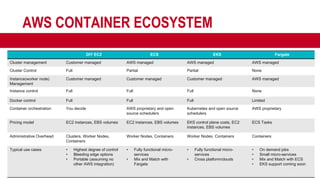
AWS CONTAINER ECOSYSTEM
DIY EC2 ECS EKS Fargate
Cluster management Customer managed AWS managed AWS managed AWS managed
Cluster Control Full Partial Partial None
Instance(worker node)
Management
Customer managed Customer managed Customer managed AWS managed
Instance control Full Full Full None
Docker control Full Full Full Limited
Container orchestration You decide AWS proprietary and open
source schedulers
Kubernetes and open source
schedulers
AWS proprietary
Pricing model EC2 instances, EBS volumes EC2 instances, EBS volumes EKS control plane costs, EC2
instances, EBS volumes
ECS Tasks
Administrative Overhead Clusters, Worker Nodes,
Containers
Worker Nodes, Containers Worker Nodes, Containers Containers
Typical use cases • Highest degree of control
• Bleeding edge options
• Portable (assuming no
other AWS integration)
• Fully functional micro-
services
• Mix and Match with
Fargate
• Fully functional micro-
services
• Cross platform/clouds
• On demand jobs
• Small micro-services
• Mix and Match with ECS
• EKS support coming soon
44
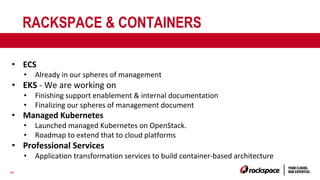
RACKSPACE & CONTAINERS
• ECS
• Already in our spheres of management
• EKS - We are working on
• Finishing support enablement & internal documentation
• Finalizing our spheres of management document
• Managed Kubernetes
• Launched managed Kubernetes on OpenStack.
• Roadmap to extend that to cloud platforms
• Professional Services
• Application transformation services to build container-based architecture
45
AGENDA
• Introduction & Recap
• Kubernetes
• EKS
• ECR
• AWS & CONTAINERS
• Q & A
Slides and Recording will be shared

Elastic Kubernetes Services (EKS)

  • 1.
    JUNE FANATICAL SUPPORT FOR AWSCUSTOMER WEBINAR: AMAZON EKS
  • 2.
    • WARNING :This session will be recorded !
  • 3.
  • 4.
    4 AGENDA • Introduction &Recap • Kubernetes • EKS • ECR • AWS & CONTAINERS • Q & A (You can ask questions in chat at anytime)
  • 5.
    5 AGENDA • Introduction &Recap • Kubernetes • EKS • ECR • AWS & CONTAINERS • Q & A (You can ask questions in chat at anytime)
  • 6.
    6 CONTAINER VS VM HostOS Hypervisor App A Binaries Guest OS (Windows) App B Binaries Guest OS (Linux) Host OS Container Engine App A Binaries OS Image (Ubuntu) App B Binaries OS image (Red Hat) The same Host Kernel VM CONTAINER Hardware Emulation
  • 7.
    7 THE ECOSYSTEM Container PaaS Asoftware package that contains everything the software needs to run; executables system tools, libraries, and settings. • Docker • LXC Container Orchestration Container Automating the process of deploying multiple containers to implement an application • Docker Swarm • Apache Mesos • Kubernetes A platform as-a-service that provides a fully managed container platform • AWS EKS • GKE (Google Kubernetes Engine) • RedHat OpenShift
  • 8.
    8 THE CONTAINER BENEFITS •Look Cool – The cool kids are doing this. • Consistency - Predictable environments that include software dependencies such as specific versions of programming language runtimes and other software • Portability – Consistency drives the portability no matter where the application is ultimately deployed • Faster – Low overhead ensures faster boot time (order of seconds) • Better Economics – Lower overhead than a VM ensures better hardware use
  • 9.
    9 DOCKER BASICS Docker Client dockerpull Dockerfile docker build docker run Docker Registry Docker Hub docker push Docker Host docker daemon docker API Running containers
  • 10.
  • 11.
    11 AGENDA • Introduction &Recap • Kubernetes • EKS • ECR • AWS & CONTAINERS • Q & A (You can ask questions in chat at anytime)
  • 12.
    12 WHAT IS KUBERNETES §K.1.2.3.4.5.6.7.8.s (k8s) § Ancient Greek for “Pilot” or ”Helmsman” § Google’s opinionated Container management framework
  • 13.
    13 IT IS MORETHAN GOOGLE • Open source (Apache 2.0 license) • Part of CNCF (Cloud Native Computing Foundation) • RedHat , IBM, Vmware, Pivotal & Microsoft are contributing to it
  • 14.
    14 AND IS WINNING… §The Container Management Battle • Google has support for K8s • Docker has support for K8s • AWS has support for K8s • Azure has support for K8s • Red Hat Openshift uses K8s
  • 15.
    15 KUBERNETES DESIGN GOALS §Primary goal is distributed micro services § But can cater for more traditional or stateful services • Concept of statefulsets in 1.9/1.10 (persistent storage, graceful deployment and termination, network identifiers)
  • 16.
    16 KUBERNETES DESIGN PRINCIPLES §Application defines/declares desired state, K8s maintains it § Lots of primitives to help with container-centric infrastructure • Scheduling • Auto-restarting/Auto-healing • Application monitoring • Service discovery & naming • Secret management • Storage
  • 17.
    17 EXTENSIBLE • Extensible –API for Plugins • Calico/Flannel – Overlay networks • CoreDNS – Service discovery using DNS
  • 18.
    18 K8S DESIGN 18 Good toknow but not critical if you are an end user consuming a K8s PaaS like Google GKE or AWS EKS API SERVER etcd SCHEDULER CONTROLLER MANAGER Master KUBELET KUBEPROXY CADVISOR Node PLUGINS KUBELET KUBEPROXY CADVISOR Node PLUGINS Cluster Architecture KUBECTL Developer Operator KOPS
  • 19.
    19 KUBERNETES CLUSTER ARCHITECTURE §Master – Runs the control plane and is the heart of the system • Etcd – Configuration and metadata store • API server – REST based API • Scheduler – Schedules Activites (Pods etc) • Controller Manager server – Cluster operations (adding nodes) • Minion – The worker nodes • Cluster – Master + Minions
  • 20.
    20 KUBERNETES CLUSTER ARCHITECTURE §Kubelet - Agent that runs on nodes and provides the execution arm for activities (e.g deploying pods) § Kube-proxy – Network proxy for load balancing, port mapping § cAdvisor – Container advisor. Resource usage and performance characteristics of running containers § Kubectl – Kubernetes CLI (cluster management and deployment) § Kops – Kubernetes cluster manager
  • 21.
    21 21 KUBERNETES CONCEPTS &TERMINOLOGY Deployment: auth Image - auth:stable Replicas - 10 Container Port - 10080 Label -app:auth Pod: auth-fm8lzPod: auth-qwc4df Deployments - Declares desired state for Pods & ReplicaSets. Pods - Runs of one or more containers. Basic building block ReplicaSets - Ensures that a specified number of pods are running Service: auth Port: 80 Node Port: <service> Target Port : 10080 DNS: auth.default.cluster.local IP: X.X.X.X or LoadBalancer :a469bd69f-XXXXX.us-west- 2.elb.amazonaws.com Services – Services binds deployments into a “service” • Creates Endpoints or load balancer • Auto-update service with DNS Names and SRV records • Updates resources whenever Pods in it change Labels & Label Selectors - Labels are key value pairs for identifying objects. Label sector matches labels to rules E.g. environment = production && application = auth
  • 22.
    22 22 Deployment: auth Image - auth:stable Replicas- 10 Container Port - 10080 Label -app:auth Pod: auth-fm8lzPod: auth-qwc4df Service: auth IP: 1.1.1.1 or LoadBalancer :a469bd69f-XXXXX.us-west- 2.elb.amazonaws.com Namespace: dev Deployment: auth Image - auth:stable Replicas - 10 Container Port - 10080 Label -app:auth Pod: auth-fm8lzPod: auth-qwc4df Service: auth Port: 80 Node Port: <service> Target Port : 10080 DNS: auth.prod.cluster.local IP: 2.2.2.2 or LoadBalancer :6rtfj5i9bd69f-XXXXX.us-west- 2.elb.amazonaws.com Namespace: prod Port: 80 Node Port: <service> Target Port : 10080 DNS: auth.dev.cluster.local Namespaces –Logical environments inside the same physical cluster Typically used with different teams or different environments (staging/production) Services can have same names across namespaces DNS entries are updated in relation to namespaces KUBERNETES CONCEPTS & TERMINOLOGY
  • 23.
    23 KUBERNETES CONCEPTS &TERMINOLOGY § StatefulSet - Introduced in version 1.10 and is like a deployment but provides guarantees about the ordering and uniqueness of these Pods (Sticky identity) § DaemonSets – Run something on every node. E.g Log collection or storage daemon § Job – Creates one of more Pods and ensures a specified number are successful. Can be used to run multiple pods in parallel
  • 24.
    24 AGENDA • Introduction &Recap • Kubernetes • EKS • ECR • AWS & CONTAINERS • Q & A (You can ask questions in chat at anytime)
  • 25.
    25 EKS (MANAGED KUBERNETES) §Fully managed Kubernetes cluster § High availability § Managed Upgrades § Automatically detects and replaces unhealthy masters § Integrated § IAM Support § VPC Support § Autoscale models § Cloudwatch & Cloudtrail support
  • 26.
    26 EKS (MANAGED KUBERNETES) §Certified Kubernetes Conformant § https://github.com/cncf/k8s-conformance § Kubernetes versions • Currently 1.10 • Choice of 3 most recent versions (going forward) • All the existing plugins and tooling from the Kubernetes community supported on your workers § Open source theme § Many components are open source
  • 27.
    27 EKS PRICING • $0.20per hour per cluster (About 144 per month) • You also pay for worker node resources - EC2 (instance sizes, reserved instances) - EBS (Elastic Block Storage) - Load balancer - Bandwidth
  • 28.
    28 EKS CLUSTER CREATION Prerequisites Provision cluster Provision worker nodes Node Registration Add-ons -IAM Role for EKS - VPC with two AZs - Public + private subnets - Security group - Kubectl - Cluster name - Version - IAM role - VPC and Subnets - Security Groups - EC2 instances - Count - Autoscale configuration - VPC and Subnets - Security Groups - Apply configuration map - Network plugins - Storage profiles - etc
  • 29.
    30 EKS NETWORKING • Anew open source VPC plugin – CNI (Container Network Interface) - Allows pods to have the same IP address as they do on the VPC network - Can be used with EC2 based K8s • This plugin does the following - Attaches network interfaces and allocates IPs to the K8s nodes - Maintains a "warm pool" of IP addresses for assignment - Configures networking on each node - Use Iptables at the host level for NAT etc (yes, it does)
  • 30.
    31 EKS NETWORKING -CALICO • Support for Calico, a network policy engine for Kubernetes • Enables the implementation of network segmentation and tenant isolation - E.g. To separate the same cluster from different environments • Works similar to security groups - Create network ingress and egress rules, - Assign network policies - But applies to pods using pod selectors and labels
  • 31.
    32 EKS USER MANAGEMENT •Two part auth; AWS IAM + K8s RBAC • Uses Heptio authenticator plugin • User creation steps - Create an IAM User or Role - Edit K8s config map to add to the K8s environment - Add IAM User or Role - Apply RBAC permissions
  • 32.
    33 EKS AUTOSCALING Deployments • ScalingControl Plane • Transparently managed by AWS Worker Nodes Cluster • Same as EC2 autoscaling. • Autoscale policies (e.g. using CPU or RAM) • Pod Autoscaler (Horizontal scaling) • Needs to be designed in conjunction
  • 33.
    34 EKS LIMITATIONS &CONSIDERATIONS • US West (Oregon) and US East (N.Virginia) only • Limitations with ELB - Native support for classic type - Beta support for the application load balancer - Alpha support for the network load balancer • Limits to secondary IPs by instance types - Impacts your Pod architecture
  • 34.
    35 EKS LIMITATIONS &CONSIDERATIONS • No Cloudwatch for the Cluster - You can use your own plugins • Security groups work at the ENI level and not the Pod level. Limits isolation between Pods. - Plugins like Calico can help overcome this • Persistent volumes are limited to block(EBS). No EFS support. • No Fargate support - Roadmap item for 2018
  • 35.
    36 EKS(CONTAINER) BEST PRACTICES •12-factor app; https://12factor.net/ Best practices for micro-services • Have a logging strategy; i.e. consolidate logs from start - Send application logs to Stdout and Stderr
  • 36.
    37 EKS BEST PRACTICES •Use separate clusters for environment separation • Design networking requirements to match EC2 limits • Autoscale models need to be careful consideration (Deployments + EC2 autoscale) • Version control Kubernetes configuration files • Use Kubernetes labels and match them with AWS tags
  • 37.
    38 EKS FURTHER READINGPLAYING • https://github.com/aws-samples/aws-workshop-for-kubernetes • https://kubernetes.io/docs/setup/minikube/
  • 38.
    39 AGENDA • Introduction &Recap • Kubernetes • EKS • ECR • AWS & CONTAINERS • Q & A (You can ask questions in chat at anytime)
  • 39.
    40 ECR • Very simpleservice • Same as Docker Hub • Highly available Docker repository • Integrated into IAM • Lifecycle policies
  • 40.
    41 ECR • Only payfor data stored and the network transfer • Can be used with on-premise Docker setups (with AWS cli) • No public images (needs an IAM user) • No private VPC endpoints (you are accessing over a public HTTPS interface)
  • 41.
    42 AGENDA • Introduction &Recap • Kubernetes • EKS • ECR • AWS & CONTAINERS • Q & A (You can ask questions in chat at anytime)
  • 42.
    43 AWS CONTAINER ECOSYSTEM DIYEC2 ECS EKS Fargate Cluster management Customer managed AWS managed AWS managed AWS managed Cluster Control Full Partial Partial None Instance(worker node) Management Customer managed Customer managed Customer managed AWS managed Instance control Full Full Full None Docker control Full Full Full Limited Container orchestration You decide AWS proprietary and open source schedulers Kubernetes and open source schedulers AWS proprietary Pricing model EC2 instances, EBS volumes EC2 instances, EBS volumes EKS control plane costs, EC2 instances, EBS volumes ECS Tasks Administrative Overhead Clusters, Worker Nodes, Containers Worker Nodes, Containers Worker Nodes, Containers Containers Typical use cases • Highest degree of control • Bleeding edge options • Portable (assuming no other AWS integration) • Fully functional micro- services • Mix and Match with Fargate • Fully functional micro- services • Cross platform/clouds • On demand jobs • Small micro-services • Mix and Match with ECS • EKS support coming soon
  • 43.
    44 RACKSPACE & CONTAINERS •ECS • Already in our spheres of management • EKS - We are working on • Finishing support enablement & internal documentation • Finalizing our spheres of management document • Managed Kubernetes • Launched managed Kubernetes on OpenStack. • Roadmap to extend that to cloud platforms • Professional Services • Application transformation services to build container-based architecture
  • 44.
    45 AGENDA • Introduction &Recap • Kubernetes • EKS • ECR • AWS & CONTAINERS • Q & A Slides and Recording will be shared