©2023 F5
1
Welcome to Unit 2
©2023 F5
2
üAttend all webinars
üComplete all hands-on labs
Use same email for all activities
Obtain Your Badge!
©2023 F5
3
üJoin #microservices-march
üGet help with Microservices
March questions
üConnect with NGINX experts
nginxcommunity Slack
©2023 F5
4
Agenda
1. Lecture
2. Q&A
3. Hands-On Lab with Office Hours
(only for live session – if you’re watching this on
demand, complete the lab on your own time)
©2023 F5
5
ROBERT HAYNES
Sr. Technical Marketing Manager
NGINX
Meet the Speaker
©2023 F5
6
What Are Secrets?
©2023 F5
7
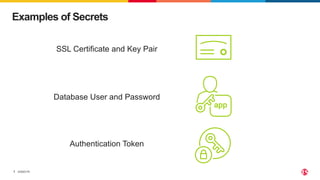
Examples of Secrets
SSL Certificate and Key Pair
Database User and Password
Authentication Token
©2023 F5
8
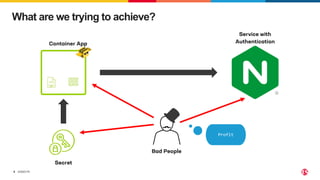
What are we trying to achieve?
Service with
Authentication
Secret
Container App
Bad People
Profit
©2023 F5
9
Key Principles
©2023 F5
10
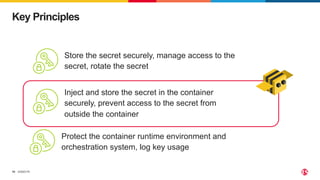
Key Principles
Store the secret securely, manage access to the
secret, rotate the secret
Protect the container runtime environment and
orchestration system, log key usage
Inject and store the secret in the container
securely, prevent access to the secret from
outside the container
©2023 F5
11
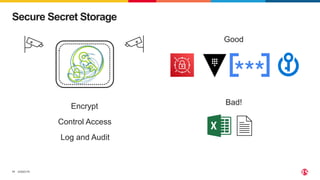
Secure Secret Storage
Encrypt
Control Access
Log and Audit
Good
Bad!
©2023 F5
12
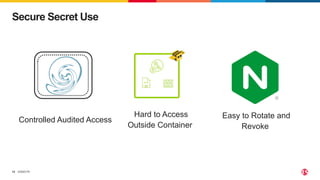
Secure Secret Use
Controlled Audited Access
Hard to Access
Outside Container
Easy to Rotate and
Revoke
©2023 F5
13
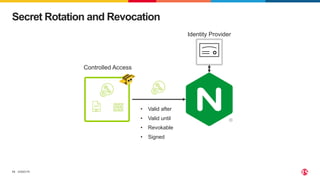
Secret Rotation and Revocation
Controlled Access
Identity Provider
• Valid after
• Valid until
• Revokable
• Signed
©2023 F5
14
How to Use Secrets in
Containers
©2023 F5
15
Never Hard Code
Container image with
secret in code / binary
*e.g. match a JWT with: ^[A-Za-z0-9_-]{2,}(?:.[A-Za-z0-9_-]{2,}){2}$
Dump
filesystem
Binary
Strings
command
Search
For
patterns*
Profit
©2023 F5
16
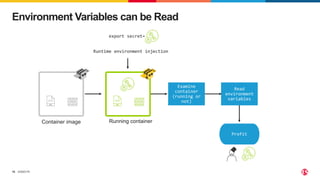
Environment Variables can be Read
Container image Running container
export secret=
Runtime environment injection
Examine
container
(running or
not)
Read
environment
variables
Profit
©2023 F5
17
Use Secrets
Container image Running container with
secret stored in filesystem
0
Secret not
in env vars
Secret not
in
filesystem
dump
dump
filesystem
Examine
container
Profit
Compromise
Host
©2023 F5
18
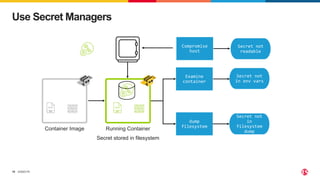
Use Secret Managers
Container Image Running Container
Secret stored in filesystem
0
Secret not
in env vars
Secret not
in
filesystem
dump
dump
filesystem
Examine
container
Secret not
readable
Compromise
host
©2023 F5
19
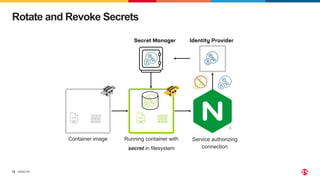
Rotate and Revoke Secrets
Container image Running container with
secret in filesystem
0
Service authorizing
connection
Identity Provider
Secret Manager
©2023 F5
20
DEMO TIME
©2023 F5
21
Q&A
©2023 F5
22
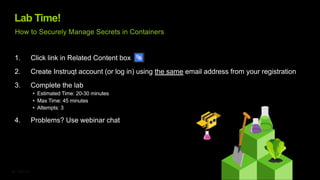
Lab Time!
1. Click link in Related Content box
2. Create Instruqt account (or log in) using the same email address from your registration
3. Complete the lab
• Estimated Time: 20-30 minutes
• Max Time: 45 minutes
• Attempts: 3
4. Problems? Use webinar chat
How to Securely Manage Secrets in Containers
©2023 F5
23
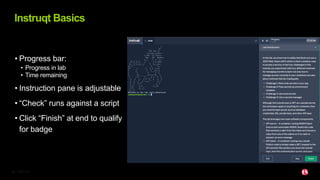
• Progress bar:
• Progress in lab
• Time remaining
• Instruction pane is adjustable
• “Check” runs against a script
• Click “Finish” at end to qualify
for badge
Instruqt Basics
©2023 F5
24
Wrap Up
Unit 2: Microservices Secrets Management 101

Unit 2: Microservices Secrets Management 101

  • 1.
  • 2.
    ©2023 F5 2 üAttend allwebinars üComplete all hands-on labs Use same email for all activities Obtain Your Badge!
  • 3.
    ©2023 F5 3 üJoin #microservices-march üGethelp with Microservices March questions üConnect with NGINX experts nginxcommunity Slack
  • 4.
    ©2023 F5 4 Agenda 1. Lecture 2.Q&A 3. Hands-On Lab with Office Hours (only for live session – if you’re watching this on demand, complete the lab on your own time)
  • 5.
    ©2023 F5 5 ROBERT HAYNES Sr.Technical Marketing Manager NGINX Meet the Speaker
  • 6.
  • 7.
    ©2023 F5 7 Examples ofSecrets SSL Certificate and Key Pair Database User and Password Authentication Token
  • 8.
    ©2023 F5 8 What arewe trying to achieve? Service with Authentication Secret Container App Bad People Profit
  • 9.
  • 10.
    ©2023 F5 10 Key Principles Storethe secret securely, manage access to the secret, rotate the secret Protect the container runtime environment and orchestration system, log key usage Inject and store the secret in the container securely, prevent access to the secret from outside the container
  • 11.
    ©2023 F5 11 Secure SecretStorage Encrypt Control Access Log and Audit Good Bad!
  • 12.
    ©2023 F5 12 Secure SecretUse Controlled Audited Access Hard to Access Outside Container Easy to Rotate and Revoke
  • 13.
    ©2023 F5 13 Secret Rotationand Revocation Controlled Access Identity Provider • Valid after • Valid until • Revokable • Signed
  • 14.
    ©2023 F5 14 How toUse Secrets in Containers
  • 15.
    ©2023 F5 15 Never HardCode Container image with secret in code / binary *e.g. match a JWT with: ^[A-Za-z0-9_-]{2,}(?:.[A-Za-z0-9_-]{2,}){2}$ Dump filesystem Binary Strings command Search For patterns* Profit
  • 16.
    ©2023 F5 16 Environment Variablescan be Read Container image Running container export secret= Runtime environment injection Examine container (running or not) Read environment variables Profit
  • 17.
    ©2023 F5 17 Use Secrets Containerimage Running container with secret stored in filesystem 0 Secret not in env vars Secret not in filesystem dump dump filesystem Examine container Profit Compromise Host
  • 18.
    ©2023 F5 18 Use SecretManagers Container Image Running Container Secret stored in filesystem 0 Secret not in env vars Secret not in filesystem dump dump filesystem Examine container Secret not readable Compromise host
  • 19.
    ©2023 F5 19 Rotate andRevoke Secrets Container image Running container with secret in filesystem 0 Service authorizing connection Identity Provider Secret Manager
  • 20.
  • 21.
  • 22.
    ©2023 F5 22 Lab Time! 1.Click link in Related Content box 2. Create Instruqt account (or log in) using the same email address from your registration 3. Complete the lab • Estimated Time: 20-30 minutes • Max Time: 45 minutes • Attempts: 3 4. Problems? Use webinar chat How to Securely Manage Secrets in Containers
  • 23.
    ©2023 F5 23 • Progressbar: • Progress in lab • Time remaining • Instruction pane is adjustable • “Check” runs against a script • Click “Finish” at end to qualify for badge Instruqt Basics
  • 24.