Practical Deep Learning Examples
with MATLAB
2 | Practical Deep Learning Examples with MATLAB
This ebook builds on Introducing Deep Learning with MATLAB, which
answered the question “What is deep learning?” Here, we show you
how it’s done. We’ll demonstrate three approaches to training a deep
learning network:
•	 Training a network from scratch
•	 Using transfer learning to train an existing network
•	 Training an existing network to perform semantic segmentation
These examples focus on image classification. But deep learning has be-
come increasingly popular for other applications as well. In the second
part of the ebook, we present two examples showing how many of the
deep learning techniques used on images can also be applied to signal
data.
All the examples and code are available for download.
Introduction
Review the Basics
•	 What Is Deep Learning? 3:33
•	 Deep Learning vs. Machine Learning 3:48
3 | Practical Deep Learning Examples with MATLAB
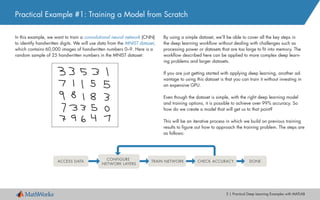
In this example, we want to train a convolutional neural network (CNN)
to identify handwritten digits. We will use data from the MNIST dataset,
which contains 60,000 images of handwritten numbers 0–9. Here is a
random sample of 25 handwritten numbers in the MNIST dataset:
Practical Example #1: Training a Model from Scratch
By using a simple dataset, we’ll be able to cover all the key steps in
the deep learning workflow without dealing with challenges such as
processing power or datasets that are too large to fit into memory. The
workflow described here can be applied to more complex deep learn-
ing problems and larger datasets.
If you are just getting started with applying deep learning, another ad-
vantage to using this dataset is that you can train it without investing in
an expensive GPU.
Even though the dataset is simple, with the right deep learning model
and training options, it is possible to achieve over 99% accuracy. So
how do we create a model that will get us to that point?
This will be an iterative process in which we build on previous training
results to figure out how to approach the training problem. The steps are
as follows:
DONECHECK ACCURACYTRAIN NETWORK
CONFIGURE
NETWORK LAYERS
ACCESS DATA
4 | Practical Deep Learning Examples with MATLAB
We can check the size and class of the data by typing whos in the
command window.
The MNIST images are quite small—only 28 x 28 pixels—and there are
60,000 training images in total.
The next task would be image labeling, but since the MNIST images
come with labels, we can skip that tedious step and quickly move on to
building our neural network.
1. Accessing the Data
We begin by downloading the MNIST images into MATLAB®
. Datasets
are stored in many different file types. This data is stored as binary files,
which MATLAB can quickly use and reshape into images.
These lines of code will read an original binary file and create an array
of all the training images:
rawImgDataTrain = uint8 (fread(fid, numImg * numRows * numCols,... 	
	 'uint8'));
% Reshape the data part into a 4D array
rawImgDataTrain = reshape(rawImgDataTrain, [numRows, numCols,...
	numImgs]);
imgDataTrain(:,:,1,ii) = uint8(rawImgDataTrain(:,:,ii));
>> whos imgDataTrain
Name			 Size			 Bytes Class
imgDataTrain 28x28x1x60000			 47040000 uint8
5 | Practical Deep Learning Examples with MATLAB
We’ll be building a CNN, the most common kind of
deep learning network.
About CNNs
A CNN passes an image through the network layers and outputs a final class. The net-
work can have tens or hundreds of layers, with each layer learning to detect different
features. Filters are applied to each training image at different resolutions, and the output
of each convolved image is used as the input to the next layer. The filters can start as very
simple features, such as brightness and edges, and increase in complexity to features that
uniquely define the object as the layers progress.
Learn More
What Is a Convolutional Neural Network? 4:44
When building a network from scratch, it’s a good idea to start with a
simple combination of commonly used layers—the lack of complexity
will make debugging much easier—but we’ll probably need to add a
few more layers to achieve the accuracy we’re aiming for.
2. Creating and Configuring Network Layers
Commonly Used Network Layers
Convolution puts the input images through a set of convolutional filters, each of which
activates certain features from the images.
Rectified linear unit (ReLU) allows for faster and more effective training by mapping nega-
tive values to zero and maintaining positive values.
Pooling simplifies the output by performing nonlinear downsampling, reducing the number
of parameters that the network needs to learn about.
Fully connected layers “flatten” the network’s 2D spatial features into a 1D vector that rep-
resents image-level features for classification purposes.
Softmax provides probabilities for each category in the dataset.
layers = [ imageInputLayer([28 28 1])
convolution2dLayer(5,20)
reluLayer
maxPooling2dLayer(2, 'Stride', 2)
fullyConnectedLayer(10)
softmaxLayer
classificationLayer() ]
6 | Practical Deep Learning Examples with MATLAB
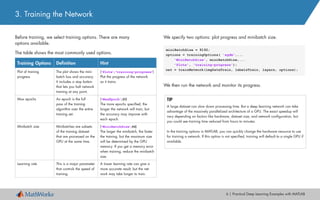
Before training, we select training options. There are many
options available.
The table shows the most commonly used options.
3. Training the Network
We specify two options: plot progress and minibatch size.
We then run the network and monitor its progress.
Training Options Definition Hint
Plot of training
progress
The plot shows the mini-
batch loss and accuracy.
It includes a stop button
that lets you halt network
training at any point.
('Plots','training-progress')
Plot the progress of the network
as it trains.
Max epochs An epoch is the full
pass of the training
algorithm over the entire
training set.
('MaxEpoch',20)
The more epochs specified, the
longer the network will train, but
the accuracy may improve with
each epoch.
Minibatch size Minibatches are subsets
of the training dataset
that are processed on the
GPU at the same time.
('MiniBatchSize',64)
The larger the minibatch, the faster
the training, but the maximum size
will be determined by the GPU
memory. If you get a memory error
when training, reduce the minibatch
size.
Learning rate This is a major parameter
that controls the speed of
training.
A lower learning rate can give a
more accurate result, but the net-
work may take longer to train.
TIP
A large dataset can slow down processing time. But a deep learning network can take
advantage of the massively parallelized architecture of a GPU. The exact speedup will
vary depending on factors like hardware, dataset size, and network configuration, but
you could see training time reduced from hours to minutes.
In the training options in MATLAB, you can quickly change the hardware resource to use
for training a network. If this option is not specified, training will default to a single GPU if
available.
miniBatchSize = 8192;
options = trainingOptions( 'sgdm',...
'MiniBatchSize', miniBatchSize,...
'Plots', 'training-progress');
net = trainNetwork(imgDataTrain, labelsTrain, layers, options);
7 | Practical Deep Learning Examples with MATLAB
We can stop training and return the current state of the network by
clicking the stop button in the top right corner of the screen. Once the
execution stops, we need to restart the training from the beginning—we
cannot resume from the point where it stopped.
4. Checking Network Accuracy
Our goal is to have the accuracy of the model increase over time. As the network trains, the progress plot appears.
Our model seems to have stopped improving after the 28th iteration and
then dropped to approximately 10% accuracy. This is a common oc-
currence when training a network from scratch. It means the network is
unable to converge on a solution. The accuracy has reached a plateau,
and is no longer improving. There is no need to continue—we can stop
the training and try some different approaches.
8 | Practical Deep Learning Examples with MATLAB
4. Checking Network Accuracy
There are many ways to adjust the accuracy of the network.
For example, we could:
•	 Increase the number of training images
•	 Increase the quality of the training images
•	 Alter the training options
•	 Alter the network configuration (for example, by adding, removing,
or reorganizing layers)
We’ll try altering the training options and the network configuration.
Changing Training Options
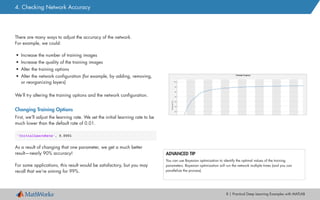
First, we’ll adjust the learning rate. We set the initial learning rate to be
much lower than the default rate of 0.01.
'InitialLearnRate', 0.0001
As a result of changing that one parameter, we get a much better
result—nearly 90% accuracy!
For some applications, this result would be satisfactory, but you may
recall that we’re aiming for 99%.
ADVANCED TIP
You can use Bayesian optimization to identify the optimal values of the training
parameters. Bayesian optimization will run the network multiple times (and you can
parallelize the process).
9 | Practical Deep Learning Examples with MATLAB
Changing the Network Configuration
Getting to 99% from 90% requires a deeper network and many rounds
of trial and error. We add more layers, including batch normalization
layers, which will help speed up the network convergence (the point at
which it responds correctly to new input).
layers = [
imageInputLayer([28 28 1])
convolution2dLayer(3,16,'Padding',1)
batchNormalizationLayer
reluLayer
maxPooling2dLayer(2,'Stride',2)
convolution2dLayer(3,32,'Padding',1)
batchNormalizationLayer
reluLayer
maxPooling2dLayer(2,'Stride',2)
convolution2dLayer(3,64,'Padding',1)
batchNormalizationLayer
reluLayer
fullyConnectedLayer(10)
softmaxLayer
classificationLayer];
The network is now “deeper.” This time, we’ll change the network but
leave the training options the same as they were before.
After the network has trained, we test it on 10,000 images.
This network achieves the highest accuracy of all—around 99%. We
can now use it to identify handwritten letters in online images, or even in
a live video stream.
Learn More
Training a Neural Network from Scratch with MATLAB 5:13
Deep Learning in 11 Lines of MATLAB Code 2:38
predLabelsTest = net.classify(imgDataTest);
accuracy = sum(predLabelsTest == labelsTest) / numel(labelsTest)
accuracy = 0.9880
4. Checking Network Accuracy
10 | Practical Deep Learning Examples with MATLAB
Practical Example #2: Transfer Learning
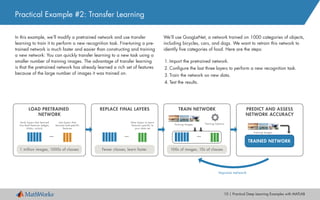
We’ll use GoogLeNet, a network trained on 1000 categories of objects,
including bicycles, cars, and dogs. We want to retrain this network to
identify five categories of food. Here are the steps:
1.	Import the pretrained network.
2.	Configure the last three layers to perform a new recognition task.
3.	Train the network on new data.
4.	Test the results.
In this example, we’ll modify a pretrained network and use transfer
learning to train it to perform a new recognition task. Fine-tuning a pre-
trained network is much faster and easier than constructing and training
a new network: You can quickly transfer learning to a new task using a
smaller number of training images. The advantage of transfer learning
is that the pretrained network has already learned a rich set of features
because of the large number of images it was trained on.
PREDICT AND ASSESS
NETWORK ACCURACY
Training Images
TRAINED NETWORK
TRAIN NETWORK
100s of images, 10s of classes
...
Training OptionsTraining Images
Improve network
REPLACE FINAL LAYERS
Fewer classes, learn faster
...
New layers to learn
features specific to
your data set
LOAD PRETRAINED
NETWORK
1 million images, 1000s of classes
...
Early layers that learned
low-level features (edges,
blobs, colors)
Last layers that
learned task-specific
features
11 | Practical Deep Learning Examples with MATLAB
1. Importing a Pretrained Network
We can import GoogLeNet in one line of code:
With a pretrained network, most of the heavy lifting of setting up the net-
work (selecting and organizing the layers) has already been done. This
means we can test the network on images in the categories the network
was original trained on without any reconfiguring:
TIP
Use this line of code to see all 1000 categories that GoogLeNet is trained on:
class_names = net.Layers(end).ClassNames;
Transfer Learning Tips
•	 Start with a highly accurate network. If a network only performs at 50% on its original
recognition task, it is unlikely to be accurate on a new recognition task.
•	 A model will probably be more accurate if the new recognition categories have similar
features to the original ones. For example, a network trained on dogs will probably
learn other animals relatively quickly.
% Load a pretrained network
net = googlenet;
%% Test it on an image
img = imread('peppers.png');
imgLabel = net.classify(imresize(img, [224 224]));
googlenet prediction: bell pepper
12 | Practical Deep Learning Examples with MATLAB
2. Configuring the Network to Perform a New Task
To train GoogLeNet to classify new images, we simply reconfigure the
last three layers of the network. These layers contain the information
needed to combine the features that the network extracts into class prob-
abilities and labels. GoogLeNet has 144 layers. Here we display the
last 5 layers of the network.
>>net.Layers(end-4:end)
We’ll reset layers 143 and 144, a softmax layer and a classification
output layer. These layers are responsible for assigning the correct cat-
egories to the input images. We want these layers to correspond to the
new categories, not to the ones that the original network learned. We
set the final fully connected layer to the same size as the number of
classes in the new dataset—five in this example.
TIP
To make speed of learning in the new layers faster than in the original layers, increase the
learning rate of the fully connected layer.
lgraph = removeLayers(lgraph, {'loss3-classifier', 'prob', ...
	 'output'});
numClasses = numel(unique(categories(trainDS.Labels)));
newLayers = [
	 fullyConnectedLayer(numClasses, 'Name','fc',...
	 'WeightLearnRateFactor',20,'BiasLearnRateFactor',20)
	 softmaxLayer('Name','softmax')
	 classificationLayer('Name','classoutput')];
lgraph = addLayers(lgraph,newLayers);
140 'pool5-7x7_sl' Average Pooling
141 'pool5-drop_7x7_sl' Dropout
142 'loss3-classifier' Fully Connected
143 'prob' Softmax
144 'output' Classification Output
13 | Practical Deep Learning Examples with MATLAB
3. Training the Network on New Data
As with training a network from scratch, to increase the network’s accu-
racy we adjust some of the training options (in this example, batch size,
learning rate, and validation data).
Training time for this model can vary significantly depending on the
hardware used among other factors. A single Tesla P100 GPU can train
this model in roughly 20 minutes.
opts = trainingOptions('sgdm','InitialLearnRate',0.001,...
	 'ValidationData',valDS,...
	 'Plots','training-progress',...
	 'MiniBatchSize',64,...
	 'ValidationPatience',3);
% Training with the optimized set of hyperparameters
tic
disp('Initialization may take up to a minute before training
begins')
net = trainNetwork(trainDS, layers_train, opts);
toc
TIP
Use tic and toc to quickly see how long it takes the training to run. tic starts a
stopwatch timer to measure performance. toc stops the timer and reads the elapsed time
displayed in the command window.
TIP
If you get an out-of-memory error for the GPU, lower the 'MiniBatchSize' value.
14 | Practical Deep Learning Examples with MATLAB
4. Evaluating the Network
Now that the network is trained, it is time to see how well it performs
on the new data.
The confusion matrix shows the network’s predictions for 150 images in
each category. If all values on the diagonal were 150, this would indi-
cate that each test image was correctly classified. Clearly, for our net-
work, this is not the case. The values outside the diagonal give a sense
of which category is getting misclassified. This can help direct us to
where we should investigate our data.
The final accuracy after training the model is 83%. While this is suffi-
cient for our example, it would not be acceptable for a real-world appli-
cation. To increase the accuracy of the model for a real-world applica-
tion, we’d continue to iterate, revisiting the training options, inspecting
the data, and reconfiguring the network.
% Classify all images from test dataset
[labels,err_test] = classify(net, testDS);
accuracy_default = sum(labels == testDS.Labels)/numel(labels);
disp(['Test accuracy is ' num2str(accuracy_default)])
15 | Practical Deep Learning Examples with MATLAB
Even if you ultimately opt to create your own network from scratch,
transfer learning can be an excellent starting point for learning about
deep learning: You can take advantage of networks developed by ex-
perts in the field, change a few layers, and begin training—and since
the model has already learned many features from the original training
dataset, it needs less training time and fewer training images than a
model developed from scratch.
Learn More
Pretrained Convolutional Neural Networks
Transfer Learning Using GoogLeNet
Transfer Learning in 10 Lines of MATLAB Code 4:00
Transfer Learning with Neural Networks in MATLAB 4:06
4. Evaluating the Network
Finally, we visually verify the network’s performance on new images.
[label,conf] = classify(net,im);
% classify a random image
imshow(im_display);
title(sprintf('%s %.2f, actual %s', ...
	 char(label),max(conf),char(actualLabel))
french_fries 0.89, actual french_fries sushi 0.58, actual sushi
16 | Practical Deep Learning Examples with MATLAB
Practical Example #3: Semantic Segmentation
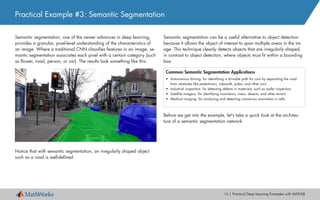
Semantic segmentation, one of the newer advances in deep learning,
provides a granular, pixel-level understanding of the characteristics of
an image. Where a traditional CNN classifies features in an image, se-
mantic segmentation associates each pixel with a certain category (such
as flower, road, person, or car). The results look something like this:
Notice that with semantic segmentation, an irregularly shaped object
such as a road is well-defined.
Semantic segmentation can be a useful alternative to object detection
because it allows the object of interest to span multiple areas in the im-
age. This technique cleanly detects objects that are irregularly shaped,
in contrast to object detection, where objects must fit within a bounding
box.
Before we get into the example, let’s take a quick look at the architec-
ture of a semantic segmentation network.
Common Semantic Segmentation Applications
•	 Autonomous driving: for identifying a drivable path for cars by separating the road
from obstacles like pedestrians, sidewalk, poles, and other cars
•	 Industrial inspection: for detecting defects in materials, such as wafer inspection
•	 Satellite imagery: for identifying mountains, rivers, deserts, and other terrain
•	 Medical imaging: for analyzing and detecting cancerous anomalies in cells
17 | Practical Deep Learning Examples with MATLAB
Semantic Segmentation Network Architecture
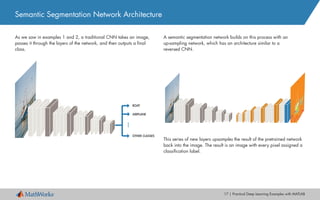
As we saw in examples 1 and 2, a traditional CNN takes an image,
passes it through the layers of the network, and then outputs a final
class.
A semantic segmentation network builds on this process with an
up-sampling network, which has an architecture similar to a
reversed CNN.
This series of new layers upsamples the result of the pretrained network
back into the image. The result is an image with every pixel assigned a
classification label.
18 | Practical Deep Learning Examples with MATLAB
1. Importing a Pretrained Network
In this example we want to build a network that an autonomous driving
system can use to detect clear road space, driving lanes, and sidewalks.
The steps are as follows:
1.	Import a pretrained network.
2.	Load in the dataset.
3.	Set up the network.
4.	Train the network.
5.	Evaluate the network’s accuracy.
We could train a network from scratch, but for this example, we’ll use
a pretrained network—as we saw in the previous example, we can test
a pretrained network on images in the categories that it was originally
trained on without reconfiguring it.
Our pretrained network is the VGG-16. Used in the ImageNet
Large-Scale Visual Recognition Challenge (ILSVRC), VGG-16 is trained
on more than a million images and can classify images into 1000 ob-
ject categories.
Importing the VGG-16 takes just one line of MATLAB code:
% Download and install Neural Network Toolbox Model for VGG-16
Network support package.
vgg16;
19 | Practical Deep Learning Examples with MATLAB
2. Loading in the Dataset
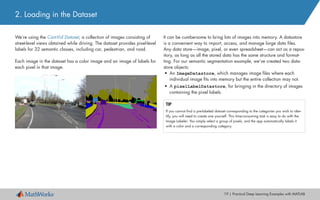
We’re using the CamVid Dataset, a collection of images consisting of
street-level views obtained while driving. The dataset provides pixel-level
labels for 32 semantic classes, including car, pedestrian, and road.
Each image in the dataset has a color image and an image of labels for
each pixel in that image.
It can be cumbersome to bring lots of images into memory. A datastore
is a convenient way to import, access, and manage large data files.
Any data store—image, pixel, or even spreadsheet—can act as a repos-
itory, as long as all the stored data has the same structure and format-
ting. For our semantic segmentation example, we’ve created two data-
store objects:
•	 An ImageDatastore, which manages image files where each
individual image fits into memory but the entire collection may not.
•	 A pixelLabelDatastore, for bringing in the directory of images
containing the pixel labels.
TIP
If you cannot find a pre-labeled dataset corresponding to the categories you wish to iden-
tify, you will need to create one yourself. This time-consuming task is easy to do with the
Image Labeler: You simply select a group of pixels, and the app automatically labels it
with a color and a corresponding category.
20 | Practical Deep Learning Examples with MATLAB
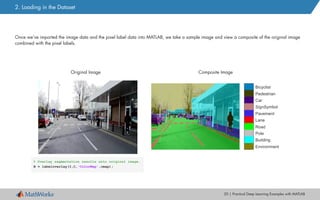
Once we’ve imported the image data and the pixel label data into MATLAB, we take a sample image and view a composite of the original image
combined with the pixel labels.
Original Image Composite Image
% Overlay segmentation results onto original image.
B = labeloverlay(I,C,'ColorMap',cmap);
2. Loading in the Dataset
21 | Practical Deep Learning Examples with MATLAB
Data augmentation is a useful technique for improving the accuracy of
the trained model. In data augmentation, you increase the number of
variations in the training images by adding altered versions of the
original images. The most common types of data augmentation are
image transformations: rotation, translation, and scale.
In this example, we incorporate a random translation.
Here’s an example of a new image created by shifting the original
image 10 pixels to the left.
While the effect of this translation is subtle, it can increase the robust-
ness of the deep learning network by forcing it to learn and understand
slight variations, which are very likely to occur in a real-world system.
augmenter = imageDataAugmenter('RandXTranslation',...
	 [-10 10],'RandYTranslation',[-10 10]);
2. Loading in the Dataset
22 | Practical Deep Learning Examples with MATLAB
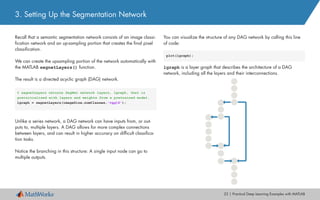
Recall that a semantic segmentation network consists of an image classi-
fication network and an up-sampling portion that creates the final pixel
classification.
We can create the upsampling portion of the network automatically with
the MATLAB segnetLayers() function.
The result is a directed acyclic graph (DAG) network.
Unlike a series network, a DAG network can have inputs from, or out-
puts to, multiple layers. A DAG allows for more complex connections
between layers, and can result in higher accuracy on difficult classifica-
tion tasks.
Notice the branching in this structure: A single input node can go to
multiple outputs.
You can visualize the structure of any DAG network by calling this line
of code:
plot(lgraph);
lgraph is a layer graph that describes the architecture of a DAG
network, including all the layers and their interconnections.
3. Setting Up the Segmentation Network
% segnetLayers returns SegNet network layers, lgraph, that is
preinitialized with layers and weights from a pretrained model.
lgraph = segnetLayers(imageSize,numClasses,'vgg16');
23 | Practical Deep Learning Examples with MATLAB
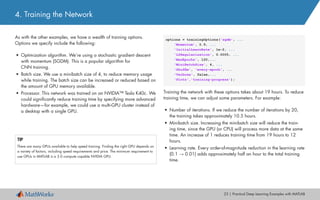
As with the other examples, we have a wealth of training options.
Options we specify include the following:
•	 Optimization algorithm. We’re using a stochastic gradient descent
with momentum (SGDM). This is a popular algorithm for
CNN training.
•	 Batch size. We use a minibatch size of 4, to reduce memory usage
while training. The batch size can be increased or reduced based on
the amount of GPU memory available.
•	 Processor. This network was trained on an NVIDIA™ Tesla K40c. We
could significantly reduce training time by specifying more advanced
hardware—for example, we could use a multi-GPU cluster instead of
a desktop with a single GPU.
Training the network with these options takes about 19 hours. To reduce
training time, we can adjust some parameters. For example:
•	 Number of iterations. If we reduce the number of iterations by 20,
the training takes approximately 10.5 hours.
•	 Minibatch size. Increasing the minibatch size will reduce the train-
ing time, since the GPU (or CPU) will process more data at the same
time. An increase of 1 reduces training time from 19 hours to 12
hours.
•	 Learning rate. Every order-of-magnitude reduction in the learning rate
(0.1 → 0.01) adds approximately half an hour to the total training
time.
TIP
There are many GPUs available to help speed training. Finding the right GPU depends on
a variety of factors, including speed requirements and price. The minimum requirement to
use GPUs in MATLAB is a 3.0 compute capable NVIDIA GPU.
options = trainingOptions('sgdm', ...
'Momentum', 0.9, ...
'InitialLearnRate', 1e-2, ...
'L2Regularization', 0.0005, ...
'MaxEpochs', 120,...
'MiniBatchSize', 4, ...
'Shuffle', 'every-epoch', ...
'Verbose', false,...
'Plots','training-progress');
4. Training the Network
24 | Practical Deep Learning Examples with MATLAB
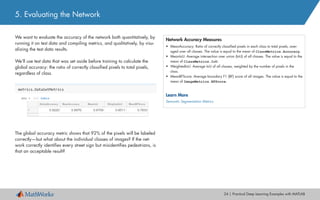
We want to evaluate the accuracy of the network both quantitatively, by
running it on test data and compiling metrics, and qualitatively, by visu-
alizing the test data results.
We’ll use test data that was set aside before training to calculate the
global accuracy: the ratio of correctly classified pixels to total pixels,
regardless of class.
The global accuracy metric shows that 92% of the pixels will be labeled
correctly—but what about the individual classes of images? If the net-
work correctly identifies every street sign but misidentifies pedestrians, is
that an acceptable result?
Network Accuracy Measures
•	 MeanAccuracy: Ratio of correctly classified pixels in each class to total pixels, aver-
aged over all classes. The value is equal to the mean of ClassMetrics.Accuracy.
•	 MeanIoU: Average intersection over union (IoU) of all classes. The value is equal to the
mean of ClassMetrics.IoU.
•	 WeightedIoU: Average IoU of all classes, weighted by the number of pixels in the
class.
•	 MeanBFScore: Average boundary F1 (BF) score of all images. The value is equal to the
mean of ImageMetrics.BFScore.
Learn More
Semantic Segmentation Metrics
5. Evaluating the Network
25 | Practical Deep Learning Examples with MATLAB
To see how accurately the network identified individual classes of
images, we can look at the class metrics.
The chart shows that the categories Cars, Environment, and Road are
classified with an accuracy of 90% or more. Poles, Signs, and Bicyclists
are classified with an accuracy under 90%.
Depending on the application, this may be an acceptable result, or the
network may need to be retrained with a higher emphasis on the classes
that were misclassified.
The cost of failure determines the level of accuracy required. For exam-
ple, while it might be acceptable for the visual system of a small robot to
occasionally misclassify a person, it certainly would not be acceptable
for a self-driving car to misclassify pedestrians.
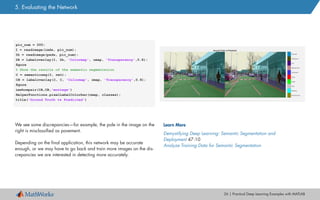
Finally, we display the original, hand-labeled image next to the output of
the trained network.
5. Evaluating the Network
26 | Practical Deep Learning Examples with MATLAB
We see some discrepancies—for example, the pole in the image on the
right is misclassified as pavement.
Depending on the final application, this network may be accurate
enough, or we may have to go back and train more images on the dis-
crepancies we are interested in detecting more accurately.
pic_num = 200;
I = readimage(imds, pic_num);
Ib = readimage(pxds, pic_num);
IB = labeloverlay(I, Ib, 'Colormap', cmap, 'Transparency',0.8);
figure
% Show the results of the semantic segmentation
C = semanticseg(I, net);
CB = labeloverlay(I, C, 'Colormap', cmap, 'Transparency',0.8);
figure
imshowpair(IB,CB,'montage')
HelperFunctions.pixelLabelColorbar(cmap, classes);
title('Ground Truth vs Predicted')
Learn More
Demystifying Deep Learning: Semantic Segmentation and
Deployment 47:10
Analyze Training Data for Semantic Segmentation
5. Evaluating the Network
27 | Practical Deep Learning Examples with MATLAB
The three examples we’ve explored so far have focused on image rec-
ognition. But deep learning is increasingly being used for other appli-
cations, such as speech recognition and text analytics, which use signal
data rather than image data. In the following sections we’ll briefly re-
view two popular techniques for classifying signal data:
•	 Using long short-term memory (LSTM) to classify signal data captured
on a smartphone
•	 Using a spectrogram to classify data from audio files
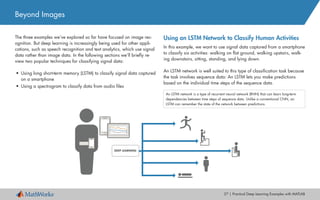
Using an LSTM Network to Classify Human Activities
In this example, we want to use signal data captured from a smartphone
to classify six activities: walking on flat ground, walking upstairs, walk-
ing downstairs, sitting, standing, and lying down.
An LSTM network is well suited to this type of classification task because
the task involves sequence data: An LSTM lets you make predictions
based on the individual time steps of the sequence data.
Beyond Images
An LSTM network is a type of recurrent neural network (RNN) that can learn long-term
dependencies between time steps of sequence data. Unlike a conventional CNN, an
LSTM can remember the state of the network between predictions.
DEEP LEARNING
28 | Practical Deep Learning Examples with MATLAB
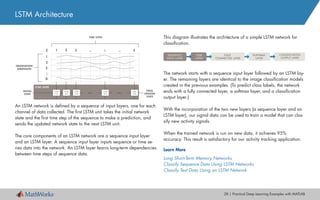
This diagram illustrates the architecture of a simple LSTM network for
classification.
The network starts with a sequence input layer followed by an LSTM lay-
er. The remaining layers are identical to the image classification models
created in the previous examples. (To predict class labels, the network
ends with a fully connected layer, a softmax layer, and a classification
output layer.)
With the incorporation of the two new layers (a sequence layer and an
LSTM layer), our signal data can be used to train a model that can clas-
sify new activity signals.
When the trained network is run on new data, it achieves 95%
accuracy. This result is satisfactory for our activity tracking application.
Learn More
Long Short-Term Memory Networks
Classify Sequence Data Using LSTM Networks
Classify Text Data Using an LSTM Network
An LSTM network is defined by a sequence of input layers, one for each
channel of data collected. The first LSTM unit takes the initial network
state and the first time step of the sequence to make a prediction, and
sends the updated network state to the next LSTM unit.
The core components of an LSTM network are a sequence input layer
and an LSTM layer. A sequence input layer inputs sequence or time se-
ries data into the network. An LSTM layer learns long-term dependencies
between time steps of sequence data.
LSTM Architecture
CLASSIFICATION
OUTPUT LAYER
SOFTMAX
LAYER
FULLY
CONNECTED LAYER
LTSM
LAYER
SEQUENCE
INPUT LAYER
LTSM LAYER
INITIAL
STATE
FINAL
UPDATED
STATE
OBSERVATION
DIMENSION
TIME STEPS
LTSM
Unit
LTSM
Unit
LTSM
Unit
LTSM
Unit
LTSM
Unit
29 | Practical Deep Learning Examples with MATLAB
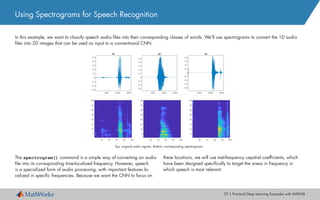
In this example, we want to classify speech audio files into their corresponding classes of words. We’ll use spectrograms to convert the 1D audio
files into 2D images that can be used as input to a conventional CNN.
Using Spectrograms for Speech Recognition
Top: original audio signals. Bottom: corresponding spectrograms.
The spectrogram() command is a simple way of converting an audio
file into its corresponding time-localized frequency. However, speech
is a specialized form of audio processing, with important features lo-
calized in specific frequencies. Because we want the CNN to focus on
these locations, we will use mel-frequency cepstral coefficients, which
have been designed specifically to target the areas in frequency in
which speech is most relevant.
30 | Practical Deep Learning Examples with MATLAB
We distribute the training data evenly between the classes of words we want to classify.
Using Spectrograms for Speech Recognition
To reduce false positives, we include a category for words likely to
be confused with the intended categories. For example, if the intend-
ed word is “on,” then words that sound similar or are easily confused
with “on,”, such as “mom”, “dawn”, and “won” are placed in the “un-
known” category.
The network does not need to know these words, just that they are NOT
the words to recognize.
TIP
Transfer learning does not work well if the features are different from the original training
set. This means that pretrained networks like AlexNet or GoogLeNet, which were trained
on images, will not transfer well to spectrograms.
We then define a CNN. Because we are using the spectrogram as an
input, which is essentially a 2D representation of the 1D signal, the struc-
ture of our CNN can be very similar to the one we used for image pro-
cessing.
31 | Practical Deep Learning Examples with MATLAB
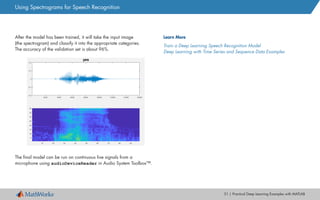
After the model has been trained, it will take the input image
(the spectrogram) and classify it into the appropriate categories.
The accuracy of the validation set is about 96%.
The final model can be run on continuous live signals from a
microphone using audioDeviceReader in Audio System Toolbox™.
Learn More
Train a Deep Learning Speech Recognition Model
Deep Learning with Time Series and Sequence Data Examples
Using Spectrograms for Speech Recognition
Deploying a Deep Learning Network
Now that you have trained a network to meet your accuracy goals, you are ready to deploy
it as an application. Deep learning models can be deployed into production systems (onsite
or in the cloud), on desktops, and on an embedded device, such as an NVIDIA Tegra GPU
or an Intel®
or ARM®
processor.
The deployment option you choose will, of course, depend on the kind of application you’re
developing. Here are the four most common ways engineers choose to deploy deep learning
models:
Deploy the model as a desktop application
Use MATLAB Compiler™ to package the model as a standalone application that end users
can run on a local machine.
Deploy to a server or cloud
Use MATLAB Production Server™ to deploy the model as an API that can be called from C,
C++, Java®
, .NET, or Python®
.
Target desktop-based GPUs, for increased performance speed
Use GPU Coder™ to generate CUDA code for training and prediction.
Deploy to an embedded device
Use GPU Coder to generate optimized CUDA code that can run outside MATLAB.
Learn More
Sharing and Deploying MATLAB Applications 26:15
© 2018 The MathWorks, Inc. MATLAB and Simulink are registered trademarks of The MathWorks, Inc. See mathworks.com/trademarks for
a list of additional trademarks. Other product or brand names may be trademarks or registered trademarks of their respective holders.
Handy Tools for Deep Learning
As the examples in this ebook have shown, with MATLAB you can build deep learning mod-
els without having to be an expert—and MATLAB makes light work of the more time-consum-
ing or irksome tasks in deep learning, with tools and functions for managing and labeling
data, monitoring training progress, and visualizing results. Here’s a quick guide to tools
we’ve used in working through the examples.
Tool or Function Description
ImageDataStore Manage large sets of training and test images for deep
learning models.
Create a custom read function to automate preprocessing of
multiple images
ImageLabeler Draw boundary boxes around objects of interest.
Quickly label images at the pixel level for semantic
segmentation.
imageDataAugmenter Extend the training dataset by creating more test images
through automatic translations, rotations, and scaling of
existing images.
heatmap Use this simple confusion matrix to visualize the accuracy of
each category in a trained model.
deepDreamImage /
activations
Visualize the layers of a model, and visualize the output of
images passed through layers.
spectrogram When working with signal data, easily convert an audio file
into its corresponding time-localized frequency.
Learn More
A Guide to Tools and Resources for Deep Learning in MATLAB

Deep learning-practical

  • 1.
    Practical Deep LearningExamples with MATLAB
  • 2.
    2 | PracticalDeep Learning Examples with MATLAB This ebook builds on Introducing Deep Learning with MATLAB, which answered the question “What is deep learning?” Here, we show you how it’s done. We’ll demonstrate three approaches to training a deep learning network: • Training a network from scratch • Using transfer learning to train an existing network • Training an existing network to perform semantic segmentation These examples focus on image classification. But deep learning has be- come increasingly popular for other applications as well. In the second part of the ebook, we present two examples showing how many of the deep learning techniques used on images can also be applied to signal data. All the examples and code are available for download. Introduction Review the Basics • What Is Deep Learning? 3:33 • Deep Learning vs. Machine Learning 3:48
  • 3.
    3 | PracticalDeep Learning Examples with MATLAB In this example, we want to train a convolutional neural network (CNN) to identify handwritten digits. We will use data from the MNIST dataset, which contains 60,000 images of handwritten numbers 0–9. Here is a random sample of 25 handwritten numbers in the MNIST dataset: Practical Example #1: Training a Model from Scratch By using a simple dataset, we’ll be able to cover all the key steps in the deep learning workflow without dealing with challenges such as processing power or datasets that are too large to fit into memory. The workflow described here can be applied to more complex deep learn- ing problems and larger datasets. If you are just getting started with applying deep learning, another ad- vantage to using this dataset is that you can train it without investing in an expensive GPU. Even though the dataset is simple, with the right deep learning model and training options, it is possible to achieve over 99% accuracy. So how do we create a model that will get us to that point? This will be an iterative process in which we build on previous training results to figure out how to approach the training problem. The steps are as follows: DONECHECK ACCURACYTRAIN NETWORK CONFIGURE NETWORK LAYERS ACCESS DATA
  • 4.
    4 | PracticalDeep Learning Examples with MATLAB We can check the size and class of the data by typing whos in the command window. The MNIST images are quite small—only 28 x 28 pixels—and there are 60,000 training images in total. The next task would be image labeling, but since the MNIST images come with labels, we can skip that tedious step and quickly move on to building our neural network. 1. Accessing the Data We begin by downloading the MNIST images into MATLAB® . Datasets are stored in many different file types. This data is stored as binary files, which MATLAB can quickly use and reshape into images. These lines of code will read an original binary file and create an array of all the training images: rawImgDataTrain = uint8 (fread(fid, numImg * numRows * numCols,... 'uint8')); % Reshape the data part into a 4D array rawImgDataTrain = reshape(rawImgDataTrain, [numRows, numCols,... numImgs]); imgDataTrain(:,:,1,ii) = uint8(rawImgDataTrain(:,:,ii)); >> whos imgDataTrain Name Size Bytes Class imgDataTrain 28x28x1x60000 47040000 uint8
  • 5.
    5 | PracticalDeep Learning Examples with MATLAB We’ll be building a CNN, the most common kind of deep learning network. About CNNs A CNN passes an image through the network layers and outputs a final class. The net- work can have tens or hundreds of layers, with each layer learning to detect different features. Filters are applied to each training image at different resolutions, and the output of each convolved image is used as the input to the next layer. The filters can start as very simple features, such as brightness and edges, and increase in complexity to features that uniquely define the object as the layers progress. Learn More What Is a Convolutional Neural Network? 4:44 When building a network from scratch, it’s a good idea to start with a simple combination of commonly used layers—the lack of complexity will make debugging much easier—but we’ll probably need to add a few more layers to achieve the accuracy we’re aiming for. 2. Creating and Configuring Network Layers Commonly Used Network Layers Convolution puts the input images through a set of convolutional filters, each of which activates certain features from the images. Rectified linear unit (ReLU) allows for faster and more effective training by mapping nega- tive values to zero and maintaining positive values. Pooling simplifies the output by performing nonlinear downsampling, reducing the number of parameters that the network needs to learn about. Fully connected layers “flatten” the network’s 2D spatial features into a 1D vector that rep- resents image-level features for classification purposes. Softmax provides probabilities for each category in the dataset. layers = [ imageInputLayer([28 28 1]) convolution2dLayer(5,20) reluLayer maxPooling2dLayer(2, 'Stride', 2) fullyConnectedLayer(10) softmaxLayer classificationLayer() ]
  • 6.
    6 | PracticalDeep Learning Examples with MATLAB Before training, we select training options. There are many options available. The table shows the most commonly used options. 3. Training the Network We specify two options: plot progress and minibatch size. We then run the network and monitor its progress. Training Options Definition Hint Plot of training progress The plot shows the mini- batch loss and accuracy. It includes a stop button that lets you halt network training at any point. ('Plots','training-progress') Plot the progress of the network as it trains. Max epochs An epoch is the full pass of the training algorithm over the entire training set. ('MaxEpoch',20) The more epochs specified, the longer the network will train, but the accuracy may improve with each epoch. Minibatch size Minibatches are subsets of the training dataset that are processed on the GPU at the same time. ('MiniBatchSize',64) The larger the minibatch, the faster the training, but the maximum size will be determined by the GPU memory. If you get a memory error when training, reduce the minibatch size. Learning rate This is a major parameter that controls the speed of training. A lower learning rate can give a more accurate result, but the net- work may take longer to train. TIP A large dataset can slow down processing time. But a deep learning network can take advantage of the massively parallelized architecture of a GPU. The exact speedup will vary depending on factors like hardware, dataset size, and network configuration, but you could see training time reduced from hours to minutes. In the training options in MATLAB, you can quickly change the hardware resource to use for training a network. If this option is not specified, training will default to a single GPU if available. miniBatchSize = 8192; options = trainingOptions( 'sgdm',... 'MiniBatchSize', miniBatchSize,... 'Plots', 'training-progress'); net = trainNetwork(imgDataTrain, labelsTrain, layers, options);
  • 7.
    7 | PracticalDeep Learning Examples with MATLAB We can stop training and return the current state of the network by clicking the stop button in the top right corner of the screen. Once the execution stops, we need to restart the training from the beginning—we cannot resume from the point where it stopped. 4. Checking Network Accuracy Our goal is to have the accuracy of the model increase over time. As the network trains, the progress plot appears. Our model seems to have stopped improving after the 28th iteration and then dropped to approximately 10% accuracy. This is a common oc- currence when training a network from scratch. It means the network is unable to converge on a solution. The accuracy has reached a plateau, and is no longer improving. There is no need to continue—we can stop the training and try some different approaches.
  • 8.
    8 | PracticalDeep Learning Examples with MATLAB 4. Checking Network Accuracy There are many ways to adjust the accuracy of the network. For example, we could: • Increase the number of training images • Increase the quality of the training images • Alter the training options • Alter the network configuration (for example, by adding, removing, or reorganizing layers) We’ll try altering the training options and the network configuration. Changing Training Options First, we’ll adjust the learning rate. We set the initial learning rate to be much lower than the default rate of 0.01. 'InitialLearnRate', 0.0001 As a result of changing that one parameter, we get a much better result—nearly 90% accuracy! For some applications, this result would be satisfactory, but you may recall that we’re aiming for 99%. ADVANCED TIP You can use Bayesian optimization to identify the optimal values of the training parameters. Bayesian optimization will run the network multiple times (and you can parallelize the process).
  • 9.
    9 | PracticalDeep Learning Examples with MATLAB Changing the Network Configuration Getting to 99% from 90% requires a deeper network and many rounds of trial and error. We add more layers, including batch normalization layers, which will help speed up the network convergence (the point at which it responds correctly to new input). layers = [ imageInputLayer([28 28 1]) convolution2dLayer(3,16,'Padding',1) batchNormalizationLayer reluLayer maxPooling2dLayer(2,'Stride',2) convolution2dLayer(3,32,'Padding',1) batchNormalizationLayer reluLayer maxPooling2dLayer(2,'Stride',2) convolution2dLayer(3,64,'Padding',1) batchNormalizationLayer reluLayer fullyConnectedLayer(10) softmaxLayer classificationLayer]; The network is now “deeper.” This time, we’ll change the network but leave the training options the same as they were before. After the network has trained, we test it on 10,000 images. This network achieves the highest accuracy of all—around 99%. We can now use it to identify handwritten letters in online images, or even in a live video stream. Learn More Training a Neural Network from Scratch with MATLAB 5:13 Deep Learning in 11 Lines of MATLAB Code 2:38 predLabelsTest = net.classify(imgDataTest); accuracy = sum(predLabelsTest == labelsTest) / numel(labelsTest) accuracy = 0.9880 4. Checking Network Accuracy
  • 10.
    10 | PracticalDeep Learning Examples with MATLAB Practical Example #2: Transfer Learning We’ll use GoogLeNet, a network trained on 1000 categories of objects, including bicycles, cars, and dogs. We want to retrain this network to identify five categories of food. Here are the steps: 1. Import the pretrained network. 2. Configure the last three layers to perform a new recognition task. 3. Train the network on new data. 4. Test the results. In this example, we’ll modify a pretrained network and use transfer learning to train it to perform a new recognition task. Fine-tuning a pre- trained network is much faster and easier than constructing and training a new network: You can quickly transfer learning to a new task using a smaller number of training images. The advantage of transfer learning is that the pretrained network has already learned a rich set of features because of the large number of images it was trained on. PREDICT AND ASSESS NETWORK ACCURACY Training Images TRAINED NETWORK TRAIN NETWORK 100s of images, 10s of classes ... Training OptionsTraining Images Improve network REPLACE FINAL LAYERS Fewer classes, learn faster ... New layers to learn features specific to your data set LOAD PRETRAINED NETWORK 1 million images, 1000s of classes ... Early layers that learned low-level features (edges, blobs, colors) Last layers that learned task-specific features
  • 11.
    11 | PracticalDeep Learning Examples with MATLAB 1. Importing a Pretrained Network We can import GoogLeNet in one line of code: With a pretrained network, most of the heavy lifting of setting up the net- work (selecting and organizing the layers) has already been done. This means we can test the network on images in the categories the network was original trained on without any reconfiguring: TIP Use this line of code to see all 1000 categories that GoogLeNet is trained on: class_names = net.Layers(end).ClassNames; Transfer Learning Tips • Start with a highly accurate network. If a network only performs at 50% on its original recognition task, it is unlikely to be accurate on a new recognition task. • A model will probably be more accurate if the new recognition categories have similar features to the original ones. For example, a network trained on dogs will probably learn other animals relatively quickly. % Load a pretrained network net = googlenet; %% Test it on an image img = imread('peppers.png'); imgLabel = net.classify(imresize(img, [224 224])); googlenet prediction: bell pepper
  • 12.
    12 | PracticalDeep Learning Examples with MATLAB 2. Configuring the Network to Perform a New Task To train GoogLeNet to classify new images, we simply reconfigure the last three layers of the network. These layers contain the information needed to combine the features that the network extracts into class prob- abilities and labels. GoogLeNet has 144 layers. Here we display the last 5 layers of the network. >>net.Layers(end-4:end) We’ll reset layers 143 and 144, a softmax layer and a classification output layer. These layers are responsible for assigning the correct cat- egories to the input images. We want these layers to correspond to the new categories, not to the ones that the original network learned. We set the final fully connected layer to the same size as the number of classes in the new dataset—five in this example. TIP To make speed of learning in the new layers faster than in the original layers, increase the learning rate of the fully connected layer. lgraph = removeLayers(lgraph, {'loss3-classifier', 'prob', ... 'output'}); numClasses = numel(unique(categories(trainDS.Labels))); newLayers = [ fullyConnectedLayer(numClasses, 'Name','fc',... 'WeightLearnRateFactor',20,'BiasLearnRateFactor',20) softmaxLayer('Name','softmax') classificationLayer('Name','classoutput')]; lgraph = addLayers(lgraph,newLayers); 140 'pool5-7x7_sl' Average Pooling 141 'pool5-drop_7x7_sl' Dropout 142 'loss3-classifier' Fully Connected 143 'prob' Softmax 144 'output' Classification Output
  • 13.
    13 | PracticalDeep Learning Examples with MATLAB 3. Training the Network on New Data As with training a network from scratch, to increase the network’s accu- racy we adjust some of the training options (in this example, batch size, learning rate, and validation data). Training time for this model can vary significantly depending on the hardware used among other factors. A single Tesla P100 GPU can train this model in roughly 20 minutes. opts = trainingOptions('sgdm','InitialLearnRate',0.001,... 'ValidationData',valDS,... 'Plots','training-progress',... 'MiniBatchSize',64,... 'ValidationPatience',3); % Training with the optimized set of hyperparameters tic disp('Initialization may take up to a minute before training begins') net = trainNetwork(trainDS, layers_train, opts); toc TIP Use tic and toc to quickly see how long it takes the training to run. tic starts a stopwatch timer to measure performance. toc stops the timer and reads the elapsed time displayed in the command window. TIP If you get an out-of-memory error for the GPU, lower the 'MiniBatchSize' value.
  • 14.
    14 | PracticalDeep Learning Examples with MATLAB 4. Evaluating the Network Now that the network is trained, it is time to see how well it performs on the new data. The confusion matrix shows the network’s predictions for 150 images in each category. If all values on the diagonal were 150, this would indi- cate that each test image was correctly classified. Clearly, for our net- work, this is not the case. The values outside the diagonal give a sense of which category is getting misclassified. This can help direct us to where we should investigate our data. The final accuracy after training the model is 83%. While this is suffi- cient for our example, it would not be acceptable for a real-world appli- cation. To increase the accuracy of the model for a real-world applica- tion, we’d continue to iterate, revisiting the training options, inspecting the data, and reconfiguring the network. % Classify all images from test dataset [labels,err_test] = classify(net, testDS); accuracy_default = sum(labels == testDS.Labels)/numel(labels); disp(['Test accuracy is ' num2str(accuracy_default)])
  • 15.
    15 | PracticalDeep Learning Examples with MATLAB Even if you ultimately opt to create your own network from scratch, transfer learning can be an excellent starting point for learning about deep learning: You can take advantage of networks developed by ex- perts in the field, change a few layers, and begin training—and since the model has already learned many features from the original training dataset, it needs less training time and fewer training images than a model developed from scratch. Learn More Pretrained Convolutional Neural Networks Transfer Learning Using GoogLeNet Transfer Learning in 10 Lines of MATLAB Code 4:00 Transfer Learning with Neural Networks in MATLAB 4:06 4. Evaluating the Network Finally, we visually verify the network’s performance on new images. [label,conf] = classify(net,im); % classify a random image imshow(im_display); title(sprintf('%s %.2f, actual %s', ... char(label),max(conf),char(actualLabel)) french_fries 0.89, actual french_fries sushi 0.58, actual sushi
  • 16.
    16 | PracticalDeep Learning Examples with MATLAB Practical Example #3: Semantic Segmentation Semantic segmentation, one of the newer advances in deep learning, provides a granular, pixel-level understanding of the characteristics of an image. Where a traditional CNN classifies features in an image, se- mantic segmentation associates each pixel with a certain category (such as flower, road, person, or car). The results look something like this: Notice that with semantic segmentation, an irregularly shaped object such as a road is well-defined. Semantic segmentation can be a useful alternative to object detection because it allows the object of interest to span multiple areas in the im- age. This technique cleanly detects objects that are irregularly shaped, in contrast to object detection, where objects must fit within a bounding box. Before we get into the example, let’s take a quick look at the architec- ture of a semantic segmentation network. Common Semantic Segmentation Applications • Autonomous driving: for identifying a drivable path for cars by separating the road from obstacles like pedestrians, sidewalk, poles, and other cars • Industrial inspection: for detecting defects in materials, such as wafer inspection • Satellite imagery: for identifying mountains, rivers, deserts, and other terrain • Medical imaging: for analyzing and detecting cancerous anomalies in cells
  • 17.
    17 | PracticalDeep Learning Examples with MATLAB Semantic Segmentation Network Architecture As we saw in examples 1 and 2, a traditional CNN takes an image, passes it through the layers of the network, and then outputs a final class. A semantic segmentation network builds on this process with an up-sampling network, which has an architecture similar to a reversed CNN. This series of new layers upsamples the result of the pretrained network back into the image. The result is an image with every pixel assigned a classification label.
  • 18.
    18 | PracticalDeep Learning Examples with MATLAB 1. Importing a Pretrained Network In this example we want to build a network that an autonomous driving system can use to detect clear road space, driving lanes, and sidewalks. The steps are as follows: 1. Import a pretrained network. 2. Load in the dataset. 3. Set up the network. 4. Train the network. 5. Evaluate the network’s accuracy. We could train a network from scratch, but for this example, we’ll use a pretrained network—as we saw in the previous example, we can test a pretrained network on images in the categories that it was originally trained on without reconfiguring it. Our pretrained network is the VGG-16. Used in the ImageNet Large-Scale Visual Recognition Challenge (ILSVRC), VGG-16 is trained on more than a million images and can classify images into 1000 ob- ject categories. Importing the VGG-16 takes just one line of MATLAB code: % Download and install Neural Network Toolbox Model for VGG-16 Network support package. vgg16;
  • 19.
    19 | PracticalDeep Learning Examples with MATLAB 2. Loading in the Dataset We’re using the CamVid Dataset, a collection of images consisting of street-level views obtained while driving. The dataset provides pixel-level labels for 32 semantic classes, including car, pedestrian, and road. Each image in the dataset has a color image and an image of labels for each pixel in that image. It can be cumbersome to bring lots of images into memory. A datastore is a convenient way to import, access, and manage large data files. Any data store—image, pixel, or even spreadsheet—can act as a repos- itory, as long as all the stored data has the same structure and format- ting. For our semantic segmentation example, we’ve created two data- store objects: • An ImageDatastore, which manages image files where each individual image fits into memory but the entire collection may not. • A pixelLabelDatastore, for bringing in the directory of images containing the pixel labels. TIP If you cannot find a pre-labeled dataset corresponding to the categories you wish to iden- tify, you will need to create one yourself. This time-consuming task is easy to do with the Image Labeler: You simply select a group of pixels, and the app automatically labels it with a color and a corresponding category.
  • 20.
    20 | PracticalDeep Learning Examples with MATLAB Once we’ve imported the image data and the pixel label data into MATLAB, we take a sample image and view a composite of the original image combined with the pixel labels. Original Image Composite Image % Overlay segmentation results onto original image. B = labeloverlay(I,C,'ColorMap',cmap); 2. Loading in the Dataset
  • 21.
    21 | PracticalDeep Learning Examples with MATLAB Data augmentation is a useful technique for improving the accuracy of the trained model. In data augmentation, you increase the number of variations in the training images by adding altered versions of the original images. The most common types of data augmentation are image transformations: rotation, translation, and scale. In this example, we incorporate a random translation. Here’s an example of a new image created by shifting the original image 10 pixels to the left. While the effect of this translation is subtle, it can increase the robust- ness of the deep learning network by forcing it to learn and understand slight variations, which are very likely to occur in a real-world system. augmenter = imageDataAugmenter('RandXTranslation',... [-10 10],'RandYTranslation',[-10 10]); 2. Loading in the Dataset
  • 22.
    22 | PracticalDeep Learning Examples with MATLAB Recall that a semantic segmentation network consists of an image classi- fication network and an up-sampling portion that creates the final pixel classification. We can create the upsampling portion of the network automatically with the MATLAB segnetLayers() function. The result is a directed acyclic graph (DAG) network. Unlike a series network, a DAG network can have inputs from, or out- puts to, multiple layers. A DAG allows for more complex connections between layers, and can result in higher accuracy on difficult classifica- tion tasks. Notice the branching in this structure: A single input node can go to multiple outputs. You can visualize the structure of any DAG network by calling this line of code: plot(lgraph); lgraph is a layer graph that describes the architecture of a DAG network, including all the layers and their interconnections. 3. Setting Up the Segmentation Network % segnetLayers returns SegNet network layers, lgraph, that is preinitialized with layers and weights from a pretrained model. lgraph = segnetLayers(imageSize,numClasses,'vgg16');
  • 23.
    23 | PracticalDeep Learning Examples with MATLAB As with the other examples, we have a wealth of training options. Options we specify include the following: • Optimization algorithm. We’re using a stochastic gradient descent with momentum (SGDM). This is a popular algorithm for CNN training. • Batch size. We use a minibatch size of 4, to reduce memory usage while training. The batch size can be increased or reduced based on the amount of GPU memory available. • Processor. This network was trained on an NVIDIA™ Tesla K40c. We could significantly reduce training time by specifying more advanced hardware—for example, we could use a multi-GPU cluster instead of a desktop with a single GPU. Training the network with these options takes about 19 hours. To reduce training time, we can adjust some parameters. For example: • Number of iterations. If we reduce the number of iterations by 20, the training takes approximately 10.5 hours. • Minibatch size. Increasing the minibatch size will reduce the train- ing time, since the GPU (or CPU) will process more data at the same time. An increase of 1 reduces training time from 19 hours to 12 hours. • Learning rate. Every order-of-magnitude reduction in the learning rate (0.1 → 0.01) adds approximately half an hour to the total training time. TIP There are many GPUs available to help speed training. Finding the right GPU depends on a variety of factors, including speed requirements and price. The minimum requirement to use GPUs in MATLAB is a 3.0 compute capable NVIDIA GPU. options = trainingOptions('sgdm', ... 'Momentum', 0.9, ... 'InitialLearnRate', 1e-2, ... 'L2Regularization', 0.0005, ... 'MaxEpochs', 120,... 'MiniBatchSize', 4, ... 'Shuffle', 'every-epoch', ... 'Verbose', false,... 'Plots','training-progress'); 4. Training the Network
  • 24.
    24 | PracticalDeep Learning Examples with MATLAB We want to evaluate the accuracy of the network both quantitatively, by running it on test data and compiling metrics, and qualitatively, by visu- alizing the test data results. We’ll use test data that was set aside before training to calculate the global accuracy: the ratio of correctly classified pixels to total pixels, regardless of class. The global accuracy metric shows that 92% of the pixels will be labeled correctly—but what about the individual classes of images? If the net- work correctly identifies every street sign but misidentifies pedestrians, is that an acceptable result? Network Accuracy Measures • MeanAccuracy: Ratio of correctly classified pixels in each class to total pixels, aver- aged over all classes. The value is equal to the mean of ClassMetrics.Accuracy. • MeanIoU: Average intersection over union (IoU) of all classes. The value is equal to the mean of ClassMetrics.IoU. • WeightedIoU: Average IoU of all classes, weighted by the number of pixels in the class. • MeanBFScore: Average boundary F1 (BF) score of all images. The value is equal to the mean of ImageMetrics.BFScore. Learn More Semantic Segmentation Metrics 5. Evaluating the Network
  • 25.
    25 | PracticalDeep Learning Examples with MATLAB To see how accurately the network identified individual classes of images, we can look at the class metrics. The chart shows that the categories Cars, Environment, and Road are classified with an accuracy of 90% or more. Poles, Signs, and Bicyclists are classified with an accuracy under 90%. Depending on the application, this may be an acceptable result, or the network may need to be retrained with a higher emphasis on the classes that were misclassified. The cost of failure determines the level of accuracy required. For exam- ple, while it might be acceptable for the visual system of a small robot to occasionally misclassify a person, it certainly would not be acceptable for a self-driving car to misclassify pedestrians. Finally, we display the original, hand-labeled image next to the output of the trained network. 5. Evaluating the Network
  • 26.
    26 | PracticalDeep Learning Examples with MATLAB We see some discrepancies—for example, the pole in the image on the right is misclassified as pavement. Depending on the final application, this network may be accurate enough, or we may have to go back and train more images on the dis- crepancies we are interested in detecting more accurately. pic_num = 200; I = readimage(imds, pic_num); Ib = readimage(pxds, pic_num); IB = labeloverlay(I, Ib, 'Colormap', cmap, 'Transparency',0.8); figure % Show the results of the semantic segmentation C = semanticseg(I, net); CB = labeloverlay(I, C, 'Colormap', cmap, 'Transparency',0.8); figure imshowpair(IB,CB,'montage') HelperFunctions.pixelLabelColorbar(cmap, classes); title('Ground Truth vs Predicted') Learn More Demystifying Deep Learning: Semantic Segmentation and Deployment 47:10 Analyze Training Data for Semantic Segmentation 5. Evaluating the Network
  • 27.
    27 | PracticalDeep Learning Examples with MATLAB The three examples we’ve explored so far have focused on image rec- ognition. But deep learning is increasingly being used for other appli- cations, such as speech recognition and text analytics, which use signal data rather than image data. In the following sections we’ll briefly re- view two popular techniques for classifying signal data: • Using long short-term memory (LSTM) to classify signal data captured on a smartphone • Using a spectrogram to classify data from audio files Using an LSTM Network to Classify Human Activities In this example, we want to use signal data captured from a smartphone to classify six activities: walking on flat ground, walking upstairs, walk- ing downstairs, sitting, standing, and lying down. An LSTM network is well suited to this type of classification task because the task involves sequence data: An LSTM lets you make predictions based on the individual time steps of the sequence data. Beyond Images An LSTM network is a type of recurrent neural network (RNN) that can learn long-term dependencies between time steps of sequence data. Unlike a conventional CNN, an LSTM can remember the state of the network between predictions. DEEP LEARNING
  • 28.
    28 | PracticalDeep Learning Examples with MATLAB This diagram illustrates the architecture of a simple LSTM network for classification. The network starts with a sequence input layer followed by an LSTM lay- er. The remaining layers are identical to the image classification models created in the previous examples. (To predict class labels, the network ends with a fully connected layer, a softmax layer, and a classification output layer.) With the incorporation of the two new layers (a sequence layer and an LSTM layer), our signal data can be used to train a model that can clas- sify new activity signals. When the trained network is run on new data, it achieves 95% accuracy. This result is satisfactory for our activity tracking application. Learn More Long Short-Term Memory Networks Classify Sequence Data Using LSTM Networks Classify Text Data Using an LSTM Network An LSTM network is defined by a sequence of input layers, one for each channel of data collected. The first LSTM unit takes the initial network state and the first time step of the sequence to make a prediction, and sends the updated network state to the next LSTM unit. The core components of an LSTM network are a sequence input layer and an LSTM layer. A sequence input layer inputs sequence or time se- ries data into the network. An LSTM layer learns long-term dependencies between time steps of sequence data. LSTM Architecture CLASSIFICATION OUTPUT LAYER SOFTMAX LAYER FULLY CONNECTED LAYER LTSM LAYER SEQUENCE INPUT LAYER LTSM LAYER INITIAL STATE FINAL UPDATED STATE OBSERVATION DIMENSION TIME STEPS LTSM Unit LTSM Unit LTSM Unit LTSM Unit LTSM Unit
  • 29.
    29 | PracticalDeep Learning Examples with MATLAB In this example, we want to classify speech audio files into their corresponding classes of words. We’ll use spectrograms to convert the 1D audio files into 2D images that can be used as input to a conventional CNN. Using Spectrograms for Speech Recognition Top: original audio signals. Bottom: corresponding spectrograms. The spectrogram() command is a simple way of converting an audio file into its corresponding time-localized frequency. However, speech is a specialized form of audio processing, with important features lo- calized in specific frequencies. Because we want the CNN to focus on these locations, we will use mel-frequency cepstral coefficients, which have been designed specifically to target the areas in frequency in which speech is most relevant.
  • 30.
    30 | PracticalDeep Learning Examples with MATLAB We distribute the training data evenly between the classes of words we want to classify. Using Spectrograms for Speech Recognition To reduce false positives, we include a category for words likely to be confused with the intended categories. For example, if the intend- ed word is “on,” then words that sound similar or are easily confused with “on,”, such as “mom”, “dawn”, and “won” are placed in the “un- known” category. The network does not need to know these words, just that they are NOT the words to recognize. TIP Transfer learning does not work well if the features are different from the original training set. This means that pretrained networks like AlexNet or GoogLeNet, which were trained on images, will not transfer well to spectrograms. We then define a CNN. Because we are using the spectrogram as an input, which is essentially a 2D representation of the 1D signal, the struc- ture of our CNN can be very similar to the one we used for image pro- cessing.
  • 31.
    31 | PracticalDeep Learning Examples with MATLAB After the model has been trained, it will take the input image (the spectrogram) and classify it into the appropriate categories. The accuracy of the validation set is about 96%. The final model can be run on continuous live signals from a microphone using audioDeviceReader in Audio System Toolbox™. Learn More Train a Deep Learning Speech Recognition Model Deep Learning with Time Series and Sequence Data Examples Using Spectrograms for Speech Recognition
  • 32.
    Deploying a DeepLearning Network Now that you have trained a network to meet your accuracy goals, you are ready to deploy it as an application. Deep learning models can be deployed into production systems (onsite or in the cloud), on desktops, and on an embedded device, such as an NVIDIA Tegra GPU or an Intel® or ARM® processor. The deployment option you choose will, of course, depend on the kind of application you’re developing. Here are the four most common ways engineers choose to deploy deep learning models: Deploy the model as a desktop application Use MATLAB Compiler™ to package the model as a standalone application that end users can run on a local machine. Deploy to a server or cloud Use MATLAB Production Server™ to deploy the model as an API that can be called from C, C++, Java® , .NET, or Python® . Target desktop-based GPUs, for increased performance speed Use GPU Coder™ to generate CUDA code for training and prediction. Deploy to an embedded device Use GPU Coder to generate optimized CUDA code that can run outside MATLAB. Learn More Sharing and Deploying MATLAB Applications 26:15
  • 33.
    © 2018 TheMathWorks, Inc. MATLAB and Simulink are registered trademarks of The MathWorks, Inc. See mathworks.com/trademarks for a list of additional trademarks. Other product or brand names may be trademarks or registered trademarks of their respective holders. Handy Tools for Deep Learning As the examples in this ebook have shown, with MATLAB you can build deep learning mod- els without having to be an expert—and MATLAB makes light work of the more time-consum- ing or irksome tasks in deep learning, with tools and functions for managing and labeling data, monitoring training progress, and visualizing results. Here’s a quick guide to tools we’ve used in working through the examples. Tool or Function Description ImageDataStore Manage large sets of training and test images for deep learning models. Create a custom read function to automate preprocessing of multiple images ImageLabeler Draw boundary boxes around objects of interest. Quickly label images at the pixel level for semantic segmentation. imageDataAugmenter Extend the training dataset by creating more test images through automatic translations, rotations, and scaling of existing images. heatmap Use this simple confusion matrix to visualize the accuracy of each category in a trained model. deepDreamImage / activations Visualize the layers of a model, and visualize the output of images passed through layers. spectrogram When working with signal data, easily convert an audio file into its corresponding time-localized frequency. Learn More A Guide to Tools and Resources for Deep Learning in MATLAB