Server Consolidation in Cloud
Computing
Dr. Hitesh Mohapatra
Associate Professor
School of Computer Engineering
KIIT (Deemed to be) University
Server Consolidation
Definition: Combining multiple servers into a single, more
powerful server or cluster
Purpose: Improve efficiency and cost-effectiveness in the cloud
environment
Technology Used: Virtualization technology
• Multiple virtual servers run on a single physical server
Benefits:
• Better resource utilization
• Improved scalability and flexibility
• Reduced number of physical servers needed
• Cost savings on hardware, power, and cooling
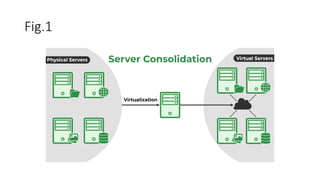
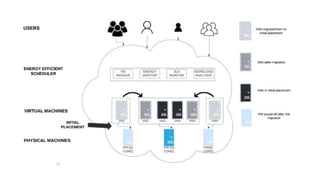
Fig.1
The Architecture of Server Consolidation
Graphical Representation: (Fig.1)
• Multiple physical servers consolidated into fewer powerful
servers using virtualization
Process:
• Creation of logical servers, each isolated with its own OS
and applications Shared physical resources (CPU, RAM,
storage) among logical servers
Physical Servers:
• Hardware consists of powerful machines with high processing speeds
• Built to manage massive volumes of data
• Utilized to run virtual servers and host virtualization software
Virtualization:
• Allows a single physical server to run several virtual servers
• Creates an abstraction layer between the real hardware and virtual servers
• Enables multiple virtual servers to share the resources of a single physical
server
Virtual Servers:
• Virtualized instances that run on top of physical servers
• Produced and controlled by virtualization software
• Each virtual server is a separate instance of an operating system
Advantages
Creation of Virtual Servers:
• Utilizes virtualization software to combine multiple physical servers into
a single virtualized environment
• Virtual servers share resources of physical servers
Resource Efficiency:
• Enables more effective use of resources
• Cost savings on hardware, power, and cooling
Ease of Management:
• Simplifies the management of existing servers
• Easy setup of new servers
• Scales resources up or down as necessary
Types of Server Consolidation
Logical Consolidation:
• Multiple virtual servers consolidated onto a single physical server
• Each virtual server is isolated with its own OS and applications
• Shared physical resources (CPU, RAM, storage) among virtual servers
Benefits:
• Significant cost savings
• Improved performance
• Flexibility to add or remove virtual servers as needed
• Easier adjustment to changing business needs
Cont.
Physical Consolidation:
• Multiple physical servers consolidated into a single, more powerful server
or cluster of servers
• Achieved by replacing older servers with newer, more powerful ones
• Alternatively, adding resources (memory, storage) to existing servers
Benefits:
• Improved performance and efficiency
• Enhanced cloud computing environment
Cont.
Rationalized Consolidation:
• Consolidation based on server workloads
• Identifies and groups servers based on their applications and
services
• Consolidates them onto fewer, more powerful servers or
clusters
Benefits:
• Improved efficiency and cost-effectiveness
• Enhanced cloud computing environment by consolidating
similar workloads
How to Perform Server Consolidation?
Server Consolidation Steps:
1.Assessing the Current Environment:
1. Determine which servers run similar workloads
2. Identify underutilized or over-utilized servers
3. Analyze usage patterns and resource utilization
2.Identifying and Grouping Servers:
1. Group servers based on workloads
2. Identify servers that can be consolidated onto fewer, more powerful servers
or clusters
3.Planning the Consolidation:
1. Determine the best consolidation approach (virtualization, cloud
management platforms, physical consolidation)
2. Identify resources required (CPU, RAM, storage)
Cont.
Testing and Validation:
• Test and validate the consolidation plan
• Ensure the plan meets organizational needs and that servers function as
expected
Consolidating the Servers:
• Shut down servers to be consolidated
• Migrate workloads to consolidated servers
• Bring servers back online
Monitoring and Maintenance:
• Monitor consolidated servers for performance and potential issues
• Perform regular maintenance to keep servers running smoothly
Optimizing the Consolidated Environment:
• Regularly evaluate usage patterns and resource utilization
• Make adjustments as needed to maintain optimal performance
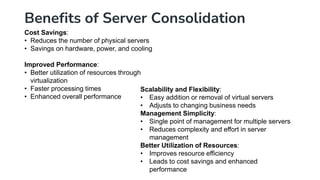
Benefits of Server Consolidation
Cost Savings:
• Reduces the number of physical servers
• Savings on hardware, power, and cooling
Improved Performance:
• Better utilization of resources through
virtualization
• Faster processing times
• Enhanced overall performance
Scalability and Flexibility:
• Easy addition or removal of virtual servers
• Adjusts to changing business needs
Management Simplicity:
• Single point of management for multiple servers
• Reduces complexity and effort in server
management
Better Utilization of Resources:
• Improves resource efficiency
• Leads to cost savings and enhanced
performance
Conclusion
Server consolidation in cloud computing is a process of combining
multiple servers into a single, more powerful server or cluster of servers,
in order to improve the efficiency and cost-effectiveness of the cloud
computing environment.
Questions
1. What is the primary cost-saving benefit of server consolidation?
2. How does server consolidation improve performance in a cloud
computing environment?
3. What technology allows multiple virtual servers to run on a single physical
server?
4. How does server consolidation enhance scalability and flexibility?
5. What is one way server consolidation simplifying server management?
6. Why is better utilization of resources important in server consolidation?
7. What is a key benefit of using virtualization technology in server
consolidation?

Server Consolidation in Cloud Computing Environment

  • 1.
    Server Consolidation inCloud Computing Dr. Hitesh Mohapatra Associate Professor School of Computer Engineering KIIT (Deemed to be) University
  • 2.
    Server Consolidation Definition: Combiningmultiple servers into a single, more powerful server or cluster Purpose: Improve efficiency and cost-effectiveness in the cloud environment Technology Used: Virtualization technology • Multiple virtual servers run on a single physical server Benefits: • Better resource utilization • Improved scalability and flexibility • Reduced number of physical servers needed • Cost savings on hardware, power, and cooling
  • 3.
  • 4.
    The Architecture ofServer Consolidation Graphical Representation: (Fig.1) • Multiple physical servers consolidated into fewer powerful servers using virtualization Process: • Creation of logical servers, each isolated with its own OS and applications Shared physical resources (CPU, RAM, storage) among logical servers
  • 5.
    Physical Servers: • Hardwareconsists of powerful machines with high processing speeds • Built to manage massive volumes of data • Utilized to run virtual servers and host virtualization software Virtualization: • Allows a single physical server to run several virtual servers • Creates an abstraction layer between the real hardware and virtual servers • Enables multiple virtual servers to share the resources of a single physical server Virtual Servers: • Virtualized instances that run on top of physical servers • Produced and controlled by virtualization software • Each virtual server is a separate instance of an operating system
  • 7.
    Advantages Creation of VirtualServers: • Utilizes virtualization software to combine multiple physical servers into a single virtualized environment • Virtual servers share resources of physical servers Resource Efficiency: • Enables more effective use of resources • Cost savings on hardware, power, and cooling Ease of Management: • Simplifies the management of existing servers • Easy setup of new servers • Scales resources up or down as necessary
  • 8.
    Types of ServerConsolidation Logical Consolidation: • Multiple virtual servers consolidated onto a single physical server • Each virtual server is isolated with its own OS and applications • Shared physical resources (CPU, RAM, storage) among virtual servers Benefits: • Significant cost savings • Improved performance • Flexibility to add or remove virtual servers as needed • Easier adjustment to changing business needs
  • 9.
    Cont. Physical Consolidation: • Multiplephysical servers consolidated into a single, more powerful server or cluster of servers • Achieved by replacing older servers with newer, more powerful ones • Alternatively, adding resources (memory, storage) to existing servers Benefits: • Improved performance and efficiency • Enhanced cloud computing environment
  • 10.
    Cont. Rationalized Consolidation: • Consolidationbased on server workloads • Identifies and groups servers based on their applications and services • Consolidates them onto fewer, more powerful servers or clusters Benefits: • Improved efficiency and cost-effectiveness • Enhanced cloud computing environment by consolidating similar workloads
  • 11.
    How to PerformServer Consolidation? Server Consolidation Steps: 1.Assessing the Current Environment: 1. Determine which servers run similar workloads 2. Identify underutilized or over-utilized servers 3. Analyze usage patterns and resource utilization 2.Identifying and Grouping Servers: 1. Group servers based on workloads 2. Identify servers that can be consolidated onto fewer, more powerful servers or clusters 3.Planning the Consolidation: 1. Determine the best consolidation approach (virtualization, cloud management platforms, physical consolidation) 2. Identify resources required (CPU, RAM, storage)
  • 12.
    Cont. Testing and Validation: •Test and validate the consolidation plan • Ensure the plan meets organizational needs and that servers function as expected Consolidating the Servers: • Shut down servers to be consolidated • Migrate workloads to consolidated servers • Bring servers back online Monitoring and Maintenance: • Monitor consolidated servers for performance and potential issues • Perform regular maintenance to keep servers running smoothly Optimizing the Consolidated Environment: • Regularly evaluate usage patterns and resource utilization • Make adjustments as needed to maintain optimal performance
  • 13.
    Benefits of ServerConsolidation Cost Savings: • Reduces the number of physical servers • Savings on hardware, power, and cooling Improved Performance: • Better utilization of resources through virtualization • Faster processing times • Enhanced overall performance Scalability and Flexibility: • Easy addition or removal of virtual servers • Adjusts to changing business needs Management Simplicity: • Single point of management for multiple servers • Reduces complexity and effort in server management Better Utilization of Resources: • Improves resource efficiency • Leads to cost savings and enhanced performance
  • 14.
    Conclusion Server consolidation incloud computing is a process of combining multiple servers into a single, more powerful server or cluster of servers, in order to improve the efficiency and cost-effectiveness of the cloud computing environment.
  • 15.
    Questions 1. What isthe primary cost-saving benefit of server consolidation? 2. How does server consolidation improve performance in a cloud computing environment? 3. What technology allows multiple virtual servers to run on a single physical server? 4. How does server consolidation enhance scalability and flexibility? 5. What is one way server consolidation simplifying server management? 6. Why is better utilization of resources important in server consolidation? 7. What is a key benefit of using virtualization technology in server consolidation?