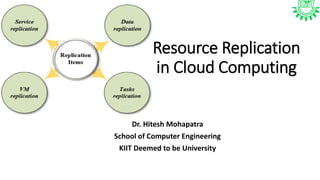
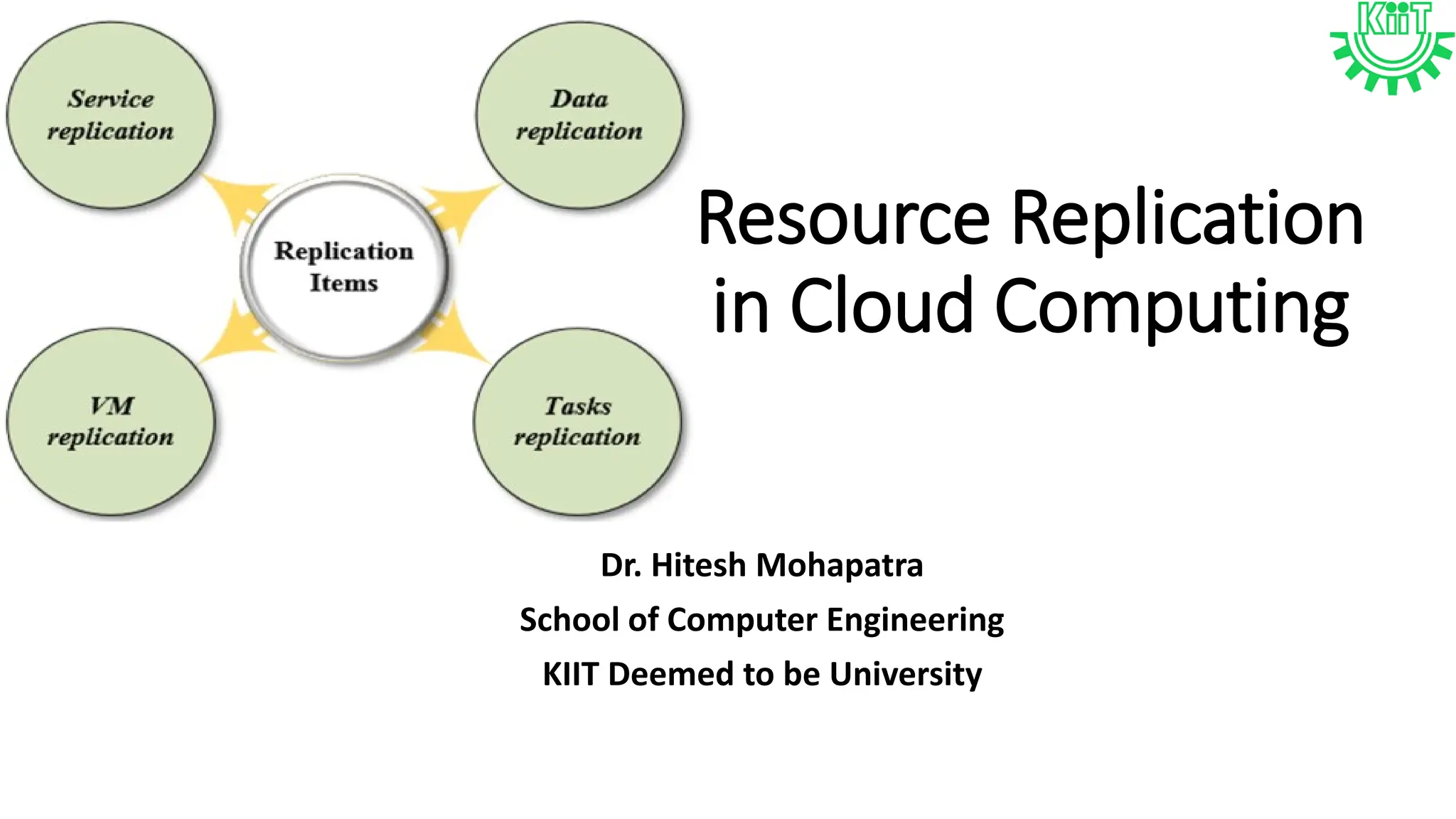
Resource Replication
in Cloud Computing
Dr. Hitesh Mohapatra
School of Computer Engineering
KIIT Deemed to be University
Definition
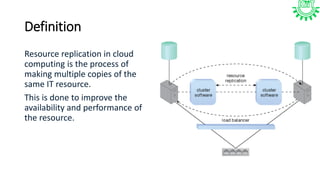
Resource replication in cloud
computing is the process of
making multiple copies of the
same IT resource.
This is done to improve the
availability and performance of
the resource.
Why is resource replication important?
• Reliability
• Resource replication helps ensure that users can access their
resources consistently, even if there are hardware failures or
network issues.
• Disaster recovery
• Resource replication can help with disaster recovery by creating
redundant copies of data in multiple locations.
• Application performance
• Resource replication can help applications run faster, especially
mobile applications.
How is resource replication done?
• Virtualization technology
• Virtualization technology is used to create multiple instances of the same
resource. For example, a hypervisor can use a virtual server image to create
multiple virtual server instances.
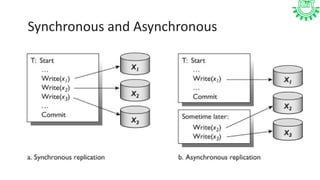
• Synchronous replication
• Data is saved to both the primary and secondary storage platforms at the
same time. This provides a more accurate backup, but it can impact network
performance.
• Asynchronous replication
• Data is saved to the primary storage first, then to the secondary storage. This
method puts less strain on systems, but there is a lag between storage
operations.
Synchronous and Asynchronous
What Is Remote Replication?
• Introduction
• Essential part of data protection and recovery.
• Historical Context
• Initially used for copying and storing application data in off-site locations.
• Technological Advancements
• Expanded capabilities over time.
• Now allows creating a synchronized copy of a VM on a remote target host.
• Functionality
• Replica: Synchronized copy of the VM.
• Functions like a regular VM on the source host.
• Flexibility
• VM replicas can be transferred to and run on any capable hardware.
• Disaster Recovery
• Powered on within seconds if the original VM fails.
• Significantly decreases downtime.
• Risk Mitigation
• Mitigates potential business risks and losses associated with disaster.
Factors to be considered!
• Distance — the greater the distance between the sites, the more
latency will be experienced.
• Bandwidth — the internet speed and network connectivity should be
sufficient to ensure an advanced connection for rapid and secure data
transfer.
• Data rate — the data rate should be lower than the available
bandwidth so as not to overload the network.
• Replication technology — replication jobs should be run in parallel
(simultaneously) for efficient network use.
Synchronous replication
• Introduction
• Essential part of data protection and recovery.
• Historical Context
• Initially used for copying and storing application data in off-site locations.
• Technological Advancements
• Expanded capabilities over time.
• Now allows creating a synchronized copy of a VM on a remote target host.
• Functionality
• Replica: Synchronized copy of the VM.
• Functions like a regular VM on the source host.
Cont.
• Flexibility
• VM replicas can be transferred to and run on any capable hardware.
• Disaster Recovery
• Powered on within seconds if the original VM fails.
• Significantly decreases downtime.
• Risk Mitigation
• Mitigates potential business risks and losses associated with disaster.
• Synchronous Replication
• Data replicated to a secondary remote location at the same time as new data is
created/updated in the primary datacenter.
• Near-instant replication: Data replicas are only a few minutes older than the source material.
• Both host and target remain synchronized, crucial for successful disaster recovery (DR).
• Impact on Network Performance
• Atomic operations: Sequence of operations completed without interruption.
• Write considered finished only when both local and remote storages acknowledge its
completion.
• Guarantees zero data loss, but can slow down overall performance.
Asynchronous replication
• Replication not performed at the same time as changes are
made in the primary storage.
• Data replicated in predetermined time periods (hourly, daily, or
weekly).
• Replica stored in a remote DR location, not synchronized in real
time with the primary location.
• Write considered complete once local storage acknowledges it.
• Improves network performance and availability without affecting
bandwidth.
• In a disaster scenario, DR site might not contain the most
recent changes, posing a risk of critical data loss.
Cont.
• Introduction
• Essential part of data protection and recovery.
• Historical Context
• Initially used for copying and storing application data in off-site locations.
• Technological Advancements
• Expanded capabilities over time.
• Now allows creating a synchronized copy of a VM on a remote target host.
• Functionality
• Replica: Synchronized copy of the VM.
• Functions like a regular VM on the source host.
• Flexibility
• VM replicas can be transferred to and run on any capable hardware.
• Disaster Recovery
• Powered on within seconds if the original VM fails.
• Significantly decreases downtime.
Cont.
• Risk Mitigation
• Mitigates potential business risks and losses associated with disaster.
• and target remain synchronized, crucial for successful disaster recovery (DR).
• Impact on Network Performance
• Atomic operations: Sequence of operations completed without interruption.
• Write considered finished only when both local and remote storages
acknowledge its completion.
• Guarantees zero data loss, but can slow down overall performance.
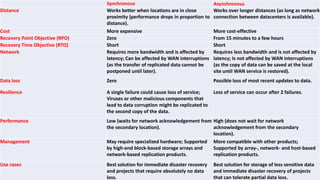
Synchronous Asynchronous
Distance Works better when locations are in close
proximity (performance drops in proportion to
distance).
Works over longer distances (as long as network
connection between datacenters is available).
Cost More expensive More cost-effective
Recovery Point Objective (RPO) Zero From 15 minutes to a few hours
Recovery Time Objective (RTO) Short Short
Network Requires more bandwidth and is affected by
latency; Can be affected by WAN interruptions
(as the transfer of replicated data cannot be
postponed until later).
Requires less bandwidth and is not affected by
latency; Is not affected by WAN interruptions
(as the copy of data can be saved at the local
site until WAN service is restored).
Data loss Zero Possible loss of most recent updates to data.
Resilience A single failure could cause loss of service;
Viruses or other malicious components that
lead to data corruption might be replicated to
the second copy of the data.
Loss of service can occur after 2 failures.
Performance Low (waits for network acknowledgement from
the secondary location).
High (does not wait for network
acknowledgement from the secondary
location).
Management May require specialized hardware; Supported
by high-end block-based storage arrays and
network-based replication products.
More compatible with other products;
Supported by array-, network- and host-based
replication products.
Use cases Best solution for immediate disaster recovery
and projects that require absolutely no data
loss.
Best solution for storage of less sensitive data
and immediate disaster recovery of projects
that can tolerate partial data loss.
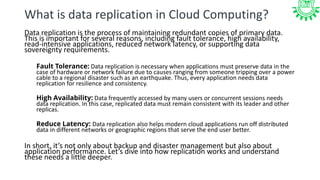
What is data replication in Cloud Computing?
Data replication is the process of maintaining redundant copies of primary data.
This is important for several reasons, including fault tolerance, high availability,
read-intensive applications, reduced network latency, or supporting data
sovereignty requirements.
Fault Tolerance: Data replication is necessary when applications must preserve data in the
case of hardware or network failure due to causes ranging from someone tripping over a power
cable to a regional disaster such as an earthquake. Thus, every application needs data
replication for resilience and consistency.
High Availability: Data frequently accessed by many users or concurrent sessions needs
data replication. In this case, replicated data must remain consistent with its leader and other
replicas.
Reduce Latency: Data replication also helps modern cloud applications run off distributed
data in different networks or geographic regions that serve the end user better.
In short, it’s not only about backup and disaster management but also about
application performance. Let’s dive into how replication works and understand
these needs a little deeper.
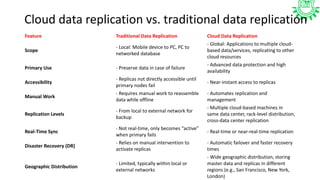
Cloud data replication vs. traditional data replication
Feature Traditional Data Replication Cloud Data Replication
Scope
- Local: Mobile device to PC, PC to
networked database
- Global: Applications to multiple cloud-
based data/services, replicating to other
cloud resources
Primary Use - Preserve data in case of failure
- Advanced data protection and high
availability
Accessibility
- Replicas not directly accessible until
primary nodes fail
- Near-instant access to replicas
Manual Work
- Requires manual work to reassemble
data while offline
- Automates replication and
management
Replication Levels
- From local to external network for
backup
- Multiple cloud-based machines in
same data center, rack-level distribution,
cross-data center replication
Real-Time Sync
- Not real-time, only becomes “active”
when primary fails
- Real-time or near-real-time replication
Disaster Recovery (DR)
- Relies on manual intervention to
activate replicas
- Automatic failover and faster recovery
times
Geographic Distribution
- Limited, typically within local or
external networks
- Wide geographic distribution, storing
master data and replicas in different
regions (e.g., San Francisco, New York,
London)
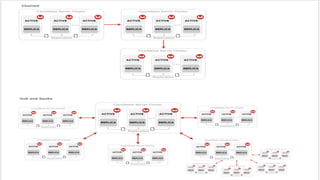
What is cloud-to-cloud data replication?
A modern hybrid cloud option uses your local network as a
master copy and multiple cloud services or varying regions
within one cloud as part of the replication. Ideally, all nodes in
this design are accessible to applications (for reading and
writing) even when no disaster is at play.
Some tools
• AWS Migration Service
• Hevo Data, Carbonite
• Veeam Backup and Replication
• Microsoft Azure
• Google Cloud Storage Snapshots
• Informatica
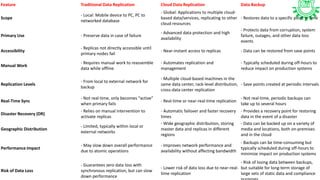
Feature Traditional Data Replication Cloud Data Replication Data Backup
Scope
- Local: Mobile device to PC, PC to
networked database
- Global: Applications to multiple cloud-
based data/services, replicating to other
cloud resources
- Restores data to a specific point in time
Primary Use - Preserve data in case of failure
- Advanced data protection and high
availability
- Protects data from corruption, system
failure, outages, and other data loss
events
Accessibility
- Replicas not directly accessible until
primary nodes fail
- Near-instant access to replicas - Data can be restored from save points
Manual Work
- Requires manual work to reassemble
data while offline
- Automates replication and
management
- Typically scheduled during off-hours to
reduce impact on production systems
Replication Levels
- From local to external network for
backup
- Multiple cloud-based machines in the
same data center, rack-level distribution,
cross-data center replication
- Save points created at periodic intervals
Real-Time Sync
- Not real-time, only becomes “active”
when primary fails
- Real-time or near-real-time replication
- Not real-time, periodic backups can
take up to several hours
Disaster Recovery (DR)
- Relies on manual intervention to
activate replicas
- Automatic failover and faster recovery
times
- Provides a recovery point for restoring
data in the event of a disaster
Geographic Distribution
- Limited, typically within local or
external networks
- Wide geographic distribution, storing
master data and replicas in different
regions
- Data can be backed up on a variety of
media and locations, both on-premises
and in the cloud
Performance Impact
- May slow down overall performance
due to atomic operations
- Improves network performance and
availability without affecting bandwidth
- Backups can be time-consuming but
typically scheduled during off-hours to
minimize impact on production systems
Risk of Data Loss
- Guarantees zero data loss with
synchronous replication, but can slow
down performance
- Lower risk of data loss due to near-real-
time replication
- Risk of losing data between backups,
but suitable for long-term storage of
large sets of static data and compliance

Resource replication in cloud computing.

  • 1.
    Resource Replication in CloudComputing Dr. Hitesh Mohapatra School of Computer Engineering KIIT Deemed to be University
  • 2.
    Definition Resource replication incloud computing is the process of making multiple copies of the same IT resource. This is done to improve the availability and performance of the resource.
  • 3.
    Why is resourcereplication important? • Reliability • Resource replication helps ensure that users can access their resources consistently, even if there are hardware failures or network issues. • Disaster recovery • Resource replication can help with disaster recovery by creating redundant copies of data in multiple locations. • Application performance • Resource replication can help applications run faster, especially mobile applications.
  • 4.
    How is resourcereplication done? • Virtualization technology • Virtualization technology is used to create multiple instances of the same resource. For example, a hypervisor can use a virtual server image to create multiple virtual server instances. • Synchronous replication • Data is saved to both the primary and secondary storage platforms at the same time. This provides a more accurate backup, but it can impact network performance. • Asynchronous replication • Data is saved to the primary storage first, then to the secondary storage. This method puts less strain on systems, but there is a lag between storage operations.
  • 5.
  • 6.
    What Is RemoteReplication? • Introduction • Essential part of data protection and recovery. • Historical Context • Initially used for copying and storing application data in off-site locations. • Technological Advancements • Expanded capabilities over time. • Now allows creating a synchronized copy of a VM on a remote target host. • Functionality • Replica: Synchronized copy of the VM. • Functions like a regular VM on the source host. • Flexibility • VM replicas can be transferred to and run on any capable hardware. • Disaster Recovery • Powered on within seconds if the original VM fails. • Significantly decreases downtime. • Risk Mitigation • Mitigates potential business risks and losses associated with disaster.
  • 7.
    Factors to beconsidered! • Distance — the greater the distance between the sites, the more latency will be experienced. • Bandwidth — the internet speed and network connectivity should be sufficient to ensure an advanced connection for rapid and secure data transfer. • Data rate — the data rate should be lower than the available bandwidth so as not to overload the network. • Replication technology — replication jobs should be run in parallel (simultaneously) for efficient network use.
  • 8.
    Synchronous replication • Introduction •Essential part of data protection and recovery. • Historical Context • Initially used for copying and storing application data in off-site locations. • Technological Advancements • Expanded capabilities over time. • Now allows creating a synchronized copy of a VM on a remote target host. • Functionality • Replica: Synchronized copy of the VM. • Functions like a regular VM on the source host.
  • 9.
    Cont. • Flexibility • VMreplicas can be transferred to and run on any capable hardware. • Disaster Recovery • Powered on within seconds if the original VM fails. • Significantly decreases downtime. • Risk Mitigation • Mitigates potential business risks and losses associated with disaster. • Synchronous Replication • Data replicated to a secondary remote location at the same time as new data is created/updated in the primary datacenter. • Near-instant replication: Data replicas are only a few minutes older than the source material. • Both host and target remain synchronized, crucial for successful disaster recovery (DR). • Impact on Network Performance • Atomic operations: Sequence of operations completed without interruption. • Write considered finished only when both local and remote storages acknowledge its completion. • Guarantees zero data loss, but can slow down overall performance.
  • 10.
    Asynchronous replication • Replicationnot performed at the same time as changes are made in the primary storage. • Data replicated in predetermined time periods (hourly, daily, or weekly). • Replica stored in a remote DR location, not synchronized in real time with the primary location. • Write considered complete once local storage acknowledges it. • Improves network performance and availability without affecting bandwidth. • In a disaster scenario, DR site might not contain the most recent changes, posing a risk of critical data loss.
  • 11.
    Cont. • Introduction • Essentialpart of data protection and recovery. • Historical Context • Initially used for copying and storing application data in off-site locations. • Technological Advancements • Expanded capabilities over time. • Now allows creating a synchronized copy of a VM on a remote target host. • Functionality • Replica: Synchronized copy of the VM. • Functions like a regular VM on the source host. • Flexibility • VM replicas can be transferred to and run on any capable hardware. • Disaster Recovery • Powered on within seconds if the original VM fails. • Significantly decreases downtime.
  • 12.
    Cont. • Risk Mitigation •Mitigates potential business risks and losses associated with disaster. • and target remain synchronized, crucial for successful disaster recovery (DR). • Impact on Network Performance • Atomic operations: Sequence of operations completed without interruption. • Write considered finished only when both local and remote storages acknowledge its completion. • Guarantees zero data loss, but can slow down overall performance.
  • 13.
    Synchronous Asynchronous Distance Worksbetter when locations are in close proximity (performance drops in proportion to distance). Works over longer distances (as long as network connection between datacenters is available). Cost More expensive More cost-effective Recovery Point Objective (RPO) Zero From 15 minutes to a few hours Recovery Time Objective (RTO) Short Short Network Requires more bandwidth and is affected by latency; Can be affected by WAN interruptions (as the transfer of replicated data cannot be postponed until later). Requires less bandwidth and is not affected by latency; Is not affected by WAN interruptions (as the copy of data can be saved at the local site until WAN service is restored). Data loss Zero Possible loss of most recent updates to data. Resilience A single failure could cause loss of service; Viruses or other malicious components that lead to data corruption might be replicated to the second copy of the data. Loss of service can occur after 2 failures. Performance Low (waits for network acknowledgement from the secondary location). High (does not wait for network acknowledgement from the secondary location). Management May require specialized hardware; Supported by high-end block-based storage arrays and network-based replication products. More compatible with other products; Supported by array-, network- and host-based replication products. Use cases Best solution for immediate disaster recovery and projects that require absolutely no data loss. Best solution for storage of less sensitive data and immediate disaster recovery of projects that can tolerate partial data loss.
  • 14.
    What is datareplication in Cloud Computing? Data replication is the process of maintaining redundant copies of primary data. This is important for several reasons, including fault tolerance, high availability, read-intensive applications, reduced network latency, or supporting data sovereignty requirements. Fault Tolerance: Data replication is necessary when applications must preserve data in the case of hardware or network failure due to causes ranging from someone tripping over a power cable to a regional disaster such as an earthquake. Thus, every application needs data replication for resilience and consistency. High Availability: Data frequently accessed by many users or concurrent sessions needs data replication. In this case, replicated data must remain consistent with its leader and other replicas. Reduce Latency: Data replication also helps modern cloud applications run off distributed data in different networks or geographic regions that serve the end user better. In short, it’s not only about backup and disaster management but also about application performance. Let’s dive into how replication works and understand these needs a little deeper.
  • 16.
    Cloud data replicationvs. traditional data replication Feature Traditional Data Replication Cloud Data Replication Scope - Local: Mobile device to PC, PC to networked database - Global: Applications to multiple cloud- based data/services, replicating to other cloud resources Primary Use - Preserve data in case of failure - Advanced data protection and high availability Accessibility - Replicas not directly accessible until primary nodes fail - Near-instant access to replicas Manual Work - Requires manual work to reassemble data while offline - Automates replication and management Replication Levels - From local to external network for backup - Multiple cloud-based machines in same data center, rack-level distribution, cross-data center replication Real-Time Sync - Not real-time, only becomes “active” when primary fails - Real-time or near-real-time replication Disaster Recovery (DR) - Relies on manual intervention to activate replicas - Automatic failover and faster recovery times Geographic Distribution - Limited, typically within local or external networks - Wide geographic distribution, storing master data and replicas in different regions (e.g., San Francisco, New York, London)
  • 17.
    What is cloud-to-clouddata replication? A modern hybrid cloud option uses your local network as a master copy and multiple cloud services or varying regions within one cloud as part of the replication. Ideally, all nodes in this design are accessible to applications (for reading and writing) even when no disaster is at play.
  • 19.
    Some tools • AWSMigration Service • Hevo Data, Carbonite • Veeam Backup and Replication • Microsoft Azure • Google Cloud Storage Snapshots • Informatica
  • 20.
    Feature Traditional DataReplication Cloud Data Replication Data Backup Scope - Local: Mobile device to PC, PC to networked database - Global: Applications to multiple cloud- based data/services, replicating to other cloud resources - Restores data to a specific point in time Primary Use - Preserve data in case of failure - Advanced data protection and high availability - Protects data from corruption, system failure, outages, and other data loss events Accessibility - Replicas not directly accessible until primary nodes fail - Near-instant access to replicas - Data can be restored from save points Manual Work - Requires manual work to reassemble data while offline - Automates replication and management - Typically scheduled during off-hours to reduce impact on production systems Replication Levels - From local to external network for backup - Multiple cloud-based machines in the same data center, rack-level distribution, cross-data center replication - Save points created at periodic intervals Real-Time Sync - Not real-time, only becomes “active” when primary fails - Real-time or near-real-time replication - Not real-time, periodic backups can take up to several hours Disaster Recovery (DR) - Relies on manual intervention to activate replicas - Automatic failover and faster recovery times - Provides a recovery point for restoring data in the event of a disaster Geographic Distribution - Limited, typically within local or external networks - Wide geographic distribution, storing master data and replicas in different regions - Data can be backed up on a variety of media and locations, both on-premises and in the cloud Performance Impact - May slow down overall performance due to atomic operations - Improves network performance and availability without affecting bandwidth - Backups can be time-consuming but typically scheduled during off-hours to minimize impact on production systems Risk of Data Loss - Guarantees zero data loss with synchronous replication, but can slow down performance - Lower risk of data loss due to near-real- time replication - Risk of losing data between backups, but suitable for long-term storage of large sets of static data and compliance