Introducing
Deep Learning
with MATLAB
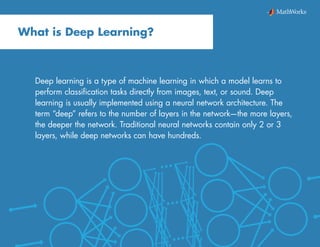
Deep learning is a type of machine learning in which a model learns to
perform classification tasks directly from images, text, or sound. Deep
learning is usually implemented using a neural network architecture. The
term “deep” refers to the number of layers in the network—the more layers,
the deeper the network. Traditional neural networks contain only 2 or 3
layers, while deep networks can have hundreds.
What is Deep Learning?
3Introducing Deep Learning with MATLAB
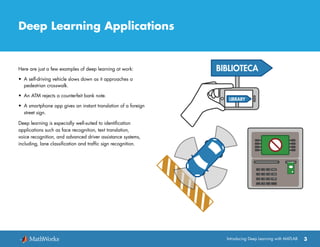
Here are just a few examples of deep learning at work:
•	 A self-driving vehicle slows down as it approaches a
pedestrian crosswalk.
•	 An ATM rejects a counterfeit bank note.
•	 A smartphone app gives an instant translation of a foreign
street sign.
Deep learning is especially well-suited to identification
applications such as face recognition, text translation,
voice recognition, and advanced driver assistance systems,
including, lane classification and traffic sign recognition.
Deep Learning Applications
BIBLIOTECA
LIBRARY
1 2
5
8 9
6
3 CANCEL
CLEAR
ENTER
4
7
0
4Introducing Deep Learning with MATLAB
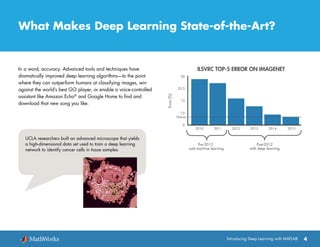
UCLA researchers built an advanced microscope that yields
a high-dimensional data set used to train a deep learning
network to identify cancer cells in tissue samples.
What Makes Deep Learning State-of-the-Art?
In a word, accuracy. Advanced tools and techniques have
dramatically improved deep learning algorithms—to the point
where they can outperform humans at classifying images, win
against the world’s best GO player, or enable a voice-controlled
assistant like Amazon Echo®
and Google Home to find and
download that new song you like.
5Introducing Deep Learning with MATLAB
What Makes Deep Learning State-of-the-Art?
continued
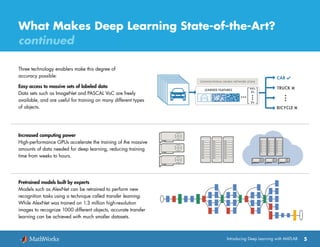
Three technology enablers make this degree of
accuracy possible:
Easy access to massive sets of labeled data
Data sets such as ImageNet and PASCAL VoC are freely
available, and are useful for training on many different types
of objects.
Increased computing power
High-performance GPUs accelerate the training of the massive
amounts of data needed for deep learning, reducing training
time from weeks to hours.
Pretrained models built by experts
Models such as AlexNet can be retrained to perform new
recognition tasks using a technique called transfer learning.
While AlexNet was trained on 1.3 million high-resolution
images to recognize 1000 different objects, accurate transfer
learning can be achieved with much smaller datasets.
6Introducing Deep Learning with MATLAB
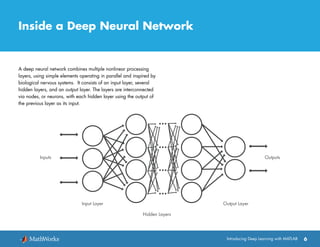
Inside a Deep Neural Network
A deep neural network combines multiple nonlinear processing
layers, using simple elements operating in parallel and inspired by
biological nervous systems. It consists of an input layer, several
hidden layers, and an output layer. The layers are interconnected
via nodes, or neurons, with each hidden layer using the output of
the previous layer as its input.
7Introducing Deep Learning with MATLAB
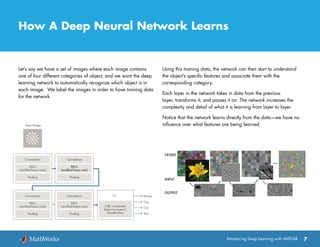
How A Deep Neural Network Learns
Let’s say we have a set of images where each image contains
one of four different categories of object, and we want the deep
learning network to automatically recognize which object is in
each image. We label the images in order to have training data
for the network.
Using this training data, the network can then start to understand
the object’s specific features and associate them with the
corresponding category.
Each layer in the network takes in data from the previous
layer, transforms it, and passes it on. The network increases the
complexity and detail of what it is learning from layer to layer.
Notice that the network learns directly from the data—we have no
influence over what features are being learned.
FILTERS
INPUT
OUTPUT
8Introducing Deep Learning with MATLAB
About Convolutional Neural Networks
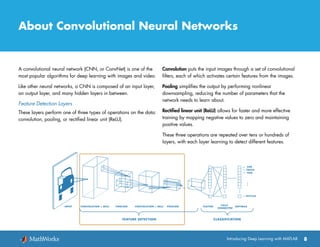
A convolutional neural network (CNN, or ConvNet) is one of the
most popular algorithms for deep learning with images and video.
Like other neural networks, a CNN is composed of an input layer,
an output layer, and many hidden layers in between.
Feature Detection Layers
These layers perform one of three types of operations on the data:
convolution, pooling, or rectified linear unit (ReLU).
Convolution puts the input images through a set of convolutional
filters, each of which activates certain features from the images.
Pooling simplifies the output by performing nonlinear
downsampling, reducing the number of parameters that the
network needs to learn about.
Rectified linear unit (ReLU) allows for faster and more effective
training by mapping negative values to zero and maintaining
positive values.
These three operations are repeated over tens or hundreds of
layers, with each layer learning to detect different features.
FLATTEN SOFTMAX
FULLY
CONNECTED
INPUT CONVOLUTION + RELU POOLING
FEATURE LEARNING CLASSIFICATION
CONVOLUTION + RELU POOLING
CAR
VAN
TRUCK
BICYCLE
INPUTINPUT CONVOLUTION + RELU POOLING CONVOLUTION + RELU POOLING FLATTEN FULLY
CONNECTED
SOFTMAX
CAR
VAN
TRUCK
BICYCLE
FEATURE DETECTION CLASSIFICATION
9Introducing Deep Learning with MATLAB
About Convolutional Neural Networks continued
Classification Layers
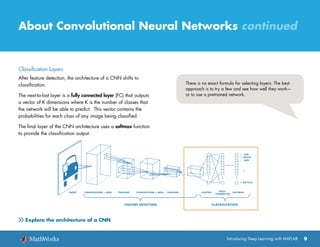
After feature detection, the architecture of a CNN shifts to
classification.
The next-to-last layer is a fully connected layer (FC) that outputs
a vector of K dimensions where K is the number of classes that
the network will be able to predict. This vector contains the
probabilities for each class of any image being classified.
The final layer of the CNN architecture uses a softmax function
to provide the classification output.
There is no exact formula for selecting layers. The best
approach is to try a few and see how well they work—
or to use a pretrained network.
FLATTEN SOFTMAXFULLY
CONNECTED
INPUT CONVOLUTION + RELU POOLING
FEATURE LEARNING CLASSIFICATION
CONVOLUTION + RELU POOLING
CAR
VAN
TRUCK
BICYCLE
INPUTINPUT CONVOLUTION + RELU POOLING CONVOLUTION + RELU POOLING FLATTEN FULLY
CONNECTED
SOFTMAX
CAR
VAN
TRUCK
BICYCLE
FEATURE DETECTION CLASSIFICATION
Explore the architecture of a CNN
10Introducing Deep Learning with MATLAB
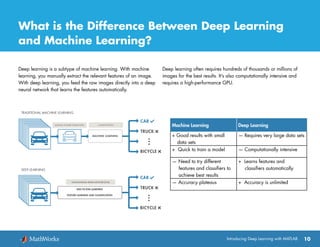
What is the Difference Between Deep Learning
and Machine Learning?
Deep learning is a subtype of machine learning. With machine
learning, you manually extract the relevant features of an image.
With deep learning, you feed the raw images directly into a deep
neural network that learns the features automatically.
Deep learning often requires hundreds of thousands or millions of
images for the best results. It’s also computationally intensive and
requires a high-performance GPU.
CONVOLUTIONAL NEURAL NETWORK (CNN)
END-TO-END LEARNING
FEATURE LEARNING AND CLASSIFICATION
Machine Learning Deep Learning
+ Good results with small
data sets
— Requires very large data sets
+ Quick to train a model — Computationally intensive
— Need to try different
features and classifiers to
achieve best results
+ Learns features and
classifiers automatically
— Accuracy plateaus + Accuracy is unlimited
11Introducing Deep Learning with MATLAB
Getting Started with Deep Learning
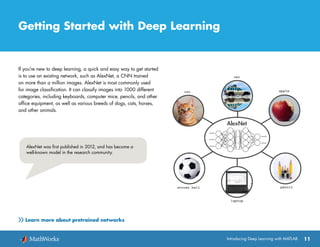
If you’re new to deep learning, a quick and easy way to get started
is to use an existing network, such as AlexNet, a CNN trained
on more than a million images. AlexNet is most commonly used
for image classification. It can classify images into 1000 different
categories, including keyboards, computer mice, pencils, and other
office equipment, as well as various breeds of dogs, cats, horses,
and other animals.
AlexNet was first published in 2012, and has become a
well-known model in the research community.
Learn more about pretrained networks
An Example Using AlexNet
12
You can use AlexNet to classify objects in any image. In this
example, we’ll use it to classify objects in an image from a
webcam installed on a desktop. In addition to MATLAB®
, we’ll be
using the following:
•	 Neural Network Toolbox™
•	 Support package for using webcams in MATLAB
•	 Support package for using AlexNet
After loading AlexNet we connect to the webcam and capture
a live image.
camera = webcam; % Connect to the camera
nnet = alexnet; % Load the neural net
picture = camera.snapshot;
% Take a picture
Next, we resize the image to 227x227 pixels, the size required
by AlexNet.
picture = imresize(picture,[227,227]);
% Resize the picture
AlexNet can now classify our image.
label = classify(nnet, picture);
% Classify the picture
image(picture); % Show the picture
title(char(label)); % Show the label
Introducing Deep Learning with MATLAB
Watch how-to video: Deep Learning in 11 Lines of MATLAB Code
13Introducing Deep Learning with MATLAB
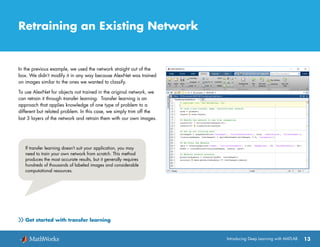
Retraining an Existing Network
In the previous example, we used the network straight out of the
box. We didn’t modify it in any way because AlexNet was trained
on images similar to the ones we wanted to classify.
To use AlexNet for objects not trained in the original network, we
can retrain it through transfer learning. Transfer learning is an
approach that applies knowledge of one type of problem to a
different but related problem. In this case, we simply trim off the
last 3 layers of the network and retrain them with our own images.
If transfer learning doesn’t suit your application, you may
need to train your own network from scratch. This method
produces the most accurate results, but it generally requires
hundreds of thousands of labeled images and considerable
computational resources.
Get started with transfer learning
14Introducing Deep Learning with MATLAB
Computational Resources for Deep Learning
Training a deep learning model can take hours, days, or weeks,
depending on the size of the data and the amount of processing
power you have available. Selecting a computational resource is a
critical consideration when you set up your workflow.
Currently, there are three computation options: CPU-based, GPU-
based, and cloud-based.
CPU-based computation is the simplest and most readily available
option. The example described in the previous section works on
a CPU, but we recommend using CPU-based computation only for
simple examples using a pretrained network.
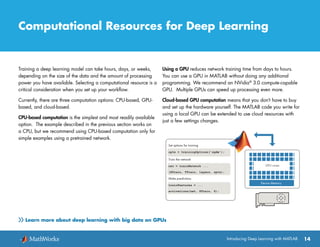
Using a GPU reduces network training time from days to hours.
You can use a GPU in MATLAB without doing any additional
programming. We recommend an NVidia®
3.0 compute-capable
GPU. Multiple GPUs can speed up processing even more.
Cloud-based GPU computation means that you don’t have to buy
and set up the hardware yourself. The MATLAB code you write for
using a local GPU can be extended to use cloud resources with
just a few settings changes.
Learn more about deep learning with big data on GPUs
© 2017 The MathWorks, Inc. MATLAB and Simulink are registered trademarks of The MathWorks, Inc. See mathworks.com/trademarks for a list of additional trademarks.
Other product or brand names may be trademarks or registered trademarks of their respective holders.
80789v00
More Deep Learning Resources
Introduction to Deep Learning
Deep Learning: Top 7 Ways to Get Started with MATLAB
Deep Learning with MATLAB: Quick-Start Videos
Start Deep Learning Faster Using Transfer Learning
Transfer Learning Using AlexNet
Introduction to Convolutional Neural Networks
Create a Simple Deep Learning Network for Classification
Deep Learning for Computer Vision with MATLAB
Cancer Diagnostics with Deep Learning and Photonic Time Stretch

Introducing Deep learning with Matlab

  • 1.
  • 2.
    Deep learning isa type of machine learning in which a model learns to perform classification tasks directly from images, text, or sound. Deep learning is usually implemented using a neural network architecture. The term “deep” refers to the number of layers in the network—the more layers, the deeper the network. Traditional neural networks contain only 2 or 3 layers, while deep networks can have hundreds. What is Deep Learning?
  • 3.
    3Introducing Deep Learningwith MATLAB Here are just a few examples of deep learning at work: • A self-driving vehicle slows down as it approaches a pedestrian crosswalk. • An ATM rejects a counterfeit bank note. • A smartphone app gives an instant translation of a foreign street sign. Deep learning is especially well-suited to identification applications such as face recognition, text translation, voice recognition, and advanced driver assistance systems, including, lane classification and traffic sign recognition. Deep Learning Applications BIBLIOTECA LIBRARY 1 2 5 8 9 6 3 CANCEL CLEAR ENTER 4 7 0
  • 4.
    4Introducing Deep Learningwith MATLAB UCLA researchers built an advanced microscope that yields a high-dimensional data set used to train a deep learning network to identify cancer cells in tissue samples. What Makes Deep Learning State-of-the-Art? In a word, accuracy. Advanced tools and techniques have dramatically improved deep learning algorithms—to the point where they can outperform humans at classifying images, win against the world’s best GO player, or enable a voice-controlled assistant like Amazon Echo® and Google Home to find and download that new song you like.
  • 5.
    5Introducing Deep Learningwith MATLAB What Makes Deep Learning State-of-the-Art? continued Three technology enablers make this degree of accuracy possible: Easy access to massive sets of labeled data Data sets such as ImageNet and PASCAL VoC are freely available, and are useful for training on many different types of objects. Increased computing power High-performance GPUs accelerate the training of the massive amounts of data needed for deep learning, reducing training time from weeks to hours. Pretrained models built by experts Models such as AlexNet can be retrained to perform new recognition tasks using a technique called transfer learning. While AlexNet was trained on 1.3 million high-resolution images to recognize 1000 different objects, accurate transfer learning can be achieved with much smaller datasets.
  • 6.
    6Introducing Deep Learningwith MATLAB Inside a Deep Neural Network A deep neural network combines multiple nonlinear processing layers, using simple elements operating in parallel and inspired by biological nervous systems. It consists of an input layer, several hidden layers, and an output layer. The layers are interconnected via nodes, or neurons, with each hidden layer using the output of the previous layer as its input.
  • 7.
    7Introducing Deep Learningwith MATLAB How A Deep Neural Network Learns Let’s say we have a set of images where each image contains one of four different categories of object, and we want the deep learning network to automatically recognize which object is in each image. We label the images in order to have training data for the network. Using this training data, the network can then start to understand the object’s specific features and associate them with the corresponding category. Each layer in the network takes in data from the previous layer, transforms it, and passes it on. The network increases the complexity and detail of what it is learning from layer to layer. Notice that the network learns directly from the data—we have no influence over what features are being learned. FILTERS INPUT OUTPUT
  • 8.
    8Introducing Deep Learningwith MATLAB About Convolutional Neural Networks A convolutional neural network (CNN, or ConvNet) is one of the most popular algorithms for deep learning with images and video. Like other neural networks, a CNN is composed of an input layer, an output layer, and many hidden layers in between. Feature Detection Layers These layers perform one of three types of operations on the data: convolution, pooling, or rectified linear unit (ReLU). Convolution puts the input images through a set of convolutional filters, each of which activates certain features from the images. Pooling simplifies the output by performing nonlinear downsampling, reducing the number of parameters that the network needs to learn about. Rectified linear unit (ReLU) allows for faster and more effective training by mapping negative values to zero and maintaining positive values. These three operations are repeated over tens or hundreds of layers, with each layer learning to detect different features. FLATTEN SOFTMAX FULLY CONNECTED INPUT CONVOLUTION + RELU POOLING FEATURE LEARNING CLASSIFICATION CONVOLUTION + RELU POOLING CAR VAN TRUCK BICYCLE INPUTINPUT CONVOLUTION + RELU POOLING CONVOLUTION + RELU POOLING FLATTEN FULLY CONNECTED SOFTMAX CAR VAN TRUCK BICYCLE FEATURE DETECTION CLASSIFICATION
  • 9.
    9Introducing Deep Learningwith MATLAB About Convolutional Neural Networks continued Classification Layers After feature detection, the architecture of a CNN shifts to classification. The next-to-last layer is a fully connected layer (FC) that outputs a vector of K dimensions where K is the number of classes that the network will be able to predict. This vector contains the probabilities for each class of any image being classified. The final layer of the CNN architecture uses a softmax function to provide the classification output. There is no exact formula for selecting layers. The best approach is to try a few and see how well they work— or to use a pretrained network. FLATTEN SOFTMAXFULLY CONNECTED INPUT CONVOLUTION + RELU POOLING FEATURE LEARNING CLASSIFICATION CONVOLUTION + RELU POOLING CAR VAN TRUCK BICYCLE INPUTINPUT CONVOLUTION + RELU POOLING CONVOLUTION + RELU POOLING FLATTEN FULLY CONNECTED SOFTMAX CAR VAN TRUCK BICYCLE FEATURE DETECTION CLASSIFICATION Explore the architecture of a CNN
  • 10.
    10Introducing Deep Learningwith MATLAB What is the Difference Between Deep Learning and Machine Learning? Deep learning is a subtype of machine learning. With machine learning, you manually extract the relevant features of an image. With deep learning, you feed the raw images directly into a deep neural network that learns the features automatically. Deep learning often requires hundreds of thousands or millions of images for the best results. It’s also computationally intensive and requires a high-performance GPU. CONVOLUTIONAL NEURAL NETWORK (CNN) END-TO-END LEARNING FEATURE LEARNING AND CLASSIFICATION Machine Learning Deep Learning + Good results with small data sets — Requires very large data sets + Quick to train a model — Computationally intensive — Need to try different features and classifiers to achieve best results + Learns features and classifiers automatically — Accuracy plateaus + Accuracy is unlimited
  • 11.
    11Introducing Deep Learningwith MATLAB Getting Started with Deep Learning If you’re new to deep learning, a quick and easy way to get started is to use an existing network, such as AlexNet, a CNN trained on more than a million images. AlexNet is most commonly used for image classification. It can classify images into 1000 different categories, including keyboards, computer mice, pencils, and other office equipment, as well as various breeds of dogs, cats, horses, and other animals. AlexNet was first published in 2012, and has become a well-known model in the research community. Learn more about pretrained networks
  • 12.
    An Example UsingAlexNet 12 You can use AlexNet to classify objects in any image. In this example, we’ll use it to classify objects in an image from a webcam installed on a desktop. In addition to MATLAB® , we’ll be using the following: • Neural Network Toolbox™ • Support package for using webcams in MATLAB • Support package for using AlexNet After loading AlexNet we connect to the webcam and capture a live image. camera = webcam; % Connect to the camera nnet = alexnet; % Load the neural net picture = camera.snapshot; % Take a picture Next, we resize the image to 227x227 pixels, the size required by AlexNet. picture = imresize(picture,[227,227]); % Resize the picture AlexNet can now classify our image. label = classify(nnet, picture); % Classify the picture image(picture); % Show the picture title(char(label)); % Show the label Introducing Deep Learning with MATLAB Watch how-to video: Deep Learning in 11 Lines of MATLAB Code
  • 13.
    13Introducing Deep Learningwith MATLAB Retraining an Existing Network In the previous example, we used the network straight out of the box. We didn’t modify it in any way because AlexNet was trained on images similar to the ones we wanted to classify. To use AlexNet for objects not trained in the original network, we can retrain it through transfer learning. Transfer learning is an approach that applies knowledge of one type of problem to a different but related problem. In this case, we simply trim off the last 3 layers of the network and retrain them with our own images. If transfer learning doesn’t suit your application, you may need to train your own network from scratch. This method produces the most accurate results, but it generally requires hundreds of thousands of labeled images and considerable computational resources. Get started with transfer learning
  • 14.
    14Introducing Deep Learningwith MATLAB Computational Resources for Deep Learning Training a deep learning model can take hours, days, or weeks, depending on the size of the data and the amount of processing power you have available. Selecting a computational resource is a critical consideration when you set up your workflow. Currently, there are three computation options: CPU-based, GPU- based, and cloud-based. CPU-based computation is the simplest and most readily available option. The example described in the previous section works on a CPU, but we recommend using CPU-based computation only for simple examples using a pretrained network. Using a GPU reduces network training time from days to hours. You can use a GPU in MATLAB without doing any additional programming. We recommend an NVidia® 3.0 compute-capable GPU. Multiple GPUs can speed up processing even more. Cloud-based GPU computation means that you don’t have to buy and set up the hardware yourself. The MATLAB code you write for using a local GPU can be extended to use cloud resources with just a few settings changes. Learn more about deep learning with big data on GPUs
  • 15.
    © 2017 TheMathWorks, Inc. MATLAB and Simulink are registered trademarks of The MathWorks, Inc. See mathworks.com/trademarks for a list of additional trademarks. Other product or brand names may be trademarks or registered trademarks of their respective holders. 80789v00 More Deep Learning Resources Introduction to Deep Learning Deep Learning: Top 7 Ways to Get Started with MATLAB Deep Learning with MATLAB: Quick-Start Videos Start Deep Learning Faster Using Transfer Learning Transfer Learning Using AlexNet Introduction to Convolutional Neural Networks Create a Simple Deep Learning Network for Classification Deep Learning for Computer Vision with MATLAB Cancer Diagnostics with Deep Learning and Photonic Time Stretch