Assemblies in .Net


                     1
What is an Assembly
• When create a project in Visual Studio .Net and
  compile it, assemblies are created.
     - .DLL
     - .EXE
• These assemblies are the fundamental units of
  applications in the .NET Framework.

• An assembly contains one or more compiled classes.


                                                   2
• When compile a program, the compiler translates
  the source code into the Intermediate Language
  code (IL).
• In addition to translating the code into IL, the
  compiler also produces metadata about the program
  during the process of the compilation.
• The IL and the metadata are linked in an assembly.
• An IL and metadata exist in portable executable
  file(EXE/DLL).

                                                   3
• In any Project folder, In bin folder that contains,
  say myproject.dll/ myproject.exe and
  myproject.pdb files.

• The myproject.dll/ myproject.exe is the assembly,
  and myproject.pdb ( program database ) file
  contains debugging information for the assembly.


                                                        4
Structure of Assemblies
• An assembly also contains an assembly manifest that
  contains the assembly metadata.
• This metadata contains information about the
  classes, methods and properties and so on
• This information is stored within the assembly file
  (DLL/EXE) itself.
• Resources are non executable data that is a part of
  Application.
      e.g: images, sound and video etc.

                                                    5
Process assemblies (EXE) and library assemblies (DLL)


• A process assembly represents a process which uses
  classes defined in library assemblies


                                                        6
Feature of Assemblies
• Assemblies are self describing
• Assembly can be load side by side
• Assembly can be private or shared


                                      7
Why use Assemblies?

• The goal of the assembly model is the elimination of
  DLL Hell. Under the current model.
• A catalog of DLLs is centralized in the Windows
  Registry.
• When a new version of a DLL is published, the
  registry re-references the catalog to point to the new
  DLL.


                                                       8
Types of Assemblies

• Assemblies can be private or shared.
• The assembly which is used by a single
  application is called as private assembly.
• Suppose we have created a DLL which
  encapsulates business logic. This DLL is used
  by the client application only and not by any
  other application.


                                              9
Shared assemblies
• Suppose we are creating a general purpose DLL
  which provides functionality to be used by a variety
  of applications. Now, instead of each client
  application having its own copy of DLL we can place
  the DLL in 'global assembly cache'. Such assemblies
  are called as shared assemblies.


                                                    10
Benefits of Private Assemblies

• Private assemblies are installed in a directory
  named bin located under the application
  directory. These files are private to the
  application.
• It is great for small utility Assemblies/
  application specific code


                                                11
Disadvantages:
• When you have multiple applications using
  one assembly, you have to deploy the
  assembly to the bin directory of each
  application.


                                          12
How to create an Assembly

• A shared assembly can be created in Visual
  Studio.Net by a Pair of tool.
      - SN.exe utility.
      - Gacutil tool
• The sn.exe utility is located in the Bin directory.
• After creating the shared assembly we should sign
  the shared assembly to the GAC by using Gacutil
  tool.


                                                   13
Calculator.cs                            MathProgram.cs

                                         using System;
namespace calculate
                                         using calculate;
{
   public class mathoperation            class mycalc
  {                                      {
     public int subtraction(int a, int       static void Main()
    b)                                       {
    {                                        mathoperation c1 = new mathoperation();
         return a-b;                         int result = c1.subtraction(50,20);
                                             Console.WriteLine("The result is:{0}",result);
    }                                        Console.Read();
  }                                          }
                                         }
}

c:>csc /t:library Calculator.cs
                                         c:>csc /t: /r:Calculator.dll MathProgram.cs

Created DLL file “Calculator.dll”        Created EXE file “MathProgram.exe”

                                                                                     14
What is Global Assembly Cache?

• An assembly that is shared by multiple applications is
  called a global assembly and is installed in the global
  assembly cache (GAC).
• Global assembly cache is nothing but a special disk
  folder where all the shared assemblies are kept.
• It is located under <drive>:WindowsAssembly
  folder on every machine running the .NET
  framework.


                                                       15
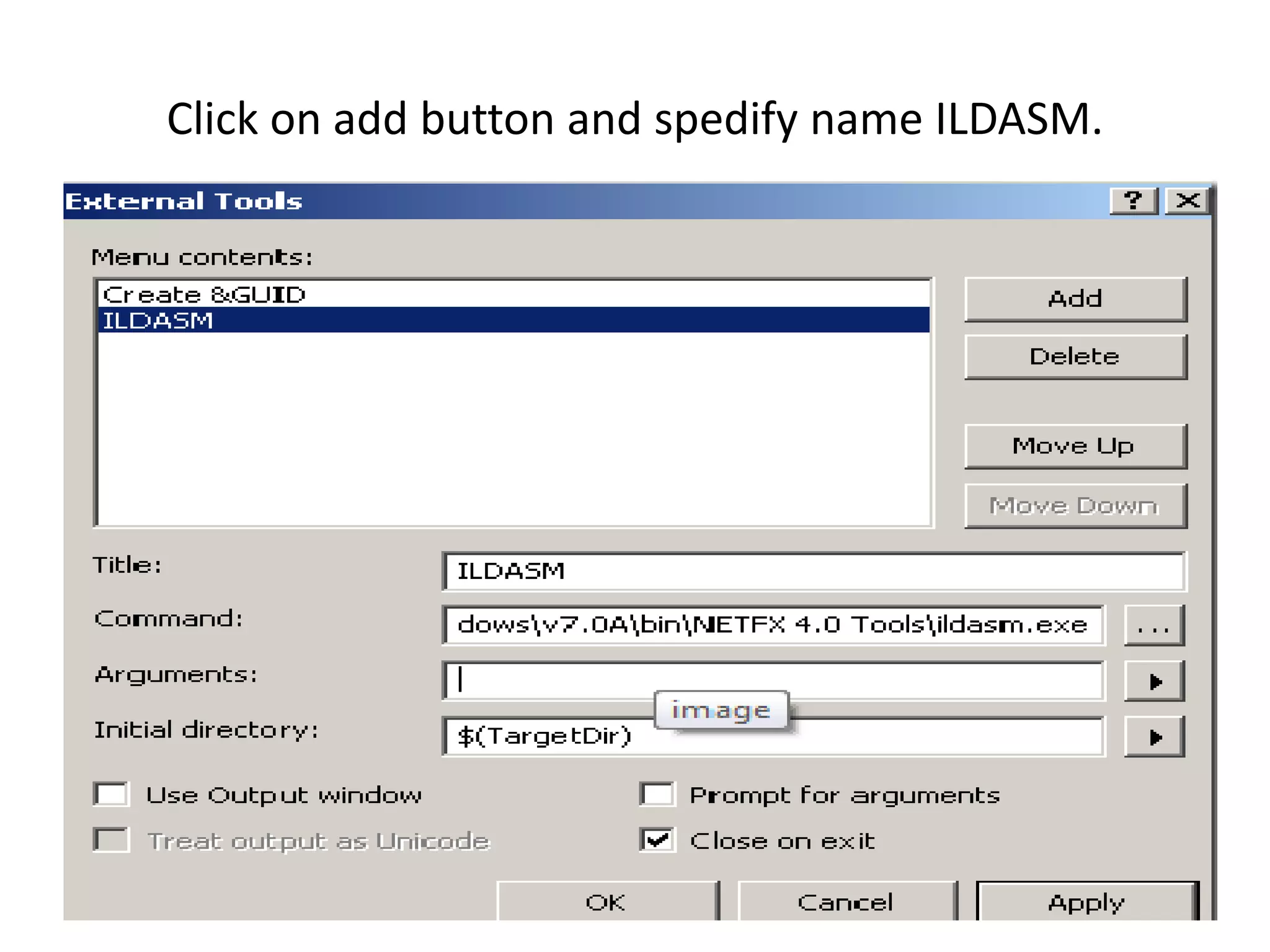
Add an External Tool
• Visual Studio provides the functionality to
  include external tools in the Tools menu.
• To modify the existing tools or to add new
  tools of your own, you simply need to go to
  Tools → External Tools.


                                                16
What is ILDASM ?
• It is Intermediate Language Dissembler SDK
  Tool that is used to examine MSIL code and
  the parts of the Assembly.
• It comes with the installation of Visual Studio
  IDE.


                                                    17
How to Add an External Tool


                              18
Click on add button and spedify name ILDASM.


                                               19
20
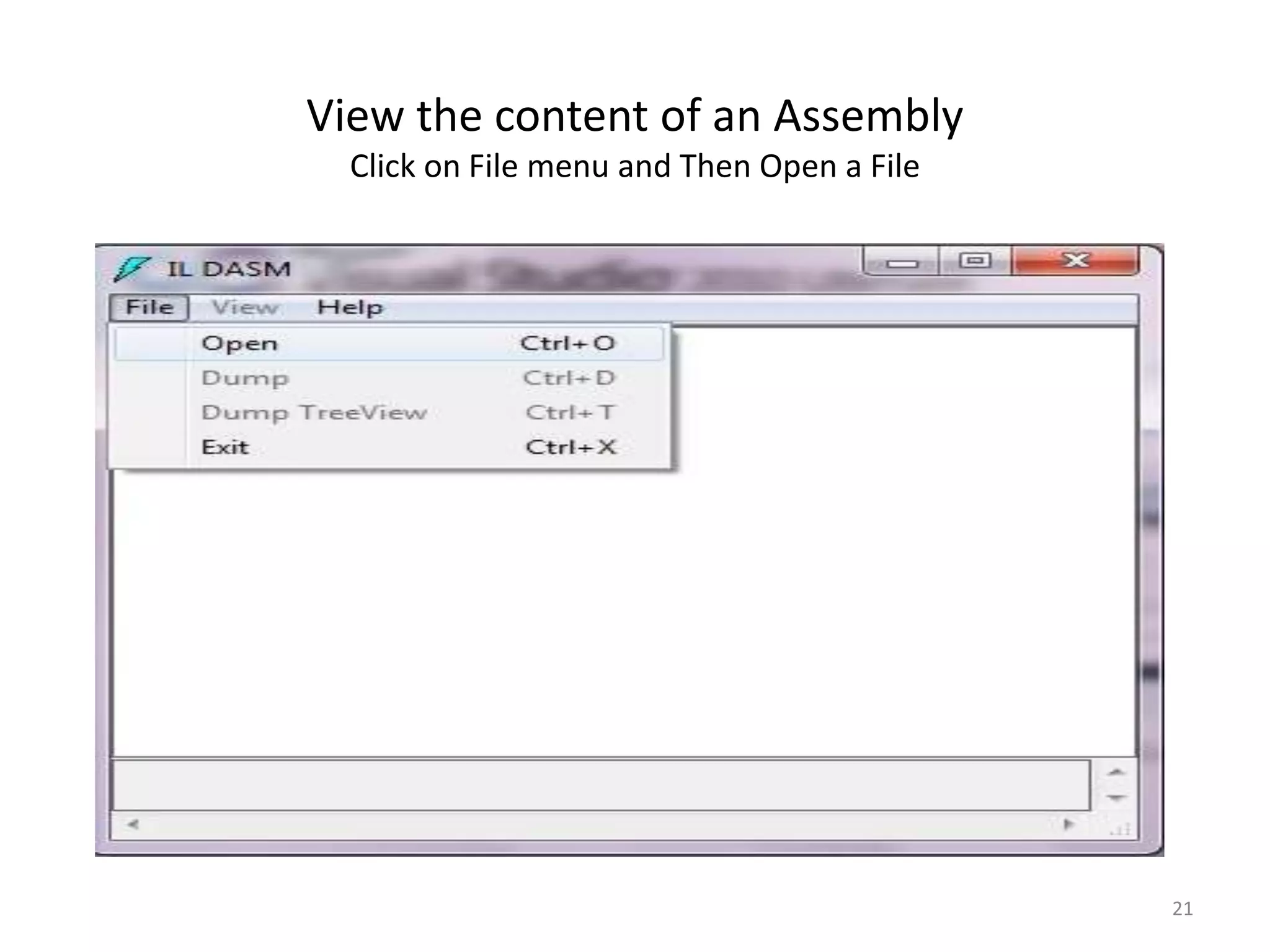
View the content of an Assembly
  Click on File menu and Then Open a File


                                            21
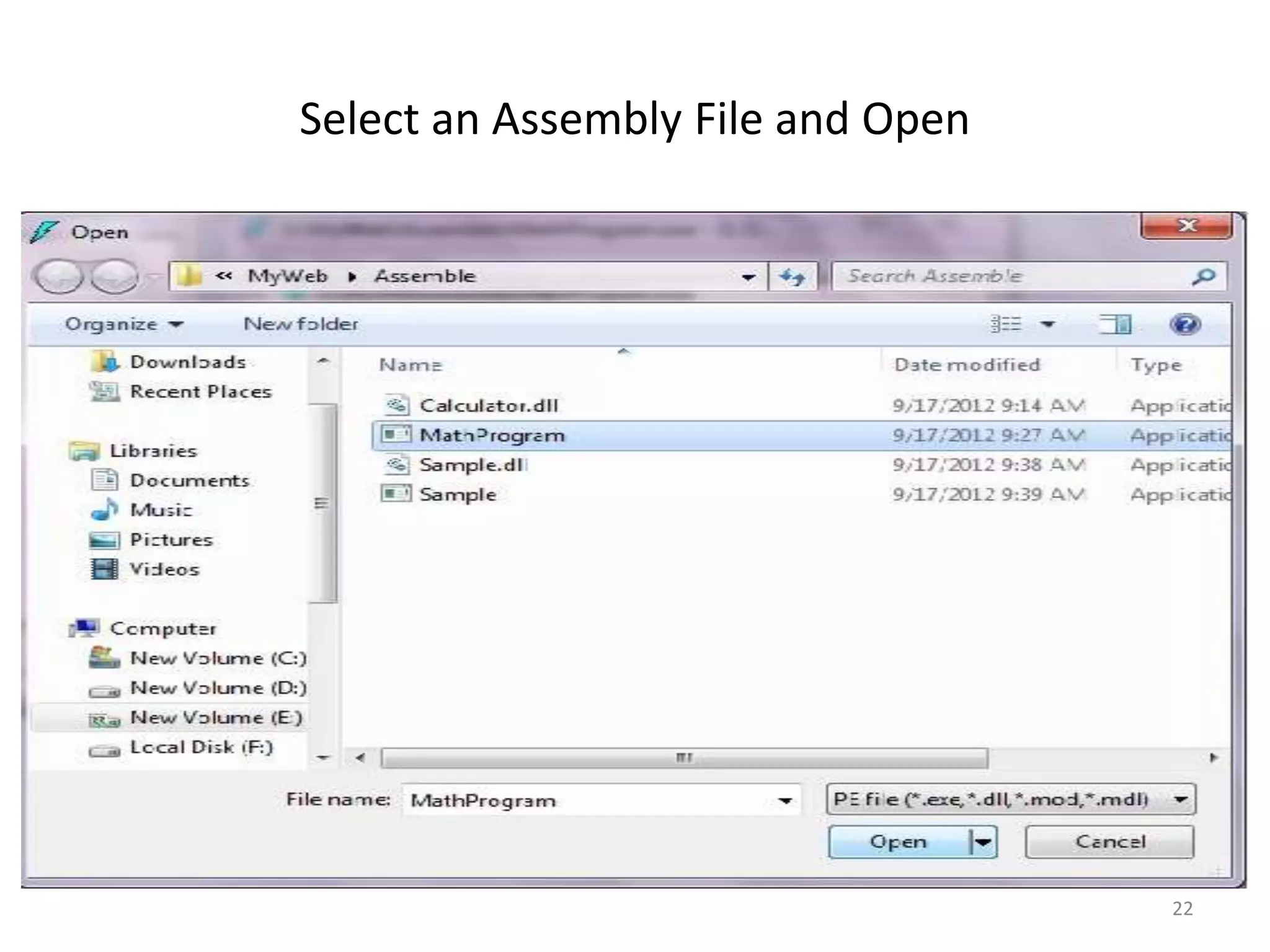
Select an Assembly File and Open


                                   22
Double Click on Manifest


                           23
Double Click on mycalc


                         24
• End of Presentation.
• Thank’s for Watching.


JANAS KHAN


                          25

Assemblies

  • 1.
  • 2.
    What is anAssembly • When create a project in Visual Studio .Net and compile it, assemblies are created. - .DLL - .EXE • These assemblies are the fundamental units of applications in the .NET Framework. • An assembly contains one or more compiled classes. 2
  • 3.
    • When compilea program, the compiler translates the source code into the Intermediate Language code (IL). • In addition to translating the code into IL, the compiler also produces metadata about the program during the process of the compilation. • The IL and the metadata are linked in an assembly. • An IL and metadata exist in portable executable file(EXE/DLL). 3
  • 4.
    • In anyProject folder, In bin folder that contains, say myproject.dll/ myproject.exe and myproject.pdb files. • The myproject.dll/ myproject.exe is the assembly, and myproject.pdb ( program database ) file contains debugging information for the assembly. 4
  • 5.
    Structure of Assemblies •An assembly also contains an assembly manifest that contains the assembly metadata. • This metadata contains information about the classes, methods and properties and so on • This information is stored within the assembly file (DLL/EXE) itself. • Resources are non executable data that is a part of Application. e.g: images, sound and video etc. 5
  • 6.
    Process assemblies (EXE)and library assemblies (DLL) • A process assembly represents a process which uses classes defined in library assemblies 6
  • 7.
    Feature of Assemblies •Assemblies are self describing • Assembly can be load side by side • Assembly can be private or shared 7
  • 8.
    Why use Assemblies? •The goal of the assembly model is the elimination of DLL Hell. Under the current model. • A catalog of DLLs is centralized in the Windows Registry. • When a new version of a DLL is published, the registry re-references the catalog to point to the new DLL. 8
  • 9.
    Types of Assemblies •Assemblies can be private or shared. • The assembly which is used by a single application is called as private assembly. • Suppose we have created a DLL which encapsulates business logic. This DLL is used by the client application only and not by any other application. 9
  • 10.
    Shared assemblies • Supposewe are creating a general purpose DLL which provides functionality to be used by a variety of applications. Now, instead of each client application having its own copy of DLL we can place the DLL in 'global assembly cache'. Such assemblies are called as shared assemblies. 10
  • 11.
    Benefits of PrivateAssemblies • Private assemblies are installed in a directory named bin located under the application directory. These files are private to the application. • It is great for small utility Assemblies/ application specific code 11
  • 12.
    Disadvantages: • When youhave multiple applications using one assembly, you have to deploy the assembly to the bin directory of each application. 12
  • 13.
    How to createan Assembly • A shared assembly can be created in Visual Studio.Net by a Pair of tool. - SN.exe utility. - Gacutil tool • The sn.exe utility is located in the Bin directory. • After creating the shared assembly we should sign the shared assembly to the GAC by using Gacutil tool. 13
  • 14.
    Calculator.cs MathProgram.cs using System; namespace calculate using calculate; { public class mathoperation class mycalc { { public int subtraction(int a, int static void Main() b) { { mathoperation c1 = new mathoperation(); return a-b; int result = c1.subtraction(50,20); Console.WriteLine("The result is:{0}",result); } Console.Read(); } } } } c:>csc /t:library Calculator.cs c:>csc /t: /r:Calculator.dll MathProgram.cs Created DLL file “Calculator.dll” Created EXE file “MathProgram.exe” 14
  • 15.
    What is GlobalAssembly Cache? • An assembly that is shared by multiple applications is called a global assembly and is installed in the global assembly cache (GAC). • Global assembly cache is nothing but a special disk folder where all the shared assemblies are kept. • It is located under <drive>:WindowsAssembly folder on every machine running the .NET framework. 15
  • 16.
    Add an ExternalTool • Visual Studio provides the functionality to include external tools in the Tools menu. • To modify the existing tools or to add new tools of your own, you simply need to go to Tools → External Tools. 16
  • 17.
    What is ILDASM? • It is Intermediate Language Dissembler SDK Tool that is used to examine MSIL code and the parts of the Assembly. • It comes with the installation of Visual Studio IDE. 17
  • 18.
    How to Addan External Tool 18
  • 19.
    Click on addbutton and spedify name ILDASM. 19
  • 20.
  • 21.
    View the contentof an Assembly Click on File menu and Then Open a File 21
  • 22.
    Select an AssemblyFile and Open 22
  • 23.
    Double Click onManifest 23
  • 24.
    Double Click onmycalc 24
  • 25.
    • End ofPresentation. • Thank’s for Watching. JANAS KHAN 25