FP304 –
DATABASE
SYSTEM
CHAPTER 1 –
FUNDAMENTALS OF
DATABASE MANAGEMENT
SYSTEM
CHAPTER 1 – FUNDAMENTALS OF DBMS

WHAT IS DBMS?


A very large integrated collection of data.



Models real-world enterprise.





Entities (e.g., students, courses)
Relationships (e.g.,Madonna is
t a k i n g FP304 )

A Database Management System is a
software package designed to store and
manage database
CHAPTER 1 – FUNDAMENTALS OF DBMS

WHY USE A DBMS?
 Data

independence and efficient access

 Reduced
 Data

application development time

integrity and security

 Unifrom

data administration

 Concurrent

access recovery from crashers
CHAPTER 1 – FUNDAMENTALS OF DBMS

WHY STUDY DATABASES?
 Shift

from computation to information



at the “low end”: scramble to webspace (a mess!)



at the :high end”: scientific applications

 Datasets

increasing in diversity and volume



Digital libraries, interactive video



... Nned for DBMS exploding
CHAPTER 1 – FUNDAMENTALS OF DBMS

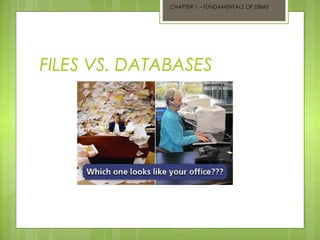
FILES VS. DATABASES
CHAPTER 1 – FUNDAMENTALS OF DBMS

ADVANTAGES OF DBMS
 Control
 Data

of data redundancy

consistency

 Sharing

of data

 Improved

security

 Improved

backup and recovery services
CHAPTER 1 – FUNDAMENTALS OF DBMS

DISADVANTAGES OF DBMS
 Complexity
 Size
 Cost

of DBMSs

 Higher

impact of a failure
CHAPTER 1 – FUNDAMENTALS OF DBMS

VARIOUS COMMON OF DBMS
 Oracle
 Microsoft
 SQL

Access

Server

 Sybase
 FoxPro
CHAPTER 1 – FUNDAMENTALS OF DBMS

FEATURES OF DBMS


Database definition



Nonprocedural access



Application development



Procedural language interface



Transaction processing



Database tuning

[BUT, THIS IS AN ASSIGNMENT AND PRESENT!]
[PERFORM IN 3 GROUPS]
CHAPTER 1 – FUNDAMENTALS OF DBMS

THREE-SCHEMA ARCHITECTURE
OF DBMS
 First


Level:

Internal schema at the internal level to
describe data storage structures and
access paths. Typically uses a physical data
model.
CHAPTER 1 – FUNDAMENTALS OF DBMS

THREE-SCHEMA ARCHITECTURE
OF DBMS
 Second


Level:

Conceptual schema at the conceptual
level to describe the structure and
constraints for the whole database. Uses a
conceptual or an implementation data
model.
CHAPTER 1 – FUNDAMENTALS OF DBMS

THREE-SCHEMA ARCHITECTURE
OF DBMS
 Third


Level:

External schema at the external level to
describe the various user views. Usually
uses the same data model as the
conceptual level.
CHAPTER 1 – FUNDAMENTALS OF DBMS

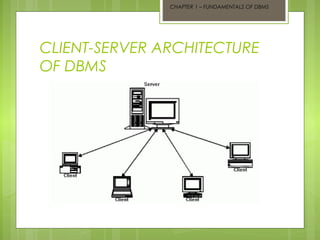
CLIENT-SERVER ARCHITECTURE
OF DBMS
CHAPTER 1 – FUNDAMENTALS OF DBMS

TRADITIONAL TWO-TIER CLIENTSERVER ARCHITECTURE
 Advantages:


It enables wider access to existing
databases.



Increased performance



Hardware costs may be reduced



Communication costs are reduced
CHAPTER 1 – FUNDAMENTALS OF DBMS

THREE-TIER CLIENT-SERVER
ARCHITECTURE
 Advantages:


The need for less expensive hardware



Application maintenance is centralized.



The added modularity makes it easier to modify or
replace one tier without affecting the other tier.



Load balancing is easier with the separation of
core business logic from the database functions.
CHAPTER 1 – FUNDAMENTALS OF DBMS

CATEGORIES OF DBMS
 Desktop

Database



Desktop databases offer an inexpensive,
simple solution to many less complex data
storage and manipulation requirements.



They earn their name by virtue of the fact
that they are designed to run on “desktop”
(or personal) computers.
CHAPTER 1 – FUNDAMENTALS OF DBMS

CATEGORIES OF DBMS
 Server

Database



Offer organizations the ability to manage
large amounts of data efficiently and in a
manner that enables many users to access
and update the data simultaneously.



If you’re able to carry the hefty pricetag, a
server-based database can provide you
with a comprehensive data management
solution.
CHAPTER 1 – FUNDAMENTALS OF DBMS

CATEGORIES OF DBMS
1.

Desktop databases.

.Example

of desktop databases:



Microsoft Access – from Microsoft in Windows OS.



FoxPro – Windows, Macintosh & UNIX



FileMaker Pro – DOS, all Windows except Win2000.



Paradox – DOS, Windows



Lotus – based on a network server
CHAPTER 1 – FUNDAMENTALS OF DBMS

CATEGORIES OF DBMS
2.

Server databases

.Examples

of server databases



Oracle,



Microsoft SQL Server, and



IBM DB2
CHAPTER 1 – FUNDAMENTALS OF DBMS

BENEFITS OF DESKTOP DATABASE
1.

Inexpensive

2.

User-friendly - Desktop DBMSs usually offer
an easy-to-navigate graphical user
interface.

3.

Offers web solution - Many modern desktop
databases provide web functionality
enabling you to publish your data on the
web in a static or dynamic fashion.
CHAPTER 1 – FUNDAMENTALS OF DBMS

BENEFITS OF SERVER DATABASE
1.

Flexibility - Server-based databases can handle just about
any data management problem you can throw at them.

2.

Powerful performance - Modern databases can manage
multiple high-speed processors, clustered servers, high
bandwidth connectivity and fault tolerant storage
technology.

3.

Scalability - server databases are able to gracefully handle
a rapidly expanding amount of users and/or data.
CHAPTER 1 – FUNDAMENTALS OF DBMS

DEFINE THE REQUIREMENTS


Who will be using the database and what tasks will they
perform?



How often will the data be modified? Who will make
these modifications?



Who will be providing IT support for the database?



What hardware is available? Is there a budget for
purchasing additional hardware?



Who will be responsible for maintaining the data?



Will data access be offered over the Internet? If so, what
level of access should be supported?
DEFINE THE REQUIREMENTS
 You

may discover that a sophisticated
multi-user server platform (like SQL Server
or Oracle) is necessary to support your
complex requirements.

 On

the other hand, a desktop database
like Microsoft Access might be just as
capable of meeting your needs
DATABASE IN SOCIETY
 Bank

Sector

 Government

Sector

 Telecommunication
 Hospitals
 Hypermarkets

Sector

DATABASE Fp304 chapter 1

  • 1.
    FP304 – DATABASE SYSTEM CHAPTER 1– FUNDAMENTALS OF DATABASE MANAGEMENT SYSTEM
  • 2.
    CHAPTER 1 –FUNDAMENTALS OF DBMS WHAT IS DBMS?  A very large integrated collection of data.  Models real-world enterprise.    Entities (e.g., students, courses) Relationships (e.g.,Madonna is t a k i n g FP304 ) A Database Management System is a software package designed to store and manage database
  • 3.
    CHAPTER 1 –FUNDAMENTALS OF DBMS WHY USE A DBMS?  Data independence and efficient access  Reduced  Data application development time integrity and security  Unifrom data administration  Concurrent access recovery from crashers
  • 4.
    CHAPTER 1 –FUNDAMENTALS OF DBMS WHY STUDY DATABASES?  Shift from computation to information  at the “low end”: scramble to webspace (a mess!)  at the :high end”: scientific applications  Datasets increasing in diversity and volume  Digital libraries, interactive video  ... Nned for DBMS exploding
  • 5.
    CHAPTER 1 –FUNDAMENTALS OF DBMS FILES VS. DATABASES
  • 6.
    CHAPTER 1 –FUNDAMENTALS OF DBMS ADVANTAGES OF DBMS  Control  Data of data redundancy consistency  Sharing of data  Improved security  Improved backup and recovery services
  • 7.
    CHAPTER 1 –FUNDAMENTALS OF DBMS DISADVANTAGES OF DBMS  Complexity  Size  Cost of DBMSs  Higher impact of a failure
  • 8.
    CHAPTER 1 –FUNDAMENTALS OF DBMS VARIOUS COMMON OF DBMS  Oracle  Microsoft  SQL Access Server  Sybase  FoxPro
  • 9.
    CHAPTER 1 –FUNDAMENTALS OF DBMS FEATURES OF DBMS  Database definition  Nonprocedural access  Application development  Procedural language interface  Transaction processing  Database tuning [BUT, THIS IS AN ASSIGNMENT AND PRESENT!] [PERFORM IN 3 GROUPS]
  • 10.
    CHAPTER 1 –FUNDAMENTALS OF DBMS THREE-SCHEMA ARCHITECTURE OF DBMS  First  Level: Internal schema at the internal level to describe data storage structures and access paths. Typically uses a physical data model.
  • 11.
    CHAPTER 1 –FUNDAMENTALS OF DBMS THREE-SCHEMA ARCHITECTURE OF DBMS  Second  Level: Conceptual schema at the conceptual level to describe the structure and constraints for the whole database. Uses a conceptual or an implementation data model.
  • 12.
    CHAPTER 1 –FUNDAMENTALS OF DBMS THREE-SCHEMA ARCHITECTURE OF DBMS  Third  Level: External schema at the external level to describe the various user views. Usually uses the same data model as the conceptual level.
  • 13.
    CHAPTER 1 –FUNDAMENTALS OF DBMS CLIENT-SERVER ARCHITECTURE OF DBMS
  • 14.
    CHAPTER 1 –FUNDAMENTALS OF DBMS TRADITIONAL TWO-TIER CLIENTSERVER ARCHITECTURE  Advantages:  It enables wider access to existing databases.  Increased performance  Hardware costs may be reduced  Communication costs are reduced
  • 15.
    CHAPTER 1 –FUNDAMENTALS OF DBMS THREE-TIER CLIENT-SERVER ARCHITECTURE  Advantages:  The need for less expensive hardware  Application maintenance is centralized.  The added modularity makes it easier to modify or replace one tier without affecting the other tier.  Load balancing is easier with the separation of core business logic from the database functions.
  • 16.
    CHAPTER 1 –FUNDAMENTALS OF DBMS CATEGORIES OF DBMS  Desktop Database  Desktop databases offer an inexpensive, simple solution to many less complex data storage and manipulation requirements.  They earn their name by virtue of the fact that they are designed to run on “desktop” (or personal) computers.
  • 17.
    CHAPTER 1 –FUNDAMENTALS OF DBMS CATEGORIES OF DBMS  Server Database  Offer organizations the ability to manage large amounts of data efficiently and in a manner that enables many users to access and update the data simultaneously.  If you’re able to carry the hefty pricetag, a server-based database can provide you with a comprehensive data management solution.
  • 18.
    CHAPTER 1 –FUNDAMENTALS OF DBMS CATEGORIES OF DBMS 1. Desktop databases. .Example of desktop databases:  Microsoft Access – from Microsoft in Windows OS.  FoxPro – Windows, Macintosh & UNIX  FileMaker Pro – DOS, all Windows except Win2000.  Paradox – DOS, Windows  Lotus – based on a network server
  • 19.
    CHAPTER 1 –FUNDAMENTALS OF DBMS CATEGORIES OF DBMS 2. Server databases .Examples of server databases  Oracle,  Microsoft SQL Server, and  IBM DB2
  • 20.
    CHAPTER 1 –FUNDAMENTALS OF DBMS BENEFITS OF DESKTOP DATABASE 1. Inexpensive 2. User-friendly - Desktop DBMSs usually offer an easy-to-navigate graphical user interface. 3. Offers web solution - Many modern desktop databases provide web functionality enabling you to publish your data on the web in a static or dynamic fashion.
  • 21.
    CHAPTER 1 –FUNDAMENTALS OF DBMS BENEFITS OF SERVER DATABASE 1. Flexibility - Server-based databases can handle just about any data management problem you can throw at them. 2. Powerful performance - Modern databases can manage multiple high-speed processors, clustered servers, high bandwidth connectivity and fault tolerant storage technology. 3. Scalability - server databases are able to gracefully handle a rapidly expanding amount of users and/or data.
  • 22.
    CHAPTER 1 –FUNDAMENTALS OF DBMS DEFINE THE REQUIREMENTS  Who will be using the database and what tasks will they perform?  How often will the data be modified? Who will make these modifications?  Who will be providing IT support for the database?  What hardware is available? Is there a budget for purchasing additional hardware?  Who will be responsible for maintaining the data?  Will data access be offered over the Internet? If so, what level of access should be supported?
  • 23.
    DEFINE THE REQUIREMENTS You may discover that a sophisticated multi-user server platform (like SQL Server or Oracle) is necessary to support your complex requirements.  On the other hand, a desktop database like Microsoft Access might be just as capable of meeting your needs
  • 24.
    DATABASE IN SOCIETY Bank Sector  Government Sector  Telecommunication  Hospitals  Hypermarkets Sector