DATA-BASE MANAGEMENT SYSTEM
CS-101 COMPUTING
FUNDAMENTALS
Presented by:
Maham Asghar (2020-CHY-10)
Misqal-e-zara (2020-CHY-23)
Bisma Arshad (2020-CHY-24)
Mahnoor Kashif (2020-CHY-26)
Qurat-ul-Ain (2020-CHY-32)
OUTLINES
 What is Database Management System?
 Brief History
 Why Use DBMS?
 Types of DBMS
 Features of DBMS
 Components of DBMS
 Advantages and Disadvantages of DBMS
Database management system
(DBMS) is middleware that
allows programmers, database
administrators (DBAs), software
applications and end users to
store, organize, access, query and
manipulate data in a database.
A Database Management System
(DBMS) consist of:
 A collection of interrelated and
persistent data (usually referred
to as the database).
 A set of application programs
used to access, update and
manage that data (which form the
data management system).
DATA VS. DATABASE VS. DBMS
 Data - the foundation of technological activity
 Database - a highly organized collection of assembled
data
 Database Management System - sophisticated
software that controls the database and the database
environment
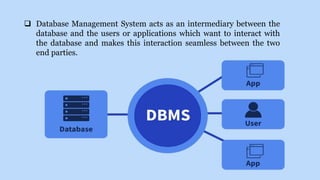
 Database Management System acts as an intermediary between the
database and the users or applications which want to interact with
the database and makes this interaction seamless between the two
end parties.
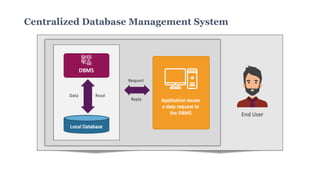
Centralized Database Management System
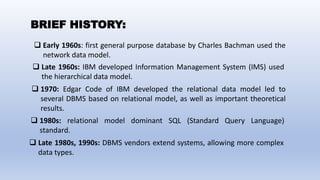
BRIEF HISTORY:
 Early 1960s: first general purpose database by Charles Bachman used the
network data model.
 Late 1960s: IBM developed Information Management System (IMS) used
the hierarchical data model.
 1970: Edgar Code of IBM developed the relational data model led to
several DBMS based on relational model, as well as important theoretical
results.
 1980s: relational model dominant SQL (Standard Query Language)
standard.
 Late 1980s, 1990s: DBMS vendors extend systems, allowing more complex
data types.
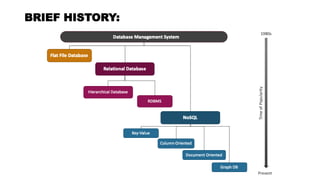
BRIEF HISTORY:
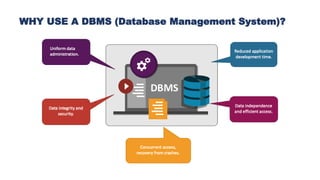
WHY USE A DBMS (Database Management System)?
1. Uniform Data Administration:
DBMS provides a centralized and standardized approach to
managing data, ensuring consistency in data administration practices.
2. Data Integrity and Security:
DBMS enforces data integrity rules and provides security
features to control access, protecting data from unauthorized use or
modification.
3. Concurrent Access and Recovery from Crashes:
DBMS supports concurrent access by multiple users and ensures
recovery mechanisms to restore the database to a consistent state in
the event of system crashes.
WHY USE A DBMS (Database Management System)?
4. Reduce Application Development Time:
DBMS abstracts the complexities of data storage and retrieval,
allowing developers to focus on application logic rather than low-level
data management tasks, thereby reducing development time.
5. Data Independence:
DBMS provides a level of abstraction between applications and
the physical storage of data, allowing changes to the database structure
without affecting application code.
6. Efficient Access:
DBMS optimizes data retrieval through powerful query
languages and query optimization techniques, resulting in efficient
access to stored information.
WHY USE A DBMS (Database Management System)?
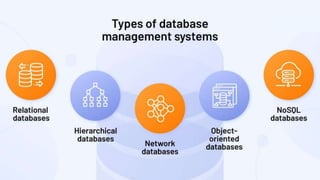
TYPES OF DBMS
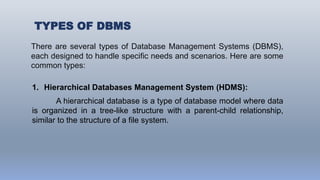
There are several types of Database Management Systems (DBMS),
each designed to handle specific needs and scenarios. Here are some
common types:
1. Hierarchical Databases Management System (HDMS):
A hierarchical database is a type of database model where data
is organized in a tree-like structure with a parent-child relationship,
similar to the structure of a file system.
TYPES OF DBMS
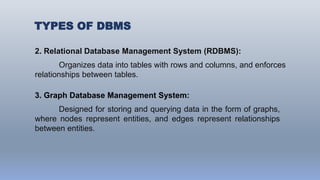
2. Relational Database Management System (RDBMS):
Organizes data into tables with rows and columns, and enforces
relationships between tables.
3. Graph Database Management System:
Designed for storing and querying data in the form of graphs,
where nodes represent entities, and edges represent relationships
between entities.
TYPES OF DBMS
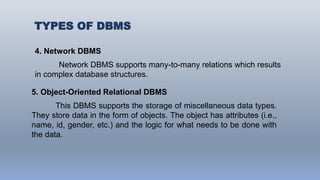
4. Network DBMS
Network DBMS supports many-to-many relations which results
in complex database structures.
5. Object-Oriented Relational DBMS
This DBMS supports the storage of miscellaneous data types.
They store data in the form of objects. The object has attributes (i.e.,
name, id, gender, etc.) and the logic for what needs to be done with
the data.
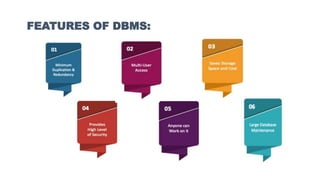
FEATURES OF DBMS:
FEATURES OF DBMS:
1. Minimum Redundancy and Duplication
Because databases are used by so many people, the risks of data
duplication are relatively high. But in a database management system,
data files are shared which brings down data duplication and
redundancy.
2. Multi User Access
Multiple users can access all forms of information contained in the
same data store with a Multi-User Access Database Management
System.
FEATURES OF DBMS:
3. Save Storage, Space and Cost:
All database management systems must save a large amount of
data. However, proper data integration saves a lot of space in the
database management system. Companies spend a lot of money to
keep their data safe. They will save money on data storage and data
entry if they have managed data to store.
4. Maintenance of a Large Database
Only a database management system can keep large databases
of large corporations up to date.
FEATURES OF DBMS:
5. Provides a High Level of Data Security
All companies that handle a substantial volume of data are
concerned about security. Except for the Database Administrator or the
department head, Database Management Systems does not grant
complete database access.
6. Usage Of Query Languages
A typical Database Management System allows users to utilize
query languages for collecting, searching, sorting, altering, and other
tasks that enable them to manipulate their database entries.
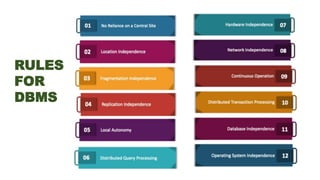
RULES
FOR
DBMS
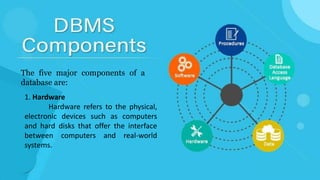
The five major components of a
database are:
1. Hardware
Hardware refers to the physical,
electronic devices such as computers
and hard disks that offer the interface
between computers and real-world
systems.
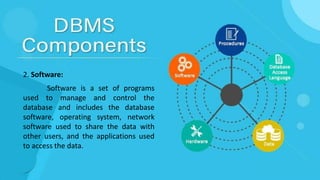
2. Software:
Software is a set of programs
used to manage and control the
database and includes the database
software, operating system, network
software used to share the data with
other users, and the applications used
to access the data.
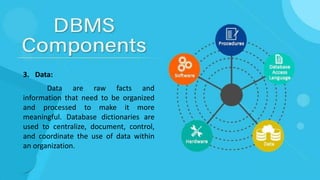
3. Data:
Data are raw facts and
information that need to be organized
and processed to make it more
meaningful. Database dictionaries are
used to centralize, document, control,
and coordinate the use of data within
an organization.
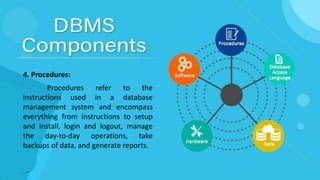
4. Procedures:
Procedures refer to the
instructions used in a database
management system and encompass
everything from instructions to setup
and install, login and logout, manage
the day-to-day operations, take
backups of data, and generate reports.
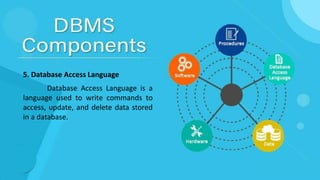
5. Database Access Language
Database Access Language is a
language used to write commands to
access, update, and delete data stored
in a database.
 Data Definition Language (DDL)
 Data Manipulation Language(DML)
 Data Control Language (DCL)
 Transactional Control Language (TCL)
There are four types of database access language:
 Data Definition Language (DDL)
Definition Language (DDL) statements are used to define the database
structure or schema.
Some examples:
CREATE to create objects in the database
ALTER- alters the structure of the database
DROP-delete objects from the database
COMMENT - add comments to the data dictionary
RENAME- rename an object
 Data Manipulation Language(DML)
Data Manipulation Language (DML) statements are used for
managing data within schema objects.
Some examples:
SELECT- Retrieve data from the a database
INSERT - Insert data into a table
UPDATE- Updates existing data within a table
DELETE-deletes all records from a table, the space for the records
remain
 Data Control Language (DCL)
DCL is short for Data Control Language which acts as an access
specifier to the database.(basically to grant and revoke
permissions to users in the database)
GRANT: grant permissions to the user for running
DML(SELECT, INSERT, DELETE,…) commands on the table
REVOKE: revoke permissions to the user for running
DML(SELECT, INSERT, DELETE,…) command on the specified
table
 Transactional Control Language (TCL)
TCL is short for Transactional Control Language which acts as an
manager for all types of transactional data and all transactions.
Some of the command of TCL are:
Roll Back: Used to cancel or Undo changes made in the database.
Commit: It is used to apply or save changes in the database.
Save Point: It is used to save the data on the temporary basis in
the database.
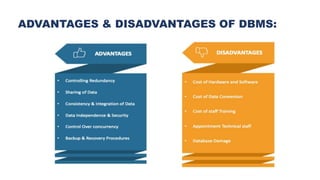
ADVANTAGES & DISADVANTAGES OF DBMS:
Examples of DBMS
There is a wide range of database software solutions,
including both enterprise and open source solutions, available for
database management. Here are some of the most popular database
management systems:
 Oracle
Oracle Database is a commercial relational database
management system. It utilizes enterprise-scale database technology
with a robust set of features right out of the box. It can be stored in
the cloud or on-premises.
 MySQL
MySQL is a relational database management system that is
commonly used with open-source content management systems and
large platforms like Facebook, Twitter, and Youtube.
 SQL Server
Developed by Microsoft, SQL Server is a relational database
management system built on top of structured query language (SQL),
a standardized programming language that allows database
administrators to manage databases and query data.
Examples of DBMS
CONCLUSION:
So, in conclusion, we have learned that a database
management system (DBMS) is a collection of programs that alter,
store, and retrieve user data records from databases while adhering to
security protocols.
As a result, it provides a link between information repositories
and application software. During this phase, the DBMS accepts an
application program’s request for data information and instructs the
operating system to provide the requested information.
THANK YOU

Database Computer presentation file .pptx

  • 1.
  • 2.
    CS-101 COMPUTING FUNDAMENTALS Presented by: MahamAsghar (2020-CHY-10) Misqal-e-zara (2020-CHY-23) Bisma Arshad (2020-CHY-24) Mahnoor Kashif (2020-CHY-26) Qurat-ul-Ain (2020-CHY-32)
  • 3.
    OUTLINES  What isDatabase Management System?  Brief History  Why Use DBMS?  Types of DBMS  Features of DBMS  Components of DBMS  Advantages and Disadvantages of DBMS
  • 4.
    Database management system (DBMS)is middleware that allows programmers, database administrators (DBAs), software applications and end users to store, organize, access, query and manipulate data in a database.
  • 5.
    A Database ManagementSystem (DBMS) consist of:  A collection of interrelated and persistent data (usually referred to as the database).  A set of application programs used to access, update and manage that data (which form the data management system).
  • 6.
    DATA VS. DATABASEVS. DBMS  Data - the foundation of technological activity  Database - a highly organized collection of assembled data  Database Management System - sophisticated software that controls the database and the database environment
  • 7.
     Database ManagementSystem acts as an intermediary between the database and the users or applications which want to interact with the database and makes this interaction seamless between the two end parties.
  • 8.
  • 9.
    BRIEF HISTORY:  Early1960s: first general purpose database by Charles Bachman used the network data model.  Late 1960s: IBM developed Information Management System (IMS) used the hierarchical data model.  1970: Edgar Code of IBM developed the relational data model led to several DBMS based on relational model, as well as important theoretical results.  1980s: relational model dominant SQL (Standard Query Language) standard.  Late 1980s, 1990s: DBMS vendors extend systems, allowing more complex data types.
  • 10.
  • 12.
    WHY USE ADBMS (Database Management System)?
  • 13.
    WHY USE ADBMS (Database Management System)? 1. Uniform Data Administration: DBMS provides a centralized and standardized approach to managing data, ensuring consistency in data administration practices. 2. Data Integrity and Security: DBMS enforces data integrity rules and provides security features to control access, protecting data from unauthorized use or modification.
  • 14.
    3. Concurrent Accessand Recovery from Crashes: DBMS supports concurrent access by multiple users and ensures recovery mechanisms to restore the database to a consistent state in the event of system crashes. WHY USE A DBMS (Database Management System)? 4. Reduce Application Development Time: DBMS abstracts the complexities of data storage and retrieval, allowing developers to focus on application logic rather than low-level data management tasks, thereby reducing development time.
  • 15.
    5. Data Independence: DBMSprovides a level of abstraction between applications and the physical storage of data, allowing changes to the database structure without affecting application code. 6. Efficient Access: DBMS optimizes data retrieval through powerful query languages and query optimization techniques, resulting in efficient access to stored information. WHY USE A DBMS (Database Management System)?
  • 17.
    TYPES OF DBMS Thereare several types of Database Management Systems (DBMS), each designed to handle specific needs and scenarios. Here are some common types: 1. Hierarchical Databases Management System (HDMS): A hierarchical database is a type of database model where data is organized in a tree-like structure with a parent-child relationship, similar to the structure of a file system.
  • 18.
    TYPES OF DBMS 2.Relational Database Management System (RDBMS): Organizes data into tables with rows and columns, and enforces relationships between tables. 3. Graph Database Management System: Designed for storing and querying data in the form of graphs, where nodes represent entities, and edges represent relationships between entities.
  • 19.
    TYPES OF DBMS 4.Network DBMS Network DBMS supports many-to-many relations which results in complex database structures. 5. Object-Oriented Relational DBMS This DBMS supports the storage of miscellaneous data types. They store data in the form of objects. The object has attributes (i.e., name, id, gender, etc.) and the logic for what needs to be done with the data.
  • 20.
  • 21.
    FEATURES OF DBMS: 1.Minimum Redundancy and Duplication Because databases are used by so many people, the risks of data duplication are relatively high. But in a database management system, data files are shared which brings down data duplication and redundancy. 2. Multi User Access Multiple users can access all forms of information contained in the same data store with a Multi-User Access Database Management System.
  • 22.
    FEATURES OF DBMS: 3.Save Storage, Space and Cost: All database management systems must save a large amount of data. However, proper data integration saves a lot of space in the database management system. Companies spend a lot of money to keep their data safe. They will save money on data storage and data entry if they have managed data to store. 4. Maintenance of a Large Database Only a database management system can keep large databases of large corporations up to date.
  • 23.
    FEATURES OF DBMS: 5.Provides a High Level of Data Security All companies that handle a substantial volume of data are concerned about security. Except for the Database Administrator or the department head, Database Management Systems does not grant complete database access. 6. Usage Of Query Languages A typical Database Management System allows users to utilize query languages for collecting, searching, sorting, altering, and other tasks that enable them to manipulate their database entries.
  • 24.
  • 25.
    The five majorcomponents of a database are: 1. Hardware Hardware refers to the physical, electronic devices such as computers and hard disks that offer the interface between computers and real-world systems.
  • 26.
    2. Software: Software isa set of programs used to manage and control the database and includes the database software, operating system, network software used to share the data with other users, and the applications used to access the data.
  • 27.
    3. Data: Data areraw facts and information that need to be organized and processed to make it more meaningful. Database dictionaries are used to centralize, document, control, and coordinate the use of data within an organization.
  • 28.
    4. Procedures: Procedures referto the instructions used in a database management system and encompass everything from instructions to setup and install, login and logout, manage the day-to-day operations, take backups of data, and generate reports.
  • 29.
    5. Database AccessLanguage Database Access Language is a language used to write commands to access, update, and delete data stored in a database.
  • 30.
     Data DefinitionLanguage (DDL)  Data Manipulation Language(DML)  Data Control Language (DCL)  Transactional Control Language (TCL) There are four types of database access language:
  • 31.
     Data DefinitionLanguage (DDL) Definition Language (DDL) statements are used to define the database structure or schema. Some examples: CREATE to create objects in the database ALTER- alters the structure of the database DROP-delete objects from the database COMMENT - add comments to the data dictionary RENAME- rename an object
  • 32.
     Data ManipulationLanguage(DML) Data Manipulation Language (DML) statements are used for managing data within schema objects. Some examples: SELECT- Retrieve data from the a database INSERT - Insert data into a table UPDATE- Updates existing data within a table DELETE-deletes all records from a table, the space for the records remain
  • 33.
     Data ControlLanguage (DCL) DCL is short for Data Control Language which acts as an access specifier to the database.(basically to grant and revoke permissions to users in the database) GRANT: grant permissions to the user for running DML(SELECT, INSERT, DELETE,…) commands on the table REVOKE: revoke permissions to the user for running DML(SELECT, INSERT, DELETE,…) command on the specified table
  • 34.
     Transactional ControlLanguage (TCL) TCL is short for Transactional Control Language which acts as an manager for all types of transactional data and all transactions. Some of the command of TCL are: Roll Back: Used to cancel or Undo changes made in the database. Commit: It is used to apply or save changes in the database. Save Point: It is used to save the data on the temporary basis in the database.
  • 35.
  • 36.
    Examples of DBMS Thereis a wide range of database software solutions, including both enterprise and open source solutions, available for database management. Here are some of the most popular database management systems:  Oracle Oracle Database is a commercial relational database management system. It utilizes enterprise-scale database technology with a robust set of features right out of the box. It can be stored in the cloud or on-premises.
  • 37.
     MySQL MySQL isa relational database management system that is commonly used with open-source content management systems and large platforms like Facebook, Twitter, and Youtube.  SQL Server Developed by Microsoft, SQL Server is a relational database management system built on top of structured query language (SQL), a standardized programming language that allows database administrators to manage databases and query data. Examples of DBMS
  • 38.
    CONCLUSION: So, in conclusion,we have learned that a database management system (DBMS) is a collection of programs that alter, store, and retrieve user data records from databases while adhering to security protocols. As a result, it provides a link between information repositories and application software. During this phase, the DBMS accepts an application program’s request for data information and instructs the operating system to provide the requested information.
  • 39.