SRM INSTITUTE OF SCIENCE AND TECHNOLOGY,RAMAPURAM CAMPUS
DEPARTMENT OF COMPUTER APPLICATION (BCA)
ACADEMIC YEAR 2024-25(ODD SEMESTER)
DATABASE MANAGEMENT SYSTEM
UNIT 1: what is database management system – Advantage of DBMS over file processing System – Introduction
and applications of DBMS – Views of data and Data Independence – SQL Data types and Schemas – Database system
Architecture –Database Users and Administrators – Roles of Database Administrator – Overview of SQL –
Comparision of Data Models – DDL ( Data Definition Language) Command –SQL: Data Manipulation Commands –
SQL : Data Control Language Commands – SQL: Transaction Control Language command
Lab : 1. Data Definition Language Command on Sample Exercise
Lab : 2. SQL Data Manipulation Language Command
Lab : 3. SQL Data Control Language Commands and Transaction Control Command to the sample exercises
Notes
1. INTRODUCTION TO BASIC CONCEPTS OF DATABASE SYSTEMS:
What Is Data?
o The raw facts are called as data.
o The word “raw” indicates that they have not been processed.
o Ex: For example 89 is the data.
What Is Information?
o The processed data is known as information.
o Ex: Marks: 89; then it becomes information.
What Is Dbms?
o Stands for Database Management System. We can break it like this
o DBMS = Database + Management System.
● Database: a database is an organized collection of structured information, or data,
typically stored electronically in a computer system. A database is usually controlled by
a database management system (DBMS)
● Management System: is a set of programs to store and retrieve those data.
● DBMS is a collection of inter-related data and set of programs to store & access those
data in an easy and effective manner.
What is File Processing System?
 Before DBMS was invented information was stored using file processing system
 File processing system is a way of storing,retrieving and manipulating data which is present
in various files
 Files are used to store various documents.All files are grouped based on their categories.
Ex: Uses different set of files for each depend in an organization .Record of one file may not be
related to the record of other file.
Disadvantages of File Processing System
 Data Redundancy and Inconsistency.
 Data Isolation.
 Integrity Problem.
 Program Data Dependency.
 Atomicity Problem.
 Security Problem.
 Program Maintenance.
2. ADVANTAGE OF DBMS OVER FILE SYSTEM
There are several advantages of Database management system over file system. Few of them are
as follows:
✔ No redundant data
✔ Data Consistency and Integrity
✔ Data Security
2
✔ Privacy
✔ Easy access to data
✔ Easy recovery
✔ Flexible
● No redundant data: Redundancy removed by data normalization. No data duplication
saves storage and improves access time.
● Data Consistency and Integrity: As we discussed earlier the root cause of data
inconsistency is data redundancy, since data normalization takes care of the data
redundancy, data inconsistency also been taken care of as part of it
● Data Security: It is easier to apply access constraints in database systems so that only
authorized user is able to access the data. Each user has a different set of access thus data
is secured from the issues such as identity theft, data leaks and misuse of data.
● Privacy: Limited access means privacy of data.
● Easy access to data – Database systems manages data in such a way so that the data is
easily accessible with fast response times.
● Easy recovery: Since database systems keep the backup of data, it is easier to do a full
recovery of data in case of a failure.
● Flexible: Database systems are more flexible than file processing systems.
Difference Between DBMS and File Processing System:
Basics File System DBMS
Structure
The file system is a way of
arranging the files in a storage
medium within a computer.
DBMS is software for managing
the database.
Data
Redundancy
Redundant data can be present in a
file system.
In DBMS there is no redundant
data.
Backup and
Recovery
It doesn’t provide Inbuilt
mechanism for backup and
recovery of data if it is lost.
It provides in house tools for
backup and recovery of data
even if it is lost.
Query
processing
There is no efficient query
processing in the file system.
Efficient query processing is
there in DBMS.
Consistency
There is less data consistency in
the file system.
There is more data consistency
because of the process of
normalization.
Complexity
It is less complex as compared to
DBMS.
It has more complexity in
handling as compared to the file
system.
Security
Constraints
File systems provide less security in
comparison to DBMS.
DBMS has more security
mechanisms as compared to file
systems.
Cost
It is less expensive than DBMS.
It has a comparatively higher cost
than a file
3. DATABASE APPLICATIONS
✔ Telecom
✔ Industry
✔ Banking System
✔ Sales
✔ Education sector
✔ Online shopping
6. VARIOUS VIEW OF DATA IN DBMS
⮚ Data Abstraction
⮚ Instance and Schema
Data Abstraction in DBMS
⚫ Database systems are made-up of complex data structures. To ease the user
interaction with database, the developers hide internal irrelevant details from users.
This process of hiding irrelevant details from user is called data abstraction.
⚫ Physical level: This is the lowest level of data abstraction. It describes how data is
actually stored in database. You can get the complex data structure details at this
level.
⚫ Logical level: This is the middle level of 3-level data abstraction architecture. It
describes what data is stored in database.
⚫ View level: Highest level of data abstraction. This level describes the user
interaction with database system. The view level provides the “view of data” to the
users and hides the irrelevant details such as data relationship, database
schema, constraint, security etc from the user.
⚫ Example:
⮚ Let’s say we are storing customer information in a customer table.
At physical level these records can be described as blocks of storage (bytes,
gigabytes, terabytes etc.) in memory. These details are often hidden from the
programmers.
⮚ At the logical level these records can be described as fields and attributes
along with their data types, their relationship among each other can be
logically implemented.
⮚ At view level, user just interact with system with the help of GUI and enter
the details at the screen, they are not aware of how the data is stored and
what data is stored; such details are hidden from them.
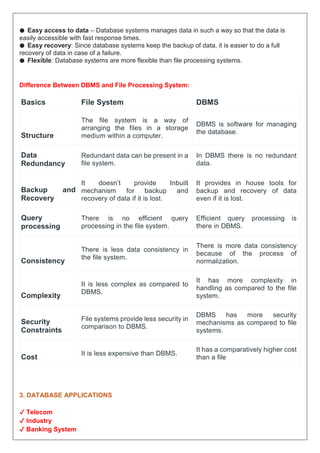
Instance
Definition of instance: The data stored in database at a particular moment of time is
called instance of database.
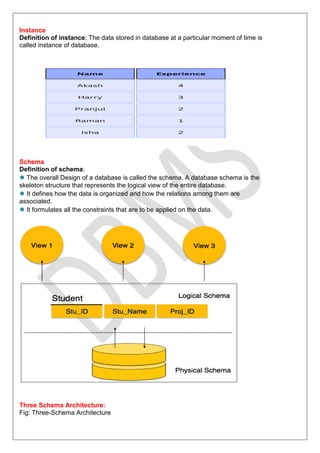
Schema
Definition of schema:
⚫ The overall Design of a database is called the schema. A database schema is the
skeleton structure that represents the logical view of the entire database.
⚫ It defines how the data is organized and how the relations among them are
associated.
⚫ It formulates all the constraints that are to be applied on the data.
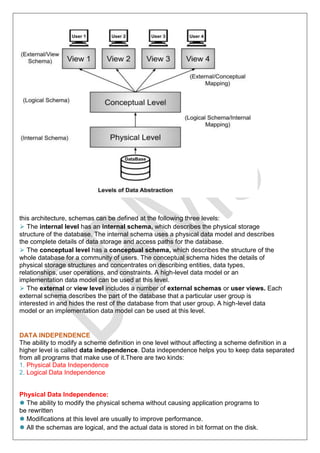
Three Schema Architecture:
Fig: Three-Schema Architecture
this architecture, schemas can be defined at the following three levels:
⮚ The internal level has an internal schema, which describes the physical storage
structure of the database. The internal schema uses a physical data model and describes
the complete details of data storage and access paths for the database.
⮚ The conceptual level has a conceptual schema, which describes the structure of the
whole database for a community of users. The conceptual schema hides the details of
physical storage structures and concentrates on describing entities, data types,
relationships, user operations, and constraints. A high-level data model or an
implementation data model can be used at this level.
⮚ The external or view level includes a number of external schemas or user views. Each
external schema describes the part of the database that a particular user group is
interested in and hides the rest of the database from that user group. A high-level data
model or an implementation data model can be used at this level.
DATA INDEPENDENCE
The ability to modify a scheme definition in one level without affecting a scheme definition in a
higher level is called data independence. Data independence helps you to keep data separated
from all programs that make use of it.There are two kinds:
1. Physical Data Independence
2. Logical Data Independence
Physical Data Independence:
⚫ The ability to modify the physical schema without causing application programs to
be rewritten
⚫ Modifications at this level are usually to improve performance.
⚫ All the schemas are logical, and the actual data is stored in bit format on the disk.
Physical data independence is the power to change the physical data without
impacting the schema or logical data.
⚫ For example, in case we want to change or upgrade the
storage system itself − suppose we want to replace
hard-disks − it should not have any impact on the logical
data or schemas.
Logical Data Independence:
⚫ The ability to modify the conceptual schema without causing application programs
to be rewritten
⚫ Usually done when logical structure of database is altered
⚫ Logical data independence is harder to achieve as the application programs are
usually heavily dependent on the logical structure of the data.
⚫ Logical data independence is a kind of mechanism, which liberalizes itself from
actual data stored on the disk. If we do some changes on table format, it should not
change the data residing on the disk.
SQL Data Types:
 Numeric Datatypes
 Date and Time Datatypes
 String Datatypes
Numeric Datatypes:
Data Type From To
BigInt -263 (-9,223,372,036,854,775,808) 263 -1 (9,223,372,036,854,775,807)
Int -231 (-2,147,483,648) 231-1 (2,147,483,647)
smallint -215 (-32,768) 215-1 (32,767)
tinyint 0 28-1 (255)
bit 0 1
decimal -1038+1 1038-1
numeric -1038+1 1038-1
money -922,337,203,685,477.5808 922,337,203,685,477.5807
smallmoney -214,748.3648 214,748.3647
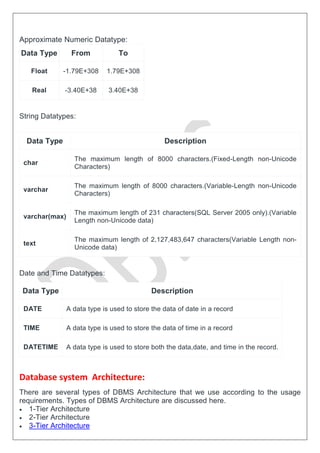
Approximate Numeric Datatype:
Data Type From To
Float -1.79E+308 1.79E+308
Real -3.40E+38 3.40E+38
String Datatypes:
Data Type Description
char
The maximum length of 8000 characters.(Fixed-Length non-Unicode
Characters)
varchar
The maximum length of 8000 characters.(Variable-Length non-Unicode
Characters)
varchar(max)
The maximum length of 231 characters(SQL Server 2005 only).(Variable
Length non-Unicode data)
text
The maximum length of 2,127,483,647 characters(Variable Length non-
Unicode data)
Date and Time Datatypes:
Data Type Description
DATE A data type is used to store the data of date in a record
TIME A data type is used to store the data of time in a record
DATETIME A data type is used to store both the data,date, and time in the record.
Database system Architecture:
There are several types of DBMS Architecture that we use according to the usage
requirements. Types of DBMS Architecture are discussed here.
 1-Tier Architecture
 2-Tier Architecture
 3-Tier Architecture
1-Tier Architecture
o In this architecture, the database is directly available to the user. It means the user can directly
sit on the DBMS and uses it.
o Any changes done here will directly be done on the database itself. It doesn't provide a handy
tool for end users.
o The 1-Tier architecture is used for development of the local application, where programmers
can directly communicate with the database for the quick response.
Advantages of 1-Tier Architecture
 Simple Architecture: 1-Tier Architecture is the most simple architecture to set up, as only a
single machine is required to maintain it.
 Cost-Effective: No additional hardware is required for implementing 1-Tier Architecture,
which makes it cost-effective.
 Easy to Implement: 1-Tier Architecture can be easily deployed, and hence it is mostly used
in small projects.
2-Tier Architecture
o The 2-Tier architecture is same as basic client-server. In the two-tier architecture,
applications on the client end can directly communicate with the database at the server side.
For this interaction, API's like: ODBC, JDBC are used.
o The user interfaces and application programs are run on the client-side.
o The server side is responsible to provide the functionalities like: query processing and
transaction management.
o To communicate with the DBMS, client-side application establishes a connection with the
server side.
Advantages of 2-Tier Architecture
 Easy to Access: 2-Tier Architecture makes easy access to the database, which makes fast
retrieval.
 Scalable: We can scale the database easily, by adding clients or upgrading hardware.
 Low Cost: 2-Tier Architecture is cheaper than 3-Tier Architecture and Multi-Tier Architecture.
 Easy Deployment: 2-Tier Architecture is easier to deploy than 3-Tier Architecture.
 Simple: 2-Tier Architecture is easily understandable as well as simple because of only two
components
3-Tier Architecture
o The 3-Tier architecture contains another layer between the client and server. In this architecture, client
can't directly communicate with the server.
o The application on the client-end interacts with an application server which further communicates
with the database system.
o End user has no idea about the existence of the database beyond the application server. The database
also has no idea about any other user beyond the application.
o The 3-Tier architecture is used in case of large web application.
Advantages of 3-Tier Architecture
 Enhanced scalability: Scalability is enhanced due to the distributed deployment of
application servers. Now, individual connections need not be made between the client and
server.
 Data Integrity: 3-Tier Architecture maintains Data Integrity. Since there is a middle layer
between the client and the server, data corruption can be avoided/removed.
 Security: 3-Tier Architecture Improves Security. This type of model prevents direct
interaction of the client with the server thereby reducing access to unauthorized data.
Disadvantages of 3-Tier Architecture
 More Complex: 3-Tier Architecture is more complex in comparison to 2-Tier Architecture.
Communication Points are also doubled in 3-Tier Architecture.
 Difficult to Interact: It becomes difficult for this sort of interaction to take place due to the
presence of middle layers.
Database Users and Administrators:
One of the main reasons for using DBMSs is to have central control of both the data and
the programs that access those data. A person who has such central control over the system is
called a database administrator (DBA).
Database Administrator Functions/Roles:
The functions of a DBA include:
Schema definition:
The DBA creates the original database schema by executing a set of data definition
statements in the DDL, Storage structure and access-method definition.
Schema and physical-organization modification:
The DBA carries out changes to the schema and physical organization to reflect the
changing needs of the organization, or to alter the physical organization to improve performance.
Granting of authorization for data access:
By granting different types of authorization, the database administrator can regulate
which parts of the database various users can access. The authorization information is kept in a
special system structure that the database system consults whenever someone attempts to
access
the data in the system.
Routine maintenance:
Database administrator’s routine maintenance activities are:
1. Periodically backing up the database, either onto tapes or onto remote servers, to prevent
loss of data in case of disasters such as flooding.
2.Ensuring that enough free disk space is available for normal operations, and upgrading disk
space as required.
3. Monitoring jobs running on the database and ensuring that performance is not degraded
by very expensive tasks submitted by some users.
Overview of SQL:
SQL is Structured Query Language, which is a computer language for storing, manipulating, and retrieving
data stored in a relational database. SQL is the standard language for Relational Database System.
Comparision of Data Models:
Hierarchical Data Model:
Hierarchical data model is the oldest type of the data model.
 It contains nodes which are connected by branches.
 The topmost node is called the root node.
 If there are multiple nodes appear at the top level, then these can be called as root
segments.
 Each node has exactly one parent.
 One parent may have many child.
Network Data Model:
It is the advance version of the hierarchical data model.
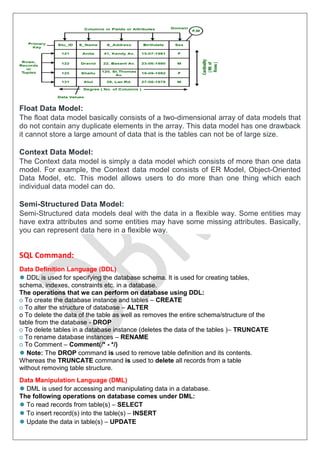
Relational Data Model:
There are no physical links as they are in the hierarchical data model.
 Data is represented in the form of table only.
 It deals only with the data not with the physical structure.
 It provides information regarding metadata.
 At the intersection of row and column there will be only one value for the tuple.
 It provides a way to handle the queries with ease.
Float Data Model:
The float data model basically consists of a two-dimensional array of data models that
do not contain any duplicate elements in the array. This data model has one drawback
it cannot store a large amount of data that is the tables can not be of large size.
Context Data Model:
The Context data model is simply a data model which consists of more than one data
model. For example, the Context data model consists of ER Model, Object-Oriented
Data Model, etc. This model allows users to do more than one thing which each
individual data model can do.
Semi-Structured Data Model:
Semi-Structured data models deal with the data in a flexible way. Some entities may
have extra attributes and some entities may have some missing attributes. Basically,
you can represent data here in a flexible way.
SQL Command:
Data Definition Language (DDL)
⚫ DDL is used for specifying the database schema. It is used for creating tables,
schema, indexes, constraints etc. in a database.
The operations that we can perform on database using DDL:
o To create the database instance and tables – CREATE
o To alter the structure of database – ALTER
o To delete the data of the table as well as removes the entire schema/structure of the
table from the database - DROP
o To delete tables in a database instance (deletes the data of the tables )– TRUNCATE
o To rename database instances – RENAME
o To Comment – Comment(/* - */)
⚫ Note: The DROP command is used to remove table definition and its contents.
Whereas the TRUNCATE command is used to delete all records from a table
without removing table structure.
Data Manipulation Language (DML)
⚫ DML is used for accessing and manipulating data in a database.
The following operations on database comes under DML:
⚫ To read records from table(s) – SELECT
⚫ To insert record(s) into the table(s) – INSERT
⚫ Update the data in table(s) – UPDATE
⚫ Delete all the records from the table – DELETE
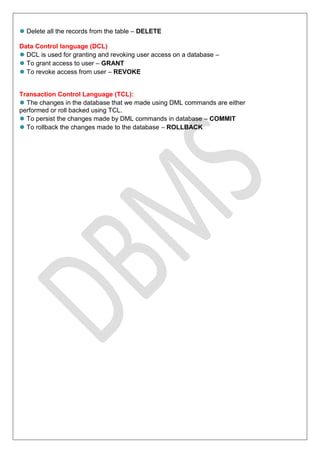
Data Control language (DCL)
⚫ DCL is used for granting and revoking user access on a database –
⚫ To grant access to user – GRANT
⚫ To revoke access from user – REVOKE
Transaction Control Language (TCL):
⚫ The changes in the database that we made using DML commands are either
performed or roll backed using TCL.
⚫ To persist the changes made by DML commands in database – COMMIT
⚫ To rollback the changes made to the database – ROLLBACK

Database management systems notes for unit 1

  • 1.
    SRM INSTITUTE OFSCIENCE AND TECHNOLOGY,RAMAPURAM CAMPUS DEPARTMENT OF COMPUTER APPLICATION (BCA) ACADEMIC YEAR 2024-25(ODD SEMESTER) DATABASE MANAGEMENT SYSTEM UNIT 1: what is database management system – Advantage of DBMS over file processing System – Introduction and applications of DBMS – Views of data and Data Independence – SQL Data types and Schemas – Database system Architecture –Database Users and Administrators – Roles of Database Administrator – Overview of SQL – Comparision of Data Models – DDL ( Data Definition Language) Command –SQL: Data Manipulation Commands – SQL : Data Control Language Commands – SQL: Transaction Control Language command Lab : 1. Data Definition Language Command on Sample Exercise Lab : 2. SQL Data Manipulation Language Command Lab : 3. SQL Data Control Language Commands and Transaction Control Command to the sample exercises Notes 1. INTRODUCTION TO BASIC CONCEPTS OF DATABASE SYSTEMS: What Is Data? o The raw facts are called as data. o The word “raw” indicates that they have not been processed. o Ex: For example 89 is the data. What Is Information? o The processed data is known as information. o Ex: Marks: 89; then it becomes information. What Is Dbms? o Stands for Database Management System. We can break it like this o DBMS = Database + Management System. ● Database: a database is an organized collection of structured information, or data, typically stored electronically in a computer system. A database is usually controlled by a database management system (DBMS) ● Management System: is a set of programs to store and retrieve those data. ● DBMS is a collection of inter-related data and set of programs to store & access those data in an easy and effective manner. What is File Processing System?  Before DBMS was invented information was stored using file processing system  File processing system is a way of storing,retrieving and manipulating data which is present in various files  Files are used to store various documents.All files are grouped based on their categories.
  • 2.
    Ex: Uses differentset of files for each depend in an organization .Record of one file may not be related to the record of other file. Disadvantages of File Processing System  Data Redundancy and Inconsistency.  Data Isolation.  Integrity Problem.  Program Data Dependency.  Atomicity Problem.  Security Problem.  Program Maintenance. 2. ADVANTAGE OF DBMS OVER FILE SYSTEM There are several advantages of Database management system over file system. Few of them are as follows: ✔ No redundant data ✔ Data Consistency and Integrity ✔ Data Security 2 ✔ Privacy ✔ Easy access to data ✔ Easy recovery ✔ Flexible ● No redundant data: Redundancy removed by data normalization. No data duplication saves storage and improves access time. ● Data Consistency and Integrity: As we discussed earlier the root cause of data inconsistency is data redundancy, since data normalization takes care of the data redundancy, data inconsistency also been taken care of as part of it ● Data Security: It is easier to apply access constraints in database systems so that only authorized user is able to access the data. Each user has a different set of access thus data is secured from the issues such as identity theft, data leaks and misuse of data. ● Privacy: Limited access means privacy of data.
  • 3.
    ● Easy accessto data – Database systems manages data in such a way so that the data is easily accessible with fast response times. ● Easy recovery: Since database systems keep the backup of data, it is easier to do a full recovery of data in case of a failure. ● Flexible: Database systems are more flexible than file processing systems. Difference Between DBMS and File Processing System: Basics File System DBMS Structure The file system is a way of arranging the files in a storage medium within a computer. DBMS is software for managing the database. Data Redundancy Redundant data can be present in a file system. In DBMS there is no redundant data. Backup and Recovery It doesn’t provide Inbuilt mechanism for backup and recovery of data if it is lost. It provides in house tools for backup and recovery of data even if it is lost. Query processing There is no efficient query processing in the file system. Efficient query processing is there in DBMS. Consistency There is less data consistency in the file system. There is more data consistency because of the process of normalization. Complexity It is less complex as compared to DBMS. It has more complexity in handling as compared to the file system. Security Constraints File systems provide less security in comparison to DBMS. DBMS has more security mechanisms as compared to file systems. Cost It is less expensive than DBMS. It has a comparatively higher cost than a file 3. DATABASE APPLICATIONS ✔ Telecom ✔ Industry ✔ Banking System
  • 4.
    ✔ Sales ✔ Educationsector ✔ Online shopping 6. VARIOUS VIEW OF DATA IN DBMS ⮚ Data Abstraction ⮚ Instance and Schema Data Abstraction in DBMS ⚫ Database systems are made-up of complex data structures. To ease the user interaction with database, the developers hide internal irrelevant details from users. This process of hiding irrelevant details from user is called data abstraction. ⚫ Physical level: This is the lowest level of data abstraction. It describes how data is actually stored in database. You can get the complex data structure details at this level. ⚫ Logical level: This is the middle level of 3-level data abstraction architecture. It describes what data is stored in database. ⚫ View level: Highest level of data abstraction. This level describes the user interaction with database system. The view level provides the “view of data” to the users and hides the irrelevant details such as data relationship, database schema, constraint, security etc from the user. ⚫ Example: ⮚ Let’s say we are storing customer information in a customer table. At physical level these records can be described as blocks of storage (bytes, gigabytes, terabytes etc.) in memory. These details are often hidden from the programmers. ⮚ At the logical level these records can be described as fields and attributes along with their data types, their relationship among each other can be logically implemented. ⮚ At view level, user just interact with system with the help of GUI and enter the details at the screen, they are not aware of how the data is stored and what data is stored; such details are hidden from them.
  • 5.
    Instance Definition of instance:The data stored in database at a particular moment of time is called instance of database. Schema Definition of schema: ⚫ The overall Design of a database is called the schema. A database schema is the skeleton structure that represents the logical view of the entire database. ⚫ It defines how the data is organized and how the relations among them are associated. ⚫ It formulates all the constraints that are to be applied on the data. Three Schema Architecture: Fig: Three-Schema Architecture
  • 6.
    this architecture, schemascan be defined at the following three levels: ⮚ The internal level has an internal schema, which describes the physical storage structure of the database. The internal schema uses a physical data model and describes the complete details of data storage and access paths for the database. ⮚ The conceptual level has a conceptual schema, which describes the structure of the whole database for a community of users. The conceptual schema hides the details of physical storage structures and concentrates on describing entities, data types, relationships, user operations, and constraints. A high-level data model or an implementation data model can be used at this level. ⮚ The external or view level includes a number of external schemas or user views. Each external schema describes the part of the database that a particular user group is interested in and hides the rest of the database from that user group. A high-level data model or an implementation data model can be used at this level. DATA INDEPENDENCE The ability to modify a scheme definition in one level without affecting a scheme definition in a higher level is called data independence. Data independence helps you to keep data separated from all programs that make use of it.There are two kinds: 1. Physical Data Independence 2. Logical Data Independence Physical Data Independence: ⚫ The ability to modify the physical schema without causing application programs to be rewritten ⚫ Modifications at this level are usually to improve performance. ⚫ All the schemas are logical, and the actual data is stored in bit format on the disk.
  • 7.
    Physical data independenceis the power to change the physical data without impacting the schema or logical data. ⚫ For example, in case we want to change or upgrade the storage system itself − suppose we want to replace hard-disks − it should not have any impact on the logical data or schemas. Logical Data Independence: ⚫ The ability to modify the conceptual schema without causing application programs to be rewritten ⚫ Usually done when logical structure of database is altered ⚫ Logical data independence is harder to achieve as the application programs are usually heavily dependent on the logical structure of the data. ⚫ Logical data independence is a kind of mechanism, which liberalizes itself from actual data stored on the disk. If we do some changes on table format, it should not change the data residing on the disk. SQL Data Types:  Numeric Datatypes  Date and Time Datatypes  String Datatypes Numeric Datatypes: Data Type From To BigInt -263 (-9,223,372,036,854,775,808) 263 -1 (9,223,372,036,854,775,807) Int -231 (-2,147,483,648) 231-1 (2,147,483,647) smallint -215 (-32,768) 215-1 (32,767) tinyint 0 28-1 (255) bit 0 1 decimal -1038+1 1038-1 numeric -1038+1 1038-1 money -922,337,203,685,477.5808 922,337,203,685,477.5807 smallmoney -214,748.3648 214,748.3647
  • 8.
    Approximate Numeric Datatype: DataType From To Float -1.79E+308 1.79E+308 Real -3.40E+38 3.40E+38 String Datatypes: Data Type Description char The maximum length of 8000 characters.(Fixed-Length non-Unicode Characters) varchar The maximum length of 8000 characters.(Variable-Length non-Unicode Characters) varchar(max) The maximum length of 231 characters(SQL Server 2005 only).(Variable Length non-Unicode data) text The maximum length of 2,127,483,647 characters(Variable Length non- Unicode data) Date and Time Datatypes: Data Type Description DATE A data type is used to store the data of date in a record TIME A data type is used to store the data of time in a record DATETIME A data type is used to store both the data,date, and time in the record. Database system Architecture: There are several types of DBMS Architecture that we use according to the usage requirements. Types of DBMS Architecture are discussed here.  1-Tier Architecture  2-Tier Architecture  3-Tier Architecture
  • 9.
    1-Tier Architecture o Inthis architecture, the database is directly available to the user. It means the user can directly sit on the DBMS and uses it. o Any changes done here will directly be done on the database itself. It doesn't provide a handy tool for end users. o The 1-Tier architecture is used for development of the local application, where programmers can directly communicate with the database for the quick response. Advantages of 1-Tier Architecture  Simple Architecture: 1-Tier Architecture is the most simple architecture to set up, as only a single machine is required to maintain it.  Cost-Effective: No additional hardware is required for implementing 1-Tier Architecture, which makes it cost-effective.  Easy to Implement: 1-Tier Architecture can be easily deployed, and hence it is mostly used in small projects. 2-Tier Architecture o The 2-Tier architecture is same as basic client-server. In the two-tier architecture, applications on the client end can directly communicate with the database at the server side. For this interaction, API's like: ODBC, JDBC are used. o The user interfaces and application programs are run on the client-side. o The server side is responsible to provide the functionalities like: query processing and transaction management. o To communicate with the DBMS, client-side application establishes a connection with the server side.
  • 10.
    Advantages of 2-TierArchitecture  Easy to Access: 2-Tier Architecture makes easy access to the database, which makes fast retrieval.  Scalable: We can scale the database easily, by adding clients or upgrading hardware.  Low Cost: 2-Tier Architecture is cheaper than 3-Tier Architecture and Multi-Tier Architecture.  Easy Deployment: 2-Tier Architecture is easier to deploy than 3-Tier Architecture.  Simple: 2-Tier Architecture is easily understandable as well as simple because of only two components 3-Tier Architecture o The 3-Tier architecture contains another layer between the client and server. In this architecture, client can't directly communicate with the server. o The application on the client-end interacts with an application server which further communicates with the database system. o End user has no idea about the existence of the database beyond the application server. The database also has no idea about any other user beyond the application. o The 3-Tier architecture is used in case of large web application.
  • 11.
    Advantages of 3-TierArchitecture  Enhanced scalability: Scalability is enhanced due to the distributed deployment of application servers. Now, individual connections need not be made between the client and server.  Data Integrity: 3-Tier Architecture maintains Data Integrity. Since there is a middle layer between the client and the server, data corruption can be avoided/removed.  Security: 3-Tier Architecture Improves Security. This type of model prevents direct interaction of the client with the server thereby reducing access to unauthorized data. Disadvantages of 3-Tier Architecture  More Complex: 3-Tier Architecture is more complex in comparison to 2-Tier Architecture. Communication Points are also doubled in 3-Tier Architecture.  Difficult to Interact: It becomes difficult for this sort of interaction to take place due to the presence of middle layers. Database Users and Administrators: One of the main reasons for using DBMSs is to have central control of both the data and the programs that access those data. A person who has such central control over the system is called a database administrator (DBA). Database Administrator Functions/Roles: The functions of a DBA include: Schema definition: The DBA creates the original database schema by executing a set of data definition statements in the DDL, Storage structure and access-method definition. Schema and physical-organization modification: The DBA carries out changes to the schema and physical organization to reflect the changing needs of the organization, or to alter the physical organization to improve performance. Granting of authorization for data access: By granting different types of authorization, the database administrator can regulate which parts of the database various users can access. The authorization information is kept in a special system structure that the database system consults whenever someone attempts to access the data in the system. Routine maintenance: Database administrator’s routine maintenance activities are: 1. Periodically backing up the database, either onto tapes or onto remote servers, to prevent loss of data in case of disasters such as flooding. 2.Ensuring that enough free disk space is available for normal operations, and upgrading disk space as required. 3. Monitoring jobs running on the database and ensuring that performance is not degraded by very expensive tasks submitted by some users. Overview of SQL: SQL is Structured Query Language, which is a computer language for storing, manipulating, and retrieving data stored in a relational database. SQL is the standard language for Relational Database System.
  • 12.
    Comparision of DataModels: Hierarchical Data Model: Hierarchical data model is the oldest type of the data model.  It contains nodes which are connected by branches.  The topmost node is called the root node.
  • 13.
     If thereare multiple nodes appear at the top level, then these can be called as root segments.  Each node has exactly one parent.  One parent may have many child. Network Data Model: It is the advance version of the hierarchical data model. Relational Data Model: There are no physical links as they are in the hierarchical data model.  Data is represented in the form of table only.  It deals only with the data not with the physical structure.  It provides information regarding metadata.  At the intersection of row and column there will be only one value for the tuple.  It provides a way to handle the queries with ease.
  • 14.
    Float Data Model: Thefloat data model basically consists of a two-dimensional array of data models that do not contain any duplicate elements in the array. This data model has one drawback it cannot store a large amount of data that is the tables can not be of large size. Context Data Model: The Context data model is simply a data model which consists of more than one data model. For example, the Context data model consists of ER Model, Object-Oriented Data Model, etc. This model allows users to do more than one thing which each individual data model can do. Semi-Structured Data Model: Semi-Structured data models deal with the data in a flexible way. Some entities may have extra attributes and some entities may have some missing attributes. Basically, you can represent data here in a flexible way. SQL Command: Data Definition Language (DDL) ⚫ DDL is used for specifying the database schema. It is used for creating tables, schema, indexes, constraints etc. in a database. The operations that we can perform on database using DDL: o To create the database instance and tables – CREATE o To alter the structure of database – ALTER o To delete the data of the table as well as removes the entire schema/structure of the table from the database - DROP o To delete tables in a database instance (deletes the data of the tables )– TRUNCATE o To rename database instances – RENAME o To Comment – Comment(/* - */) ⚫ Note: The DROP command is used to remove table definition and its contents. Whereas the TRUNCATE command is used to delete all records from a table without removing table structure. Data Manipulation Language (DML) ⚫ DML is used for accessing and manipulating data in a database. The following operations on database comes under DML: ⚫ To read records from table(s) – SELECT ⚫ To insert record(s) into the table(s) – INSERT ⚫ Update the data in table(s) – UPDATE
  • 15.
    ⚫ Delete allthe records from the table – DELETE Data Control language (DCL) ⚫ DCL is used for granting and revoking user access on a database – ⚫ To grant access to user – GRANT ⚫ To revoke access from user – REVOKE Transaction Control Language (TCL): ⚫ The changes in the database that we made using DML commands are either performed or roll backed using TCL. ⚫ To persist the changes made by DML commands in database – COMMIT ⚫ To rollback the changes made to the database – ROLLBACK