Data	
  Mining	
  With	
  Weka	
  
Hands-­‐on	
  Tutorial	
  on	
  the	
  open-­‐source	
  	
  
java-­‐based	
  Data	
  Mining	
  Toolbox	
  Weka	
  
Alban@ihr.mrc.ac.uk	
  
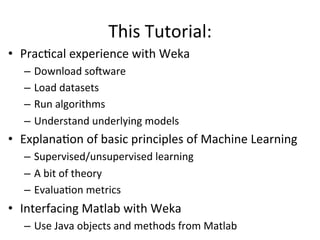
This	
  Tutorial:	
  
•  PracBcal	
  experience	
  with	
  Weka	
  
–  Download	
  soDware	
  
–  Load	
  datasets	
  
–  Run	
  algorithms	
  
–  Understand	
  underlying	
  models	
  
•  ExplanaBon	
  of	
  basic	
  principles	
  of	
  Machine	
  Learning	
  
–  Supervised/unsupervised	
  learning	
  
–  A	
  bit	
  of	
  theory	
  
–  EvaluaBon	
  metrics	
  	
  
•  Interfacing	
  Matlab	
  with	
  Weka	
  
–  Use	
  Java	
  objects	
  and	
  methods	
  from	
  Matlab	
  
NO	
  MATHS	
  TODAY	


New	
  Zealand	
  
•  hSp://www.independent.co.uk/news/world/poliBcs/new-­‐zealands-­‐potenBal-­‐new-­‐flag-­‐
design-­‐says-­‐goodbye-­‐to-­‐the-­‐union-­‐jack-­‐and-­‐welcomes-­‐the-­‐silver-­‐fern-­‐a6773576.html#	
  
Other	
  proposiBons	
  were	
  	
  
Other	
  proposiBons	
  were	
  
MoBvaBon	
  
•  Data	
  is	
  everywhere	
  –	
  and	
  that’s	
  only	
  the	
  beginning	
  
•  Necessity	
  to	
  be	
  able	
  to	
  handle	
  data,	
  learn	
  from	
  it,	
  predict	
  it	
  
•  Many	
  tools	
  out	
  there,	
  find	
  the	
  ones	
  that	
  suit	
  your	
  needs	
  
Data	
  Mining	
  
•  Data	
  Mining	
  is	
  the	
  analysis	
  of	
  data	
  and	
  the	
  use	
  of	
  soDware	
  
techniques	
  for	
  finding	
  paSerns	
  and	
  regulariBes	
  in	
  datasets	
  
•  Interdisciplinary	
  field	
  involving	
  
–  Databases	
  
–  StaBsBcs	
  
–  Machine	
  Learning	
  
–  High-­‐Performance	
  CompuBng	
  
–  VisualizaBon	
  
–  MathemaBcs	


•  In	
  a	
  nutshell:	
  do	
  whatever	
  it	
  takes	
  to	
  extract	
  knowledge	
  
from	
  data.	
  
What	
  is	
  Weka?	
  
•  Waikato	
  Environment	
  for	
  Knowledge	
  Analysis	
  
•  Data	
  mining	
  toolkit:	
  popular	
  suite	
  of	
  machine	
  learning	
  
soDware	
  and	
  visualizaBon	
  tools	
  
-­‐>	
  Use	
  for	
  data	
  analysis	
  and	
  predicBve	
  modeling	
  (regression,	
  
classificaBon,	
  aSribute	
  selecBon,	
  clustering)	


•  ConBnuous	
  efforts	
  since	
  1994	


Why	
  use	
  Weka?	
  
•  Free	
  availability	
  (GNU	
  license)	
  
•  Doesn’t	
  require	
  Data	
  Mining	
  experBse	
  
•  Portability	
  (java	
  is	
  nº1	
  must-­‐know	
  language	
  for	
  programmers)	
  
•  Extensibility	
  	
  
•  Comprehensive	
  collecBon	
  of	
  data	
  preprocessing	
  and	
  
modeling	
  techniques	
  
•  Nice	
  user-­‐interface	
  for	
  exploraBon	
  
•  AcBve	
  community	
  	
  
•  One	
  of	
  the	
  most	
  widely	
  used	
  data	
  mining	
  systems	
  
•  Pedagogical	
  value	
  -­‐	
  also	
  with	
  their	
  book	
  ‘Data	
  Mining:	
  
PracBcal	
  Machine	
  Learning	
  Tools	
  and	
  Techniques’	
  
Hands-­‐on	
  with	
  Weka	
  
•  Download	
  soDware	
  (3min)	
  
•  Load	
  datasets	
  (arff	
  format,	
  3min,	
  next	
  slide)	
  
•  Explore	
  Dataset	
  (Preprocess	
  &	
  Visualize	
  panels,	
  5min)	
  
•  Run	
  algorithms	
  (Classify	
  &	
  Cluster	
  panels,	
  2min)	
  
•  Understand	
  underlying	
  models	
  (aDer	
  ML	
  explanaBons)	
  
ARFF	
  File	
  Format	
  
•  Text	
  file	
  describing	
  a	
  set	
  of	
  instances	
  sharing	
  a	
  set	
  of	
  aSributes	
  
hSp://www.cs.waikato.ac.nz/~ml/weka/arff.html	


•  The	
  datatype	
  can	
  be	
  of	
  any	
  of	
  (version	
  3.2.1):	
  
numeric,	
  	
  	
  <nominal-­‐specificaBon-­‐in-­‐curly-­‐brackets>,	
  	
  	
  string,	
  	
  	
  date	
  [<date-­‐format>]	


•  Missing	
  values	
  are	
  represented	
  by	
  `?’	
  
%	
  The	
  first	
  lines	
  with	
  ‘%’	
  are	
  usually	
  comments	
  describing	
  the	
  dataset	
  
@RELATION	
  <dataset-­‐name>	
  
@ATTRIBUTE	
  <aSribute1-­‐name>	
  <datatype>	
  
@ATTRIBUTE	
  <aSribute2-­‐name>	
  <datatype>	
  
@ATTRIBUTE	
  class	
  {Iris-­‐setosa,	
  Iris-­‐versicolor,	
  Iris-­‐virginica}	
  
@DATA	
  
5.1,	
  3.5,	
  Iris-­‐setosa	
  
4.9,	
  ?	
  	
  ,	
  Iris-­‐versicolor	
  
…	
  
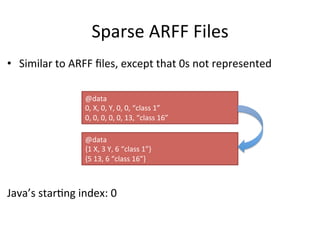
Sparse	
  ARFF	
  Files	
  
•  Similar	
  to	
  ARFF	
  files,	
  except	
  that	
  0s	
  not	
  represented	


Java’s	
  starBng	
  index:	
  0	


@data	
  	
  
0,	
  X,	
  0,	
  Y,	
  0,	
  0,	
  “class	
  1”	
  
0,	
  0,	
  0,	
  0,	
  0,	
  13,	
  “class	
  16”	
  
@data	
  	
  
{1	
  X,	
  3	
  Y,	
  6	
  “class	
  1”}	
  
{5	
  13,	
  6	
  “class	
  16”}	
  
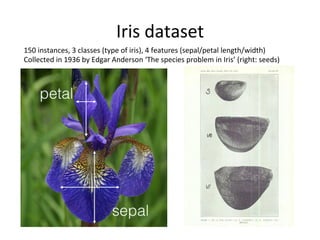
Iris	
  dataset	
  
150	
  instances,	
  3	
  classes	
  (type	
  of	
  iris),	
  4	
  features	
  (sepal/petal	
  length/width)	
  
Collected	
  in	
  1936	
  by	
  Edgar	
  Anderson	
  ‘The	
  species	
  problem	
  in	
  Iris’	
  (right:	
  seeds)	
  
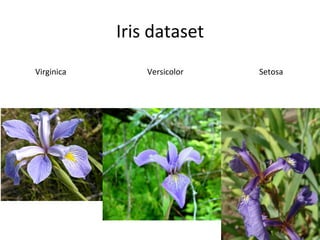
Iris	
  dataset	


  Virginica	


  Versicolor	


  Setosa	
  
Machine	
  Learning	
  
•  Herbert	
  Simon:	
  “Learning	
  is	
  any	
  process	
  by	
  which	
  
a	
  system	
  improves	
  performance	
  from	
  
experience.”	
  
•  Tasks:	
  
–  ClassificaBon	
  (labeling)	
  
–  Regression	
  (guess	
  real	
  value)	
  
–  Clustering	
  (regrouping	
  similar	
  objects)	
  
–  Ranking	
  (order	
  a	
  collecBon,	
  recommendaBon)	
  
–  Problem	
  solving	
  (games,	
  calculus,	
  driving)	
  
–  ASribute	
  selecBon	
  	
  
–  AssociaBon	
  rules	
  (?)	
  
Machine	
  Learning	
  
•  Examples	
  of	
  everyday	
  ML	
  
Google’s	
  ranking	
  algorithm	
  
Spam	
  filters	
  
Face	
  detecBon	
  
Self-­‐driving	
  cars	
  
Credit	
  card	
  fraud	
  detecBon	
  
Speech	
  recogniBon	
  
Digit	
  recogniBon	
  
Medical	
  diagnosis	
  
Customer	
  segmentaBon	
  
…	
  
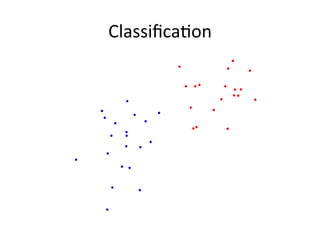
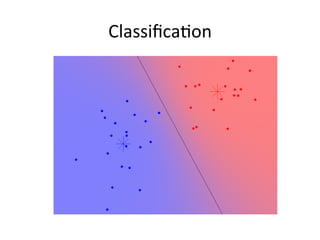
ClassificaBon	
  
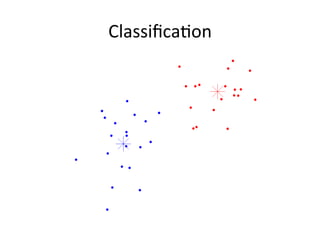
ClassificaBon	
  
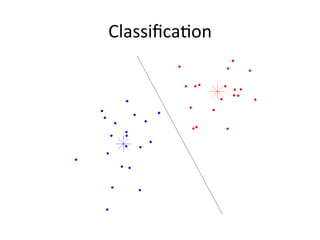
ClassificaBon	
  
ClassificaBon	
  
ClassificaBon	
  
•  Many	
  strategies	
  /	
  algorithms	
  
– Linear	
  classifiers	
  
– Support	
  Vector	
  Machines	
  (well-­‐founded	
  theory)	
  
– k-­‐nearest	
  neighbours	
  (decision	
  from	
  neighbours)	
  
– BoosBng	
  (meta-­‐algorithm)	
  
– Neural	
  networks	
  
•  Many	
  measures	
  of	
  performance	
  
–  Simplest:	
  percentage	
  of	
  correct	
  classificaBon	
  
•  Let’s	
  become	
  a	
  classifier	
  
Decision	
  Trees	
  
•  Decision	
  support	
  that	
  uses	
  a	
  tree-­‐like	
  graph	
  of	
  
model	
  of	
  decisions	
  
•  Weka’s	
  tree.UserClassifier	
  allows	
  the	
  user	
  to	
  
manually	
  build	
  a	
  tree,	
  using	
  shapes	
  (e.g.	
  
rectangles)	
  on	
  scaSer	
  plots	
  
•  Weka’s	
  tree.J48	
  builds	
  a	
  decision	
  tree	
  on	
  the	
  
features’	
  values	
  
J48	
  –	
  Decision	
  tree	
  
•  Top-­‐down	
  inducBon	
  of	
  decision	
  trees:	
  
– Uses	
  informaBon	
  entropy	
  to	
  select,	
  at	
  each	
  node,	
  
which	
  aSribute	
  will	
  most	
  effecBvely	
  split	
  the	
  data	
  
– Spli•ng	
  criterion:	
  Kullback-­‐Leibler	
  divergence	
  
(informaBon	
  gain)	
  
– Recursively	
  applied	
  in	
  sublists	
  
– Stop	
  if	
  all	
  instances	
  have	
  same	
  class	
  
Ibk	
  –	
  k-­‐nearest	
  neighbour	
  
•  No	
  model	
  –	
  lazy	
  learning	
  
•  Chooses	
  majority	
  class	
  of	
  the	
  K-­‐nearest	
  neighbours	
  
+++	
  Very	
  general,	
  only	
  requires	
  a	
  noBon	
  of	
  distance	
  
+++	
  Useful	
  for	
  theoreBcal	
  studies	
  
-­‐-­‐-­‐	
  ComputaBonally	
  costly	
  
-­‐-­‐-­‐	
  Doesn’t	
  bring	
  any	
  insight	
  of	
  the	
  data	
  
Problem	
  of	
  Overfi•ng	
  
•  Overfi•ng	
  happens	
  when	
  a	
  model	
  is	
  
excessively	
  complex,	
  leading	
  to	
  poor	
  
predicBve	
  power	
  
•  Typically,	
  too	
  many	
  parameters	
  relaBve	
  to	
  the	
  
number	
  of	
  observaBons	
  
•  EvaluaBng	
  a	
  model	
  (e.g.	
  J48’s	
  decision	
  tree)	
  
should	
  be	
  done	
  using	
  unseen	
  data:	


  TRAINING	
  DATA	
  ≠	
  TEST	
  DATA	
  
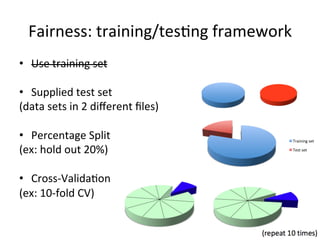
Fairness:	
  training/tesBng	
  framework	
  
•  Use	
  training	
  set	


•  Supplied	
  test	
  set	
  	
  
(data	
  sets	
  in	
  2	
  different	
  files)	


•  Percentage	
  Split	
  
(ex:	
  hold	
  out	
  20%)	


•  Cross-­‐ValidaBon	
  
(ex:	
  10-­‐fold	
  CV)	
  
Training	
  set	
  
Test	
  set	
  
Weka’s	
  Cross-­‐ValidaBon	
  
•  Weka	
  performs	
  by	
  default	
  a	
  straBfied	
  10-­‐fold	
  
cross-­‐validaBon,	
  with	
  randomness	
  pre-­‐saved	
  
in	
  seeds	
  for	
  reproducibility	
  (instances	
  of	
  all	
  
classes	
  are	
  distributed	
  in	
  all	
  folds)	
  
•  Weka	
  would	
  build	
  11	
  models,	
  the	
  first	
  being	
  
built	
  on	
  the	
  enBre	
  dataset	
  (not	
  used)	


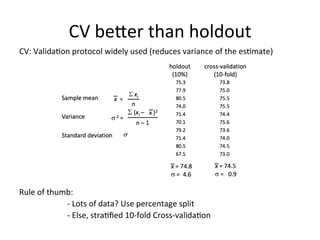
CV	
  beSer	
  than	
  holdout	
  
CV:	
  ValidaBon	
  protocol	
  widely	
  used	
  (reduces	
  variance	
  of	
  the	
  esBmate)	


Rule	
  of	
  thumb:	


  -­‐	
  Lots	
  of	
  data?	
  Use	
  percentage	
  split	


  -­‐	
  Else,	
  straBfied	
  10-­‐fold	
  Cross-­‐validaBon	


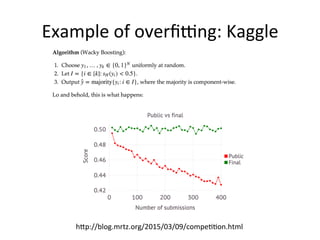
Example	
  of	
  overfi•ng:	
  Kaggle	
  
hSp://blog.mrtz.org/2015/03/09/compeBBon.html	
  
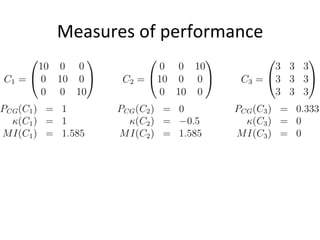
Measures	
  of	
  performance	


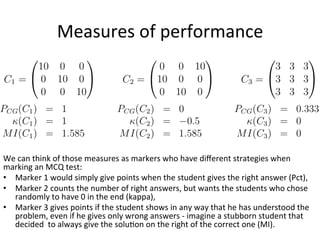
Measures	
  of	
  performance	


We	
  can	
  think	
  of	
  those	
  measures	
  as	
  markers	
  who	
  have	
  different	
  strategies	
  when	
  
marking	
  an	
  MCQ	
  test:	
  	
  
•  Marker	
  1	
  would	
  simply	
  give	
  points	
  when	
  the	
  student	
  gives	
  the	
  right	
  answer	
  (Pct),	
  
•  Marker	
  2	
  counts	
  the	
  number	
  of	
  right	
  answers,	
  but	
  wants	
  the	
  students	
  who	
  chose	
  
randomly	
  to	
  have	
  0	
  in	
  the	
  end	
  (kappa),	
  
•  Marker	
  3	
  gives	
  points	
  if	
  the	
  student	
  shows	
  in	
  any	
  way	
  that	
  he	
  has	
  understood	
  the	
  
problem,	
  even	
  if	
  he	
  gives	
  only	
  wrong	
  answers	
  -­‐	
  imagine	
  a	
  stubborn	
  student	
  that	
  
decided	
  	
  to	
  always	
  give	
  the	
  soluBon	
  on	
  the	
  right	
  of	
  the	
  correct	
  one	
  (MI).	
  
Data	
  Mining	
  with	
  Weka	
  
•  How	
  can	
  we	
  learn	
  something	
  about	
  the	
  data	
  using	
  a	
  
classifier?	
  
–  rules.ZeroR	
  (baseline)	
  
–  rules.OneR	
  (How	
  far	
  can	
  go	
  w/	
  1	
  aSribute)	
  
–  trees.J48	
  (Efficient	
  decision	
  tree)	
  
–  lazy.Ib1	
  (~	
  lazy.Ibk	
  -­‐K	
  1)	
  
–  meta.ClassificaBonViaClustering	
  (is	
  clustering	
  enough?)	
  
–  FuncBons.SimpleLogisBc	
  (linear	
  funcBon	
  of	
  aSributes)	
  
–  funcBons.SMO	
  (SVM)	
  
Weka	
  by	
  command-­‐line	
  
•  Reference:	
  Weka	
  Primer	


•  Set	
  environment	
  variable	
  CLASSPATH	
  
setenv	
  CLASSPATH	
  path/to/weka/weka.jar	


•  ClassificaBon:	


java	
  weka.classifiers.<package>.<class>	
  [opBons]	


•  Important	
  generic	
  opBons:	
  
	
  -­‐t	
  <training_file>	


  To	
  specify	
  training	
  file	
  
	
  -­‐T	
  <test_file>	


  If	
  none,	
  10-­‐fold	
  CV	
  by	
  default	
  
	
  -­‐x	
  <number_of_folds> 	


  -­‐d	
  <output_file_save_model> 	
  To	
  save	
  the	
  model	
  built	
  
	
  -­‐l	
  <input_file_saved_model> 	
  To	
  use	
  a	
  saved	
  model	
  on	
  new	
  data	
  (lower	
  case	
  L)	


java	
  weka.classifiers.trees.J48	
  -­‐t	
  /Users/pmaal/weka_data/iris.arff	


java	
  -­‐Xmx1024m	
  	
  weka.classifiers.bayes.NaiveBayes	
  -­‐t	
  	
  
/Users/pmaal/weka_data/segment-­‐challenge.arff	
  -­‐T	
  /Users/pmaal/weka_data/segment-­‐test.arff	
  -­‐p	
  0	


•  OpBons	
  of	
  a	
  given	
  classifier:	
  simply	
  run	
  
java	
  weka.classifiers.bayes.NaiveBayes	


•  Some	
  staBsBcs	
  on	
  a	
  dataset	
  
java	
  weka.core.Instances	
  /Users/pmaal/weka_data/iris.arff	
  
Dataset:	
  Importance	
  of	
  preprocessing	
  
•  Importance	
  of	
  features:	
  good	
  data	
  beats	
  
complex	
  classifier	
  
•  There	
  is	
  no	
  single	
  best	
  classifier	
  (but	
  sBll…)	
  
•  3	
  OpBons	
  (depending	
  on	
  what	
  you	
  do/your	
  skills):	
  
– Preprocess	
  before	
  calling	
  Weka	
  (e.g.	
  with	
  Matlab)	
  
– Write	
  your	
  own	
  preprocessing	
  as	
  a	
  Weka	
  package	
  
– Use	
  Weka’s	
  filters	
  
Using	
  Filters	
  
•  Edit	
  data	
  files	
  
–  Ex:	
  delete	
  first	
  and	
  second	
  aSribute	
  
java	
  weka.filters.ASributeFilter	
  –R	
  1,2	
  –I	
  iris.arff	
  –o	
  iris_new.arff	
  
•  Create	
  new	
  features	
  
–  Ex:	
  Principal	
  component.	
  Clustering	
  result	
  
–  Ex:	
  Unsupervised.ASribute.AddCluster	
  with	
  3	
  clusters	
  
•  ASribute	
  selecBon	
  
•  Change	
  datatype	
  
–  Ex:	
  DiscreBzeFilter	
  discreBzes	
  a	
  range	
  of	
  numeric	
  aSributes	
  in	
  the	
  
dataset	
  into	
  nominal	
  aSributes	
  
–  Ex:	
  NominalToBinaryFilter	
  converts	
  nominal	
  aSributes	
  into	
  binary	
  
ones	
  
•  Can	
  be	
  applied	
  at	
  run	
  Bme,	
  using	
  meta.FilteredClassifier	
  
•  Others	
  
–  classAssigner	
  to	
  change	
  default	
  posiBon	
  of	
  aSribute	
  to	
  classify	


Package	
  Manager	
  
•  GUI	
  >	
  Tools	
  >	
  Package	
  Manager	
  
– To	
  install	
  3rd	
  party	
  tools	
  (try	
  some)	
  
Matlab	
  with	
  Weka	
  
•  Make	
  an	
  .arff	
  file	
  
•  Addjavapath	
  
•  Import	
  packages	
  
•  Create	
  java	
  object	
  
•  Manage	
  opBons	
  
•  Run	
  classificaBon	
  
Meka:	
  MulB-­‐label	
  extension	
  to	
  Weka	
  
•  hSp://meka.sourceforge.net/	
  
•  To	
  predict	
  mulBple	
  output	
  variables	
  for	
  each	
  instance.	
  
•  Literally	
  built	
  on	
  top	
  of	
  Weka:	
  
	
  java	
  meka.classifiers.mulBlabel.BR	
  –t	
  music.arff	


  –W	
  weka.classifiers.bayes.NaiveBayes	


•  Run:	
  .	
  ~/Downloads/meka-­‐release-­‐1.9.0/run.sh	


References	
  
•  Data	
  Mining	
  With	
  Weka	
  (video	
  series)	
  	
  
hSp://www.cs.waikato.ac.nz/ml/weka/mooc/
dataminingwithweka/	
  
•  Andrew	
  Ng’s	
  course	
  Machine	
  Learning	
  
•  Java,	
  must-­‐know	
  language:	
  
hSp://www.devtopics.com/most-­‐popular-­‐
programming-­‐languages/	
  
•  Weka	
  tutos	
  
hSp://www.cs.ccsu.edu/~markov/weka-­‐tutorial.pdf	


Data mining with Weka

  • 1.
    Data  Mining  With  Weka   Hands-­‐on  Tutorial  on  the  open-­‐source     java-­‐based  Data  Mining  Toolbox  Weka   Alban@ihr.mrc.ac.uk  
  • 2.
    This  Tutorial:   • PracBcal  experience  with  Weka   –  Download  soDware   –  Load  datasets   –  Run  algorithms   –  Understand  underlying  models   •  ExplanaBon  of  basic  principles  of  Machine  Learning   –  Supervised/unsupervised  learning   –  A  bit  of  theory   –  EvaluaBon  metrics     •  Interfacing  Matlab  with  Weka   –  Use  Java  objects  and  methods  from  Matlab  
  • 3.
  • 4.
    New  Zealand   • hSp://www.independent.co.uk/news/world/poliBcs/new-­‐zealands-­‐potenBal-­‐new-­‐flag-­‐ design-­‐says-­‐goodbye-­‐to-­‐the-­‐union-­‐jack-­‐and-­‐welcomes-­‐the-­‐silver-­‐fern-­‐a6773576.html#  
  • 5.
  • 6.
  • 7.
    MoBvaBon   •  Data  is  everywhere  –  and  that’s  only  the  beginning   •  Necessity  to  be  able  to  handle  data,  learn  from  it,  predict  it   •  Many  tools  out  there,  find  the  ones  that  suit  your  needs  
  • 8.
    Data  Mining   • Data  Mining  is  the  analysis  of  data  and  the  use  of  soDware   techniques  for  finding  paSerns  and  regulariBes  in  datasets   •  Interdisciplinary  field  involving   –  Databases   –  StaBsBcs   –  Machine  Learning   –  High-­‐Performance  CompuBng   –  VisualizaBon   –  MathemaBcs     •  In  a  nutshell:  do  whatever  it  takes  to  extract  knowledge   from  data.  
  • 9.
    What  is  Weka?   •  Waikato  Environment  for  Knowledge  Analysis   •  Data  mining  toolkit:  popular  suite  of  machine  learning   soDware  and  visualizaBon  tools   -­‐>  Use  for  data  analysis  and  predicBve  modeling  (regression,   classificaBon,  aSribute  selecBon,  clustering)     •  ConBnuous  efforts  since  1994          
  • 10.
    Why  use  Weka?   •  Free  availability  (GNU  license)   •  Doesn’t  require  Data  Mining  experBse   •  Portability  (java  is  nº1  must-­‐know  language  for  programmers)   •  Extensibility     •  Comprehensive  collecBon  of  data  preprocessing  and   modeling  techniques   •  Nice  user-­‐interface  for  exploraBon   •  AcBve  community     •  One  of  the  most  widely  used  data  mining  systems   •  Pedagogical  value  -­‐  also  with  their  book  ‘Data  Mining:   PracBcal  Machine  Learning  Tools  and  Techniques’  
  • 11.
    Hands-­‐on  with  Weka   •  Download  soDware  (3min)   •  Load  datasets  (arff  format,  3min,  next  slide)   •  Explore  Dataset  (Preprocess  &  Visualize  panels,  5min)   •  Run  algorithms  (Classify  &  Cluster  panels,  2min)   •  Understand  underlying  models  (aDer  ML  explanaBons)  
  • 12.
    ARFF  File  Format   •  Text  file  describing  a  set  of  instances  sharing  a  set  of  aSributes   hSp://www.cs.waikato.ac.nz/~ml/weka/arff.html                         •  The  datatype  can  be  of  any  of  (version  3.2.1):   numeric,      <nominal-­‐specificaBon-­‐in-­‐curly-­‐brackets>,      string,      date  [<date-­‐format>]     •  Missing  values  are  represented  by  `?’   %  The  first  lines  with  ‘%’  are  usually  comments  describing  the  dataset   @RELATION  <dataset-­‐name>   @ATTRIBUTE  <aSribute1-­‐name>  <datatype>   @ATTRIBUTE  <aSribute2-­‐name>  <datatype>   @ATTRIBUTE  class  {Iris-­‐setosa,  Iris-­‐versicolor,  Iris-­‐virginica}   @DATA   5.1,  3.5,  Iris-­‐setosa   4.9,  ?    ,  Iris-­‐versicolor   …  
  • 13.
    Sparse  ARFF  Files   •  Similar  to  ARFF  files,  except  that  0s  not  represented                   Java’s  starBng  index:  0     @data     0,  X,  0,  Y,  0,  0,  “class  1”   0,  0,  0,  0,  0,  13,  “class  16”   @data     {1  X,  3  Y,  6  “class  1”}   {5  13,  6  “class  16”}  
  • 14.
    Iris  dataset   150  instances,  3  classes  (type  of  iris),  4  features  (sepal/petal  length/width)   Collected  in  1936  by  Edgar  Anderson  ‘The  species  problem  in  Iris’  (right:  seeds)  
  • 15.
    Iris  dataset      Virginica            Versicolor              Setosa  
  • 16.
    Machine  Learning   • Herbert  Simon:  “Learning  is  any  process  by  which   a  system  improves  performance  from   experience.”   •  Tasks:   –  ClassificaBon  (labeling)   –  Regression  (guess  real  value)   –  Clustering  (regrouping  similar  objects)   –  Ranking  (order  a  collecBon,  recommendaBon)   –  Problem  solving  (games,  calculus,  driving)   –  ASribute  selecBon     –  AssociaBon  rules  (?)  
  • 17.
    Machine  Learning   • Examples  of  everyday  ML   Google’s  ranking  algorithm   Spam  filters   Face  detecBon   Self-­‐driving  cars   Credit  card  fraud  detecBon   Speech  recogniBon   Digit  recogniBon   Medical  diagnosis   Customer  segmentaBon   …  
  • 18.
  • 19.
  • 20.
  • 21.
  • 22.
    ClassificaBon   •  Many  strategies  /  algorithms   – Linear  classifiers   – Support  Vector  Machines  (well-­‐founded  theory)   – k-­‐nearest  neighbours  (decision  from  neighbours)   – BoosBng  (meta-­‐algorithm)   – Neural  networks   •  Many  measures  of  performance   –  Simplest:  percentage  of  correct  classificaBon   •  Let’s  become  a  classifier  
  • 23.
    Decision  Trees   • Decision  support  that  uses  a  tree-­‐like  graph  of   model  of  decisions   •  Weka’s  tree.UserClassifier  allows  the  user  to   manually  build  a  tree,  using  shapes  (e.g.   rectangles)  on  scaSer  plots   •  Weka’s  tree.J48  builds  a  decision  tree  on  the   features’  values  
  • 24.
    J48  –  Decision  tree   •  Top-­‐down  inducBon  of  decision  trees:   – Uses  informaBon  entropy  to  select,  at  each  node,   which  aSribute  will  most  effecBvely  split  the  data   – Spli•ng  criterion:  Kullback-­‐Leibler  divergence   (informaBon  gain)   – Recursively  applied  in  sublists   – Stop  if  all  instances  have  same  class  
  • 25.
    Ibk  –  k-­‐nearest  neighbour   •  No  model  –  lazy  learning   •  Chooses  majority  class  of  the  K-­‐nearest  neighbours   +++  Very  general,  only  requires  a  noBon  of  distance   +++  Useful  for  theoreBcal  studies   -­‐-­‐-­‐  ComputaBonally  costly   -­‐-­‐-­‐  Doesn’t  bring  any  insight  of  the  data  
  • 26.
    Problem  of  Overfi•ng   •  Overfi•ng  happens  when  a  model  is   excessively  complex,  leading  to  poor   predicBve  power   •  Typically,  too  many  parameters  relaBve  to  the   number  of  observaBons   •  EvaluaBng  a  model  (e.g.  J48’s  decision  tree)   should  be  done  using  unseen  data:        TRAINING  DATA  ≠  TEST  DATA  
  • 27.
    Fairness:  training/tesBng  framework   •  Use  training  set     •  Supplied  test  set     (data  sets  in  2  different  files)     •  Percentage  Split   (ex:  hold  out  20%)     •  Cross-­‐ValidaBon   (ex:  10-­‐fold  CV)   Training  set   Test  set  
  • 28.
    Weka’s  Cross-­‐ValidaBon   • Weka  performs  by  default  a  straBfied  10-­‐fold   cross-­‐validaBon,  with  randomness  pre-­‐saved   in  seeds  for  reproducibility  (instances  of  all   classes  are  distributed  in  all  folds)   •  Weka  would  build  11  models,  the  first  being   built  on  the  enBre  dataset  (not  used)        
  • 29.
    CV  beSer  than  holdout   CV:  ValidaBon  protocol  widely  used  (reduces  variance  of  the  esBmate)                         Rule  of  thumb:        -­‐  Lots  of  data?  Use  percentage  split      -­‐  Else,  straBfied  10-­‐fold  Cross-­‐validaBon    
  • 30.
    Example  of  overfi•ng:  Kaggle   hSp://blog.mrtz.org/2015/03/09/compeBBon.html  
  • 31.
  • 32.
    Measures  of  performance     We  can  think  of  those  measures  as  markers  who  have  different  strategies  when   marking  an  MCQ  test:     •  Marker  1  would  simply  give  points  when  the  student  gives  the  right  answer  (Pct),   •  Marker  2  counts  the  number  of  right  answers,  but  wants  the  students  who  chose   randomly  to  have  0  in  the  end  (kappa),   •  Marker  3  gives  points  if  the  student  shows  in  any  way  that  he  has  understood  the   problem,  even  if  he  gives  only  wrong  answers  -­‐  imagine  a  stubborn  student  that   decided    to  always  give  the  soluBon  on  the  right  of  the  correct  one  (MI).  
  • 33.
    Data  Mining  with  Weka   •  How  can  we  learn  something  about  the  data  using  a   classifier?   –  rules.ZeroR  (baseline)   –  rules.OneR  (How  far  can  go  w/  1  aSribute)   –  trees.J48  (Efficient  decision  tree)   –  lazy.Ib1  (~  lazy.Ibk  -­‐K  1)   –  meta.ClassificaBonViaClustering  (is  clustering  enough?)   –  FuncBons.SimpleLogisBc  (linear  funcBon  of  aSributes)   –  funcBons.SMO  (SVM)  
  • 34.
    Weka  by  command-­‐line   •  Reference:  Weka  Primer     •  Set  environment  variable  CLASSPATH   setenv  CLASSPATH  path/to/weka/weka.jar     •  ClassificaBon:         java  weka.classifiers.<package>.<class>  [opBons]     •  Important  generic  opBons:    -­‐t  <training_file>        To  specify  training  file    -­‐T  <test_file>        If  none,  10-­‐fold  CV  by  default    -­‐x  <number_of_folds>        -­‐d  <output_file_save_model>  To  save  the  model  built    -­‐l  <input_file_saved_model>  To  use  a  saved  model  on  new  data  (lower  case  L)     java  weka.classifiers.trees.J48  -­‐t  /Users/pmaal/weka_data/iris.arff     java  -­‐Xmx1024m    weka.classifiers.bayes.NaiveBayes  -­‐t     /Users/pmaal/weka_data/segment-­‐challenge.arff  -­‐T  /Users/pmaal/weka_data/segment-­‐test.arff  -­‐p  0     •  OpBons  of  a  given  classifier:  simply  run   java  weka.classifiers.bayes.NaiveBayes       •  Some  staBsBcs  on  a  dataset   java  weka.core.Instances  /Users/pmaal/weka_data/iris.arff  
  • 35.
    Dataset:  Importance  of  preprocessing   •  Importance  of  features:  good  data  beats   complex  classifier   •  There  is  no  single  best  classifier  (but  sBll…)   •  3  OpBons  (depending  on  what  you  do/your  skills):   – Preprocess  before  calling  Weka  (e.g.  with  Matlab)   – Write  your  own  preprocessing  as  a  Weka  package   – Use  Weka’s  filters  
  • 36.
    Using  Filters   • Edit  data  files   –  Ex:  delete  first  and  second  aSribute   java  weka.filters.ASributeFilter  –R  1,2  –I  iris.arff  –o  iris_new.arff   •  Create  new  features   –  Ex:  Principal  component.  Clustering  result   –  Ex:  Unsupervised.ASribute.AddCluster  with  3  clusters   •  ASribute  selecBon   •  Change  datatype   –  Ex:  DiscreBzeFilter  discreBzes  a  range  of  numeric  aSributes  in  the   dataset  into  nominal  aSributes   –  Ex:  NominalToBinaryFilter  converts  nominal  aSributes  into  binary   ones   •  Can  be  applied  at  run  Bme,  using  meta.FilteredClassifier   •  Others   –  classAssigner  to  change  default  posiBon  of  aSribute  to  classify    
  • 37.
    Package  Manager   • GUI  >  Tools  >  Package  Manager   – To  install  3rd  party  tools  (try  some)  
  • 38.
    Matlab  with  Weka   •  Make  an  .arff  file   •  Addjavapath   •  Import  packages   •  Create  java  object   •  Manage  opBons   •  Run  classificaBon  
  • 39.
    Meka:  MulB-­‐label  extension  to  Weka   •  hSp://meka.sourceforge.net/   •  To  predict  mulBple  output  variables  for  each  instance.   •  Literally  built  on  top  of  Weka:    java  meka.classifiers.mulBlabel.BR  –t  music.arff          –W  weka.classifiers.bayes.NaiveBayes     •  Run:  .  ~/Downloads/meka-­‐release-­‐1.9.0/run.sh      
  • 40.
    References   •  Data  Mining  With  Weka  (video  series)     hSp://www.cs.waikato.ac.nz/ml/weka/mooc/ dataminingwithweka/   •  Andrew  Ng’s  course  Machine  Learning   •  Java,  must-­‐know  language:   hSp://www.devtopics.com/most-­‐popular-­‐ programming-­‐languages/   •  Weka  tutos   hSp://www.cs.ccsu.edu/~markov/weka-­‐tutorial.pdf