
WEKA
Waikato Environment for Knowledge
Analysis
HOW WEKA DEVELOPED FROM BIRD
Weka. The weka (also known as Maori hen or woodhen) (Gallirallus australis)
is a flightless bird species of the rail family.
The beans placed in front of kiwi and when the kiwi get beans then the people
made it name of mathematical and processing of numberings.
Then it was developed as a name of weka.
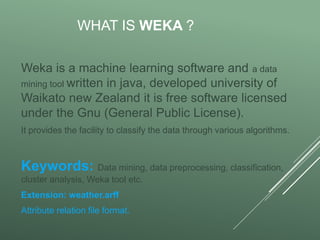
WHAT IS WEKA ?
Weka is a machine learning software and a data
mining tool written in java, developed university of
Waikato new Zealand it is free software licensed
under the Gnu (General Public License).
It provides the facility to classify the data through various algorithms.
Keywords: Data mining, data preprocessing, classification,
cluster analysis, Weka tool etc.
Extension: weather.arff
Attribute relation file format.
WEKA PROPERTIES...
 In 1993 it developed in university of Waikato New Zealand.
 In 1997 it re-developed from scratch in java.
 In 2005 data mining and knowledge discovery award SIGKDD
received.
 Weka contain tools for data preprocessing. IT IS GRAPHICAL
USER INTERFACE.
Weka Functions...
1. Preprocessing
2. Classifying
3. Clustering
4. Select Attribute
5. Association
6. Visualization
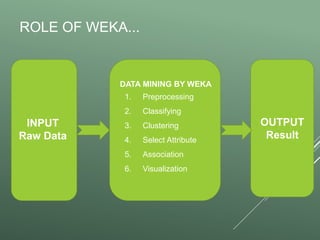
ROLE OF WEKA...
INPUT
Raw Data
OUTPUT
Result
DATA MINING BY WEKA
1. Preprocessing
2. Classifying
3. Clustering
4. Select Attribute
5. Association
6. Visualization
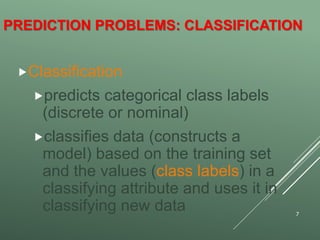
PREDICTION PROBLEMS: CLASSIFICATION
Classification
predicts categorical class labels
(discrete or nominal)
classifies data (constructs a
model) based on the training set
and the values (class labels) in a
classifying attribute and uses it in
classifying new data 7
ROLE OF PREPROCESSOR DATA
 Measures for data quality: A multidimensional view
 Accuracy: correct or wrong, accurate or not
 Completeness: not recorded, unavailable, …
 Consistency: some modified but some not, dangling, …
 Timeliness: timely update?
 Believability: how trustable the data are correct?
 Interpretability: how easily the data can be understood?
8
START WEKA...
From Windows Desktop
I. Click “Start”, choose “All Programs”
II. Choose weka “3.8” to start weka.
Then the first interface window appears:
Weka Gui Chooser
FUNCTIONS
PREPROCESS...
It Means to collect data that is already saved.
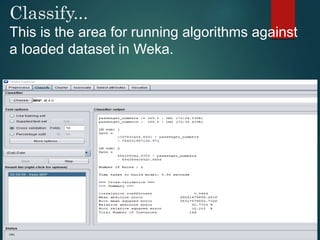
Classify...
This is the area for running algorithms against
a loaded dataset in Weka.
CLUSTER...
clustering Weka classifies the training instances into
clusters according to the cluster representation
ASSOCIATE...
It builds up attribute-value (item) sets that maximize the number
of instances that can be explained (coverage of the dataset)
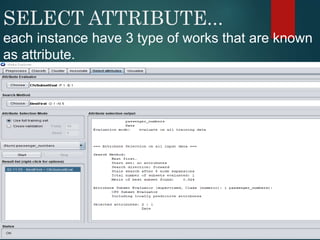
SELECT ATTRIBUTE...
each instance have 3 type of works that are known
as attribute.
VISUALIZE...
Visualization tool which allows datasets and the
predictions of Classifiers and Clusters to be
visualized in two dimensions.
TREE...
TREES IN WEKA ARE USED FOR
DECISION SUCH AS IF WEATHER
GRATER THAN 30 SO GO OUTSIDE
OTHERWISE DONT GO OUTSIDE.
Decision Tree Induction: An Example
18
age?
overcast
student? credit rating?
<=30 >40
no yes yes
yes
31..40
fairexcellentyesno
age income student credit_rating buys_computer
<=30 high no fair no
<=30 high no excellent no
31…40 high no fair yes
>40 medium no fair yes
>40 low yes fair yes
>40 low yes excellent no
31…40 low yes excellent yes
<=30 medium no fair no
<=30 low yes fair yes
>40 medium yes fair yes
<=30 medium yes excellent yes
31…40 medium no excellent yes
31…40 high yes fair yes
>40 medium no excellent no
 Training data set: Buys_computer
 The data set follows an example of
Quinlan’s ID3 (Playing Tennis)
 Resulting tree:
How to Handle Noisy Data?
 Binning
 first sort data and portition into (equal-frequency) bins
 then one can smooth by bin means, smooth by bin median,
smooth by bin boundaries, etc.
 Regression
 smooth by fitting the data into regression functions
 Clustering
 detect and remove outliers
 Combined computer and human inspection
 detect suspicious values and check by human (e.g., deal
with possible outliers)
19
CREATING
ACCOUNT IN WEKA
WEKA.COM
1) Now click on login Area
A dialogue box appears.
Click on Sign in
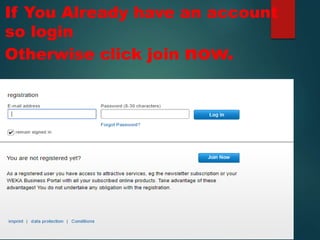
If You Already have an account
so login
Otherwise click join now.
After clicking on join
now so fill these
options.
After Filling then the
activation code sent to id.
This type of Message
appears in gmail id so click
on link and add activation
code
For activation add code here
and send it .
After login in these
options appear.
So we selected Product
and services.
The software in shop appears
The software are type of data processing
and documenting
CONCLUSIONS
The overall goal of weka is to build
a State-of-The-Art facility for
developing Machine Learning (ML)
techniques and allow people to
apply tem to real world data mining
problems.
THANKS
FOR WATCHING
THE END

Weka presentation

  • 1.
    WEKA Waikato Environment forKnowledge Analysis
  • 2.
    HOW WEKA DEVELOPEDFROM BIRD Weka. The weka (also known as Maori hen or woodhen) (Gallirallus australis) is a flightless bird species of the rail family. The beans placed in front of kiwi and when the kiwi get beans then the people made it name of mathematical and processing of numberings. Then it was developed as a name of weka.
  • 3.
    WHAT IS WEKA? Weka is a machine learning software and a data mining tool written in java, developed university of Waikato new Zealand it is free software licensed under the Gnu (General Public License). It provides the facility to classify the data through various algorithms. Keywords: Data mining, data preprocessing, classification, cluster analysis, Weka tool etc. Extension: weather.arff Attribute relation file format.
  • 4.
    WEKA PROPERTIES...  In1993 it developed in university of Waikato New Zealand.  In 1997 it re-developed from scratch in java.  In 2005 data mining and knowledge discovery award SIGKDD received.  Weka contain tools for data preprocessing. IT IS GRAPHICAL USER INTERFACE.
  • 5.
    Weka Functions... 1. Preprocessing 2.Classifying 3. Clustering 4. Select Attribute 5. Association 6. Visualization
  • 6.
    ROLE OF WEKA... INPUT RawData OUTPUT Result DATA MINING BY WEKA 1. Preprocessing 2. Classifying 3. Clustering 4. Select Attribute 5. Association 6. Visualization
  • 7.
    PREDICTION PROBLEMS: CLASSIFICATION Classification predictscategorical class labels (discrete or nominal) classifies data (constructs a model) based on the training set and the values (class labels) in a classifying attribute and uses it in classifying new data 7
  • 8.
    ROLE OF PREPROCESSORDATA  Measures for data quality: A multidimensional view  Accuracy: correct or wrong, accurate or not  Completeness: not recorded, unavailable, …  Consistency: some modified but some not, dangling, …  Timeliness: timely update?  Believability: how trustable the data are correct?  Interpretability: how easily the data can be understood? 8
  • 9.
    START WEKA... From WindowsDesktop I. Click “Start”, choose “All Programs” II. Choose weka “3.8” to start weka. Then the first interface window appears: Weka Gui Chooser
  • 10.
  • 11.
    PREPROCESS... It Means tocollect data that is already saved.
  • 12.
    Classify... This is thearea for running algorithms against a loaded dataset in Weka.
  • 13.
    CLUSTER... clustering Weka classifiesthe training instances into clusters according to the cluster representation
  • 14.
    ASSOCIATE... It builds upattribute-value (item) sets that maximize the number of instances that can be explained (coverage of the dataset)
  • 15.
    SELECT ATTRIBUTE... each instancehave 3 type of works that are known as attribute.
  • 16.
    VISUALIZE... Visualization tool whichallows datasets and the predictions of Classifiers and Clusters to be visualized in two dimensions.
  • 17.
    TREE... TREES IN WEKAARE USED FOR DECISION SUCH AS IF WEATHER GRATER THAN 30 SO GO OUTSIDE OTHERWISE DONT GO OUTSIDE.
  • 18.
    Decision Tree Induction:An Example 18 age? overcast student? credit rating? <=30 >40 no yes yes yes 31..40 fairexcellentyesno age income student credit_rating buys_computer <=30 high no fair no <=30 high no excellent no 31…40 high no fair yes >40 medium no fair yes >40 low yes fair yes >40 low yes excellent no 31…40 low yes excellent yes <=30 medium no fair no <=30 low yes fair yes >40 medium yes fair yes <=30 medium yes excellent yes 31…40 medium no excellent yes 31…40 high yes fair yes >40 medium no excellent no  Training data set: Buys_computer  The data set follows an example of Quinlan’s ID3 (Playing Tennis)  Resulting tree:
  • 19.
    How to HandleNoisy Data?  Binning  first sort data and portition into (equal-frequency) bins  then one can smooth by bin means, smooth by bin median, smooth by bin boundaries, etc.  Regression  smooth by fitting the data into regression functions  Clustering  detect and remove outliers  Combined computer and human inspection  detect suspicious values and check by human (e.g., deal with possible outliers) 19
  • 20.
  • 21.
  • 22.
    1) Now clickon login Area A dialogue box appears.
  • 23.
  • 24.
    If You Alreadyhave an account so login Otherwise click join now.
  • 25.
    After clicking onjoin now so fill these options.
  • 26.
    After Filling thenthe activation code sent to id.
  • 27.
    This type ofMessage appears in gmail id so click on link and add activation code
  • 28.
    For activation addcode here and send it .
  • 29.
    After login inthese options appear.
  • 30.
    So we selectedProduct and services.
  • 31.
    The software inshop appears
  • 32.
    The software aretype of data processing and documenting
  • 33.
    CONCLUSIONS The overall goalof weka is to build a State-of-The-Art facility for developing Machine Learning (ML) techniques and allow people to apply tem to real world data mining problems.
  • 34.
  • 35.