Weka: A Short Introduction
Introduction A collection of open source ML algorithms pre-processing classifiers clustering association rule Created by researchers at the University of Waikato in New Zealand  Software Platform: Java based
What is WEKA Waikato Environment for Knowledge Analysis (WEKA) Developed by the Department of Computer Science, University of Waikato, New Zealand Machine learning/data mining software written in Java (distributed under the GNU Public License) Used for research, education, and applications http://www.cs.waikato.ac.nz/ml/weka/
Installation Download software from  http://www.cs.waikato.ac.nz/ml/weka/ If you are interested in modifying/extending weka there is a developer version that includes the source code Set the weka environment variable for java Download some ML data from  http://mlearn.ics.uci.edu/MLRepository.html
Main Features 49 data preprocessing tools 76 classification/regression algorithms 8 clustering algorithms 15 attribute/subset evaluators + 10 search algorithms for feature selection 3 algorithms for finding association rules More algorithms being added Options to customize using the Java source code is made available. Custom extensions and plug ins can be developed Excellent mailing and discussion lists available. 3 graphical user interfaces “ The Explorer” (exploratory data analysis) “ The Experimenter” (experimental environment) “ The KnowledgeFlow” (new process model inspired interface)
Weka Interfaces Command-line Explorer preprocessing, attribute selection, learning, visualiation Knowledge Flow visual design of KDD process capabilities  ~  Explorer Experimenter testing and evaluating machine learning algorithms
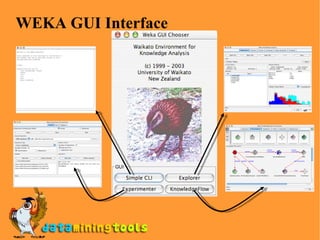
WEKA GUI Interface
WEKA  Data format Uses flat text files to describe the data Can work with a wide variety of data files including its own “.arff” format and C4.5 file formats Data can be imported from a file in various formats:  ARFF , CSV, C4.5, binary Data can also be read from a URL or from an SQL database (using JDBC)
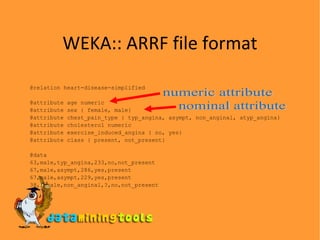
WEKA:: ARRF file format @relation heart-disease-simplified @attribute age numeric @attribute sex { female, male} @attribute chest_pain_type { typ_angina, asympt, non_anginal, atyp_angina} @attribute cholesterol numeric @attribute exercise_induced_angina { no, yes} @attribute class { present, not_present} @data 63,male,typ_angina,233,no,not_present 67,male,asympt,286,yes,present 67,male,asympt,229,yes,present 38,female,non_anginal,?,no,not_present ... numeric attribute nominal attribute
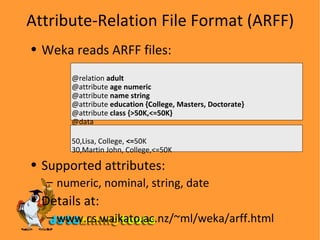
Attribute-Relation File Format (ARFF) Weka reads ARFF files: @relation  adult @attribute  age   numeric @attribute  name string @attribute  education {College, Masters, Doctorate} @attribute  class {>50K,<=50K} @data 50,Lisa, College,  <= 50K 30,Martin John, College,<=50K Supported attributes: numeric, nominal, string, date  Details at: www.cs.waikato.ac.nz/~ml/weka/arff.html
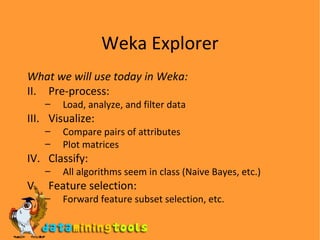
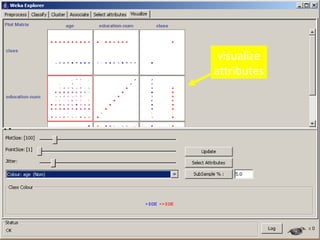
Weka Explorer What we will use today in Weka: Pre-process: Load, analyze, and filter data Visualize: Compare pairs of attributes Plot matrices Classify: All algorithms seem in class (Naive Bayes, etc.) Feature selection: Forward feature subset selection, etc.
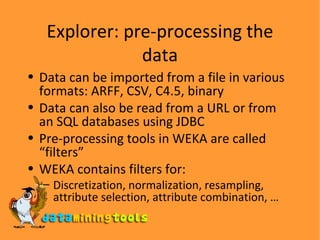
Explorer: pre-processing the data Data can be imported from a file in various formats: ARFF, CSV, C4.5, binary Data can also be read from a URL or from an SQL databases using JDBC Pre-processing tools in WEKA are called “filters” WEKA contains filters for: Discretization, normalization, resampling, attribute selection, attribute combination, …
Explorer: Building classification models “ Classifiers” in WEKA are models for predicting nominal or numeric quantities Implemented schemes include: Decision trees and lists, instance-based classifiers, support vector machines, multi-layer perceptrons, logistic regression, Bayes’ nets, … “ Meta”-classifiers include: Bagging, boosting, stacking, error-correcting output codes, data cleansing, …
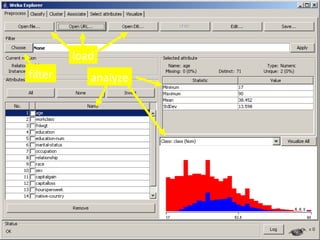
load filter analyze
visualize attributes
Weka Experimenter If you need to perform many experiments: Experimenter makes it easy to compare the performance of different learning schemes Results can be written into file or database Evaluation options: cross-validation, learning curve,  etc. Can also iterate over different parameter settings Significance-testing built in .
Visit more self help tutorials Pick a tutorial of your choice and browse through it at your own pace. The tutorials section is free, self-guiding and will not involve any additional support. Visit us at www.dataminingtools.net

An Introduction To Weka

  • 1.
    Weka: A ShortIntroduction
  • 2.
    Introduction A collectionof open source ML algorithms pre-processing classifiers clustering association rule Created by researchers at the University of Waikato in New Zealand Software Platform: Java based
  • 3.
    What is WEKAWaikato Environment for Knowledge Analysis (WEKA) Developed by the Department of Computer Science, University of Waikato, New Zealand Machine learning/data mining software written in Java (distributed under the GNU Public License) Used for research, education, and applications http://www.cs.waikato.ac.nz/ml/weka/
  • 4.
    Installation Download softwarefrom http://www.cs.waikato.ac.nz/ml/weka/ If you are interested in modifying/extending weka there is a developer version that includes the source code Set the weka environment variable for java Download some ML data from http://mlearn.ics.uci.edu/MLRepository.html
  • 5.
    Main Features 49data preprocessing tools 76 classification/regression algorithms 8 clustering algorithms 15 attribute/subset evaluators + 10 search algorithms for feature selection 3 algorithms for finding association rules More algorithms being added Options to customize using the Java source code is made available. Custom extensions and plug ins can be developed Excellent mailing and discussion lists available. 3 graphical user interfaces “ The Explorer” (exploratory data analysis) “ The Experimenter” (experimental environment) “ The KnowledgeFlow” (new process model inspired interface)
  • 6.
    Weka Interfaces Command-lineExplorer preprocessing, attribute selection, learning, visualiation Knowledge Flow visual design of KDD process capabilities ~ Explorer Experimenter testing and evaluating machine learning algorithms
  • 7.
  • 8.
    WEKA Dataformat Uses flat text files to describe the data Can work with a wide variety of data files including its own “.arff” format and C4.5 file formats Data can be imported from a file in various formats: ARFF , CSV, C4.5, binary Data can also be read from a URL or from an SQL database (using JDBC)
  • 9.
    WEKA:: ARRF fileformat @relation heart-disease-simplified @attribute age numeric @attribute sex { female, male} @attribute chest_pain_type { typ_angina, asympt, non_anginal, atyp_angina} @attribute cholesterol numeric @attribute exercise_induced_angina { no, yes} @attribute class { present, not_present} @data 63,male,typ_angina,233,no,not_present 67,male,asympt,286,yes,present 67,male,asympt,229,yes,present 38,female,non_anginal,?,no,not_present ... numeric attribute nominal attribute
  • 10.
    Attribute-Relation File Format(ARFF) Weka reads ARFF files: @relation adult @attribute age numeric @attribute name string @attribute education {College, Masters, Doctorate} @attribute class {>50K,<=50K} @data 50,Lisa, College, <= 50K 30,Martin John, College,<=50K Supported attributes: numeric, nominal, string, date Details at: www.cs.waikato.ac.nz/~ml/weka/arff.html
  • 11.
    Weka Explorer Whatwe will use today in Weka: Pre-process: Load, analyze, and filter data Visualize: Compare pairs of attributes Plot matrices Classify: All algorithms seem in class (Naive Bayes, etc.) Feature selection: Forward feature subset selection, etc.
  • 12.
    Explorer: pre-processing thedata Data can be imported from a file in various formats: ARFF, CSV, C4.5, binary Data can also be read from a URL or from an SQL databases using JDBC Pre-processing tools in WEKA are called “filters” WEKA contains filters for: Discretization, normalization, resampling, attribute selection, attribute combination, …
  • 13.
    Explorer: Building classificationmodels “ Classifiers” in WEKA are models for predicting nominal or numeric quantities Implemented schemes include: Decision trees and lists, instance-based classifiers, support vector machines, multi-layer perceptrons, logistic regression, Bayes’ nets, … “ Meta”-classifiers include: Bagging, boosting, stacking, error-correcting output codes, data cleansing, …
  • 14.
  • 15.
  • 16.
    Weka Experimenter Ifyou need to perform many experiments: Experimenter makes it easy to compare the performance of different learning schemes Results can be written into file or database Evaluation options: cross-validation, learning curve, etc. Can also iterate over different parameter settings Significance-testing built in .
  • 17.
    Visit more selfhelp tutorials Pick a tutorial of your choice and browse through it at your own pace. The tutorials section is free, self-guiding and will not involve any additional support. Visit us at www.dataminingtools.net

Editor's Notes

  • #3 Talk about * hacking weka * discretization * cross validations
  • #8 Simple CLI provides a commandline interface to weka’s routines Explorer interface provides a graphical front end to weka’s routines and components Experimenter allows you to build classification experiments KnowledgeFlow provides an alternative to the Explorer as a graphical front end to Weka&apos;s core algorithms.