CYBER SECURITY IN BANKS
PRESENTED BY:
TEAM CYBER AVENGERS
ANMOL TAPOL
SANISH SHRESTHA
SANJAY GAUTAM
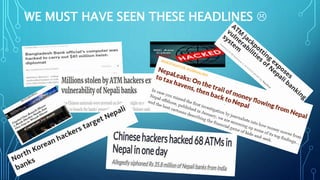
WE MUST HAVE SEEN THESE HEADLINES 
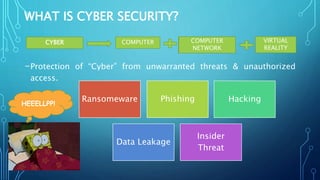
WHAT IS CYBER SECURITY?
-Protection of “Cyber” from unwarranted threats & unauthorized
access.
CYBER COMPUTER COMPUTER
NETWORK
COMPUTER
NETWORK
VIRTUAL
REALITY
Ransomeware Phishing Hacking
Data Leakage
Insider
Threat
HEEELLPP!
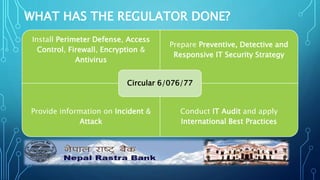
WHAT HAS THE REGULATOR DONE?
Install Perimeter Defense, Access
Control, Firewall, Encryption &
Antivirus
Prepare Preventive, Detective and
Responsive IT Security Strategy
Provide information on Incident &
Attack
Conduct IT Audit and apply
International Best Practices
Circular 6/076/77
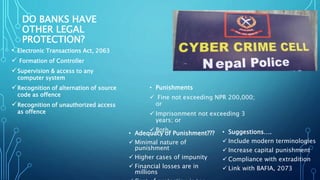
DO BANKS HAVE
OTHER LEGAL
PROTECTION?
• Electronic Transactions Act, 2063
 Formation of Controller
Supervision & access to any
computer system
Recognition of alternation of source
code as offence
Recognition of unauthorized access
as offence
• Punishments
 Fine not exceeding NPR 200,000;
or
 Imprisonment not exceeding 3
years; or
 Both
• Adequacy of Punishment???
 Minimal nature of
punishment
 Higher cases of impunity
 Financial losses are in
millions
• Suggestions….
 Include modern terminologies
 Increase capital punishment
 Compliance with extradition
 Link with BAFIA, 2073
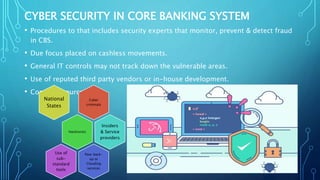
CYBER SECURITY IN CORE BANKING SYSTEM
• Procedures to that includes security experts that monitor, prevent & detect fraud
in CBS.
• Due focus placed on cashless movements.
• General IT controls may not track down the vulnerable areas.
• Use of reputed third party vendors or in-house development.
• Common sources:
Cyber
criminals
National
States
Hacktivists
Insiders
& Service
providers
Poor back-
up or
Clouding
services
Use of
sub-
standard
tools
MODERNIZATION
TARGETS
•Financial Institutions and Banks
•Internet Service Providers
•Governments and Defense agencies
•Multinational corporations
•Everyone connected to the network
Cracker:
Computer-savvy
programmer creates
attack software
Script Kiddies:
Unsophisticated
computer users
who know how to
execute
programs
Hacker Bulletin Board
SQL Injection
Buffer overflow
Password Crackers
Password Dictionaries
Successful attacks!
Crazyman broke into …
CoolCat penetrated…
Criminals:
Create & sell bots -> spam
Sell credit card numbers,…
System Administrators
Some scripts are useful
to protect networks…
11
TYPE OF MAJOR ATTACKS
• Social Engineering
• Malware
• Phishing
• Man-In-The-Middle Attack
• Denial-of-service attack
• Password Attack
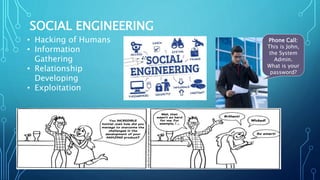
SOCIAL ENGINEERING
• Hacking of Humans
• Information
Gathering
• Relationship
Developing
• Exploitation
Phone Call:
This is John,
the System
Admin.
What is your
password?
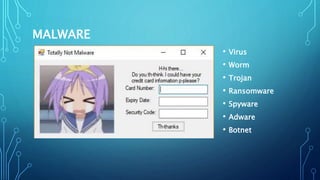
MALWARE
• Virus
• Worm
• Trojan
• Ransomware
• Spyware
• Adware
• Botnet
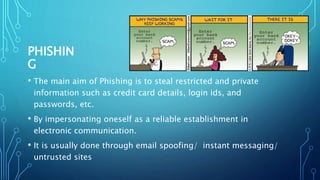
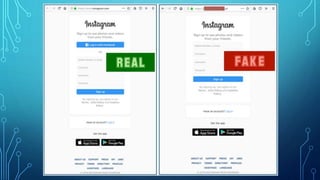
PHISHIN
G
• The main aim of Phishing is to steal restricted and private
information such as credit card details, login ids, and
passwords, etc.
• By impersonating oneself as a reliable establishment in
electronic communication.
• It is usually done through email spoofing/ instant messaging/
untrusted sites
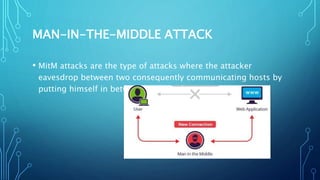
MAN-IN-THE-MIDDLE ATTACK
• MitM attacks are the type of attacks where the attacker
eavesdrop between two consequently communicating hosts by
putting himself in between the point of data transmission
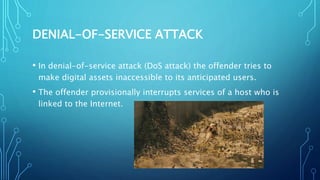
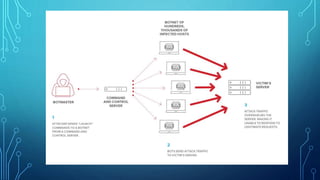
DENIAL-OF-SERVICE ATTACK
• In denial-of-service attack (DoS attack) the offender tries to
make digital assets inaccessible to its anticipated users.
• The offender provisionally interrupts services of a host who is
linked to the Internet.
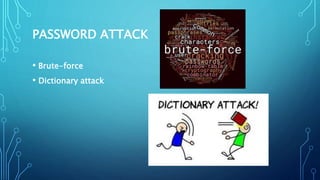
PASSWORD ATTACK
• Brute-force
• Dictionary attack
SYMPTOMS
 Antivirus software detects a problem
 Pop-ups suddenly appear (may sell security software)
 Disk space disappears
 Files or transactions appear that should not be there
 System slows down to a crawl
CONT..
 Unusual messages, sounds, or displays on your monitor
 Stolen laptop (1 in 10 stolen in laptop lifetime)
 Your mouse moves by itself
 Your computer shuts down and powers off by itself
 Often not recognized
HOW TO PROTECT YOURSELF FROM CYBER
ATTACK
• Upgrade Your Operating System
• Turn on Automatic Updates
• Anti-Virus Software
• Back Up Your Data
• Create Secure Passwords
CONT..
• Set up a Firewall
• Validate SSL Certificates
• Avoid Installing Bundled Freeware
• Be Careful What You Download
• What To Do If You Get Hacked
• Never Ever Pay Hackers
BACKUP DATA
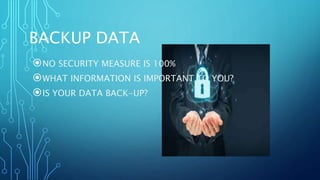
NO SECURITY MEASURE IS 100%
WHAT INFORMATION IS IMPORTANT TO YOU?
IS YOUR DATA BACK-UP?
THE FLOOR IS OPEN
THANK YOU
&
HAVE A GOOD DAY 

Cyber security ppt final

  • 1.
    CYBER SECURITY INBANKS PRESENTED BY: TEAM CYBER AVENGERS ANMOL TAPOL SANISH SHRESTHA SANJAY GAUTAM
  • 2.
    WE MUST HAVESEEN THESE HEADLINES 
  • 3.
    WHAT IS CYBERSECURITY? -Protection of “Cyber” from unwarranted threats & unauthorized access. CYBER COMPUTER COMPUTER NETWORK COMPUTER NETWORK VIRTUAL REALITY Ransomeware Phishing Hacking Data Leakage Insider Threat HEEELLPP!
  • 4.
    WHAT HAS THEREGULATOR DONE? Install Perimeter Defense, Access Control, Firewall, Encryption & Antivirus Prepare Preventive, Detective and Responsive IT Security Strategy Provide information on Incident & Attack Conduct IT Audit and apply International Best Practices Circular 6/076/77
  • 5.
    DO BANKS HAVE OTHERLEGAL PROTECTION? • Electronic Transactions Act, 2063  Formation of Controller Supervision & access to any computer system Recognition of alternation of source code as offence Recognition of unauthorized access as offence • Punishments  Fine not exceeding NPR 200,000; or  Imprisonment not exceeding 3 years; or  Both • Adequacy of Punishment???  Minimal nature of punishment  Higher cases of impunity  Financial losses are in millions • Suggestions….  Include modern terminologies  Increase capital punishment  Compliance with extradition  Link with BAFIA, 2073
  • 6.
    CYBER SECURITY INCORE BANKING SYSTEM • Procedures to that includes security experts that monitor, prevent & detect fraud in CBS. • Due focus placed on cashless movements. • General IT controls may not track down the vulnerable areas. • Use of reputed third party vendors or in-house development. • Common sources: Cyber criminals National States Hacktivists Insiders & Service providers Poor back- up or Clouding services Use of sub- standard tools
  • 8.
  • 10.
    TARGETS •Financial Institutions andBanks •Internet Service Providers •Governments and Defense agencies •Multinational corporations •Everyone connected to the network
  • 11.
    Cracker: Computer-savvy programmer creates attack software ScriptKiddies: Unsophisticated computer users who know how to execute programs Hacker Bulletin Board SQL Injection Buffer overflow Password Crackers Password Dictionaries Successful attacks! Crazyman broke into … CoolCat penetrated… Criminals: Create & sell bots -> spam Sell credit card numbers,… System Administrators Some scripts are useful to protect networks… 11
  • 12.
    TYPE OF MAJORATTACKS • Social Engineering • Malware • Phishing • Man-In-The-Middle Attack • Denial-of-service attack • Password Attack
  • 13.
    SOCIAL ENGINEERING • Hackingof Humans • Information Gathering • Relationship Developing • Exploitation Phone Call: This is John, the System Admin. What is your password?
  • 14.
    MALWARE • Virus • Worm •Trojan • Ransomware • Spyware • Adware • Botnet
  • 15.
    PHISHIN G • The mainaim of Phishing is to steal restricted and private information such as credit card details, login ids, and passwords, etc. • By impersonating oneself as a reliable establishment in electronic communication. • It is usually done through email spoofing/ instant messaging/ untrusted sites
  • 17.
    MAN-IN-THE-MIDDLE ATTACK • MitMattacks are the type of attacks where the attacker eavesdrop between two consequently communicating hosts by putting himself in between the point of data transmission
  • 18.
    DENIAL-OF-SERVICE ATTACK • Indenial-of-service attack (DoS attack) the offender tries to make digital assets inaccessible to its anticipated users. • The offender provisionally interrupts services of a host who is linked to the Internet.
  • 20.
  • 21.
    SYMPTOMS  Antivirus softwaredetects a problem  Pop-ups suddenly appear (may sell security software)  Disk space disappears  Files or transactions appear that should not be there  System slows down to a crawl
  • 22.
    CONT..  Unusual messages,sounds, or displays on your monitor  Stolen laptop (1 in 10 stolen in laptop lifetime)  Your mouse moves by itself  Your computer shuts down and powers off by itself  Often not recognized
  • 23.
    HOW TO PROTECTYOURSELF FROM CYBER ATTACK • Upgrade Your Operating System • Turn on Automatic Updates • Anti-Virus Software • Back Up Your Data • Create Secure Passwords
  • 24.
    CONT.. • Set upa Firewall • Validate SSL Certificates • Avoid Installing Bundled Freeware • Be Careful What You Download • What To Do If You Get Hacked • Never Ever Pay Hackers
  • 25.
    BACKUP DATA NO SECURITYMEASURE IS 100% WHAT INFORMATION IS IMPORTANT TO YOU? IS YOUR DATA BACK-UP?
  • 26.
  • 27.
    THANK YOU & HAVE AGOOD DAY 

Editor's Notes

  • #26 Backup should be done (at least)once a week. If possible, store to a removable media. The removable media should be big enough to hold 52 weeks of backup (e.g., 500GB). Do a full backup once a month and store it in offsite location. This would be useful in case of a disaster in your office (fire, theft, flood, etc). On the removable media create 12 folders for each month. Backup data should be tested periodically to ensure reliability.